Most e-commerce stores do not need more campaigns. They need a few well-built workflows that send the right message at the right time.
If I had to sum up the article in plain English, it would be this:
I would start with cart recovery, browse abandonment, welcome, post-purchase, and win-back
I would give each workflow one job
I would use clear triggers, exit rules, and send limits
I would track conversion rate, revenue per recipient, AOV, repeat purchase rate, and LTV
I would keep channels in sync so email, SMS, push, and ads do not all hit the same person at once
A few numbers make the case fast:
Welcome emails average 91.43% opens
Cart flows can recover 8%–15% of abandoned carts
Abandoned cart sequences can recover 10%–20% of lost revenue
Top cart flows can bring in $3.65 revenue per recipient on average
Domains with SPF, DKIM, and DMARC can see inbox placement near 89%, vs. 44% without them
What matters most is not fancy setup. It is control. I need to know when a workflow starts, who gets it, how often they hear from me, and when they stop. If someone buys, they should leave recovery flows at once. If someone is already in a high-intent flow, lower-intent flows should pause.
Here is the short version of the full article:
Welcome flow: send within 5–10 minutes
Browse abandonment: first message in 45–90 minutes
Cart recovery: first message in 1–2 hours
Post-purchase: follow a timed sequence for reviews, tips, cross-sells, and reorders
Win-back: start after 90–180 days of inactivity
Retargeting: use short windows for cart abandoners and stop ads right after purchase
Testing: test one variable at a time and use a 5%–10% holdout group
Agency scale: use the same intake, QA, launch, and reporting flow across clients
For me, the core lesson is simple: good lead workflows are not about sending more. They are about sending fewer, better-timed messages that match buyer intent and drive revenue.
That is the frame for everything that follows.
5 MUST-HAVE email flows for your ecommerce brand
sbb-itb-a781ab9
How to Design High-Performing E-Commerce Lead Workflows
Start with one clear goal tied to one funnel stage. If you're building a welcome flow, the job is to drive a first purchase. If you're building a post-purchase flow, the job is to drive a repeat purchase or increase LTV. One workflow should do one job.
Once the goal, segment, and timing are mapped out, launch the highest-intent workflows first.
Set Goals, Triggers, and Success Metrics
Use metrics that connect to revenue. Conversion rate, revenue per recipient (RPR), and average order value (AOV) tell you much more than opens and clicks by themselves. Benchmark data shows abandoned cart flows can reach about $3.07 RPR at the high end, while browse abandonment flows are closer to $0.95 RPR[3][4].
After you pick the KPI, match the trigger to the buyer's intent. High-intent triggers like cart abandonment need faster, more direct messages. Lower-intent triggers like browse abandonment usually work better with softer, educational content.
Set each trigger's exclusions and re-entry rules before launch. For example, a cart recovery flow should fire only when a shopper leaves without buying and has not completed the order in the last few hours.
Build Segments and Personalization Logic
Segmentation based on lifecycle stage, purchase history, browsing behavior, and intent signals helps separate relevant messages from generic blasts. A first-time subscriber usually needs education and trust signals. A repeat browser needs category-specific recommendations, not a brand introduction.
That can mean holding back acquisition-style offers from recent buyers, showing category-specific recommendations to repeat browsers, and saving loyalty incentives for high-value customers.
Start small. Use a tight set of rules you trust, then add more logic only after testing shows clear gains. Those same rules should also shape how often each segment gets messages.
Timing and Frequency Guardrails
Timing should line up with customer intent and with what the channel allows. High-intent flows need a fast first message. Nurture flows can wait longer.
Set global frequency caps so one shopper doesn't get pulled into overlapping reminder sequences. In the U.S., email and SMS workflows must follow consent, opt-out, and local sending-hour rules. SMS opt-out rates average about 0.42% per send[5], so re-entry windows and suppression rules need to be set with care.
Here's a simple gut check: if someone just bought, they should be removed from win-back flows right after checkout, not dropped back in the next morning.
E-Commerce Lead Workflows to Implement First
Start with the flows tied to the most revenue. In most stores, that means cart recovery first, then browse abandonment, followed by welcome, post-purchase, cross-sell, and win-back. Use the trigger, suppression, and exit rules from the prior section so these flows don't collide.
Welcome, Browse Abandonment, and Cart Recovery
A welcome series should fire right after someone subscribes or creates an account, ideally within 5–10 minutes. A 3–4 email sequence spread across 5–7 days can confirm the signup, build trust, and push the subscriber toward a first order. Multi-email welcome series can drive about 90% more orders and up to 51% more revenue than a single welcome email [9][11].
Browse abandonment reaches a much larger group than cart abandonment. About 85%–90% of visitors leave during browsing, while only around 10%–15% make it to the cart [12][10]. That's why this flow matters so much: it speaks to shoppers before they vanish for good.
Send the first browse email 45–90 minutes after the visitor leaves. Show the exact products they viewed, and keep the message helpful, not pushy. A second touch 24–48 hours later can add social proof or a small incentive. Keep it tight, though - 1–2 messages per browse event is enough. Once the shopper creates a cart or starts checkout, they should exit the browse flow.
Cart recovery is the highest-intent flow in the mix. Abandoned cart sequences average about $3.65 in revenue per recipient, and top performers can hit $28.89[6][2]. Send the first message within 1–2 hours of abandonment. Follow with a second email about 24 hours later to handle objections like shipping costs or return policies. If it fits your margin, send a third message at 48–72 hours with a small incentive. Done well, cart flows can recover 8%–15% of abandoned carts [7].
Post-Purchase, Cross-Sell, and Win-Back Flows
Once the order is placed, the goal changes. Now you're trying to drive repeat purchases, grow LTV, and keep the customer engaged.
A practical post-purchase cadence looks like this:
Day 0: order confirmation
Day +2: shipping update
Day +7: review request
Day +14: usage tips or care guidance
Day +30: cross-sell suggestions
Day +60: replenishment reminder
This timing comes from a common post-purchase structure [7]. If you sell consumables, match the replenishment timing to how long the product actually lasts. A skincare brand, for example, shouldn't wait the same amount of time as a coffee subscription.
Cross-sell emails work best when the recommendation fits the original purchase. An apparel brand suggesting fabric care products after someone buys clothing feels useful. An electronics store recommending a matching case after a device purchase makes sense too. That's the line: helpful, not salesy. Keep cross-sell to 1–2 emails per purchase event, and stop the sequence if the customer already bought the suggested product.
Win-back flows should start after 90–180 days of inactivity, based on the product type and buying cycle. A 2–3 message sequence usually works well: lead with new products, then bring in an incentive later. Reactivation rates often land in the 3%–8% range, depending on the vertical [8].
Common Workflow Mistakes to Avoid
The biggest mistake is letting flows overlap. A new subscriber who abandons a cart might qualify for a welcome series, a browse abandonment series, and a cart recovery series all at once. If you don't set priority rules and global frequency caps, that person can get all three in a pileup. That's a fast way to annoy a shopper.
Set cart recovery as the top-priority flow. Pause lower-intent flows while a higher-intent one is live, and enforce a daily send cap for each contact.
The next problem is weak or missing exit rules. If a customer places an order, they should leave cart recovery and win-back flows right away. No lag, no extra reminder, no awkward "you forgot something" email after they already paid.
Segmentation mistakes make this worse. Sending the same message to a first-time subscriber and a lapsed buyer flattens relevance. And on offers, don't lead with discounts too soon. Save them for later touches. Start with lighter nudges like free shipping, points, or early access.
How to Run Omnichannel and Retargeting Workflows Without Creating Noise
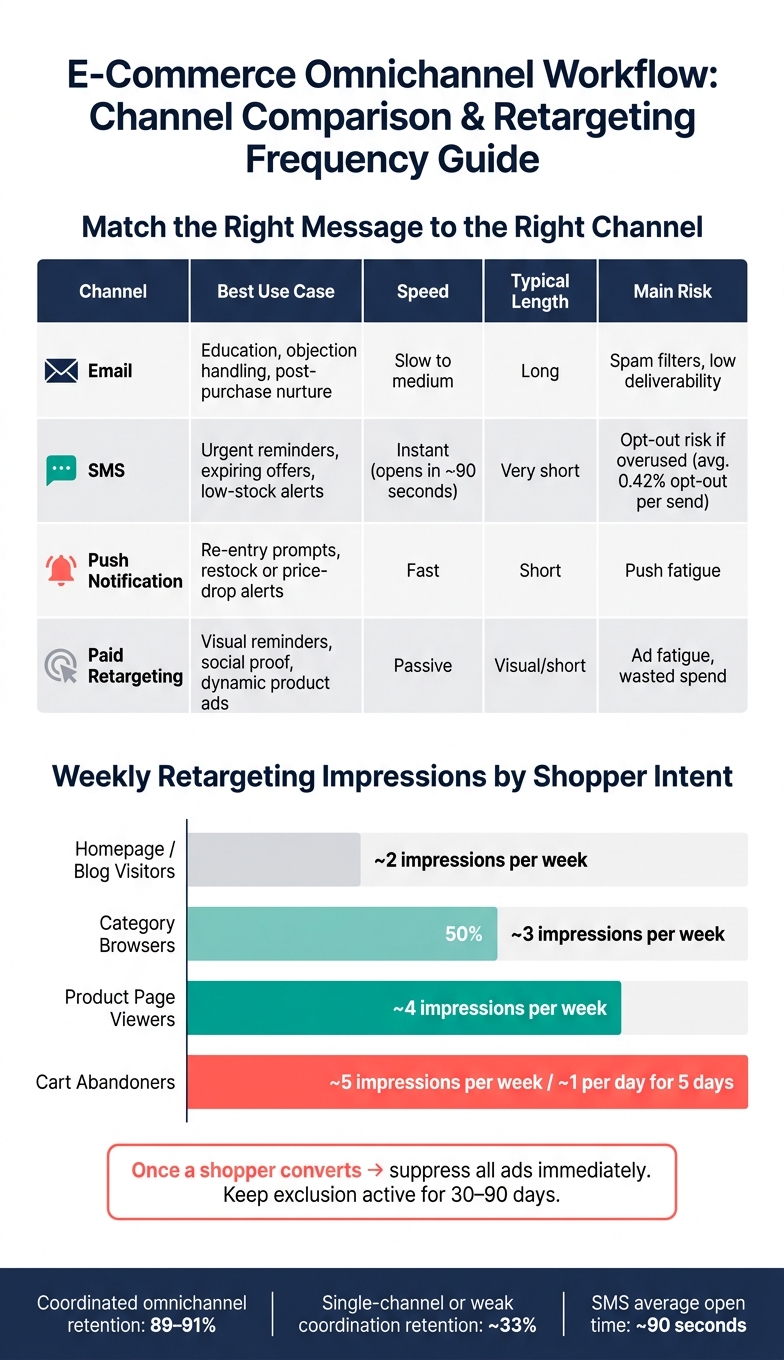
E-Commerce Lead Workflow Channels: Best Use Cases & Performance Guide
Omnichannel starts to break when each channel acts on its own. The fix is simple: use the same priority rules across every channel so high-intent actions shut off lower-intent ones.
If email, SMS, push, and paid retargeting all go out without coordination, the shopper gets the same nudge again and again. That feels messy, not helpful. When brands coordinate these touchpoints well, retention can reach about 89%–91%, compared with roughly 33% for weak or single-channel setups [13][14][15]. In practice, this is just the same workflow logic from the last section carried across the full stack: triggers, timing, suppression, and exit rules all need to match.
Match the Right Message to the Right Channel
Each channel has a job to do.
Email works best for education. Product details, reviews, objection handling, and shipping policies fit here because email gives you room for longer copy and visuals.
SMS should stay reserved for urgent, time-sensitive nudges. People usually open texts in about 90 seconds[16], so this is the place for short alerts, not long explanations.
Push notifications are best as light re-entry prompts for users who already opted in on app or web. Think of a saved cart reminder or a restock alert.
Paid retargeting on Meta or Google keeps the product in view while the shopper is still deciding. Dynamic product ads and social proof work well here because they remind without asking the person to read much.
Visual reminders, social proof, dynamic product ads
Passive
Visual/short
Ad fatigue, wasted spend
One rule matters across all of them: keep the offer, deadline, and tone the same. If your email says "15% off ends tonight," your SMS and retargeting ads should back up that same deadline. They shouldn't introduce a different discount or a new angle that muddies the message.
Retargeting Windows and Frequency Caps
Once each channel has a clear role, set limits on how long people stay in each audience. Cart abandoners should have the shortest window. Product page viewers can stay in longer. Category browsers usually get the broadest window because their intent is weaker.
A practical frequency setup by intent level looks like this [17]:
Homepage or blog visitors: about 2 impressions per week
Category browsers: about 3
Product page viewers: about 4
Cart abandoners: around 5 per week, or about 1 per day for 5 days
The moment someone converts, suppress all related ads and messages right away. Keep that exclusion in place for 30–90 days, based on your product's replenishment cycle [18][19]. Few things annoy shoppers faster than seeing "You left something behind" after they've already bought.
If someone clicks a retargeting ad and still doesn't convert, don't keep serving the exact same ad. Swap the creative or pause that audience. And don't let SMS and push go out for the same event within minutes of each other. Move up to the next channel only when intent is still high and the earlier touch didn't do the job.
Use these rules to keep retargeting in sync with the rest of your workflow stack.
Lead Scoring, Data Enrichment, and Performance Optimization
Once your channel rules are in place, the next job is deciding who gets priority. That’s where scoring and enrichment come in.
Both sit inside the trigger/condition/exit setup you already use. Scores help decide which workflow should fire, which channel should carry the message, and which offer a contact should see. Enrichment adds context, so the message feels better matched to the person receiving it.
Build a Practical E-Commerce Lead Scoring Model
The goal is simple: give each contact a number that reflects how likely they are to buy, then use that number to trigger the right workflow. Think of the model as a routing layer. The score decides which workflow, which channel, and which offer a contact gets.
A practical setup is a 0–60 scale built from three parts:
Fit (20–30%): location, acquisition source, and whether the person is a repeat customer
Engagement (30–40%): email clicks, product page views, and time on site
Purchase intent: the strongest buying signals, like adding items to cart, reaching checkout, or starting checkout with financing [27][31][32]
Here’s what that can look like in practice: +5 for three recent opens, +10 for a product click, +15 for carts over $100, +20 for checkout start, and −10 for 30 days of inactivity. Leads with a score of 40 or higher move into a high-intent recovery flow. Leads from 20 to 39 go into a nurture flow. Anyone under 20 stays in a low-frequency nurture track until behavior changes. [27][31][32]
The key is making the score do something. For example, if a contact’s score is 60 or higher and their last cart value is $150 or more, send a high-intent cart recovery flow and add that person to a high-value retargeting audience. That’s when the score stops being just a number and starts driving action. [28][30]
Once scoring shows you who matters most, enrichment helps you decide what to say.
Use Data Enrichment to Personalize at Scale
First-party data tells you what a person did. Enrichment fills in the blanks, so workflows can make better calls on timing, channel, and offer selection without pushing the customer to fill out another form.
The most useful fields go well past basic contact details. Shopping signals like average order value (AOV), total revenue, purchase frequency, last purchase date, product categories purchased, preferred price range, and discount sensitivity help you understand what kind of buyer you’re dealing with. Lifecycle fields such as new vs. repeat status, VIP status, loyalty tier, subscription status, churn risk score, and referrals help shape treatment. Channel preference data - like whether someone responds more to email or SMS, preferred send times, typical device, and message frequency tolerance - helps you pick the best way to reach them. [29][33]
This is what makes dynamic content workable at scale. Say a home fitness brand uses one email template for product recommendations. Based on purchase history, that same template can show strength accessories to someone who bought dumbbells in the last 30 days, while showing recovery tools to someone whose last order was more than 90 days ago. The email updates on its own, and each send lines up with that buyer’s history. [34]
Measure, Test, and Improve Workflow Performance
Deliverability sits underneath everything. If your messages don’t land in the inbox, the rest doesn’t matter much.
Domains without proper SPF, DKIM, and DMARC authentication see inbox placement rates of about 44%, compared with 89% for fully authenticated domains. That’s a 45-point gap. [26] Weak deliverability can wipe out 40–60% of possible email revenue, which stings even more when email often brings in about $36 for every $1 spent. [21][23]
For A/B testing, keep it disciplined. Test one variable at a time. Pick one primary metric before the test starts, such as revenue per recipient or conversion rate within seven days. Use a 5–10% holdout group from eligible users to measure actual incremental lift. Then make the winner the default workflow. That’s the difference between a team that keeps getting better and one that just runs tests for show. [20][22][25]
Track benchmark metrics on a steady schedule. Good targets include hard bounce rates under 0.2%, soft bounces under 2%, spam complaint rates under 0.1–0.2%, open rates around 52%, and overall bounce rates near 0.35%. [24]
At the workflow level, watch entry volume, completion rate, conversion to purchase, time to conversion, and revenue per workflow participant. Break those numbers out by segment - like new vs. repeat buyers or high-value vs. low-value carts - instead of relying on blended totals. Aggregate numbers often hide the actual trouble spots. [20][25]
These same benchmarks also make reporting across multiple clients easier to standardize. When the rules are standardized, rolling them out across accounts gets much simpler.
How Agencies Can Run E-Commerce Lead Workflows at Scale
Once your benchmarks are set, the next job is making that same level of consistency work across every client account, not just one.
Standardize Multi-Client Workflow Operations
Agencies that grow without chaos usually lean on repeatable systems. Each new e-commerce client should move through the same core path: client intake → data validation and enrichment → workflow mapping → build → QA → launch → reporting. What changes from client to client is the brand voice, the audience, and the offer logic.
A smart way to set this up is to begin with one pilot client. Document each step, then lock in baseline KPIs like QA pass rate, launch time, and conversion rate. Once that process is steady, roll out the same build-and-launch setup across other clients. From there, adjust only the audience, offer, and brand voice.
The trigger rules, suppression rules, and exit rules should also start as templates. Then you tailor them to each store’s catalog and buying cycle. That gives your team a steady way to execute, while still keeping each client’s messaging and timing tied to its own customers.
Shared intake checklists, audience templates, and one reporting layer make this much easier to manage. Track workflow QA pass rate, launch time, conversion rate, revenue per recipient, and unsubscribe rate across all accounts so account managers can see what’s happening in one place instead of bouncing between dashboards. [35]
Using SalesLabel to Power White-Label Lead Workflow Delivery
Manual execution gets expensive fast. Manual outreach by itself can cost $5,000 to $8,000 per month per seat, and that’s before list building, enrichment, or follow-up management. [1]
When an agency has to repeat that process across many clients, software cuts out the slow manual work that drags down launch speed and follow-up. SalesLabel gives agencies a white-label way to run the full workflow under their own brand.
It automates:
lead sourcing
enrichment
personalized outreach
follow-ups
inbox management
real-time lead scoring
The platform can also search a database of 250M+ contacts, which helps agencies find prospects faster and get a live white-labeled operation running in about 7 days. [1]
Separate workspaces keep client data isolated and reporting clean, while your team runs everything from one backend.
Conclusion: Build Workflows That Increase Revenue and Scale Operations
Most e-commerce automation revenue comes from four core workflows: welcome, cart recovery, post-purchase, and win-back [36].
Once those core flows are live, results come from discipline, not from piling on more campaigns. Focus on repeat purchase rate and LTV. Segment based on behavior. Suppress messages when someone converts. Keep each channel doing its job, and keep frequency caps in line.
Review performance every month and test every quarter so revenue per recipient, conversion rate, and repeat purchase rate keep moving in the right direction.
For agencies, that same discipline has to hold across every client account. Scale comes from standardized journeys, shared SOPs, and centralized reporting.
The aim isn’t more workflows. It’s the right workflows: built on clear triggers, running on autopilot, and getting better with each cycle. That’s how e-commerce automation becomes repeatable revenue.
FAQs
Which workflow should I build first?
Start with the end-to-end glossary">lead generation workflow: define your ICP, automate prospect finding and verification, then add AI-personalized outreach, follow-ups, and CRM/calendar booking.
That gives you the core pipeline: capture, qualification/scoring, outreach, and booking.
Once that system is in place, later upgrades are much easier to add.
How do I stop workflows from overlapping?
Use SalesLabel’s centralized automation system to run the full lead lifecycle in one place. When sourcing, enrichment, outreach, follow-ups, and meeting bookings all live together, there’s less fragmentation and fewer workflow clashes.
That means outreach stays coordinated, follow-ups stay consistent, and each lead moves through one clear sequence without duplicate or conflicting touchpoints.
What metrics matter most for workflow performance?
Focus on lead scoring accuracy first. That means looking at fit, engagement, and time-decay or predictive signals. If the score says a lead is ready, it should line up with what happens next.
Then watch the conversion metrics that prove whether those scores mean anything in practice. Look at whether high-scoring leads turn into outcomes, not just activity.
You should also track end-to-end engagement results, including:
Qualified leads
Conversion rates
Booked meetings
And don’t overlook data quality. Enrichment speed and accuracy have a direct effect on scoring and outreach performance. If the data is slow, messy, or wrong, the score will be off too, and your team will feel it almost at once.