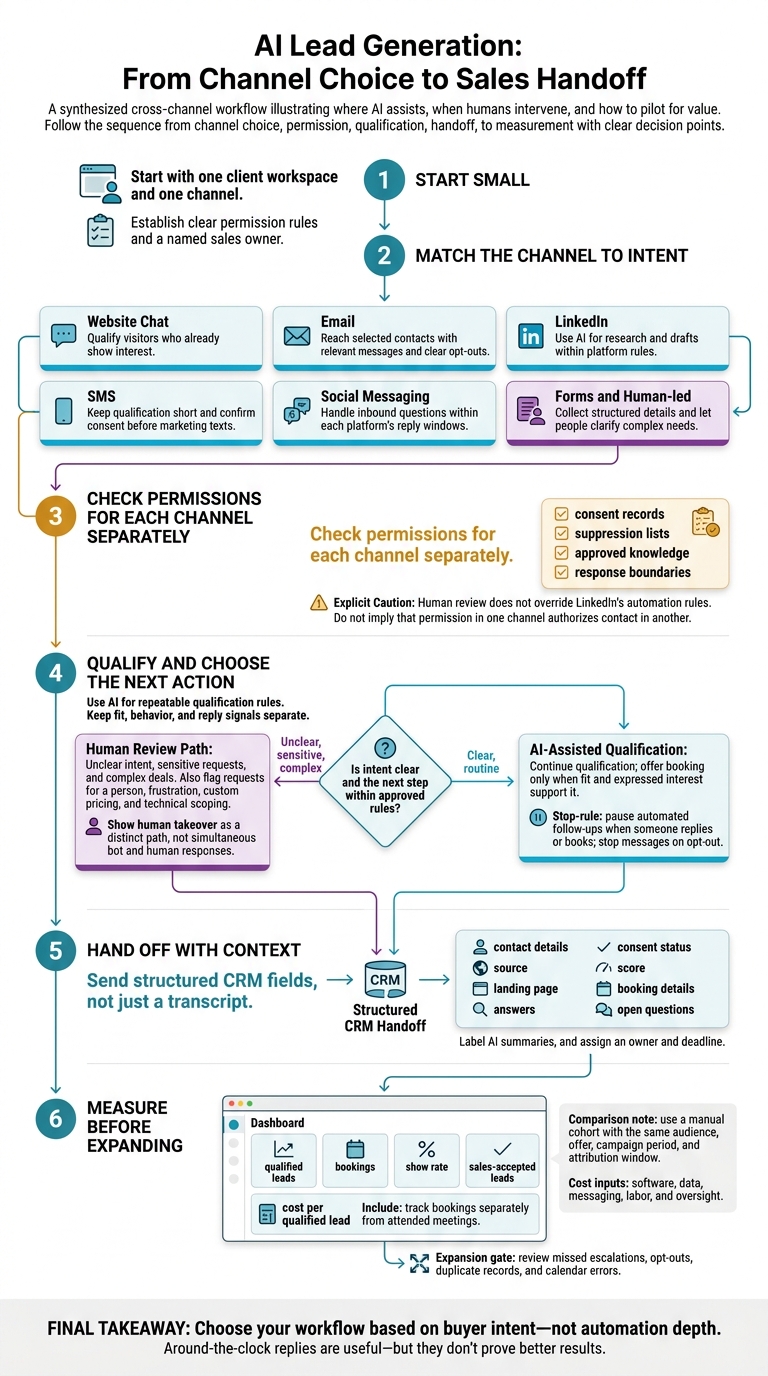
I’d start with one channel, clear permission rules, and a named sales owner - not more automation. AI can handle routine questions and follow-ups, but people should handle unclear intent, sensitive requests, and complex deals.
Here’s how I’d choose:
Website chat: Qualify visitors who already show interest.
Email: Reach selected contacts with relevant messages and clear opt-outs.
LinkedIn: Use AI for research and drafts within platform rules.
SMS: Keep qualification short and confirm consent before marketing texts.
Social messaging: Handle inbound questions within each platform’s reply windows.
Forms and human-led outreach: Collect structured details and let people clarify complex needs.
Quick Comparison
I’d compare intent, response time, handoff quality, total cost, and channel rules - not message volume alone.
Channel
Starting intent
Response timing
Handoff needs
Main costs and controls
Website chat
Existing interest
Immediate
Answers, source, owner
Software, review, privacy
Email
Often low or unknown
Depends on replies
Original reply, fit, objections
Data, sending, opt-outs
LinkedIn
Professional fit, not always buying intent
Human-reviewed
Conversation and buying signals
Review time, platform permissions
SMS
Permission-based interest
Fast, within sending hours
Consent, answers, booking details
Carrier fees, consent records
Social messaging
Usually inbound interest
Platform reply windows
Platform ID, history, owner
Platform fees, templates, coverage
Forms and human-led outreach
Varies by request
Depends on staffing
Verified details and next action
Staff time, privacy, contact rules
My test is simple: <u>does the workflow produce qualified leads that sales accepts?</u> I’d track bookings, attendance, and cost per qualified lead against a manual baseline. Around-the-clock replies are useful - but they don’t prove better results.
glossary">Lead Generation: From Channel Choice to Sales Handoff" >
AI Lead Generation: From Channel Choice to Sales Handoff
1. Website Chat
Lead Capture and Qualification
Website chat is the clearest inbound use case: visitors are already engaged, so AI qualifies rather than persuades. That makes it a high-intent baseline for comparing other channels.
Pricing-page visits, return visits, campaign source, and availability questions are intent signals - not proof that someone is ready to buy. Chat can adjust its questions in real time. Start with one to three questions, then ask about company, need, timing, budget range, and fit only as needed. Allow “not sure” answers, and don’t automatically reject a lead because budget details are missing.
Response and Follow-Up
Score answers and behavior using written thresholds. Offer qualified visitors a booking link. Give researchers a relevant resource and the option to receive follow-up messages.
Confirm bookings with a clearly stated time zone. If no one is available, provide an honest follow-up window instead of suggesting a salesperson is watching.
Lead Handoff and Data Sharing
A structured handoff gives sales the context to act. Send structured CRM fields, not just a transcript: contact details, source, landing page, answers, consent status, score, booking details, and open questions.
Label AI summaries, and assign an owner and deadline. Route leads by territory, service, or account ownership. Escalate requests for a person, custom pricing, or technical scoping. Frustration and uncertainty also call for a handoff - with the context included.
Costs, Oversight, and Compliance
24/7 availability doesn’t guarantee accuracy. Keep approved content up to date, and hand off to a person when pricing or service details can’t be verified.
Track setup, integrations, usage, maintenance, and review as separate costs. Compare cost per qualified lead, show rate, and sales acceptance against forms and staffed chat - not contact volume.
Disclose the AI assistant before collecting personal details, explain how data will be used, and get consent for marketing follow-up. Limit what you collect, restrict transcript access, set retention periods, and check whether vendors use conversations for model training. Keep a visible privacy-policy link and a clear way to opt out.
Email outreach reverses this flow: AI must create interest before it can qualify it.
sbb-itb-a781ab9
How to Get More Leads for Your Service Business Using AI Chatbots (Get Leads While You Sleep!)
2. Email Outreach
Unlike website chat, email starts cold. List quality and relevance determine whether contacts are a good fit.
Lead Capture and Qualification
Define your ideal customer profile before sourcing contacts. Use lawful, reputable sources, verify email addresses, and check employers, roles, company size, and recent business activity. Let AI rank fit and flag missing evidence, but don’t mistake enriched contact data for intent.
Personalization should connect a verified business signal to a relevant offer and a low-pressure call to action. Keep drafts within approved fields and claims. Once the sequence starts, the reply - not an open or click - determines what happens next.
Response and Follow-Up
Classify replies as interested, requesting information, objection, not now, referral, out of office, unsubscribe, or negative. Score company fit separately from intent signals, such as a stated need or buying timeline. An open or click is engagement, not booking intent. Offer a booking only when the contact meets your fit criteria and has expressed interest.
Pause follow-ups when someone replies. Suppress bounced addresses and opt-outs, and resume out-of-office follow-ups on the person’s return date. Set a follow-up limit, and give each message useful context. Send ambiguous replies for review before taking any sales action.
Lead Handoff and Data Sharing
After classifying replies, pass only qualified conversations to sales. For SalesLabel workflows, verify which records sync to the CRM and calendar before launch.
Include email-specific details in the structured handoff: reply classification, detected needs, objections, intent score, and the reason the lead qualified. Keep the original reply so sales can check the AI’s interpretation.
Costs, Oversight, and Compliance
Use approval-based sending for new campaigns, unfamiliar data, high-value accounts, and sensitive claims. Automate only tested segments with clear exception rules and regular review. Start small before increasing volume. Compare cost per qualified meeting and show rate by audience and approval model - not just the number of messages sent.
Authenticate domains with SPF, DKIM, and applicable DMARC settings. Suppress invalid addresses, and monitor complaints and unsubscribes. Gmail’s bulk-sender requirements apply when sending close to 5,000 or more messages per day to personal Gmail accounts from the same primary domain.[2][4]
CAN-SPAM covers commercial email, including B2B messages. Use accurate headers, nondeceptive subject lines, a clear opt-out method, and a valid physical postal address. Honor opt-outs within 10 business days, and keep the opt-out mechanism working for at least 30 days after sending.[3]
3. LinkedIn Outreach
LinkedIn sits between cold email and website chat: outreach starts with a professional signal, then moves into a conversation reviewed by a person.
Lead Capture and Qualification
Use LinkedIn-approved sources and integrations - not scraped profiles. AI can remove duplicate records, standardize job titles, and flag outdated roles before a person reviews priority accounts.
Base outreach on a verified professional signal, such as a company expansion or a public request for agency recommendations. A relevant role shows fit; a request for help shows intent.
Once a connection is made, shift from sourcing to qualification.
Response and Follow-Up
AI can draft replies for human review. Treat connection acceptance as permission to continue the conversation, not a booking signal. When a prospect replies, look for explicit interest, a buying timeline, or a meeting request.
Pause follow-ups as soon as a reply arrives, and block further outreach to anyone who asks not to be contacted. Confirm the meeting’s purpose and time zone before sharing a calendar link. Qualified interest should trigger a handoff - not more automated messages.
Lead Handoff and Data Sharing
Track LinkedIn-specific stages - pending, connected, qualified, booked - so sales can tell whether someone has simply connected or is ready to talk.
Pass along the permitted profile or company reference, conversation summary, buying signal, lead score, suppression status, and owner. Check for duplicates across agency accounts to avoid overlapping outreach. Before using SalesLabel, verify its supported CRM, enrichment, and inbox permissions.
Costs, Oversight, and Compliance
Human review does not override LinkedIn’s automation rules. LinkedIn prohibits unauthorized tools that scrape profiles or automate connection requests, messages, and engagement. Violations can lead to account restrictions or shutdowns.[5][6][7] Send sensitive replies to a person; use automation for drafting, reminders, and summaries.
Compare AI-assisted and manual prospecting using review time, correction rate, qualified conversations, and cost per held meeting - not connection volume. Include enrichment and integration costs, and recheck platform permissions before launch.
4. SMS
SMS is faster than email or LinkedIn. That makes timing, consent, and clear handoffs more important than message volume.
Lead Capture and Qualification
Keep qualification brief. Identify the business, then ask one question at a time about service needs, location, budget, urgency, or the preferred appointment window. Offer multiple-choice replies when possible to make answering easier.
A reply is not consent to promotional texts. Before sending automated marketing messages, collect prior express written consent as generally required under the TCPA. Name the sender and save the disclosure, phone number, source, timestamp, and consent scope.[8]
Response and Follow-Up
Save previous answers, the campaign source, and the last completed step so the bot picks up where the conversation left off.
With SMS, timing matters as much as the message. Set sending windows based on the recipient’s local time - generally 8:00 a.m. to 9:00 p.m. - and check stricter state rules before launch.[1] Limit follow-ups to one reminder after 24 hours and one final reminder several days later.
Pause automation when the lead replies, books a meeting, no longer qualifies, or asks for no further contact. Send appointment reminders only within the agreed scope.
Lead Handoff and Data Sharing
Send requests for a person, complex pricing questions, and urgent or high-value inquiries to staff. Include the transcript, qualification answers, and consent status so the lead doesn’t have to repeat everything.
Before syncing records, verify the intended contact, remove duplicates, and map consent and opt-out fields. Before booking, check the time zone, slot availability, appointment length, calendar permissions, and assigned owner. The bot must not invent availability or overwrite another contact’s record.
Costs, Oversight, and Compliance
Process STOP and other reasonable requests to stop immediately.[11] Send one opt-out confirmation, then block further messages across connected systems within the same scope.[9][10][11] Keep consent records separate for each agency client.
Before launch, test opt-in, opt-out, wrong-number replies, after-hours sends, failed bookings, and human takeover.
Measure SMS by qualified leads and booked meetings, not reply rate alone. Compare AI-assisted texting with manual texting, including staff review, phone-number registration, carrier fees, and integrations.
Message length also affects cost. A single segment generally holds 160 GSM-7 characters, while Unicode messages can drop to 70 characters per segment. Longer messages use multiple segments.[12] Use AI for routine qualification and reminders, and bring in people for conversations that require judgment.
Social messaging uses the same qualification logic, but platform inbox rules change the handoff.
5. Social Messaging
Social messaging offers the speed of chat, but consent and reply-window rules are stricter than email or SMS. It works best for permission-based inbound engagement, not broad outbound campaigns.
Lead Capture and Qualification
Inbound interest isn’t outbound permission. Use incoming DMs, replies, and comments to start a short qualification flow. A comment or story reply doesn’t give you permission to send continued promotions. Before initiating WhatsApp contact, get opt-in and use an approved template.[13]
Response and Follow-Up
Once someone responds, the platform’s reply window controls what you can send next. WhatsApp allows free-form replies within 24 hours of the user’s latest message. Each new user message resets that window; messages sent outside it require an approved template.[13]
For Instagram and Messenger, follow the reply-window and API rules for each entry point: DM, comment, story, or ad. Send replies only within the allowed window. Stop automated follow-ups when someone replies, books, opts out, or moves to a human agent.
Lead Handoff and Data Sharing
Keep the platform ID, campaign source, qualification answers, consent status, and last-response timestamp. Confirm identity before merging Instagram and WhatsApp records - matching names alone isn’t enough.
Hand the conversation to a person when someone shows buying intent, expresses frustration, asks about complex pricing, or requests information outside the approved knowledge base. Use a shared inbox or CRM handoff so only one party responds at a time.
Costs, Oversight, and Compliance
Rules differ by channel and entry point, shaping how much you can automate and scale. Track qualified leads, bookings, show rates, responses, and human takeovers separately for inbound inquiries and outbound campaigns.
Budget for platform fees, template review, human coverage, analytics, and maintenance. WhatsApp Business Platform uses usage-based pricing, with rates per delivered message that vary by category and country.[14][15]
Audit each client’s opt-ins, template approvals, and suppression lists. Check Meta’s current rules before launch; personalization doesn’t remove template requirements. Send conversations that need judgment to people.
6. Forms and Human-Led Outreach
Use this manual baseline to compare AI-assisted workflows.
Lead Capture and Qualification
Keep forms to five to seven key fields, then have a rep check budget, authority, need, and timeline. Forms collect stated needs. People clarify vague answers and confirm intent on complex deals.
Response and Follow-Up
Aim to respond to high-intent submissions within five minutes during staffed hours[16]. Send an immediate acknowledgment, then have a person handle discovery and next steps.
Follow up after two business days, then again after five to seven business days. For rep-led LinkedIn outreach, tailor each message and ask one relevant question. Use calls to clarify urgency and agree on next steps.
Lead Handoff and Data Sharing
Give every submission a CRM owner, next action, and due date. Require sales to accept or reject qualified leads within one business day and record rejection reasons. Across channels, the goal stays the same: structured data in, clear ownership out.
If your team still uses spreadsheets, lock fields, use dropdowns, and audit them weekly.
Costs, Oversight, and Compliance
Compare workflows by hours per qualified lead. Include time spent on research, calls, LinkedIn activity, data cleanup, and after-hours coverage. AI assistance can cut routine coordination, but people still need to check for inaccurate data and misread intent.
Forms should explain how data will be used and link to a privacy notice. Document procedures for opt-outs, calling hours, and do-not-call requests.
AI-Assisted vs. Manual Lead Generation
The channel-by-channel review points to the same pattern: AI works best when the next step is predictable. People do better when intent is unclear.
Compare workflows within the same segment. AI wins on speed and scale; manual work wins when intent is unclear, stakes are high, or a deal calls for judgment.
Dimension
AI-assisted
Manual
Speed
Near-immediate replies and around-the-clock coverage
Depends on staffing hours, queues, and rep availability
Cost structure
Software, usage, setup, integration, and oversight
Labor, training, and admin
Personalization
Uses rules and data to personalize at scale
Better judgment in context and stronger relationship handling
Qualification quality
Consistent rules and progressive profiling, but weaker with ambiguity
Better at interpreting unclear answers and nuanced needs
Follow-up reliability
Runs on schedule, but needs stop rules and escalation
Highly tailored, but workload and missed tasks can cause gaps
Lead Capture and Qualification
Use AI for repeatable qualification rules. Bring in people when answers are unclear or an account is a high priority.
That division of work applies beyond first contact. It shapes every follow-up decision, too.
Response and Follow-Up
Speed matters, but the goal is to book qualified meetings - and stop when intent changes. Automate timing within each channel’s permissions and the scope of consent. Leave uncertain replies to human judgment.
Once a lead qualifies, the next owner needs a record they can trust and act on fast.
Lead Handoff and Data Sharing
Cross-channel work needs one usable lead history, not just connected tools. Fragmented histories lead to bad routing, booking errors, and duplicate outreach. Keep fit, behavior, and reply signals separate.
The cost comparison also needs to go beyond software pricing. Include the full cost of running the workflow and keeping it under control.
Costs, Oversight, and Compliance
AI cuts labor costs but adds governance work. Manual workflows cost more in labor but reduce exposure to platform rules. Scaling AI means more reviews, permission checks, and work to prevent and contain failures - not just more tool spending. Compare total operating cost per qualified lead, rather than subscription price alone.
Benefits and Risks by Workflow
Faster workflows don’t prove better conversion. An instant reply or completed intake can save work, but neither proves a lead is ready for sales. Weigh each workflow’s convenience against the effort needed to keep it accurate and compliant.
Use the table as a deployment check, not a feature list: where AI saves time, where it creates risk, and when people need to step in.
Workflow
Benefits
Drawbacks and risks
Situations requiring human involvement
Website chat
Immediate replies, structured qualification, and booking
Invented pricing or product claims, repetitive questions, privacy concerns, and integration work
Complex technical requirements, complaints, high-value leads, sensitive personal data, or requests outside the approved knowledge base
Email outreach
Works at scale when targeting is strong
Stale contact data, inaccurate personalization, spam complaints, and unsubscribe failures
Key accounts, detailed objections, or negative replies
LinkedIn outreach
Professional context and higher perceived relevance
Platform-policy violations, automation without permission, scraping, and irrelevant messages that damage relationships
Human review of outreach, nuanced replies, and relationship-sensitive conversations; review does not permit prohibited automation
SMS
Fast qualification for opted-in leads with clear intent
Consent risk, intrusive timing, message fatigue, and limited room for explanation
Consent disputes, complaints, sensitive details, or complex objections; opt-outs should stop messages automatically
Social messaging
Fast responses to inbound campaign interest
Reply-window and API restrictions, privacy risks, fragmented context across channels, and scripted interactions
Public complaints, unclear intent, key accounts, or conversations needing empathy
Forms
Standardized data for assessing fit and routing
Completion friction, incorrect data, and limited context about intent
Contradictory entries, incomplete requests, sensitive information, or high-value submissions
Human-led outreach
Stronger rapport and judgment when fit or intent is unclear
Limited availability, slower responses, uneven follow-up, and missing CRM entries
Humans run the conversation; automation supports reminders, recordkeeping, and scheduling
Check permissions for each channel separately. A workflow may be allowed in one channel but risky in another. Commercial email needs accurate sender details and prompt opt-out handling.[3] SMS has its own consent and revocation rules; email consent does not carry over.[17][18] On LinkedIn, use human-reviewed research and drafting rather than automated interaction without permission.[19]
Before launch, verify ownership, consent, and handoff rules for each channel. Track sales-accepted leads and show rate alongside response volume.
Conclusion: Match Workflows to Lead Intent and Agency Readiness
Choose your workflow based on buyer intent - not automation depth.
Workflow
Best fit
Launch requirement
Website chat
Inbound qualification and routing
Approved knowledge, qualification rules, and human escalation
Email and LinkedIn
Targeted outbound outreach
Legal requirements, platform rules, and conservative sending limits
SMS and social messaging
Permission-based conversations
Documented opt-in, opt-out handling, and channel-specific controls
Human-led work
Complex, high-value, or sensitive leads
Named owner with authority to resolve exceptions
Use these fit rules to pick a pilot workflow. Then check its controls before launch.
Readiness checklist: Document your ICP, approved knowledge, response boundaries, qualification rules, escalation owners, CRM mapping, consent records, and suppression lists. Agencies using a white-label stack need the same checks.
SalesLabel fits agencies that want white-label AI lead generation under their own brand. Before launch, verify CRM and calendar integrations, consent and suppression handling, retention controls, workspace isolation, audit access, and human-approval settings.
Start with one client workspace and one channel. Give AI routine research, first responses, and qualification. Keep strategy, exceptions, and important sales conversations with people. AI is best suited to work where intent is clear, permission is established, and the handoff is clean. People should handle ambiguity, risk, and high-value deals.
Expand only after reviewing missed escalations, opt-outs, duplicate records, and calendar errors. After the pilot, compare results with a manual cohort using the same audience, offer, campaign period, and attribution window.
Measure qualified leads, bookings, show rate, and cost per qualified lead. Include software, data, messaging, labor, and oversight in your costs, and track bookings separately from attended meetings.
FAQs
How much lead volume justifies an AI chatbot?
There’s no set lead volume that makes an AI chatbot worth using. The tipping point is when manual outreach holds back growth or follow-up becomes inconsistent.
For agencies, that shift makes sense when each representative spends more than 20 hours a week on repetitive tasks like sourcing leads, scoring them, and following up across multiple channels. Tools like SalesLabel can automate these workflows while keeping outreach personalized.
How long should I run a chatbot pilot?
Run your AI-powered lead generation chatbot pilot for 4 to 6 weeks. Track reply rates, meetings booked, and total costs, then compare those results with your manual processes. Some implementations suggest a 30-day test to assess personalization and client controls.
Keep the pilot focused on one or two clients or a single vertical. Use the results to check that the workflow is stable before rolling it out across your agency’s client base.
How do I attribute leads across channels?
Track how prospects interact with your business and automatically record their source channel when they enter your pipeline through web forms, landing pages, or database queries.
Rank leads by intent with weighted scoring based on attributes, such as job title, and behaviors, such as link clicks. SalesLabel uses behavioral signals and source channels to score leads, helping route high-intent leads to sales reps and others to nurturing. View consolidated tracking data in a branded dashboard.
 glossary">Lead