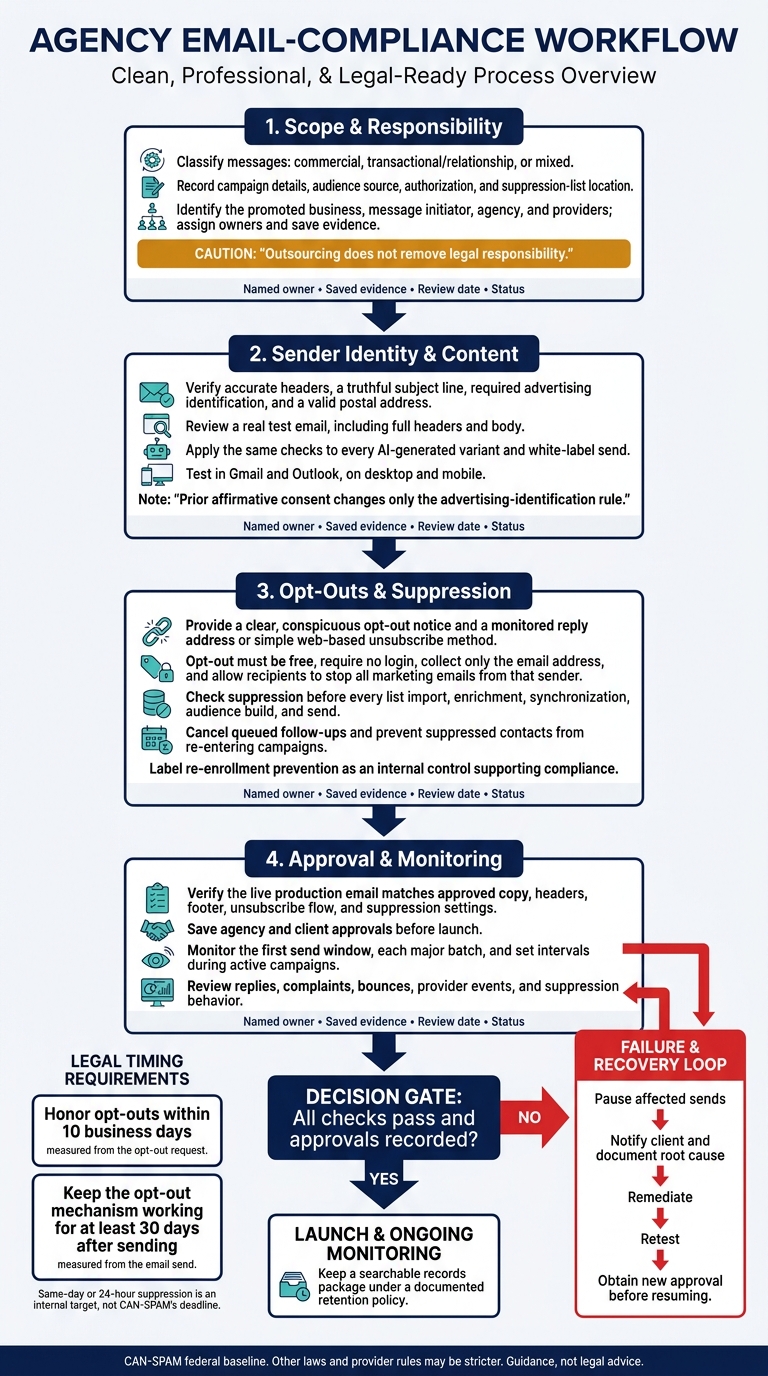
Before I launch a client’s commercial email campaign, I check who’s sending it, what it says, and whether recipients can opt out.CAN-SPAM requires honoring opt-outs within 10 business days and keeping the opt-out method working for at least 30 days after sending.
I use this checklist to:
Classify messages and assign agency, client, and provider duties.
Check sender details, subject lines, disclosures, and postal addresses - including AI-generated and white-label emails.
Test unsubscribe paths and stop suppressed contacts from entering future sends.
Save approvals, monitor campaigns, and pause sends when checks fail.
B2B email generally doesn’t require prior opt-in under CAN-SPAM, but other laws and provider rules may be stricter. My rule: <u>test before sending, document the results, and get legal review when needed</u>. This checklist is guidance, not legal advice.
Use the FTC CAN-SPAM guide as the federal baseline. Complete these checks before writing, scheduling, or uploading a send. Fill in every field and save supporting records with the approved message.
Classify Messages and Record Campaign Details
[ ] Classify each message as commercial, transactional/relationship, or mixed. For mixed messages, review the subject line, where transactional content appears, and how prominently promotions appear. A studies">customer relationship does not turn a promotional email into a transactional message. Transactional-only messages still cannot use materially false or misleading routing information.[1] Responsible party: ___ | Evidence: Final copy and classification analysis ___ | Review date: ___ | Status: ☐ Pass ☐ Needs correction
[ ] Complete the campaign record. Record every promoted business, campaign ID, sending domain, From and reply-to addresses, audience source, list-import date, send date and time, time zone, and suppression-list location. Include any separate state, international, industry, or platform review. Responsible party: ___ | Evidence: Campaign brief and deployment record ___ | Review date: ___ | Status: ☐ Pass ☐ Needs correction
[ ] Document audience authorization. Keep collection or provider terms, client authorization, consent or notice records, segment filters, exclusions, and the latest suppression-screening date. A list source alone does not prove permission or exemption. Responsible party: ___ | Evidence: Source records and screening report ___ | Review date: ___ | Status: ☐ Pass ☐ Needs correction
Assign Agency, Client, and Provider Duties
Outsourcing does not remove legal responsibility. Both the promoted business and the party originating the message may be liable. Contracts can divide duties and costs, but they do not remove liability under the law.[1][4]
[ ] Identify the parties behind the send. Name the promoted business, message initiator, From-line entity, agency, sending provider, and any data provider. Check that the contract matches the actual sending setup. Responsible party: ___ | Evidence: Contract and sender configuration ___ | Review date: ___ | Status: ☐ Pass ☐ Needs correction
[ ] Name an owner for each duty. Assign owners for business identity, postal address, offers, claims, audience use, classification, copy, headers, sender identity, exclusions, approvals, unsubscribe processing, suppression records, provider controls, and corrective actions. Put escalation deadlines and the agency’s right to pause sending in writing. Once owners are assigned, review sender identity and content. Responsible party: ___ | Evidence: Responsibility matrix and approval workflow ___ | Review date: ___ | Status: ☐ Pass ☐ Needs correction
[ ] Review messages that promote multiple businesses. List each promoted business and confirm the qualifying sender. The designated sender must be the only From-line sender and meet identification, postal-address, and opt-out requirements.[1][3] Responsible party: ___ | Evidence: Sender-role analysis and legal approval ___ | Review date: ___ | Status: ☐ Pass ☐ Needs correction
Sender Identity and Email Content Checklist
Check Headers, Subject Lines, and Disclosures
Review a real test email, not just the campaign editor. Check its full headers and body.
Requirement
Agency verification
Common failure
☐ Accurate headers
Inspect From, To, Reply-To, sending domain, return-path, and routing information. Confirm they identify the person or business initiating the message. Send a test reply. Owner: ___ Status: ☐ Pass ☐ Needs revision
Branding hides the responsible sender, or routing information is materially misleading.
☐ Truthful subject line
Compare the subject with the body, offer, and landing page. Owner: ___ Status: ☐ Pass ☐ Needs revision
False urgency, unsupported claims, deceptive “Re:” or “Fwd:” language, or a subject that suggests a relationship that doesn't exist.
☐ Advertising identification
Confirm a clear and conspicuous advertisement or solicitation disclosure unless an exception applies. Owner: ___ Status: ☐ Pass ☐ Needs revision
The disclosure is missing or hidden in faint footer text.
☐ Valid postal address
Verify the sender’s current street address, USPS-registered P.O. Box, or registered commercial mail receiving agency mailbox. Owner: ___ Status: ☐ Pass ☐ Needs revision
An outdated address, missing footer, or mailbox that doesn't meet USPS requirements.
Prior affirmative consent changes only the advertising-identification rule. Keep the consent date, source, scope, and wording.
Review AI Messages and White-Label Branding
Apply the same sender identity and disclosure checks to every AI-generated variant and white-label send.
[ ] Review automated content and white-label settings together. Check first-touch emails, replies, follow-ups, fallback responses, and personalization branches. Include blank and unusual field values in your tests. Look for invented client relationships, misstated recipient circumstances, unsupported performance claims, and subjects that don't match the message.
Before activation, verify the generated copy, sender name, client branding, domain, Reply-To, disclosures, and postal address - including when using SalesLabel. Send test emails to Gmail and Outlook accounts. Inspect their headers and check how footers display on desktop and mobile.
Confirm who controls each setting. Software doesn't supply missing required elements. Save the prompt or template version, review date, sample size, corrections, and approved outputs. Repeat the review after material changes to templates, domains, addresses, or automation. Keep written agency and client approval.
Owner: ___ | Evidence: Reviewed outputs, test emails, and written approvals ___ | Status: ☐ Pass ☐ Needs revision
Once sender identity and content pass review, move to opt-out handling.
sbb-itb-a781ab9
Opt-Out and Suppression Checklist
After approving the message, check unsubscribe and suppression handling before every send.
Test Unsubscribe Instructions and Access
☐ Unsubscribe functionality - CAN-SPAM required. Make sure every commercial email includes a clear, conspicuous opt-out notice and either a monitored reply address or a simple web-based unsubscribe method. The process must be free, require no login, collect only the email address, and let recipients unsubscribe from all marketing emails from that sender. Keep the mechanism able to process requests for at least 30 days after sending.[1]
Test links and replies on desktop and mobile with the same inboxes and routing setup used for production sends. Check that security filters, automated routing, shared inbox rules, and email authentication controls don't quarantine or discard requests. Save the tested message, unsubscribe URL or reply mailbox, and test results.
☐ Suppression enforcement - CAN-SPAM required. Honor opt-out requests within 10 business days, including requests that affect scheduled, automated, and AI-generated follow-ups. Record the request timestamp, suppression timestamp, deadline, and actual processing time. Keep separate suppression lists for each client and sender identity. Don't share opted-out addresses except with a company hired to help comply with CAN-SPAM.[1]
☐ Re-enrollment prevention - internal control supporting compliance. Check suppression before every list import, enrichment, synchronization, audience build, and send. A newly supplied address does not count as new consent. Before reactivation, obtain subsequent legally sufficient affirmative consent where policy or counsel requires it, and save the evidence. Test monthly and after system changes to confirm suppression stays in place through each workflow and cancels queued follow-ups. Keep both expected and actual test results.
Label stricter internal targets separately: same-day or 24-hour suppression is not CAN-SPAM’s deadline.[1] If a test fails, pause the campaign, save the logs, assign remediation, and retest before launch. Then run the final send check and monitor delivery for failures.
Campaign Approval and Monitoring Checklist
Complete Final Checks Before Sending
Once content, identity, and suppression controls pass, run a live pre-send check on the production build.
☐ Verify the live test email. Check that it matches the approved copy, headers, footer, and unsubscribe flow. Confirm suppression is active in the production audience and queued follow-ups are canceled.[1][5]Owner (Email Operations): ___ | Verification evidence: ___ | Status: ☐ Pass ☐ Fail ☐ Blocked
When the live message matches the approved version, lock the release record before launch.
☐ Record launch approval. Save the campaign ID, version, client, sending domain, purpose, audience source, approvers, timestamp, and launch status. Agency owner: ___ | Client approver: ___ | Verification record: ___ | Status: ☐ Approved ☐ Blocked
Monitor Results and Fix Compliance Failures
After launch, monitor sends, replies, and suppression behavior.
☐ Assign recurring checks. Review the first send window, each major batch, and set intervals during active campaigns. Check complaints, bounces, opt-out replies, forwarding or reply-routing failures, AI replies, and provider events. Verify that the correct client and suppression rules apply - don’t rely only on dashboard totals. Owner (Campaign Operations): ___ | Last verified (MM/DD/YYYY): ___ | Evidence: ___ | Status: ☐ Pass ☐ Fail ☐ Remediation Required
Use this table to set review frequency and escalation thresholds.
Control
When to check
Evidence
Escalate when
Opt-out availability and processing
Before every send and during active campaigns
Test results and processing timestamps
Opt-out path fails or the 10-business-day deadline is at risk[1]
Suppression and follow-ups
After workflow changes
Suppression and cancellation logs
Suppressed recipient is queued or contacted
Complaints, bounces, and AI replies
First send window, each major batch, and set intervals
Delivery and reply review records
Spikes, misleading claims, or unapproved changes appear
Provider and sender configuration
After client, domain, source, purpose, or automation changes
Settings and a new test message
Branding, routing, or suppression sync fails
If any control fails, stop the campaign and begin incident handling.
☐ Contain failures and approve recovery. Pause affected sends, notify the client, document the root cause, and retest. Obtain new approval before resuming. Incident owner: ___ | Retest evidence: ___ | Status: ☐ Paused ☐ Remediation Required ☐ Approved to Resume
☐ Keep a searchable records package. Retain final files, audience records, suppression snapshots, incident tickets, remediation records, and the evidence above under a documented retention policy. Keep these records available for audits, client disputes, and remediation tracking. Records owner: ___ | Policy/reference: ___ | Status: ☐ Complete ☐ Incomplete
Conclusion: Check Every Campaign
Make CAN-SPAM compliance a launch requirement for every campaign. Before launch and after major changes, check four areas: scope and responsibility, sender identity and content, opt-outs and suppression, and final approval plus monitoring. Name owners at the agency, client, and provider. Put their duties in writing to clarify accountability - but remember that written duties do not remove legal liability.[1][3]
Honor opt-outs within 10 business days and keep the opt-out mechanism working for at least 30 days after sending. Prevent imports and automation from adding suppressed contacts back to your lists.[1]
Review current FTC CAN-SPAM guidance before changing your audience, sender, or automation. Consult qualified counsel for mixed-content messages, multiple advertisers, regulated industries, or cross-border recipients.[1][2]
FAQs
What penalties could my agency face for CAN-SPAM violations?
CAN-SPAM violations can put your agency at risk of legal action and penalties. Your agency is fully liable for every send unless its contract with a white-label partner explicitly transfers that responsibility.
Honor opt-out requests within 10 business days and keep unsubscribe links working for at least 30 days. Include all required sender information and physical addresses. Check suppression lists and audit trails to help prevent violations.
How long should I keep compliance records?
There’s no universal legal retention period for compliance records. How long you need to keep them depends on your jurisdiction, the data you process, and industry regulations, such as SEC or FINRA rules. Work with legal counsel to set a formal retention schedule, and keep written protocols and records that meet your obligations.
SalesLabel supports oversight with infrastructure for audit logs and opt-out management, helping agencies show consistent compliance over time.
Can I send transactional emails after someone unsubscribes?
Yes. You can still send transactional emails after someone unsubscribes from your marketing campaigns. Transactional or relationship messages - such as invoices, order confirmations, and service notifications - are generally exempt from CAN-SPAM’s marketing opt-out requirements.
Keep these emails strictly transactional. Adding promotional content could turn them into commercial emails subject to CAN-SPAM’s marketing rules.