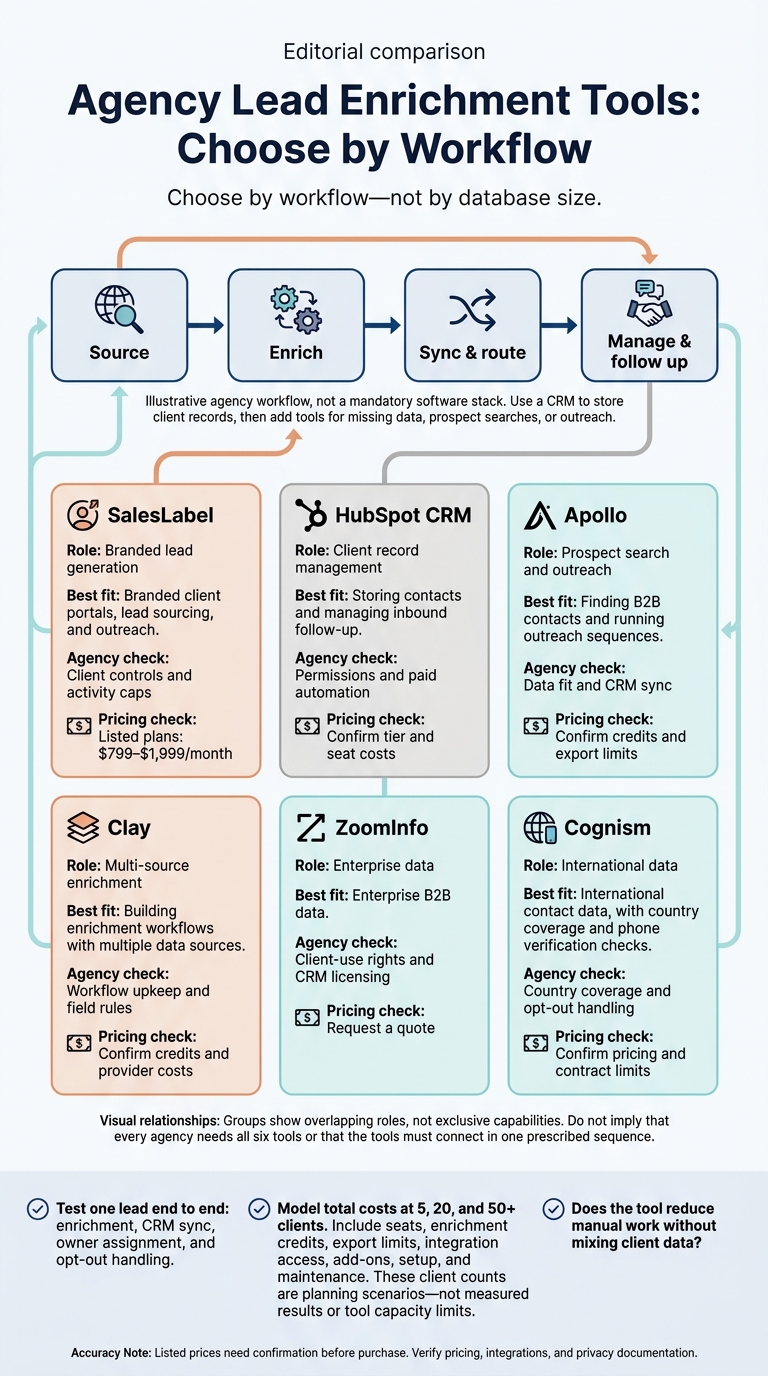
I’d choose by workflow - not by database size. Use a CRM to store client records, then add tools for missing data, prospect searches, or outreach. Before buying, test one lead from enrichment through owner assignment and opt-out handling.
Here’s how I’d shortlist the six tools:
SalesLabel: For branded client portals, lead sourcing, and outreach.
HubSpot CRM: For storing contacts and managing inbound follow-up.
Apollo: For finding B2B contacts and running outreach sequences.
Clay: For building enrichment workflows with multiple data sources.
Listed prices need confirmation before purchase. I’d compare data quality, CRM sync, client separation, privacy controls, and total costs at 5, 20, and 50+ clients. My final test: <u>Does the tool reduce manual work without mixing client data?</u>
Agency Lead Enrichment Tools: Choose by Workflow
7 Best Data Enrichment Tools (Full Demo & Comparison)
sbb-itb-a781ab9
Tool Types and Comparison Criteria
Compare tools by how they help you source, enrich, sync, and route leads across client accounts.
Tool
Primary role
CRM connectivity
Enrichment features
Best fit
Pricing
SalesLabel
White-label lead-generation system
Built-in CRM layer with sync support
AI-powered sourcing, enrichment, and lead scoring
Branded client portals and automated outreach
Published plans; reseller pricing in supplied research.
HubSpot CRM
CRM platform
Native CRM and contact management
Inbound lead tracking and contact management
Managing inbound records and follow-up
Public plans; confirm current details directly.
Apollo
Prospecting database with outreach sequences
Syncs with major CRMs
Large B2B database and intent signals
Finding prospects and running sequences
Public pricing; confirm seats, credits, and export limits.
Clay
Enrichment workflow tool
CRM and database integrations
Multi-source data enrichment and automated workflows
Technical or data-heavy agencies building custom processes
Public pricing; confirm credits and connected-provider costs.
ZoomInfo
Enterprise prospecting database
Enterprise CRM integrations
Enterprise B2B data and contact verification
Enterprise data sourcing
Pricing not established; request confirmation.
Cognism
Prospecting database
Enterprise CRM integrations
International contact data
Cross-border prospecting
Pricing not established; request confirmation.
Choose by workflow, not an overall ranking. Match each tool to the stage it supports best, then compare sync quality, data coverage, and the work needed to keep it running.
Evaluation Criteria and Fact-Checking
For agencies, the test is straightforward: can the tool keep lead records clean, current, and routed to the right place without much manual work?
Test the full handoff before leads enter client accounts. Check sync direction, field mapping, duplicate handling, data update frequency, and owner routing. Also review regional and role coverage, client-account controls, privacy controls, and suppression handling.
Price the complete workflow - not just the plan. Confirm seat requirements, enrichment credits, export limits, integration access, and add-on costs. Factor in setup and regular maintenance when assessing whether the workflow can scale. Frequent manual fixes make it harder to support more client accounts.
Verification note: Verify pricing, integrations, and privacy documentation before publication, and record the verification date.
SalesLabel suits agencies that want lead sourcing, enrichment, and outreach in one branded workflow.
SalesLabel handles AI lead sourcing, enrichment, outreach, and CRM handoff under your agency’s brand. Native integrations and automations pass records into client CRMs, helping keep the workflow under your name.[1][3]
Reply quality depends on client data. Keep each client’s website and offer details current so AI replies stay relevant.[1]
Agency Branding, Controls, and Limits
SalesLabel supports custom domains, logos, and agency-set pricing. Its branded dashboard displays leads, replies, and booked meetings under your agency’s name.[1] Launch takes 5 to 7 business days, with branding setup included. Automation runs in the cloud.[1][3]
Area
Advantage
Limitation or check
Automation
AI-assisted replies and meeting booking cut manual work.
Requires accurate client information and initial configuration.
Enrichment
Multi-source enrichment and personality analysis help personalize messages.
Accuracy depends on source-profile quality.
Outreach
LinkedIn and email sequences include personalized follow-ups.
Daily activity caps still apply.
Setup
Branding requires no custom development.
Custom domains need DNS and SSL configuration.
SalesLabel Plans and Account Limits
Current website pricing lists Starter at $799 per month, Growth at $1,279 per month, and Scale at $1,999 per month.[3]
Account limits vary by tier, so check each plan’s capacity before rollout.
Plan
Monthly price
LinkedIn accounts
Setup and branded extension
Support and strategy
Starter
$799
Up to 30
Setup help; email support
Standard/email support
Growth
$1,279
Up to 99
Setup help; branded Chrome extension
Priority support; monthly strategy call
Scale
$1,999
Unlimited
Setup help; branded Chrome extension; documentation center
Use HubSpot CRM as the system of record for cleaned, routed leads, with third-party tools handling most enrichment and outbound work.[3] HubSpot syncs contact and company records with outreach tools, but enrichment and advanced automation usually require paid tiers.[3][6]
Keep each client’s access and reporting separate to prevent data from spreading across accounts. Keep HubSpot and outreach tools in sync to reduce duplicate records and data silos.[6]
Clients will still see HubSpot branding. That makes it a shared system of record, not a white-labeled client portal. Its partner program offers revenue sharing, not full white-label resale.[3][5]
HubSpot CRM Free and Paid Features
Check current limits before planning a rollout.
Area
What to verify
Paid access and cost checks
Contact and company records
Confirm current record, user, and access limits.
Check which seats and permissions each client needs.
Enrichment
Check which enrichment features are included, if any.
Enrichment often requires higher-tier subscriptions. Confirm the product and included usage.[3]
Automation and reporting
Confirm which actions your setup includes.
Advanced automation and reporting typically require Starter, Professional, or Enterprise tiers.[3]
Budget for each client account based on the required tier and usage.[3] Track lead quality, meetings booked, and pipeline value weekly or monthly.[6]
HubSpot stores the records. Apollo supplies the prospects and outreach sequences that feed it.
Apollo pairs a B2B contact and company database with outreach sequences for prospecting and contact enrichment before outreach. It supports email and LinkedIn outreach, and agencies usually pair it with a CRM for delivery.[3][6]
Check the data against each client’s targeting needs. Review the contact and company filters, then verify match quality for each client segment. The supplied sources don’t provide audience-level accuracy rates. Apollo typically costs less than enterprise data providers, but those sources don’t specify current USD pricing or credit rules.[3]
For agency delivery, sync quality is the key test. Verify native CRM sync with systems such as HubSpot, Salesforce, and Pipedrive. Apollo fits agency-side prospecting better than client-facing delivery because it lacks white-labeling.[3][6]
Clay is an enrichment layer, not a CRM. It sits between prospecting and the CRM, so workflow control matters more than database size. Agencies use it for LinkedIn and B2B enrichment, then sync the records to each client’s CRM.[3][6]
For agencies handling client data at scale, check how Clay syncs with HubSpot, Salesforce, and Pipedrive. Native sync helps avoid data silos, but confirm overwrite rules, source priority, and client-access permissions before syncing.[6]
Clay Workflow Setup, Upkeep, and Costs
Area
Potential advantage
Limitation or check
Customization
Supports client-specific fields.
Check the technical skills needed to build and maintain workflows.
Provider coverage
Multiple sources can help fill gaps in lead records.[6]
Confirm current provider coverage and completeness for each field.
Data control
Native CRM sync can keep enriched records in the client’s existing system.[6]
Check duplicate handling, overwrite controls, and client-access permissions.
Setup and maintenance
Reusable workflows can reduce repeat setup work.
Assign someone to handle setup and routine upkeep.
Usage-based costs
Usage-based billing and volume discounts affect costs.[3]
Model costs for 5, 20, and 50+ clients to assess volume discounts.[3]
For agencies that need deeper enterprise data, ZoomInfo provides B2B data for prospecting and lead enrichment. It’s not a standalone CRM.[3][6]
Ask for a live demo covering contact and company data, segmentation filters, intent signals, and features that need extra licenses. Check the exact HubSpot or Salesforce connection you’ll use, including permissions, sync direction, and any added licensing costs.[3] These checks help prevent cleanup work across client accounts.
Confirm whether the contract allows use across multiple client accounts. Your agency will need to handle data isolation and reporting in-house.[6]
Pricing is quote-based. Ask for separate costs for seats, data credits, and implementation.[3]
For agencies serving European or multinational clients, Cognism is a country-level coverage check after reviewing broad enterprise data. Use it for prospecting when coverage by country and phone verification matter more than database size.
Before sending records to a client CRM, check the following:
Area
What to verify with Cognism
Verification methods
How Cognism verifies contact and phone data, when records were last checked, and what each verification status means.
Geographic coverage
Whether contact and company data cover each target country, job function, and company size. Request a sample matched to your client’s audience.
Intent signals
Which buying signals Cognism supports and how often they update.
CRM enrichment and synchronization
Confirm connections to HubSpot, Salesforce, and Pipedrive, plus field mapping, update frequency, duplicate handling, and overwrite rules.
Agency administration
Check client-account separation, role-based permissions, and whether administrators can switch between sub-accounts from a central admin dashboard.
Usage limits
Get written limits for searches, enrichment, exports, API access, and seats, along with any overage charges.
Verified purchasing terms
The supplied sources do not establish USD pricing, minimum commitments, export rights, or client-use rights. Require these terms in the order form and license.
Privacy controls
Check opt-out management, data residency settings, and audit logs.[6]
Use intent to prioritize outreach - not as a substitute for contact permission.[6]
Before syncing live client records, test how updates affect existing fields and opt-outs. Privacy controls help, but compliance still depends on lawful basis, notices, and opt-out handling.[6]
Conclusion: Choose Tools by Agency Workflow
Use workflow fit as your final filter when comparing tools.
Make your CRM the system of record. Prospecting, enrichment, and outreach tools should feed it, with each tool supporting a clear stage of the workflow.[6]
Before buying, test one end-to-end flow: sync, routing, opt-out handling, calendar handoffs, and stopping follow-ups when someone replies.[3]
Calculate total costs at 5, 20, and 50+ clients before setting your service prices.[3]
Agency-Fit Comparison Table
Use this table to build your final shortlist.
“Unverified” means the supplied information does not establish the feature or limit. Confirm plan-specific terms before purchase.
Tool
Primary role
Agency use case
CRM connectivity
Enrichment
Outreach automation
White-label support
Multi-client controls
Pricing transparency
Setup effort
SalesLabel
White-label lead generation
Branded lead generation
Native sync (HubSpot/Salesforce)
AI-powered
Email + LinkedIn
Full branding (domain and logo)
Yes (sub-accounts)
Published pricing
Low
HubSpot
System of record
Inbound lead management
Native
AI-assisted features
Email (limited)
No
Limited
Moderate
Moderate
Apollo
Data/prospecting
Outbound prospecting
Yes
B2B database
Email + LinkedIn
No
No
High
Low
Clay
Enrichment
Custom enrichment
Unverified
Multi-source
Unverified
Unverified
Unverified
Unverified
Unverified
ZoomInfo
Data provider
Enterprise prospecting
Yes
Enterprise data
Unverified
No
Unverified
Low
Moderate
Cognism
Data provider
International prospecting
Yes
International data
Unverified
No
Unverified
Low
Moderate
Setup estimates are planning guides, not guarantees.
FAQs
How can I measure lead enrichment ROI?
Track pipeline metrics that link lead enrichment to revenue: positive replies from interested prospects, meetings booked, and opportunities created in your CRM. Calculate your cost per meeting booked to see what your outreach delivers for the money spent.
Use automated, white-labeled reporting dashboards to share these results with clients and show how enrichment data helps turn outreach into successful meetings.
How often should I refresh enriched leads?
How often you update data depends on the field and your data quality plan. Company size often needs an update every 6 to 12 months[1]. Run automated cleanups weekly to catch data decay [2].
Use real-time triggers when new leads enter your system, alongside scheduled batch updates for stale records. Keep an eye on fields that change often, including job titles, names, and contact information, to maintain lead quality [2].
How can I prevent cross-client data leaks?
Choose platforms with multi-tenant workspace management that keep each client’s data in a separate, secure sub-account [1][2]. Use client-scoped credentials, separate reporting views, and role-based access controls to keep accounts separate while managing them from one dashboard [3][4].
For CRM integrations, set independent sync rules for each client. Test those rules in a sandbox to confirm records never enter another client’s database [3][4].