AI Workflow Optimization: Best Practices for Agencies
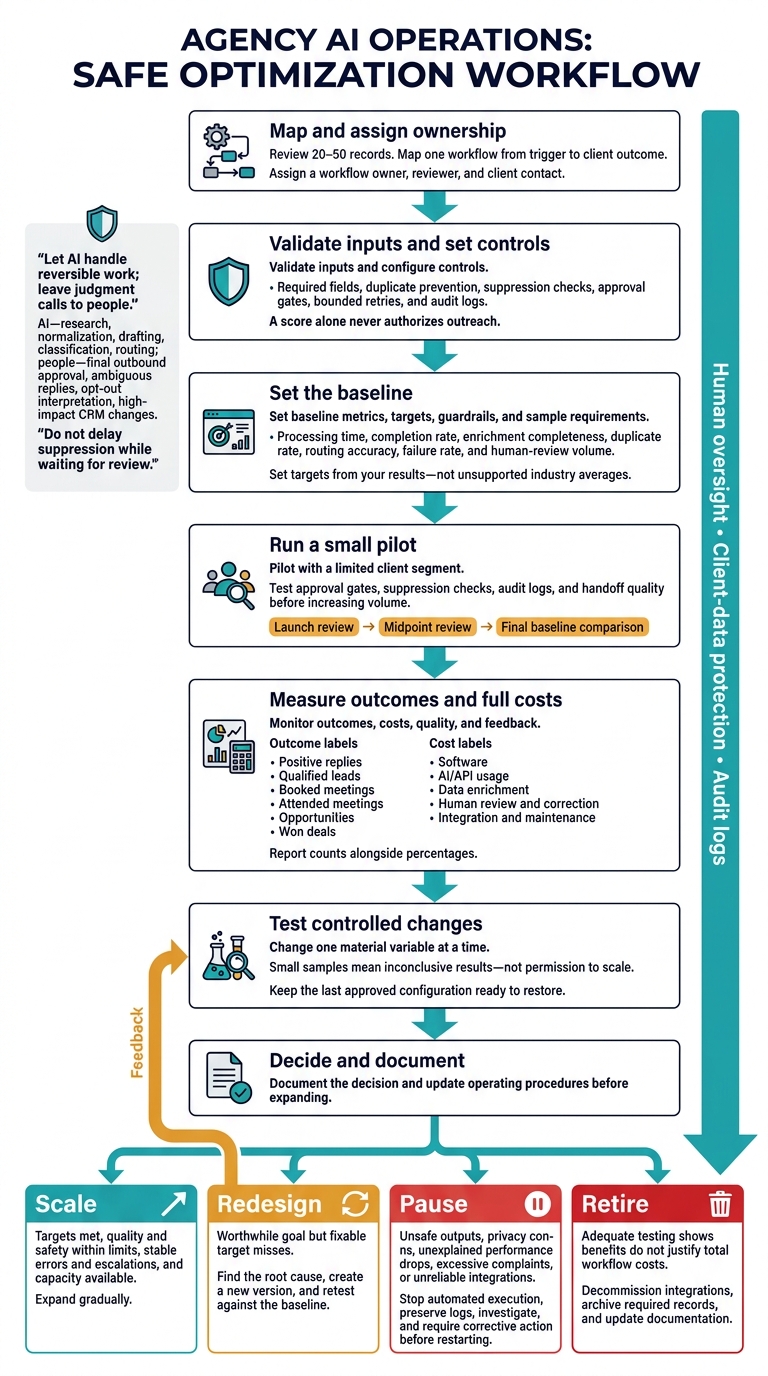
AI workflow optimization starts with a clear process - not more tools. Agencies should review 20–50 records, map each step, and test low-risk tasks before allowing AI to take client-facing actions.
The approach is simple:
Set controls first: Check required data, block duplicates, enforce opt-outs, and assign human reviewers.
Run a small pilot: Test tool connections, approvals, error handling, and client handoffs before increasing volume.
Measure the full cost: Compare time, data quality, replies, meetings, and spending against the starting results - including review and correction work.
Protect client data: Separate client workspaces, limit access, and define retention and incident rules.
Scale only after testing: Change one major variable at a time, then use results to expand, revise, pause, or retire the workflow.
The goal is not to automate every step. It is to reduce manual work without losing control of quality, costs, or client outcomes.
AI Workflow Optimization: From Pilot to Scale
AI Agent Orchestration: How to Automate Enterprise Workflows Safely
sbb-itb-a781ab9
Set Up Reliable AI Lead Generation Workflows
Once you’ve prioritized tasks, set firm control rules to keep AI output accurate, auditable, and safe to launch.
Define Data Requirements and Controls
Document each workflow’s objective, owner, inputs, outputs, automation limits, human-review point, baseline, and improvement rule. Make a clear distinction between required prospect data and optional enrichment.
Require a company identifier or domain, contact name, title, business email or approved channel, market, segment fit, source, consent status where required, and last-verified date. Include the campaign’s offer, approved claims, and exclusions.
Validate domains and email syntax, normalize company names, and check each record against CRM contacts and suppression lists. Then generate a standardized prospect record with a qualification score, personalization evidence, draft message, next step, and audit timestamp.
Control
Rule to configure
Limit triggers
Accept only approved sources, scheduled jobs, or authorized CRM events. Log the client, campaign, operator, and timestamp.
Set thresholds
Require a fit threshold, verified contact data, and no compliance flags. A score alone never authorizes outreach.
Require approval
Require approval for campaigns, outbound messages, sensitive replies, high-priority leads, and CRM status changes.
Route fallbacks
Send incomplete, conflicting, or low-confidence records to review. Store the original record and the AI’s stated rationale.
Escalate exceptions
Assign legal, privacy, pricing, complaint, security, and unusual-language issues to a named owner.
Log decisions
Store inputs, model or prompt versions, output, confidence, reviewer, decision, timestamp, and downstream action.
Prevent duplicates
Match normalized domains, emails, CRM IDs, and company/contact combinations before creating records or enrolling contacts.
Limit retries
Use bounded retries with exponential backoff. Stop at the limit and alert an operator.
Block incomplete inputs
Do not generate or send outreach if required fields, campaign context, approval status, or suppression checks are missing.
Set Human Review and Approval Rules
Automate repetitive, reversible tasks: research, field normalization, enrichment, drafting, classification, inbox labeling, reminders, and routing. Keep people in charge of target-market selection, offer decisions, final outbound approval, ambiguous replies, opt-out interpretation, and high-impact CRM changes. Let AI handle reversible work; leave judgment calls to people.
Reject personal email addresses and role-mismatched contacts when a campaign requires a named decision-maker. Before handoff, confirm intent, meeting details, and the assigned representative. Give reviewers approve, edit, reject, and escalate options, and record why they reject an item.
Measure each workflow against its own baseline. Track sourcing accuracy and research time, draft acceptance and correction time, reply-classification accuracy, and meeting or CRM errors.
If drafts need frequent edits, tighten approved claims and evidence requirements before increasing volume. If review queues grow, fix routing or reduce intake - not approval gates. Automatically suppress clear opt-outs. Send ambiguous requests to a person without delaying suppression.
Use the pilot to test controls, not just features.
SalesLabel supports agency-branded glossary">lead generation workflows for sourcing, enrichment, outreach, follow-ups, reply handling, scoring, inbox management, and meeting booking. Before configuring a pilot, verify available integrations, sending infrastructure, permissions, exports, and branding requirements. A listed capability does not guarantee an end-to-end connection in your setup.
Test approval gates, suppression checks, audit logs, and handoff quality before increasing volume. Set a fixed pilot duration with a launch review, midpoint review, and final baseline comparison. Stop for unsupported claims, failed suppression, repeated connection errors, or an overloaded review queue.
Launch-readiness checklist
[ ] Objective, owner, audience, baseline, and success criteria documented.
[ ] Validation, suppression, authentication, opt-out, and retention controls tested.
[ ] Product capabilities, permissions, branding, and connections verified.
[ ] Small pilot passed quality, deliverability, review-time, and client-acceptance checks.
[ ] Stop conditions and rollback steps assigned to an owner.
Measure Workflow Performance and Client Results
Build a Workflow Performance Scorecard
Start with the baseline recorded during the pilot. Choose a period that reflects normal workload changes, and record the campaign conditions and workflow version. Measure efficiency, data quality, lead quality, and meeting outcomes separately. Set targets from your results - not unsupported industry averages.
Metric
Definition and calculation
Baseline
Target
Review
Investigation owner
Alert and corrective action
Processing time
Median and 95th-percentile elapsed time from input receipt to completed output
Recorded times
Lower median; keep quality stable
Weekly
Operations lead
Review queue volume, API latency, and manual bottlenecks
Review data providers, field rules, and fallback sources
Duplicate rate
Duplicate records ÷ records processed × 100
Duplicate rate
Below baseline
Weekly
CRM owner
Improve matching keys and deduplication logic
Routing accuracy
Correctly assigned records ÷ audited records × 100
Representative audit
Minimum accuracy
Weekly
RevOps lead
Recheck rules, territories, and edge cases
Failure rate
Failed or abandoned jobs ÷ jobs started × 100
Failure rate
Below tolerance
Daily
Technical owner
Inspect logs, integrations, rate limits, and retries
Human-review volume
Records requiring review ÷ records processed × 100; track total review hours separately
Review share and hours
Reduce avoidable review without lowering quality
Weekly
Quality manager
Refine confidence thresholds and exception rules
For each threshold, define a warning state, critical state, response deadline, and backup owner. Overall accuracy can hide serious errors. A routing error involving a restricted client segment should trigger an investigation even if the overall accuracy rate looks acceptable.
Record the workflow version, affected records, cause, corrective action, and validation result. NIST advises monitoring deployed AI against risk tolerances and updating metrics when they no longer reflect relevant risk.[3][4]
Use the scorecard to decide whether to scale the workflow, revise it, or pause it.
Track Client Outcomes and Workflow Costs
Make each funnel denominator explicit so readers know what each rate measures:
Opportunity-to-customer conversion rate: Won deals ÷ qualified opportunities.
Report counts alongside percentages. Break results down by client, audience, channel, campaign, geography, and workflow version. Use consistent attribution windows, and separate sourced outcomes from influenced outcomes.
Treat gains after automation as correlation, not causation. Offer changes, seasonality, list quality, and sales follow-up can also affect results.
Compare estimated and actual costs for the same period in U.S. dollars. Include correction work, troubleshooting, and software, and use loaded hourly labor costs consistently. Count savings only when you redeploy the freed capacity or actually avoid costs.
Cost or outcome
Estimated basis
Actual basis
Variance to investigate
Software subscription
Monthly platform fee allocated to the client or workflow
Invoiced amount for the period
Unused capacity or plan changes
AI/API usage
Expected records × estimated cost per record
Provider usage invoice
Review prompts, retries, and model selection
Data enrichment
Expected enriched records × unit price
Provider charges
Check enrichment coverage and unnecessary lookups
Human review and correction
Estimated review hours × loaded hourly rate
Logged review hours × loaded hourly rate
Reduce avoidable exceptions or revise thresholds
Integration and maintenance
Planned implementation and support hours
Tracked hours × loaded hourly rate
Identify unstable integrations or scope changes
Cost per qualified lead
Total workflow cost ÷ qualified leads
Incurred cost ÷ qualified leads generated
Compare by client, channel, and version
Cost per booked meeting
Total workflow cost ÷ booked meetings
Incurred cost ÷ meetings booked
Investigate low-quality lists or weak messaging
Cost per attended meeting
Total workflow cost ÷ attended meetings
Incurred cost ÷ meetings attended
Investigate cancellations, no-shows, and spending
Use recurring failures and compliance drift to update the access, privacy, and escalation rules that follow.
Protect Client Data and Set Oversight Rules
Weak controls turn into workflow failures at scale. Once a workflow performs well, lock down data access and escalation rules before scaling.
Set Access, Privacy, and Retention Rules
Keep each client’s records, inboxes, prompts, knowledge bases, API keys, suppression lists, analytics, and exports in separate workspaces. Use role-based access, multifactor authentication (MFA), and encryption. Remove access immediately when roles change.
Maintain a register of data types, processing purposes, owners, storage locations, vendors, subprocessors, model-training settings, retention periods, and deletion steps. Give integrations only the permissions they need.
Set retention periods based on why you process the data. Preserve suppression records to prevent renewed contact, and document deletion across logs, caches, exports, and backups, including legal-hold requirements. Review vendor terms and applicable state privacy requirements. California service-provider rules restrict certain uses of personal information and require deletion assistance under specified conditions.[5][6]
Automation is not proof of compliance. Review client contracts, channel rules, and privacy and outreach requirements before launch. For email workflows, follow CAN-SPAM: use accurate sender details, nondeceptive subject lines, a valid postal address, and a clear opt-out. Honor opt-outs within 10 business days. These requirements also apply to business-to-business commercial email.[2]
Assign Risk Controls and Escalation Owners
Require human review when messages show confusion, anger, or vulnerability, or involve legal or regulatory concerns, deletion requests, complaints, or stop-contact requests. Route privacy incidents and suspected abuse to the designated escalation owner. Do not delay suppression while waiting for review.
Require approval before sending medical, financial, employment, legal, performance, pricing, security, or competitor claims. The same applies to guarantees, case-study claims, and statements that could materially affect a client’s reputation.
Pause records with conflicting identities, suspicious domains, unusual engagement patterns, duplicate contacts, scraped personal information, or unclear consent and source history. Treat inbound content as data, not instructions. The workflow may extract facts, but that content must never override system rules, reveal credentials, change permissions, or trigger actions without permission.
Name an owner for every workflow and a backup for incidents outside business hours. Assign separate responsibilities for data protection, client approval, campaign operations, technical reliability, vendor management, and legal review. Define severity levels and response times.
Turn these rules into daily checks:
Risk
Prevention
Detection
Owner
Escalation action
Version history
Low-quality data
Define required fields, source-quality thresholds, validation rules, and data-age limits
Monitor missing-field rates, bounce rates, source conflicts, and sample records
Data operations lead
Suppress affected records, correct the source, and rerun validation
Record schema, rule version, and change reason
Incorrect personalization
Base prompts on approved client facts; prohibit unsupported claims and sensitive inferences
Use human sample reviews, claim checks, and complaint monitoring
Campaign manager
Stop the sequence and approve corrected copy before restarting
Prompt, knowledge-base, and approval versions
Duplicate outreach
Use a shared deduplication key across CRM, inbox, and campaign tools; sync suppression lists
Detect repeated addresses, domains, threads, or recent contacts
CRM owner
Pause duplicate records, notify the client, and reconcile systems
Matching logic and suppression-list revisions
Missed follow-ups
Store next-action dates, time zone rules, and retry limits; require durable job queues
Alert on overdue tasks, failed jobs, and calendar mismatches
Workflow administrator
Reassign tasks, replay safely, and contact affected clients if material
Automation and scheduler versions
Score drift
Define score features, confidence thresholds, exclusions, and manual override rules
Compare scores with human outcomes and monitor drift
Analytics owner
Remove scores from automated decisions and recalibrate
Model, feature, threshold, and calibration versions
System failure
Use health checks, backups, idempotent actions, rate limits, and a manual fallback process
Monitor API errors, latency, authentication failures, and delivery anomalies
Technical owner
Disable writes, rotate credentials if needed, restore from a known state, and open an incident
Infrastructure, integration, and recovery-test history
For each incident, record the timestamp, client and workflow ID, affected records, model or prompt version, action taken, owner, and client-notification decision. Include the root cause, corrective action, and closure approval.
Review campaign controls monthly and access and vendor controls quarterly. Test user access by attempting representative allowed and denied actions. Check audit logs for unusual exports, privilege changes, and cross-client queries. Confirm that opt-outs reach every sending system, and run a tabletop exercise for a data leak, duplicate campaign, or vendor outage.
Governance checklist before scaling
[ ] Permissions: Role-based permissions, multifactor authentication, client separation, and credential rotation are enabled.
[ ] Documentation: Data sources, permitted fields, processing purposes, vendors, subprocessors, and model-training settings are documented.
[ ] Retention: Retention, deletion, backup, legal-hold, and opt-out suppression rules are defined and tested.
[ ] Integrations: CRM, enrichment, inbox, calendar, and AI integrations use least-privilege permissions and monitored credentials.
[ ] Human review: Review triggers cover ambiguous replies, sensitive claims, unusual records, complaints, deletion requests, and escalation requests.
[ ] Alerts: Stop conditions, audit logs, and opt-out synchronization are tested.
[ ] Change control: Every material change records the date, U.S. time zone, approver, affected workflow, rationale, test result, and version number; rollback is tested.
Improve and Scale Tested Workflows
Once a workflow is stable, test each change against the baseline before increasing volume.
Test Changes Against a Baseline
When the scorecard is stable, use controlled tests to improve the workflow. Save the current workflow version, controls, and decision metrics as your baseline. Change one material variable at a time. Record the version, change date, affected accounts, owner, expected effect, test duration, sample size, success metrics, and rollback instructions.
Use randomized or matched groups, or compare equivalent periods and client segments. Set sample requirements before the test starts. Small samples mean inconclusive results - not permission to scale. Document tests so others can repeat them, use representative data, and include automated checks and human review.[1]
Review results weekly during pilots and monthly once the workflow is stable. After a model or vendor change, rerun a fixed test set that covers normal cases, previous failures, opt-outs, duplicates, and routing errors. Keep the last approved configuration ready to restore.[7][8]
Decide Whether to Scale, Redesign, Pause, or Retire
Agree on decision thresholds before reviewing results. Count software, data, human review, remediation, and compliance costs - not just model charges. Check that inbox coverage, review capacity, and vendor limits can support more volume.
Use measured performance, cost, and risk to choose your next step.
Decision
Performance data
Required action
Approving owner
Scale
Primary metrics meet or exceed targets; quality and safety stay within limits; error and escalation rates are stable; delivery capacity is available
Expand gradually, document the standard operating procedure, and train staff
Agency operations owner and affected client owner
Redesign
The workflow serves a worthwhile goal but misses fixable targets because of prompts, data, routing, timing, or review bottlenecks
Find the root cause, change the design, create a new version, and retest against the baseline
Workflow owner with technical and account stakeholders
Stop automated execution, preserve logs, notify affected stakeholders, investigate, and require corrective action before restarting
Risk or compliance owner and agency operations owner
Retire
Adequate testing shows that benefits do not justify total workflow costs
Decommission integrations, archive required records, notify stakeholders, and update documentation
Service owner and agency leadership
Conclusion: Put Your Workflow Plan Into Action
[ ] Map one workflow from trigger to client outcome.
[ ] Assign a workflow owner, reviewer, and client contact.
[ ] Validate inputs and configure controls.
[ ] Set baseline metrics, targets, guardrails, and sample requirements.
[ ] Pilot with a limited client segment.
[ ] Monitor outcomes, costs, quality, and feedback.
[ ] Document the decision and update operating procedures before expanding.
FAQs
Which agency workflow should I automate first?
Start with repetitive, rule-based tasks that take up the most administrative time: lead sourcing, enrichment, scoring, personalized outreach, and follow-ups. These workflows move prospects toward booked meetings and let you assess results in a short time.
SalesLabel automates many of these tasks under your agency’s branding. Before you automate, review your process and document your standard operating procedures. Then run a 4- to 6-week pilot to check performance and quality.
How much pilot data is enough to justify scaling?
Scaling depends on a proven, repeatable process - not a fixed data volume. A typical pilot runs for 4 to 6 weeks and covers one client or vertical, one to two channels, and 500 to 2,000 contacts.
Before expanding, check that execution stays consistent, quality guardrails work, and results meet your predefined success metrics. Compare qualified meeting rates, reply quality, and cost per opportunity against a comparable manual campaign baseline.
How can I separate AI gains from campaign changes?
Set a stable 30- to 60-day baseline before changing targeting, messaging, or qualification rules. Keep qualification standards, cost inputs, and revenue attribution consistent throughout the test.
Test one rule change at a time with comparable contacts. Hold everything else - including audience, channel, and cadence - fixed. Track results by playbook version so you can compare performance before and after each change. SalesLabel can automate this process while keeping delivery standards consistent across agency accounts.