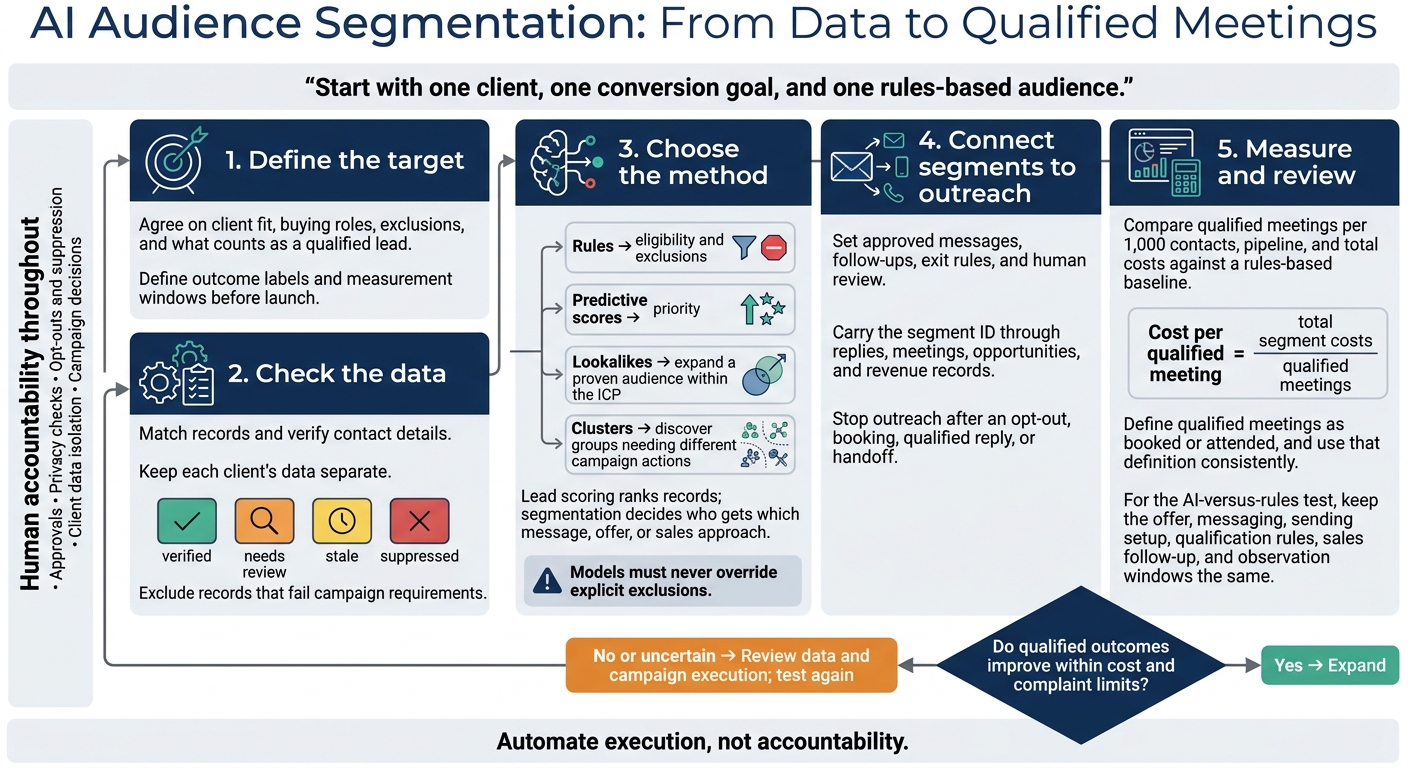
Practical workflow for agencies to build, test, and measure AI-driven audience segments that increase qualified meetings while preserving human oversight.
SalesLabel Team
Growth Expert • 11/11/2026
Share:
Procurando uma solução pronta?
SalesLabel automatiza a prospecção do início ao fim — IA encontra prospects, envia mensagens personalizadas e agenda reuniões sob sua marca.
I’d start with one client, one conversion goal, and one rules-based audience - not a complex AI model. Use verified company, role, and activity data to decide who belongs in outreach. Then test whether AI helps generate more qualified meetings at a lower cost.
Here’s the workflow I recommend:
Define the target: Agree on client fit, buying roles, exclusions, and what counts as a qualified lead.
Check the data: Match records, verify contact details, and keep each client’s data separate.
Choose the method: Use rules for eligibility, predictive scores for priority, and lookalikes or clusters when they support a different campaign action.
Connect segments to outreach: Set messages, follow-ups, exit rules, and human review - including when using a white-label service such as SalesLabel.
Measure and review: Compare qualified meetings per 1,000 contacts, pipeline, and total costs against a rules-based baseline.
My bottom line: <u>automate execution, not accountability</u>. Keep approvals, privacy checks, opt-outs, and campaign decisions under human control. Expand only when qualified outcomes improve - not just reply counts.
AI Audience Segmentation: From Data to Qualified Meetings
How to Build Customer Segments with AI (Real-World Use Case)
sbb-itb-a781ab9
What Is AI Audience Segmentation?
AI audience segmentation groups accounts or contacts into audiences you can act on, using shared attributes, behavior, or predicted outcomes. Unlike a static list, an AI-supported segment updates as new signals arrive.
Lead scoring ranks records; segmentation decides who gets which message, offer, or sales approach. This keeps targeting separate from prioritization. Segments also determine who to exclude from outreach and where to route contacts. Scores help prioritize contacts within those groups.[2][3][4]
A useful segment links ideal studies">customer profile (ICP) fit to campaign action. Fit tells you whether an account belongs in your target market. Role identifies the relevant buyer, while behavior helps assess timing. Measure results through qualified replies, booked meetings, sales-qualified leads (SQLs), and closed-won revenue - not replies alone. Keep segments separate only when they call for different campaign decisions or produce meaningfully different outcomes.[3][5]
Rules-Based vs. Dynamic vs. Predictive Segmentation
Approach
Definition
Data needs
Update frequency
Agency uses
Limitations
Rules-based
Human-defined conditions assign records to segments.
Reliable account and contact fields.
On import or when rules run.
ICP targeting, exclusions, and client reporting.
Misses patterns outside the chosen rules; requires maintenance.
Dynamic
Records automatically enter or leave a segment when defined fields or events change.
Updated CRM, enrichment, and engagement data.
Near real time or on a scheduled sync.
Stage-based messaging, outreach pauses, and routing.
Not necessarily AI; depends on up-to-date data.
Predictive
A statistical or machine-learning model estimates a defined outcome, such as a qualified meeting.
Relevant attributes and reliable historical outcome data.
Scheduled scoring or updates triggered by new signals.
Prioritizing eligible accounts and finding high-potential audiences.
Needs validation; may repeat bias and be harder to explain.
These approaches can work together. Use explicit rules to decide eligibility and exclusions, then use predictive scores to set priorities. Rules still matter: they're transparent, easy to audit, and useful for exclusions and compliance controls.
A prediction is an estimate, not proof of buying intent. Check data quality first. Then compare predictive targeting with a rules-based baseline, using a separate test set or a controlled campaign. Judge performance by downstream outcomes.[3][7][9]
Set Client Goals and ICP Criteria
Create a one-page client brief that covers the primary conversion goal, required and preferred ICP attributes, buying roles, geography, triggers, and exclusions. Agree on qualification standards before launch: a positive reply isn't a qualified lead, and a booked meeting isn't yet an opportunity. Define each outcome label and its measurement window so reporting and model training use the same definitions.[6][8]
Document data sources, field owners, data update schedules, missing fields, and known outcomes. Include privacy and outreach rules, access controls, retention limits, campaign ownership, and how often reviews will happen. Start with rules if historical outcomes are limited or inconsistent. Use the first campaign to collect clean labels, and test predictive targeting only once you have enough reliable outcome data.[5][6][8]
Prepare Account and Contact Data
Use stable IDs for accounts, people, campaigns, and activities. This lets contacts move between campaigns without losing attribution. AI can only segment data that’s correctly linked and verified. Store account fields such as industry, employee count, revenue, location, technology stack, and customer status. For contacts, keep job title, seniority, department, buying role, verified email, and engagement history.
Keep records and model outputs in a client-isolated workspace. For every campaign, log approved sources, permitted fields and uses, the client approver, and retention and deletion dates. Get explicit authorization before reusing another client’s contacts or conversion history. Clean, linked data supports every segment that follows.
Combine Fit, Engagement, Intent, and Outcome Data
Start with signals that could change campaign decisions. Use the inventory below to connect fit, timing, and buying behavior to action, then update role and contactability fields before launch.
Data category
Approved sources
Segmentation use
Update needs
Limitations
Best use
Firmographics
Client CRM, company website, approved business databases
Identify integration fit or replacement opportunities
Monthly or quarterly
Detection may be incomplete or outdated
Technology-specific messaging
Roles and seniority
CRM, professional profiles, enrichment
Separate decision makers, evaluators, users, and influencers
On ingestion and quarterly review
Titles vary widely across companies
Persona-based email and LinkedIn workflows
First-party engagement
Replies, form fills, meetings, event attendance, website activity
Prioritize active accounts and tailor follow-up
Near real time or daily
Activity does not always indicate buying intent; use opens only for deliverability monitoring
Retargeting, nurture, and sales follow-up
Timing signals
Client notes, public announcements, hiring pages, contract dates
Create time-bound segments
Weekly or when verified
Signals may be ambiguous or delayed
Trigger-based outreach
Third-party intent
Approved intent provider or publisher network
Prioritize accounts for buying-interest research
Weekly or per provider schedule
Probabilistic; may reflect anonymous research, not an identified buyer
Human-reviewed research lists
Conversion history
CRM opportunities, meetings, proposals, closed deals, churn records
Train propensity models and identify high-value segments
Daily or after each status change
Historical bias and inconsistent stage definitions
Lookalike campaigns and budget allocation
Keep observations separate from interpretations. Store replies, visits, and meeting requests as timestamped events. Store inferred intent separately, along with its confidence, source, and model version. An email open or third-party intent score doesn’t prove someone is ready to buy. Send uncertain signals to research rather than automatic qualification.
Match Records and Check Data Quality
Prepare records before segmentation:
Match stable CRM and source-system IDs first, then normalized domains and verified emails.
Standardize company names, legal suffixes, phone numbers, states, ZIP Codes, URLs, and email casing.
Use fuzzy matching only to flag possible duplicates for review. Never merge on name alone, and preserve original values and merge history.
Check for duplicate accounts and contacts, missing IDs, invalid emails, mismatched domains, stale job titles, conflicting employee counts, outdated opportunity stages, impossible dates, inactive-company contacts, and do-not-contact conflicts.
Use enrichment to update matched records only.
For important fields, attach field-level provenance: source, collection method, original and normalized values, verification date, last update date, confidence, owner, and permitted use. Don’t let enrichment silently overwrite manually verified information.
Mark records as verified, needs review, stale, or suppressed. Exclude records that fail campaign requirements. Recheck critical fields before launch, then monitor duplicates, completeness, invalid emails, and stale records monthly. These checks help prevent false segments, duplicate outreach, and bad model labels when segmenting by fit, behavior, and outcome.
Choose a Segmentation Method
Once your data is clean, choose the simplest method that supports the campaign decision: include, prioritize, expand, or discover. Add models only when they improve targeting, prioritization, or audience expansion.
Use this table to match the method to the campaign’s job.
Method
When to use it
Required data
Main risks
Firmographic and behavioral rules
Set eligibility and messaging
Clean account, role, and recent activity fields
Stale rules, oversimplification, overlapping segments
Propensity scoring
Prioritize likely qualified outcomes
Enough labeled outcomes, consistent time windows, validation records
Rare outcomes, data leakage, drift, overconfident scores
Lookalike modeling
Expand a proven audience within the ICP
Representative seed accounts with reliable outcomes
Before choosing a method, document each segment’s size, stability, reachability, overlap, expected value, and messaging differences. Recalculate membership across historical snapshots to check how it changes over time. When segments overlap, decide which takes precedence.
Measure reachable records, the percentage overlapping another segment, median record age, and qualified-response rate. Split segments only when the campaign action changes.
Then define the rules that control eligibility and messaging.
Segment by Company, Role, and Behavior
Combine company fit - industry, employee count, revenue, geography, and business model - with buying role, engagement recency, content downloads, and response history. Use fixed size bands and 30-, 60-, or 90-day activity windows.
Rules determine who qualifies and which message they receive. Models help prioritize those records, but must never override explicit exclusions.
Hypothetical B2B campaign: An agency promoting outbound appointment-setting services could target U.S. B2B SaaS companies with 50–500 employees, $5 million–$100 million in annual revenue, and at least five sales representatives. Select sales, revenue, or growth directors and VPs with meaningful engagement in the past 60 days.
Predict Outcomes With Propensity Scores
Use propensity scoring only when you have enough relevant historical examples with consistent outcomes. Keep the distinctions clear: fit measures ICP alignment, intent signals possible interest, and propensity predicts a defined outcome. Predicted campaign value can also account for deal value, margin, and delivery cost.
Train on earlier campaigns and validate on later periods. Use only inputs available before outreach to avoid data leakage. If positive outcomes are rare, apply suitable weighting or sampling.
Assess precision, recall, lift, and calibration - not accuracy alone. Compare top-score bands against a holdout using qualified meetings per 1,000 contacts and cost per qualified meeting.
Build Lookalike Audiences and Clusters
Build lookalikes from representative, high-value customers or qualified opportunities. Remove poor-fit accounts and unusual one-off deals, then keep the search within ICP boundaries.
Clustering groups records without predefined outcome labels. Normalize numeric inputs, and remove identifiers or duplicated signals that could distort similarity.
Keep only clusters with a clear commercial use, enough reachable records, stable membership, and a separate campaign action - a different message, offer, or route. Retain them only if they add lift, useful coverage, or campaign execution value beyond the rules-based baseline.
Use Segments in Outreach Campaigns
Treat each segment as its own campaign: give it a brief, launch it, and track its results separately.
Write a Campaign Brief for Each Segment
Create a one-page brief for each segment. Include its name and ID, inclusion criteria, exclusions, overlap priority, source data, objective, offer, owner, and business problem. Add approved proof points, personalization fields, claims that need review, channels, sequence length, cadence, recipient time zone, and handoff owner.
Define what makes a lead sales-qualified. Spell out the qualification criteria sales must confirm before accepting it.
Set clear entry and exit rules. Block customers, open opportunities, invalid contact data, prior opt-outs, and contacts already in a conflicting sequence. Stop outreach after an opt-out, booking, qualified reply, or handoff.
Carry the segment ID and version through replies, meetings, opportunities, and revenue records. That way, later changes to the segment won’t break attribution.
Build the campaign from the approved brief, keeping the segment ID attached at every step.
SalesLabel runs segment-based outreach under an agency’s branding. It covers lead sourcing, enrichment, outreach, follow-ups, AI-driven replies, inbox management, and meeting booking. Use it to launch approved messages, monitor replies, and route qualified prospects to booking.
Before launch, test the full path of the segment ID: enrollment, reply, handoff, and meeting outcome. Give the receiving salesperson the reply thread, verified qualification details, trigger event, and next step - not just a score or calendar invitation.
Set Automation and Human Review Rules
Once the brief is approved, set the automation and review controls. Approve every new segment, message variant, and channel before activation.
Schedule outreach on business days in the recipient’s U.S. time zone. Follow sending limits and channel policies, and check suppression again before every send. If intent is unclear, pause the sequence rather than send another follow-up.
Use this workflow to assign ownership: AI handles scale; humans handle exceptions.
Workflow step
Automation
Human review
Prospecting
Match, enrich, deduplicate, and assign segment IDs
Review unusual prospects, data conflicts, and high-value accounts
Message drafting
Draft from verified signals and approved claims
Review new variants, sensitive claims, and unsupported inferences
Scheduling
Apply time zones, cadence, permissions, and sending limits
Confirm channel eligibility and client restrictions
Follow-ups
Schedule approved steps and stop on exit events
Review complaints and exceptions before restarting
Reply classification
Label interest, objections, referrals, opt-outs, and unclear replies
Review unclear replies and pricing, security, or legal questions
Inbox handling
Route replies, draft responses, and update status
Approve responses with major business or client impact in the client’s voice
Qualification
Check required fields and book the meeting when criteria are met
Confirm meetings tied to key business goals and handoff context
Outcome tracking
Carry segment IDs into meeting and sales records
Audit missing links and attribution errors
Measure Segment Performance
Once a segment is live, compare its results by segment ID and launch version with a prior campaign’s funnel results and costs. Use the brief’s approved qualification rules and attribution window. Judge targeting by qualified pipeline - not sends or replies.[10][11]
Track Funnel Results and Segment Costs
Build a scorecard that shows counts and rates, with every denominator labeled. Include these calculations:
Deliverable contacts ÷ total selected contacts
Positive replies ÷ delivered messages
Qualified replies ÷ delivered messages or positive replies, depending on your definition
Booked meetings ÷ delivered messages
Attended meetings ÷ booked meetings
Opportunities created ÷ attended meetings
Also track bounces, unsubscribes, and time and cost per stage. Measure pipeline and closed-won revenue per target account. Deduplicate accounts and opportunities so multiple contacts don’t inflate results.
Calculate cost per qualified meeting = total segment costs ÷ qualified meetings. State whether “qualified meetings” means booked or attended meetings, and stick with that definition. Include software, data, enrichment, sending infrastructure, setup, campaign labor, sales time, and human review.
Report costs in U.S. dollars, including cost per opportunity. Keep sourced pipeline, influenced pipeline, and closed-won revenue separate. Potential deal value is not revenue.[13]
Test Segments and Check Model Drift
With the scorecard defined, test whether AI targeting beats a rules-based control. Randomly assign eligible accounts to comparable test groups, keeping all contacts from the same account together.
Keep the offer, messaging, sending setup, qualification rules, and sales follow-up the same across groups. Use equal observation windows and track response speed separately. If messaging needs to change, run a separate test. Otherwise, you can’t tell whether targeting or messaging drove the result.
Test condition
Primary metrics
Guardrails
Decision criteria
Rules-based control
Qualified meetings per assigned account; cost per qualified meeting
Keep as the benchmark while quality limits are met
AI targeting
Same as control; pipeline per assigned account
Same limits, plus false positives and review workload
Expand only with meaningful improvement and acceptable uncertainty
Holdout: no test outreach
Opportunity conversion per assigned account
No overlapping campaign outreach; equal observation window
Estimate incremental lift rather than crediting every conversion to outreach
Set the primary metric, minimum lift, sample size, and end date before launch. Don’t stop after early wins. Report confidence intervals and label low-volume results as preliminary.[12]
Watch for false positives, missed good-fit accounts, and uneven results by industry, size, geography, and role. Compare live score distributions, how current the data is, and segment size with the pre-launch reference before expanding the segment or retraining the model.
If quality drops or the audience gets too narrow, pause expansion, review how the campaign is run, and update the data. Retrain only after rechecking the thresholds.[10][11]
Manage Client Data and Review Controls
After launch, protect segment performance by keeping client data separate and maintaining review controls.
Use tenant-level separation and block cross-client exports so one client’s data can’t affect another client’s audience logic. Ban cross-client model reuse by default. Require explicit authorization and legal review before sharing training data. Apply least-privilege access, MFA, logging, vendor due diligence, and export controls. Name owners for data stewardship, campaign approval, model monitoring, privacy escalation, and security operations.[11]
If you use SalesLabel, verify through contracts and technical checks that client data, enrichment, model training, and logs stay isolated.
Follow U.S. Privacy and Outreach Rules
Once segments go live, compliance checks need to run alongside delivery. Treat email, calls, and texts as separate compliance tracks because rules vary by channel and state.
For commercial email, use nondeceptive subject lines, accurate sender information, a valid postal address, and a clear opt-out option. Honor opt-outs within 10 business days and keep the unsubscribe path active for 30 days.[1] For calls and texts, have qualified counsel review TCPA consent and revocation requirements, Do Not Call rules, and applicable state privacy laws. Requirements also depend on the recipient and campaign purpose.[14][15]
Keep suppression records with each contact’s ID, channel, scope, timestamp, and status. Sync these records across every connected system so enrichment can’t add suppressed contacts back in. Verify vendors’ terms for storage, subcontractors, and model training. Restrict sensitive attributes and inferred traits, and audit proxy fields such as ZIP code and language.[11]
Document Changes and Schedule Reviews
Keep an audit trail for every segment and model version so you can quickly trace performance changes.
Maintain a versioned control record that includes client and segment IDs, data-source snapshots, eligibility rules and exclusions, model and prompt versions, score thresholds, approved message variants, channels, launch date, and approval history. Link each change to a specific segment, model, and launch. Record what changed, who approved it, and the last approved version available for rollback. Preserve applicable consent evidence, vendor agreements, and incident and rollback notes.
Monthly segment reviews: Check segment membership, how current the data is, exclusions, cost per qualified response, and client feedback.
Quarterly model or ICP reviews: Review model features, thresholds, vendor sources, access rights, and retention policy.
Pause immediately for suppression failures, missing consent, unapproved inputs, model drift, or suspected cross-client exposure.[11]
Conclusion: Start With One Campaign
Once you’ve defined segments, controls, and measurement, start with one client, one goal, and one rules-based segment. Set a measurable campaign window and decide what counts as a qualified conversion before launch. Data quality, eligibility rules, and offer fit matter more than model complexity.
Next, test predictive scoring or lookalikes against that baseline, keeping the offer and channel the same. Expand only when qualified outcomes improve within your cost and complaint limits. Mixed results call for another test - not a larger audience.
SalesLabel can handle white-label outreach, replies, and bookings under your agency’s brand. Your agency should retain ownership of segment validation, data permissions, suppression rules, and approvals - automate execution, keep accountability in-house.
FAQs
How much historical data do I need for predictive segmentation?
Predictive lead scoring typically needs 12 to 24 months of win and loss data and at least 5,000 historical leads. A hybrid model that combines transparent, rules-based scoring with predictive AI can work with 1,000 or more historical deals.
If you have limited data, start with qualification rules you can audit. Use those rules until you’ve collected enough outcome data to test and calibrate your model.
How can I test AI targeting with a small audience?
Start with a 2- to 4-week pilot focused on one client, one segment, and one offer. Define an Ideal Customer Profile (ICP) with at least eight criteria, then test SalesLabel workflows on fewer than 100 contacts.
Check routing, suppression, and bookings by hand. Require human approval for sensitive replies, and track both qualified meetings and time spent on manual review. Scale only when results are repeatable, meeting quality stays stable, and compliance is consistent.
How do I segment leads with incomplete data?
Don’t let AI guess missing data. Use fallbacks in this order: verified prospect facts, account-level facts, role-and-industry messaging, then a neutral value proposition. Record why each fallback was used.
If critical fields are missing, block workflow enrollment and set the status to “insufficient data.” Use firmographic enrichment to fill missing company records, and verify matches before updating the CRM. Send leads with unclear status to a person for review instead of automating those decisions.