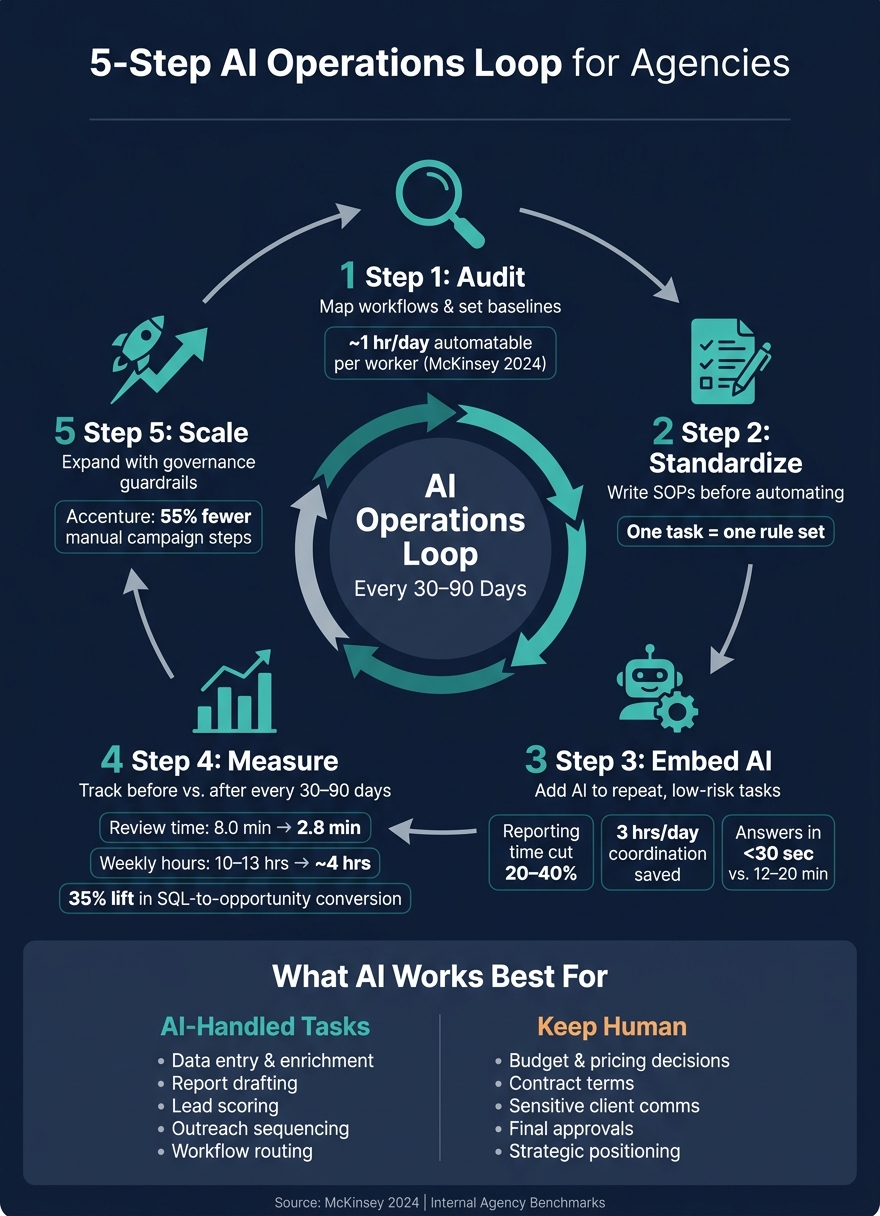
AI helps agencies improve over time when I use it inside repeat work, track the results, and fix what slows the team down. The article’s core point is simple: I should not drop AI into messy workflows and expect better output. I need to audit work first, standardize steps, add AI to repeat tasks, measure before vs. after, and scale with rules.
Here’s the short version:
Start with repeat work like lead enrichment, reporting, CRM updates, and outreach
Set a baseline first for time, errors, rework, and client impact
Write SOPs before automation so one task follows one set of rules
Use AI for structured, low-risk work and keep human review for pricing, contracts, and sensitive client communication
Track results every 30 to 90 days and update prompts, handoffs, and approval steps
Scale only after the pilot proves itself with data and clear oversight
A few numbers make the case plain:
Agencies that automated reporting, analysis, and data collection cut weekly time from 10–13 hours to about 4 hours
That equals about 25–40 hours saved per month, per team
In one case, prompt changes and a review checklist cut review time from 8.0 minutes to 2.8 minutes per item
AI-assisted reporting can cut report-building time by 20% to 40%
AI lead scoring has been tied to a 35% lift in SQL-to-opportunity conversion and an 18% lift in average deal size
What I like about this piece is that it treats AI as a process improvement system, not a one-time tool. The message is clear: if I want gains that last, I need a simple loop - audit, standardize, embed, measure, and scale.
That’s the full idea in one view. The rest of the article explains how to put that loop into day-to-day agency work.
5-Step AI Operations Loop for Agencies: Audit to Scale
How to Automate Any Business With AI in 3 Steps (Beginner's Guide)
Step 1: Audit Current Operations and Find the Best AI Opportunities
Before you add AI, get clear on how work happens right now. A workflow audit helps you spot where time slips away, where mistakes show up, and where handoffs slow everything down.
Map Repetitive Workflows and Baseline Performance
Start by listing every repeat process your team handles - lead generation, onboarding, reporting, coordination, and follow-ups. Then document the trigger, inputs, steps, owner, tools, output, time spent, volume, error rate, and client impact.
You also need baseline numbers. Track the average time per task, weekly volume, error or rework rates, and downstream client impact, like delayed reports or late campaign launches.
Talk to the people doing the work each day. They usually know where the process falls apart better than anyone else. McKinsey's 2024 workplace research identified about one hour per day of automatable activity per worker, rising to three hours per day by 2030 with broader adoption.[1] For agencies with high-volume, repeat workflows, that can add up in a hurry.
These numbers give you a reference point for every later AI test.
Prioritize Low-Risk, High-Impact Use Cases
Once your workflow map is done, rank each process using three filters: operational impact, implementation risk, and ease of measurement.
Start with repeat tasks that use structured inputs and have clear outputs. Good early picks include:
Lead list enrichment
Report drafting
CRM updates
Outreach sequencing
These are often easier to test because the work is predictable. And the upside can be big. Manual B2B prospecting can take 20+ hours per rep each week, and one SDR role can cost $5,000 to $8,000 per month.[2]
At the same time, keep high-stakes work human-led in the early stage. That includes final budget decisions, contract terms, and sensitive client conversations.
Build a 90-Day AI Operations Roadmap
A 90-day plan keeps the rollout focused. It also gives you enough time to gather data before you scale anything.
Phase
Timeframe
Focus
Audit & Select
Days 1–30
Complete workflow map, pick 1–3 pilot workflows, define success metrics, set up tools
Pilot & Train
Days 31–60
Embed AI into chosen workflows, train staff, monitor performance weekly, collect feedback
Refine & Decide
Days 61–90
Compare results to baseline, adjust or expand pilots, document lessons learned
Give each pilot one clear owner, usually an operations manager or senior account lead. Then pair that person with the team member who knows the workflow inside and out. That combo tends to work well: one person drives the rollout, the other keeps it grounded in how the job is done.
Tie success metrics to numbers your team already tracks, such as hours saved per week, lower error rates, meetings booked, or leads processed per day.
Use the first 90 days to prove the workflow. After that, standardize what works before you roll it out more broadly.
Step 2: Standardize Processes Before You Automate
For the pilot workflows you picked in Step 1, write the rules down before you automate anything. Get the workflow into one clear shape first.
Why? Because AI tends to magnify messy process issues. If one team handles a task three different ways, automation won’t fix that. It will just scale the confusion. One task should have one rule set before automation begins.
Document SOPs and Workflow Rules
A standard operating procedure (SOP) for an AI-supported workflow needs more than a simple checklist. It should spell out:
what triggers the process
who owns each step
which inputs are needed
what the output should look like
how exceptions are handled
when the work needs to be escalated
For each pilot workflow, be specific. For example, a lead qualification SOP might define required CRM fields such as first name, last name, email, company, annual revenue in USD, industry, and lead source. It might also set the line between a qualified and unqualified lead, explain when AI scoring is used, and show when a human needs to review a borderline score.
If those rules aren’t written down, outputs start to drift and ownership gets fuzzy. These rules become the base for every AI handoff and approval.
Capture 30 to 90 days of activity before locking rules for workflows that change often.[4] Store SOPs in version control, assign an owner, and review them quarterly.[4][5]
Separate AI Tasks From Tasks That Need Human Judgment
Use AI for repetitive, structured, low-risk work. Keep strategy, pricing, legal, and sensitive client communication in human hands.[3][6][7]
A clean split helps a lot:
Task Type
Best Handled By
Examples
Data entry and enrichment
AI
Filling CRM fields, firmographic data
Initial outreach drafting
AI
Personalized email sequences at scale
Lead scoring
AI (with human review thresholds)
ICP-based scoring rules
Strategic decisions
Human
Campaign positioning, budget allocation
Sensitive client communication
Human
Escalations, contract discussions
Final approvals
Human
Messaging sign-off, pricing changes
Define the handoff inside the SOP: where AI stops, what context gets passed along, and who takes over next.[3] That kind of clarity keeps accountability in place and helps stop work from slipping through the cracks.
Step 3: Embed AI Into Core Agency Workflows
Once your pilot workflows are standardized, the next move is simple: put AI into the parts of the agency that save the most time and cut the most mistakes. Start where the work is already well-defined, happens often, and doesn't call for much judgment. That's how a documented workflow becomes a live AI process.
Use AI for Reporting, Coordination, and Workflow Execution
The fastest wins usually show up in client reporting, campaign coordination, and workflow execution.
For reporting, use AI to pull data from ad platforms, Google Analytics, and your CRM, then draft client-ready reports for human review. That means faster turnaround and steadier output across accounts. This can cut report-building time by 20% to 40% while keeping formatting consistent across accounts.[8]
Coordination is another strong use case. AI can read a campaign brief, pull out deliverables, and assign tasks based on launch dates. That helps reduce handoff mistakes and keeps launches moving. In one operations case, AI-assisted triage and routing removed about 3 hours per day of repetitive coordination work and cut routing errors by 67% within 30 days.[8]
An AI assistant trained on SOPs and playbooks can also answer common questions almost instantly instead of making people dig through docs or ask around. In one workflow, answers came back in under 30 seconds instead of 12 to 20 minutes, which freed up expert time and cut onboarding time by 40%.[8]
Lead generation is one of the cleanest places to use the same playbook.
Improve Lead Generation Operations With SalesLabel
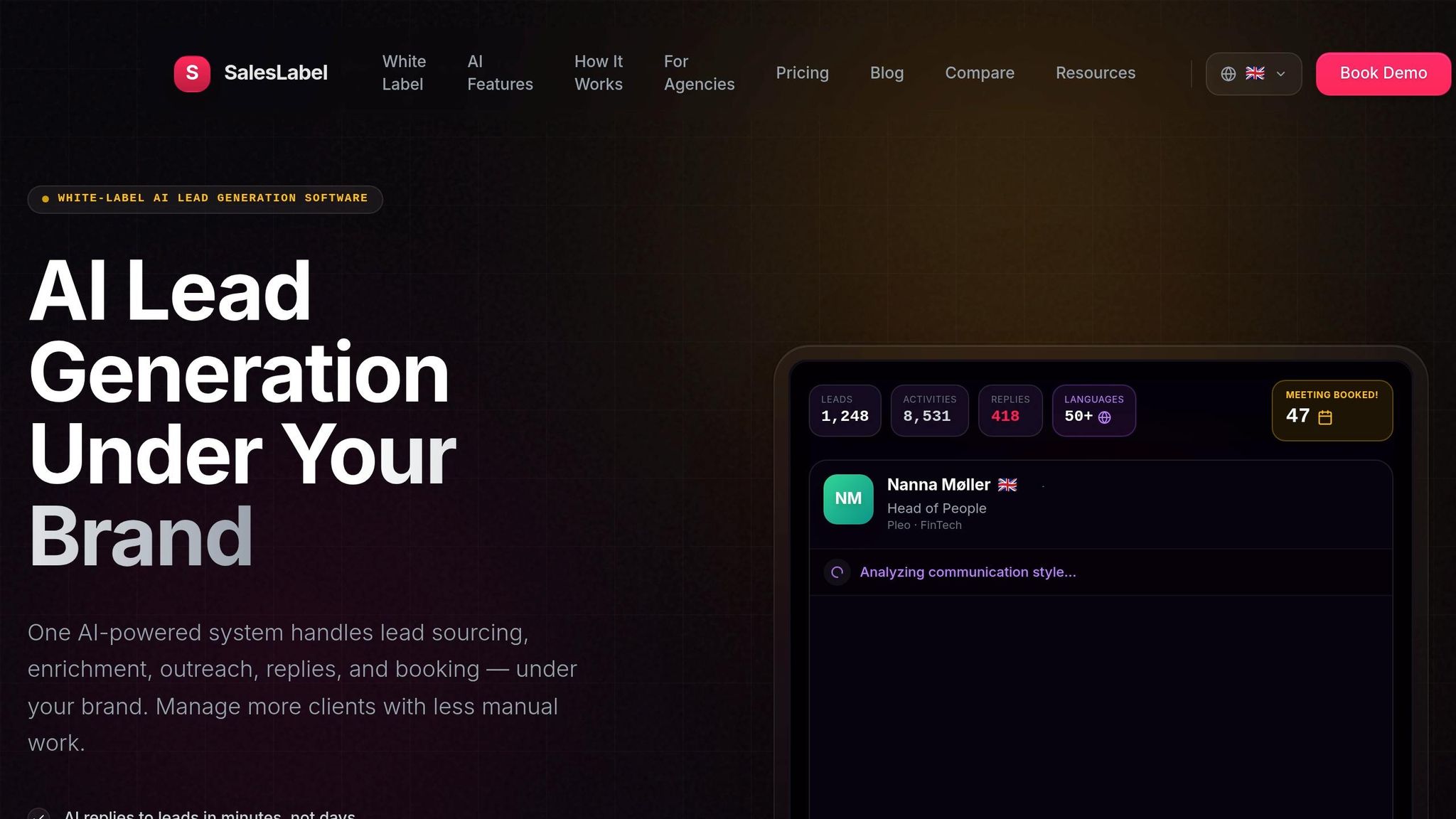
Lead generation is one of the most repetitive parts of agency operations, so it's a strong fit for AI automation. SalesLabel is a white-label AI-powered lead generation software for agencies. It handles:
Lead sourcing
Enrichment
Outreach
Follow-ups
Meeting bookings
Lead scoring
Inbox management
All of this runs under your agency's branding.
SalesLabel keeps your agency front and center. Its real-time lead scoring uses firmographic data plus behavioral signals like opens, clicks, and replies, so your team can spend time on the leads most likely to close. AI-driven replies can also handle common objections and scheduling requests automatically, which helps keep response times fast.
Once lead flow starts moving better, you need to line it up with what your team can actually deliver.
Connect Lead Quality to Delivery Capacity
Lead scoring can change pipeline volume fast, so connect it to delivery capacity. A simple capacity model goes a long way here. Track:
Average onboarding time per client
Account manager workload
Campaign launch cycles
Then set a hard threshold. For example, cap new retainers at five accounts above $8,000/month in any 30-day window. If pipeline volume gets close to that mark, stagger start dates or put higher-LTV clients first.
This matters because better scoring can drive clear sales gains. A technology SaaS company that put AI lead scoring in place saw a 35% increase in SQL-to-opportunity conversion rates in one quarter and an 18% increase in average deal size.[9] The part that matters for agencies is tying those gains back to delivery planning, so service quality holds up as AI speeds up the pipeline.
Track these outputs against your baseline so Step 4 can refine what works.
sbb-itb-a781ab9
Step 4: Measure Results and Build Feedback Loops
Once AI is part of the workflow, check what actually changed. Go back to the baseline from Step 1 and compare pre-AI performance with post-AI performance. That’s how you keep improvement moving instead of treating AI like a one-and-done project.
Track the Right Metrics
Start with a 30-day baseline before any AI goes live. Then track cycle time, billable vs. non-billable hours, error and rework rates, utilization, client satisfaction, retention, and revenue per client against your Step 1 audit data.
These numbers help you see two things fast:
Where AI adds capacity
Where AI creates friction
That matters because the point isn’t just to save time. It’s to find which workflows need the next round of fixes.
Run Iteration Cycles Every 30 to 90 Days
This is the feedback loop that turns AI from simple automation into steady improvement.
In each cycle, review the metrics, collect short written feedback from the team, inspect 2–3 live workflows, fix the prompt or handoff issue causing friction, and update the SOP. Keep your attention on prompts, routing logic, and approval flows. That’s usually where the gains stack up over time.
By day 60, lock in tracking so your comparisons stay consistent. By day 90, decide which workflows to scale, revise, or stop.
Use Comparison Tables to Show Before-and-After Results
Use one table per workflow to show before-and-after results. A table makes the changes easy to spot at a glance. Add percentage change, then tie each row to a business result. These tables also help with scaling decisions in Step 5.
Here’s an example for monthly client reporting:
Metric
Pre-AI Workflow
Post-AI Workflow
Average cycle time
5 business days
2 business days
Total hours per report
8 hours
3 hours
Non-billable hours
5 hours
1.5 hours
Error/rework incidents per month
6
2
Client satisfaction (CSAT 1–5)
3.8
4.4
Estimated internal cost per report
$400
$150
For lead gen, show the shift in volume and speed: [10]
Metric
Manual Lead Generation
AI-Powered Lead Generation (SalesLabel)
Leads sourced per week
100
350
Research time per lead
12 minutes
3 minutes
Personalized emails per week
80
280
Positive reply rate
6%
9%
Meetings booked per week
5
20
Avg. time to first meeting
10 days
4 days
Step 5: Scale AI Across the Agency With Governance
Once Step 4 shows the workflow works, governance is what lets you roll it out across the agency without quality slipping. The key is to expand in stages and set the rules before each new rollout.
Expand From Internal Workflows to Client-Facing Processes
Start on the inside first. Reporting, task routing, and resource planning are smart places to begin because they help your team get comfortable with the process. Then, once the internal version is stable and has been reviewed, move into client-facing work.
A good middle ground is semi-client-facing work. That includes AI-drafted proposals, QBR decks, and scoped statements of work that an account manager checks before anything goes out. After that, move to more standardized outputs like invoices, monthly performance summaries, and project status updates. These tend to work well because the rules are clear and the data is structured.
A simple filter helps here: repetitive, data-driven, low-risk tasks are good fits for AI assistance. Tasks tied to budgets, contracts, or client trust should still get human review.
For agencies running lead generation services, SalesLabel uses the same phased approach. Test workflows internally first. Then extend them to client campaigns through SalesLabel's white-label setup, using separate workspaces for each client so data stays clean and branding stays under control.
Set Guardrails for Quality, Privacy, and Oversight
Governance keeps speed from turning into mistakes. Start with an AI use policy that spells out which tools are approved, what data each tool can use, and who has the authority to approve new AI workflows that touch client work.
Approval tiers matter too. A low-risk internal output may only need a team lead's sign-off. But high-impact deliverables, like proposals, QBR decks, or anything with financial figures, should go through director-level review before they leave the agency.
You also need a record of what happened at each step. Log who started the task, what system was used, who edited the output, and who gave final approval. That audit trail gives you backup if a client questions a deliverable. It also makes root-cause analysis much faster when something goes sideways.
Client data should stay separated. If you're working with regulated clients, check HIPAA, GLBA, and vendor terms before processing any data.
Training matters just as much as policy. Give strategists, account managers, and ops staff role-based guidance so they know where the lines are. That cuts down on mistakes and helps good habits stick.
Use these controls before each new AI rollout:
Governance Layer
What to Define
Who Owns It
AI use policy
Approved tools, permitted data types, prohibited uses
Operations and Legal
Approval tiers
Sign-off requirements by risk level
Department leads
Audit trails
Logging of tasks, edits, approvals, timestamps
Ops and IT
Data boundaries
Client data isolation, retention rules, vendor terms
Conclusion: Turn AI Into a Long-Term Operating Advantage
After Step 5, the goal shifts from implementation to repeatable improvement. The five-step loop - audit, standardize, embed, measure, and scale - should run every 30 to 90 days. Each pass makes workflows faster, more reliable, and easier to grow. That steady repetition is what helps agencies handle more active accounts per project manager without giving up quality.
A good example comes from Accenture. Its AI-enabled marketing platform cut manual campaign management steps by 55% after data integration, standardization, and governance were put in place.[11]
For agencies that run lead generation services, SalesLabel fits neatly into this model. It keeps pipeline work moving while your team spends more time on higher-value sales and delivery. Its lead scoring also helps with capacity planning, so growth doesn't get out of hand.
Keep the feedback loop simple. Track:
hours saved
cost per lead
response rates
turnaround time
Then use those numbers to tighten your SOPs every 30 to 90 days. Here's a simple cadence to follow:
Timeframe
Action
Within 7 days
Identify 2–3 repetitive workflows and document their current process and metrics
Within 30 days
Pilot one AI-assisted workflow internally; define success in hours saved and cost per lead
Within 90 days
Run a full iteration cycle - compare before/after performance and refine your SOPs
Within 6–12 months
Establish an AI operations owner, formalize governance guidelines, and roll out proven workflows to more clients and departments, including AI-powered lead generation where relevant
The agencies that win over the long haul aren't waiting for the perfect moment to scale AI. They're running the loop, measuring what works, and building from there - one iteration at a time.
FAQs
How do I choose the best AI workflow to pilot first?
Start with the most manual, time-consuming tasks in your current pipeline. Focus on the workflows where your team burns hours on repeat work, like prospecting, manual outreach, or lead research.
The best pilot is usually the one that cuts expensive manual work first. With SalesLabel, agencies can automate the whole flow under their own branding - from sourcing and personalized messaging to meeting bookings.
What should stay human-led when using AI in an agency?
Human oversight should stay at the center of your Ideal Customer Profile and conversion tracking. AI can take a lot off your plate, like lead sourcing, personalized outreach, and meeting booking. But your core strategy still needs a person behind it.
That matters because your agency’s direction shouldn’t be left on autopilot. When people guide these choices, AI output is more likely to match your quality standards while helping you scale outreach with precision and relevance.
How do I know when an AI workflow is ready to scale?
An AI workflow is ready to scale when it can reliably handle end-to-end prospecting at a larger volume. That includes lead sourcing, personalized outreach, and meeting bookings, all while keeping conversion rates strong.
In plain English: if the system can do the full job again and again without things falling apart, you're in a good place to expand.
It’s often time to scale when you need more outreach capacity but don’t want to add headcount. That’s the point where manual work starts to slow you down, and the cracks show.
Tools like SalesLabel can help agencies shift from hands-on, manual tasks to higher-volume operations. The key is that outreach still stays consistent, personalized, and under the agency’s own brand.