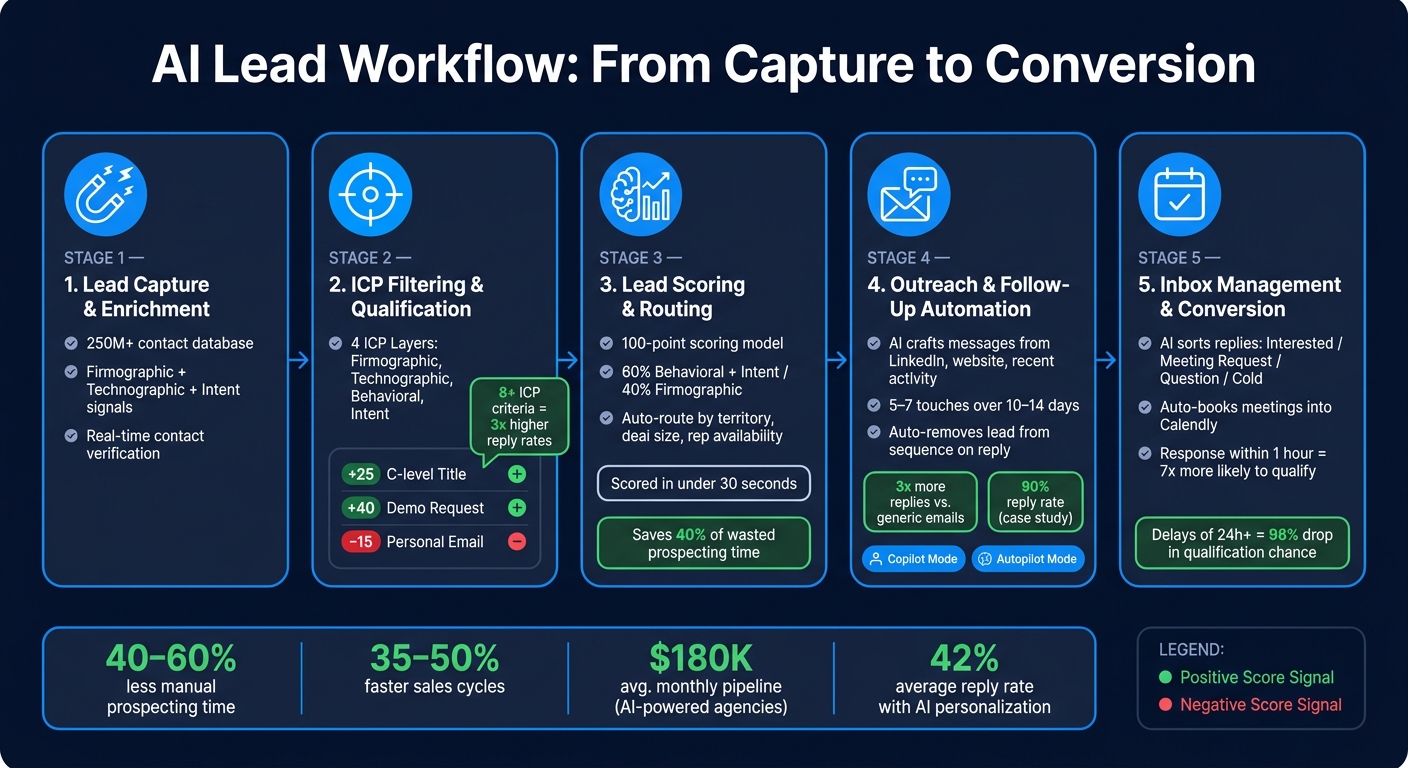
Managing leads manually is time-consuming and limits scalability. AI-powered workflows solve this by automating tasks like lead sourcing, scoring, outreach, and follow-ups. These systems can reduce manual prospecting time by 40–60%, score and route leads in under 30 seconds, and speed up sales cycles by 35–50%. Tools like SalesLabel allow agencies to automate lead management under their own branding, improving efficiency and response times.
Key highlights:
Lead Capture: AI enriches contact data with firmographics, technographics, and intent signals.
Scoring & Routing: Machine learning prioritizes leads based on explicit and behavioral signals, reducing wasted effort.
Outreach Automation: Personalized AI-driven messages earn 3x more replies than generic emails.
Follow-Up: AI ensures no lead is missed by automating replies and scheduling meetings.
Customization: Define your Ideal Customer Profile (ICP) with firmographic, technographic, behavioral, and intent layers to target high-potential leads.
This article covers how to set up AI workflows, from defining your ICP to automating lead management and tracking performance. By refining these workflows, agencies can handle more clients, respond faster, and increase conversions.
AI Lead Workflow: From Capture to Conversion
I Built a $3,500 AI Lead Automation Workflow (Full Walkthrough)
sbb-itb-a781ab9
What AI Workflow Customization Covers
A customizable AI lead workflow isn't just one tool - it’s a connected system where every stage seamlessly feeds into the next. From identifying a lead to scheduling a meeting on a rep’s calendar, each part of the process plays a role. Knowing how these layers work makes it easier to set up and fine-tune.
Lead Capture and Enrichment
AI taps into databases with over 250 million contacts to find leads that match your Ideal Customer Profile (ICP) [1]. But it doesn’t stop there. Enrichment adds key firmographic details like industry, company revenue, and tech stack. It also verifies contact information and picks up intent signals by analyzing profiles and recent social activity [1]. This means your team gets leads that are ready to act on - not just a list of names.
Lead Scoring and Routing
Scoring and routing are the backbone of a tailored workflow. They ensure the right reps get the right leads at the right time. AI prioritizes leads using explicit signals (like job title, company size, or location) and implicit behaviors (like email opens, pricing page visits, or content downloads). Unlike static systems, machine learning adapts these scores over time, learning from your pipeline’s data [6]. Without scoring, teams can waste up to 40% of their time chasing unqualified leads [2]. AI helps cut that waste dramatically.
Once scored, leads are routed automatically based on factors like territory, deal size, product interest, or rep availability. Distribution can follow round-robin or weighted rules [6]. To avoid losing opportunities, always set up a fallback path for leads that don’t fit primary routing criteria.
Outreach and Follow-Up Automation
AI takes personalization to the next level by creating tailored outreach messages. These messages are crafted based on each lead’s role, company details, and recent activity. The impact? Personalized AI outreach earns three times more replies compared to generic templates [2].
"The AI sometimes answers better than I would. It analyzes the website and profile of the person." – Mike R., SalesLabel user [2]
AI doesn’t stop at the first email. It manages the entire follow-up process, from detecting reply intent - like distinguishing an "interested" response from a general question - to drafting replies and booking meetings directly into tools like Calendly [4]. Slow follow-ups can cost agencies up to 30% of warm leads[2]. Automating this process ensures no lead gets overlooked. Tools like SalesLabel handle everything under your branding, blending AI-powered inbox management with real-time lead scoring. This ensures a smooth handoff between stages. Next, dive into configuring your workflow inputs to make these AI tools work even harder for you.
Setting Up Workflow Inputs
Getting your AI workflows to perform at their best starts with setting up the right inputs. This means having a well-defined Ideal Customer Profile (ICP), using strategic lead capture sources, and applying precise qualification rules. When these inputs are clear, your AI system can handle everything else - like targeting and outreach - more effectively.
Defining Your Ideal Customer Profile (ICP)
A solid ICP is the cornerstone of success. In fact, research shows that many failures in AI sales tools are due to poor targeting, not the technology itself.
"The #1 reason AI sales tools fail founders isn't the tool, the messaging, or the timing. It's the ICP." [7]
To make your ICP truly effective, it should translate broad categories into highly specific filters. For example, instead of just targeting "technology companies", narrow it down to B2B SaaS companies using Salesforce, with 50–200 employees, based in the U.S. Companies that define eight or more ICP criteria see three times higher positive reply rates compared to those with three or fewer [8].
A comprehensive ICP includes four key layers:
Firmographic: Details like industry, company size, and revenue.
Technographic: The tools and platforms they use.
Behavioral: Indicators like recent hiring activity or funding announcements.
Intent Signals: Evidence that they’re actively researching solutions.
Using all four layers can boost results by 3–5x compared to relying on firmographics alone [8]. Additionally, don’t forget to define your anti-ICP - companies you want to avoid targeting. For instance, exclude companies with less than $1M in revenue or those outside your serviceable area. This not only protects your domain reputation but also keeps your AI focused on high-potential prospects [7][8].
Once your ICP is nailed down, the next step is to configure lead capture sources that align with these criteria.
Configuring Lead Capture Sources
With your ICP in place, it’s time to identify the right lead capture sources. These might include web forms, chatbots, landing pages, or database queries. Every lead entry point should trigger real-time enrichment and scoring. For example, using webhooks allows you to automate enrichment workflows instantly, ensuring a fast speed to lead[9].
At this stage, set up filters to eliminate irrelevant leads. For instance, you can automatically exclude existing customers, competitors, or any leads that don’t match your ICP. This ensures that only high-quality data moves through your pipeline [8].
Once you’ve configured your capture sources, it’s crucial to establish clear qualification rules.
Establishing Qualification Rules
Poor qualification is a major problem in sales - it’s responsible for 67% of lost opportunities and wastes 32% of sales reps’ time [9]. To avoid this, implement a 100-point scoring model. This model assigns points for explicit attributes (like job title or company size) and implicit behaviors (such as visiting a pricing page or downloading content).
What’s different here is the use of negative scoring, which deducts points for disqualifying signals. For instance, leads using a personal email address (e.g., @gmail.com) or visiting only the "Careers" page should lose points. This keeps your scoring system accurate and helps prioritize the right leads.
Here’s an example of how points might be allocated:
Attribute/Action
Point Value
Job Title: C-level Tech Exec (CTO, VP Eng)
+25
Company Size: 50–500 employees (ICP fit)
+10
Attended specialized technical workshop
+30
Requested pricing or demo
+40
Uses personal email address (e.g., @gmail.com)
−15
Visiting "Careers" page only
−10
Set clear thresholds to determine when a lead becomes a Marketing Qualified Lead (MQL) or a Sales Qualified Lead (SQL). Start with 5–7 key factors and refine your criteria monthly based on conversion data [9].
Building Lead Qualification Logic
When developing lead qualification logic, it's essential to combine three key data types: firmographic data, behavioral signals, and intent-based data. Together, these inputs give your AI a comprehensive understanding of a lead's suitability and stage in the buying process.
Using Firmographic Data
Firmographic data - like company size, industry, revenue, and location - forms the backbone of any scoring model. AI evaluates this data in context. For instance, a CEO at a mid-sized SaaS company with $20M in revenue represents a completely different opportunity than a CEO at a tiny startup.
To make this data actionable, base your scoring on historical win rates. Here's an example of how to structure point values:
This approach ensures your pipeline focuses on high-potential prospects without requiring manual intervention.
Adding Behavioral Signals
Firmographics tell you who the lead is, but behavioral signals reveal how engaged they are. These two elements work best when combined. Even a perfect firmographic match is low-priority if the lead shows no interest.
Behavioral signals should be weighted based on how strongly they correlate with conversions. For example, high-intent actions like requesting a demo or visiting the pricing page deserve more points, while early-stage actions like reading a blog post carry less weight. AI can analyze these behaviors in combination, identifying patterns that signal readiness. For instance, a lead who visits your pricing page twice and downloads a case study within 48 hours is clearly more engaged than someone who simply opens a newsletter.
"Traditional lead scoring is fundamentally broken... a CEO at a 5-person startup and a CEO at a 500-person enterprise both score 'CEO = 10 points'... even though one is a $50,000 opportunity and the other is a $500 sales conversation." - John V. Akgul, Founder & CEO, PxlPeak [10]
Negative behaviors matter too. Actions like unsubscribing, visiting your career page, or using competitor IP addresses should lower a lead's score or even flag them for suppression. AI models that consider both positive and negative signals can achieve 85–95% predictive accuracy, far outperforming traditional rule-based systems, which hover around 50–70% [5].
Pair these behavioral insights with intent data to pinpoint leads that are actively entering a buying phase.
Using Intent-Based Data
Intent data helps distinguish leads who simply fit your ICP from those ready to make a purchase. This includes first-party signals (like visits to your pricing page or searches for documentation) and third-party signals (such as research activity on external platforms before the lead interacts with you).
The impact of intent data is clear. Companies that respond to leads within 5 minutes are 9x more likely to convert[11]. Tools like SalesLabel leverage real-time lead scoring to make this possible, updating scores instantly when a lead crosses a high-intent threshold - eliminating delays caused by manual reviews.
A good rule of thumb is to allocate 60% of the total score to behavioral and intent signals and 40% to firmographic fit[11]. This reflects the importance of readiness over fit alone. Use these weighted scores to trigger personalized outreach immediately, setting the stage for the next step: automated engagement tailored to each lead's needs.
Customizing Outreach and Follow-Up Steps
Once you've nailed down your lead scoring and qualification process, the next step is turning those scores into meaningful, timely interactions. This is where AI-powered tools can elevate your outreach and follow-up game.
Personalizing Lead Outreach
Generic messages rarely make an impact. In fact, personalized outreach is three times more likely to get a response compared to generic messages [2]. When leads feel like you "get" them, they're far more likely to engage.
AI bridges this personalization gap by analyzing data like a prospect's LinkedIn profile, recent activity, and website. It can then craft messages that align with their tone and highlight relevant details [2]. For example, you can set up a "waterfall" data method - where the AI prioritizes high-value signals (like a recent funding announcement) and shifts to secondary signals if needed [13].
To fine-tune your outreach, consider these AI instructions:
Skip starting messages with the prospect's name.
Leave out corporate suffixes like "LLC" or "Inc."
Keep the language simple - around a 7th-grade reading level - for clarity [12].
For high-priority accounts, Copilot mode allows AI to draft messages for human review before sending. Meanwhile, Autopilot mode handles broader campaigns by sending messages directly, saving your team time [2][4].
Once your initial outreach is personalized, you can automate follow-up touches to keep the conversation alive.
Automating Follow-Up Sequences
Effective cold outreach typically requires 5–7 touches over 10–14 days, while complex enterprise deals might need as many as 15–20 touches [14]. AI-driven sequences adjust dynamically based on how leads engage, ensuring no opportunity is missed.
One key rule: the moment a lead replies, they should be removed from the automated sequence so a human can step in immediately [14]. Ignoring this can lead to missed opportunities - up to 30% of warm leads can slip through the cracks due to delayed or mismatched follow-ups [2].
Svit Babarovic, COO at Mountaindrop, shared how using SalesLabel's personalized sequencing helped overhaul their outbound strategy. The result? A stunning 90% reply rate on their campaigns [2].
By automating follow-ups, you can seamlessly move leads from initial engagement to meaningful human interaction.
AI-Driven Inbox Management
Once replies start rolling in, managing them efficiently becomes a challenge. AI-driven inbox tools can sort incoming messages by intent - like "Interested", "Meeting Request", "Question", or "Cold" - allowing your team to focus on what matters most [2].
But it doesn’t stop at sorting. The AI can also draft tailored responses by pulling information from a prospect's profile and past conversations. This keeps messages feeling personal rather than robotic.
Speed is critical here. Companies that respond to leads within an hour are nearly seven times more likely to qualify them compared to those who wait an extra hour [15]. And if you delay by 24 hours or more? The chances of qualifying that lead drop by over 98% [15]. AI inbox management ensures response times stay lightning-fast - even when your team isn’t available.
With tools like SalesLabel, you can choose between Copilot mode (AI drafts for human approval) or Autopilot mode (full automation). Starting with Copilot mode lets you refine the tone and ensure brand alignment before transitioning to full automation [2].
Connecting Branding, Permissions, and Reporting
Once you've streamlined your outreach and follow-up processes, the next step is to integrate your agency's identity through branding, permissions, and performance reporting. This step ties your personalized and automated approach together, ensuring a cohesive experience for clients.
White-Label Branding Options
It's essential that your clients interact with your brand - not the software behind it. Platforms like SalesLabel make this possible by allowing you to host the platform on a custom subdomain (e.g., app.yourbrand.com). You can also include your logo (in PNG, SVG, or JPG format) and customize the "From Name" in emails to reflect your agency. Additionally, your brand name will appear in browser tab titles and email subject lines automatically.
For the best visual results, use a logo size of 200x50px at 2x resolution to ensure sharpness on retina displays. Make sure to configure your CNAME, DNS, and SSL settings early - preferably within the first week - so your branded subdomain is live before onboarding clients. The white-label setup process typically takes 7–14 days to complete.
Upgrading to higher-tier plans unlocks even more branding options. For example, the Growth plan ($1,279/month) includes a branded Chrome extension, while the Scale plan ($1,999/month) adds a branded documentation center. These features further reinforce the impression that the technology is entirely your own.
Once your branding is in place, it's time to establish team roles to maintain smooth operations.
Setting Team Permissions
Defining team roles is critical to avoid mistakes, especially when using AI for outreach. Start small by assigning roles to a single team, evaluate the results, and then expand permissions as needed.
There are two key principles to follow here. First, establish clear handoff points - specific moments when an automated sequence should transfer a lead to a human representative. Second, implement approval steps for AI-generated messages before they are sent at scale. As noted by the Improvado Editorial Team:
"Embedding a 'human-in-the-loop' process ensures that automation enhances performance without compromising strategic alignment or brand integrity." [15]
A practical way to refine your workflows is to start in Copilot mode, where AI drafts messages for human review, before transitioning to Autopilot. With roles clearly defined, you can then focus on monitoring performance to fine-tune your processes.
Monitoring Workflow Performance
AI reporting tools can help you identify where leads are dropping off, allowing you to make quick adjustments. Focus on tracking four key metrics:
Volume: Includes leads and activities.
Engagement: Covers reply rates and response times.
Quality: Looks at metrics like Fit Score and intent.
Conversion: Tracks meetings and pipeline value.
Here are some benchmarks to guide you: AI-personalized outreach typically achieves a 42% reply rate[2]. Agencies using AI-powered systems report an average pipeline value of $180,000 per month[2][17]. However, if your cold outreach response rate falls below 3%, it's time to revisit your deliverability settings, ICP targeting, and personalization strategies [16]. For leads with a Fit Score above 90 and labeled as "Interested", prioritize immediate manual follow-up to boost your chances of conversion [2].
Conclusion and Next Steps
Building an AI-powered lead workflow isn’t a one-and-done process. It needs regular tweaks and adjustments to truly deliver results. While the steps outlined here provide a strong starting point, the real progress happens after launch.
Start small. Use a limited number of scoring factors and focus on a narrow lead source before expanding to your full pipeline. Why? Because it minimizes risk and gives you a chance to catch any issues early. Research indicates that about 40% of workflow automations fail within the first 90 days[3]. A phased rollout not only reduces disruptions to your campaigns but also sets you up for ongoing improvements instead of scrambling to fix problems later.
Once you’re live, it’s all about monitoring and refining. Check performance weekly during the first month, then move to monthly reviews, and conduct quarterly audits to ensure your Ideal Customer Profile (ICP) stays accurate and your AI stays sharp. Teams that revisit and refine their workflows quarterly often see growth compound by 20%[4].
Tools like SalesLabel can make this process easier. The platform’s automated reporting dashboards let you review performance without the hassle of manual data pulls. These snapshots help pinpoint issues - like a sudden drop in reply rates or a rise in disqualified leads - before they become major problems, keeping your pipeline on track.
"Continuous evolution is key - review performance frequently and retrain AI with fresh data to sustain growth." - Lucas Correia, CEO & Founder, BizAI GPT [4]
FAQs
What data is required to set up an AI lead workflow?
To create an effective AI-driven lead workflow, start by collecting essential data. This includes the Ideal Customer Profile (ICP) details, such as industry, location, and company size. You'll also need contact information like email addresses and phone numbers, along with behavioral data, such as social media activity and engagement patterns.
For a more refined process, incorporate firmographic and technographic data to improve lead scoring accuracy. Additionally, track lead source information to monitor performance and ensure compliance with regulations like GDPR and CPRA. These steps help streamline lead sourcing, enrichment, and qualification.
How do I choose MQL and SQL score thresholds?
To determine MQL (Marketing Qualified Lead) and SQL (Sales Qualified Lead) score thresholds, start by analyzing your historical data and conversion metrics. Use this information to shape fit and engagement scores that align with your Ideal Customer Profile (ICP). Look for patterns in past successful deals to establish benchmarks.
Set your MQL thresholds for leads that demonstrate strong engagement or align well with your ICP. For SQL thresholds, focus on identifying leads that show higher intent or readiness to purchase. Regularly review and fine-tune these thresholds to ensure they remain accurate and help improve your sales team's efficiency.
When should I use Copilot vs. Autopilot mode?
Use Copilot mode to get task-specific help for things like personalized outreach, lead scoring, or data enrichment. It’s perfect when you want to stay hands-on but need a little extra support to streamline your workflow.
On the other hand, Autopilot mode is ideal when you want the AI to take over completely. It handles the entire lead generation process - from finding and qualifying leads to even booking meetings - without much input from you.
In short, Copilot gives you guided assistance, while Autopilot takes care of everything from start to finish.