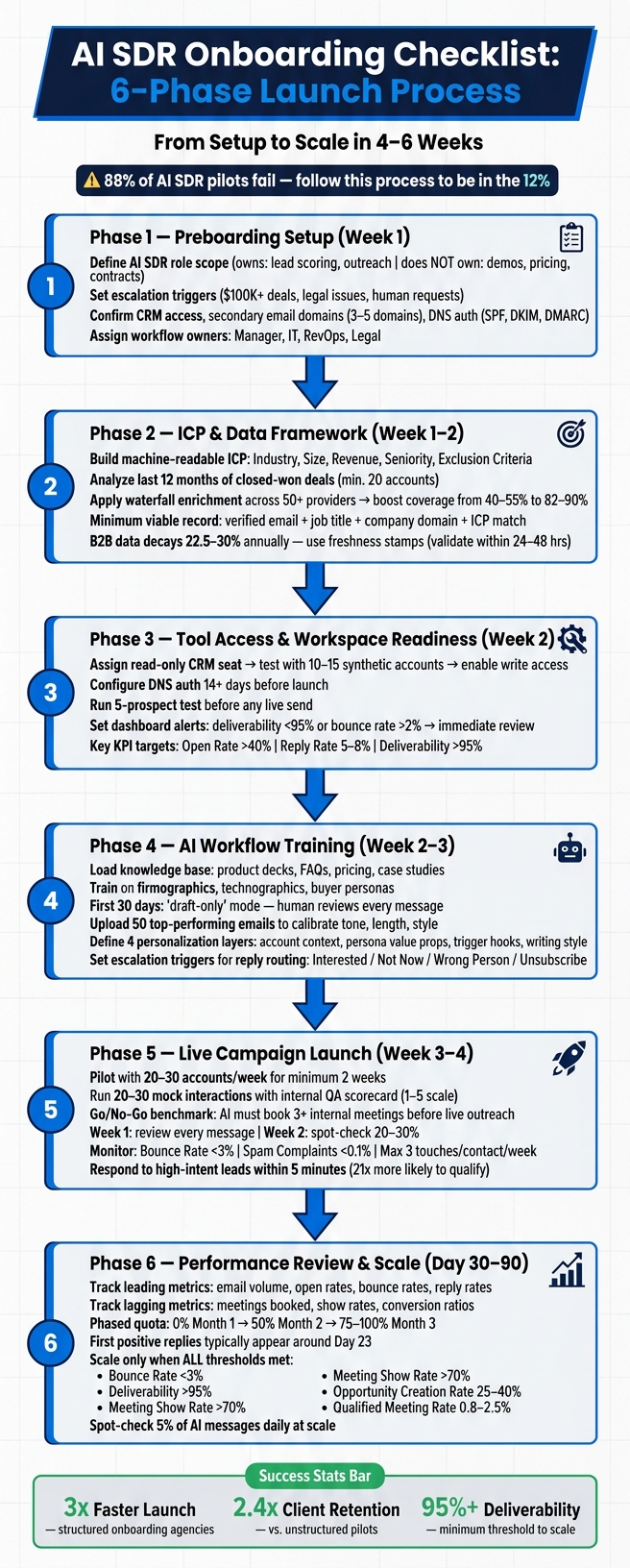
6-phase onboarding checklist to train AI SDRs: define roles, fix data and domains, pilot carefully, monitor metrics, and scale safely.
SalesLabel Team
Growth Expert • 5.06.2026
Share:
Szukasz gotowego rozwiązania?
SalesLabel automatyzuje prospecting od początku do końca — AI znajduje potencjalnych klientów, wysyła spersonalizowane wiadomości i rezerwuje spotkania pod Twoją marką.
AI SDRonboarding is the process of setting up an AI sales representative to run outbound campaigns effectively. It typically takes 4–6 weeks and requires careful planning to avoid the 88% failure rate seen in many pilots. Success depends on clear role definitions, proper tool setup, accurate data, and structured workflows.
Here’s what you need to know:
Define AI SDR Roles: Specify tasks (e.g., lead scoring, outreach) and escalation points (e.g., deals over $100K). Use a 30/60/90-day ramp plan to improve accuracy over time.
Prepare Tools: Verify CRM access, set up secondary email domains, and ensure DNS authentication (SPF, DKIM, DMARC) to avoid deliverability issues.
Build a Machine-Readable ICP: Structure your Ideal Customer Profile with clear, filterable fields like industry, size, and exclusion criteria.
Ensure Data Quality: Use waterfall enrichment to improve lead accuracy and maintain a 95%+ deliverability rate.
Pilot Before Launch: Test campaigns with small batches (20–30 accounts) and monitor metrics like open rates, reply rates, and bounce rates.
Monitor and Adjust: Review metrics daily during the first two weeks, then weekly. Set thresholds for escalation if performance drops.
Key Metrics for Success:
Deliverability: >95%
Positive Reply Rate: 5–8%
Meeting Show Rate: >70%
Bounce Rate: <3%
This process is not plug-and-play - think of it as training a new team member. Proper setup and gradual scaling are essential to avoid costly mistakes and achieve long-term results.
AI SDR Onboarding Checklist: 6-Phase Launch Process
Preboarding Setup
A well-executed preboarding phase sets the stage for a smooth AI SDR launch. Before diving into campaigns, focus on defining roles, verifying tools, and assigning workflow ownership. A strong foundation is key to success.
Define Role Expectations
Clearly outline the AI SDR's responsibilities and boundaries. For instance, tasks like account research, lead scoring, and initial outreach should fall under its scope. On the flip side, activities such as demo calls, pricing discussions, and contract negotiations should remain with human team members.
Set up escalation triggers to ensure seamless human intervention when necessary. These could include situations like prospects requesting a person, deals exceeding $100,000, competitor mentions, or legal/security concerns [1][5].
Role Element
Example Definition
Mission
Generate qualified pipeline from ICP accounts
Owns
Account research, lead scoring, first-touch outreach
Prospect asks for human, deal is $100K+, legal issues
Reports to
Head of Sales Development
From day one, implement a 30/60/90-day ramp plan to ensure steady progress. During the first 30 days, aim for 80% accuracy with full human review. By days 31–60, strive for 90% accuracy with spot checks, and by day 90, the system should reach 95%+ accuracy with minimal oversight [5].
Confirm Tool Availability
Ensure all necessary tools are ready and functional before onboarding. This includes verifying CRM access with bidirectional syncing, setting up email infrastructure using secondary domains, and provisioning the AI platform within its workspace.
For email operations, avoid using your main corporate domain for AI outbound communication. Instead, purchase 3–5 secondary domains (e.g., trycompany.io) and warm them up in advance [1]. Configure DNS authentication (SPF, DKIM, and DMARC records) to maintain email deliverability and security.
Verify that the SalesLabel workspace is operational and integrated with both your CRM and email systems (https://sales-label.com). Additionally, prepare a centralized knowledge base containing essential resources like sales decks, FAQs, pricing sheets, and case studies. This ensures the AI SDR can communicate in a way that feels informed and tailored [7][9].
Assign Workflow Ownership
Every step in the AI SDR process should have a designated owner to avoid confusion or gaps in execution. Assign responsibilities for onboarding and ongoing operations to specific team members.
"Someone on your team needs to 'manage' the AI worker. This person reviews performance, adjusts configuration, and advocates for the AI worker internally. Without an owner, AI workers drift." - Shadow Workers [5]
Role
Preboarding Responsibility
Manager / Head of Sales Dev
Define role scope and set 30/60/90-day goals
IT
Provision CRM, email, and AI software access; verify domain authentication
RevOps
Map CRM custom fields and establish bidirectional data syncing
Legal
Review data-handling rules and AI acceptable use policies
Submit IT requests at least five days before the start date, as SSO setups for AI tools can take 24–48 hours to complete.
With these preboarding steps finalized, you’ll be ready to move on to building a robust ICP and data framework.
sbb-itb-a781ab9
ICP and Data Framework
Define your target audience with a machine-readable ICP (Ideal Customer Profile) and ensure your data set is accurate and up-to-date.
Create ICP Guidelines
One common mistake agencies make is treating the ICP as a static presentation rather than a flexible, filterable data structure.
"An ICP for an AI SDR is a data structure, not a slide. AI does not interpret; unclear data yields unreliable results." - GetSalesClaw [13]
Your ICP must be structured so AI can apply it directly to individual records. For example: Industry: SaaS; Employees: 50–500; Revenue: $5M–$100M; Seniority: Director+; Exclude: Current customers. Every field should use clear ranges, predefined options, or specific text - vague or open-ended values won’t work [10].
To build this, analyze your last 12 months of closed-won deals. Identify at least 20 successful accounts and group them by deal size (ACV), sales cycle length, and retention rate. This ensures your targeting reflects actual success, not wishful thinking [13]. Overly optimistic ICPs often lead to pipelines that don’t convert.
Your ICP should include details across eight key areas:
Company Size (headcount and ARR)
Industry (vertical and sub-vertical)
Geography
Tech Stack
Growth Signals
Champion Title
Decision-maker Title
Exclusion Criteria (e.g., current or recently churned accounts)
Including exclusion criteria is especially important to avoid wasting outreach efforts on unsuitable leads [10][13]. Also, make sure your data handling processes incorporate these criteria.
For early-stage clients, update your ICP quarterly. For growth-stage companies, refresh it every six months. Unlike human sales reps, AI tools won’t instinctively check places like LinkedIn for updates before engaging [10].
Once you’ve nailed down your ICP, the next step is ensuring your data matches its quality.
Set Up Data Sources
Even the best-defined ICP won’t deliver results if your data is outdated or incomplete. B2B contact data deteriorates at a rate of 22.5%–30% annually [12]. This means a list compiled just six months ago could already have 15% inaccurate records.
The answer? Waterfall enrichment. Instead of relying on a single data provider, query multiple sources in sequence. Single-source enrichment typically covers only 40–55% of a target list, but using waterfall enrichment across 50+ providers can boost coverage to 82%–90% [11]. That difference directly impacts how many leads your AI SDR can reach.
"AI prospecting makes bad data move faster." - DataFixr [14]
Establish a minimum viable record standard before any lead enters your AI workflow. Each record should include:
A verified work email
Job title
Company domain
Confirmation that it matches your ICP
Records that don’t meet this standard should be flagged for enrichment [14].
Additionally, use freshness stamps to track when each email or phone number was last verified. For active sequences, focus on records validated within the last 24–48 hours. This simple step helps reduce hard bounces and protects your sender reputation [10].
Once your data is in order, it’s time to organize your lead management system to handle operations effectively.
Organize Lead Management
With your data sources connected, you’ll need a system to manage leads across multiple clients without creating chaos. This is especially critical for agencies running campaigns for several accounts at once.
SalesLabel simplifies this process by aligning your data and workflows under consistent, branded management. It supports lead sourcing, enrichment, and real-time lead scoring, all while keeping the experience branded for your agency. Its inbox management and AI-driven reply tools also keep lead activity organized without requiring constant manual oversight [2].
No matter what platform you use, standardize CRM field values to avoid segmentation errors. A clean, standardized database is the difference between agencies that scale efficiently and those stuck troubleshooting campaigns for weeks.
Tool Access and Workspace Readiness
Once your lead data is organized and your ideal customer profile is set, the next challenge is ensuring your tools are properly configured. An incorrectly set up CRM or an unauthenticated inbox can quietly sabotage your campaign before it even begins. With your tools ready, it's essential to validate their setup in your live workspace to prevent delays. Start by confirming that your CRM aligns with your campaign requirements.
Verify CRM Configuration
Begin by assigning a read-only CRM seat for your AI. Once you've tested its integration reliability in a sandbox environment with 10–15 synthetic accounts, you can enable write access [15].
"An AI SDR is useless if it exists in a silo. It must communicate with your central source of truth." - Sales Closer AI [7]
Make sure the AI's CRM seat has the right permissions. Data variables should be mapped correctly, and exclusion rules - like "Do Not Contact" lists for active opportunities, current clients, and recently churned accounts - must be in place [7][17][18]. Overlooking this step could result in cold outreach emails being sent to your most valuable clients.
Test Inbox and Sequencing Access
DNS authentication (SPF, DKIM, and DMARC) should be configured at least 14 days before launching your campaign. Siddharth Gangal, Founder of Gangly, stresses the importance of this setup:
"If the SDR's new domain-email does not have SPF, DKIM, and DMARC configured at least two weeks before day 1, their first sequence will land in spam and the reply rate will be zero." [16]
Run a test email through the CRM and ensure it appears in the CRM timeline within five minutes. Book a test meeting using your scheduling link and confirm that it logs correctly in both your calendar and CRM [8]. Before going live, pilot the AI with a small batch of five prospects to catch any errors early.
"The 5-prospect test takes 15 minutes and saves you from sending 500 embarrassing emails. Always review before going live." - Shogo Team [9]
Once inbox and sequencing access are verified, you can shift your attention to setting up reporting.
Check Reporting Visibility
Before launch, ensure your dashboards are ready and tailored for each managed territory or client account [16]. Integrate your platform with Slack or Microsoft Teams to receive real-time alerts when the AI flags a high-intent lead, so you don’t have to constantly log into the CRM.
Set your alert thresholds in advance. For example, if your deliverability rate drops below 95% or your bounce rate exceeds 2%, these should trigger an immediate review [20]. The following table highlights the core metrics you should monitor from day one:
Without these metrics in place, your campaign could lack the visibility needed during its most critical phase.
AI Workflow Training
Once tools and data are ready, the next major step is training SDRs (Sales Development Representatives) to use AI effectively. Surprisingly, many AI deployments fail - not because of the technology itself, but due to insufficient training and outdated workflows. Research shows that 67% of AI SDR deployments fail within the first 90 days, with poor training and lack of process being the main culprits [6].
Train on AI Prospecting Tools
Start by equipping SDRs with a robust knowledge base for the AI. This includes materials like product decks, pricing sheets, FAQs, and case studies. The quality of AI-driven prospecting depends heavily on the quality of these inputs. Training should then focus on defining three critical layers of targeting:
Firmographics: Details like company size and revenue.
Technographics: Information about the tools or platforms a prospect uses.
Buyer Personas: Specific pain points or needs associated with different roles.
This level of detail is what transforms a generic outreach effort into a targeted campaign.
For the first 30 days, SDRs should use the AI in "draft-only" mode, manually reviewing every AI-generated message before it is sent. Only when the AI achieves a 90%+ accuracy rate across at least 50 actions should you consider easing up on this review process [15]. To minimize risk during this learning phase, focus on low-priority leads - such as ghosted prospects, lapsed customers, or old contacts that haven’t been engaged in months [19].
Once SDRs master prospecting, the next step is refining their messaging skills.
Review Personalized Messaging
With prospecting under control, the focus shifts to creating personalized messages that genuinely connect with prospects. Jason Lemkin, Founder of SaaStr, captures this well:
"The fantasy: Buy AI SDR → leads appear → make money. The reality: Buy AI SDR → spend 15–20 hours weekly training it on how the best humans already sell → then make money." [21]
To train AI effectively, SDRs should upload 50 successful emails from top-performing reps. These examples help calibrate the AI for tone, length, and style. From there, SDRs should learn to incorporate four layers of personalization into their outreach:
Account-level context: Recent news, hiring trends, or other company-specific details.
Persona-specific value propositions: Tailoring benefits to the recipient's role.
Trigger-based hooks: References to events like funding rounds or LinkedIn activity.
Writing style calibration: Ensuring the AI mimics the desired tone and voice.
Equally important is setting clear boundaries for the AI. SDRs must teach it what not to do - like fabricating pricing details or mentioning unreleased features [22].
Platforms such as SalesLabel help streamline this process. They enable AI-driven message personalization while maintaining a consistent voice and brand - especially useful for agencies managing outreach across multiple accounts.
Set Up Follow-ups and Reply Handling
A critical rule for follow-ups: pause the sequence immediately when a prospect replies. Nothing kills a deal faster than sending a "just checking in" email after someone has already responded [23]. SDRs should learn to categorize replies into clear buckets - Interested, Not Now, Wrong Person, or Unsubscribe - and set up automated routing based on these categories.
Before launching live campaigns, define clear escalation triggers. For example, if a prospect asks a technical question outside the AI's knowledge base, requests a conversation with a human, or represents a high-value deal, the AI should stop and escalate immediately [22]. When handing off a lead, the AI should provide a detailed summary, including the prospect’s pain points, their qualification score, and recommended next steps. This ensures that human reps can seamlessly pick up the conversation without starting over.
"The shift isn't from manual to automated - it's from automation to autonomy. Rule-based tools execute what you tell them. Agentic AI reasons about what to do next." - Nadeem Azam, Founder, Rep [24]
Live Campaign Launch Checks
Before going live with outreach, there are three key elements to finalize: running a controlled pilot, setting up active monitoring, and verifying reply routing. These steps build on the groundwork laid during preboarding and training, ensuring your system is ready to engage with real prospects effectively.
Run Pilot Campaigns
Launching your entire contact list on day one is risky. Instead, start small - test with 20–30 accounts per week for at least two weeks [15]. This approach minimizes risk while providing valuable performance insights.
Conduct 20–30 mock interactions where team members act as skeptical prospects [1]. Use a QA scorecard to evaluate each interaction on a 1–5 scale for accuracy and tone, along with a compliance pass/fail check. Set a clear "Go/No-Go" benchmark: the AI should successfully schedule at least three internal meetings during these simulations before engaging real leads [1].
In the first week, review every AI-generated message. By the second week, spot-check 20–30% of them [15]. Keep a log of issues like incorrect job titles, factual errors, or off-tone messages. This record will guide adjustments to your system [15].
Set Monitoring Rules
A common mistake is launching a pilot and then passively waiting for results. As Qualified.com points out:
"The teams that reach day 90 with clean data are those that reviewed metrics bi-weekly and adjusted, not those that set the pilot and waited." [27]
For the first 14 days, review metrics daily, then switch to weekly check-ins [1][25]. Focus on these critical areas from the start:
Launch Check Category
Specific Action
Deliverability
Ensure SPF, DKIM, and DMARC are configured correctly (set DMARC to p=quarantine or p=reject) [1][17]
Bounce Rate
Keep it below 3% to protect sender reputation [1][18]
Spam Complaints
Stay under 0.1% (no more than 1 complaint per 1,000 emails) [1]
Confirm lead status updates and activity logs function properly in sandbox mode [15]
Additionally, track the positive reply rate - it often predicts meeting counts by 2–3 weeks [16]. Establish clear "kill signals" early: if the AI's revision rate exceeds your human baseline by more than 20% or factual errors surpass 10%, pause the campaign and adjust the workflow [26].
Verify Reply Routing
Quick response times are critical. InsideSales research shows that responding to a lead within 5 minutes makes you 21 times more likely to qualify them compared to waiting 30 minutes [18].
Enable real-time notifications (via Slack, SMS, or email) for immediate human follow-up on high-intent replies [18]. Before launching the pilot, double-check that scheduling tools like Calendly or Chili Piper are set up with round-robin rules or a designated default booking owner. This ensures a smooth handoff from automated outreach to human interaction [16][28]. Also, make sure that "soft-book" replies (e.g., "Send me more info") trigger a different response than "hard-book" replies (e.g., "Let's meet Thursday") to avoid routing errors [17].
Assign both a primary and a backup manager to oversee reply routing. If the primary manager is unavailable, an unrouted high-value response could mean a missed opportunity [19].
Using tools like SalesLabel can simplify these processes. Its real-time notifications, scheduling integrations, and monitoring features make it easier to transition from pilot testing to a live campaign smoothly.
Performance Review and Ramp Validation
After successfully navigating the pilot and training phases, it's time to confirm whether your AI SDR system is ready to scale. This section outlines the key metrics and consistency checks required to ensure reliable performance before expanding.
Track Early Results
The first positive responses typically appear around day 23[1], so plan your tracking timeline accordingly. Focus on two types of metrics:
Leading metrics: Email volume, open rates, bounce rates, and positive reply rates.
Lagging metrics: Meetings booked, show rates, and conversion ratios.
Monitor progress at 30-, 60-, and 90-day intervals using a phased quota system: 0% quota in Month 1, 50% in Month 2, and 75–100% by Month 3[3][29]. This gradual approach allows the system to calibrate without undue pressure.
"If leadership expects ROI in week one, reset those expectations before you launch - or the pilot dies before it has a chance to work." - Prospeo Team [1]
Validate Workflow Consistency
Metrics alone aren’t enough; you also need to ensure the AI adheres to defined workflows. By week two, check CRM data for completeness. If data accuracy drops below 85%, take immediate corrective action [30]. Poor data habits can snowball, becoming harder to correct as you scale.
For the first 30 days, review AI-generated messages daily. After that, shift to spot-checking a filtered sample [19]. Keep an eye out for recurring issues like formatting errors, off-tone language, or personalization mistakes. These could signal deeper workflow problems. If three or more leading metrics fall below targets for two consecutive weeks, treat it as a critical issue requiring escalation [30].
A consistent and clean workflow is a strong indicator your system is ready for broader outreach.
Decide on Scaling Scope
Scale only when the system consistently meets key performance thresholds. Here's a quick reference for the minimum metrics required to expand:
Take a gradual approach to scaling, whether by segment, region, or use case. Keep quality in check by performing daily spot-checks on at least 5% of AI-generated messages[4]. Additionally, update the AI’s knowledge base regularly with the latest pricing and product information to avoid sending outdated details at higher volumes [19].
"Scale domains and volume proportionally - don't 5x your sending overnight." - Prospeo Team [1]
Platforms like SalesLabel can simplify this phase by offering built-in monitoring and inbox management tools, helping you maintain quality as you ramp up outreach efforts.
Conclusion
Bringing an AI SDR onboard is a process that demands both patience and careful planning. Success doesn’t hinge solely on having the latest technology - it’s about laying the groundwork first: organizing clean data, setting up reliable domain infrastructure, maintaining an up-to-date knowledge base, and rolling out the system gradually to build confidence before scaling.
Here’s a striking fact: 88% of AI SDR pilots fail because of bad data[1]. On the flip side, agencies that stick to a structured onboarding process launch three times faster and retain 2.4 times more clients in their first year [2]. This methodical approach is the backbone of every successful AI SDR deployment we’ve covered.
It’s important to manage expectations - this isn’t a plug-and-play solution. Think of onboarding an AI SDR as coaching a new team member rather than flipping a switch. Proper warmup, testing, and calibration are critical to long-term success. Regularly updating your checklist ensures your process keeps pace with market shifts.
FAQs
What should my AI SDR handle vs. escalate to a human?
Your AI SDR can take on tasks like sourcing leads, running outreach sequences, qualifying interest, and scheduling meetings. It’s perfect for scaling personalized outreach and managing those initial conversations with prospects.
However, when it comes to situations requiring more nuanced judgment - like handling complex pricing discussions, security concerns, or legal questions - it’s time to bring in a human SDR. Similarly, if the AI encounters ambiguous responses or if a high-touch, personalized sales approach is necessary, those leads should be routed to a human for follow-up.
How many secondary domains do I need before sending outbound?
For the best email deliverability, it's smart to rely on secondary sending domains rather than your primary one. Usually, having 5–15 secondary domains is enough. However, if you're a high-volume agency, you might need 10 or more domains paired with 20–50+ inboxes to handle the load. Tools like SalesLabel make this process easier by handling white-label domain setup and structuring your accounts during onboarding. This ensures your system is ready to support smooth and effective outbound campaigns.
When is it safe to scale beyond the pilot?
Scaling should only happen after achieving specific metrics, not simply by following a set timeline. Start with a focused 30–90 day pilot targeting a small audience. During this period, aim to meet benchmarks such as a 10% reply rate and an 8% Sales Qualified Opportunity (SQO) rate. Before moving forward, ensure your infrastructure is fully authenticated, your team has thoroughly reviewed and validated the AI's outputs, and the conversion data confirms measurable business success.