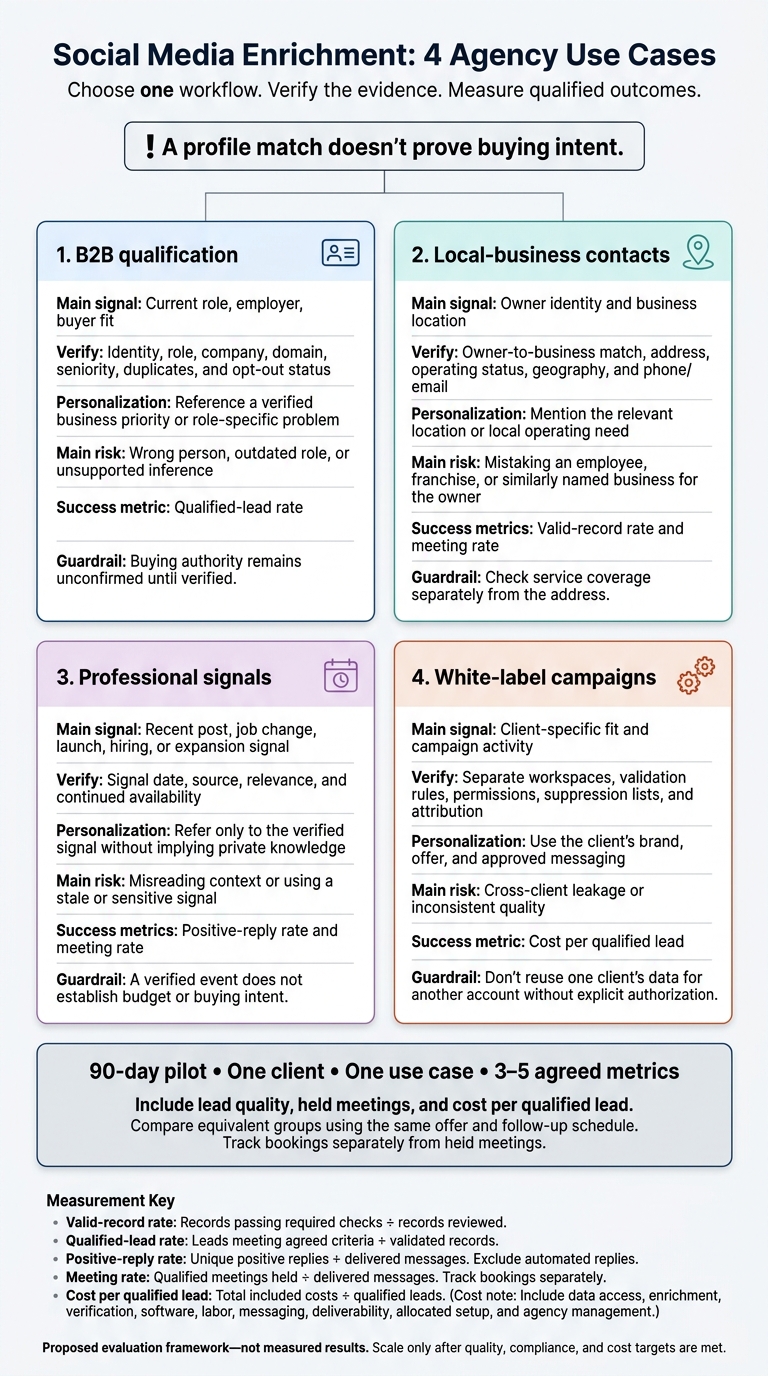
Validated social profiles can improve outreach and qualification but don’t prove buying intent—run a 90‑day pilot with clear metrics.
SalesLabel Team
Growth Expert • 25.11.2026
Share:
Leter du etter en ferdig løsning?
SalesLabel automatiserer utgående prospektering fra A til Å — AI finner potensielle kunder, sender personaliserte meldinger og booker møter under ditt merke.
Social media enrichment helps agencies check who to contact and what to say - but a profile match doesn’t prove buying intent. Start with one client and one use case, verify each record’s source and date, and measure lead quality, held meetings, and cost per qualified lead.
Agencies can use enrichment to:
Qualify B2B contacts: Check current roles, employers, and account fit before outreach.
Verify local-business contacts: Match owners or managers to the correct business and service area.
Personalize outreach: Reference recent, checked business activity without assuming budget or interest.
A 90-day pilot with 3–5 agreed metrics can test whether the workflow meets quality, privacy, and cost targets. Compare similar groups using the same offer and follow-up schedule. Treat software claims and planning figures as inputs to check - not results.
Social Media Enrichment: 4 Agency Use Cases
Qualify B2B Prospects
Turn raw imports into a B2B list that’s ready for outreach.
A U.S. demand-generation agency receives 1,200 SaaS records with missing roles, locations, and emails, and must clean the list before outreach.[1][5]
Enrichment helps the agency check and filter records before sending, so lead quality starts with the list - not the campaign.
Check Roles, Employers, and Buyer Fit
Match the person, not just the name. Cross-check each record using the name, employer, domain, and profile URL. Confirm the current title, seniority, department, employment status, and location. Standardize titles, remove duplicates, and route conflicting employer matches to manual review.
Before outreach, validate email format, domain match, and deliverability. Flag catch-all addresses separately.[1][5]
Keep profile fields separate from verified company data. Use company sources or independent business data to check industry, employee range, and operating location.[1][4]
Classify contacts as buyers, influencers, or disqualified records, but keep buying authority marked as unconfirmed until verified. Exclude former employees, unrelated departments, suppressed contacts, and accounts outside the ICP.[2][3]
Once those checks are complete, count how many records qualify for outreach.
Track List Quality and Booked Meetings
Apply the same rules before and after enrichment to see what changed. To compare outreach results, use equivalent segments - one with the existing process and one with enriched records - over the same 30-day sending period.
Metric
Before enrichment
After enrichment
Measurement rule
List size
1,200 imported records
1,200 imported records
All imported records
Valid profiles
Count at initial audit
Count after enrichment and review
Current, confidently matched profiles
Qualified prospects
Meet all qualification rules
Recount using unchanged rules
Person-level and account-level fit
Positive-reply rate
Measure existing-process segment
Measure enriched segment
Positive replies ÷ delivered messages
Booked meetings
Count for existing-process segment
Count for enriched segment
Distinct campaign-attributed bookings
Track minutes per qualified prospect to test whether the workflow cuts manual delays. Log segment size, delivered messages, dates, campaign IDs, and definitions for positive replies and sales acceptance.
Keep the offer, copy, sender, and follow-up cadence consistent. Report held meetings separately from booked meetings, and document any targeting changes. A before-and-after increase alone does not prove enrichment caused it.[6]
sbb-itb-a781ab9
Validate Local-Business Contacts
For local-business lists, matching a company name isn’t enough. The social profile must belong to the owner or manager responsible for the correct location or service area.
An agency starts with 1,200 plumber and HVAC records across Phoenix, Mesa, and Scottsdale, but owner identities still need verification.
Before outreach, confirm who controls each location and whether the business serves the target city. These checks help filter out poor-fit leads.
Match Owners to Business Locations
Action: Match each social profile to the business website and at least one other reliable source, such as a licensing record or official business directory. Verify the person’s current role at the correct location and confirm the service area. Save the supporting URLs and verification date. A Google Business Profile can help support the match, but it doesn’t prove that a named person currently owns the business.[9][10]
Check service coverage separately from the address. A contractor based outside Phoenix may serve Phoenix customers, while a Phoenix address alone doesn’t confirm coverage. Google allows service-area businesses to leave out a public street address. Verify coverage on the business website, then check whether the business is operating using current hours, a working phone number, or recent business updates.[11]
Merge duplicate records using domain, phone, and address, while keeping legitimate branches under one parent account. Send conflicting owner names, renamed businesses, and unclear service areas for manual review. Add only verified owners or managers to Phoenix, Mesa, or Scottsdale email segments. Assign businesses serving multiple cities to just one segment to prevent overlap.[7][8]
Track Invalid Contacts and Geographic Fit
Before outreach begins, measure how many records fail the identity or geography checks.
Result - measurement plan: Run a 30-day pilot. Record the actual numbers processed and delivered - don’t report planned metrics as achieved results. Use the same geographic rules when comparing the starting list with the validated list.
Metric
Starting-list baseline
Post-validation measurement
Invalid-record rate
1,200 starting records
Invalid, unreachable, duplicate, closed, or misidentified records ÷ 1,200; count each record once
Geographically qualified leads
Count confirmed in-area contacts
Verified owners/managers serving target cities ÷ deliverable contacts; report counts by city
Campaign-attributed bookings ÷ delivered messages; report held meetings separately
Use Recent Professional Signals in Outreach
Scenario: A U.S. agency targets founders and Heads of Sales at growing B2B software companies and tests whether verified signals increase qualified conversations per 1,000 delivered emails without widening the audience.
Verify Signals Before Writing Messages
Verify each signal before adding it to the sequence. Link one verified event to the client’s offer - not to an assumed need to buy. Record the signal type, source, URL, date, affected company/contact, relevance note, approved opener, and review status. Check company announcements separately from personal profiles. Funding can support a company-growth message, but it doesn’t show that a sales leader owns the initiative.[13][16]
Use these proposed review windows: 30 days for role changes and public posts about business challenges, and up to 90 days for launches, expansion, hiring, funding, and acquisitions. Recheck open roles and separate announced acquisitions from completed deals. Contact new leaders within 8–30 days of their appointment.[14][16]
Before every send, confirm ownership, dates, wording, and relevance. Reject stale or unclear signals. Reference only the stated business fact. Don’t infer budget, buying intent, personal traits, or an undisclosed problem.[14][16]
Compare Replies and Meetings by Signal
Test design only: Run a 30-day campaign using the groups below. Randomly assign comparable contacts within the same industry, company size, geography, buyer role, and deliverability segments. Keep the sender, offer, sequence, sending schedule, and follow-ups the same. Count a reply as qualified only when an in-scope buyer expresses interest; exclude automated responses. Booked meetings must meet the same buyer-fit rules.[18][19]
Apply the same audience filters across the test and control groups. Only the opening changes.
Group
Planned sample
Opening
Qualified-reply rate
Qualified meeting rate
Role-change enriched
500 contacts
Verified leadership change
Qualified replies ÷ delivered emails
Qualified meetings ÷ delivered emails
Hiring enriched
500 contacts
Verified sales hiring
Qualified replies ÷ delivered emails
Qualified meetings ÷ delivered emails
Non-enriched control
500 contacts
Standard role-based opening
Qualified replies ÷ delivered emails
Qualified meetings ÷ delivered emails
Report actual delivery counts alongside both rates. Compare each signal group with its matching control subset. More replies alone don’t prove better pipeline. Track opt-outs, complaints, enrichment cost, and review time. Assess the results in light of sender reputation, seasonality, signal age, and sample size.[12][15][17]
Run White-Label Lead Generation for Multiple Clients
Agencies serving multiple clients need enrichment that keeps each account’s rules, data, and reporting separate.
A multi-client agency can use social enrichment to run white-label prospecting across accounts without mixing data, rules, or reporting.
The validation logic from the B2B and local-business examples applies here, too. This workflow shows how to separate accounts while tracking capacity and cost.
Set Validation Rules and Keep Client Data Separate
Give each client a written ICP, exclusion list, required enrichment fields, and qualification rule. Keep workspaces, suppression lists, campaigns, inboxes, calendars, and reports separate.
Set client-specific approval rules, access permissions, and reply ownership. Document these controls rather than assuming they’re in place. Don’t reuse one client’s data for another account without explicit authorization.
SalesLabel supports white-label sourcing, enrichment, outreach, follow-ups, lead scoring, inbox management, and booking under your agency’s brand.
Before implementation, check its social-data sources and how current the data is. Also verify CRM and calendar integrations, client-facing reporting, permissions, data isolation, export and deletion controls, opt-out handling, usage limits, and audit logs.
Track Client Capacity and Cost per Qualified Lead
Before comparing clients, apply the same qualification rule to each. Compare equivalent segments and contact volumes over a fixed period, such as 90 days.
Track hours per client, launch time, booked meetings, held meetings, cost per qualified lead, and opt-outs. Use the same cost formula for every workflow:
[ \text{Cost per qualified lead} = \frac{\text{total included campaign and delivery cost}}{\text{qualified leads}} ]
Planning comparison per client over 90 days
Metric
Manual research and outreach
White-label workflow with human review
Staff hours
35 hours
18 hours
Launch time
3 weeks
10 business days
Qualified leads
12
20
Booked meetings
4
8
Held meetings
Record actual count
Record actual count
Cost per qualified lead, USD
Documented labor and tool costs ÷ qualified leads
Documented labor, platform, and data costs ÷ qualified leads
Opt-outs
Record actual count
Record actual count
These figures are planning assumptions.
Manage Data Quality and Measure Results
Once enrichment is live, keep records accurate, compliant, and measurable. Apply the same controls across all four workflows: B2B qualification, local-business contacts, professional signals, and white-label campaigns.
Set Data Validation and Handling Rules
Keep one record per verified contact, including the profile URL, name, matched employer, role, location, signal date, source, validation date, confidence status, client, campaign, and opt-out status. Store the source evidence alongside it.
Standardize records, verify each match, and confirm buyer fit. Send conflicts to human review. Before activation, suppress contacts that are invalid, duplicated, irrelevant, stale, or opted out.
Recheck roles, employers, and signals on a fixed schedule, with shorter intervals for active campaigns. Check deliverability and suppression status before every send. These are recommended operating rules, not measured performance findings. Log the reason and date for every correction, suppression, and manual override.
Accurate data still needs clear collection and outreach rules. Check platform terms, privacy law, and email compliance before collecting data or contacting anyone.[23][20][22][21] Collect only the fields you need, set retention and deletion periods, and honor opt-out requests promptly.[20][22][7][8]
Compare Use Cases, Risks, and Success Metrics
The table below presents proposed evaluation criteria - not results. Use the same measurement rules across use cases to keep comparisons consistent.
Use case
Main signal
Validation needs
Personalization
Main risk
Success metric
B2B qualification
Current role, employer, buyer fit
Check identity, role, company, domain, seniority, duplicates, and opt-out status
Reference a verified business priority or role-specific problem
Wrong person, outdated role, or unsupported inference
Qualified-lead rate
Local-business contacts
Owner identity and business location
Check the owner-to-business match, address, operating status, geography, and phone/email
Mention the relevant location or local operating need
Mistaking an employee, franchise, or similarly named business for the owner
Valid-record rate and meeting rate
Professional signals
Recent post, job change, launch, hiring, or expansion signal
Check the signal’s date, source, relevance, and continued availability
Refer only to the verified signal without implying private knowledge
Misreading context or using a stale or sensitive signal
Positive-reply rate and meeting rate
White-label campaigns
Client-specific fit and campaign activity
Check separate workspaces, validation rules, permissions, suppression lists, and attribution
Use the client’s brand, offer, and approved messaging
Cross-client leakage or inconsistent quality
Cost per qualified lead
Only present findings as documented when campaign records or cited evidence support them. Software features alone do not establish results.
Set denominators before launch and keep them consistent:
Valid-record rate: Records passing required checks ÷ records reviewed.
Qualified-lead rate: Leads meeting agreed criteria ÷ validated records.
Cost per qualified lead: Total included costs ÷ qualified leads. Include data access, enrichment, verification, software, labor, messaging, deliverability, allocated setup, and agency management.
When possible, randomly split comparable contacts into enriched and control groups. Keep the offer, channel, and follow-up timing the same. If random assignment isn’t possible, use matched cohorts and disclose that limitation.
Report the baseline, dates, sample size, raw counts, source systems, exclusions, and attribution window. A before-and-after comparison alone does not establish causation.
Conclusion: Start With One Measurable Use Case
Validated social data can help you qualify leads, write more relevant messages, and deliver repeatable work for clients. But it doesn’t prove buying intent or guarantee meetings. Treat these workflows as pilots to test - not proven performance claims.
Choose one workflow that fits your highest-volume client segment and measurement setup. Run a 90-day pilot with one client, one use case, and 3–5 agreed metrics, including lead quality, held meetings, and cost per qualified lead.[24]
Keep those metric definitions the same when deciding whether to turn the pilot into a recurring white-label service. Judge SalesLabel against those requirements, not assumptions. Scale only after the pilot meets your quality, compliance, and cost targets.
FAQs
Which enrichment use case should my agency test first?
Start with an end-to-end firmographic enrichment workflow for one client and one campaign - not the size of your database. Choose five to eight fields that shape targeting or qualification, such as industry, employee count, or location.
Before you scale, check that records are clean, CRM syncing works correctly, and owner routing and opt-out handling run automatically. Measure success by better account decisions and research time saved, not just field fill rates.
How can I personalize outreach without sounding intrusive?
Skip the generic templates. SalesLabel uses prospects’ LinkedIn activity, recent company news, and firmographic data to draft personalized messages that sound human.
Have your team review and approve AI-generated drafts before sending. That keeps your team in control of your brand voice and claims.
For follow-ups, use specific engagement signals - like website activity or email interactions - instead of a generic schedule. This helps keep each message timely and relevant.
When should I scale enrichment beyond one client?
Scale only after a pilot with one to three clients shows that the workflow can be repeated and delivers a clear return on investment. Check that enrichment fields consistently help you make better qualification decisions - not just fill more data fields.
Before adding clients, confirm that meeting quality, workflow reliability, and outreach control remain stable across your current clients.