How AI fills company data gaps, matches and validates firmographics, and improves targeting, scoring, and CRM routing with quality controls.
SalesLabel Team
Growth Expert • 9.11.2026
Share:
Leter du etter en ferdig løsning?
SalesLabel automatiserer utgående prospektering fra A til Å — AI finner potensielle kunder, sender personaliserte meldinger og booker møter under ditt merke.
AI firmographic enrichment fills gaps in company records - such as industry, employee count, revenue, and location. I recommend starting with five to eight fields tied to a clear task, like filtering accounts or assigning sales territories.
Here’s what I focus on before using that data:
Match the right company: Don’t confuse a parent company with a branch or subsidiary.
Check each value: Keep sources and dates, and label estimates.
Test the results: Measure accuracy, research time, and cost - not just completed fields.
Set data rules: Control access, retention, and how contact data is used.
For agencies, including those using white-label tools like SalesLabel, enrichment can support targeting, scoring, and outreach. But my rule is simple: <u>more data isn’t the goal</u>. Better account decisions are.
Using AI for Attribute Mapping and Enrichment
sbb-itb-a781ab9
How Does AI Firmographic Enrichment Work?
How AI Firmographic Enrichment Works
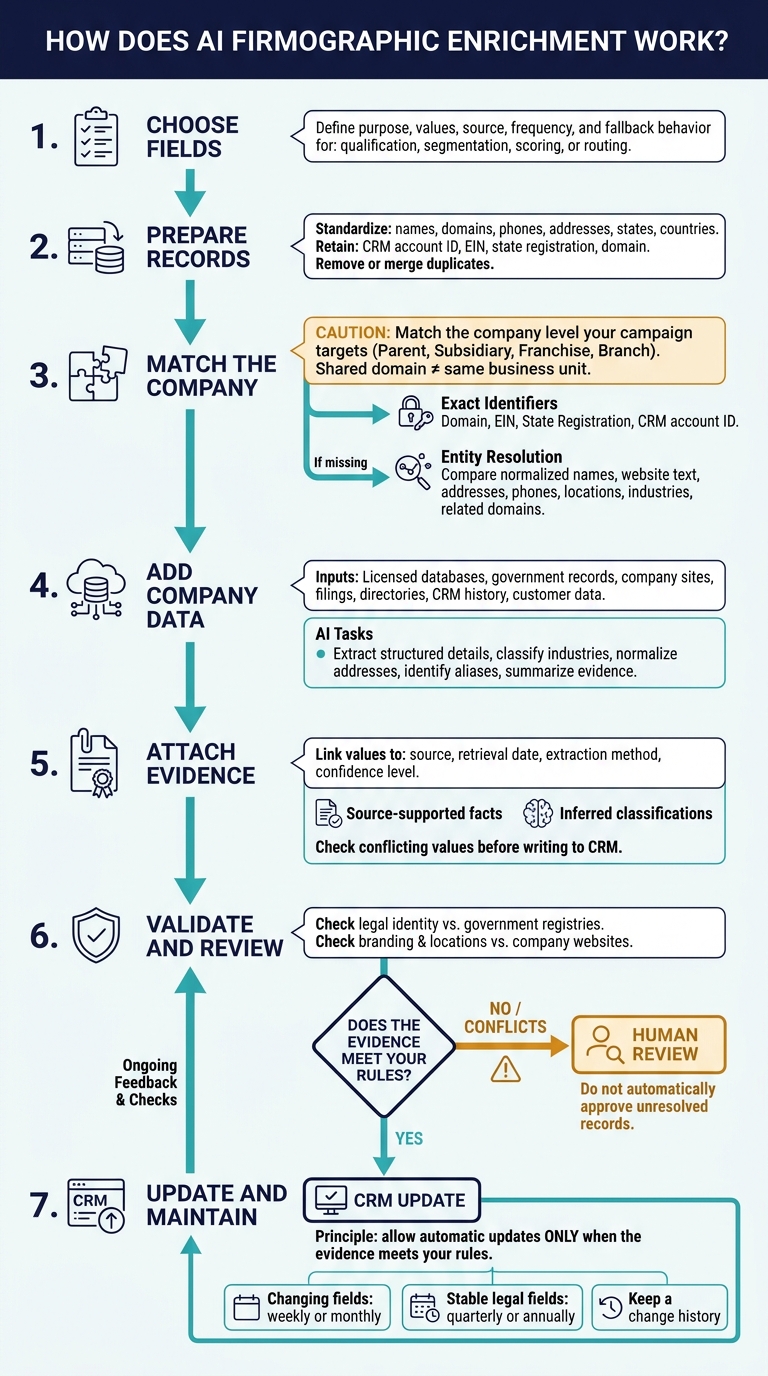
Once you’ve defined your target fields, enrichment follows a matching and validation workflow: prepare records, match companies, add data, and check it before updating your CRM.
Choose Fields and Prepare Records
Start with the outcome you want: qualification, segmentation, scoring, or routing. For each field, define its purpose, acceptable values, preferred source, update frequency, and fallback behavior.
Then standardize company names, domains, phone numbers, addresses, state abbreviations, and country names. Keep stable identifiers, such as a CRM account ID, EIN, state registration number, or domain. Remove or merge duplicate records before enrichment.
Match Companies and Add Data
Start with exact identifiers: a domain, EIN, state registration number, or CRM account ID. If those are missing, use entity resolution to compare normalized company names, website text, addresses, phone numbers, locations, industry descriptions, and related domains.
Match the company level your campaign targets. A shared domain might point to a parent company, subsidiary, franchise, or branch - not necessarily the business unit you need.
After matching the record, add data from licensed databases, government records, company sites, filings, directories, CRM history, and customer data. AI can extract structured details from web pages, classify industries from business descriptions, normalize addresses, identify aliases, and summarize the evidence for review.
Link every added value to its source, retrieval date, extraction method, and confidence level. Keep source-supported facts separate from inferred classifications, and check conflicting values before writing records back to the CRM.
Check Data and Schedule Updates
After matching, compare important values against authoritative sources. Use government registries to check legal identity and company websites to check branding and locations.
Flag conflicts for human review. Update changing fields weekly or monthly, and stable legal fields quarterly or annually. Keep a change history, and allow automatic updates only when the evidence meets your rules.
Why Do Agencies Use Firmographic Enrichment?
Once records are matched and updated, agencies use the data to decide which accounts to focus on first. Firmographic enrichment fills gaps in CRM records, turning missing fields into useful account filters and reducing manual research. Up-to-date data also helps prevent good accounts from being excluded or routed to the wrong team.
Use Company Data for Targeting, Scoring, and Outreach
The main value is practical: better targeting, cleaner scoring, and faster outreach. Industry, employee count, revenue, and location turn an ideal customer profile (ICP) into rules for segmentation, prioritization, and territory routing. Set clear criteria for what’s required and what simply makes an account a better fit.
Account fit is not intent. Keep firmographic fit separate from intent signals, such as replies or site visits. Use firmographic scores to prioritize SDR review - not replace it.
For account-based outreach, company details can guide messaging, regional timing, and the offer. They don’t tell you what an individual needs. Break down reports by industry, size, revenue, and location to find the strongest account groups.[5]
For agencies running client campaigns at scale, white-label features">automation brings these uses into campaign delivery. SalesLabel combines sourcing, enrichment, outreach, follow-ups, reply handling, scoring, inbox management, and booking under the agency’s branding. Company data helps agencies set targeting rules, filter accounts for fit, prioritize review, and route prospects into the right workflow.[5][6]
Agencies should approve targeting criteria, review key accounts, and oversee outreach and replies. Track field completeness, routing accuracy, and time spent on manual research to measure how enrichment affects day-to-day work. Enrichment supports decisions; it does not guarantee accuracy, meetings, or sales.[5]
How Can Agencies Manage Enrichment Quality and Data Use?
After matching and updating records, agencies need a repeatable process to check that enriched data is reliable and ready to use.
Test Coverage, Accuracy, and Business Value
Test a sample that spans industries, company sizes, regions, and messy records - not just clean accounts. Measure usable fill rate, match accuracy, data age, duplicates, and review rate for AI-enriched data by field and segment. Count a field only after it passes validation.
Set confidence thresholds for each field. Accept verified matches, review conflicting domains or locations, and send unresolved identities for manual review. For every field, track its source, verification date, confidence, reviewer decision, and change history. Flag outdated records before using them in campaigns.
Compare enriched accounts with a similar holdout group. Check research time, qualification decisions, and cost per qualified account, then weigh savings against software, data, review, and compliance costs. Set rollout thresholds before testing - there’s no accuracy or ROI benchmark that applies across the board. Retest when sources, matching logic, or AI models change.
Once you’ve measured quality, define how the data can be stored and used.
Set Privacy, Access, and Retention Rules
Quality checks don’t replace access and retention controls. Separate company fields from contact data, including names, emails, phone numbers, and titles. Document why you need each field and who can use it in client campaigns. Use role-based access, MFA, encryption, and audit logs. The FTC recommends limiting collection, protecting retained data, and securely deleting data you no longer need.[4][7]
Write retention rules for each data category and purpose, with scheduled reviews and deletion from connected systems. Assign responsibility for corrections, opt-outs, deletion requests, and vendor follow-through. Protect suppression records so opted-out contacts aren’t reimported.
Have qualified counsel review applicable U.S. requirements and agency-client responsibilities. Businesses covered by California law may need to provide notices and handle consumer requests, including sending deletion requests to service providers or contractors.[8][9]
What Should Agencies Know Before Getting Started?
Before scaling enrichment, start small and test the setup. Firmographic enrichment adds company-level data to records. AI speeds up that work, but it won’t fix poor source data. You still need correct company matches, validation, human review, and maintenance.
Start with one client, one campaign, and five to eight fields that shape targeting or qualification decisions. Clear up any ambiguity before importing records:
Does “company size” mean employee count, revenue range, or both?
Use a standard industry taxonomy rather than free-text labels.
With those fields defined, run a small pilot on real accounts before rollout. Give every field a clear job:
Employee count for segmentation, location for territory assignment, or industry for fit filtering.
Scale only when the fields improve qualification decisions - not just fill rate.
FAQs
Can AI enrich records for small or newly formed businesses?
Yes. AI-powered enrichment fills gaps in basic lead records for small or newly formed businesses. It pulls firmographic details - such as industry, revenue range, employee count, and location - from public sources and databases.
SalesLabel automates this process under your agency’s branding. These details help you score leads accurately, personalize outreach, and check whether early-stage companies match your ideal customer profile.
How much should I budget for firmographic enrichment?
Separate one-time setup costs from recurring expenses. Setup can cost $2,500–$3,500 and includes CRM cleanup, workflow configuration, and onboarding assets [1]. Monthly expenses cover software subscriptions, data credits, API fees, and human oversight [1].
SalesLabel offers three plans: Starter at $799/month, Growth at $1,279/month, and Scale at $1,999/month[2][3]. Track cost per booked qualified meeting and gross margin to see whether your investment improves efficiency [1].
How can I prevent enrichment from overwriting verified CRM data?
Set a clear hierarchy for each field based on how reliable the source is. Treat your CRM as the source of truth, and never overwrite critical fields like contact names and email addresses. For other fields, give manual updates priority over verified system data, with AI-inferred enrichment last.
Use confidence thresholds to prevent low-confidence data from changing fields used for routing or outreach. Send uncertain matches to a person for review.