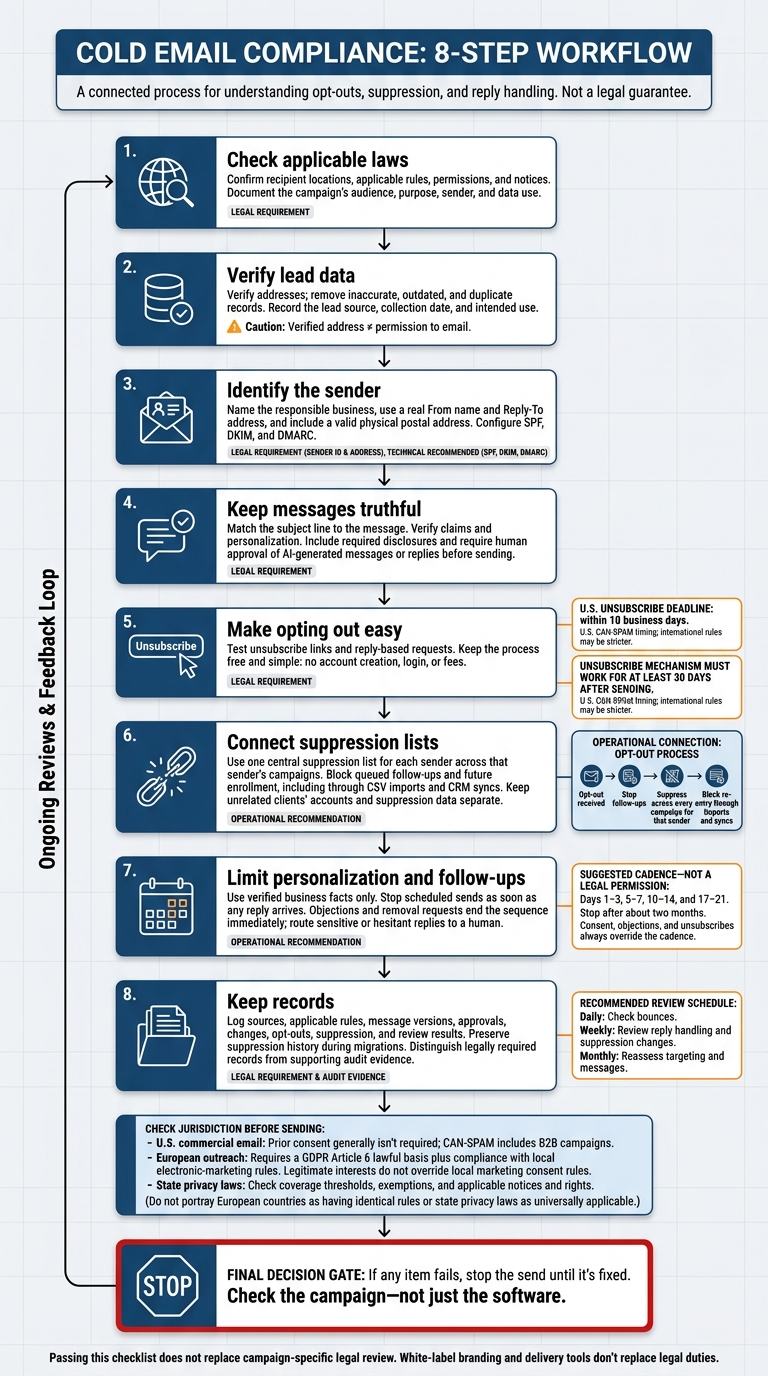
8 compliance checks for cold outreach: verify leads, ID the sender, use truthful copy, provide easy opt-outs, centralize suppression, and keep records.
SalesLabel Team
Growth Expert • 2.10.2026
Share:
Leter du etter en ferdig løsning?
SalesLabel automatiserer utgående prospektering fra A til Å — AI finner potensielle kunder, sender personaliserte meldinger og booker møter under ditt merke.
Before I send a cold email, I check the recipient’s location, the lead source, and how opt-outs will work. U.S. commercial email generally doesn’t require prior consent, but unsubscribe requests must be honored within 10 business days. European outreach also requires a GDPR lawful basis and compliance with local marketing rules.
I use these 8 checks before launching a campaign:
Check applicable laws: Confirm which rules, permissions, and notices apply.
Verify lead data: Check addresses and record where the data came from.
Identify the sender: Name the responsible business and include a valid postal address.
Keep messages truthful: Check subject lines, claims, and AI-written copy.
Make opting out easy: Test links and reply-based requests.
Connect suppression lists: Block future sends across that sender’s campaigns.
Limit personalization and follow-ups: Use verified business facts and stop sequences when replies arrive.
Keep records: Log approvals, opt-outs, changes, and review results.
My rule: <u>Check the campaign - not just the software.</u> Email delivery tools and white-label branding don’t replace legal duties or campaign-specific legal review.
Cold Email Compliance: 8 Essential Checks
Which Laws Apply to Cold Email?
Start by checking the laws tied to the recipient’s location and the data you use.
CAN-SPAM covers U.S. commercial email, including B2B campaigns. Prior consent generally isn’t required. But emails must clearly identify the sender and business, use truthful content, include a physical postal address, and offer a working unsubscribe option. You must honor unsubscribe requests within 10 business days.[1][2] Once you know which rules apply, verify the lead source before sending.
European outreach must meet both GDPR and local electronic-marketing rules. If you rely on legitimate interests, document your purpose, why the data use is necessary, and how it balances against recipients’ rights. That basis doesn’t override local marketing consent rules. A work email address doesn’t automatically qualify for a B2B exception - rules differ by country.
State privacy laws apply when you meet their coverage tests. Check the thresholds and exemptions under CCPA and other applicable laws. Also check whether sourcing or transferring leads may count as a sale or sharing. These duties apply alongside CAN-SPAM.
Use this checklist to map the core requirements:
Planning check
U.S. commercial email
European outreach
State privacy laws
Consent or lawful basis
Prior consent generally not required
Article 6 basis and local consent rules
Coverage thresholds and exemptions
Disclosures
Sender identity and postal address
Controller, privacy notice, and data source
Applicable collection and privacy notices
Opt-outs
Honor unsubscribe requests within 10 business days
Stop direct marketing upon objection
Applicable rights; honor Global Privacy Control where required
Documentation
Recommended suppression and source records
Required accountability records
Request records and contracts where required
Recordkeeping duties depend on the law and company. Not every recommended audit record is legally required.
sbb-itb-a781ab9
1. Check Applicable Laws Before Sending
Write a campaign compliance brief before importing leads into the outreach platform. Document recipient locations, sender identity, message purpose, and the data used. Include only the rules that apply to the campaign, along with required permissions and notices.[1][3] Use this brief to decide which leads can move through verification.
For EU outreach, document the Article 6 lawful basis for data use separately from local marketing permission. Data rights and email permission need separate approvals.[1][3]
White-label branding does not change sender, data, or opt-out duties. U.S. approval does not cover international recipients; check each destination’s rules before adding recipients to the campaign.[1][3]
Send financial-services campaigns to counsel for SEC and FINRA review. Keep health-status references out of healthcare and benefits copy.[1] If a lead’s location or permission is unclear, leave it out of the send queue until verification is complete. Only leads that pass this review move to source verification.
2. Verify Lead Data and Record Its Source
Verify work email addresses before sending, and remove bad records. Use CRM queries or automated checks to filter out inaccurate, outdated, or duplicate entries. Watch bounce rates and slow down sending if they spike.[2][4][5]
After verification, log each lead’s source, collection date, and intended use. Keep only the professional details you need, such as job title, responsibilities, company size, and industry.[1][3]
Before using enrichment vendors, review their data sources and contract terms.[1]
A verified address confirms deliverability - not lawful collection or permission to email.[1][2] Once you’ve checked the source, clearly identify the sender and business in every message.
3. Clearly Identify the Sender and Business
After lead verification, make it clear who’s sending every message. Use a real From name and Reply-To address. Don’t disguise the sender in email headers or routing.[1][6]
If an agency sends email on a client’s behalf, clearly name the client and explain the agency’s role where relevant. Include a valid physical postal address in the footer.[1]
Check every sending domain before launch, and configure SPF, DKIM, and DMARC to authenticate email. For outreach through a separate domain, use a dedicated outreach domain - not the client’s primary domain - and make its connection to the responsible business clear.[1][2][5] A clear sender identity doesn’t replace the need for a truthful message.
SalesLabel supports white-label branding, but that branding must not hide who’s sending the email.[1][7]
4. Write Truthful Subject Lines and Messages
After clearly identifying the sender, make sure the message is accurate. The subject line must match the message. Don’t invent a referral, suggest a conversation happened when it didn’t, or make up a deadline to pressure someone into replying. Base your outreach on verified facts - not invented connections.[1]
Keep personalization factual, too. Check job titles, company news, funding, and technology details before sending. Explain who’s contacting the recipient and how the offer relates to those facts. A mutual connection doesn’t mean you have a referral.[1]
Include required advertising and commercial disclosures. Have counsel review industry-specific language.[1]
For AI-assisted outreach, treat automated content as a draft - not a message ready to send. Require human review before sending AI-generated messages or replies. AI can draft; a person must approve. Check personalization, integration claims, and AI reply labels against source data before features">automation.[1][3][7]
5. Make Opting Out Clear and Easy
Truthful messaging is only part of the job. Every commercial email needs clear, easy-to-find unsubscribe instructions that work. Honor opt-outs within 10 business days, and keep the process free and simple: no account creation, login, fees, or extra steps. The unsubscribe mechanism must work for at least 30 days after you send the email. Don’t disable links when a campaign ends.[1][3]
Before launch, test the unsubscribe flow on mobile using a staging account. Confirm that the link works and the form is easy to complete. Check for broken pages, confusing forms, and unexpected vendor branding in the footer that could leave recipients unsure where they are.[1][6]
If recipients can unsubscribe by replying, test that process from start to finish, too. Replies such as “stop” or “remove me” must reach a monitored inbox and trigger suppression. AI can route these requests, but verify that suppression works across every active campaign so recipients don’t receive future sends.[3]
For international outreach, check for stricter rules before setting your processing deadline. In financial services, written compliance protocols often call for opt-out workflows to be completed within 24 hours.[1]
6. Honor Opt-Outs Across Sender Campaigns
Making opt-outs easy is only part of the job. Use one central suppression list for each sender - not separate lists for each campaign. Connect it to your CRM and sequencing systems so an opt-out stops queued follow-ups and prevents future enrollment, even when a contact returns through a CSV import or CRM sync.[1][3]
Keep unrelated clients in separate sub-accounts, each with its own campaign data and login credentials. That way, one client’s opt-outs won’t affect another client’s campaigns. Apply suppression within each sender’s sub-account, and don’t copy suppression data between client accounts.[1][3][6]
For automated outreach teams, check that suppression works - not just that it appears in the logs. When a contact opts out of one sequence, they must stay suppressed across every sequence for that sender.[1][3]
Once suppression is centralized, test every system that could re-add a lead. In a test sub-account, try re-enrolling a suppressed contact through both a CSV import and a CRM sync. Repeat these checks after integration or system changes, and document the results.[1]
7. Limit Personalization and Follow-Ups
Once suppression is set, limit personalization and follow-up volume. Use only verified business details: job title, function, company size, industry, and relevant company news. Leave out individual health information, unnecessary personal attributes, and placeholder-only personalization such as {{firstName}}.
To avoid over-contact, keep the cadence short: days 1–3, 5–7, 10–14, and 17–21. Stop after about two months.[8][9] Consent, objections, and unsubscribes always override the cadence.[1][8]
Stop scheduled sends as soon as any reply arrives. Switch from the sequence to handling the reply. An objection or removal request must end the sequence immediately. Send negative, sensitive, or hesitant replies to a human for review, and route deletion requests to your privacy workflow.[1][3][4]
Set AI reply-handling rules before automation goes live. If you use SalesLabel’s AI reply classification, define which reply categories stop outreach and trigger human review. Test those rules before enabling automation.[1][4]
8. Keep Records and Review Campaigns
After each campaign, keep a file showing who you contacted, why, and which rules applied. Include data sources and collection dates, the target audience and purpose, jurisdiction checks, sender identity, and message versions. Also keep timestamped logs for deliveries, bounces, replies, opt-outs, and suppression. [1][4]
For EU-targeted outreach, separate legally required records from supporting audit evidence. Document the GDPR Article 6 lawful basis in the campaign file, and confirm which sourcing, disclosure, and recordkeeping duties apply to each jurisdiction and industry. Authentication records and delivery metrics can support audits, but they aren’t always required records. [1][4]
Record the human approver before launch. Log every later change and who approved it. [1][7]
Keep each client’s records separate. When migrating systems, preserve suppression history so contacts who opted out remain suppressed. [1][3]
Schedule reviews to spot broken opt-outs, missing suppression, and outdated targeting:
Daily: Check bounces.
Weekly: Review reply handling and suppression changes.
Monthly: Reassess targeting and messages.
For each review, save the date, reviewer, findings, and corrective action taken. [1][2][3][4]
Pre-Send Compliance Checklist
Before every send, run this final check of the eight practices.
[ ] Sender and addresses: Make sure the sender, business name, and authenticated domain are clearly identified. Verify that sending is authenticated. [1][2][4]
[ ] Subject and postal address: Check that the subject matches the message and the footer includes a valid business postal address. [1][2]
[ ] Working opt-outs: Test the unsubscribe link from a controlled inbox. Make sure requests reach suppression within the applicable legal deadline. [1]
[ ] Synchronized suppression: Verify that one suppression list blocks all future sends for that sender or client. [1][3]
[ ] Lead source and lawful use: Check that the lead source, permitted use, and GDPR lawful basis, where applicable, are documented. [1]
[ ] Follow-up stops and reply handling: Test that “remove me,” “stop,” and other opt-out phrases halt follow-ups and trigger suppression. Check that out-of-office replies pause the sequence. [1][3]
[ ] Required notices and permissions: Verify required notices and permissions, and send regulated copy to counsel for review. [1]
If any item fails, stop the send until it’s fixed.
Passing this checklist does not replace campaign-specific legal review. Targeting, jurisdiction, data use, and message content can create obligations that technical checks alone cannot resolve. [1]
Conclusion: Use All 8 Practices Together
Cold email compliance depends on all eight practices working together: lawful sourcing, accurate data, clear identity, truthful copy, easy opt-outs, central suppression, controlled follow-ups, and records. [1][3]
White-label AI software such as SalesLabeldoesn’t shift legal responsibility. Agencies and clients still need to approve content, verify sourcing, and assign responsibility for disclosure review. [1][7]
Before sending, check the campaign - not just the platform settings. Have legal counsel review the audience, data sources, and disclosure language against the rules that apply in each jurisdiction, especially when entering new jurisdictions or working in regulated industries. [1][3]
FAQs
Can I cold email publicly listed addresses?
Yes, you can cold email publicly listed addresses, as long as your outreach follows applicable privacy laws, such as GDPR and CAN-SPAM. An address being public doesn’t exempt you from those rules.
SalesLabel helps you meet these requirements with automated opt-out management, real-time suppression, and data minimization. Include clear unsubscribe links and follow email deliverability standards, including proper domain authentication and list verification, to protect your sender reputation.
How long should I keep compliance records?
The provided documentation does not specify retention periods. Agencies must keep written compliance protocols and records to meet applicable requirements under GDPR, CAN-SPAM, and industry-specific SEC or FINRA rules [1][2]. Consult legal counsel to set a retention schedule based on your jurisdiction and the data you process.
SalesLabel provides infrastructure for audit logs and opt-out management to help show that compliance is maintained over time [2].
Who is liable when an agency sends cold emails?
The agency is responsible for compliance unless its white-label provider explicitly takes on that responsibility in the contract [1]. This covers data sourcing that complies with GDPR and CCPA, email content that meets CAN-SPAM Act requirements, and clear processes for handling unsubscribe requests.
If the white-label partner doesn’t provide the required contract protections or systems built to support compliance, the agency bears the legal risk on behalf of its client [1].