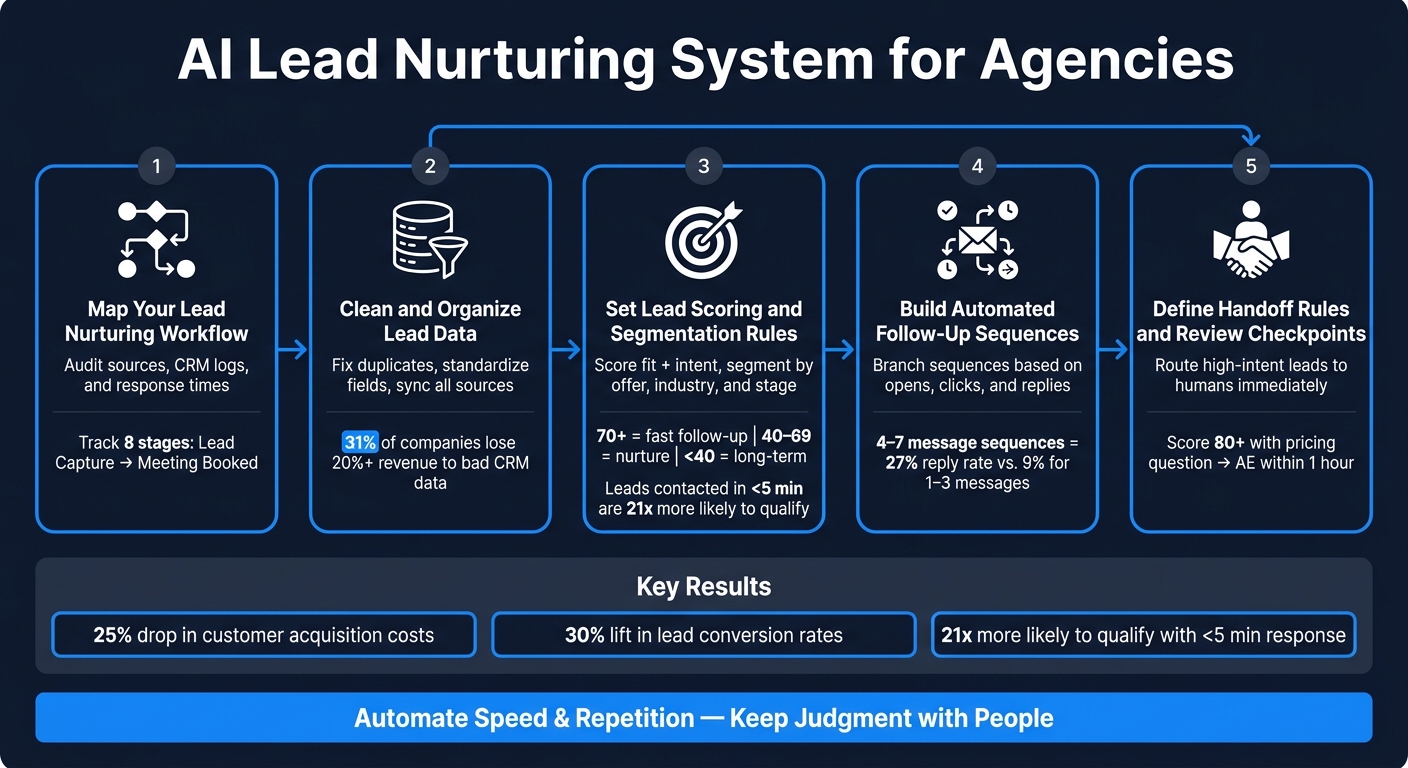
Most agencies do not lose leads because of bad offers. They lose them because follow-up is slow, uneven, or off-topic. I’d sum up the fix like this: use AI to reply fast, sort leads by intent, send better follow-ups, and move hot leads to a person right away.
Here’s the short version:
AI cuts response time by replying in seconds, including after hours.
AI helps with lead scoring by using fit and behavior signals to sort leads by priority.
AI improves follow-up with message paths based on clicks, replies, and page visits.
Clean CRM data matters first because bad fields and duplicate records lead to bad outreach.
Human handoff rules matter just as much because pricing, contracts, and strong buying signals should leave automation fast.
A few numbers stand out:
Companies using AI for lead nurturing report a 25% drop in customer acquisition costs and a 30% lift in lead conversion rates.
AI lead scoring is tied to 20%–30% higher conversion rates.
Leads contacted within 5 minutes are reported to be 21x more likely to qualify than leads contacted after 30 minutes.
Sequences with 4–7 messages can reach about a 27% reply rate, vs. 9% for sequences with only 1–3 messages.
What I take from the article is simple: AI does best when the process is already clear. That means mapping the workflow, fixing CRM fields, setting score thresholds, building branch-based follow-up, and reviewing results every week.
If I had to reduce the whole piece to one line, it would be this: automate speed and repetition, but keep judgment with people.
AI Lead Nurturing System for Agencies: 5-Step Process
How to Automate Lead Nurturing with AI Agents Using Pabbly for Maximum Impact
sbb-itb-a781ab9
Step 1: Map Your Current Lead Nurturing Workflow
Start with an audit of your current lead nurturing workflow. Look at lead sources, CRM activity, and outreach logs. Pull the last 90 days of leads, calculate time-to-first-response, and check how many touches each lead got in the first 14 to 30 days [5][6].
Pay close attention to the stages where slow replies, uneven follow-up, and missed handoffs cause meetings to slip. Compare your ideal workflow against your system logs to find bottlenecks, handoff misses, and qualified leads that never got contacted. A swimlane chart can make those handoff gaps much easier to spot before you automate anything. That map helps you see where AI can cut response and follow-up time without covering up broken process steps.
Track Each Stage from Lead Capture to Meeting Booked
Map each stage from the moment a lead enters your system to the moment a meeting is booked. A practical agency workflow usually looks like this: Lead Capture → Lead Enrichment → Qualification and Scoring → Lead Assignment → Initial Outreach → Ongoing Follow-Up → Meeting Confirmation → Meeting Booked.
For each stage, document four things:
The owner
The tool
The response-time target
The rule for moving the lead to the next stage
For example, at lead capture, note where the lead came from, which CRM fields are required, and how fast the lead should sync into the system. Aim for first contact within 15–60 minutes for inbound leads and within 1 business day for outbound replies [3][4][6][7]. At the meeting-booked stage, record who sends the calendar invite, how time zones are handled, who owns reminders, and who prepares pre-meeting communication.
List the tools used at each stage - CRM, email automation, scheduling, and your white-label platform - so handoff gaps are plain to see.
Separate AI Tasks from Human Tasks
Once each stage is mapped, assign ownership before you automate it. Mark repeatable work as AI-assisted. Keep pricing, scope changes, and complex objections with people. The point is simple: automate speed, not judgment.
Stage
Owner
AI Does
Human Does
Lead Capture
Marketing / RevOps
Sync leads to the CRM and validate required fields
Define source rules and required fields
Lead Enrichment
Ops / AI system
Pull firmographic and contact data, validate emails
Review flagged records
Scoring
AI + SDR
Score behavior and fit signals
Review high-intent leads before assignment
Outreach / Follow-Up
AI
Send timed follow-ups and branch on replies
Approve templates and handle nuanced replies
Pricing / Objections
AE
Draft suggested replies
Edit, approve, and send
Meeting Booked
AI + AE
Propose times, send invites, and send reminders
Confirm details and prepare for the call
Mark each step as AI-assisted, human-led, or human-only. Next comes the data cleanup that powers those handoffs.
Step 2: Clean and Organize Lead Data
After you map the workflow, the next job is cleaning up the fields and signals that feed it.
AI works best when the data behind it is clean and structured. That’s what lets it tailor outreach, score intent, and time follow-ups well. When CRM records are messy, AI can sort leads into the wrong bucket, send off-target messages, and miss high-value prospects. According to Validity's 2024 CRM data management report, 31% of admins said poor-quality data costs their company at least 20% of annual revenue, and 48% noticed customer data decaying faster than the year before. [13]
Audit CRM Fields and Fix Data Issues
Start by exporting the last 3–6 months of leads and running a profiling check. Look for missing values, uneven entries, and duplicate records. In many agencies, 20–40% of records are missing a valid lead source or service interest. Those two fields matter because AI uses them to rank leads and tailor outreach. [8][9]
Free-text fields are a common source of chaos. If one rep types "SaaS", another types "SAAS", and someone else writes "Software as a Service", the CRM may treat those as three separate segments. That throws off AI fast. The fix is simple: use controlled dropdowns for every categorical field and set one standard list for each.
Field
Example Standardized Values
Industry
Software & SaaS, Professional Services, E-commerce & Retail, Healthcare
SEO Retainer, Paid Social Management, Full-funnel Lead Gen
Once those fields are standardized, run a full deduplication pass. Use exact matching for records with the same email address. Then use fuzzy matching for records that share a company domain and have a similar name or role. If a case looks unclear, send it to a person for review instead of auto-merging it. When you do merge records, keep the oldest record, combine the activity history, and keep the newest contact details.
Connect Lead Sources for All Lead Activity
Pull forms, website behavior, email clicks, LinkedIn activity, bookings, and engagement history into one CRM. That way, outreach reflects the lead’s full buying context instead of one isolated action.
When SalesLabel ingests these combined signals, it can use real-time lead scoring and AI-driven replies that reflect where a lead actually is in the buying process, not just where they entered the funnel. [10][11][12] Here’s a simple example: if a lead downloaded an SEO playbook, came back to the local SEO service page twice, and then booked a call, the follow-up should mention local SEO pain points and related case studies, not a generic agency intro.
You should also track four fields for every lead:
Last Activity Date
Last Reply Date
Next Scheduled Activity Date
Lifecycle Stage
Automate updates to those fields so AI knows when to follow up, when to pause, and when to route the lead to a human.
With clean fields and synced activity, you can score and segment leads in Step 3.
Step 3: Set Lead Scoring and Segmentation Rules
Use clean data to score leads and send them into the right follow-up sequence. Scoring tells you priority. Segmentation tells you what to say, how often to say it, and when to send it. Put those two together, and you can tell who needs a fast reply and who should stay in nurture.
Define High-, Mid-, and Low-Intent Lead Signals
Score two things: fit and intent. Fit shows how closely a lead matches your ICP. Intent shows whether that lead is active right now.
Once you score both, combine them to route leads. A high-fit, low-intent lead should usually stay in a slower nurture track. A high-fit, high-intent lead should get to a human fast. Speed matters here. Leads contacted within 5 minutes are 21x more likely to qualify than leads contacted after 30 minutes. [15][16]
Here’s a scoring framework agencies can use right away:
Start with two simple thresholds. [14] A score of 70+ means high intent and fast follow-up. 40–69 means mid-intent nurture. Anything below 40 goes into long-term nurture. Those tiers make the next step much easier because they point each lead to the right sequence.
One more thing: weight recency more than raw activity count. A visit from yesterday should matter more than a cluster of visits from last month. That keeps your scoring tied to what the lead is doing now, not what they did a while back. SalesLabel can update priority in real time as new signals come in.
Build Segments by Offer, Industry, or Buying Stage
Scoring sets priority. Segmentation shapes the message and sequence. If scoring answers who goes first, segmentation answers what should they get.
Start with the offer or service the lead showed interest in. An SEO lead and a paid ads lead usually care about different problems, timelines, and objections. Sending both the same nurture email is like handing every prospect the same brochure and hoping it sticks. It usually doesn’t.
For example, an SEO segment for SaaS companies should get messaging around organic pipeline and technical SEO. A paid ads segment for eCommerce brands should lead with ROAS benchmarks and creative testing. Same agency, same sales funnel, very different angle.
Then add industry. A SaaS lead may care most about predictable pipeline and demo bookings. A local business may care more about visibility and booked appointments. The service might look similar on paper, but the pitch should change. AI can use enriched firmographic data to route each lead into the right message track.
Last, tag each lead by buying stage: Awareness, Consideration, or Decision. This is where timing and context come together.
Awareness: First-time blog readers
Consideration: Service-page visitors who download a case study
Decision: Leads asking about pricing
Each stage needs its own sequence, CTA, and pace. A lead in Awareness usually needs education. A lead in Decision needs direct follow-up and less fluff. AI can move leads between stages on its own, so outreach stays in step with where they are in the funnel.
Step 4: Build Automated Follow-Up Sequences
With scoring and segments set up, the next move is building follow-up sequences that react to behavior. High-intent leads need a faster, tighter path. Low-intent leads need a slower nurture track.
Create Multi-Step Sequences with Timing and Branching
A good follow-up sequence isn't a fixed drip campaign. It's a set of conditional paths that change based on what a lead does after each touch.
Email sequences with 4–7 messages have been reported to achieve about a 27% reply rate, compared with 9% for sequences with only 1–3 messages[17]. Put simply: more touches, timed well, can move the needle.
Start with a fast first response. Send the initial email within 1–2 hours of a lead opting in or submitting an inquiry, ideally between 10:00 a.m. and 3:00 p.m. in the lead's local time zone [18].
A practical baseline cadence for B2B agencies looks like this:
Day 1: Send a personalized intro email that mentions the lead's source, offer, and role.
Day 2–3: View the lead's LinkedIn profile and send a connection request if it fits. Then follow up with a case study or ROI example. Branch based on whether they opened Day 1 - awareness-stage leads get education, consideration-stage leads get proof, and decision-stage leads get a direct CTA.
Day 5–7: Send a value-focused email or SMS, if compliant, with a checklist or audit offer. Branch based on clicks without replies vs. no opens.
Day 9: Send a direct meeting CTA with suggested times based on the lead's local time zone. High-intent actions like pricing clicks or direct replies should trigger a human handoff, while inactivity should move the lead into a later re-engagement track.
Each branch should account for at least four states:
Opened but no click
Clicked but no reply
Replied
No activity
A reply should pause automation and trigger human follow-up. If a lead goes inactive, move them to a lower-frequency re-engagement track instead of sending another hard-sell email. Also, avoid sending during very early mornings, late evenings, or major U.S. federal holidays. That helps protect deliverability and respects local norms [18].
Those same branch rules should also decide when AI pauses and hands the conversation to a person.
Use AI to Personalize Replies and Outreach
AI helps by pulling in lead data such as company size, industry, role, page views, and email engagement, then using that data to write messages that mention something specific.
Instead of a generic promise, a well-set-up AI writes something like:
Because you're running paid social for a mid-market SaaS company, here's a 3-step play we've used to increase demo bookings by 27%.
That kind of specificity is what gets replies.
To keep AI output on-brand, build a style guide into your prompts. Define tone, preferred sentence length, U.S. spelling conventions, and phrases to avoid. Require every AI-generated message to mention at least one concrete detail - the lead's role, a recent action they took, or a pain point tied to their industry.
Human review should focus on high-intent replies and complex objections. AI can handle the rest in a steady way across a large volume of messages.
Once the rules are in place, a branded system can keep them consistent across client accounts.
Use a White-Label System to Scale Delivery
SalesLabel centralizes automated follow-up, real-time scoring, inbox handling, and meeting bookings under the agency's brand. That way, every client account can run the same sequence logic without manual oversight.
Step 5: Define Handoff Rules and Review Checkpoints
Automated sequences can move a lead forward, but only up to a point. Then a person needs to step in. Once your automation is running, spell out the exact moment that handoff happens.
Set Clear Triggers for Human Takeover
Write down the takeover triggers in plain terms. Move the conversation to a person when the lead asks about pricing, budget, proposals, integrations, contracts, or shows any other strong buying signal. If the intent score is 80+ and the lead asks about price or a proposal, send it to an AE within 1 hour.
When the handoff happens, the rep should get the full thread, the current lead score, recent activity, and a suggested next step. Not just a name and email address. That extra context helps the rep pick up the conversation without forcing the lead to repeat themselves.
Signal
Automation Action
Human Action
Pricing or budget question
Acknowledge and pause sequence
Rep responds with tailored pricing within 1 hour
Strong buying signal such as asking about start dates or requesting a contract
Flag as high-intent and stop outreach
AE follows up right away
Complex objection such as a past bad experience with agencies
Route to human inbox with context
Senior strategist responds with a relevant case study and call offer
Repeated high-quality engagement from a high-fit account
Notify SDR and flag for a pattern interrupt
SDR sends a personalized LinkedIn message or direct email
Request for a custom proposal or specific integration
Stop sequence and create a CRM opportunity
AE drafts the proposal within 1 business day
Any reply, meeting booking, or unsubscribe
Pause automation immediately
Rep reviews and responds as needed
Review Performance Weekly and Refine the System
Once the handoff rules are live, check performance every week. Focus on four metrics:
Reply rate by segment
Booked-meeting rate
Handoff response time
Scoring accuracy, meaning how often 80+ leads turn into opportunities
If high-scored leads keep going nowhere, change the scoring thresholds. If a lead sits untouched past your SLA, alert the team or reassign it. Speed matters here. Leads contacted within 5 minutes are reported to be 21x more likely to qualify than those reached after 30 minutes.[2][19]
It also helps to review a sample of both AI and human replies each week for relevance, tone, and brand fit. SalesLabel's centralized dashboards let you review this data across client accounts in one place.
Common Mistakes Agencies Should Avoid
AI falls apart when the inputs and handoffs are weak. In most cases, the problem comes back to three things: bad data, a messy process, and keeping high-intent leads stuck in automation for too long. You can have the workflow, scoring, and sequences set up - but these are still the mistakes that tend to wreck performance.
Automating Before Fixing Data and Process
Bad data breaks AI. Bad data sends AI down the wrong path.
Duplicate records can make up 15–30% of contact databases[20]. That means a big share of your outreach may be pointed at the wrong people before a single sequence even starts. Before you connect any AI tool, audit your CRM for:
Incomplete records
Old contact info
Inconsistent formatting
Mismatched lead sources
Without a defined workflow, automation has no guardrails.
There’s another problem too: process drift. A lead gets qualified, but your system still treats that person like a cold prospect. That’s how follow-up starts to feel off, mistimed, or flat-out wrong.
Over-Automating High-Intent Conversations
High-intent leads should leave automation right away. AI should move leads, not trap them in drip sequences.
When agencies treat AI like a volume machine instead of a relevance engine, the system tends to break at the exact point that matters most [1].
Route demo requests, pricing questions, and strong buying signals to a person immediately.
Conclusion: A Practical AI Lead Nurturing System for Agencies
AI can speed up a solid lead nurturing process. It won't repair a messy one.
Once your workflow, data, scoring, sequences, and handoffs are set up, the whole thing starts working like a loop instead of a pile of disconnected tasks.
Map the workflow. Clean the data. Score and segment leads. Automate follow-up. Hand off high-intent conversations fast.
That’s the system agencies should build, test, and refine.
If you want to put this into day-to-day use across client accounts, a white-label setup can make that much easier. A white-label platform like SalesLabel can run this system under your agency's brand.
Review lead scoring, sequence timing, and handoff triggers every week so the system keeps getting better. Build the process. Clean the data. Automate the repeat work. Let humans handle judgment calls.
FAQs
How do I know which lead nurturing tasks should stay human?
Keep your team focused on high-level strategy and the parts of outreach that need a real human touch. AI can take care of the repetitive work, like lead sourcing, personalized outreach, scoring, follow-ups, and meeting booking.
Your team should still run the process. That means tracking performance, improving lead nurturing loops, and handling the more complex prospect conversations that move deals closer to a close.
What CRM data should I clean before using AI?
Before you use AI for lead nurturing, clean up your CRM data. That one step can make a big difference in predictive scoring and personalized outreach.
Start with the basics:
Validate your data against your ideal customer profile (ICP)
Remove outdated or duplicate records
Standardize your fields and audit the database
Why does this matter? Because AI is only as good as the data you feed it. If your CRM is messy, lead scoring gets shaky, follow-ups miss the mark, and outreach can feel off.
Clean data gives AI solid inputs. That means better scoring, sharper follow-ups, and a smoother way to scale outreach through SalesLabel.
How often should I review and adjust my AI lead scoring?
Review and adjust your AI lead scoring on a regular basis by comparing it with actual conversion results.
Don’t treat this as a one-time setup or a task tied to a rigid calendar. Make it part of an ongoing process. As you gather more data on lead behavior, fit, and intent, use those findings to fine-tune your scoring criteria and keep your focus on the prospects most likely to convert.