Turn social engagement into qualified leads using five AI workflows—outreach, listening, chatbots, scoring, and analytics.
SalesLabel Team
Growth Expert • 23/11/2026
Share:
Cerchi una soluzione chiavi in mano?
SalesLabel automatizza la prospezione dall’inizio alla fine — l’IA trova potenziali clienti, invia messaggi personalizzati e prenota riunioni con il tuo marchio.
AI can help turn social media interest into qualified leads - not just more clicks. Start with one audience, one platform, and one goal, such as booked meetings. Record four weeks of baseline data before testing a workflow.
The five approaches serve different jobs:
Personalized outreach: Draft messages using verified details, with human approval before first contact.
Social listening: Find public buying signals, then check whether the person fits the target audience.
Chatbots and inbox tools: Answer routine questions, qualify interest, and pass complex conversations to a person.
Lead scoring and follow-ups: Rank leads using fit and intent, then follow up within consent and channel rules.
Campaign analytics: Compare campaigns by qualified meetings, costs, and revenue - not clicks alone.
Quick Comparison
Approach
Best starting point
Main check
Outreach
Verified prospect details
Message accuracy
Social listening
Relevant public conversations
Buying intent
Chatbots and inbox tools
Repeated inbound questions
Correct answers and handoffs
Scoring and follow-ups
Clean CRM records
Score accuracy and contact permission
Analytics
Connected campaign and sales data
Data quality and attribution gaps
Keep people in control. Use permitted data, honor opt-outs, and review customer-facing messages. Test one workflow in a 30-day pilot, then expand only if lead quality, meetings, and sales outcomes support it.
How to Turn Your Socials Into a Lead Engine with AI
sbb-itb-a781ab9
Set Your Audience, Goals, and Safeguards
Define your ideal customer profile (ICP) by industry, company size, location, decision-maker role, and business challenge. Separate fit from intent: company size tells you whether a business fits, while a pricing question or demo request signals intent. Likes and follows are weaker signals. Document who to exclude: existing customers, competitors, students, job seekers, and businesses outside your service area.
Choose one channel based on where those buyers research purchases. Then pick one primary conversion goal, such as booking a consultation. Before launch, define what makes a lead qualified: target industry, location, relevant role, need, and a clear reason to contact them.
Record at least four weeks of baseline data before launch. Track reach, engagement, clicks, qualified leads, meetings, show rate, cost per qualified lead, and attributed revenue.
With your ICP set, confirm your data sources and system of record before launch. Use one CRM to track the source platform, campaign, consent status, lead score, owner, last interaction, and next action. Label AI-inferred details separately from verified facts. Keep a data-source register that records permitted uses, access, and retention. Use only permissioned data and authorized platform features. Public visibility does not give you permission to scrape data or automate messages.[2][3]
Create a short brand-voice guide covering tone, approved claims, personalization limits, and escalation triggers. Require human approval for first-contact messages, pricing or contract statements, performance claims, complaints, and cases where intent is unclear. Keep the source data, AI draft, approver, and final message in an audit trail. NIST recommends documenting human-oversight roles so responsibility is clear.[4]
Collect required consent, identify the sender, and sync opt-outs across your CRM, social inbox, and follow-up tools. Stop outreach promptly when someone declines. For commercial email follow-ups - including B2B email - the FTC requires honoring opt-outs within 10 business days and keeping the opt-out mechanism working for at least 30 days after sending.[1][5] Review platform terms and applicable privacy requirements before activating each workflow.
1. Personalize Social Outreach With AI
With your audience defined, use verified signals to write outreach that feels timely rather than generic.
Required Prospect Data
Give AI only verified details: the prospect’s role, company, recent post, and stated challenge. Include a source and date for each. Role and company establish relevance. The post and stated challenge explain why you’re reaching out now.
AI Workflow and Human Review
Ask AI to draft an observation, a brief value proposition, one question, and an easy next step. Adjust the message to the channel: keep connection requests short and pitch-free, link a stated challenge to a useful outcome in direct messages, and reply first in public comments.
Test a small batch manually and require human approval before sending. Check that the observation supports the offer - not just the tone.[6][9]
Use SalesLabel to bring sourcing, enrichment, outreach, and inbox management into one place. Before deployment, verify its current social channel support, permitted integrations, CRM connections, and rate limits directly.[7][8]
Automation Limits and Safeguards
Reject drafts that simply drop a name into a generic pitch. Add duplicate-message checks and frequency caps. Label drafts as accurate, irrelevant, risky, or ready to send, then use those labels to improve prompts each week. Never invent familiarity, pain points, urgency, or claims.[10]
Use the reply patterns collected here to refine the buying-signal rules in the next workflow.
2. Identify Buying Signals With AI Social Listening
After personalizing outreach, use social listening to find prospects already expressing a need. Let AI find and rank signals - not automatically send first-contact messages.
What to Monitor
Filter public posts and comments by industry, company size, location, seniority, tech stack, and use case.[11][12][13][14] Look for signals that show both buyer fit and an active need.
Start with about 10–15 high-signal phrases or keyword groups: a competitor’s name plus “alternative,” your category plus “recommend,” pricing, demo, migration, or a few buyer pain points.[13][15] Group signals by purchase intent, problem awareness, competitor comparisons, hiring, and business changes.[11][12][13][14]
AI Workflow and Human Review
Have AI remove duplicates, summarize context, and rank signals by fit, specificity, repetition, recency, and business context.[13][15] Give specific vendor comparisons and pricing questions the highest priority. Relevant hiring may point to a future need, but it doesn’t mean a purchase decision is underway.[12][13][16]
Before responding, check that the post is current, public, matches your ideal customer profile (ICP), comes from someone in a relevant role, and describes a real need. Also ask whether you can offer a useful answer.[11][14] Move high-intent signals to inbox qualification next.
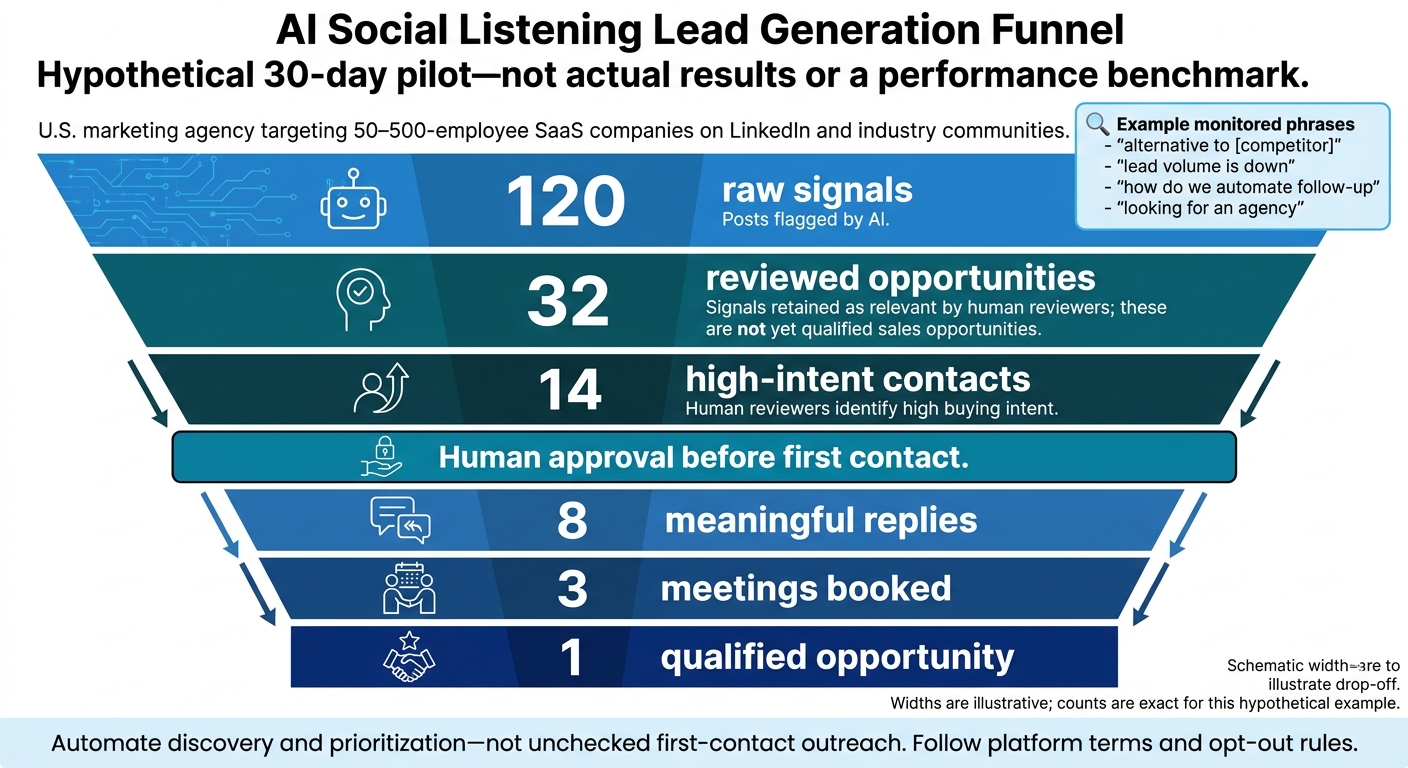
Example Funnel
The hypothetical pilot below shows how signals can move through the workflow.
Hypothetical 30-day pilot: A U.S. marketing agency serving 50–500-employee SaaS companies monitors LinkedIn and industry communities for “alternative to [competitor],” “lead volume is down,” “how do we automate follow-up,” and “looking for an agency.” Over 30 days, AI flags 120 posts; human reviewers retain 32 as relevant, 14 as high intent, and the agency receives 8 meaningful replies, books 3 meetings, and creates 1 qualified opportunity.
Limit automation to discovery, classification, prioritization, and draft preparation. Require human approval for first contact, sensitive topics, unclear sentiment, competitor complaints, and messages that could seem personalized using private or inferred information.[11][14]
Follow platform terms, retention limits, and opt-out rules.[17][18][19] Send unclear signals to a person for review instead of triggering outreach automatically.
Best for: B2B agencies with a clear ICP whose buyers post publicly to ask for recommendations, compare vendors, consider switching, or describe a time-bound problem.
Avoid: sarcasm, stale posts, irrelevant keyword matches, privacy violations, biased scoring, and mass outreach. Likes, shares, follows, and generic comments show awareness - not purchase intent.[12][13][16] High-intent replies move into inbox qualification.
When social listening spots a buyer showing intent, use chat or inbox tools to qualify the lead before handing the conversation to a person.
3. Qualify Social Leads With AI Chatbots and Inbox Tools
Required Prospect Data
Collect the company type, service need, timeline, budget range, decision-maker role, and meeting availability. Ask one question at a time, and offer multiple-choice budget ranges when possible. You don’t need a full personal profile.[22][24][25]
AI Workflow and Human Review
Answer the prospect’s immediate question first. Then ask 3–4 qualifying questions, score fit and intent against predefined rules, and route the lead to chat, a nurture flow, a sales task, or a meeting link. Give priority to clear needs, confirmed budgets, and near-term timelines.[20][21][24]
Give the sales rep the answers, score, summary, and any open questions. Tell the prospect who will respond and when. If they book a meeting, confirm it in their local time zone.
For agencies, SalesLabel can bring branded replies, scoring, inbox management, follow-ups, and meeting booking into one workflow. Set up these tools around your qualification rules. Use the AI score to guide routing - not to make the final sales decision. Feed the prospect’s answers into lead scoring and follow-up rules.
Lead Generation Results
Track qualified-conversation rate, median handoff time, meeting show rate, and complaint or opt-out volume.[26]
Automation Limits and Safeguards
Have a person handle objections, sensitive questions, unusual requests, and high-value opportunities. Escalate after two bot failures or whenever the prospect asks for a person.
Disclose automation, use approved answers, and log routing decisions and human overrides. Review conversations weekly for incorrect answers and missed handoffs.[22][23][24][25] Use the collected answers to refine downstream scoring and follow-up.
4. Score Leads and Automate Relevant Follow-Ups
Required Prospect Data
Once a lead is qualified, score it to decide how soon to follow up and how much automation to allow. Give fit, intent, and engagement the most weight. Use recency and conversation history to adjust the score. Lower scores as engagement goes stale, and log each change.
AI Workflow and Human Review
Use clear score bands, not a black-box score:
80–100: Human follow-up within one business day.
50–79: Education-only follow-up.
0–49: Pause automation until a new permitted signal appears.
Give the representative the evidence behind the score - not just the number. Use these bands to route each lead to its next follow-up path.
SalesLabel supports real-time lead scoring, AI replies, inbox management, automated follow-ups, and meeting booking. Before using it, verify supported platforms, permissions, and review controls.[7][29]
Lead Generation Results
Measure how each score band performs, not just total lead volume. Track qualified-lead rate by score band, meeting-booking rate, show rate, conversion to customer, and revenue per campaign.
Where possible, compare automated and human-reviewed paths using the same audience and time period. Check each score band for false positives and false negatives.
Automation Limits and Safeguards
Trigger follow-ups only from permitted signals: a reply, comment, direct inquiry, approved form submission, or consented tracked click. Don't use profile-visitor identities unless the platform explicitly provides an identifiable, permitted signal and follow-up is expected.[27][28]
Set channel-specific limits before launch. For example, allow no more than one automated social follow-up every three to five business days, and no more than three or four total follow-ups without a response.
Stop automation immediately when someone replies, opts out, asks not to be contacted, books a meeting, or becomes an existing customer or active opportunity. Suppress bounces, complaints, duplicates, and any client do-not-contact records.
Send messages during local hours in the recipient's U.S. time zone, and avoid overnight delivery. Require human approval for messages that could create legal, reputational, or contractual risk.
5. Improve Social Campaigns With AI Analytics
Required Prospect Data
Link audience segments, content formats, message variants, posting times, and campaign IDs to platform, website, and CRM records.
In the CRM, track job role, company size, response rates, meeting bookings, and qualification outcomes. Pass UTM parameters into the CRM so AI can identify what drives qualified conversations and revenue - not just clicks.[30][31][32]
AI Workflow and Human Review
Ask AI to compare segments, formats, messages, and posting windows. Keep paid, organic, retargeting, and employee-amplified results separate, and test one major variable at a time.[37][38]
Before making changes, have a person check the campaign content, audience definitions, CRM data, and sales feedback. Then use verified results to refine targeting, rewrite the CTA, or adjust follow-up timing.
Lead Generation Results
Focus on qualified meetings over clicks. Target an increase from 3 to 5 qualified meetings per 1,000 impressions, with a cost per qualified meeting below $150.
Hypothetical agency example: In a 30-day LinkedIn campaign for software clients, an agency tests format while holding the audience, budget, landing page, and CTA constant, investigating AI-flagged customer-story videos generating fewer clicks but more booked meetings than educational carousels among operations leaders. Targets only, not results.
Before launch, define a qualified meeting and set sample-size requirements. Extend the test if the results remain uncertain. Review each lead cohort again after sales has had time to qualify it, rather than judging campaign quality on early bookings alone.[31][32][35]
Automation Limits and Safeguards
Treat AI findings as hypotheses when samples are small, audiences overlap, or CRM data is incomplete. Document attribution gaps caused by cross-device activity, private sharing, offline conversations, cookie limits, and multiple touchpoints. Attributed conversions don’t prove causation.[30][33][34]
Require human approval before changing audiences, budgets, or messaging. Log the evidence, decision, and test outcome.[36]
Use these results to compare the five strategies below.
Compare the 5 Strategies: Benefits and Limits
Choose by data readiness and review capacity - not deployment speed alone. Start with a workflow that fits the data you already have. Assess AI for reliability, transparency, bias, privacy, and accountability. Then measure your chosen workflow against meetings and revenue.
Strategy
Speed to deploy
Personalization
Data requirements
Human review
Scale potential
Main limit
AI-personalized outreach
Fast after copy and rules approval
High with accurate prospect data
Moderate: segments, approved copy, contact and consent rules
Approve drafts and review exceptions
High across repeatable campaigns
Inaccurate personalization can feel intrusive or irrelevant
AI social listening
Fast with approved sources and signal rules
High with clear context
Moderate to high: keywords, sources, taxonomy, historical examples
Scores can be biased, outdated, or hard to explain
AI analytics
Slower because data must be connected and tested
Indirect, through targeting and content decisions
High: consistent events, campaign tags, CRM links, revenue data
Validate recommendations and attribution
Moderate to high across channels
Incomplete attribution can hide revenue drivers
Have limited historical data? Start with outreach or listening. Outreach fits when you have verified prospect details and someone to approve drafts. Listening makes sense when relevant public conversations are available but your prospect list is thin.
Choose inbox qualification when incoming message volume is high and questions repeat. It fits teams whose immediate bottleneck is handling routine inquiries.
Reliable CRM outcomes make scoring an option for prioritizing leads. Consistent, connected campaign tracking makes analytics an option for guiding spend. Neither fills gaps in missing records.
For a small team, limit the first workflow to one platform, one audience, and one conversion event, with a named review owner. Once that workflow is stable, use the next section’s metrics to check whether it produces qualified leads.
Measure Qualified Leads, Meetings, and Revenue
Once you choose a workflow, measure the outcomes that matter: qualified leads, meetings, and revenue from social media. Define qualification before you start. Record fit, contact, need, timing, and decision-maker criteria in CRM fields. Apply the same MQL/SQL rules across every channel.[42] Before reporting, remove duplicates using contact ID, business email, and phone. Send uncertain matches for human review, and keep the surviving record’s activity history, ownership, qualification data, and opportunities.[39][44]
Track qualified conversations, qualified leads, booked meetings, held meetings, opportunities, and closed-won revenue by client, social channel, campaign, and reporting period. Track cancellations, no-shows, and reschedules separately. A rescheduled meeting isn't a new booking.
Calculate show rate = held meetings ÷ booked meetings × 100, using bookings scheduled to take place during the reporting period. Store each prospect’s time zone and display appointments in that zone, such as:
Cost per qualified lead = total software, media, and allocated labor costs ÷ qualified leads.
Cost per booked meeting = total software, media, and allocated labor costs ÷ booked meetings.[41]
Give revenue credit only once, following a documented attribution policy. Record UTM parameters, campaign IDs, CRM source fields, and booking data. Report sourced revenue separately from influenced revenue.[41] Before increasing spend or accepting AI recommendations, have a person check classifications, duplicates, date filters, and closed-won revenue.[40][43]
Conclusion: Start With 1 Measurable Workflow
Use AI to turn social engagement into qualified conversations - not just more activity. Bring the five strategies into one workflow, with human review at every handoff. Now, choose where to start.
Start with one audience, one channel, and one conversion goal. Test the workflow in a 30-day pilot before expanding. In week one, define your audience, offer, qualification rules, privacy requirements, and success metrics. In week two, prepare approved templates and routing rules. Then run a limited test and log outcomes daily.
Assign one owner to approve, override, or stop automation.[4] This person should review replies about pricing, complaints, sensitive information, or complex deals. Keep data collection limited, honor opt-outs, and check access permissions. Measure results through qualified leads, meetings, and revenue - not activity alone.
Expand only when lead quality holds up. Before scaling, review false positives, complaints, brand consistency, privacy compliance, meeting-to-opportunity rate, and revenue.
FAQs
What budget do I need for an AI lead generation pilot?
Your pilot budget should cover software, data, messaging, setup and oversight labor, and analytics. Compare the total operating cost per qualified meeting with what you currently spend using a manual process.
SalesLabel plans start at $799 per month, versus $5,000–$8,000 per month for a typical manual SDR seat. Run the pilot with one to three clients for 4–6 weeks to check that the workflow runs reliably before scaling.
How can I spot bias in AI lead scores?
Compare predicted rankings with actual conversions. If high-scoring leads stall while lower-scoring leads close, your scoring logic may rest on faulty assumptions. Check CRM data for missing or inconsistent entries that could distort how the AI reads prospect intent.
Track meeting bookings and opportunity creation by score range to see which segments get more attention than their results warrant. Review the model quarterly to check for changes in how well it performs and make adjustments.
How do I measure ROI when sales take months?
Track leading indicators instead of waiting for closed-won revenue. Before launch, set consistent attribution windows - for example, 30 days for replies and bookings and 90 days for opportunities. Monitor qualified-opportunity rates and meeting conversions.
To calculate cost per qualified meeting, divide total pilot costs - including software, data, messaging, labor, and delivery - by the number of qualified meetings booked. Report unresolved leads separately so newer cohorts aren’t penalized for having less time to convert.
 Lead