Explainable AI that separates fit and intent, automates routing, suppression, and human handoffs; pilot before scaling.
SalesLabel Team
Growth Expert • 28/10/2026
Share:
Vous cherchez une solution clé en main ?
SalesLabel automatise votre prospection de A à Z — l’IA trouve les prospects, envoie des messages personnalisés et réserve des rendez-vous sous votre marque.
I use AI lead scoring to decide who gets contacted, when, and by whom - not just to assign points. My starting rule: check fit first, rank buying signals second, and stop outreach on opt-outs or failed requirements.
Research covering about 1.25 million leads linked contact within one hour to nearly 7x higher odds of qualification than waiting another hour - not a guaranteed conversion lift.
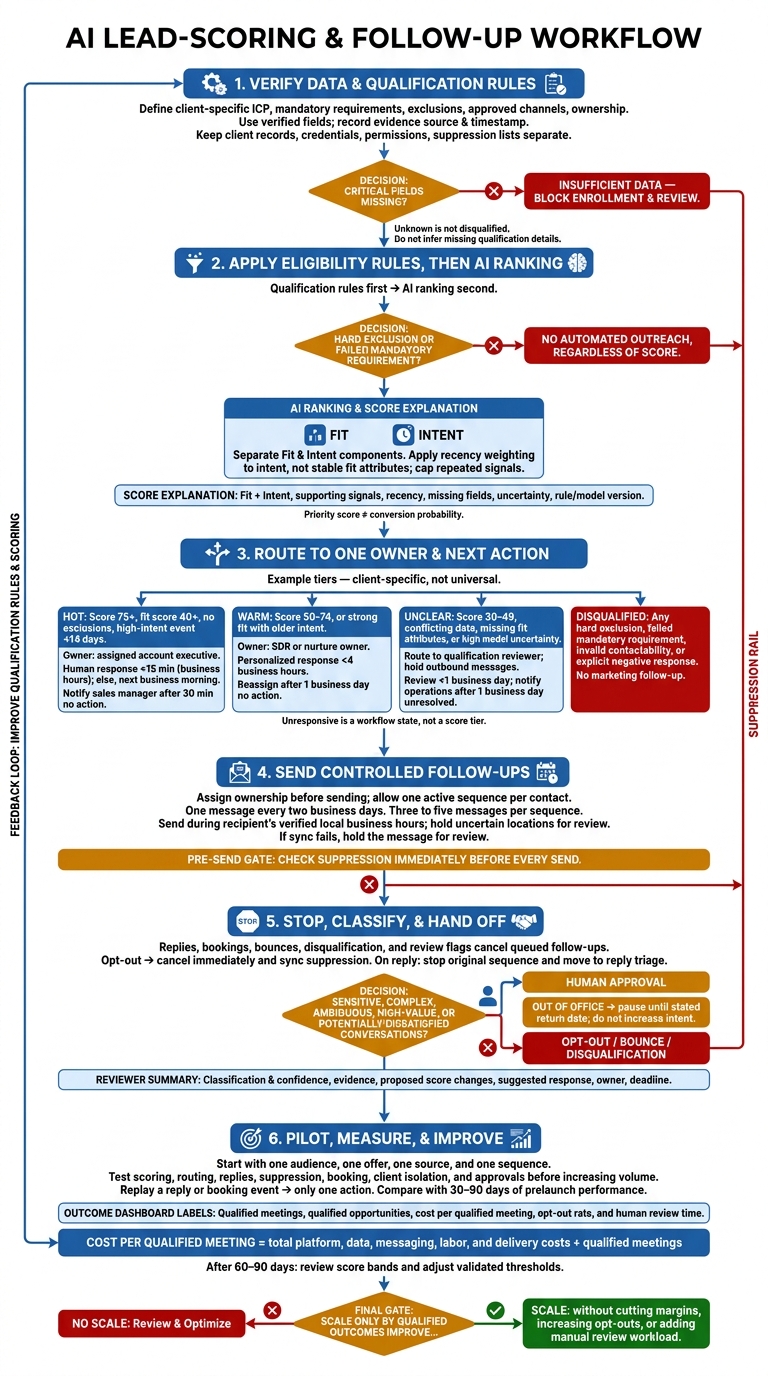
Here’s the workflow I’d build:
Verify the data: Set client-specific rules, check sources, and keep client records separate.
Explain each score: Separate fit from intent, weigh recent signals, and flag missing information.
Control follow-ups: Assign owners, limit sends, and stop queued messages when someone replies or books.
Keep people involved: Send unclear or sensitive replies for human review.
Test before scaling: Check scoring, routing, access, and suppression in a small pilot, including any SalesLabel setup.
My measure of success is qualified opportunities and cost, not message volume. I’d expand only after the workflow meets its targets for results, spending, and <u>human review time</u>.
AI Lead Scoring and Follow-Up Automation Workflow
Prepare Lead Data and Qualification Rules
Create a client-specific qualification brief covering the ICP, target industries, company size range, service area, buyer roles, disqualifiers, required CRM fields, scoring criteria, approved channels, and handoff rules.
Limit CRM and inbox access to the records and fields needed for the work. Assign ownership of high-priority leads, name who approves AI-generated messages, and specify when automation must stop. Use these rules to keep the scoring model limited to approved, reliable fields.
Define Client Fit and Buying Signals
Make the ideal customer profile (ICP) measurable. Specify target industries, employee or revenue ranges, service locations, buyer roles, and service needs. Separate must-have requirements from preferences and exclusions.
Record need, authority, budget, and timeline in separate fields. Unknown is not disqualified. Do not let AI fill gaps by inference.
Label each piece of evidence as observed, self-reported, enriched, or inferred, and include its source and timestamp.
A pricing request is direct interest; a relevant job opening still needs verification.
Treat opens and clicks as weak signals that need context. Privacy features and security scanners can distort engagement data.
Clean and Protect Lead Data
Require a verified contact ID, approved channel, company, domain, role, location, source, owner, last-verified date, and consent or lawful-basis status where required.
Standardize fields and check for duplicates at both the contact and account levels. Send uncertain matches for review. Record the enrichment source and date, verify uncertain values, and set a recheck date for stale records. Missing critical fields should block workflow enrollment and trigger an “insufficient data” status.
Keep each client’s records, credentials, permissions, scoring rules, templates, and suppression lists separate. Test that one client’s user cannot retrieve another client’s contacts. Set retention periods and restrict exports before launch.
Check suppression immediately before every send, and stop on opt-outs or hard bounces. For U.S. commercial email - including B2B messages - the FTC requires honoring opt-outs within 10 business days and keeping the opt-out mechanism working for at least 30 days after sending.[3] Treat that deadline as a legal maximum, not a reason to delay suppression. These controls define which fields the scoring model can trust.
sbb-itb-a781ab9
Build an Explainable AI Lead-Scoring Model
Use two layers: qualification rules first, AI ranking second. Hard exclusions always override the score. AI ranks eligible leads based on historical outcomes and changing behavioral signals. If you have limited history, start with auditable rules until you have enough outcomes to test the model.[4]
Feed the model only verified fields from the qualification brief. Its score should guide who gets contacted, how soon, and by whom.
Keep a priority score separate from a conversion probability. Priority points set the order for attention. A probability estimates a specific outcome within a set period. Only call it a probability after checking calibration.
For example, a model might estimate the probability of a qualified meeting within 30 days. Leads assigned a 20% likelihood should convert at approximately 20% over time.
Score Fit, Intent, and Recency
Track fit and intent separately. Apply recency weighting to intent - not stable fit attributes. Group related activity by signal type, then cap each type’s contribution so repeat visits don’t inflate the score.[5][6]
The weights below are examples only.
Signal
Data source
Scoring effect
Recommended action
Industry and company-size match
CRM or enrichment provider
+25 fit points
Verify stale records
Decision-maker job function
CRM, form, or enrichment
+15 fit points
Prioritize matching seniority and role
Pricing-page visit
Website analytics
+12 intent points, decaying after 14 days
Move to a warm sequence; cap repeat visits.
Demo or meeting request
Form, calendar, or CRM
+30 intent points
Route promptly to an owner with the event timestamp
Direct positive reply
Inbox or engagement platform
+25 intent points
Classify the reply and route to a person immediately.
Opt-out or failed mandatory requirement
Suppression records or qualification rules
Hard exclusion
Block automated outreach regardless of score
Use score tiers to set routing, follow-up timing, and human handoff rules.
Set Lead Tiers and Explain Scores
Set thresholds around the client’s sales process and the volume of leads reviewers can handle. Give each tier a clear follow-up path.
Example tiers:
Hot: Score of 75 or higher, fit score of at least 40, no exclusions, and a high-intent event within 14 days.
Warm: Score of 50–74, or strong fit with older intent.
Unclear: Score of 30–49, conflicting data, missing fit attributes, or high model uncertainty.
Disqualified: Any hard exclusion, failed mandatory requirement, invalid contactability, or explicit negative response.
Beside every decision, show the total score and its fit and intent components, top positive signals, negative signals, recency, missing fields, confidence or uncertainty, and the rule/model version. Let reviewers record why they override a decision.
As outcomes accumulate, compare AI rankings against the rules and validate probabilities on a separate test period. Once validated, the score can drive automated follow-up rules.
Connect Lead Scores to Follow-Up Workflows
Assign Owners and Actions by Lead Tier
Set ownership before sending any message. Start with the client account and named owner, then check territory, time zone, and workload capacity. Record the routing reason in the CRM. Treat response targets as internal SLAs, not promises of results. “Unresponsive” is a workflow state, not a separate score tier.
Tier or state
Owner
Trigger
Response target
Stop condition
Escalation rule
Hot
Assigned account executive
High fit plus a recent buying signal
Human response within 15 minutes during business hours; otherwise, next business morning
Reply, booking, opt-out, disqualification, or review flag
Notify sales manager after 30 minutes without action
Warm
SDR or nurture owner
Good fit with moderate intent or incomplete qualification
Personalized response within 4 business hours
Reply, booking, opt-out, score decline, or sequence limit
Reassign after one business day without action
Review queue
Qualification reviewer
Conflicting data, missing fields, or uncertain classification
Review within one business day; hold outbound messages
Review resolved
Notify operations after one business day unresolved
Unresponsive
Automated nurture owner
Acceptable fit, no recent engagement
Three to five messages over 14–21 days
Reply, booking, opt-out, bounce, disqualification, or sequence completion
Send to review rather than continue indefinitely
Disqualified / suppressed
No outreach owner
Failed fit criteria, invalid data, opt-out, or legal restriction
No marketing follow-up
Remains suppressed
Require documented approval before reactivation
Next, lock the sync rules so a lead can't enter multiple workflows. Use one source of truth per field to sync ownership, score evidence, lifecycle stage, sequence ID, last-touch time, reply status, booking status, opt-out status, and suppression reason.
Use idempotency keys and one active-sequence flag per contact to keep routing tied to clean, current records. If sync fails, hold the message for review. Once routing and sync rules are set, define message content and sending limits.
Personalize Messages and Limit Follow-Ups
Build messages only from verified fields and conversation history. Ask one question about a missing qualification detail. Never invent a budget, technology stack, or business problem.
Limit automation to one message every two business days and three to five messages per sequence, with no parallel sequences. Apply recipient, domain, campaign, and agency caps. Send during the recipient’s verified local business hours, using daylight-saving-aware time zones. Hold contacts with uncertain locations for review.
Replies, bookings, bounces, disqualification, and review flags must cancel queued follow-ups. Cancel them immediately on opt-out, and sync suppression status immediately across every campaign and client workspace.
When a lead replies, move from outbound automation to triage.
Classify Replies and Set Human Handoffs
Classify each reply as interested or requesting information, objection, not now, referral, wrong person, out of office, opt-out, disqualified, hostile, ambiguous, or sensitive/high-risk.
A reply is a signal, not proof of intent. Out-of-office messages should pause outreach until the stated return date without increasing intent.
AI can summarize the thread and suggest field updates or next actions. But sensitive, complex, ambiguous, high-value, or potentially dissatisfied conversations need human approval.
Give the reviewer the thread summary, classification and confidence, supporting evidence, proposed changes to fit, intent, and recency, suggested response, owner, and deadline. Keep the original sequence stopped while the appropriate reply workflow takes over.[4][7]
Test one client workflow from start to finish: lead scoring, routing, replies, suppression, and booking. SalesLabel lists lead sourcing, enrichment, outreach, follow-ups, real-time scoring, inbox management, and meeting booking among its functions. Verify each separately.[12][10]The goal is to prove the workflow works correctly, not just check off features.
Set Up and Test One Client Workflow
Use the rules from the previous section to test one live client setup. Start with one client, one ICP, and one offer. Document the industry, company size, geography, job titles, tech signals, exclusions, and qualification criteria. Enrich a small sample and check the added fields. Confirm that the scoring model keeps fit and intent separate, and connect only confirmed outreach and booking integrations.[8][12]
Before increasing volume, test edge cases involving fit, data quality, reply types, opt-outs, and booking events. Replay a reply or booking event to check that it triggers only one action. Confirm that routing, suppression, and stop conditions work as intended.
Keep a timestamped log comparing expected and actual behavior. Require human approval until these checks pass. If the system doesn't show the reasoning behind a score, record it manually. Once the workflow passes, test branding and client access controls separately.
Set Agency Branding and Client Boundaries
Treat branding as a delivery-layer check. Set up the custom domain, logo, and brand colors for the client-facing portal.[9][10] Then test client-role access to leads, inboxes, scores, campaigns, and reports. Confirm that each client can access only its own data and approval path. Branding does not prove data isolation.
Build the service around targeting, data checks, approval, inbox monitoring, qualification, booking, and reporting. Specify prospect volume, the response-time SLA, human-review responsibilities, and a monthly scoring review in the agreement. Results depend on data quality, setup, offer relevance, and outreach - not branding.[10][11]
Measure and Improve Results
After the pilot, compare the workflow with 30–90 days of prelaunch performance. Use a randomized holdout or phased rollout when possible. Measure qualified outcomes per eligible lead - not total outreach. Report unresolved leads separately so newer cohorts aren't penalized for having less time to convert. Use these results to decide whether to scale the workflow or adjust it.
Track Conversions and Agency Costs
Define your metrics before launch:
Response rate by tier
Time to first follow-up
Score-to-meeting conversion
Meeting-show rate
Qualified-opportunity rate
Opt-out rate
Keep each metric's attribution window consistent across cohorts.
For example, use 30 days for replies and bookings and 90 days for opportunities.
Break down results by client, source, campaign, workflow, and tier. Add platform, data, messaging, labor, and delivery costs into one cost total. Divide that total by qualified meetings to calculate cost per qualified meeting. Subtract it from workflow revenue to calculate client margin.
Verify hours saved through time tracking. Scale only when qualified outcomes improve without cutting margins, increasing opt-outs, or adding to the manual review workload.
Review Scores and Adjust Thresholds
After 60–90 days, compare score bands with attended meetings, qualified opportunities, and revenue. Check false positives, false negatives, duplicates, and unexplained score changes. Don't count unresolved leads as failures.
Test models on held-out or later-period data, using only information available when each lead was scored. Record the old and new thresholds, the approval owner, and the effective date.
Symptom
Diagnostic check
Corrective action
Response rate rises, but qualified opportunities fall
Compare reply categories and sales acceptance by source and tier
Tighten qualification and send ambiguous replies to human review
High-scoring leads rarely book meetings
Inspect stale signals, duplicates, and score explanations
Correct inputs and reweight signals before changing thresholds
Low-scoring leads later become opportunities
Review missed early signals and sales-cycle length
Add valid early signals and validate on later-period data
Follow-up timing varies
Check trigger times, queue delays, and business-hour rules
Normalize time zones and repair routing delays
Scores change without lead activity
Compare enrichment updates, field mappings, and model versions
Freeze automatic changes until inputs are stable
Opted-out leads receive messages
Trace suppression across channels and workflows
Pause affected automation and block re-entry
Cost per qualified meeting rises
Separate data, messaging, labor, and rework costs
Remove low-yield sources and unnecessary touches
Enforce Outreach and Approval Rules
Keep compliance checks within the same workflow. Commercial emails must include accurate sender information, a clear opt-out mechanism, and a valid physical postal address.[3][17] Honor opt-outs within 10 business days, and keep the opt-out mechanism active for at least 30 days after sending.[3] Suppress opt-out requests immediately across affected workflows.
For calls and texts, review TCPA, National Do Not Call, and applicable state rules with qualified legal counsel. FCC guidance generally requires consent for autodialed or prerecorded calls and texts to wireless numbers. Commercial automated texts and certain advertising calls require written consent.[13][14]
Follow platform policies and document any action that requires approval. Retain audit histories for score inputs, model versions, messages, approvals, sends, and suppression events.[15][16]
Conclusion: Start With One Measurable Workflow
Start with verified, compliant data. Use AI to prioritize leads - not replace judgment. Build explainable scores around fit and intent, give each tier one next step, and measure the results.
To scale safely, begin with one audience, one offer, one source, and one sequence that connects scoring, routing, reply handling, and booking. Document the baseline, test window, owner, and success thresholds. Track qualified meetings, opportunities, and cost - not message volume.
For agencies using SalesLabel, test the workflow in a sandbox before launch. Check score explanations, client data separation, integrations, approvals, suppression, audit history, and pause controls.[12][10] Expand only after the workflow meets conversion, cost, and human-review targets.
FAQs
How much historical data do I need for AI lead scoring?
Predictive lead scoring models typically use 12 to 24 months of historical win and loss data to spot patterns tied to closed deals. Real-time scoring adds current behavior to the mix. It instantly adjusts scores based on page views, form submissions, or CRM updates, helping keep outreach relevant.
Review your model quarterly and recalibrate its weights with the latest win and loss data to account for model drift.
How can I detect bias in my lead scores?
Compare predicted lead rankings with actual conversions [1]. If high-scoring leads stall while lower-scoring leads consistently close, your scoring logic probably rests on faulty assumptions [1].
Check CRM data for inconsistent entries or missing values that could skew how AI reads prospect intent [2]. Regularly review opportunity creation rates and meetings booked by score range to see which segments get too much attention - or too little [1].
How do I set realistic targets for my first pilot?
Run a 30-day calibration with 1–2 clients. Set targets using campaigns with the same audience, channel, and qualification rules. Define what counts as a qualified meeting based on each client’s ideal customer profile (ICP) and success criteria.
Track positive replies, qualified meetings booked, opt-outs/unsubscribes, manual review time, and cost per qualified meeting (total pilot cost ÷ qualified meetings booked).
Scale only if meeting quality and workflow reliability remain stable while costs and review time decrease [1].