Ultimate Guide to AI Campaign Lifecycle Automation
Let AI automate repeat campaign tasks, keep people on high-risk decisions, and measure only metrics tied to pipeline and revenue.
SalesLabel Team
Growth Expert • 09/09/2026
Share:
Vous cherchez une solution clé en main ?
SalesLabel automatise votre prospection de A à Z — l’IA trouve les prospects, envoie des messages personnalisés et réserve des rendez-vous sous votre marque.
Ultimate Guide to AI Campaign Lifecycle Automation
AI can cut campaign work, improve reply rates, and move leads to sales in seconds - but only if your data, rules, and handoff steps are set up right.
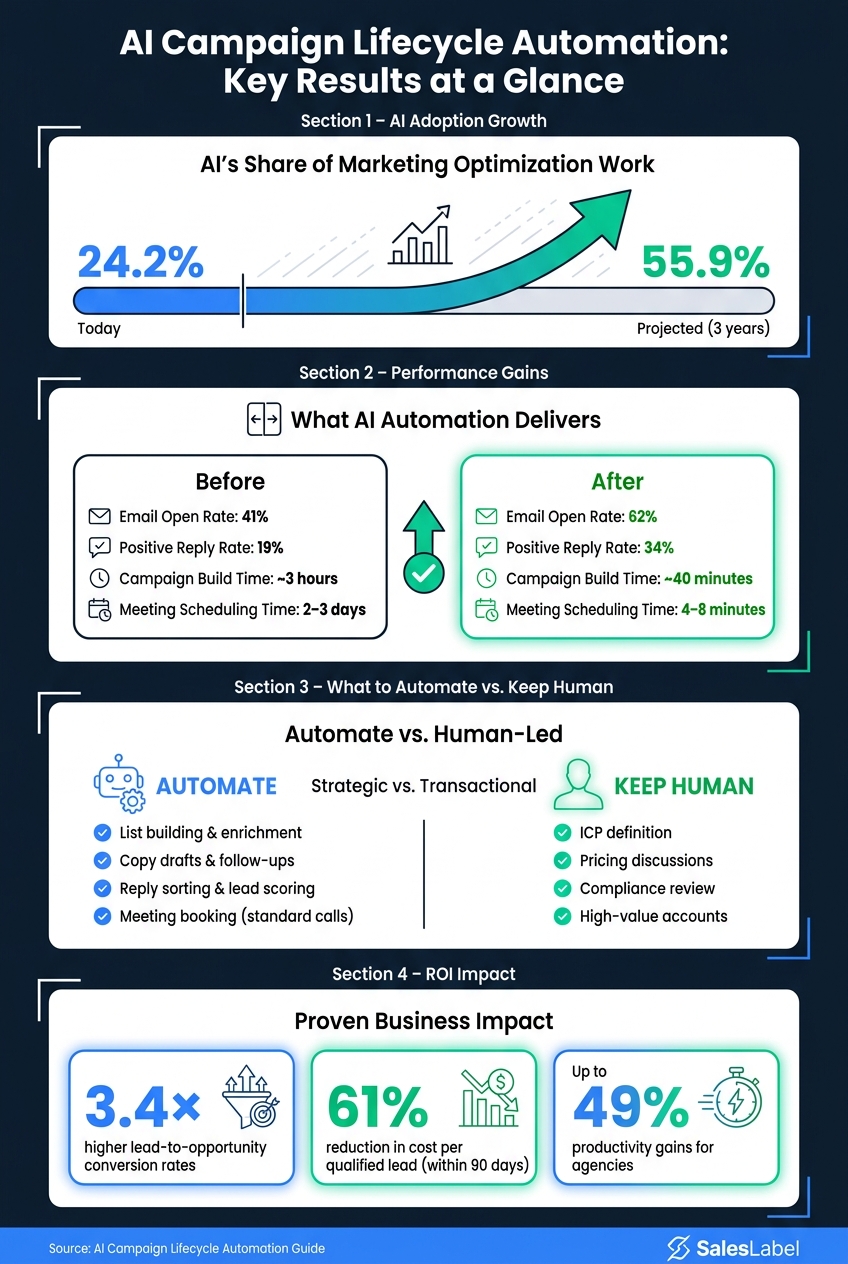
If I had to sum up this guide in plain English, it would be this: automate the repeat work, keep people on high-risk decisions, and track the numbers that tie to pipeline and revenue. The article shows that AI is already doing 24.2% of marketing optimization work, with that share projected to reach 55.9% within three years. It also points to gains like email open rates moving from 41% to 62%, positive replies from 19% to 34%, and meeting scheduling dropping from 2–3 days to 4–8 minutes.
Here’s the full picture at a glance:
What to automate first: list building, enrichment, copy drafts, follow-ups, reply sorting, lead scoring, and meeting booking for standard calls
What should stay human-led: ICP definition, pricing talk, compliance review, tough objections, high-value accounts, and regulated offers
What has to be in place first: clean CRM fields, event tracking, inbox labels, attribution rules, SPF/DKIM/DMARC, routing logic, and connected tools
What to measure: reply rate, positive reply rate, meetings booked, speed to lead, cost per acquisition, pipeline influenced, and closed-won revenue
What can break automation fast: weak data, poor deliverability, unclear lifecycle stages, bad routing, and no review rules
How to roll it out: start with one pilot, run it for 4–6 weeks, compare it to manual work, then expand by campaign type or client
The core idea is simple: AI campaign lifecycle automation is not just about sending more messages. It’s about building a system that reacts to behavior, routes leads based on fit and intent, and gives clients clear reporting tied to results. Done well, it can help agencies handle more accounts without letting quality slip.
AI Campaign Automation: Before vs. After Key Performance Metrics
How Publicis Sapient transformed its marketing organization
sbb-itb-a781ab9
How the AI Campaign Lifecycle Works
Each stage reacts to live prospect behavior, not a preset timeline. If someone visits your pricing page, the next step should look different from the path for someone who opened an email and stopped there. That signal-based logic is what makes AI automation feel different from a basic drip campaign.
Audience Setup and Triggering
Audience setup pulls from four inputs: firmographic, behavioral, intent, and engagement data. Use dynamic enrollment so only ICP-fit leads with live signals enter the sequence. For example, that could mean an enterprise healthcare prospect who engaged with a related asset in the last 7 days.
Exclusion rules matter just as much. Before the first message goes out, suppress:
competitors
unsubscribes
incomplete profiles
students
Once the right leads are in, both timing and message content can shift on their own.
Outreach, Follow-Up, and Scheduling
AI writes messages based on role, company, industry, and the trigger signal. A prospect who downloaded a case study should get a different opener than someone who visited the pricing page twice in one week. In controlled testing, AI-powered cold email personalization increased open rates from 41% to 62% and positive replies from 19% to 34%, while cutting campaign time from about 3 hours to 40 minutes[6].
Follow-up timing changes the same way. A contact who clicks but doesn’t reply gets a lighter second touch. Someone who visits a high-intent page gets a more direct message or a meeting prompt. If they reply, AI sorts the response as positive, neutral, objection, or unsubscribe and routes it from there.
The sequence doesn’t keep marching through a fixed 7-touch plan. It can pause, redirect, or escalate based on engagement. When a meeting gets booked, outreach stops and the lead moves into scheduling. AI-driven scheduling can shrink the time from expressed interest to a confirmed meeting from 2–3 days with manual coordination to 4–8 minutes[3].
If a prospect responds, the workflow moves from outreach into qualification.
Scoring, Handoff, and Reporting
Lead scoring runs on fit and intent. Keeping those separate matters. A perfect-fit lead who has gone quiet needs a different move than a high-intent lead who sits a bit outside the target profile.
Scores update in real time as new signals come in. If engagement fades, score decay lowers the lead’s score and sends it back to nurture [4][5].
Handoff happens when a lead crosses the fit-and-intent threshold. At that point, the system changes the lifecycle stage, alerts the right rep, and sends a full signal summary: pages visited, assets consumed, reply history, and campaign touchpoints. That helps agencies send only qualified leads to sales instead of crowding the queue with weak fits.
Reporting should track:
reply rate
positive reply rate
meeting-booked rate
speed to lead
pipeline influenced
Break those numbers out by trigger type, audience segment, and handoff path.
Those results depend on clean inputs and connected systems, which the next section covers.
Data and Systems You Need Before Automating
Automation makes good systems move faster. It also makes bad data spread faster.
That’s why you need your records, tracking, and system connections in good shape before you build a single workflow. These inputs drive audience triggers, personalization, scoring, handoff, and reporting. And they’re what make the workflows in the next section actually work.
Core Data Inputs
Every contact in your CRM should have these fields filled in:
Valid work email
Standardized first and last name
Company and role or job title
Industry
Clearly defined lifecycle stage
If a record is missing any of those fields, enrich it or keep it out of automation until it’s fixed. Otherwise, you’re asking workflows to run on shaky inputs.
Your CRM data is only part of the picture. Automation also depends on four event groups:
Website and product events: page views, sign-ups, key in-app milestones
Conversion events: form submissions, demo requests, trial activations, purchases, upgrades - each timestamped and tied to a source and campaign ID
Connected inbox data: sales and outreach inboxes labeled by positive reply, objection, wrong-person reply, and referral, so AI can interpret responses and adjust sequences
Channel and campaign influence should stay attached to every lead. In plain English: don’t let attribution get messy halfway through the funnel. Use consistent UTM naming and campaign IDs so reporting stays trustworthy.
Operational Readiness Checklist
Clean data by itself won’t save you. The systems moving that data also need to be set up the right way before automation runs at scale.
Readiness Area
What to Confirm Before Launch
Domain authentication
SPF, DKIM, and DMARC records verified on all sending domains
Inbox setup
Dedicated outreach inboxes are configured, warmed gradually, and logged back to the CRM
Campaigns, sequences, templates, field names, and event names follow a consistent format (e.g., Email_MidMarketSaaS_DemoOffer_2026-09)
Lifecycle stage definitions
Each stage has explicit entry and exit criteria mapped to CRM fields
Routing rules
Assignment logic based on territory, company size, or intent is documented and testable
System integrations
CRM, outreach tool, website analytics, inbox, scheduling tool, and reporting layers are connected and syncing bidirectionally
One more thing: routing speed matters. A lot. Automation case studies have reported lead handoff from intake to sales notification in under 30 seconds[8].
It also helps to document a data dictionary for each key field, its accepted values, and the person who owns it.
With the data cleaned up and the systems connected, you can start automating the workflows that matter most first.
The Highest-Value AI Workflows to Automate First
Start with the workflows that move prospects from first touch to booked meeting the fastest. These are usually the first automation layers agencies can track and judge fast.
Personalization and Send Optimization
For most agencies, the best place to start is AI-written, context-aware copy paired with multichannel send-time optimization. Well-built cold email sequences usually get 1%–3% reply rates, while multichannel sequences can reach 12%–25%.[9]
Use AI to create persona-based variants, then adjust send time and channel order based on recipient behavior and time zone.
In the background, run behavioral segmentation and suppression. Put contacts into groups based on engagement state, such as:
new prospect
engaged but not yet responded
warm reply
disengaged
Each group should get a different cadence. Suppression rules should also pause outreach on their own for unsubscribed contacts, bounced addresses, negative replies, and anyone who has reached your outreach cap. That helps protect deliverability and keeps fatigue in check.
Once outreach is live, speed becomes the next edge.
Lead Management and Conversion Workflows
As replies start coming in, the bottleneck usually shifts to speed and classification. When replies are handled within 24 hours, about 25–40% of responding prospects can turn into a booked meeting.[9]
AI reply classification helps sort incoming messages into labels like positive, neutral, objection, out of office, or negative. You can also add sub-tags such as pricing question or timeline. From there, the workflow branches out. Positive replies can trigger follow-ups with open times in the prospect's local time zone. Soft objections can get a pre-approved response. More complicated cases can be passed to a human rep.
Meeting booking can be automated too. AI can spot interest in a reply, ask a few light qualification questions when needed, suggest specific time windows, and share a branded booking link. Keep fully automated booking to standard discovery calls. High-value or more involved accounts should still go through human approval.
For agencies putting this stack under one brand, one platform can handle the full path from source to booking.
SalesLabel supports sourcing, enrichment, outreach, reply handling, scoring, and booking under the agency's brand, with Autopilot for standard conversations and human approval for higher-stakes ones.
Once these workflows are proven, move them into a phased rollout and measurement plan. Next comes the rollout framework for testing these workflows without hurting deliverability or quality.
A Practical Implementation Framework
Move from manual campaigns to AI automation in stages. Don't flip the whole system at once. Use a pilot to prove one workflow first, then scale what works.
Phase 1: Audit and Pilot
Start by mapping your current campaign lifecycle from start to finish. Write down each step: how you define audiences, run outreach, manage follow-ups, and hand leads to sales. For every step, track weekly hours, error points, and where inconsistency shows up. Then focus on repetitive, high-volume, rules-based tasks like list building, personalization, and follow-up.[13][14]
Choose one high-value workflow for the pilot, such as personalization, follow-up, or meeting booking. Keep the scope tight: one client or one vertical, 500 to 2,000 contacts, one or two channels, and a 4- to 6-week window. Run it alongside the manual process so you have a clean comparison. Add manual review checkpoints too. For example, a strategist can review the first 50 AI-generated messages before anything is sent. Before launch, confirm that your data is clean, compliance flags are in place, and systems are connected.[10][16]
Set success metrics before the pilot begins. Good options include reply rate, qualified meeting rate, cost per opportunity, average response time, time saved per campaign manager, and fewer errors. A baseline from a recent similar campaign makes it much easier to tell if the pilot is working - or if something needs to change.[2][15] Then use those results to decide what to standardize, where to expand, and what to stop.
Phase 2: Test and Expand
Once the pilot data comes in, break it down by segment. Look at which industries, roles, or message variants did best. Compare AI-assisted results against past manual campaigns, then use that data to fine-tune targeting rules, personalization logic, send-time timing, follow-up cadence, and handoff criteria before scaling further.[11][12]
Next, document the winning workflow as the default operating model. Be clear about what is fully automated, what is AI-assisted, and where a human approval is required before anything moves forward. A simple tiered setup works well:
Auto-send for messages inside a pre-approved sequence
Send-with-approval for new offers or copy changes
Human-only for high-risk accounts
From there, expand step by step. Start with similar campaigns in the same vertical. Then move to more clients with similar data maturity and risk tolerance.[11][12] Agencies using SalesLabel can clone proven workflows across client workspaces and monitor them from one place.[11][12]
Component
Phase 1: Pilot Focus
Phase 2: Expansion Focus
Scope
One client or vertical, one journey, 4–6 weeks
Similar campaigns in the same vertical, then additional clients
Data
Clean records, compliance flags, connected systems
Maintain data quality, tracking, and segmentation as you expand
Automation Level
AI drafts; human approves sends
Tiered rules: auto-send, send-with-approval, or human-only
Success Criteria
Reply rate, qualified meeting rate, time saved
Reply rate, meetings booked, conversion to pipeline, time saved
Process
Audit manual steps, set review checkpoints
Assign ownership, enforce guardrails
Once the workflow is stable, put controls, testing, and performance tracking around it.
Controls, Testing, and Performance Measurement
Once campaigns are live, control matters more than launch speed.
Guardrails and Quality Control
After an AI campaign goes live, the main risk is no longer a bad launch. It’s slow drift over time. Without guardrails, messaging can slide off-brand, miss compliance rules, or muddy your reporting.
Start with message rules. Set clear brand voice standards, approved claims, and a short list of actions the system cannot take. That can include changing unsubscribe language, quoting pricing, or making legal claims. Use role-based permissions so only the right strategists can publish campaigns or edit core templates. If a workflow is new or the change carries more risk, require senior sign-off before anything goes live.
Deliverability is a required guardrail. Keep a close eye on bounce rate, spam complaints, and send volume. If a campaign crosses your set limits, pause it.
For inbox monitoring, pair automated intent triage with human spot checks. Review 5%–10% of AI-handled threads each week. Any reply that mentions budget, timeline, or purchase intent should go to a human within 2 business hours. SalesLabel can auto-tag intent and route sales-ready threads to humans, while leaving negotiations and more involved discussions manual.
Metrics That Actually Matter
Don’t track a pile of numbers just because you can. Track the ones that show campaign quality, efficiency, and revenue impact.
Metric
What It Measures
Reporting Format
Conversion rate
% of contacted leads that become qualified opportunities or customers
% (e.g., 3.2%)
Meetings booked
Scheduled demos, discovery calls, or consultations
Always timestamp campaign reports in U.S. format, like 07/15/2026–08/15/2026. Then break results out by channel, segment, and campaign type. That extra detail matters when a client starts asking tough questions about ROI.
Use these metrics to decide what to test next.
Optimization Loops for Ongoing Improvement
After measurement comes adjustment.
Set up a monthly AI performance review. Bring strategists, sales, and operations together, look at the numbers, and decide what to change. Keep it short. Keep it monthly.
For targeting, find the segments that drive the best pipeline value and conversion rates. Then tighten your ICP filters, such as firmographics, technology stack, and intent signals.
For messaging, run A/B tests on subject lines, value propositions, and CTAs. Feed the winners into your AI templates and cut the weak versions.
For follow-up timing, test cadence spacing. Then optimize for positive replies and meetings booked, not opens.
For lead scoring, add more weight to behaviors that point to a likely purchase, like multiple website visits, a certain content download, or a reply that mentions budget. Lower scores for non-engaged or negative responses, and trigger a different sequence or a pause.
Over time, these loops build on each other. Better targeting gives you better data. Better data sharpens scoring. Sharper scoring improves handoff quality. And that helps close more deals.
Common Risks, Limits, and Tool Tradeoffs
For agencies, the goal is scale without losing client trust. Once the right controls are in place, the next call is simple: where should automation stop?
Where Automation Breaks Down
Automation tends to fall apart fast when data quality starts to slip.
A few thresholds are worth tracking closely. Duplicate rates above 2% on active contacts, verified emails below 85% of contacts in active sequences, or firmographic completeness below 80% on target accounts are all warning signs. [17] Once total data error rates climb past 15%, segmentation and scoring become shaky. Push past 25%, and automation is more likely to hurt results than help them. [18]
List quality issues usually show up in deliverability first. Then they hit reply quality.
Poor oversight makes both worse. If AI can publish, send, or route campaigns without approval rules, bad messages, weak claims, and wrong routing can slip through. The riskiest workflows are first-touch outreach, high-value accounts, pricing discussions, regulated industries, and account escalation.
Choosing the Right Level of Automation
A simple way to think about it: sort tasks by the cost of failure, then automate only as far as the risk still feels manageable. The right level depends on failure cost, data quality, and what the client expects.
Keep a task human-led if a mistake would be hard to explain to a client. That matters even more with small but high-value audiences, like enterprise prospects or strategic partners. In those cases, one bad message can cost more than the time you saved.
For agencies comparing tools, the tradeoffs usually come down to flexibility versus control and speed versus governance. All-in-one CRM and marketing automation platforms can give you unified timelines and make team alignment easier, but they can also get complex and expensive on advanced tiers. [22][23] Sales engagement and multichannel outreach tools help with sequencing and personalization at scale, though they often bring more setup work, deliverability risk, and workflow limits. [19][20][21]
Choose the tool that matches your workflow, approval process, and data quality.
Conclusion: Building a Scalable Agency Growth Engine with AI
Once the controls and metrics are in place, the next move is simple: turn automation into the way the agency runs. AI campaign lifecycle automation isn't one tool or a one-off setup. It's a working system that gets better as you refine each part of it: targeting, outreach, scoring, handoff, and reporting. Agencies that treat it like a system tend to see more capacity, steadier results, and stronger client relationships over time.
The data supports that. AI marketing agents set up to manage the full lead lifecycle have driven 3.4× higher lead-to-opportunity conversion rates and cut cost per qualified lead by 61% within 90 days.[24] On the efficiency side, agencies using AI report productivity gains of up to 49%.[1]
That kind of lift changes the math. Account managers who used to handle 8-10 campaigns at once can often manage 20-25 without slipping on quality. More room means more clients served, better margins, and a clearer path to higher retainers. When agencies package this work as recurring services, it starts to look a lot more like steady monthly revenue than project-by-project hustle.
Client impact often shows up most clearly in consistency and reporting. Standardized scoring, sequencing, and handoff logic means every client gets the same level of care, no matter who's running the account. That's a big deal. Every stage needs to follow the same rules, from targeting all the way through reporting. SalesLabel gives agencies a way to run that system under their own brand, and that kind of consistency helps support renewals.
The move from ad-hoc execution to a systems-first model is, at its core, an organizational shift. It means treating workflows like repeatable operating playbooks, putting time into documentation, and getting the team to trust data instead of gut feel. Agencies that make that shift build growth through connected automation in a way that can scale, repeat, and hold up over time.
FAQs
How do I know which campaign tasks to automate first?
Start with the manual, repetitive work that eats up the most admin time, like lead sourcing, scoring, and outreach. Focus first on AI-driven workflows for lead capture and personalized messaging. That’s usually where agencies see fast time savings.
SalesLabel can help automate these early-stage tasks, including real-time lead scoring and meeting bookings, so your agency can scale outreach without adding headcount.
What data problems should I fix before using AI automation?
Before you use AI automation, define your Ideal Customer Profile (ICP) first. That gives your sourcing and scoring a clear target, so they stay accurate instead of drifting.
It also helps to check your data against conversion metrics and use lead enrichment. That way, your system works with complete, usable details for personalized outreach.
These basics set your campaigns up for efficient automated scaling through SalesLabel.
When should AI hand a lead to a human rep?
AI should pass a lead to a human rep when the prospect hits a qualification threshold based on real-time lead scoring.
With SalesLabel handling lead sourcing, enrichment, and outreach, human reps can spend their time on qualified, high-intent leads that need a personal touch to close. Meanwhile, earlier-stage prospects can stay in automated nurture flows until they’re ready for a sales conversation.