Struggling with low response rates in your cold outreach? You’re not alone - average reply rates in 2026 hover around 3.43%, but top performers achieve 10% or more. The secret? Focus on better deliverability, targeting, and personalization. Here’s how you can improve your results:
Fix Deliverability Issues: Set up SPF, DKIM, and DMARC to avoid spam folders. Aim for an inbox placement rate above 80%.
Use Smaller, Targeted Lists: Campaigns with fewer than 50 recipients perform 3x better than mass emails.
Personalize Emails: Reference specific company events or job challenges. Personalized subject lines can boost replies by 30%.
Follow Up Consistently: Most responses come after 4–7 emails. A single follow-up can increase replies by 65.8%.
Leverage AI Tools: Automate lead scoring, email drafting, and follow-up sequences to save time and scale efficiently.
How to Get Better Cold Email Reply Rates (Proven Data Tips)
How to Analyze Your Campaign Performance
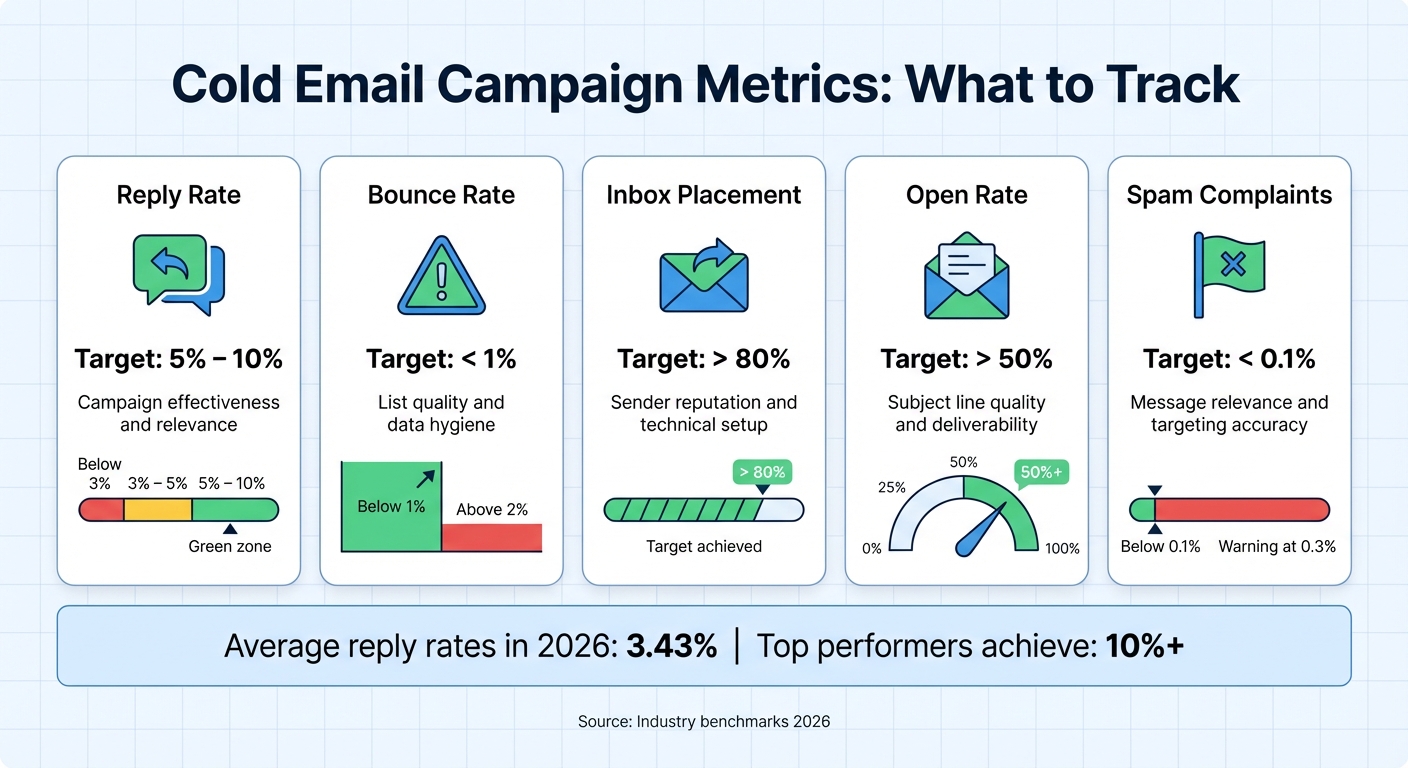
Cold Email Campaign Metrics: Target Benchmarks and Performance Indicators
To address low response rates effectively, you need to determine exactly where your campaign is falling short. Evaluate every stage of the funnel - from email delivery to engagement - to identify problem areas. Campaign metrics are your diagnostic tools. For example, if emails are being delivered but not opened, the issue might lie in unappealing subject lines or emails landing in spam folders. On the other hand, strong open rates paired with low reply rates suggest that your messaging or offer may need adjustment. These insights help you make targeted improvements.
Which Metrics to Track
Your reply rate is the key indicator of your campaign's success - aim for a range of 5% to 10% [2]. If your reply rate falls below 3%, it could signal issues with targeting, messaging, or email deliverability. Keep an eye on your bounce rate, ensuring it stays under 1% [5]. A bounce rate above 2% often points to outdated or low-quality email lists, which can harm your sender reputation.
Another critical metric is your inbox placement rate, particularly as open rates have become less reliable due to privacy features like Apple's Mail Privacy Protection. Strive for at least 80% of your emails to land in the primary inbox instead of being filtered into promotions or spam folders [5]. Tools like Google Postmaster Tools can provide valuable insights into your email delivery performance [7].
Also, monitor your open-to-reply ratio. For instance, if your open rate is 50% but your reply rate is only 2%, it indicates that your email copy or call-to-action isn't connecting with your audience. Lastly, keep spam complaints below 0.1% [5], as complaints exceeding 0.3% can lead to email providers throttling your sending capabilities.
In addition to monitoring these metrics, setting up proper email authentication is essential for achieving high deliverability.
Email Authentication Setup Checklist
Email authentication plays a crucial role in ensuring your emails land in inboxes. Without proper SPF, DKIM, and DMARC configurations, email providers may flag your messages as spam. Gabriel Martínez, Founder of Reachflow, emphasizes this point:
"Deliverability is the foundation of cold email success. You can have the best copy, the strongest offer, and perfect timing - but if your emails never reach the inbox, none of that matters" [6].
Here’s a quick guide to setting up email authentication:
SPF (Sender Policy Framework): This authorizes specific servers to send emails on your behalf. Add a DNS TXT record listing all services, such as Google Workspace or your outreach tool, that send emails for your domain [7].
DKIM (DomainKeys Identified Mail): Add a public key to your DNS to verify that emails remain unchanged during transit [7].
DMARC (Domain-based Message Authentication, Reporting, and Conformance): Start with a p=none policy to monitor authentication results without blocking emails. Once SPF and DKIM are aligned, transition to p=quarantine (sending failures to spam) and eventually to p=reject (blocking failures entirely) [9][7]. Ensure the domain in your "From" address matches the domains validated by SPF and DKIM to avoid DMARC failures [9][8].
For added protection, consider using a subdomain like outreach.yourbrand.com for your campaigns. This isolates your outreach reputation from your primary domain, preventing a single campaign issue from affecting your entire email infrastructure[9][10].
How to Personalize Your Outreach Messages
Generic emails often fail to make an impact. In fact, 71% of cold emails are ignored because they don’t address the recipient’s specific needs or situation[15]. When you take the time to understand your prospect’s challenges and tailor your message, you immediately separate yourself from the flood of cookie-cutter emails in their inbox.
Personalization isn’t just about dropping in someone’s name. It’s about referencing company milestones, addressing role-specific challenges, and timing your outreach to align with what’s happening in the prospect’s world. And the results are clear: personalized emails drive 6× higher transaction rates[13]. They can also elevate reply rates from the industry norm of 0.5–2% to an impressive 6–20%+[11]. This deeper, more thoughtful approach to personalization fosters stronger engagement and lays the groundwork for tailored communication.
While manual research for personalization can take up to 20 minutes per prospect, AI tools can cut that down to under 2 minutes[11].
Using Company Events and Job-Specific Challenges
To create messages that resonate, tie your outreach to specific company events or challenges tied to the prospect’s role. Start your email with a line that shows you’ve done your homework. Mention triggers like recent funding announcements, executive hires, product launches, or market expansions. For example, instead of a generic “I see you work in sales,” try something like, “Congrats on hiring a new VP of Sales - exciting to see the team growing!”
Addressing job-specific pain points is another powerful tactic. For example, a Head of Sales may be focused on scaling efficiency and improving pipeline predictability, while an SDR manager might care more about lead quality and team productivity. Craft your message to reflect these unique concerns. A great example: In 2025, Lifesize used Adobe’s AI tools to segment cold email campaigns by lead intent and behavior, resulting in a 57% increase in open rates and an 82% boost in response rates[14].
You can also build credibility by referencing a prospect’s content, such as their LinkedIn posts, podcast appearances, or blog articles. This shows you’ve done your research and are genuinely interested in their work.
AI-Powered Lead Data Enrichment
Scaling personalized outreach doesn’t have to mean sacrificing quality. Tools like SalesLabel use AI to gather data from LinkedIn, company websites, news articles, and social media to create detailed prospect profiles in seconds. By pulling from multiple data providers, the tool ensures accurate, verified email addresses, as well as technographic and firmographic insights.
Once the data is ready, the AI generates custom opening lines, value propositions, and calls-to-action based on the prospect’s context and your campaign objectives. It even uses spin syntax like {Hi|Hello|Hey} to vary your messages, helping maintain deliverability and protect your sender reputation.
All of this is done under your agency’s branding. With a white-labeled interface featuring your logo and domain, you can deliver a seamless experience to clients while scaling your outreach efforts. This allows you to send anywhere from 100 to over 1,000 personalized emails per week without adding extra staff. By adding a human touch, you’ll only need 15–30 seconds to review and fine-tune AI-generated lines before hitting send.
Writing Better Subject Lines and Calls-to-Action
Boosting response rates starts with sharp, relevant messaging - especially in your subject line and CTA. Why? Because your subject line is your first impression. Between 43% and 47% of recipients decide to open emails based on the subject line alone, while poorly written ones cause 69% of emails to be flagged as spam [30,33,35]. You’ve got just a few words to make it count.
The most effective subject lines don’t try to be overly clever or cryptic. Instead, they mimic the tone of a message from a colleague: short, clear, and to the point. Aim for 6–10 words and keep it under 50 characters to ensure it displays fully on mobile devices [33,34]. For example, question-based subject lines like "Question about [Goal]?" can boost open rates by 21% to 32% in B2B outreach [16]. Personalization also makes a difference, with tailored subject lines being 26% to 50% more likely to be opened compared to generic ones [33,35].
"Think of your email as the movie, and the subject line as the movie trailer. There's no way you can create the latter without the former."
– Jason Bay, Founder, Outbound Squad[17]
Avoid tricks like fake "Re:" or "Fwd:" tags - they harm your reputation and break trust [33,39]. Skip hype words, emojis, and all-caps. Instead, write your email body first and craft a subject line that accurately reflects the content inside.
Subject Line Writing Tips
Write subject lines that sound like internal messages. Use lowercase, avoid exclamation points, and skip adding the recipient's name - it can trigger spam filters and feels outdated [17].
Reference specific events, challenges, or timely moments. Examples include "Congrats on the [Event]" or "[Metric] for [Company]."
Test question-based hooks like "Question about scaling your SDR team?" These often perform better than vague lines that leave readers guessing [16].
Data-driven testing can significantly improve results. For example, in 2025, CB Insights used A/B/C testing for newsletter subject lines by sending variations to 6.67% of their audience. After identifying the top performer within an hour, they sent the winning version to the rest of their subscribers, generating at least $625,000 in additional revenue[3].
When testing, change one variable at a time (e.g., question vs. statement) and track results based on meetings booked, not just open rates [33,5]. AI-generated subject lines can improve open rates by up to 22%[15], but always add a personal touch to maintain relevance.
Once your subject lines are solid, shift your focus to crafting effective CTAs.
How to Write Clear CTAs
CTAs that ask interest-based questions like "Open to seeing how it works?" have a 30% success rate, while open-ended questions like "What are your thoughts on this?" only see 13% success [17]. Why? Simplicity. Yes-or-no questions are quick and easy to answer, while open-ended ones require more effort.
Keep it simple: limit your email to one low-effort CTA [36,4]. Examples include "Worth a 10-minute chat?" or "Is [goal] a priority right now?" These are easy for the recipient to process and respond to.
A/B test your CTAs as well. Compare direct asks (e.g., "Free next week?") with softer, interest-based questions to see which approach gets better results [18]. Track the impact on meetings booked and double down on what works. Also, don’t underestimate the power of your first follow-up email - it can increase response rates by 50%[3]. Pair your refined CTAs with thoughtful follow-ups to maximize engagement.
sbb-itb-a781ab9
Creating Follow-Up Email Sequences
Most sales reps give up too soon. About 70% stop after sending just one email, even though 80% of B2B sales require at least five follow-up touches to close[23]. Here's the kicker: 55% of cold email responses come from follow-ups, not the initial email[22]. Sending just one additional email can boost your response rate by 22%[21]. Meanwhile, campaigns with 4–7 emails see three times the responses compared to those with only 1–3 emails[19]. Bottom line? The follow-up is where the magic happens.
Building a Multi-Touch Follow-Up Schedule
A successful follow-up sequence needs three things: proper timing, variety, and value. Start with a 2–3 day gap before your first follow-up, wait 4–5 days for the second, and then space subsequent emails at least a week apart[21]. Each email should bring something fresh to the table - don’t just "check in." Instead, share a case study, an industry trend, or a useful resource[21].
Take Nervure, for example. In 2024, this tech company revamped its outreach strategy. Led by founder Himanshu, their small SDR team of three shifted from a basic 1–2 touch approach to a more structured 6-touch follow-up sequence. By the fifth email, they were sharing relevant case studies, which led to a 347% jump in qualified meetings and $300,000 in additional pipeline revenue within a single quarter. One Fortune 500 client, worth $90,000 annually, only responded after the fifth follow-up[23].
Here’s a framework for a multi-touch sequence:
Day 0: Start with an introductory email that highlights a clear problem and solution.
Day 2–3: Send a short "bump" email with a quick value-add.
Day 5–7: Include social proof, like a client testimonial or success story.
Day 10–14: Share an educational resource or address a new pain point.
Day 20+: Send a "breakup" email acknowledging that the timing might not be right. Interestingly, these emails often generate a 33% response rate[23] - people hate to miss out.
Keep all follow-ups in the same email thread as the original message[20]. Stick to one simple, low-pressure call-to-action per email, such as, "Would you be open to a 15-minute chat next Tuesday?" This makes it easy for recipients to respond[20]. With a clear plan, automating your follow-up process ensures consistency and saves time.
Manual follow-ups are prone to errors and missed opportunities. Automation solves this by taking care of the "who, when, and how" of your follow-up schedule[23]. Tools like SalesLabel make it easy to execute a multi-touch strategy without lifting a finger. The platform handles email, LinkedIn, and phone touchpoints, ensuring consistent outreach across channels[19]. Plus, it uses real-time lead scoring based on engagement signals - like email opens, link clicks, or website visits - to prioritize prospects with the highest intent[24].
SalesLabel also pauses sequences automatically when a prospect replies[24]. If someone clicks a specific link, the system can shift them into a different follow-up track. Its AI even categorizes responses into buckets like "Interested", "Not Interested", or "Out of Office", so your team knows where to focus their efforts[5]. To maximize deliverability, SalesLabel schedules emails based on the recipient’s local timezone and sends them in small, natural-looking batches (about 8 emails per hour). Daily sends are capped at around 100 emails per inbox, keeping hard bounce rates below 2%[22][25].
Using AI for Lead Scoring and Response Management
AI-driven lead scoring uses historical data to rank leads based on their likelihood to close, replacing the guesswork and outdated spreadsheets many teams still rely on. These systems analyze a mix of factors, including job titles, company size, tech stack, and behavioral signals like email clicks, website visits, and content downloads[53,54].
What sets AI apart is its ability to adapt. Unlike traditional models that require constant manual updates, AI systems automatically adjust scoring weights as new sales data comes in. The results? Companies using AI for lead scoring report a 20% boost in sales team productivity, with 98% noting better lead prioritization[4]. Businesses that regularly retrain their models see even better outcomes, with a 17% increase in lead conversion rates[26].
Real-time scoring takes this a step further. When a prospect downloads a case study or visits a pricing page, AI can instantly flag them as a "hot lead", enabling sales reps to act while interest is at its peak[53,6]. As Florin Tatulea, Head of Sales Development at Common Room, explains:
"Intent data is powerful but only useful if you reach out immediately. In most cases, it's not useful if you reach out 2 weeks later and this is where a lot of teams get screwed."[4]
How Real-Time Lead Scoring Works
AI lead scoring uses three data layers to pinpoint the most promising leads:
Demographic and firmographic data: Identifies whether a prospect fits your ideal customer profile (ICP) and has the budget to buy.
Behavioral data: Tracks actions like email opens, link clicks, and website visits to gauge interest.
AI analysis: Balances these factors to distinguish between "fit" (matches your ICP) and "engagement" (shows active interest), ensuring your team focuses on leads ready to convert[53,54].
The impact can be dramatic. For example, DocuSign used predictive lead scoring with Lattice over two months, achieving a 38% increase in Sales Qualified Leads and a 22x ROI. Similarly, Grammarly saw a 30% jump in customer conversions, and HES FinTech cut qualification time, leading to a 40% boost in loan approvals[4].
To replicate these results, it's crucial to integrate your CRM, marketing automation, and website analytics so the AI has a unified data flow[26]. Setting clear thresholds for "hot", "warm", and "cold" leads also helps, as does creating a feedback loop where sales reps rate lead quality to refine predictions[53,54].
Once leads are scored, the next challenge is managing their responses efficiently.
AI-Generated Replies and Inbox Organization
Handling lead replies can quickly become overwhelming. SalesLabel's AI reply agent automates this process by categorizing messages as "Interested", "Not Interested", "Out of Office", or "Requires More Information." This eliminates the need for manual sorting and allows the AI to draft personalized responses in under 5 minutes, keeping the momentum alive[8,56].
There are two ways to manage AI-drafted replies:
Human-in-the-Loop Mode: AI drafts are sent to Slack for quick team approval.
Autopilot Mode: Replies are sent automatically based on preset rules.
Starting with Human-in-the-Loop mode for at least two weeks is recommended to fine-tune accuracy before switching to Autopilot[2,21,56].
SalesLabel’s Unibox simplifies inbox management by consolidating all client replies into a single dashboard. Agencies managing multiple inboxes can filter messages by campaign, tag replies for follow-up, and assign tasks to team members. This system can cut reply triage time by 80%, and responding to leads within the critical 5-minute window significantly boosts demo booking rates[8,21,56].
SalesLabel Pricing Plans
SalesLabel offers three pricing tiers tailored to agencies at different growth phases:
Plan
Price
Best For
Key Features
Starter
$799/mo
Testing the system
Full AI prospecting system, white-label branding, AI replies, setup help, email support (up to 30 LinkedIn accounts)
Growth
$1,279/mo
Most agencies start here
Everything in Starter, a Chrome extension with your brand, priority support, and a monthly strategy call (up to 99 LinkedIn accounts)
Scale
$1,999/mo
Full support included
Everything in Growth, unlimited accounts, a documentation center, bi-weekly strategy calls, and a dedicated success manager
Every plan includes AI-powered lead sourcing, personalized outreach, automated follow-ups, real-time lead scoring, and inbox management, all under your agency's branding. The Growth plan is a popular choice for agencies looking to scale, while the Scale plan provides unlimited accounts and hands-on support with a dedicated success manager.
Testing and Scaling Your Campaigns
Running A/B Tests and Reviewing Data
A/B testing takes the guesswork out of improving your email campaigns. By testing one variable at a time - like subject lines, email copy, or CTAs - you can pinpoint exactly what drives better performance. Stick to a test group of 200–300 recipients for 3–7 days to gather reliable data [58,62,63]. Testing multiple changes at once? That muddies the waters, making it impossible to know what actually worked.
For example, test subject lines to boost open rates, tweak email copy to encourage replies, or refine CTAs to secure more meetings [58,59]. Data-backed adjustments like these can lead to impressive results: conversion rates can climb by 49%, while ROI can jump by 83% [27]. If one version underperforms, archive it and test something new. Personalized subject lines alone can increase open rates by 20% to 30%, while simplifying to a single CTA can skyrocket clicks by 371% [63,61,2].
Take time to review your metrics every week, breaking them down by segment to identify what’s driving meetings and positive responses [63,2]. Agency founder Will Butler emphasizes the importance of regular campaign reviews:
"Friday is a great day to take a look at our campaigns and make adjustments to messaging. Cold email is not just a set it and forget it system, there are always pivots needing to be made." [1]
These regular insights make it easier to scale your outreach while keeping deliverability intact.
Setting Up Processes for Team Growth
Scaling your email campaigns isn’t just about sending more - it’s about doing it strategically. Start by spreading email volume across multiple authenticated accounts. Keep each account limited to 30–50 emails per day to avoid deliverability issues [11,64,8]. When onboarding new inboxes, take it slow: begin with 5–10 emails per day and gradually increase over four weeks [64,8].
Tools like SalesLabel’s unified inbox (Unibox) can make scaling smoother. With Unibox, you can consolidate replies from all sending accounts into one dashboard. This setup helps ensure no leads slip through the cracks while keeping response times fast. Features like campaign filtering, task assignment, and reply tagging eliminate the hassle of juggling multiple logins [8,21,56]. Plus, SalesLabel’s flat-fee pricing lets you add unlimited team members and accounts without worrying about extra costs [2,8].
Pay close attention to deliverability metrics during this process. If inbox placement drops below 80% or hard bounce rates exceed 1%, pause and address the issues before continuing to scale [8,57,2]. Keep spam complaints under 0.3% to safeguard your sender reputation [2,8]. Scaling isn’t about brute force - it’s about clean data, gradual increases, and streamlined management across multiple accounts.
Conclusion: Improving Response Rates with SalesLabel
By leveraging strategies like AI-driven personalization, thorough testing, and automation, agencies can achieve 10–25% reply rates, far surpassing the typical 1–5% industry average [12]. The key lies in sending fewer, highly personalized emails that feel authentic, rather than relying on large, impersonal email blasts.
SalesLabel makes this process scalable by taking care of the time-consuming tasks. Its AI dives deep into prospect data - like LinkedIn activity, company updates, or funding milestones - to craft personalized icebreakers that go beyond basic name-dropping. It also preps new accounts over a 30-day period to ensure emails land in recipients' primary inboxes. With access to a database of over 450 million leads and waterfall enrichment, SalesLabel helps keep bounce rates below 1%, while enabling you to create hyper-targeted micro-lists based on specific buying signals.
The platform doesn’t just stop at tailored outreach. It simplifies follow-up processes with multi-touch sequences that adjust based on how prospects engage. Its AI Reply Agent categorizes incoming responses - whether they’re positive, objections, or out-of-office emails - and drafts tailored replies within minutes. These automated workflows reduce triage time by as much as 80%, giving your team more bandwidth to focus on closing deals.
SalesLabel’s flat-fee pricing model is designed for flexibility. Starting at $799/month, agencies can test the platform with unlimited team members and email accounts. As you grow, advanced plans are available to support higher volumes, all while maintaining safe distribution and allowing for rigorous testing. Plus, the platform operates under your own branding, offering a seamless and scalable outreach solution.
Cold email success requires constant refinement. With tools like SalesLabel and a commitment to improving your approach, you can transform low response rates into a steady stream of qualified meetings.
FAQs
What can I do to make sure my cold emails reach the primary inbox?
To help your cold emails reach the primary inbox, it's important to follow email deliverability best practices. Start by setting up SPF, DKIM, and DMARC authentication - these protocols help email providers recognize your messages as trustworthy. Keep your email list in good shape by removing invalid or inactive addresses, aiming to keep your bounce rate under 0.5%. Also, steer clear of spammy phrases or stuffing emails with too many links, as these can trigger spam filters.
Regularly test where your emails land to catch and fix any issues early. Adding a personal touch to your emails and sending them from a verified domain can further enhance your credibility and improve their chances of landing in the primary inbox.
How does AI help improve response rates in cold outreach?
AI brings a new level of efficiency to cold outreach by automating and fine-tuning critical parts of the process. One standout feature is its ability to deliver personalized messages at scale. Instead of generic emails, AI crafts tailored content that feels relevant to each recipient, leading to better engagement and higher response rates.
AI also analyzes recipient data to determine the best times to send messages. This timing optimization can significantly improve both open rates and the chances of getting a reply.
Another advantage is automated follow-ups. AI handles these seamlessly, ensuring consistent communication without requiring constant manual input. It even verifies contact details to improve deliverability and minimize the risk of emails being flagged as spam. In short, AI simplifies targeting, timing, and messaging, making cold outreach campaigns more effective and less time-consuming.
How many times should I follow up if I don’t get a response to my cold outreach?
It’s often suggested to follow up 3 to 5 times to improve your chances of receiving a response. Research indicates that reaching out multiple times can greatly enhance engagement rates.
When crafting your follow-ups, leave a few days between messages and aim to provide something new or helpful each time, rather than simply restating your initial point. Tailor each follow-up to address the recipient’s specific needs or challenges, showing that your outreach is sincere. Thoughtful persistence tends to yield results!