Agency Lead Generation Checklist: 15 Essential Steps
15 practical steps to build a predictable agency lead pipeline: define ICP, optimize pages, create magnets, use AI for sourcing, and automate outreach.
SalesLabel Team
Growth Expert • 1/30/2026
Share:
Looking for a done-for-you solution?
SalesLabel automates outbound end-to-end — AI finds prospects, sends personalized messages, and books meetings under your brand.
Agency Lead Generation Checklist: 15 Essential Steps
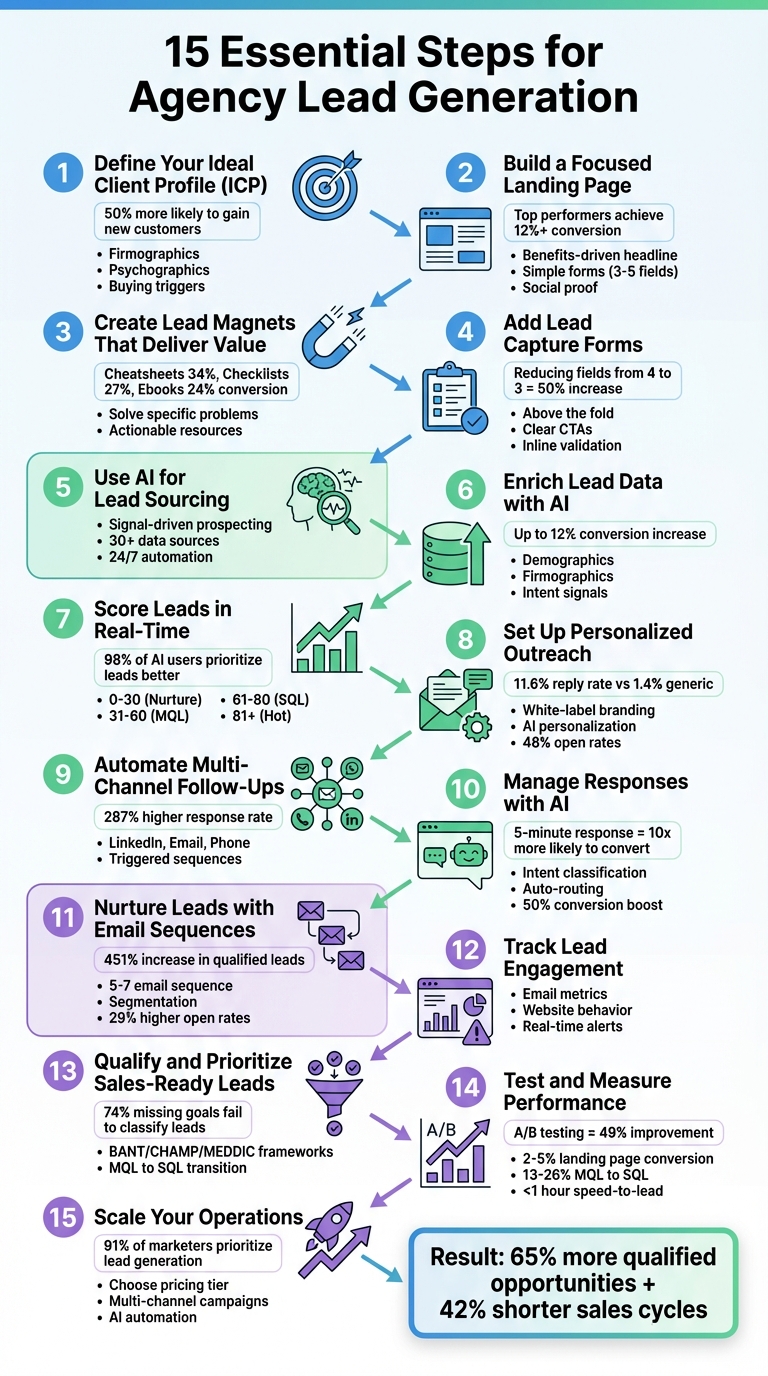
Lead generation is the backbone of any agency's growth. This 15-step checklist is designed to help agencies create a steady, reliable pipeline of high-quality leads, reduce sales cycles, and improve conversion rates. From defining your ideal client profile to leveraging AI tools for prospecting and automating follow-ups, this guide covers every step to streamline your lead generation process. Here’s a quick overview:
Define Your Ideal Client Profile (ICP): Understand your target audience by identifying firmographics, psychographics, and buying triggers.
Optimize Landing Pages: Use clear messaging, fast load times, and simple forms to boost conversions.
Create High-Value Lead Magnets: Offer resources like templates or guides to attract potential clients.
Use AI Tools: Automate lead sourcing, data enrichment, and scoring for efficiency and precision.
Personalize Outreach: Tailor messages to prospects using detailed data and AI-generated insights.
Automate Multi-Channel Follow-Ups: Engage leads through email, LinkedIn, and calls at the right time.
Track and Qualify Leads: Monitor behavior and prioritize prospects based on engagement and readiness to buy.
Test and Improve Campaigns: Continuously refine your strategies by analyzing performance metrics.
Scale with Tools Like SalesLabel: Expand outreach while maintaining quality and efficiency.
This guide offers actionable steps to help agencies build a predictable, scalable pipeline and focus on high-value opportunities.
15-Step Agency Lead Generation Checklist: Complete Process Flow
A Step-by-Step, A-Z Checklist for Building a Successful Agency to $50k/mo+ (Cold Email & Marketing)
Step 1: Define Your Ideal Client Profile
To attract the right leads, start by defining your ideal client profile (ICP). This step sets the groundwork for successful lead generation. Companies with a well-defined ICP are 50% more likely to gain new customers, while data-driven organizations are 23 times more likely to acquire customers compared to those that don't leverage such insights [5].
Your ICP should cover firmographics - details like industry, company size, annual revenue, and location. But don't stop there. Add psychographic details too. What challenges keep your ideal client awake at night? Are they dealing with broken paid media strategies, high customer churn, or inefficient sales processes? Pinpointing these pain points makes your outreach much sharper [1].
"The agencies growing fastest in 2026 aren't generalists - they're specialists. Instead of claiming to serve everyone, they've staked their claim in a specific vertical, service area, or client type." – ALM Corp [1]
A great way to refine your ICP is by interviewing 10–15 of your best clients. Record these conversations to capture the exact language they use to describe their struggles [1]. Additionally, look for buying triggers - events like recent funding rounds (Series A/B), leadership changes, or technology updates. These signals often indicate a company is ready to invest in agency services [1][7].
Don't forget to define your red flags - traits of clients you should avoid. These might include unrealistic budgets or a history of high churn. Knowing who not to work with is just as important as knowing your ideal client [1].
Once your ICP is clearly outlined, you'll be ready to focus on targeting and engaging the leads that align best with your goals.
Step 2: Build a Focused Landing Page
Your landing page is where visitors decide whether to engage further or move on, making it a key tool for turning traffic into leads. Across industries, the median landing page conversion rate is 6.6%, but top-performing pages can achieve 12% or higher[9][11]. To reach those higher numbers, focus on clear messaging, reduce friction, and give visitors a compelling reason to share their contact details. Every element should speak directly to your ideal client.
Start with a benefits-driven headline. Instead of something generic like "Digital Marketing Solutions", opt for a headline that highlights a specific advantage, such as "Scale Your E-commerce Revenue by 300% in 6 Months" [3]. Follow this up with a short, clear subheadline that communicates the offer's value in just a few seconds. Remember, pages that take longer than three seconds to load risk losing about 40% of users[11].
"Your website must function as your hardest-working salesperson, not a digital brochure." – Jay Kang, Author [3]
When it comes to the lead capture form, simplicity is key. For top-of-funnel offers, stick to 3–5 fields (e.g., name, email, company, role) [9][11]. Research shows that reducing a form from four fields to three can nearly double your conversion rate[9]. Place the form above the fold or in a sticky sidebar so it’s always visible without scrolling [9][11]. To make the process smoother, include inline validation with red or green indicators to catch errors as users type [9].
Your lead magnet should offer real value - think SEO checklists, webinar recordings, templates, or guides. Pair this with social proof near your call-to-action button. Adding client logos, testimonials, or trust badges has been shown to boost conversions by up to 34%[11]. Finally, after someone submits the form, redirect them to a "thank you" page. Use this page to outline next steps or offer additional resources to keep them engaged [8].
Step 3: Create Lead Magnets That Deliver Value
A lead magnet is your first step in starting a conversation with potential clients by solving a specific problem they face. Formats like cheatsheets, checklists, and ebooks have proven to be highly effective, converting at 34%, 27%, and 24% respectively [12]. Quick, actionable resources tend to outperform lengthy guides because they offer immediate solutions.
Focus on tackling one pressing challenge your ideal client is dealing with. For instance, you could create something like "ROI Calculator: See Your Potential Revenue Growth in 60 Seconds" or "30-Day Content Calendar Template for E-commerce Brands." Career coach Ashlee Anderson saw impressive results with a simple top-ten list, which converted at 32.4% and eventually brought in $27,000 in passive income from her digital course [12]. Similarly, digital marketing consultant Laurie Wang developed a social media content planner that generated over 3,600 consulting leads between 2020 and 2021 [12]. The key is to frame your offer around an urgent need, then simplify the sign-up process to boost conversions.
"The content that generates quality leads solves specific problems with actionable solutions." – Jay Kang, Author, Swydo [3]
Data shows that shorter lead magnets tend to convert better [12]. Once someone downloads your resource, ensure they receive it immediately via automated email. For example, Shelby DeVore uses highly optimized lead magnets that achieve a landing page conversion rate of over 35% [12].
The title of your lead magnet also plays a big role in its success. Use benefit-driven phrases like "How to..." or "The Complete Guide to..." to clearly communicate value [12]. You don’t need to start from scratch, either - repurpose your best-performing content, such as blog posts, internal presentations, or podcast transcripts, into downloadable PDFs to save time while still delivering value [12].
Step 4: Add Lead Capture Forms
Once you’ve created a strong lead magnet, the next step is to turn visitors into trackable prospects using lead capture forms. The trick is to make these forms simple to fill out while still gathering enough information to qualify your leads.
Start by placing your forms where they’ll get the most attention. Key spots include the homepage hero section, pricing pages, and service pages - ideally above the fold so they’re immediately visible [6][9]. For blog posts, you can embed forms within the content after readers have engaged or use exit-intent pop-ups that appear when someone is about to leave [10][17]. Even small touches, like Mailchimp’s microcopy “We hate spam too” under email fields, can make a big difference - this particular tweak boosted conversions by 7% [9]. These trust-building details help ease concerns and encourage more people to complete your forms.
When designing your forms, keep them as straightforward as possible. Studies show that reducing the number of fields from four to three can increase conversions by nearly 50% [9]. For low-commitment offers, such as a free download, just ask for a name and email. Save more detailed questions for higher-value offers like consultations or free trials. Use clear, action-oriented CTAs like “Get My Free Audit” instead of bland options like “Submit” [9][10]. Also, testing reveals that first-person language in button text (e.g., “Start my trial”) can perform up to 90% better than second-person phrases like “Start your trial” [9].
"Lead capture forms remain the strongest source of explicit intent - prospects knowingly exchange their details for value." – Sushma Shetty, Marketing Expert, LeadSquared [9]
To make the most of your forms, connect them directly to your CRM for seamless lead integration. Use hidden fields to track UTM parameters (source, medium, campaign) so you know exactly where each lead came from [9][15]. Enable autocomplete attributes like autocomplete="email" to make filling out forms faster and easier [9][10]. Inline validation with real-time feedback can also reduce errors and improve the user experience [9].
Finally, avoid frustrating users with intrusive CAPTCHAs. Around 30% of people will abandon a form if they’re forced to complete one [9]. Instead, use a hidden “honeypot” field that bots are likely to fill out, allowing you to filter out spam submissions without disrupting real users. By keeping your forms simple, user-friendly, and connected to your systems, you’ll capture leads more effectively and be ready to follow up right away.
Step 5: Use SalesLabel for AI-Powered Lead Sourcing
Take your lead generation efforts to the next level by automating prospecting with AI. Manual prospecting can be time-consuming and inconsistent, but an automated, branded solution can seamlessly fit into your existing processes while saving resources.
SalesLabel offers a white-label platform that allows you to deploy AI-powered lead generation tools under your own brand. In just three minutes, you can have a system set up with your logo, colors, and domain - all designed to keep your brand front and center for clients [18]. This not only enhances trust but also showcases your use of advanced technology. The platform uses signal-driven prospecting, which prioritizes timing over basic demographic fit. By tracking factors like hiring trends, funding events, tech stack changes, and website behavior, it identifies prospects actively searching for solutions [20]. This ensures your outreach targets leads who are ready to buy, rather than just meeting general criteria.
SalesLabel also enriches lead data from over 30 sources, automatically populating verified emails, phone numbers, and social profiles [20]. This eliminates the need for hours of manual research. Plus, the platform integrates directly with your CRM, centralizing data, tracking prospect behavior, and sending alerts when buying signals are detected [19]. Running 24/7, the AI ensures a steady flow of leads, helping you avoid the feast-or-famine cycles that can disrupt sales pipelines [19].
Another benefit? You can resell the platform as a monthly subscription, creating a recurring revenue stream for your agency [18]. Since the software is free to set up, you can focus on delivering value and determining your own pricing [18]. Start small by sourcing a few dozen high-quality leads, then scale up as you demonstrate results. This system brings consistency and efficiency to lead generation, far surpassing what manual prospecting can achieve [19].
Step 6: Enrich Lead Data with AI
Once you've sourced leads using SalesLabel, the next step is to elevate their potential with detailed, actionable data. Basic contact details like names and email addresses are just the starting point. To truly connect with prospects, you need deeper insights - like their job titles, company size, revenue, technology stack, and even behavioral patterns that hint at buying intent. With AI-powered enrichment, those basic details evolve into comprehensive profiles.
SalesLabel takes every lead and enriches it with a wealth of information: demographic details (such as job title, seniority, and location), firmographic data (industry, employee count, revenue, and tech stack), and intent signals (website visits, content downloads, social media activity, or leadership changes). This enriched data helps you zero in on leads with decision-making power and the budget to act while filtering out low-intent prospects - like those with competitor email domains or those browsing your careers page [25]. These enriched profiles make lead qualification more precise. Companies using enriched data have reported conversion rates increasing by up to 12%, while AI-driven processes can cut manual data entry by as much as 60% [22][23].
AI also introduces a scoring system that prioritizes leads more effectively. For example, it can assign negative scores - like deducting 1,000 points - for low-intent actions, ensuring your team focuses only on high-value opportunities. Streamlining lead capture forms is another benefit; by collecting just a name and email, you can increase form conversions by up to 25%, letting AI automatically fill in the gaps [22].
"AI's predictive abilities enable sales teams to pinpoint and prioritize their most promising leads, then scale timely, tailored outreach that's more likely to convert." – Ian Heinig, Agentic AI Marketer, Sendbird [23]
Finally, AI can alert you to critical triggers like funding announcements or executive hires, creating perfect opportunities for outreach. These notifications ensure your team is always ready to act at the right moment. With clean, enriched data flowing straight into your CRM, your sales team can spend less time on admin and more time building relationships that close deals.
Step 7: Score Leads in Real-Time
Once you've enriched your leads with detailed data, the next step is to rank them instantly based on how well they align with your ideal client profile and how actively they interact with your content. Traditional scoring methods often rely on static criteria, which can waste up to 64% of sales time on leads that aren't a good fit. In contrast, real-time AI-powered scoring prioritizes behavioral data, which is three times more predictive, allowing for immediate lead prioritization [26]. This approach helps you focus on the most promising prospects without delay.
SalesLabel's real-time scoring system evaluates leads using four key data types:
Firmographics: Details like company size, industry, and revenue.
Behavior: Actions such as website visits, email clicks, and resource downloads.
Intent Signals: Indicators like viewing pricing pages or requesting demos.
Recency: How recently a lead engaged with your content.
For instance, a lead who visits your pricing page twice in 24 hours and downloads a case study would score far higher than someone who merely opened an email three months ago. AI-powered triggers dynamically adjust these scores in real-time as leads engage with critical touchpoints.
Leads can then be automatically routed based on their scores:
Negative scoring can also be applied for actions like 90 days of inactivity or visits to pages that don’t drive conversions. This ensures your pipeline remains focused on high-quality opportunities.
"98% of sales teams using AI report that it helps them prioritize which leads to work on first." – Salesforce and Forbes Tech Council [26]
To maintain accuracy, retrain your scoring model weekly using updated "closed-won" and "closed-lost" data. AI models can lose up to 40% of their accuracy within 60 days, so this regular retraining is essential [26][28]. With real-time scoring, your team can respond to high-intent leads in under 90 seconds [26], significantly increasing demo bookings and delivering a 138% ROI compared to 78% without scoring [27].
Step 8: Set Up White-Label Personalized Outreach
Once you've scored your leads and gathered enriched data, it's time to put personalized outreach into action. The secret? Using AI to craft messages tailored to each prospect. AI-personalized outreach delivers an 11.6% reply rate - far better than the 1.4% you’d get from generic templates[7]. The trick lies in creating messages that feel personal while keeping your agency's branding intact.
Start by customizing your outreach platform to reflect your agency's identity. For example, SalesLabel allows you to add your logo, colors, and even set your own pricing in just a few minutes [18]. You can also use your domain or subdomain for all emails and LinkedIn messages, ensuring every interaction looks like it’s coming directly from your agency - not a third-party tool [18][7]. This approach strengthens your brand's credibility and builds trust with your prospects from the start.
AI takes personalization to the next level by analyzing real-time website data, including pricing pages, blog headlines, or recent news [7]. Instead of sending generic messages like "Hi [Name], I noticed your company...", you can reference specific events, such as a recent funding round or product launch. To avoid mistakes, spend just 10 seconds reviewing each AI-generated intro to ensure it’s accurate and sounds natural [7]. This small step keeps your messages professional while preserving the efficiency of automation.
For secure and scalable delivery, make sure your outreach domains are authenticated with SPF, DKIM, and DMARC records [7]. Spread your email volume across multiple inboxes (between 3 and 8) and adjust sending limits based on the age of the mailbox. For example:
New inboxes (under 4 weeks): 25–50 emails per day
Warm inboxes (1–2 months): 100–200 emails per day
Mature inboxes (2+ months): 250–400 emails per day
Randomizing delays and scaling gradually protects your primary domain’s reputation while allowing simultaneous outreach across email and LinkedIn [18][7].
The results speak for themselves: AI-personalized campaigns see open rates of around 48%, compared to 21% for generic messages, and spam complaints drop to 0.04%, compared to 0.35% for high-volume blasts[7]. By blending white-label branding with smart personalization, you maintain full control over your messaging while delivering the results your clients demand.
sbb-itb-a781ab9
Step 9: Automate Follow-Ups Across Multiple Channels
After personalizing your outreach, the next step is to automate follow-ups across multiple platforms to keep prospects engaged. Here's a critical stat: most B2B sales happen after the fifth follow-up, but many sales reps give up after just two attempts [35]. Using multiple channels can make a huge difference, with multi-channel campaigns achieving response rates that are 287% higher than single-channel efforts [35].
Each channel should serve a specific purpose. For instance, LinkedIn can be used for light, non-intrusive touches, email is great for sharing detailed value propositions, and phone calls work best for engaging high-intent leads [32]. The key is to customize your messaging for each platform, ensuring you're offering something meaningful and relevant at every step.
Automation can also help you stay on top of lead engagement. For example, if a prospect interacts with your LinkedIn message but doesn’t respond within 3–5 days, you can automatically add them to an email sequence. Similarly, if they take a high-intent action - like clicking on a pricing page - you can set up triggers for an immediate phone call follow-up [32][33][34]. This kind of "lead-to-call" automation ensures you're reaching out when the prospect is most interested.
However, automation should stop the moment you receive a response. Continuing with pre-scheduled follow-ups after a prospect has replied can quickly erode trust [36]. At that point, it's time to switch to a personalized approach.
Finally, respect platform limits to keep your engagement authentic and avoid triggering restrictions. For LinkedIn, stay under 100 connection requests per week and 200 messages per day. Also, vary the timing of your actions to mimic natural behavior [36]. This keeps your outreach effective and compliant.
Step 10: Manage Responses with AI
When your multi-channel follow-ups start bringing in replies, the next big hurdle is managing those responses effectively. And here's the kicker: speed beats perfection. Leads left waiting for more than 5 minutes are 10 times less likely to convert[37]. This is where AI-powered tools step in, streamlining response management by handling repetitive tasks like sorting, categorizing, and even replying to messages. The goal? Free up your team to focus on closing deals while keeping the process smooth and efficient.
AI can start by using intent classification to sort replies into categories such as "interested", "not interested", "out of office", or "requesting more info." Each category triggers an appropriate action or workflow [37][23]. For instance, if a prospect shows positive interest - like asking about pricing or availability - AI can immediately alert your sales team via Slack or email, giving them the chance to act within that crucial 5-minute window [37]. On the other hand, if the response is an "out of office" message, AI can pause the sequence and schedule a follow-up for when the prospect returns [37][7].
To ensure accuracy and maintain your brand’s tone, start with a Human-in-the-Loop (HITL) approach for the first 50–100 replies. Here, AI drafts responses, but humans review and approve them before sending [37][7]. Once the system is fine-tuned, you can transition to full Autopilot mode for specific segments, letting AI draft and send responses automatically. Businesses using AI in lead generation have reported up to a 50% boost in conversion rates[23].
AI isn’t limited to email. Integrate AI chatbots or virtual receptionists to handle inquiries on your website, mobile app, or SMS - day or night [23][21][24]. These tools can engage prospects in real-time, ask qualifying questions, and even book meetings by syncing with your calendar [23][24]. This ensures no lead is overlooked, even after hours, and can result in a 67% increase in sales-qualified leads[23].
Lastly, make sure your AI tools are connected to your CRM. This eliminates the need for manual data entry by automatically updating lead statuses from "outreach" to "engaged" as soon as a response is received [37][23]. By reducing manual input by up to 60%, your sales team can spend more time where it matters - closing deals [23].
Step 11: Nurture Leads with Email Sequences
After setting up multi-channel follow-ups, the next step is keeping your leads engaged over time with email nurturing. These sequences work alongside automated follow-ups to guide leads until they’re ready to make a decision. It’s worth noting that 96% of website visitors aren’t prepared to buy during their first interaction [41]. Companies that actively nurture their leads see a whopping 451% increase in qualified leads compared to those that don’t [38].
To get started, segment your leads based on factors like industry, company size, or their position in the buyer’s journey [38][39]. This allows you to tailor your approach. For instance, the messaging for healthcare professionals will differ from that for e-commerce businesses. Once segmented, design a 5–7 email sequence that gradually moves the lead from learning about your offerings to taking action:
Email 1: Share your lead magnet and set expectations.
Email 2: Offer educational content that addresses their challenges.
Email 3: Highlight a case study with measurable results.
Email 4: Invite them to a webinar or demo.
Email 5: Extend an offer for a free consultation or audit.
Email 6: Add urgency with a limited-time offer.
Email 7: Send a final reminder and shift unresponsive leads to a long-term nurture campaign.
By delivering segmented and relevant content, you can move prospects smoothly through your sales funnel.
Personalization is key here. Emails that feel tailored to the recipient achieve 29% higher open rates and 41% higher click-through rates [35]. AI-powered tools can help you analyze details like a lead’s industry, role, and recent interactions, enabling you to craft tailored messages at scale. These tools can also trigger adjustments to your sequence based on specific behaviors, such as visiting your pricing page or downloading a resource [19][35]. Every email should include a clear call-to-action, whether it’s booking a consultation, attending a demo, or accessing additional resources [38][13].
Keep an eye on key metrics like open rates, click-through rates, and how many marketing-qualified leads (MQLs) convert into sales-qualified leads (SQLs). Use these insights to refine your sequences and improve results [38][39][40]. This continual fine-tuning ties back to the overall strategy you’ve built.
"We leverage a combination of strategies to nurture leads and build trust... This organic strategy fosters genuine relationships and often leads to longer-lasting, more invested partnerships."
Understanding how leads interact with your content is key to knowing their position in the sales funnel. By monitoring their behavior, you can identify where they stand and how to engage with them effectively.
Start by tracking email engagement metrics like opens, clicks, and replies. These indicators reveal whether your messages are hitting the mark and which topics are grabbing attention. On your website, keep an eye on sessions, key page views (like pricing or demo request pages), and time spent on site. For example, if a lead visits your pricing page three times in one week, it’s a strong buying signal [43]. To act quickly, set up real-time alerts in your CRM so your sales team knows immediately when a lead engages with high-intent pages [14].
In addition to these basics, monitor content interactions such as downloads of lead magnets, webinar participation, or demo views. Pair this information with your existing lead scoring system [42][44]. These insights allow you to refine your strategies and focus on behaviors that show genuine interest.
"Lead tracking provides the data, lead management turns that data into action, and lead scoring helps you prioritize."
To make the most of this data, centralize everything in your CRM. When your team has access to the full picture of a lead’s journey, they can tailor their conversations based on real behaviors instead of assumptions [42][14]. This level of visibility strengthens the connection between marketing and sales, ensuring no lead is overlooked.
Step 13: Qualify and Prioritize Sales-Ready Leads
Now that you’ve set up engagement tracking and real-time scoring, it’s time to focus on identifying and prioritizing sales-ready leads. Not every person who downloads a whitepaper or clicks on an email is ready to make a purchase. That’s why it’s so important to have a system that separates casual browsers from serious buyers.
Start by assigning points based on both fit and behavior. For example:
A demo request: +25 points
Visiting the pricing page: +15 points
Holding a Director or VP title: +10 points
Company size over 100 employees: +5 points
Subtract points for poor fits like students, interns, or unsubscribers: -10 points
Set a clear score threshold (e.g., 60 points) where a lead automatically transitions from a Marketing Qualified Lead (MQL) to a Sales Qualified Lead (SQL) and gets routed to your sales team [45][46].
To ensure your scoring system is effective, pair it with a qualification framework. Depending on your sales approach, you might choose:
BANT (Budget, Authority, Need, Timeline) for traditional B2B sales.
CHAMP (Challenges, Authority, Money, Prioritization) if you’re focusing on solving pain points.
MEDDIC (Metrics, Economic Buyer, Decision Criteria, Decision Process, Pain, Champion) for more complex enterprise deals [45][47].
Before scheduling a discovery call, double-check lead details on LinkedIn or the company’s website to confirm they match your Ideal Customer Profile (ICP) [47].
Here’s a critical stat: 74% of companies that miss revenue goals fail to properly classify their leads as MQLs, SQLs, or unqualified[47]. To avoid this, test your scoring model over 2–4 weeks. Pay close attention to whether SQLs are converting into opportunities or closed deals. If they’re not, tweak your point system to better reflect actual buyer behaviors [29][30].
Finally, automate the lead handoff process. Use your CRM to create dynamic lists that update in real time as scores change. When a lead crosses the threshold, trigger an instant notification to your sales team so they can act while the prospect’s interest is still high. This way, you eliminate guesswork and ensure no sales-ready lead falls through the cracks [29].
Step 14: Test and Measure Performance
Once you've identified your sales-ready leads, the work doesn’t stop there. The next step is all about fine-tuning your efforts through testing and measurement. This is where data takes center stage, replacing any guesswork. By analyzing your qualified leads, you can refine every aspect of your campaigns. For instance, A/B testing alone has been shown to improve conversion rates by up to 49% [16].
To get the most accurate insights, focus on testing one variable at a time. Start with high-impact elements like headlines, call-to-action (CTA) buttons, or the length of your forms. Small changes can lead to big results. For example, cutting form fields from 11 to 4 boosted conversion rates by 120%, while reducing fields from 9 to 5 increased form fill rates by 34% [43]. Even something as simple as changing a CTA button color - like switching from blue to a brighter green - resulted in a 36% increase in conversions [43].
What Metrics Should You Track?
To truly understand the effectiveness of your lead generation efforts, keep an eye on key performance indicators (KPIs). Here are some benchmarks to guide you:
Landing Page Conversion Rate: A solid campaign typically converts between 2% and 5%, while top performers can exceed 10%.
Cost Per Lead (CPL): For B2B software and tech, CPL averages between $164 and $310.
MQL to SQL Conversion Rate: In the B2B software sector, this usually ranges from 13% to 26%.
Speed-to-Lead: Reaching out to a lead within one hour makes you seven times more likely to qualify them [41].
Continuous Improvement Is Key
As Lawrence Dy, SEO Strategy Manager at Vendasta, puts it:
"Continuous improvement is key if you want to improve conversion rates over time. Keep an eye on the KPIs defined at the beginning of your lead generation process, and experiment with different approaches." [49]
To make this process smoother, automate your CRM reporting to monitor KPIs in real time [48]. Allow your campaigns to run long enough to collect meaningful data, and then adjust based on what’s working. If your SQLs aren’t translating into closed deals, take a closer look at your scoring criteria and messaging to ensure they align with actual buyer behavior.
Step 15: Scale Your Operations with SalesLabel
Once your campaigns are fine-tuned, the next logical move is scaling your efforts. To do this effectively, having the right infrastructure in place is key. With 91% of marketers identifying lead generation as their top priority [50][4], choosing a pricing plan that aligns with your agency’s growth goals becomes essential.
SalesLabel provides three pricing options to suit different scaling needs:
Starter Plan: $799/month, supporting up to 30 LinkedIn accounts with full AI prospecting.
Growth Plan: $1,279/month, which includes a branded Chrome extension, priority support, and monthly strategy calls for up to 99 accounts.
Scale Plan: $1,999/month, offering unlimited LinkedIn accounts, bi-weekly strategy calls, and a dedicated success manager.
After selecting the plan that fits your objectives, it’s important to perform operational checks to ensure smooth scaling. Start by auditing your funnel metrics to confirm that your system can handle increased outreach volume. SalesLabel’s tools help manage outreach across multiple clients, allowing daily email limits ranging from 250 to 2,500, all while providing a partner-level admin dashboard to monitor performance [31].
For even better results, consider leveraging multi-channel campaigns that integrate tools like Dialer, Voice, SMS, and Voicemail drops, which are available in the higher-tier plans. Additionally, use built-in warmup tools to protect your domain health as you scale your daily email activity [31][51].
To streamline operations further, AI Reply Agents can automatically sort leads, ensuring high-priority responses are handled within two hours [51]. This feature is especially valuable when managing larger pipelines without increasing your team size. Scaling with SalesLabel not only broadens your outreach capabilities but also ensures a reliable and efficient lead generation process.
Conclusion
This checklist offers a clear plan to turn your agency's lead generation from a guessing game into a structured, reliable process. The difference between agencies stuck at $500,000 and those reaching beyond $5 million boils down to one key factor: consistency. Successful agencies commit to daily action, consistently fill their pipeline, and convert leads into loyal, long-term clients [52].
Building consistency doesn’t happen overnight - it’s a step-by-step process. Start small by focusing on 2–3 strategies, like creating a detailed ideal client profile and incorporating AI-powered outreach. Hone these into repeatable systems before expanding further [3][2]. Agencies that take this approach often experience 65% more qualified opportunities and 42% shorter sales cycles, paving the way for steady growth [1].
The ultimate goal is to work with clients who appreciate your expertise and align with your agency’s strengths [3]. A well-structured pipeline built on these principles allows you to be more selective, confidently predict revenue, and invest in growth without taking on every project that comes your way. Start implementing these steps today to create a dependable, scalable pipeline for your agency.
FAQs
How can AI tools help agencies generate better leads?
AI tools are reshaping lead generation for agencies by taking over repetitive tasks and boosting precision. Take predictive lead scoring, for example - it leverages AI to sift through data and pinpoint prospects with the highest potential. This allows teams to zero in on leads that are most likely to convert, saving time and effort.
AI also steps up personalized outreach with features like automated email campaigns and chatbots. These tools deliver customized messages at scale, making communication more relevant and engaging. On top of that, AI analyzes buyer behavior and intent, providing agencies with sharper targeting strategies. This ensures their messaging connects with the right audience.
By simplifying workflows and focusing on lead quality, AI helps agencies operate more effectively, attract better prospects, and drive stronger results.
What are the key components of a strong ideal client profile (ICP)?
A well-crafted ideal client profile (ICP) pinpoints the traits of your agency's perfect customer, allowing you to zero in on prospects with the most potential. This profile should detail demographic and firmographic factors such as the industry they operate in, company size, revenue, location, and key decision-makers. Equally important is understanding their challenges, objectives, and behaviors.
A strong ICP also helps identify prospects who not only fit your offerings but also have the budget and intent to make a purchase. By tailoring your outreach to meet their specific needs and preferences, you can boost lead quality, streamline your sales process, and foster long-term client relationships.
Why is it important to use multiple channels for lead follow-up?
Using several communication channels for lead follow-up is crucial because it boosts your chances of connecting with prospects where they’re most active - whether that’s through email, social media, phone calls, or direct messages. This approach allows for consistent, tailored communication that builds trust and keeps your agency at the forefront of their minds as they weigh their options.
Relying on just one method can mean missed opportunities. A multi-channel strategy minimizes this risk by adapting outreach to fit individual preferences, leading to better engagement and stronger relationships. Plus, in today’s fast-paced digital environment, prospects expect timely and relevant interactions across multiple platforms, making this approach a must for effective lead generation.