Evaluate AI follow-up platforms: personalization, reply triage, client controls, deliverability, and a 30-day pilot.
SalesLabel Team
Growth Expert • 07.10.2026
Share:
Hazır bir çözüm mü arıyorsunuz?
SalesLabel, giden satışı uçtan uca otomatikleştirir — yapay zekâ potansiyel müşterileri bulur, kişisellendirilmiş mesajlar gönderir ve markanız altında toplantılar ayarlar.
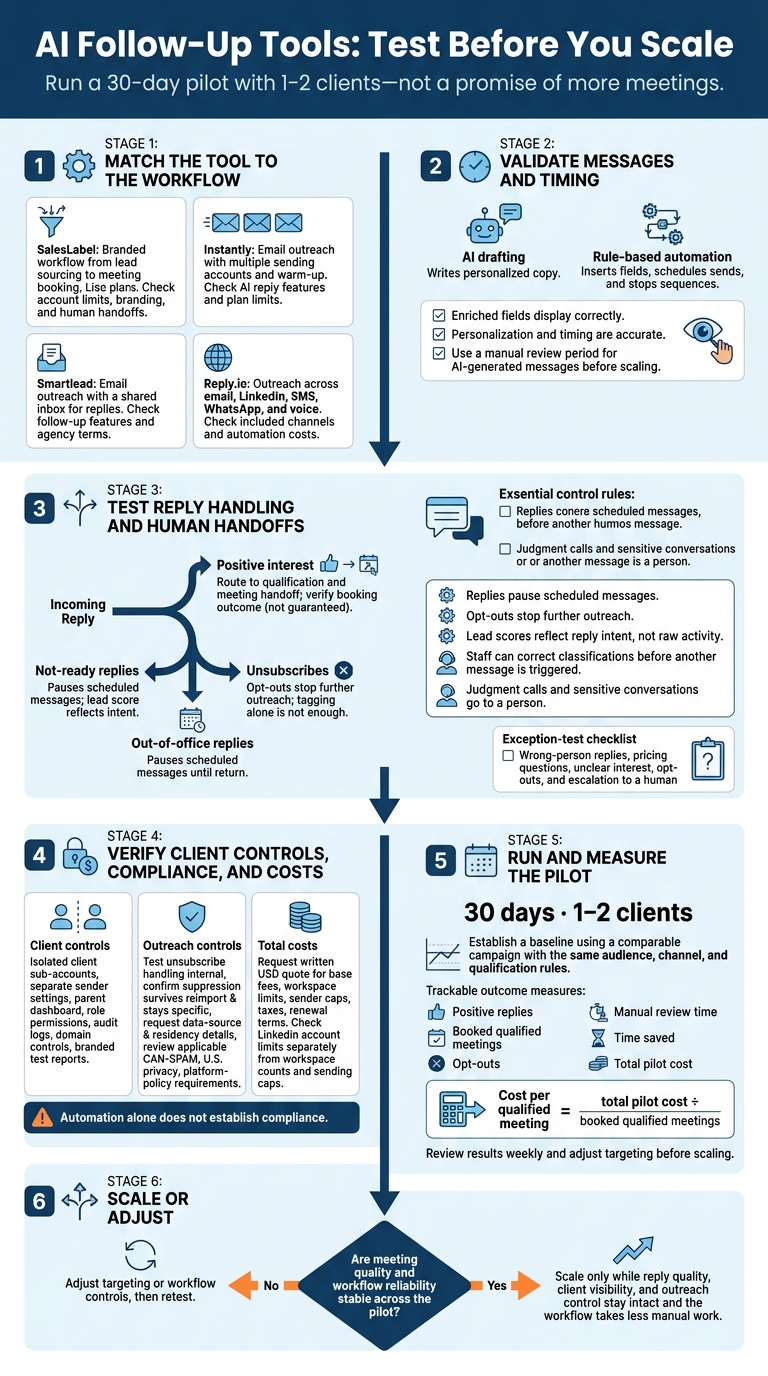
I’d start with a 30-day pilot for 1–2 clients - not a promise of more meetings. My checks: accurate messages, reply handling, human review, client inbox controls, opt-outs, and total cost per qualified meeting.
Here’s how I’d narrow the options:
SalesLabel: A branded workflow from lead sourcing to meeting booking. Listed plans run from $799 to $1,999 per month; verify current terms.
Instantly: Email outreach with multiple sending accounts and warm-up.
Smartlead: Email outreach with a shared inbox for replies.
Reply.io: Outreach across email, LinkedIn, SMS, WhatsApp, and voice.
My rule: <u>test the whole workflow before scaling</u>. Check personalization and timing, confirm replies stop scheduled sends, and keep people in charge of sensitive conversations. Then compare qualified meetings, opt-outs, review time, and total costs - not just message volume. Automation alone does not establish compliance.
AI Follow-Up Tools: Test Before You Scale
Follow-Up Features Agencies Need
Message Personalization and Follow-Up Timing
Check that enriched fields display correctly in message drafts. AI drafting and rule-based automation do different jobs: AI writes personalized copy, while rules insert fields, schedule sends, and stop sequences.
During testing, make sure replies pause scheduled messages and opt-outs stop further outreach. Tagging the contact alone isn’t enough.
Reply Handling, Lead Scoring, and Meeting Booking
Next, check how the tool sorts responses. Inbox categories should separate positive interest, not-ready replies, unsubscribes, and out-of-office replies. This helps staff focus on conversations that need attention instead of reading every message in order.
Use lead scores only when they reflect reply intent, not raw activity. Staff should be able to correct a classification before it triggers another message. Send judgment calls to a person.
Inbox Visibility and Client Controls
Reply handling is only part of the picture for agencies. Each client needs an isolated sub-account with separate sender settings, plus a parent dashboard for campaign oversight.[1][3] Larger teams should also check role permissions, audit logs, and single sign-on.[1]
Agency-scale follow-up depends on deliverability, brand consistency, and clean reporting. Before increasing outreach volume, check whether the platform can protect deliverability and maintain your brand. Review deliverability settings and domain controls, including sender domains and inbox rotation.[1][3]
Set up branded reports and send a test report. Check for vendor branding in footers, login screens, and PDFs.[1][3]
sbb-itb-a781ab9
SalesLabel: White-Label Lead Generation and Follow-Up
SalesLabel suits agencies that want one branded workflow for sourcing leads, outreach, follow-up, and booking. The deciding factor is whether your team wants to manage these tasks together - not promised conversion gains.
SalesLabel’s Lead-to-Meeting Workflow
SalesLabel’s internal B2B database lets you filter prospects by industry, revenue, technology stack, and role. AI then generates multi-touch LinkedIn and email sequences, tailoring follow-ups to recent posts, company news, or hiring patterns.
AI-driven replies and real-time lead scoring help qualify responses. Inbox management routes conversations for human review, while positive replies trigger a meeting handoff to the agency or client.
During a demo, ask to see the dashboard, sequence approval, exception handling, and response summaries. Follow one prospect through the entire workflow. Check where staff can step in and how a meeting handoff turns into a booked meeting. Then review branding and account caps.
Agency Branding and LinkedIn Account Limits
The supplied information lists custom logos, custom domains, and custom pricing. Confirm what clients see and which action limits apply.
LinkedIn account counts aren’t daily action limits. They also don’t establish compliance with LinkedIn policies, so ask about those restrictions separately. Compare plans by account allowance and support level.
SalesLabel Plans, Pricing, and Support
Start with account limits and support, then compare monthly costs. Starter includes lead sourcing, enrichment, outreach, follow-up, and AI replies. Growth adds a branded Chrome extension, and Scale adds a knowledge base.
Verify prices, features, plan terms, and additional charges directly with SalesLabel. Ask what counts toward the account allowance and what setup help covers. Match the plan to the accounts you need and the support your team will use.
Other AI Follow-Up Tools
For agencies comparing tools with a narrower focus, these options trade white-label control for simpler email or multi-channel workflows.
Instantly focuses on high-volume email outreach, with unlimited sending accounts and built-in warm-up. Check your plan for AI follow-up writing and reply handling before subscribing.
Smartlead focuses on email deliverability. Its Master Inbox brings replies from warmed accounts into one place. Confirm its AI follow-up automation and agency terms before subscribing.
Reply.io supports conditional workflows across email, LinkedIn, SMS, WhatsApp, and voice calls. It includes reply detection and sentiment analysis. Check how much of the response workflow your plan automates.
Compare Tool Features, Controls, and Costs
Tool
Primary workflow
AI follow-up capabilities
Supported channels
Client-management options
White-label availability
Pricing model
Limitations to verify
Instantly
High-volume cold email
AI warm-up, basic A/B testing
Email
Basic multi-account setup
No (standard UI)
Flat monthly fee
Email-only; no dialer or LinkedIn
Smartlead
Deliverability-first email
IP rotation, auto-warmup
Email
Master Inbox for unified replies
Available (agency focus)
Per lead volume
Email-only; no native LinkedIn
Reply.io
Multi-channel engagement
Reply detection, sentiment analysis
Email, LinkedIn, SMS, WhatsApp, voice
Mid-market team features
Limited/custom
Per user/month
Higher cost for multi-channel
Match the Tool to Your Agency
Use the same follow-up criteria to find the workflow that fits your agency. Choose how follow-up will run, not just which features you’ll get.
Automation works only when replies reach the right person. Test the handoff, not just the message generator. Check AI triage, booking, and exception handling before automating replies. Keep people in charge of classification exceptions, client-specific ICP adjustments, and sensitive conversations.
Set a target response time for replies. If you’re not using AI triage, schedule human inbox reviews at least every 4 hours[1].
Marketing Agencies Adding Lead Generation
Define the service before adding it to a retainer. Before launch, assign responsibility for prospect data, approvals, reply handling, and data ownership. Standardize kickoff, approvals, and reporting so you can repeat onboarding with fewer manual handoffs. Report replies and booked meetings separately from pipeline.
Resellers and Solo Agency Owners
A platform still needs clear day-to-day responsibilities. Before committing, confirm setup support, total per-client cost, account limits, and sub-account isolation.
Ask which tasks stay with you after onboarding, including message revisions and reply escalation. This helps you judge how much manual follow-up the platform can remove. Match the plan to each client’s account needs, not your sales target.
Once you’ve chosen a fit, check costs, opt-outs, and pilot results before scaling.
Check Costs, Compliance, and Pilot Results
Once you shortlist a tool, check its costs, compliance controls, and pilot results before rolling it out.
Total Costs and Account Limits
Request a written quote in USD covering base fees, workspace limits, sender caps, taxes, and renewal terms. Check LinkedIn account limits separately from workspace counts and sending caps.
Opt-Outs, Data Handling, and Human Review
Distinguish documented features from controls you still need to test.
Start with a manual review period for AI-generated messages before scaling. Test unsubscribe handling with internal recipients. Then confirm that suppression survives reimport and stays specific to each client.
Request details about data sources and residency. Review applicable CAN-SPAM, U.S. privacy, and platform-policy requirements. Automation alone does not establish compliance.
After the controls pass your checks, measure whether the workflow saves time.
Pilot Metrics to Track Before Scaling
Set a baseline using a comparable campaign with the same audience, channel, and qualification rules. Before scaling, track positive replies, booked qualified meetings, opt-outs, manual review time, and time saved. Keep these separate from activity metrics such as sends and opens.
If the platform labels replies by intent, check those labels against actual conversations to measure how much review time they save. Review results weekly and adjust targeting before scaling [3].
Calculate cost per qualified meeting = total pilot cost ÷ booked qualified meetings. Scale only after meeting quality and workflow reliability remain stable across the pilot.
Conclusion: Choose a Tool and Test the Workflow
Choose a tool that fits your workflow, not the one with the most features. Look at the whole process: personalization, reply handling, booking, client controls, compliance, and cost.
For agencies that need a branded all-in-one workflow, SalesLabel fits that use case. If your current data and booking flow already work, assess the platform only by the follow-up gaps it fills.
Once you choose a tool, run a 30-day pilot with 1–2 clients. Go beyond routine scheduling: test wrong-person replies, pricing questions, unclear interest, opt-outs, and escalation to a human. Scale only if reply quality, client visibility, and outreach control stay intact while the workflow takes less manual work.
FAQs
When should I escalate AI replies to a human?
Hand AI-handled conversations to a human when prospects meet real-time lead-scoring qualification thresholds or ask complex questions about budget, timeline, or purchase intent. Humans should also step in for high-value accounts, negotiations, and in-depth discussions [1]. Require human approval for enterprise or compliance-sensitive threads [2].
Each week, spot-check 5% to 10% of AI-handled threads. Route high-intent replies to a human within 2 business hours[1].
How do I define a qualified meeting for each client?
Start by defining each client’s ideal customer profile (ICP) based on industry, company size, revenue range, and job seniority. Match qualification questions and offer types to their niche and business goals. Skip the one-size-fits-all approach.
Use real-time lead scoring to rank prospects by ICP fit and engagement. When a lead responds, use AI to detect positive interest and trigger scheduling.
How many pilot meetings are enough to justify scaling?
Run a pilot with one to three clients instead of aiming for a set number of meetings [1]. Over 4–6 weeks, track reply rates, meetings booked, cost per lead, cost per meeting, and pipeline generated [1][2].
Scale when the pilot shows a clear return on investment and confirms the platform can support your current client load [1][2].