Start with one bottleneck and a 30-day pilot to apply AI for lead prioritization, controlled outreach, and measured ROI.
SalesLabel Team
Growth Expert • 30.10.2026
Share:
Szukasz gotowego rozwiązania?
SalesLabel automatyzuje prospecting od początku do końca — AI znajduje potencjalnych klientów, wysyła spersonalizowane wiadomości i rezerwuje spotkania pod Twoją marką.
I’d start with one bottleneck and a 30-day test - not more features">automation everywhere. AI can reduce time spent on lead research, outreach, and follow-ups, but I’d count setup, software, and human review before calling it a win.
Here’s how I’d put that time to work:
Prioritize leads: Check contact data and rank accounts by fit and interest.
Control outreach: Approve messages, stop follow-ups after replies or opt-outs, and route sensitive conversations to people.
Plan client delivery: Set clear service limits, staff ownership, and review capacity before adding clients.
Protect client data: Check access, privacy rules, email setup, and AI output.
Measure the return: Compare total costs, staff hours, errors, and qualified meetings against the same baseline.
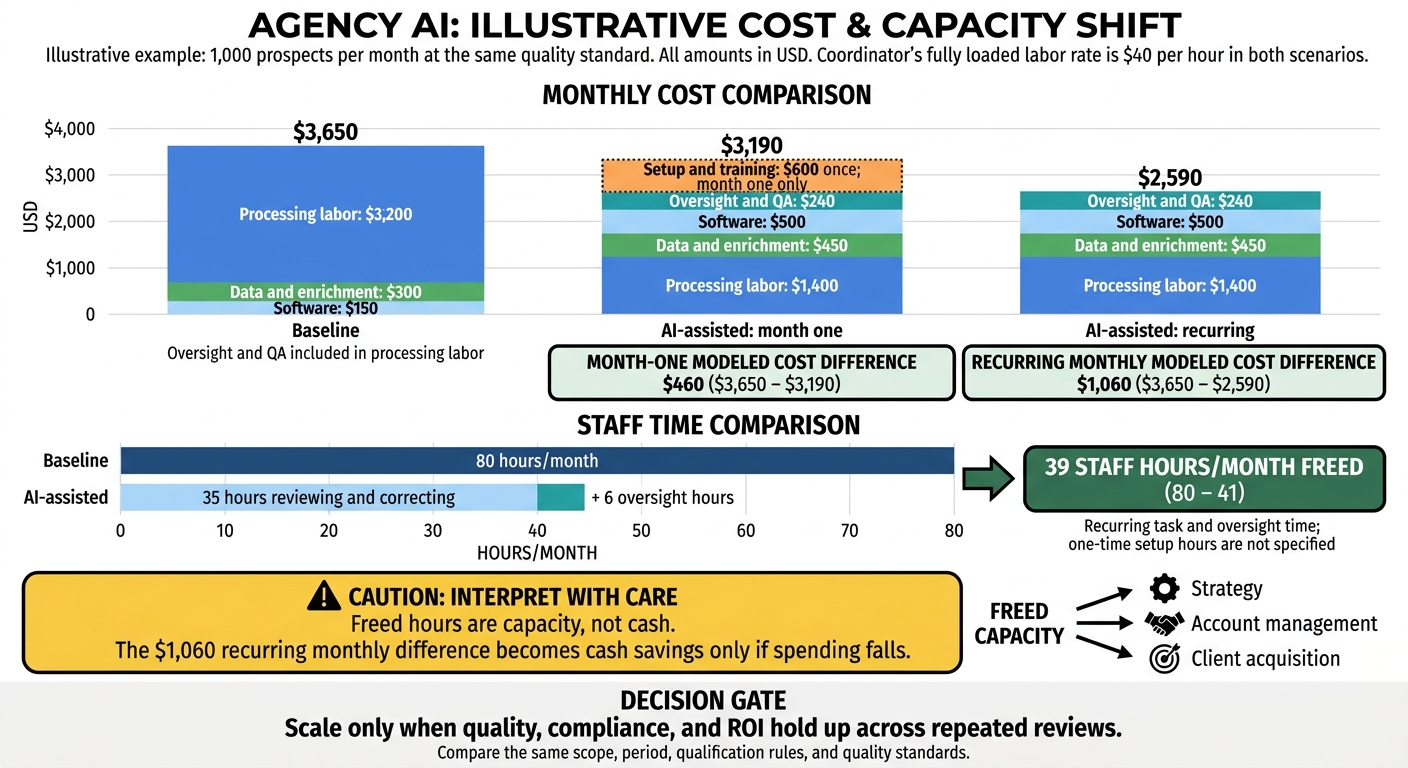
The article’s cost example shows a $1,060 monthly cost difference after setup. But freed hours aren’t cash savings unless spending falls. My rule: <u>scale only when quality holds and the saved time has a clear use.</u>
Plan How to Use AI and Staff
Use AI to put people, time, budget, data, and tech toward measurable gains. Start with the tasks that take the most time in lead sourcing, outreach, and follow-up.
Measure Capacity and Find Bottlenecks
Identify the bottleneck, then use data to find where AI can cut the most manual work. Track weekly hours per client, fully loaded labor cost, lead volume, response time, meetings, fulfillment backlog, utilization, and rework. Count software costs, admin time, and QA time, too.
Before assigning more campaigns, compare available delivery hours with committed client work.
Split the funnel into inputs, work-in-progress, and outcomes. Watch research queues, follow-up delays, and meeting volume to understand what’s limiting capacity:
A growing queue signals a processing bottleneck; weak replies signal targeting or messaging problems; too many meetings with no delivery capacity shift the bottleneck to fulfillment.
Use these measurements to decide which tasks AI can handle and which need human judgment.
Decide Which Tasks to Automate
Set ownership and review requirements for research, enrichment, outreach, follow-up, and booking. Keep people in charge of approvals, sensitive conversations, complex objections, and final decisions on unusual prospects. Choose the model based on error risk - not speed alone.
Factor
AI-assisted
AI-led
Labor and speed
Faster selected steps; staff review remains
Less routine labor and higher throughput after setup
Oversight
Approval checkpoints
Active monitoring and exception handling
Scalability
More volume per employee
Greater capacity within workflow limits
Risk
Depends on review quality
Errors can spread if controls fail
Assign a workflow owner, AI operator, quality reviewer, and escalation owner. One employee can fill several roles. Document approval rules, a fallback process, and the conditions that pause automation.
Set a spending ceiling based on expected value, including setup and oversight costs. Freed hours are capacity, not cash. Put those hours toward strategy or delivery, then measure the results.
Use this division of work to prioritize leads and outreach based on what AI can safely own.
sbb-itb-a781ab9
Prioritize Leads With AI
Use AI to focus research and outreach on accounts most likely to convert. That gives your team more time for high-value prospects.
Build Targeted Lists and Check Lead Data
Define an ideal customer profile (ICP) for each client before sourcing leads. Cover industry, company size, annual revenue range, location, technology used, job title, seniority, likely pain points, and disqualifiers. Add minimum contract value, expected delivery effort, and geographic coverage so AI looks for prospects your agency can serve profitably.
Use AI to find matches, fill gaps in ICP data, summarize company websites, and identify likely decision-makers. Limit enrichment to fields that affect fit and routing. Have staff check the details that matter most and review unusual accounts or those tied to key business goals.
Before outreach, check for duplicates, incorrect roles, invalid emails, outdated details, and missing firmographic fields. Also review source terms, privacy rules, and suppression lists. A reachable contact still needs to pass compliance checks.
Score Leads and Review Rankings
Keep fit and intent separate. Fit tells you whether a prospect matches the ICP. Intent reflects whether the available evidence points to interest now. Give recent, relevant replies more weight than older engagement, and retain the evidence behind each ranking. SalesLabel combines sourcing, enrichment, and real-time lead scoring so SDRs can review the highest-priority leads first.
Send the highest-ranked leads to SDRs for review. Give high-fit accounts without current intent lighter-touch nurture. A score doesn't confirm need, authority, budget, or timing - a conversation must establish those details.
Measure whether the ranking model saves review time and improves conversion. Audit rankings against qualified conversations, qualified meetings, and opportunities. Track research hours per qualified account, and review both high-scoring leads that fail to qualify and low-scoring leads that convert. Adjust the model before scaling volume.
Automate Outreach With Human Review
Set Message and Follow-Up Rules
After AI ranks the best-fit leads, move them into a controlled outreach workflow. Map each step: choosing a channel, approving personalization, sending messages, handling replies, and booking meetings. Set rules for sender identity, tone, claims, send windows, and volume limits for each sender, domain, campaign, and client. Templates save writing time, but require approval for new messages, unsupported personalization, and client-sensitive claims.
Set follow-up intervals and a firm stopping point. Stop automation after any reply, booking, opt-out, or hard bounce, then route replies to a separate workflow. Sending limits alone don’t guarantee deliverability or compliance. Under CAN-SPAM, commercial email must identify the sender, offer an easy opt-out, and honor opt-out requests within 10 business days.[3]
Route Replies and Flag Conversations for Review
Use SalesLabel for AI-drafted replies, inbox management, follow-ups, and booking under the agency’s brand. For ambiguous replies, pricing, contracts, sensitive topics, complex objections, and high-value accounts, have AI draft the response and a person approve it. Limit autonomous handling to low-risk replies and scheduling. An interested reply isn’t a qualified lead; confirm fit before sharing a booking link.
Give each review queue a named owner. Include the full thread, detected intent, suggested response, risk flags, and wait time. Set review targets of 1 business hour for complaints or buying signals and 1 business day for routine objections. When intent is unclear, pause the response.
Keep denominators and reporting periods consistent. Each week, review successful, failed, escalated, and automated conversations. Expand automation only when it saves time without increasing errors, opt-outs, or unqualified bookings.
Use SalesLabel to manage white-label sourcing, enrichment, outreach, follow-ups, reply handling, scoring, inbox management, and booking under your agency brand.[5] Automation reduces the effort needed for each added task, but your team still needs to check quality and review exceptions. That shift matters most when you move from one-off campaigns to repeatable client delivery.
Standardize Client Onboarding
Build one intake template that covers the ideal customer profile, target industries, roles, company sizes and locations, exclusions, and required data. Include approved claims, tone, channels, sending domains, follow-up limits, calendar rules, CRM handoff, reporting cadence, and the billing owner.
Keep positioning specific to each client. Get written approval and check CRM, calendar, email, and social integrations before launch. These steps help prevent rework, duplicate setup, and missed approvals.
Consistent onboarding also makes it easier to forecast package delivery and staffing needs.
Define Recurring Service Packages
Define each package by its scope, support level, and who owns delivery. Spell out contact volumes, channels, follow-up limits, response coverage, approval duties, and exclusions.
Price packages to cover software, data, account management, quality checks, and support - not assumed meeting volume. Sell scope and quality standards, not meetings or revenue.
Fixed packages cut custom work, making staffing, workload planning, and owner assignments more predictable.
Set Workload Limits and Assign Owners
Use this table as your agency’s operating model.
Workstream
Recommended automation
Owner
Review point
Success metric
Research and enrichment
High; review fit
Account manager
Audit each new list
Valid ICP-fit contacts
Outreach
High within approved rules
Account manager; strategist approves positioning
Approve campaign changes
Positive reply rate
Inbox management
AI triage; human exceptions
Account manager
Queue capacity
Overdue replies
Qualification
AI scoring; human confirmation
Sales specialist
Qualification rubric
Qualified lead accuracy
Booking
Automate approved prospects
Account manager
Calendar routing and availability
Qualified meetings held
Reporting
Automate data collection
Account manager
Validate totals weekly
Accurate, on-time reports
Strategy
Human-led
Strategist
Monthly campaign review
Conversion by segment
Set limits for active clients per account manager, daily review volume, unresolved conversations, and weekly campaign changes. These limits help keep review queues, approvals, and reporting within your team’s capacity while protecting quality as volume grows. Track review time alongside client count.
If your team repeatedly misses quality checks or response SLAs, delay new launches, reduce campaign volume, or add staff. Only scale as far as your team can still review exceptions and meet SLAs.
Protect Data, Deliverability, and Client Trust
Once delivery is standardized, risk control becomes the next limit on scale. Fast outreach only helps if it avoids cleanup work and protects client trust. Set aside recurring time for monitoring, QA, and monthly access and data reviews. Budget separately for verification, security tools, legal and vendor reviews, training, and incident response. Start with access control and compliance, then review output.
Set Security and Compliance Rules
Keep client records, credentials, suppression lists, and activity logs separate. Limit access by role and require MFA. Document data sources, allowed uses, retention, deletion, and incident response procedures.
Before connecting SalesLabel, check encryption, vendor subprocessors, breach-notification terms, deletion controls, and whether your data can be used to train the model. Automation does not guarantee compliance. Include security work in the cost of running automation.
Apply CAN-SPAM and channel-specific rules separately. Keep suppression lists active across all campaigns.[3]
Authenticate domains with SPF, DKIM, and DMARC. Verify addresses, cap sending volume, and increase it slowly. Track bounces, complaints, blocks, and unsubscribes by client and domain. Pause automation when authentication fails, bounces or complaints spike, or opt-out handling breaks. Meeting legal requirements alone does not guarantee inbox placement.
Use only approved claims and verified personalization. Never fabricate job changes, funding events, or personal details. Review every message during the pilot, then sample 2%–5% weekly to check facts and brand fit. Log source data, versions, approvals, classifications, and resolutions.
Send pricing, legal, privacy, sensitive, and unclear replies to a named human owner and backup. Give them authority to pause sending, correct records, handle complaints, and notify the client. They should approve a restart only after the cause is fixed. Every correction takes staff time, so preventing errors protects throughput.
Test AI Workflows and Measure Returns
Agency AI Costs: Baseline vs. AI-Assisted
Start With One Workflow
Choose one task you can measure, such as lead enrichment or follow-up drafting. Run a 2–4 week pilot with one owner and a clear baseline. Before launch, document expected gains, costs, oversight, and ownership.[1][2][7][8]
Measure
Baseline
Pilot comparison
Staff hours per week
Current task and review hours
Same scope, including corrections
Direct labor cost
Fully loaded labor cost
Same loaded rate, plus AI usage and setup costs
Completed records or contacts
Current volume
Same unit and period
Error or rework rate
Baseline error rate
Same quality-check sample and rules
Qualified leads
Current qualification rule
Same qualification rule
Human review hours
Current review time
Include escalations and approvals
Compliance or quality incidents
Baseline incident rate
No meaningful increase
Scale only when quality, compliance, and ROI hold up across repeated reviews.[1][2]
Track Resource Use and Business Results
Once the pilot starts, track changes in capacity, quality, and margin - not just task speed. Check hours per client, cost per qualified lead, and qualified meetings weekly. Review client retention, gross margin, and attributed revenue monthly. Keep qualification rules, cost inputs, retention periods, and revenue attribution fixed throughout the test.[6] The aim is to move saved hours into higher-value work, not automate tasks just to count them.
Cheaper leads aren't a reason to spend more if meeting quality drops. Take on more clients only when quality and margins hold. Reserve 10%–15% of team time for exceptions, client requests, and system failures. Retention and revenue also need more observation time than a short pilot allows.[6][9][10]
Calculate Costs and Reassign Staff Time
Use the numbers to check whether the workflow frees up staff time.
An agency processes 1,000 prospects monthly at the same quality standard. Before AI, a coordinator spends 80 hours at a loaded rate of $40 per hour. During the pilot, the coordinator spends 35 hours reviewing and correcting AI output, plus six oversight hours. Setup and training cost $600 once.
Cost category
Baseline monthly
AI-assisted cost
Processing labor
$3,200
$1,400
Software
$150
$500
Oversight and QA
Included above
$240
Data and enrichment
$300
$450
Setup and training: month one only
$0
$600
Month-one total
$3,650
$3,190
Recurring total after setup
$3,650
$2,590
The model shows a $1,060 recurring monthly difference, but that becomes cash savings only if spending falls.[6][10] Report freed-up hours separately, then assign that time to strategy, account management, or client acquisition.
Conclusion: Allocate Resources Based on Results
AI works best when it takes routine tasks off your team’s plate while people handle judgment, compliance, and client promises. Measurement should guide your decisions. Assess the workflow by total cost and business results - not message volume.
SalesLabel brings sourcing, enrichment, outreach, replies, scoring, and booking into one workflow under your agency’s brand. You can test how well it fits your agency’s day-to-day work.[4]
Use the pilot to decide where AI can handle more volume and where human review still protects results. Start with one bottleneck, name a review owner, and set a clear pilot goal. Compare time saved, review workload, and the quality of qualified meetings against your baseline. Keep complaint rates within your current threshold.
FAQs
Which AI workflow should my agency test first?
Start by testing AI on repetitive, rule-based tasks that take time but need little human judgment. Client reporting, lead generation, and outreach are good places to start.
Automating lead sourcing, enrichment, scoring, and sequencing saves manual hours and improves response rates. SalesLabel handles these steps under your agency’s branding, from first contact to booked meetings.
Before you automate, audit your process, document a standard operating procedure (SOP), and set a baseline so you can track efficiency and maintain oversight.
How can I turn saved hours into higher margins?
Move your team’s time from non-billable admin tasks to high-value client work. Automation cuts manual work so your agency can serve more clients without increasing payroll.
SalesLabel automates lead sourcing, outreach, and personalized follow-ups. That gives account managers more time to handle additional clients or focus on work that brings in revenue. Track client revenue against delivery costs to check whether those saved hours are improving profitability.
How do I know when to automate more versus hire?
Automate repetitive, rules-based work when tasks like lead sourcing, enrichment, and outreach slow your team down - and software can handle them reliably without human input. Standardize these workflows before hiring more people. Tools like SalesLabel can help your current team serve more clients.
Hire only when the work calls for human judgment, complex original direction, or a careful approach to client relationships. Keep final budget decisions, sensitive client communication, and high-stakes negotiations in human hands.