AI follow-up converts when clean CRM data, behavior-based triggers, and instant stop rules keep outreach timely and compliant.
SalesLabel Team
Growth Expert • 22.06.2026
Share:
Szukasz gotowego rozwiązania?
SalesLabel automatyzuje prospecting od początku do końca — AI znajduje potencjalnych klientów, wysyła spersonalizowane wiadomości i rezerwuje spotkania pod Twoją marką.
Most sales are lost in follow-up, not in the first touch. If I want AI follow-up features">automation to work, I need three things in place from day one: clean CRM data, behavior-based triggers, and stop rules that pause outreach the moment a lead replies, opts out, or books time.
Here’s the short version:
Most B2B deals need 5 to 12 touches, yet many reps stop after one.
Fast response wins: leads contacted within 5 minutes are 9x more likely to convert.
Behavior-based sequences beat fixed drips, often by 2–3x.
A simple starting point is a 7-touch, 21-day sequence across email, SMS, and voice.
AI should handle timing, draft writing, scoring, and routing.
Humans should step in for pricing questions, objections, and high-dollar deals.
I should track reply rate, booking rate, opt-outs, bounce rate, and rep edits every week.
U.S. compliance still matters: CAN-SPAM, TCPA, consent logs, and 10DLC for texting.
The main idea is simple: AI follow-up works when it reacts to what leads do, sends the next message at the right time, and stops the second a human reply needs care.
If I had to boil the whole article down to one line, it would be this: use AI to keep follow-up fast and consistent, but keep human review where money, tone, or compliance are on the line.
How to Automate Lead Follow-Up Using AI (Email, SMS & Ads)
sbb-itb-a781ab9
Build a Strong Data and Trigger Foundation
AI follow-up only works when your CRM data and trigger rules are clean. If you're running outreach for multiple clients, that means records need to stay accurate, fast-moving, and on-brand in every account.
CRM Data Quality and Enrichment Basics
Before a record enters automation, it should include the basics: name, company, role, stage, deal value, and last touch date. Then add the context that gives follow-ups a point. That includes site activity, email engagement, meeting notes, objections, firmographics, tech stack, and recent news. Without those signals, automated outreach starts to sound generic fast.
Compliance data matters just as much. Each record should store email subscription status, SMS opt-in timestamps, the source of consent, and a global opt-out history. Use one CRM as the source of truth so opt-outs sync across every channel.
Follow-Up Triggers That Work
Speed matters more than most teams think. Leads contacted within 5 minutes are 9x more likely to convert than those reached after 30 minutes [9]. But that kind of response time doesn't happen by accident. You need trigger rules in place before anything goes live.
Start sequences when a lead shows clear intent, like a form submission, demo request, content download, pricing page visit, or missed call [1][8]. Then use timing rules to guide the next touch.
Some rules should be hard stops. If a lead replies, opts out, or bounces, automation should end at once [7][15].
Use Lead Scoring to Focus Outreach
Real-time scoring helps sort contacts into three groups: Cold (no prior interaction), Warm (visited your site or downloaded content), and Hot (requested a demo or visited the pricing page) [2]. From there, you can route each lead the right way. Some stay in automation. Others should go straight to a person.
Scoring should pull from firmographics, behavior, and intent data. A contact who opens an email three times and clicks a pricing link should not be treated the same as someone who opened once and disappeared. Hot leads need to go straight to a human rep.
For high-value deals, a human-approval flow usually makes more sense. AI can draft the message, but a person should approve it before it goes out [7]. SalesLabel's lead scoring surfaces the highest-intent prospects first, which helps agencies put human attention where it counts most.
With data, triggers, and scoring in place, the next step is cadence and branching.
Design Follow-Up Sequences That Convert
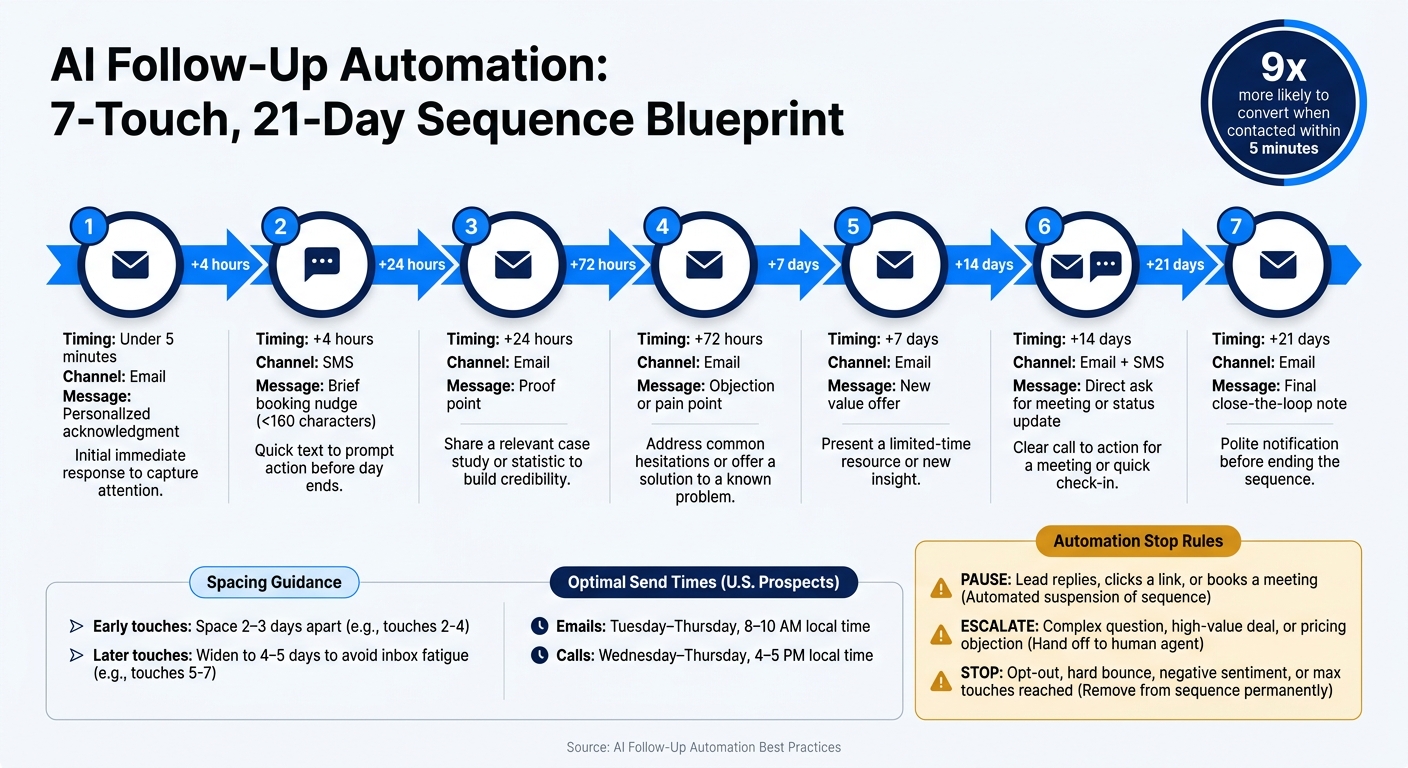
AI Follow-Up Automation: 7-Touch, 21-Day Sequence Blueprint
Pick the Right Cadence and Touch Count
Once your triggers and scoring are set, cadence decides when the system moves. A solid starting point is a 7-touch sequence over 21 days.
Touch
Timing
Channel
Message
1
< 5 min
Email
Personalized acknowledgment
2
+ 4 hours
SMS
Brief booking nudge (< 160 characters)
3
+ 24 hours
Email
Proof point
4
+ 72 hours
Email
Objection or pain point
5
+ 7 days
Email
New value
6
+ 14 days
Email + SMS
Direct ask for a meeting or status update
7
+ 21 days
Email
Final email: close-the-loop note
A good rule of thumb: keep the early touches closer together, then give people more room as the sequence goes on. In practice, that means spacing early touches 2–3 days apart, then widening to 4–5 days later in the sequence to avoid inbox fatigue [3].
For U.S.-based prospects, timing matters more than people think. Schedule emails Tuesday through Thursday between 8–10 AM local time, and calls Wednesday through Thursday between 4–5 PM[11]. And yes, time zones matter. A message that lands at the right hour can feel well-timed. The same message at the wrong hour can feel like noise.
Keep the last email on Day 21 clear and direct. No fluff. Just close the loop.
Use Behavior-Based Branching
Branching should react to live intent signals, not just follow a calendar. If someone leans in, tighten the gap. If they go quiet, slow the pace.
Here’s the idea: if a prospect clicks a pricing link, your next touch should land within 4–24 hours, not whenever the drip campaign happens to be set to send [2][4]. Interest has a short shelf life. If you wait too long, you miss the moment.
On the other hand, after three unanswered emails, it’s usually time to switch channels or move the lead into a re-engagement track [2][4]. Pushing harder in the same channel often backfires.
AI send-time optimization by itself - even if you don’t change the copy - can improve reply rates by 11–18%[2]. That lift comes from simple timing. You’re showing up when people are more likely to look, click, and answer.
Know When to Pause, Escalate, or Stop
Stop logic protects trust, deliverability, and routing quality. Set that up and test it before you turn on send logic [7][15]. It’s one of those things that seems small until it saves you from a messy mistake.
Action
When It Triggers
Why It Matters
Pause
Any reply, link click, meeting booked
Prevents mis-timed follow-ups that damage trust
Escalate
Complex question, high-value deal, explicit request to talk
Routes the right conversations to a human rep
Stop
Opt-out, hard bounce, negative sentiment, max touches reached
Protects deliverability and compliance
Treat out-of-office replies as a pause-and-resume case [2][7]. That way, the sequence doesn’t keep firing while someone is away.
For high-value deals, use a draft-first flow: AI writes the message, and a rep approves it before it goes out [7][15]. That extra check helps when the stakes are higher and tone matters more.
If unsubscribe rates climb above 2%, that usually points to weak timing or messaging [7]. And when someone opts out by email, that choice needs to sync across SMS and every other channel through your CRM [15].
Once stop logic is locked in, the next gain comes from making each message fit the prospect better.
Personalize Follow-Ups Without Losing Scale
Personalization Layers That Matter Most
Once your cadence is live, relevance becomes the biggest driver of replies. Start with the highest-signal personalization first.
Begin with context: prior conversations, meeting notes, and logged objections [18][10]. Then layer in live behavior signals. If someone revisits your pricing page or downloads a case study, that gives you a strong clue about what they care about right now [19][6][16]. Role, industry, and company size still help, but they work best as supporting context, not the main hook.
What makes this work at scale? Simple: the strongest signals are the ones your system can pull on its own from CRM records and behavior data.
A good gut check is the five-second test: if your opening line could work for almost anyone, rewrite it [10]. "Saw you closed your Series A last Thursday - congrats" works. "I hope this email finds you well" doesn’t.
AI-personalized templates can drive conversion rates of 8–18%, versus 1–3% for generic templates [8].
Set Tone, Brand, and Messaging Standards
When follow-ups run across many client accounts, brand drift can show up fast. The fix is to set segment-specific voice profiles before launching a sequence. Those profiles should be based on each client’s follow-up style, not broad writing rules.
Build each profile from 10–20 top-performing emails for that segment. Then add a banned-phrase list to remove obvious AI tells like "I wanted to circle back"[10][17]. In practice, these guardrails usually do more for tone control than endless prompt edits.
For touchy subjects like pricing or legal responses, set an approval threshold so a person reviews those messages before they go out [18]. SalesLabel can centralize approvals and reply handling across client accounts.
Use AI Replies to Keep Conversations Moving
Fast replies matter. When a lead shows strong intent, even a short delay can cool the thread. AI reply handling can answer in 30–60 seconds, which helps keep that momentum going [6].
That said, not every reply should be automated. Simple questions, scheduling requests, and basic confirmations are good candidates for full automation. But if a prospect pushes back on pricing, shows frustration, or asks something that calls for judgment, a human should step in [20][6].
Set handoff triggers with clear rules. Any reply that includes a complex objection, a direct pricing question, or a request to speak with someone should pause the AI sequence right away and route the thread to a rep, with the full conversation history attached [7][6]. That way, automation handles the volume without letting strong sales conversations stall.
From there, watch which prompts, handoff rules, and reply types lead to the best conversations.
Measure, Govern, and Optimize at Scale
Track the KPIs That Actually Matter
Once your sequences are live, the job changes. Now it’s about measuring what leads to pipeline and meetings, not just watching open rates.
Focus on two groups of metrics. Performance KPIs show whether your messaging is getting people to respond and book time: speed to first response, open rate by touch, reply rate by touch, booking rate, time to booking, and sequence completion rate. Health KPIs show whether your automation is staying clean and within the rules: unsubscribe/opt-out rate, bounce rate, and rep override rate - how often reps change AI-written drafts before they go out.
If reps are editing more than 50% of AI drafts, that’s a red flag. In most cases, the prompt needs work or the system needs more CRM context, like meeting notes or objection logs [7].
Metric
What It Tells You
What to Do When It's Off
Reply rate by touch
Whether your messaging connects with prospects
Test new angles or value offers
Rep override rate
Whether AI drafts need more context
Refine prompts or improve CRM data entry
Unsubscribe/opt-out rate
Whether outreach feels too frequent
Adjust frequency caps or touch spacing
Bounce rate
Whether list quality or deliverability is slipping
Clean data and review deliverability
Sequence completion rate
Whether your halt logic is working
Check halt logic and reply detection
Review these every week, not once a month. A fast sample of 20–30 AI conversations per week is enough to catch tone drift, prompt mistakes, or compliance gaps before they pile up [6]. Those signals should guide your next test.
Run Tests and Build Feedback Loops
Treat the first 30 days like calibration. During that stretch, batch-review 10–20 drafts before they go live. It’s a simple way to catch prompt issues and tone problems early, before they hit actual prospects.
After that, test one variable at a time:
Timing
Messaging
The AI prompt itself
When something works, write down why it worked, not just the result. That extra bit of context is what turns testing into a useful feedback loop instead of a pile of random wins.
For high-value deals, keep a draft-for-rep-review flow even after calibration [7][5].
Keep Human Oversight and Stay Compliant
Governance is what keeps the system in check. Use handoff data from AI replies to see where automation needs a human eye. For dormant leads, set a separate re-engagement cap of 3–5 touches over 3–4 weeks. Push past that, and deliverability usually takes the hit.
Pause email, SMS, and WhatsApp on the first reply [16][7].
Compliance in the U.S. is pretty specific. CAN-SPAM requires a clear sender identity, a physical mailing address, and an unsubscribe link. TCPA requires prior express written consent for automated SMS or voice messages [14][6]. If you’re texting through 10-digit long codes, 10DLC registration is required for U.S. texting [6].
Log every automated action - what triggered it, what was sent, and the consent status at that moment [14]. SalesLabel inbox management keeps client threads and consent logs organized.
Conclusion
Once the foundation, cadence, personalization, and governance are in place, follow-up stops being a scramble and starts working like a repeatable growth system. AI follow-up automation works best when data, triggers, scoring, and cadence line up.
A solid 8–12-touch sequence across email, SMS, and voice can lift closed deals by 25% to 60% without adding headcount.
There’s also a big gap between bland outreach and messaging that feels personal. Generic templates usually see 1%–3% reply rates, while personalized ones can hit 8%–18%[8]. At scale, those results hold up when behavior-based branching, send-time optimization, and immediate halt logic are doing their job. And on the other side of the house, weekly audits, human review gates, and compliance checks help keep the system reliable over time.
For agencies, the upside is consistency across every client account. For agencies, SalesLabel brings outreach, replies, lead scoring, and inbox management together under one brand.
FAQs
How do I know when AI should hand a lead to a rep?
AI should pass a lead to a human rep when set escalation triggers are hit or the lead shows high buying intent.
Common handoff points include:
A lead requests a meeting
A lead asks a complex question
A lead needs service right away
A lead visits a pricing page
A lead replies
A lead books an appointment
A lead reaches a deal stage where a person needs to step in, such as when the deal is above a set dollar threshold
That’s the basic idea: let AI handle the early back-and-forth, then bring in a human when timing, deal size, or buyer intent says it’s time.
What CRM data is essential before automating follow-up?
Before you automate follow-up, your CRM needs to be the source of truth. That means clean, complete data you can trust.
At a minimum, each record should include:
Prospect name
Company name
Last meeting summary
Objections raised
Deal value
Days since last contact
If you want stronger personalization, go a bit deeper. Capture call or meeting notes, deal stage and stage history, and details like industry and location.
It also helps to keep your pipeline stages consistent, fill in missing records, and make sure reply detection is dependable. If the data is messy, the follow-up will be messy too.
How can I personalize AI follow-ups without sounding robotic?
Use rich CRM context so the AI has something concrete to work with. That means details like meeting summaries, specific objections, and the current deal stage. When you give it that kind of input, the draft feels tied to the actual buyer and not like a generic sales template.
It also helps to be blunt in your prompt. Tell the AI to skip filler phrases, follow a clear structure, and match a tone you define with strong examples. Think of it like giving directions to a new rep: the more specific you are, the better the output tends to be.
And one more thing matters a lot: keep a human in the loop. AI can get you to a solid first draft, but someone should still review it before it goes out. That final check helps catch awkward phrasing, missing context, or anything that just doesn’t sound like your team.