Clean and govern CRM data, set AI read/write rules, choose the right sync, and protect deliverability for scalable outreach.
SalesLabel Team
Growth Expert • 6.07.2026
Share:
Szukasz gotowego rozwiązania?
SalesLabel automatyzuje prospecting od początku do końca — AI znajduje potencjalnych klientów, wysyła spersonalizowane wiadomości i rezerwuje spotkania pod Twoją marką.
Bad CRM data can cost a company $12.9 million per year, and AI outreach makes that problem show up fast. If I want AI outreach to work, I need to do four things first: clean CRM data, set field rules, connect tools the right way, and track replies, bounces, and meetings back in the CRM.
Here’s the short version:
Clean the data first. Email should be the main ID, duplicates need to be blocked, and core fields must be complete.
Control what AI can touch. AI can fill blanks and draft messages, but people should keep control of owner, consent, and deal-stage fields.
Pick the right sync setup. Native apps fit simple setups, middleware fits custom flows, and API sync fits high-volume teams.
Use CRM signals to drive outreach. Pricing-page visits, lifecycle changes, and lead-score jumps should trigger the next step.
Protect compliance and deliverability. Real-time opt-out sync, pre-send validation, and inbox caps matter.
Track the right numbers. Interested-reply rate, bounce rate, email match rate, response time, and pipeline impact tell me if the system is working.
A few numbers stand out:
28% of rep time goes to non-selling work
33% of CRM records are incomplete, old, or duplicated
2%–3% of B2B contact data decays each month
Bi-directional sync is tied to 23% higher win rates
Cutting lead response time from 47 minutes to under 5 minutes is tied to 21x higher qualification rates
If I had to boil the full guide down to one idea, it would be this: AI outreach only works well when the CRM stays clean, synced, and in control.
Area
What matters most
What I’d do
Data prep
Clean fields and no duplicates
Use email as the main key and re-check records before each campaign
AI rules
Clear read/write limits
Let AI fill blanks, but keep consent and ownership under human control
Integration
Right sync pattern
Use real-time sync for leads and replies; batch jobs for scoring and enrichment
Personalization
Signal-based messaging
Map role, industry, behavior, and timing signals to each sequence
Risk control
Compliance and inbox health
Sync opt-outs at once, validate emails, and cap sends at 30/day per inbox
Measurement
Revenue-linked reporting
Watch interested replies, bounces, match rates, and meeting outcomes
That’s the core of the article: use the CRM as the source of truth, let AI act on clean signals, and send every result back into the record so the system gets better over time.
How to Build AI CRM Agents that Automate your CRM
sbb-itb-a781ab9
Prepare Your CRM Data for AI-Powered Personalization
CRM data only helps AI outreach when it’s clean, consistent, and tied to a clear use case. Before AI touches your CRM, clean the fields it will rely on. Then decide which fields AI can use and which ones should stay under human control.
Audit, Clean, and Standardize Core CRM Fields
Start with identity data, firmographics, role data, and lifecycle stage. These fields need to be complete and consistent before any features">automation goes live.
Normalize company-name variants so one company doesn’t turn into several records. Do the same for country names. If one record says “United States,” another says “USA,” and a third says “US,” segmentation can fall apart fast. Since B2B contact data decays at 2% to 3% per month, re-check records for each campaign [7].
Clean data is the difference between useful personalization and automated noise.
Use the email address as the main unique identifier across all records. That one rule helps stop duplicate contacts from getting the same outreach from two different AI agents.
Once your core fields are in shape, set clear rules for how AI can read from them and write back to them.
Set Data Rules for AI Use
Define what AI can read, what it can write, and what it can trigger. Not every field should be open to AI action.
A simple starting point works well: AI can fill in blank fields, like a missing LinkedIn URL, but it should not overwrite fields owned by people, such as Owner or Opt-out Status. Sensitive fields, like reply sentiment, should go through human review before they sync back. That helps prevent bad updates from polluting the CRM. Outreach should also be blocked unless the record includes a first name, company name, a valid email or phone number, and a confirmed ICP match.
Rule Category
How to Apply It
Why It Matters
Completeness
Require first name, company name, and a valid email or phone before AI activation
Prevents failed sends and made-up personalization
Formatting
Use picklists for Industry, Seniority, and Lead Status
Removes free-text variations that break segmentation
Duplicates
Use email as unique key; run idempotency checks on every write
Stops multiple agents from contacting the same person
Ownership
Set "CRM wins" for Deal Stage and Owner fields
Keeps the CRM as the main system of record
Consent
Sync opt-outs in real time; tag records by HQ country for GDPR/CCPA routing
Prevents compliance failures before they happen
With those rules in place, the next step is simple: connect each field to a specific outreach move.
Map CRM Fields to Outreach Use Cases
Each field should answer one part of the outreach flow: who to contact, what to say, why now, and when to hold back. The strongest workflows connect each CRM signal to one message decision.
Job title and seniority shape the tone of the opening line. Industry and company size help decide which case study or value proposition to include. A funding date or a recent executive hire can become the “why now” angle. Last activity date handles suppression, because a contact who just became a customer should never get dropped into a cold outreach sequence.
A signal-to-message mapping approach can turn partner overlap data into outreach that feels relevant and can lead to stronger pipeline [10].
Build the CRM-AI Integration Architecture
Once your fields are mapped, the next job is simple to say and harder to get right: decide how data moves, when it moves, and which system owns each update. That choice affects day-to-day control and also what falls apart when a sync fails.
Choose the Right Integration Pattern
Most CRM-AI setups land in one of three patterns.
Native integrations are a good fit for agencies using standard workflows on common CRMs like HubSpot, Salesforce, or Pipedrive. Setup usually takes 10–60 minutes and doesn't need custom code. The downside is pretty clear: you're limited to what the platform already supports, no more [4].
Middleware tools like Make, n8n, or Clay sit between your CRM and your outreach system. They make sense when you need custom logic, non-native CRM pairings, or sequential enrichment. That means trying multiple data sources one after another to fill gaps. In practice, that can push email match rates from 60% to over 90%[7].
API-based custom sync gives you full programmatic control and real-time sync. It's built for high-volume teams with unusual data structures. For complex enterprise or multi-CRM setups, build costs usually land around $8,000–$15,000, with $200–$500 per month in maintenance [11].
Use the lightest pattern that still covers your sync speed, customization needs, and record volume.
Integration Pattern
Setup Effort
Best Fit
Native
Low (10–60 min)
Standard SMB workflows
Middleware
Medium
Custom logic, enrichment
API-Based
High (1–3 weeks)
Enterprise, high volume
For most agencies, a hybrid sync pattern is the sweet spot. Use real-time webhooks for time-sensitive events like new leads or inbound replies, and batch processing for background jobs like lead scoring or enrichment updates [11].
Set Up Field Mapping, Triggers, and Sync Logic
Standard fields like Name, Email, and Company matter, but they aren't enough on their own. Agencies should also map AI-specific custom fields like AI_Fit_Score, AI_Qualification_Status, AI_Outreach_Angle, and Conversation_Summary[8][11]. Those fields give the AI context for message personalization, so it isn't forced to guess.
Triggers should fire from specific CRM events, not from a simple timer. A lead score crossing 80, a lifecycle stage moving from MQL to SQL, or a proposal being opened several times are all strong signals worth acting on right away [8][1]. For inbound leads and replies, real-time webhook sync with 2–8 second latency is the right move. For lead scoring and enrichment, batch sync every few minutes to daily is steadier and costs less to run [11].
When you set up the sync, turn on "Skip Empty Values" so blank fields from the outreach tool never overwrite valid CRM data [5]. Also add duplicate-write checks on every write. That helps stop multiple agents from reaching out to the same person [5].
With those rules in place, the next issue is ownership. If that isn't clear, conflicts show up fast.
Define Data Ownership and Update Rules
Every field needs a clear owner. If it doesn't, two systems will eventually write different values to the same record.
A simple rule works well: let the CRM own core record fields and let the outreach tool own engagement data. If both systems try to update the same field at once, version checks and a latest-valid-update rule can stop quiet overwrites [11].
For agencies handling multiple clients, it helps to build a field-mapping template and reuse it across CRM instances. That keeps field names, data types, and picklist values aligned. It also cuts down on sync issues caused by format mismatches, like an outreach tool sending "small company" when the CRM expects "1–50 employees" [5][12].
Log every AI action in the CRM for reporting and review [3].
For agencies that don't want to build each layer from scratch, one platform can cover the core stack. SalesLabel fits this workflow by handling sourcing, enrichment, outreach, replies, follow-ups, and CRM sync under the agency's brand.
Turn CRM Data Into Scalable Personalized Campaigns
Once your integration setup is running, the next move is simple: use the data. You want messages that feel relevant to each person without sitting down to write every email from scratch.
Segment by Firmographics, Lifecycle Stage, and Behavior
Start with the CRM fields you synced in the last section. Those fields decide who should get which sequence. That split matters. A well-segmented campaign gets replies; a generic one gets skipped.
Firmographic data gives you the base layer: industry, company size, geography, funding stage, and tech stack. If your CRM has gaps, enrichment can help fill them so those fields are actually usable [8][14]. Then add lifecycle stage - prospect, MQL, SQL - and behavioral signals like pricing page visits, content downloads, or repeat site visits [8][13].
Not all behavior means the same thing. Someone who keeps coming back to your pricing page is showing high intent. That person should not get the same sequence as a contact who hasn’t engaged at all.
Before you launch cold outreach, set up CRM suppression lists. Leave out customers, active partners, and competitors [4][14].
Data Point
Segment Type
Outreach Action
Pricing page visits
Behavioral
Trigger "High Intent" sequence with a direct CTA [8][13]
Industry / company size
Firmographic
Shift value prop to sector-specific pain points [8][14]
Archive or move to a long-term "Cold Nurture" track [8]
Use AI to Personalize Messages and Follow-Ups
After your segments are set, use AI to shape the message and the next step. A simple way to do it: write one template for each segment, then let AI plug in the company name, recent activity, and likely pain point.
This can pay off fast. Personalized subject lines based on CRM data can more than double reply rates, moving them from 3% to 7% [13]. AI can also improve send timing with CRM location data, so your outreach lands at the right local time across U.S. time zones [8].
Follow-up gets easier too. AI reply classification can tag responses as "Interested", "Objection", or "Out of Office" and then update CRM fields so each lead moves to the right next step [3][4].
Build Multi-Step Outreach Sequences From CRM Signals
The same CRM signals can also power multi-step outreach. Instead of relying on a fixed calendar, let the signal guide the sequence. A pricing page visit should send someone down a very different path than a cold contact who opened an email twice but never clicked.
What changes from segment to segment is the message inside each touch, not the structure itself. If a lead reopened a proposal five times in 24 hours, send a direct message with some urgency. If a lead is marked Interested, reply in a way that picks up on what they said and pushes toward a meeting.
Also, don’t let sequences run longer than they should. Stop them as soon as a meeting is booked or a reply comes in. Teams using bi-directional sync see 23% higher win rates than teams handling data flows by hand [4].
Protect Data Quality, Compliance, and Deliverability
Once CRM and AI are connected, data quality and compliance decide whether the setup runs smoothly or falls apart.
Manage Consent, Opt-Outs, and Data Access
If the CRM is the source of truth, it also needs to control who can be contacted and when.
In the U.S., email outreach has to follow CAN-SPAM. That means working unsubscribe links, a physical address, and subject lines that aren't deceptive. SMS and AI voice outreach need prior express written consent.
The biggest danger usually isn't bad intent. It's a slow suppression sync.
If opt-outs don't sync right away, automated sequences can still go out to contacts who should be blocked. That's why suppression lists for opt-outs, customers, and closed-lost deals need to sync in real time [16][17].
You also need an append-only consent log that stores:
And compliance by itself won't save performance. You can follow the rules and still hurt inbox placement if your data is messy.
Reduce Deliverability Risks From Bad Data and Over-Automation
About 33% of CRM records in the average B2B company are incomplete, outdated, or duplicated [4]. That's a big problem. Stale fields, duplicate records, and invalid domains often lead straight to bounces and spam trouble.
Without pre-send validation, autonomous agents can push bounce rates as high as 15%–25% [2]. The goal is much lower: keep bounces at 1% or less[3][5].
Three CRM-side controls do most of the heavy lifting:
Validate before entry. Check email syntax and MX records before a contact enters any sequence. If the domain is catch-all, skip email and send the record to a manual outreach track [2].
Sync suppression in real time. Use webhooks instead of batch exports so sequences can't send to suppressed contacts.
Cap and rotate sending volume. Limit each inbox to 30 emails per day and rotate sending domains to protect sender reputation [5][15].
Here’s how those controls map to the most common failure points:
Risk
Root Cause
CRM-Side Fix
High bounce rate
Stale or unverified contacts
Email + MX validation before sequence entry
Opt-out compliance gap
Slow suppression sync
Real-time webhook from CRM to outreach tool
Domain blacklisting
High send volume from one inbox
Inbox rotation and a 30 emails/day cap per address
Deliverability gets better when data hygiene is maintained month after month, not patched once and forgotten. Run a monthly audit for duplicates, stale records, and malformed fields before those records reach active sequences.
Measure Results, Score Leads, and Improve Performance
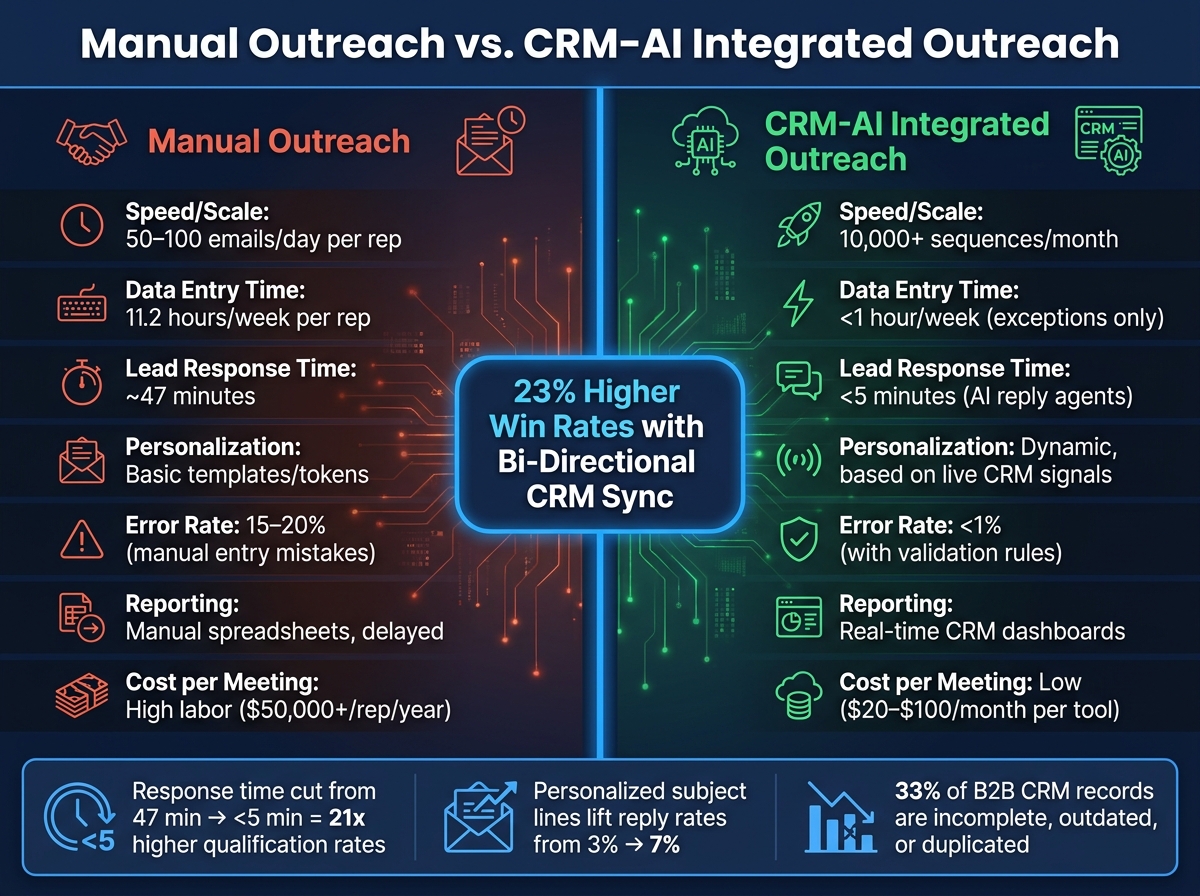
Manual Outreach vs. CRM-AI Integrated Outreach: Key Performance Metrics
Track the Metrics That Matter
Once outreach is live, your CRM should show what went out, who engaged, and what led to revenue. That gives you a clean line between one campaign and the next.
One metric stands out here: interested-reply rate. It's more useful than raw reply rate because it cuts out the junk and shows whether your targeting is landing with the right people [7]. You should also track pipeline velocity, attribution fields, bounce rate, and email match rate so you can connect revenue back to each sequence. If you're using waterfall enrichment, a solid benchmark for email match rate is 85% to 92%[5][7].
AI can also help sort replies and kick off the right CRM workflow on its own. That keeps follow-up moving and saves your team from digging through inboxes by hand [4].
After you measure performance, those same CRM signals can guide the next round of outreach.
Use AI Lead Scoring to Prioritize Outreach
AI lead scoring helps you focus on the accounts most likely to convert. It does that by comparing new records with past closed-won patterns, using signals like company size, industry, seniority, and deal fit [9].
SalesLabel's real-time lead scoring fits neatly into this setup, updating priority as new engagement data comes in.
Of course, scoring only matters if routing happens fast enough to use it. Cutting lead response time from 47 minutes to under 5 minutes is tied to 21x higher qualification rates[4].
With metrics and scoring in place, the next step is to look at the difference between a manual setup and an integrated one.
Compare Manual and Integrated Outreach Performance
The gap between manual outreach and an integrated CRM-AI workflow is hard to ignore, especially when agencies need to show ROI to clients.
Companies that use bi-directional CRM-outbound sync see 23% higher win rates than teams still depending on manual data flow [4]. That's the kind of jump that gets attention fast.
Build a Continuous Optimization Loop
A CRM-AI integration won't get better on its own. You need a steady feedback loop.
A reliable setup follows five steps: read live CRM and enrichment data, score the opportunity, route or draft the next action, send high-risk decisions through human review, and log the outcome back into the CRM so future scoring and prompts improve [9]. When closed-lost reasons go back into the system, the AI can tighten targeting and tune message prompts. Past wins also help sharpen the scoring model [4][9].
On a monthly schedule, compare CRM activity history with campaign analytics to spot reconciliation gaps, especially records where engagement data failed to sync the right way [3]. Then review segmentation logic and message prompts. That gives you a repeatable way to improve performance without tearing the whole system apart.
"We spend the first week of every CRM+AI project on data cleanup. It's unglamorous... and it accounts for 40% of the total ROI." - John V. Akgul, PxlPeak [8]
Conclusion: Build a CRM-AI Outreach System That Scales
Start with clean data. Then automate.
Map the right fields, let the CRM own the record, and sync replies, bounces, bookings, and status changes back on autopilot. That setup keeps your outreach data in one place instead of scattered across tools.
Once the CRM flow is in place, personalization becomes the next big lever. Trigger-based outreach tied to funding rounds or pricing page visits can lift reply rates 3x to 5x[7]. Add compliance guardrails, proper opt-out handling, and verify before send to protect deliverability and your sender reputation.
After outreach goes live, measurement tells you which signals lead to deals. Track revenue-linked metrics, use AI scoring to route high-fit leads, and feed closed-won and closed-lost outcomes back into the system. That feedback loop is what turns a CRM-AI setup into a scalable outreach engine for client campaigns.
FAQs
How clean should my CRM be before using AI outreach?
Your CRM should be clean, complete, current, and governed before you use AI outreach. AI won’t fix messy data. If anything, it can make the mess worse, like sending to duplicate records or treating current customers like cold prospects.
Start with the basics:
Remove duplicates
Validate email addresses and phone numbers
Standardize field values
Keep opt-out and suppression lists up to date
Add interaction context, such as time-stamped engagement signals, to improve personalization
That prep work matters. Better data gives AI the context it needs to write outreach that feels relevant instead of off-base.
Which CRM fields should AI never update?
AI shouldn't update fields that depend on human judgment or a person with clear authority. That includes manually checked data like phone numbers, plus commercial-policy fields such as discount limits, pricing rules, legal clauses, and manager approval thresholds.
Your CRM should stay the source of record. For sensitive changes - like deal stage or lifecycle stage updates - route them through approval queues or human review.
What sync setup is best for my team?
A two-way, real-time integration is usually the best setup, with your CRM as the main system of record. That cuts down on manual entry, helps stop duplicate records, and gives your team one clear view of lead activity, including emails, replies, and meetings.
It’s smart to start with a single data flow first. That gives you a chance to check data quality before you add two-way updates and automated workflows to keep records clean and reduce sync issues.