White-label branding turns partner tools into a predictable, branded lead-gen service agencies can scale while protecting margins.
SalesLabel Team
Growth Expert • 9.10.2026
Share:
Leter du etter en ferdig løsning?
SalesLabel automatiserer utgående prospektering fra A til Å — AI finner potensielle kunder, sender personaliserte meldinger og booker møter under ditt merke.
White-label branding lets you sell lead generation under your agency’s name without building every tool yourself. I recommend starting with a four- to six-week pilot for one or two clients before adding more accounts.
The payoff isn’t just a branded portal. It’s one client experience - from onboarding to reporting - with clear ownership behind it. Here’s what I’d put in place:
Choose the delivery model: Your team runs the software, a partner handles agreed tasks, or you split the work.
Check branding and access: Test emails, booking pages, reports, and client permissions before launch.
Automate with review: Use tools such as SalesLabel for sourcing, outreach, follow-ups, and booking, while keeping people responsible for approvals and problem cases.
Measure sales progress: Track qualified leads, held meetings, accepted opportunities, and delivery costs - not just activity.
Protect your margin: Confirm plan limits, data rights, support terms, and opt-out handling before setting prices.
My rule: <u>sell only what you’ve tested</u>. Branding helps clients recognize your agency. Reliable delivery gives them a reason to stay.
Label Lead Generation: From Pilot to Scale" >
White-Label Lead Generation: From Pilot to Scale
What White-Label Lead Generation Means
White-label lead generation is software, campaign delivery, or both supplied by a partner under your agency’s brand. Your brand should appear at every client-facing touchpoint, from onboarding to reporting. Clients judge your agency by that experience, not the backend they don’t see. Legal, privacy, and contract disclosures still apply.
The main question is who controls the workflow: your team, the provider, or both.
Agencies turn these tools into recurring monthly services while keeping strategy, sales, and client management in-house. Partners may provide data, enrichment, automation, inbox management, scheduling, analytics, and support. Your agency still creates the offer, approves targeting and messaging, tracks performance, handles escalations, and shares results.
Spell out client-data rights, campaign-asset ownership, and export terms in the contract. How you divide the work affects the trust, control, and margin your agency keeps.
White-Label Software vs. Outsourced Delivery
Software provides the tools. Outsourced delivery provides the people who do the work. With white-label software, your team runs the platform. With outsourced delivery, a provider handles agreed campaign tasks. The two can overlap when a provider runs campaigns inside your branded software.
This distinction helps you decide what stays in-house and what goes to a partner.
Area
White-label software
Outsourced delivery
Who does the work
Your team sets up workflows, reviews activity, and manages campaigns.
The provider handles agreed campaign tasks under your instructions.
Branding control
Usually high through interface settings, messaging, and reports.
Depends on contract terms and the approval workflow.
Client ownership
The agency holds the client relationship, contract, and pricing.
The agency generally keeps the client relationship; the provider works behind the scenes.
Staffing needs
Requires campaign operators, reviewers, and account managers.
Reduces internal execution staffing but increases reliance on provider capacity.
Liability
The agency remains responsible for its service and compliance obligations.
Outsourcing does not remove agency responsibility; the contract defines each party’s obligations and liability.
The agreement sets each party’s responsibilities. Both models still require oversight.
SalesLabel automates lead sourcing, enrichment, outreach, follow-ups, and bookings under your brand. Your agency still needs clear rules about who does the work, who approves it, who can access client data, and who handles problems. Describe the offering as an agency-managed service supported by partner technology or fulfillment. That keeps your branding in place while making the working arrangement clear.
sbb-itb-a781ab9
Build Client Trust Through Branding and Delivery
Follow one client experience standard across welcome emails, kickoff materials, the workspace, updates, and reports. Keep agency branding in client-facing systems and use the client’s approved identity for outbound prospecting. Use the same terminology and approval sheet throughout onboarding and reporting so lead statuses and qualification rules don’t change along the way.
Branding earns trust when delivery stays predictable. Before launch, set a communication schedule: a kickoff meeting, a written launch plan within one business day, weekly campaign updates, monthly performance reviews, and same-business-day acknowledgment of urgent issues. Every update should cover completed work, key metrics, decisions needed, risks, next actions, and owners.
AgencyAnalytics’ 2025 Marketing Agency Benchmarks Report identified strong relationships (81%) and effective communication (67%) as retention factors.[5] These findings suggest that trust depends on more than campaign numbers. A steady schedule shows clients that your team follows a plan rather than making things up as it goes.
Client-Facing Branding Checklist
Check every branding option - don’t assume it’s included. Review approved logos, colors, typography, the favicon, and any custom portal domain or subdomain. Then check sender names, signatures, templates, booking pages, and notifications. Make sure dashboards, report exports, onboarding guides, FAQs, and support docs use the right identity. Get written approval for client-facing copy and visual assets before launch.
Give terminology and formatting the same attention. Keep lead-status labels, qualification definitions, date formats, and time zones consistent across the workspace and reports. Confirm that client-specific workspaces and role-based permissions separate contacts, campaigns, reports, credentials, integrations, and billing. Test access with a client role, not just an admin account, and verify that it cannot expose another client’s data.[4]
For SalesLabel, confirm that your plan supports the branding, domain, permissions, exports, and data separation you plan to sell. Before launch, review test emails, booking confirmations, dashboard access, and exported reports. Include support hours, approved channels, escalation contacts, and response targets in the onboarding guide.
Set only standards your team can meet, such as reports by the fifth business day and urgent issues acknowledged within four business hours.
Support Client Retention With Measurable Results
Connect each stage to revenue: sourcing finds ICP-fit accounts, enrichment verifies contacts, outreach starts conversations, follow-up moves interest forward, and booking turns qualified prospects into meetings. Track booked meetings, held meetings, and opportunities accepted by sales separately. A full calendar doesn’t always mean sales progress.[9] Once the brand is in place, retention depends on reporting the right results.
Define Reports and Team Responsibilities
Report sourced leads, duplicate and invalid records removed, enrichment completion, delivered messages, follow-up touches, replies, qualified replies, meetings booked and held, and opportunities accepted by sales.[9] Show conversion rates and base volumes alongside activity counts.[6][7][8]Keep open pipeline separate from closed revenue. Flag missing CRM updates, attribution gaps, and sales-cycle delays rather than treating incomplete results as final.[10]
Use weekly reports to guide data-quality fixes, campaign changes, and follow-up recovery. In monthly business reviews, compare targets with opportunities, pipeline, and cost per qualified opportunity.[6][7][8][9] Before launch, agree on qualification rules, attribution windows, and the two or three business metrics leadership will review.[11] Each review should explain what changed, why, and what you’ll test next.[10]
Clear ownership keeps branded service predictable as volume grows. Give every handoff one owner and one backup.
Agency: sourcing, enrichment, outreach, inbox triage, reporting, and first-line support.
Client: qualification, sales calls, calendar availability, proposals, and opportunity updates.
Record lead owners, stage-change timestamps, and first-response times in a shared CRM. Set reply-time targets and name who handles escalations for overdue tasks or unanswered questions.[9] Visibility, prompt follow-up, and clear handoffs help reduce churn by keeping the client-facing service reliable.
Client Retention Risks and Controls
Retention risk
Control protecting branded delivery
Brand drift
Approved message library and change approvals for client-facing assets.
Poor data
Field verification, deduplication, rejection tracking, and suppression lists.
Delayed follow-up
Monitored inbox, reply-time alerts, and daily overdue-task checks.
Unclear ownership
Documented handoff statuses, owners, backups, and escalation paths.
Weak reporting
Client-visible funnel stages, definitions, base volumes, timestamps, and campaign results.
Unclear escalation
Unresolved-request tracking, severity levels, and recurring-issue reviews.
When results fall short, check the funnel in order: account fit, delivery, reply handling, attendance, and sales follow-up.[10] Document the corrective action, owner, deadline, and next review date. These controls let you automate more of the workflow with less risk of losing visibility.
Scale Lead Generation With Automation and Oversight
With roles and reporting defined, you can scale delivery without losing control. AI automation takes on repetitive work across more accounts, while white-label branding keeps client-facing touchpoints consistent. SalesLabel supports sourcing, enrichment, outreach, follow-ups, replies, scoring, inbox management, and booking under each client’s brand. Capacity still depends on clean data, correct settings, and human review.
Manual vs. Automated Lead Generation Tasks
Task
Automation’s role
Human review or oversight
Sourcing
Find records that match approved filters and import them into the client workspace
Approve targeting rules, data sources, and prospect fit
Enrichment
Add company size, industry, job title, location, and other available attributes
Validate high-value records and resolve missing or conflicting information
Personalization
Draft opening lines or message variations using approved fields
Approve tone, claims, personalization quality, and topic restrictions
Outreach
Send approved sequences within schedules and contact rules
Enforce volume and quality limits
Follow-ups
Trigger reminders based on timing, nonresponse, or engagement
Approve sequence length and stopping rules
Replies
Classify responses, suggest answers, and flag buying signals or objections
Review nuanced, negative, sensitive, or high-intent replies before sending
Lead scoring
Rank prospects using firmographic, behavioral, and reply signals
Audit scoring criteria, classification errors, and thresholds
Inbox management
Label, route, prioritize, and consolidate conversations
Manage escalations and client service standards
Booking
Offer approved calendar slots and create meetings
Confirm qualification rules, routing, time-zone settings, and handoff ownership
Before scaling, review 50 to 100 records per segment for title, company, duplicate, and personalization errors. Treat enrichment as a first pass - not verification. Send pricing exceptions, security questions, and ambiguous replies to a person.
Set Account Controls Before Scaling
Once task ownership is clear, set account permissions before increasing volume. Keep each client’s contacts, credentials, sender identities, calendars, campaign settings, and reports separate. Limit who can launch campaigns, export data, or change volume based on their role.
Require approval before activating a new campaign or increasing sending volume. Lock approved positioning, qualification rules, and exclusions to the correct account. Log automated actions and configuration changes, and specify who can pause campaigns when complaints, data errors, or routing failures appear.
Scaling also means staying within account and channel limits. Apply each client’s suppression list before sending, and prevent imports from adding opted-out contacts back into campaigns. For U.S. commercial email, the FTC requires opt-out mechanisms to work for at least 30 days after sending and requests to be honored within 10 business days.[12] Suppress requests promptly and retain timestamps. Route ambiguous requests or legal concerns to the designated reviewer to protect client trust and manage agency risk.
Before adding accounts, verify SalesLabel’s current account limits, seats, sending caps, integrations, API quotas, and data-use terms. Check channel restrictions separately: LinkedIn prohibits third-party tools that scrape data or automate activity on its website.[13] Use documented account limits rather than informal sending targets, and track review time against output.
Once branding and account controls are in place, turn the workflow into a paid service. SalesLabel supports white-label lead generation for agencies, covering sourcing, enrichment, outreach, follow-ups, replies, scoring, inbox management, and meeting booking. Use the platform to deliver your service - not to promise results. Check that your chosen plan includes each feature before adding it to client contracts.[15][3]
Set Up Branding and Service Pricing
Set up your domain, logo, colors, and service pricing before onboarding clients. Applicable plans include a branded Chrome extension. Use the same branding in onboarding documents, reports, and support messages. You control the client relationship and branded service, not the software.
Base your recurring price on implementation, campaign management, reply review, strategy, and reporting. Include allocated software costs and your margin. Your contract should spell out included usage, who approves what, response times, and overage charges. Then choose a plan that fits your clients’ account volume and support needs.
SalesLabel Plans, Pricing, and Account Limits
Confirm current pricing and account-count rules with SalesLabel before buying or publishing them.[15][3] Use the table to compare capacity, support, and monthly costs against how you deliver your service.
Plan
Monthly cost
Connected LinkedIn accounts
Highlighted features and support
Starter
$799/month
Up to 30 accounts
Setup help and email support
Growth
$1,279/month
Up to 99 accounts
Branded Chrome extension, priority support, and monthly strategy call
Scale
$1,999/month
Unlimited accounts
Documentation center, strategy calls every two weeks, and dedicated success manager
Check how SalesLabel counts accounts, whether seat, data, or onboarding fees apply, and what “unlimited” covers. Growth costs $480/month more than Starter, while Scale costs $720/month more than Growth. Pay for the capacity and support your team needs, while protecting your service margin. A higher-priced plan doesn’t mean better results.
Build a Repeatable, Profitable Service
Once branding and account controls are set, turn delivery into a repeatable service. Before launch, create a one-page service blueprint that covers your ideal client, target market, channels, qualification rules, reporting cadence, exclusions, and sales handoff ownership. Use it to keep client promises in line with what your team delivers.
Start With a Small Client Pilot
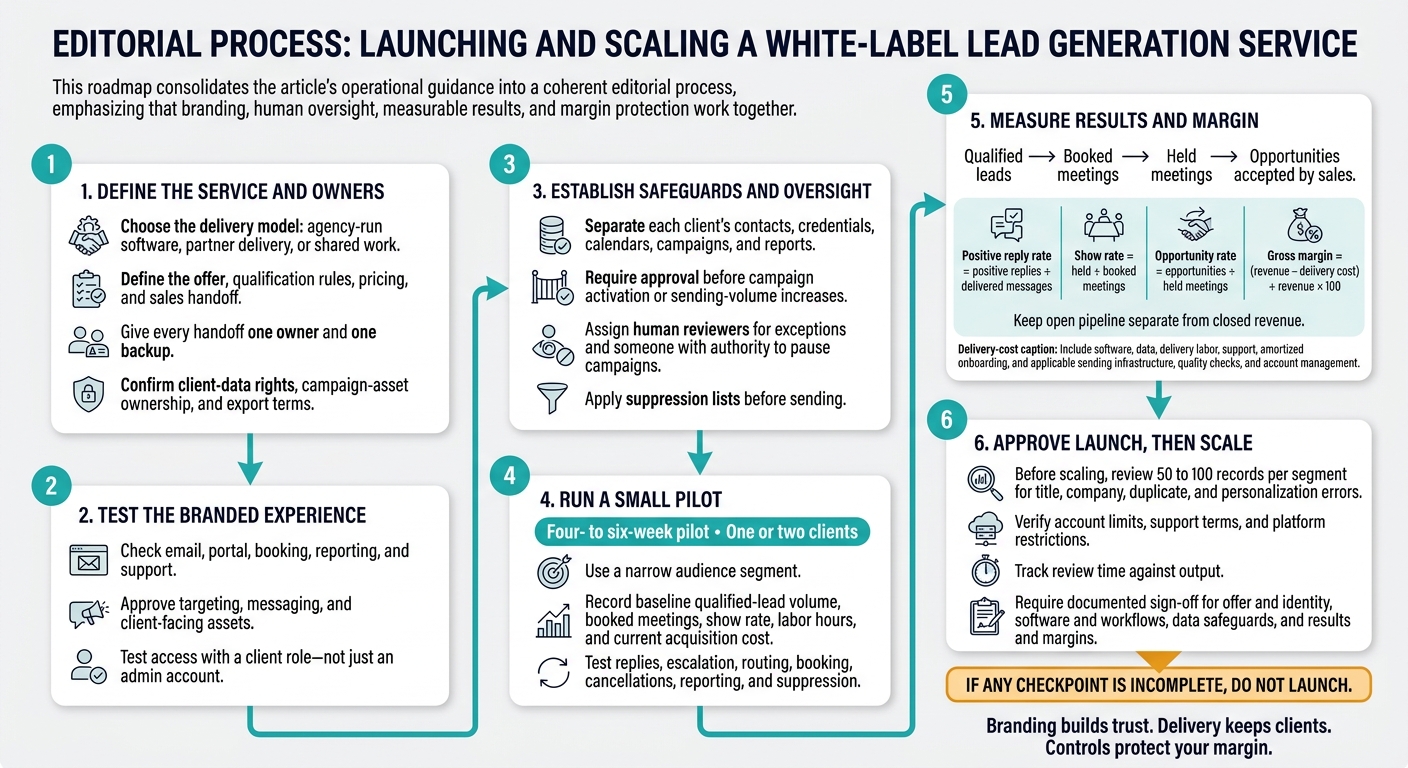
Run a four- to six-week pilot with one or two clients in a narrow audience segment. Record baseline qualified-lead volume, booked meetings, show rate, labor hours, and current acquisition cost.
Get written permissions and connect approved mailboxes, calendars, and CRM access. Begin with only the approved channels you need. Set targeting and personalization rules, then test client-facing branding, replies, escalation, salesperson routing, booking, cancellations, reporting, and suppression.
Give the agency responsibility for targeting, list hygiene, campaign configuration, first-line reply triage, and reporting. Have the client approve positioning, claims, qualification rules, and sales handoff. Define support hours and response targets - for example, routing high-intent replies within one business hour.
Before scaling, check that the pilot meets CAN-SPAM requirements, applicable state privacy laws, and platform terms.[12] Test that opt-outs are honored within 10 business days and that the opt-out mechanism works for at least 30 days after sending.[14] Pause if suppression fails or quality thresholds are breached.
Once the pilot is stable, use those same metrics to set pricing and protect your margin.
Measure Client Results and Agency Margins
Use a simple margin model to check whether the service can scale profitably. Agree on definitions and attribution windows before launch, then track:
Show rate (held ÷ booked meetings) and opportunity rate (opportunities ÷ held meetings).
Client retention (starting clients retained at period end ÷ clients active at the start).
Track cancellations and pauses separately. Use consistent reporting periods and break down results by audience and channel.
Calculate gross margin as (revenue − delivery cost) ÷ revenue × 100. Delivery cost should include software, data, delivery labor, support, and amortized onboarding, plus sending infrastructure, quality checks, and account management where applicable.
Conclusion: White-Label Launch Checklist
Branding builds trust, delivery keeps clients, and controls protect your margin. Launch readiness requires sign-off - not just software setup. Use these checkpoints to decide whether you’re ready to launch.
Offer and identity: Confirm your offer, deliverables, delivery timeline, qualification definition, and pricing. Check that every client-facing touchpoint - email, portal, booking, reporting, and support - matches your brand.
Software and workflows: Test only the features you plan to sell. In your live SalesLabel setup, check branding, replies, scoring, inbox handling, and account limits. Before launch, approve targeting, messaging, sending rules, follow-up limits, escalation paths, and booking rules. Assign someone to review exceptions and give them the authority to pause campaigns.
Data safeguards: Before sending, confirm access controls, retention and deletion rules, backups, offboarding steps, and opt-out handling.
Results and margins: Launch only when reports show qualified leads, booked meetings, pipeline, and revenue coverage. Pricing must also cover delivery, support, compliance, and exception handling.
Every checkpoint needs an owner and documented approval. If any checkpoint is incomplete, do not launch.
FAQs
How do I explain white-label delivery to clients?
White-label delivery is our agency’s end-to-end system, not just access to third-party tools. We’ve configured specialized infrastructure, such as SalesLabel, to manage lead sourcing, outreach, and pipeline activity under our brand.
That means you get one consistent experience, fast execution, and a clear view of progress. Your dedicated dashboard lets you track results and meetings in one place.
Our technology and expertise keep the focus on outcomes: connecting with leads, booking meetings, and moving your pipeline forward. We work as your growth partner, managing the system from lead sourcing through pipeline activity.
What if my pilot generates no qualified leads?
Use the reports and analytics in your SalesLabel dashboard to pinpoint the issue. Check reply rates and positive reply rates to see whether your messaging connects with your target audience. Make sure you and your client use the agreed-upon definition of a qualified lead.
Then refine your targeting, adjust your offer, or A/B test your outreach copy to improve results before the next cycle.
How do I know when to scale?
You’re ready to scale when lead generation runs as a repeatable system. Standardized intake, templates, and reporting let your team onboard clients without the founder’s involvement [1].
Scaling also helps you become an embedded partner and grow revenue without adding staff. When manual tasks cause bottlenecks or recurring workflow problems, a white-label platform like SalesLabel can help you serve 10 to 100 clients efficiently [2][1].
 Label Lead Generation: From Pilot to Scale" >