White-Label Tools for Agencies Adding Lead Services
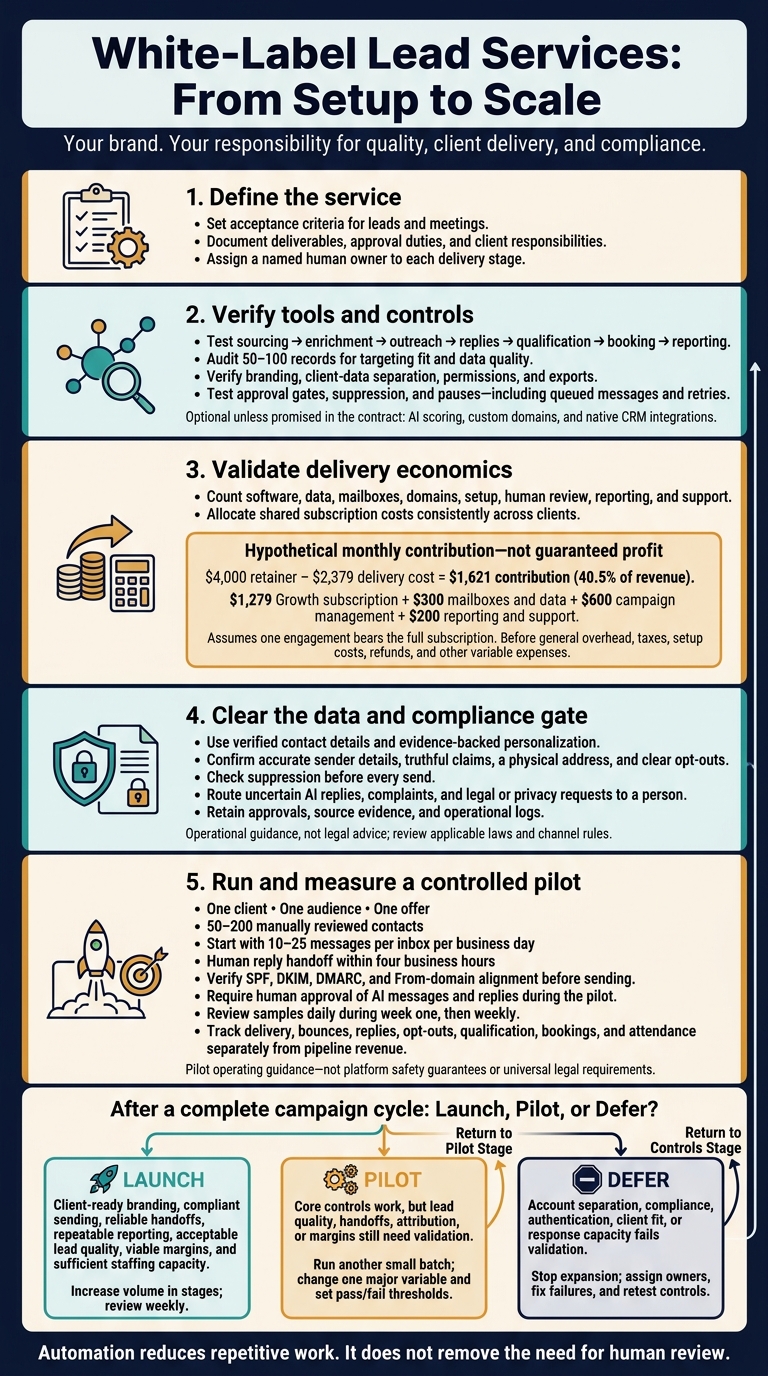
Agency checklist for white‑label lead tools: define services, verify data separation, pilot 50–200 reviewed contacts, and require human review.
SalesLabel Team
Growth Expert • 20/11/2026
Share:
Cerchi una soluzione chiavi in mano?
SalesLabel automatizza la prospezione dall’inizio alla fine — l’IA trova potenziali clienti, invia messaggi personalizzati e prenota riunioni con il tuo marchio.
White-Label Tools for Agencies Adding Lead Services
White-label tools let agencies sell lead services under their own brand - but the agency still owns quality, client delivery, and compliance. Before launch, define the service, verify client-data separation, and test the workflow with 50–200 manually reviewed contacts.
The checks come down to four areas:
Service and software: Set lead and meeting criteria, assign staff, and test sourcing, enrichment, outreach, replies, booking, branding, and reporting.
Pricing and margins: Check SalesLabel’s plan limits and count software, data, inboxes, review time, and support - not just the subscription.
Data and compliance: Verify contact details, approve message claims, enforce opt-outs, and route uncertain AI replies to a person.
Launch readiness: Measure lead quality, handoffs, results, and costs. Expand only when the pilot supports it; otherwise, test again or defer.
Automation reduces repetitive work. It does not remove the need for human review.
White-Label Lead Services: From Setup to Scale
What to Check in White-Label Lead Tools
Check the controls, not just the feature names. Ask for a live demo, sample exports, and written plan limits to confirm the tool supports how you deliver your service. Appointment-setting needs booking tools; AI replies matter only if they’re part of your offer. Each feature should reduce delivery risk, keep client accounts separate, or improve reporting.
Test every control as it would work in a live client account.
Capability
Delivery requirement
Evidence to verify
Sourcing, enrichment, and outreach
Accurate contacts and controlled messaging
Audit 50–100 records; test message previews, approval gates, neutral fallback copy, and follow-up stops
Replies, qualification, booking
Required when included in the service
Test reply classification and calendar routing from start to finish
Branding, reporting, and access control
Client-ready delivery
Check branded screens, separate client permissions, and exportable reports
Pause and suppression controls
Required to stop unwanted outreach
Confirm that queued messages and retries stop
AI scoring, custom domains, native CRM integrations
Optional unless promised in the contract
Check accuracy in a pilot, domain setup, and integration tests
Sourcing, enrichment, and outreach
Test 50–100 records against your industry, location, company size, job title, and relevant technology filters. Check email status, source dates, missing fields, duplicates, and options for correcting records.
Review generated messages before sending. Missing prospect details should trigger neutral fallback copy - not made-up personalization. Test approval queues, sending limits, business-hour settings, and whether follow-ups stop after replies, bookings, disqualification, or opt-outs.
Replies, Qualification, and Meeting Booking
Run interested, negative, ambiguous, unsubscribe, and out-of-office replies through the workflow. Assign one owner, set a response SLA, keep conversation history available, and route uncertain messages to a human. Test each client’s qualification rules and manual overrides.
For booking, check calendar availability, time zones, buffers, routing, and cancellations. Confirm that the assigned representative receives both the qualification notes and the full conversation.
Branding, Reporting, and Campaign Controls
Inspect logos, client-facing screens, exportable report templates, and vendor-brand removal. Verify custom domains only if your offer needs them. Check that billing controls fit how you deliver the service, then test approval gates and permission limits to ensure clients can’t bypass approvals.
Report sends and replies separately from qualified leads, meetings held, opportunities, and pipeline value. Match exports against calendar and CRM records. Before pricing or launching the service, test pauses at the campaign, mailbox, and client levels - including whether they stop scheduled messages and retries.
Connect SalesLabel features to each delivery stage. AI sourcing and enrichment help with prospect research. Personalized outreach and follow-ups support campaign delivery. AI replies, inbox management, real-time lead scoring, and meeting booking help your team handle conversations.
Custom domains, logos, and agency-set pricing can support a branded service. Confirm which client-facing screens your plan covers, then check whether the plan fits how you deliver that service.[1][5]
Assign one human owner to each stage. Approve targeting and copy before launch, and send uncertain replies and qualification calls to staff. Get written confirmation of supported channels, CRM and calendar integrations, client-data separation, subaccounts, permissions, and data retention/export rules.[1][5]
Compare SalesLabel Plans and Account Limits
Check the current plan sheet and confirm the terms before buying.[3] Compare the limits below with your client load and delivery process.
Account allowances do not override LinkedIn’s rules or guarantee safe outreach volumes.[6][3]
Set Service Prices and Calculate Margins
Once you confirm the plan, price your service around delivery costs - not software access alone.
You can charge for software access, managed campaigns, qualified meetings, or a mix of these services. Count platform fees, data, mailboxes, domains, setup, human review, reporting, and support as delivery costs. Use a consistent method to divide shared subscription costs across clients.
Your agreement should spell out account and campaign capacity, review frequency, and client duties. That includes approvals, calendar availability, and sales follow-up. If you charge per meeting, define target roles, company fit, attendance requirements, and cancellation or replacement rules.
Hypothetical monthly calculation: Assume one managed engagement bears the full $1,279 Growth subscription, plus $300 for mailboxes and data, $600 for campaign management, and $200 for reporting and support. Delivery cost totals $2,379. A $4,000 retainer leaves $1,621, or 40.5% of revenue, before general overhead, taxes, setup costs, refunds, and other variable expenses. This illustrates contribution, not guaranteed profit; price onboarding separately or include its allocated cost before setting your fee.
Before launch, use these costs and margins to guide the data-quality and compliance review that follows.
Data Quality, Outreach Compliance, and Human Review
White-label outreach runs under your agency’s brand. Data checks, legal review, and a clear path to human review help protect it. Tie each compliance rule to a tool control, approval step, or log entry.
Check Prospect Data and Personalization
Collect only what the campaign needs: name, work email, title, company, industry, company size, source URL, and relevant business signal. Record each source and collection date. Check contact details for errors, duplicates, role changes, bounced addresses, and generic inboxes. Document consent or a lawful basis where required. Avoid sensitive personal data unless you have a documented legal and operational need.
Use only verified company, role, product, hiring, funding, technology, or public business information to personalize messages. Get reviewer approval before launch, and keep the source evidence, final copy, and approval records.
Follow Email Laws and Channel Rules
This is operational guidance, not legal advice. Have counsel review campaigns, contracts, and applicable state privacy duties.
Under CAN-SPAM, use accurate sender details, nondeceptive subject lines, a clear opt-out method, a valid physical address, and truthful commercial identification. Honor opt-outs within 10 business days, and keep the opt-out mechanism active for at least 30 days after sending.[2][4] Both the agency and the client may bear responsibility when one sends on the other’s behalf.[7]
Same-day suppression is an agency control - not the federal deadline. Check suppression lists before every send so imports and enrichment don’t reactivate unsubscribed contacts.
Before launch, review provider acceptable-use policies, authentication requirements, automation limits, rate limits, and prohibited scraping or messaging practices. Get separate legal review before targeting Canada, the UK, or Europe, including CASL, PECR, GDPR, and applicable ePrivacy rules.
Assign Review and Escalation Duties
Document who can approve messages, export data, change suppression records, and stop sending. Specify who owns compliance records, what clients may access, and how long records stay before deletion.
Use the checklist below as both a launch gate and an operating record. Your pause procedure should name who can stop sending, how the team confirms the pause, and which queues and sending systems must be disabled. Test the checklist during the pilot, before the full client launch.
Workflow stage
Agency control
Record to retain
Responsible owner
Prospect sourcing
Set approved sources and required fields; reject unnecessary sensitive data
Source, collection date, purpose
Data or campaign specialist
Data enrichment
Validate company, role, work email, and business relevance; remove duplicates and record confidence scores
Process, compliance, and delivery need to work together with a real client - not just pass an internal review.
Set Up and Run a Small Pilot
Once your controls pass internal review, test them in a live pilot. Start with one client, one audience, one offer, and 50–200 manually reviewed contacts. Check that every lead, reply, meeting, and client note stays in the correct account. Before sending, verify SPF, DKIM, DMARC, and From-domain alignment.[8]
Use only preapproved targeting, qualification rules, copy, and escalation paths. Send small batches, starting with 10–25 messages per inbox per business day.
Test how the service handles interest, requests for information, disinterest, unsubscribe requests, wrong-person replies, pricing objections, hostile replies, and out-of-office replies. Follow a booking through confirmation, rescheduling, cancellation, and attendance tracking. Check that records, notifications, and reports reach the correct client owner.
During the pilot, require human reply handoff within four business hours and human approval of AI messages and replies. Measure delivery and reply quality before increasing volume.
Measure Quality and Client Results
Track delivery, bounce, reply, opt-out, qualification, booking, and attendance rates separately from pipeline revenue. Define attribution rules before launch. Small samples can point you in a direction, but they don’t support reliable forecasts.
Review samples daily during week one, then weekly. Check fit, accuracy, personalization, claims, tone, suppression, and routing.
Let the results guide your fixes. Strong delivery but weak replies points to targeting or messaging problems. Bookings with poor attendance call for better confirmations and reminders.
Pause if authentication fails, bounces or complaints jump, outreach becomes irrelevant or deceptive, routing breaks, or the client can’t handle incoming replies. Use these findings to decide whether to launch, extend the pilot, or defer.
Decide Whether to Launch, Pilot, or Defer
Make one scaling decision based on the pilot results. To judge whether the service can grow profitably, count pilot labor and delivery costs - not just software fees. Include data, inboxes, domains, review time, support, and rework.
Expand only after a complete campaign cycle shows consistent quality and enough staffing capacity to handle more replies and meetings without delays.
Decision
Readiness criteria
Open risks
Next action
Launch
Client-ready branding, compliant sending, reliable handoffs, repeatable reporting, acceptable lead quality, and viable margins
Routine tuning only
Increase volume in stages; review weekly and pause expansion if quality or capacity declines
Pilot
Core controls work, but lead quality, handoffs, attribution, or margins need validation
Unproven service performance
Run another small batch; change one major variable and set pass/fail thresholds
Stop expansion; assign owners, fix failures, and retest controls
Conclusion: Confirm Readiness Before Expanding
Before launching a service under your brand, document deliverables, approval duties, and acceptance criteria for leads and meetings. These terms set the baseline for a controlled launch.
SalesLabel can automate sourcing, outreach, replies, and booking. Your agency still owns quality and compliance, so assign a named owner to each responsibility.
Use live results to choose whether to launch, run another pilot, or defer. Launch only when you can repeat both the results and the processes behind them.
FAQs
Which clients are best suited for white-label lead services?
B2B companies that rely on targeted prospecting are the best fit. These include professional services firms, B2B software companies, consultancies, and other agencies. A clear ideal customer profile helps automated lead generation deliver precise results.
These clients need to value a steady flow of qualified conversations enough to pay a monthly retainer. That commitment helps your agency cover the cost of delivering the service and earn a profit.
How do I set realistic lead generation expectations?
Set a 21–35-day timeline from contract signature to the first booked meeting, with three stages: infrastructure, ramp-up, and live delivery.
Start by setting up the sending infrastructure. Then allow two weeks for sender warm-up before moving into live outreach and meeting booking. Don’t promise leads in the first week: skipping warm-up puts sending accounts at risk of suspension.
Define a qualified lead in the contract as someone who matches the agreed-upon ideal customer profile (ICP) and confirms availability or interest. Raw replies or outreach touches alone don’t count.
How many clients can one campaign manager support?
Manual outreach puts a cap on growth. Campaign managers typically handle 3 to 5 clients before performance slips, and processes often break down at 10 to 15 active accounts.
An automated, AI-powered white-label platform like SalesLabel can expand that capacity by letting managers focus on campaign planning and fine-tuning. Agencies can then serve dozens or even hundreds of clients without hiring someone for every new account.