Use AI to route push, email, SMS, and in-app messages: optimize timing, consent, fatigue, and measure conversion lift.
SalesLabel Team
Growth Expert • 08/07/2026
Share:
Cerchi una soluzione chiavi in mano?
SalesLabel automatizza la prospezione dall’inizio alla fine — l’IA trova potenziali clienti, invia messaggi personalizzati e prenota riunioni con il tuo marchio.
AI push works best when I use it as part of one system with email, SMS, and in-app messages. The main idea is simple: I let AI decide who should get a message, which channel should carry it, when it should send, and when to stop. That matters because people often use 3 to 5 channels before they buy, and poorly synced campaigns lead to repeats, opt-outs, and lost sales.
Here’s the short version:
Push is for fast action like cart reminders, price drops, streaks, and app activity
Email is for detail like onboarding, receipts, and product education
SMS is for urgent moments when timing matters most
In-app messages fit active users who need help inside the product
AI improves timing and message choice based on live behavior
Frequency caps and suppression rules stop duplicate sends
Holdout tests show whether push adds lift or just appears in the path
Consent must be tracked by channel because push, SMS, and email each follow different rules
A few numbers stand out. AI send-time models can drive 3x higher open rates, behavior-based segmentation can lift CTR by 94%, and too many irrelevant messages can push 46% of users to opt out after just 2 to 5 messages in one week. So the goal is not “send more.” It’s send one message, in the right place, at the right time.
If I were setting this up, I’d focus on four things first:
AI-based timing, personalization, and fatigue controls
Measurement based on conversion lift, not clicks alone
That’s the whole playbook in plain English: route each event well, keep the message short, respect consent, and measure what leads to revenue and retention.
Building the Multi-Channel Architecture
Channel Roles and Campaign Flow
Once the role of each channel is set, the next step is the routing layer. That’s the part that decides what goes out, when it goes out, and where it goes.
A multi-channel campaign tends to work best when each channel has one clear job. In most cases, the simplest setup is a fallback chain with clear priority rules and escalation thresholds: start with push, move to email if needed, and keep SMS for time-sensitive escalations. That cuts down on message fatigue.
But there’s a catch. This only works if suppression rules block duplicate follow-ups. If someone opens a push notification or converts, downstream sends should be canceled on their own.
Data, Events, and Consent Management
Routing depends on a unified customer profile: one shared profile, one event stream, and one source of truth. Without that setup, the AI can’t make smart routing choices across channels.
Track each action as a named event, such as user.signed_up, abandoned_cart, and order.shipped. These events feed the routing layer. They also help stop duplicate sends when an upstream system retries a failed request.
Consent and preferences need to be enforced in that same decision layer. Otherwise, routing falls apart fast. SMS needs explicit opt-in under TCPA rules. Android 13 and iOS both require runtime permissions for push. A simple three-level preference model works well:
Critical transactional alerts can bypass user preferences. Promotional messages can’t. Local quiet hours should also suppress non-critical sends on their own [5][3].
For agencies, SalesLabel fits at the handoff point. AI replies, lead scoring, and inbox management help turn push-driven interest into managed follow-up.
Once that handoff is clear, AI can optimize timing and personalization across channels.
sbb-itb-a781ab9
AI Personalization and Orchestration Strategies
Segmentation and Next-Best-Channel Logic
With a shared event stream in place, AI can pick the right channel and the right message for each trigger. It looks at behavior, recency, and intent, then decides how to respond for that specific event.
At the center of this is a scoring model. AI weighs recency, frequency, and intent signals, then routes the message to the channel most likely to convert. High-urgency events go to SMS. Mid-intent signals fit email. Lower-intent browsing stays on push. The outcome is a next-best-channel decision made for each user, for each event, in real time.
This kind of segmentation doesn’t sit still. It keeps updating based on actions like pricing-page visits, recent app activity, and feature usage. Those signals say far more about intent than demographics on their own.
Behavior-based segmentation beats broad broadcasts because it lines up with what the user wants right now. Segmented campaigns powered by connected behavioral data deliver a 94% higher CTR than universal broadcasts [2].
Send-Time Optimization and Frequency Control
AI can move you away from fixed send schedules and toward user-level timing models built from past opens, clicks, and app activity. That change alone can lift CTR by 20% to 40% compared with fixed-schedule sends [7].
Set clear caps across channels so people don’t feel spammed:
One promotional push per day
Three emails per week
One SMS per week
Too many messages lead to opt-outs and make future engagement harder.
It also helps to suppress non-critical sends during local quiet hours, add a cooldown after repeated dismissals, and sunset users who stay inactive for 60–90 days. That keeps push ready for the moments when it has the best shot of working.
High-Impact Campaign Use Cases
Cart abandonment, onboarding, and reactivation tend to be the strongest use cases. A simple way to think about it: push handles the first touch, email adds detail, and SMS is saved for urgent escalation. Each channel has a clear role, and the flow should stop as soon as a purchase happens.
The apparel brand Linksoul increased automated flow revenue by 82% year over year after improving orchestration across messaging channels [2]. Push, email, SMS, and in-app work best when they’re treated as one connected system that shifts with user behavior.
For agencies, the biggest wins usually come from visible-intent moments, when push can close the loop before interest fades. The same routing logic works anywhere user intent is easy to spot.
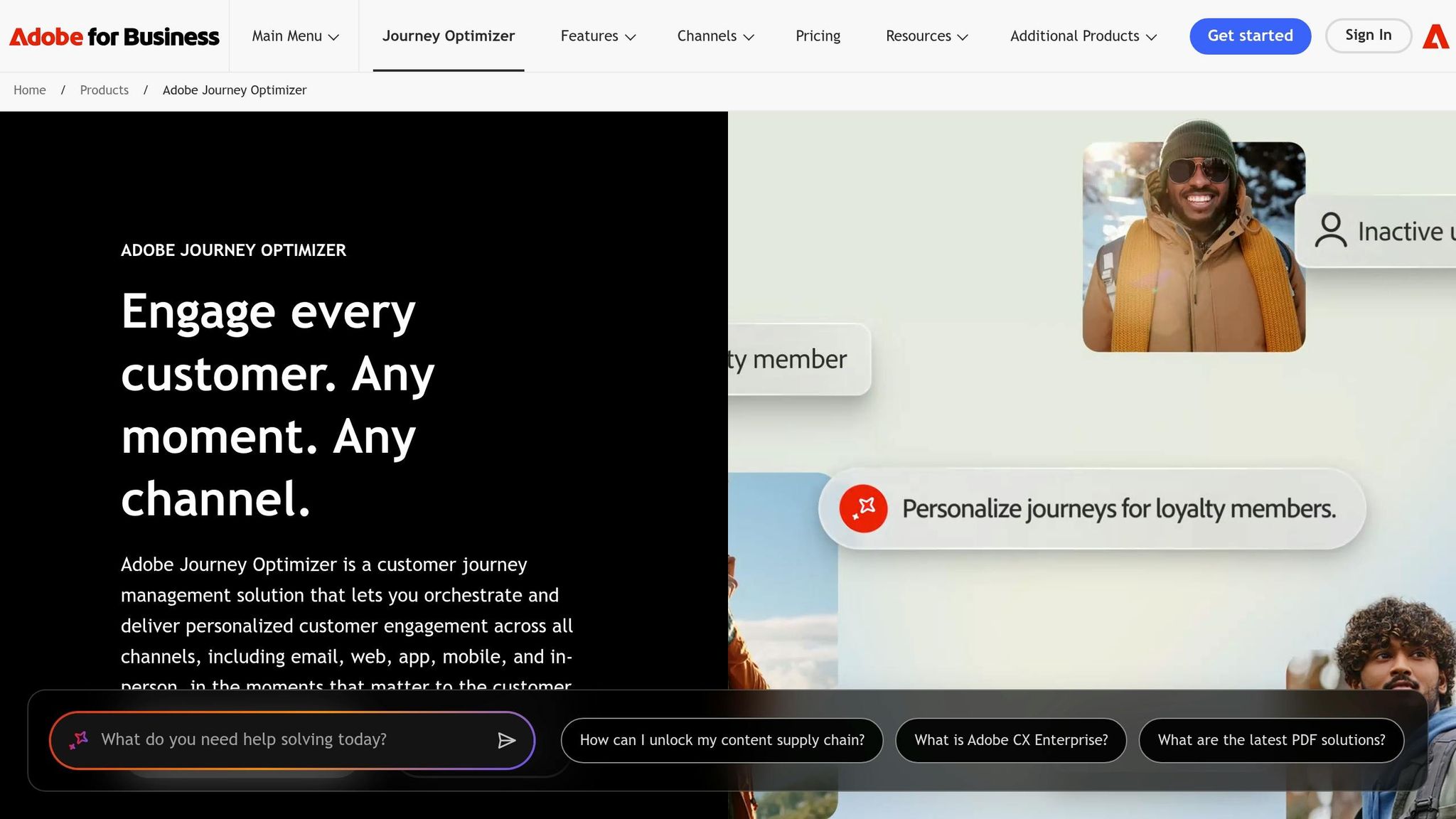
Create and Test Push Notification Marketing Campaigns in Journey Optimizer | Adobe for Business
Designing AI-Optimized Push Messages
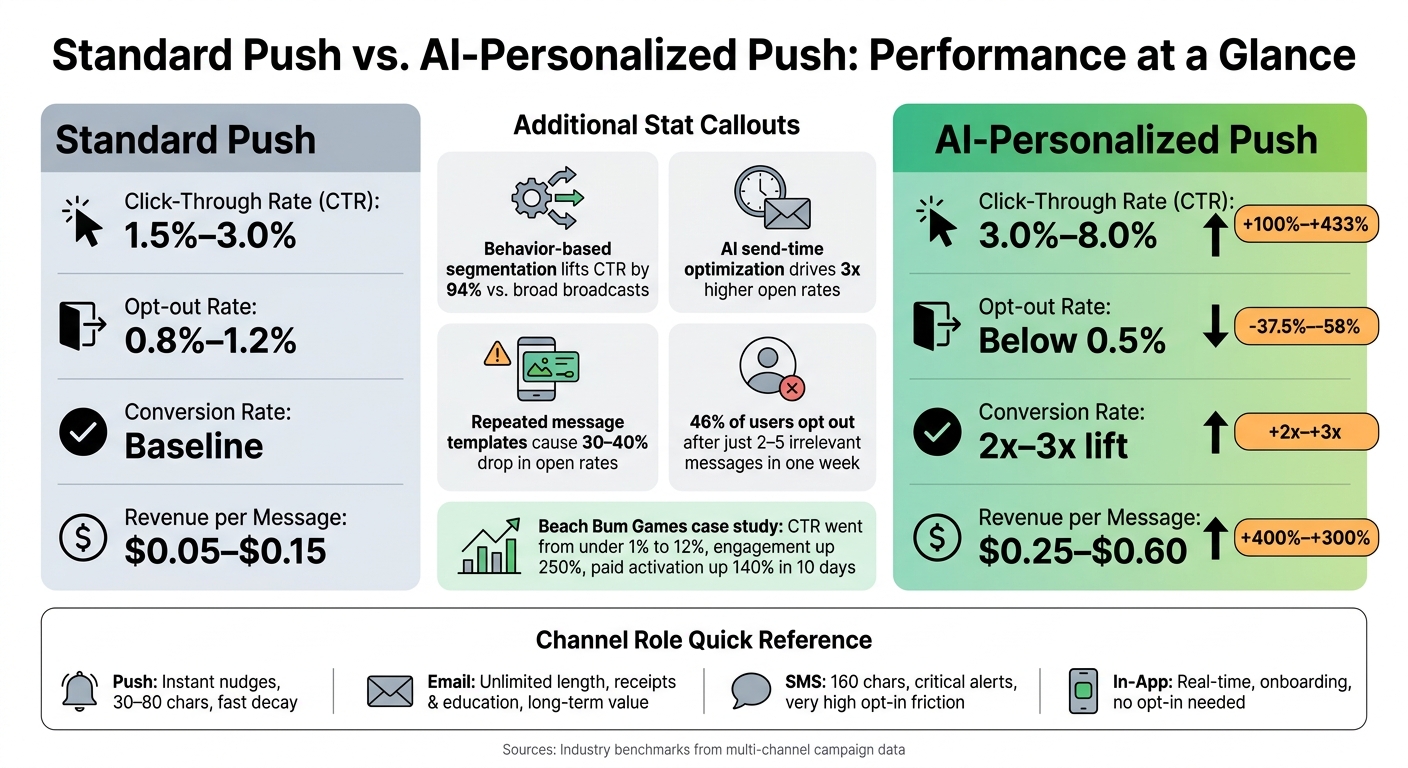
Standard vs. AI-Personalized Push Notifications: Performance Metrics Compared
Message Structure and CTA Best Practices
After orchestration picks the channel, the next thing that decides performance is the message itself. If AI selects push, the copy has to fit the channel's limits and its sense of urgency. Push notifications are short - usually 30–80 characters - so structure matters more than flair.
A simple format tends to work best: Hook → Benefit → CTA. The hook gets attention. The benefit gives the user a reason to care. The CTA tells them what to do next. Keep it tight: one CTA, one main benefit, and no wasted words [1][8].
AI can also help avoid message fatigue by rotating variants instead of sending the same template again and again. When wording gets repeated too often, open rates can fall by 30–40%[4]. LLMs can vary the angle - humor, anticipation, milestones, or social proof - without drifting away from brand voice. To avoid truncation on iOS and Android, keep titles under 45 characters and total copy under 80 characters[4][8].
For SaaS, push works well for:
Trial activation
Streak reminders
Feature adoption
For lead gen, it fits abandoned booking recovery and pricing updates.
Creative Elements and Deep Linking
Rich media should be there for a reason. Use it when it adds context the user can grasp at a glance: the exact product they viewed, progress toward a goal, or an image that makes the offer obvious. Used this way, rich notifications can lift open rates by 25% to 50% compared with text-only messages [3][4].
Action buttons make push even more direct because users can respond from the lock screen without opening the app. But the destination has to match the promise. Deep links should send people to the exact cart, page, or step mentioned in the message. If a push says “finish your setup” and then dumps the user on the homepage, conversion takes a hit.
Beach Bum Games is a good example of what tight message-to-destination alignment can do. The company used behavioral data tags to tailor re-engagement campaigns around quest progress and play style. The result: push CTR climbed from under 1% to 12%, engagement went up 250%, and paid user activation rose 140% within 10 days[9].
Platform behavior matters too. Android notifications often remain visible longer. iOS notifications are affected more by Focus modes. AI tools need to account for both when choosing timing and format [1][4].
The next step is measuring which message setups and landing points drive conversions.
Channel and Personalization Comparison Tables
Use these limits to match the channel to the job. The choice usually comes down to urgency, message length, and how hard it is to get permission.
Channel
Speed
Character Limit
Ideal Use Case
Opt-in Friction
Engagement Pattern
Push
Instant
Very low (30–80 chars)
Nudges, time-sensitive alerts
System permission required
High visibility, fast decay
Email
Delayed
Unlimited
Receipts, newsletters, education
Low (email capture)
Searchable, long-term value
SMS
Instant
Low (160 chars)
Critical alerts, flash sales
Very high (strict compliance)
Extremely interruptive
In-App
Real-time
Medium
Onboarding, feature discovery
None (active users only)
Contextual, high conversion
Here’s what AI-driven personalization tends to do for push metrics:
A lot of the gain comes from relevance. When a message lines up with what a user just did - or what they’re likely to need next - the numbers change fast. These benchmarks give you a practical baseline for testing copy, format, and deep links against each other.
Measuring Performance and Optimizing Results
Core Metrics That Matter
Once your copy, timing, and routing are live, measurement tells you which triggers and channels are driving lift. Start with delivery rate: how many notifications make it past operating-system filters and notification summaries. Then track CTR, conversion rate, and revenue per notification (RPN). Pass a value field in your conversion events so you're measuring actual dollar return per send, not just clicks [11]. Also break results out by trigger type. Behavior-triggered sends usually beat broadcasts [10].
Retention is where push makes its long-term case. 75.8% of teams say push has the highest impact on retention in the first 30 days after install, compared with email and in-app messaging [10]. Track 1-, 7-, 30-, and 90-day retention for users who engaged with push versus users who didn't. If push falls short, that's a sign your messages are adding friction instead of helping.
You also need to watch opt-out rate and app uninstalls. 46% of users will opt out after getting just 2–5 irrelevant messages in a single week[12]. A short-term click isn't worth burning the channel.
The biggest measurement mistake in multi-channel programs is giving every channel full credit for the same conversion. Push shows up in conversion paths a lot, so it's easy to give it more credit than it earned [13].
The cleanest fix is a holdout group. In most cases, that's 5–10% of users who get no push while your other channels stay active [13]. Then compare the treatment group with the holdout group to measure lift:
That shows whether push is driving incremental lift or just along for the ride.
If you're measuring journeys across email, SMS, and push, Shapley Value models can split credit across the full path [13]. Pair those MTA scores with holdout lift data so push doesn't get over-weighted just because it appears often in the journey [13].
After that, keep tracking clean so results stay comparable across campaigns and channels. Standardize your UTM parameters with consistent, lowercase, dash-separated naming like utm_source=push and utm_campaign=[ID] across every push link. That keeps performance data comparable in Google Analytics 4[11]. For non-browser conversions, use server-side postbacks for more accurate credit [11]. That kind of tracking discipline also makes it much easier to scale, enforce consent rules, and keep control as campaigns grow.
Governance, Compliance, and Scaling for Agencies
Consent, Preferences, and Frequency Caps
After attribution, the next limit is permission. Once you can measure lift, compliance becomes the thing that decides whether a message can go out at all.
Each channel follows its own consent rule, and consent in one place does not carry over to another [14]. Mobile push needs a native iOS or Android opt-in. SMS needs Prior Express Written Consent, along with A2P 10DLC Brand and Campaign Registration. AI-generated outbound calls need Prior Express Written Consent under the TCPA. Email still works under CAN-SPAM's opt-out model. So if someone says yes to push, that does not mean they said yes to SMS or voice.
Use channel-level consent as the first check in every routing decision.
One of the most common mistakes is treating opt-outs as if they stay inside one channel. They don't. If a contact texts "STOP", that preference needs to sync at once across SMS, push, and any AI voice workflows [16][17]. If suppression is split across tools, agencies can drift into TCPA risk fast. Statutory damages can hit $500 per unsolicited message, and that can jump to $1,500 for willful violations [16][18].
For send volume, keep promotional push close to one per day and use fatigue scoring to hold back over-messaged users [3][21]. Before showing the native permission prompt, use a pre-prompt explainer - an in-app message that tells users exactly what they'll get, like "shipping updates and special discounts" [14]. Then give them an in-app preference center so they can switch notification types on or off instead of facing an all-or-nothing unsubscribe [14].
Consent logs matter too. Record each consent event with:
timestamp
source
IP address
disclosure text
Keep those records for at least five years[15][20].
How Agencies Can Run AI Push at Scale
At the agency level, the big problem is scattered consent data across client accounts. Once those rules live in one place, teams can apply them the same way across every account. The backbone of that setup is a consent ledger - a centralized, channel-specific record of who consented to what, when, and from which source [19]. AI can tailor copy, but it can't guess consent when the record is missing or messy.
For campaign execution, use a two-step approval flow: AI drafts the message, then a human reviewer from brand or legal approves it before launch, especially in regulated industries or for high-risk sends [21]. Governance should also set clear ownership across three groups:
Product/Growth owns segments and cadence
Engineering owns SDK health and delivery infrastructure
Brand/Legal owns claims review and approval SLA [21]
That handoff becomes most important after a push click or reply. For agencies, SalesLabel handles the lead follow-up that push starts: replies, scoring, booking, and inbox management under the agency's brand.
Conclusion: Turning AI Push into a Scalable Growth Channel
AI push turns into a growth channel you can scale when profiles, triggers, and orchestration work as one multi-channel decision system, not as a one-off tactic.
That setup matters because personalization and timing drive most of the lift. AI-generated notifications that change the message on every send can deliver 35–50% higher open rates over a 90-day period than static templates [4].
But opens aren't enough. If you want to know what's working, you need to measure more than clicks and surface-level engagement. Look at activation events, depth of feature adoption, and subscription renewals. Those signals give you a much clearer read on business impact. And holdout groups matter here. They show incremental lift, instead of giving push credit for conversions that likely would have happened anyway.
For agencies, scale comes down to control. That means:
centralizing consent and preference records
setting global frequency caps across every channel
using a hybrid approval workflow where AI drafts the message and humans review it before anything goes live in regulated industries or high-stakes campaigns
Once the system is live, the next step is response handling. Push can spark interest fast, but that interest fades just as fast if no one follows up. When push drives engagement, SalesLabel can take it from there by handling lead scoring, follow-up sequencing, and meeting bookings, so no warm lead goes cold between the notification and the close.
The goal is simple: one message, routed well, sent at the right moment.
FAQs
How do I choose the best channel for each message?
Choose the channel based on urgency, content length, and user intent.
Use push notifications for time-sensitive actions inside an app, SMS for critical alerts, and email for longer messages or content people may want to revisit later.
To keep messaging in sync, set a clear channel hierarchy so people don’t get the same message twice. For example, you might suppress a follow-up email if a user already opened a push notification.
As you scale, let user behavior shape delivery through one automation system that coordinates every channel.
What data do I need before using AI push orchestration?
Before you use AI push orchestration, you need one shared data foundation with a complete view of your audience. That means pulling together behavioral data, transactional data, and zero-party data such as channel preferences and interest profiles.
You also need stable identifiers and shared consent flags across your tech stack. Without them, triggers can misfire, frequency caps can break, and people may get duplicate outreach that wears them out fast.
How can I measure whether push notifications truly drive conversions?
Tie each push campaign to one main goal, then connect your push platform to your central CRM. That way, you’re not just sending messages - you’re tying each send to a clear business result.
Use UTM parameters on destination URLs, along with custom conversion events like purchases or lead form completions, to track performance in tools like Google Analytics.
To measure how well a campaign worked, watch metrics such as:
Direct opens
Session windows
Unsubscribe rates
You should also run A/B tests with the same audience segments each time. That makes it easier to isolate the effect of your AI-driven creative instead of mixing it up with audience changes.