Lead scoring works when it changes what your team does next. If you connect scores to routing, follow-up speed, and message type, you can send fewer weak leads to sales, reply faster to high-intent buyers, and improve conversion rates.
Here’s the short version:
I use fit data and behavior data to score leads
I send leads into different workflows based on score bands
I watch score changes over time, not just the current score
I review conversion rate, response time, meeting rate, and sales cycle length
I fix data quality issues and update scoring rules on a set schedule
A few numbers from the research stand out:
Predictive scoring can improve conversions by 40% to 70% over static manual scoring
One studies/:slug">case study showed 52% fewer leads sent to sales, 79% more converted leads, and 41% revenue growth
AI-based scoring was tied to 2.1x higher MQL-to-SQL conversion
What this means for you is simple: a score should decide who gets contacted, when they get contacted, and what they get sent. Low-score leads need slower nurture. Mid-score leads need targeted follow-up. High-score leads need fast outreach, often within 1 to 24 hours.
If I were setting this up, I’d keep the model simple, tie each score range to a clear workflow, and review the system every quarter so bad data or old scoring rules don’t send the wrong leads to sales.
How Lead Scoring Models Are Built
Once scores update in real time, the next step is figuring out which signals matter most. That’s the heart of model building: choosing what gets scored, deciding how much weight each signal gets, and setting the point where a score should trigger action.
Rule-Based Scoring Inputs
Rule-based models give points to two main buckets: fit signals and engagement signals.
Common fit signals include:
Company size
Revenue
Industry
Geography
Tech stack
Job title
Seniority
Department
Engagement signals work a bit differently. High-intent actions, like pricing-page visits and demo requests, earn more points than lower-intent actions, like email opens or ebook downloads. Negative signals subtract points. Caps and diminishing returns also help keep the system in check, so repeated activity doesn’t let a poor-fit lead slip into the sales queue.[4]
Predictive and Real-Time Scoring
Predictive models learn scoring weights from past conversions. They usually train on 12–24 months of historical win/loss data to find signal patterns tied to closed deals.[2][7] The output often shows up as either a probability score or a lead tier.
Real-time scoring pushes this one step further. Scores change as soon as a form submission, page view, or CRM update comes in, which means workflow changes can happen within seconds.[3][5]For agencies, that means teams can react across client accounts the moment buyer intent shifts.
Those score outputs then feed the rules that send leads into different workflows.
sbb-itb-a781ab9
How Scores Trigger Personalized Workflows
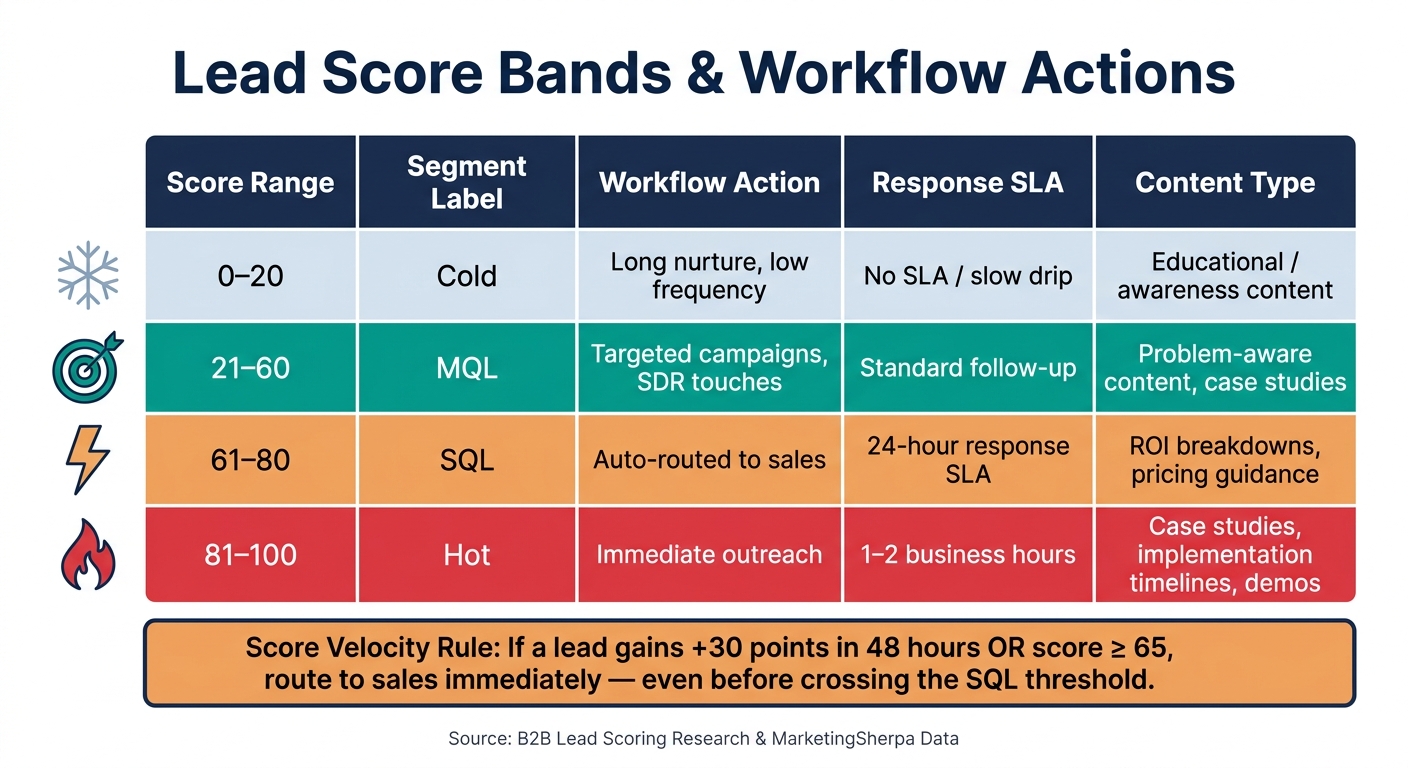
Lead Scoring Score Bands: Workflow Actions by Score Range
Once a score is calculated, it stops being just a number. It becomes a trigger. Routing, timing, and nurture rules can all react on their own.
Score Thresholds and Journey Routing
Most U.S. B2B teams split their lead database into three to five score bands. Each band maps to a different workflow path. A common setup looks like this: [12][13][14]
Score Range
Segment
Workflow Action
0–20
Cold
Long nurture, low frequency
21–60
MQL
Targeted campaigns, SDR touches
61–80
SQL
Auto-routed to sales, 24-hour response SLA
81–100
Hot
Immediate outreach, 1–2 business hours
Absolute score matters, but score velocity matters too. If a lead jumps +30 points in 48 hours - for example, after repeated pricing page visits - that can kick off a high-touch sequence even if the lead hasn't crossed the SQL cutoff yet. A common rule is to route to sales at score ≥ 65 or when a lead gains ≥ 25 points in 7 days. Leads that sit in the middle for weeks without new activity often get a requalification email or a last-touch sales check-in before they move back into long-term nurture. [13][15][16]
Personalization Levers Inside the Workflow
Lead scores shape three core workflow variables: timing, channel mix, and content. Hot leads get faster outreach across more than one channel. Cold leads usually move into slower, email-first nurture tracks. [12][13][14]
The content changes too. Higher-score leads get intent-focused material like case studies, ROI breakdowns, pricing guidance, and implementation timelines. Lower-score leads get educational content first, so they can build problem awareness before they see bottom-funnel offers. [12][13][14]
Agency Use Case: Applying Scoring at Scale
At the agency level, the tricky part isn't making one scoring model work. It's making the same rules work across many client accounts without turning every setup into a custom project.
SalesLabel can handle this at scale by using the same scoring thresholds across accounts, then triggering branded routing, booking, and follow-up paths as scores change, without rebuilding each workflow from scratch. [8][9][10][11]
What Research Shows About Performance Impact
Conversion and Lead Quality Improvements
Once scores start shaping routing and messaging, the next step is simple: do they move the needle?
The data says yes.
Lead scoring can tighten the whole process. MarketingSherpa reported that an HR consultancy added lead scoring and, within a year, cut the number of leads sent to Sales by 52%, increased converted leads by 79%, and grew revenue by 41%.[17]
That kind of shift matters because scoring gives Marketing and Sales a shared way to judge lead quality. When both teams use the same firmographic and behavioral signals, there’s less back-and-forth over which leads are worth attention. Handoffs get cleaner, and follow-up tends to stay more consistent.
Efficiency and Response-Time Gains
The upside isn’t just in conversion rates. It shows up in speed too.
When a score changes, the lead can move at once into the right workflow. That cuts out manual review and the lag that comes from waiting in a queue. For SDRs and agency teams, that usually means less time sorting lists and more time talking to people who fit.
SalesLabel handles this with real-time scoring and follow-up automation, so routing and prioritization happen without the usual spreadsheet shuffle.
To measure impact, track a small set of metrics:
Lead-to-opportunity conversion rate
Opportunity-to-close rate
Average response time
Meeting-booking rate
Sales cycle length
SDR time saved per week
Taken together, these numbers show whether score-based personalization is helping with routing, speed, and revenue performance.
Implementation Considerations for Agencies
Data Quality, Validation, and Model Updates
Once you start seeing better results, the biggest setup risk usually shifts to data quality. Lead scoring is only as good as the data feeding it. If job titles are messy, emails bounce, or behavior events are tracked one way in one tool and another way elsewhere, the scores stop being dependable. And when scores aren't dependable, routing, timing, and content selection can fall apart across the whole workflow.[20]
Before scoring anything, agencies should lock in a few baseline requirements:
Validated business email addresses
Standardized firmographic fields like industry, company size, and location
Unified tracking IDs across the CRM, outreach tool, and marketing automation platform
Automated deduplication and enrichment passes help keep records clean without piling more work onto the team. These can run nightly or fire when a new form submission comes in.[19]
Model drift is a different problem. Over time, old weights can send the wrong leads into the wrong sequence, which hurts workflow performance even if the system itself is still running as expected. A good rule is to review scores every quarter and recalibrate weights when recent win/loss data shows the model has drifted.[20][22] If mid-tier leads start beating top-tier leads, that's usually a sign the model needs recalibration, not just a tweak to the workflow. SDR feedback also helps here, especially when reps flag leads that were mis-scored or turned out much stronger than expected.[21][23]
Running Scoring Inside a White-Label Service
For agencies, maintenance becomes a bigger deal when the same scoring setup has to run across many client accounts. White-label scoring tends to work best when it's treated as a standardized pipeline. In plain terms, that means building one repeatable blueprint you can use again and again. ICP filters, messaging, and score thresholds can shift by client, but the pipeline logic underneath stays the same.
SalesLabel standardizes sourcing, enrichment, scoring, outreach, follow-up, and booking inside one branded workflow, while still letting each client keep its own ICP filters and score thresholds. Score bands then control what happens next. High-score leads get immediate personalized outreach. Mid-score leads move into a slower nurture track. Low-score leads stay in a broader awareness flow until new intent signals show up. That setup keeps personalized workflows consistent across clients without giving up client-specific routing rules.
Key Takeaways for Workflow Personalization Strategy
Once routing and personalization rules are in place, the next step is day-to-day execution. The research is pretty clear on this point: lead scoring only works when it shapes routing, timing, content, and cadence.[1][24]
Scoring logic alone isn't enough. Data quality and model freshness matter just as much, and more than half of B2B companies recalibrate their models every 6–8 months.[6]
The upside can be hard to ignore. Research ties predictive scoring to higher conversion rates and shorter sales cycles. In one finding, AI-driven lead scoring delivers 2.1× higher MQL-to-SQL conversion rates than manual or rules-based qualification.[18][25]
For agencies, the main win is scale. This isn't about building a custom setup from scratch for every client. It's about treating scoring as a standardized, governed system with shared score bands, consistent routing logic, and scheduled model reviews. That setup helps keep personalization accurate across accounts without piling on extra work.
A white-label platform like SalesLabel can support that model under the agency's branding, with real-time scoring and automated workflows.
In practice, workflows convert when scoring, data, and automation stay aligned.
FAQs
How do I choose the right score thresholds?
Set score thresholds based on ICP fit and engagement first. Then tighten them using actual conversion data.
The idea is simple: don’t guess where the cutoff should be. Check how leads at each score level behave. If leads scoring 70+ convert at a much higher rate than leads scoring 50–69, that gives you a clearer line for sales handoff.
It also helps to use time decay. Without it, someone who clicked a few emails six months ago can still look hot today. That can clutter your pipeline and waste follow-up time. Time decay keeps the score tied to what’s happening now, not what happened ages ago.
If you’re using predictive or AI behavioral scoring, set thresholds that separate true high-intent leads using real-time signals. That might include recent page views, repeat visits, demo-page activity, pricing-page visits, or form actions. Then keep reviewing those cutoffs as more conversion data comes in. What looks like a strong signal at first may not hold up once you have a larger sample.
What data problems hurt lead scoring most?
The biggest problem is outdated batch processing. It creates a lag between what buyers do and how sales teams respond.
Lead scoring works best when it runs on real-time data from your CRM, website, and intent sources. SalesLabel helps fix this with AI-driven, real-time scoring based on live inbox signals and behavioral data, so personalized workflows stay accurate and responsive.
How often should I update my scoring model?
Update your scoring model on a regular basis, then check it against actual conversion data. That way, your ICP-based fit and engagement scores stay in line with what the sales team is seeing.
If you’re using SalesLabel’s real-time scoring from live CRM, web, and intent data, you still need to watch performance closely and fine-tune your predictive AI settings as market conditions change.