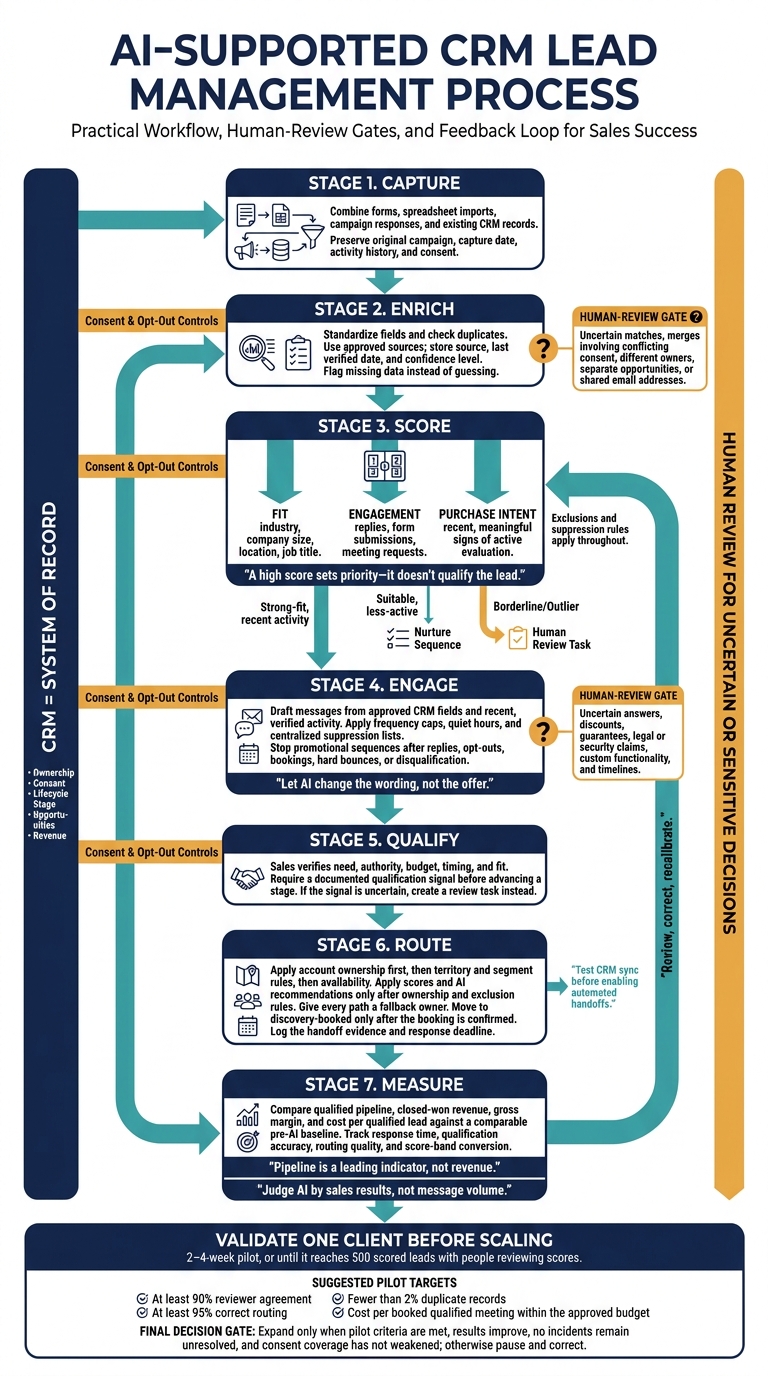
AI helps turn CRM records into better lead priorities, timely replies, and clear sales handoffs - but a high score isn’t proof that someone will buy. I recommend starting with one client and a 2–4-week pilot, with people reviewing scores before you automate more tasks.
Here’s the approach I use:
Clean the data: Check sources, fix duplicates, and preserve consent and activity history.
Rank and engage leads: Separate fit from buying intent, draft messages from verified facts, and stop follow-ups after replies or opt-outs.
Connect the workflow: Test CRM updates, assign owners, and confirm bookings before changing stages.
Keep people in control: Review uncertain matches, sensitive replies, and pricing commitments.
Measure before expanding: Compare qualified meetings, revenue, and delivery costs against your starting results.
My rule: <u>keep the CRM as the system of record</u> and judge AI by sales results, not message volume. Set pilot targets before launch - for example, 95% correct routing - and expand only when results and data controls hold up.
AI CRM Lead Management Workflow
AI Agents for Real-Time Lead Generation: Tools, Frameworks, & LLMs
sbb-itb-a781ab9
AI Lead Capture and Data Enrichment
Once leads enter the CRM, AI cleans and enriches raw records before scoring begins. It extracts details from unstructured text and suggests record matches. It does not verify inferred data.
Combine and Enrich Lead Records
Use one field map to combine forms, spreadsheet imports, campaign responses, and existing CRM records. Keep the original campaign, capture date, and activity history. Add company, role, industry, and location details ONLY from approved sources.
Set source priority for each field so enrichment cannot overwrite prospect data, consent, or do-not-contact rules. For every enriched value, store its source, last verified date, and confidence level.
Send uncertain company or contact matches for review before using enriched fields to route leads or guide outreach.
Find Duplicates and Fix Data Errors
Before matching records, standardize email spacing and case, phone country codes, state abbreviations, industry values, and company domains. Match exact identifiers first, then use similarity matching to find variations.
A shared domain suggests a company link, not the same person. Require approval for proposed merges that involve conflicting consent, different owners, separate opportunities, or shared email addresses.[1][2]
Factor
Manual maintenance
AI-assisted maintenance
Speed
Staff review records one by one or in batches.
Workflows screen records continuously or on schedule.
Consistency
Depends on staff following standards.
Applies configured rules; exceptions need review.
Scale
More records require more handling.
Handles larger batches within system limits.
Human effort
People find, compare, and correct issues.
People set rules, review uncertain matches, and audit changes.
Check records at capture and during scheduled reviews for missing required fields, invalid formats, outdated enrichment, and conflicting values. Automatically correct safe formatting issues, but flag missing data instead of guessing.
Before turning on automatic merges, test against known duplicates and distinct contacts. Define which record survives, preserve related activities, and log every correction so errors can be traced and reversed. These controls protect the accuracy of routing, outreach, and reporting - and give AI cleaner data for scoring fit and intent.
Predictive Lead Scoring and Qualification
Once CRM records are clean, score each lead using conversion history and current activity.
Predictive scoring estimates how likely a lead is to convert based on past outcomes and current signals. A high score sets priority - it doesn’t qualify the lead. Sales still needs to verify need, authority, budget, timing, and fit.[4][5][7]
Score Fit, Engagement, and Buying Intent
Keep these three dimensions separate:
Fit: How closely the lead matches the client’s ideal customer profile (ICP), including industry, company size, location, and job title.
Engagement: Actions such as replies, form submissions, and meeting requests.
Purchase intent: Signs of active evaluation based on recent, meaningful activity. Intent does not confirm an approved purchase.
Give email opens little weight because Apple Mail Privacy Protection can inflate them. Put more weight on replies, completed forms, and meeting bookings, and give older activity less weight.[4][7][10][11]
Set handoff thresholds based on each client’s conversion history and sales capacity - not an arbitrary score. Send strong-fit leads with recent activity to sales. Nurture suitable leads that are less active, and send borderline or outlier cases for human review. Record why each lead was handed off and the deadline for a response. Honor exclusions, including unsubscribed contacts and unsupported regions.[4][7][9]
Use these signals to decide how strict the model should be.
Choose and Test a Scoring Model
Match the model to the client’s available data and qualification rules.
Model
Data needs
Strengths
Limits
Best use cases
Rule-based
Defined firmographic, demographic, and behavioral fields
Transparent, quick to launch, and easy for sales teams to explain
Can oversimplify relationships and become outdated
New CRM programs, small datasets, strict qualification rules
Predictive
Historical lead records with reliable outcomes and consistent features
Finds complex patterns and updates lead rankings as data changes
Needs enough clean data; can inherit bias and be hard to explain
Mature programs with meaningful conversion history
Hybrid
Historical outcomes plus explicit business rules
Pairs model-based rankings with safeguards teams can control
Needs governance and coordination between rules and model outputs
Agencies managing varied clients, compliance constraints, or hard disqualifiers
Define one prediction target, such as opportunity creation or closed-won revenue. Test the model on a separate, later evaluation period, using only information available when each lead was scored. Save each score, then compare later conversion rates by score band. Track sales acceptance, qualified pipeline per 100 leads, revenue per routed lead, and false positives and negatives - not engagement alone.[5][8]
If conversion history is limited, start with transparent rules. Audit results by industry, company size, and region: past sales priorities can bias the model against overlooked segments. Give sales a way to flag incorrect scores. Review performance quarterly, and recalibrate sooner when pricing, campaigns, capacity, or the ICP changes.[6][8]
AI-Personalized Outreach and Follow-Ups
Tailor Messages and Follow-Up Sequences
Once lead scoring ranks your leads, AI can tailor the first message and follow-up timing. Base each message on approved CRM fields and recent, verified activity. Require a source and timestamp for any personalization fact that shapes the message, and leave out anything uncertain. Set client-specific rules for tone, terminology, sender identity, and approved claims.
Let AI change the wording, not the offer. Cold outreach should explain why you’re reaching out. Engaged leads should get a next step, while qualified leads should get a booking prompt.
Set frequency caps, quiet hours, and a maximum number of follow-ups across channels. Check centralized suppression lists before sending. Stop promotional sequences after replies, opt-outs, bookings, hard bounces, or disqualification. Track sender authentication, bounce rates, and complaints.
Follow U.S. email rules: use accurate headers, include a valid postal address, and provide a clear opt-out. Process opt-outs within 10 business days and keep the opt-out mechanism active for 30 days.[12] Use only LinkedIn-approved workflows; don’t automate scraping or messaging.[13][14]
Manage Replies and Escalate Questions
When a lead replies, stop outbound sequencing and move to reply handling. Classify each reply by intent: interest, questions, objections, referrals, unsubscribes, or out-of-office notices. A positive reply should create a CRM task, notify the assigned representative, and trigger the next approved step. Use an approved knowledge base for routine answers, and save both the reply and routing decision for audits.
Require human approval for uncertain answers and sensitive commitments. That includes discounts, guarantees, legal or security claims, custom functionality, and timelines. Supported routine answers can send automatically. Queue uncertain drafts for review, and escalate sensitive exchanges without sending a response.
Before confirming a meeting, check the owner’s calendar, time zone, meeting type, attendee details, buffer time, and duplicate bookings.
If you run this workflow through SalesLabel, define CRM sync rules before launch. SalesLabel supports sourcing, enrichment, personalized outreach, follow-ups, AI-driven replies, real-time scoring, inbox management, and meeting bookings under the agency’s brand.[15]
Keep the CRM as the system of record for ownership, consent, lifecycle stage, opportunities, and revenue. Before launch, verify which events sync - especially replies, opt-outs, and bookings.
CRM Integration and Lead Routing
Once AI starts scoring leads and sending replies, CRM sync rules determine where each action lands.
Test CRM Data Sync
Confirm with SalesLabel and your CRM provider whether the setup uses a native connector, REST API, middleware, webhooks, or scheduled imports. Check supported objects, custom fields, authentication scopes, rate limits, and required CRM editions. Test each client workspace separately to ensure records never cross into another client’s CRM.
Clean sync helps prevent routing errors, duplicate records, and missed follow-ups. Document each field’s destination, format, required values, update direction, and source of truth. Then run sandbox tests using this checklist.
Check
Purpose
Validation test
☐ Field mapping
Map lead data
Verify that standard, custom, blank, long, and invalid values map to the intended fields and formats.
☐ Two-way updates
Align shared fields
Change a field in each system and confirm that permitted updates sync without overwrite loops.
☐ Duplicate prevention
Prevent duplicates
Resubmit matching identifiers and check matching, merge, and review behavior.
☐ Ownership
Preserve ownership
Check assignments and alerts for existing accounts, territories, unavailable users, and fallback owners.
☐ Conversation logging
Log activities
Send an email, reply, or call note. Check its record association, timestamp, channel, participants, and consent status.
☐ Permissions
Protect client boundaries
Confirm that API scopes and user roles enforce read, create, update, export, and delete permissions.
☐ Webhook or scheduled sync
Match sync timing to workflow
Simulate create, update, delete, duplicate, delayed, missed, and out-of-order events. Check delivery delay, assignment time, and reconciliation.
Test failures, not just successful transfers. Store each event with an ID, timestamp, source, payload status, and failure reason. Make repeated events idempotent so duplicate webhooks don’t create duplicate leads. Retry temporary failures with exponential backoff. Send permanent failures, such as invalid field values or revoked permissions, to a human-review queue.
Define field ownership and conflict rules for overlapping updates. Use origin markers to prevent update loops. Add a scheduled reconciliation job that compares source and CRM records to find missed events.[18][20]
Once sync is stable, routing rules can assign owners and update stages without breaking CRM history.
Assign Leads and Update Pipeline Stages
Normalize geography, industry, account tier, and campaign values before routing. Apply account ownership first, followed by territory and segment rules, then availability. Use scores and AI recommendations only after ownership and exclusion rules have been applied. Give every path a fallback owner.
Set measurable targets such as new inbound leads appearing in the CRM within 2 minutes and failed updates being retried within 15 minutes. For routing, high-intent demo requests may require acceptance within 5 minutes during business hours, while lower-intent leads can allow one business day; alert the manager when acceptance is overdue and reassign at the deadline.[16][17][19]
Require a documented qualification signal before advancing a stage. That might be a confirmed need, budget, timeline, or meeting acceptance. If the signal is uncertain, create a review task instead. Move a lead to the discovery-booked stage only after the booking is confirmed.
Log the previous stage, trigger source, timestamp, evidence, and automation ID. Add reminders for missing next actions, plus stalled-deal alerts tied to each stage’s inactivity limit.
Data Controls and Performance Tracking
Protect Client Data and Set Automation Limits
Keep each client’s data in separate workspaces, with client-scoped credentials, reporting views, and suppression lists. Set access by role. Log imports, exports, score changes, prompt or rule changes, approvals, and admin actions. Maintain a data inventory that records each source, its purpose, and its retention and deletion rules.
These controls also help keep scoring and reporting reliable.
Group workflows into low-, medium-, and high-risk actions. AI can automatically normalize fields, flag duplicates, recommend scores, or draft routine replies. Require human approval before sending sensitive claims, changing qualification status, contacting regulated audiences, offering discounts, making legal or pricing commitments, or escalating complaints.
Auto-send only when confidence reaches 90% and the message uses an approved template. Keep human approval thresholds, a global pause button, and an escalation path with named owners and response-time targets. Review exceptions weekly. Don’t let the model expand its own permissions.
Risk
Preventive control
Detection and response
Poor data
Required fields, source labels, validation rules, checks for current data, and enrichment confidence thresholds
Monitor completeness and bounce rates; quarantine records below the threshold.
Inaccurate scores
Separate fit from engagement, exclude suspicious events, and require explainable score factors
Audit conversion by score band; recalibrate or disable the model.
Duplicates
Match on normalized email, phone, company, and domain; preserve merge history
Run duplicate reports; reverse unsafe merges and notify affected owners.
Excessive automation
Central contact policy, channel caps, suppression lists, and human approval thresholds
Monitor send frequency and complaints; pause the workflow.
Compliance failure
Consent ledger, opt-out synchronization, do-not-contact screening, and legal review
Review delivery logs and complaints; suppress the contact and investigate.
Inconsistent branding
Client-specific knowledge base, approved templates, prohibited-claims list, and review queue
Sample messages; revoke the template or retrain the workflow.
Apply separate rules for email, SMS, calls, and social automation. Keep consent and opt-out records by channel, and route legal, refund, security, and deletion requests to humans.[12][21][22]
With access and automation limits set, standardize measurement so every client is assessed the same way.
Track Lead Quality and Revenue
Measure whether automation improves lead quality and revenue - not just activity volume. Focus on qualification quality and routing speed. Define every metric before launch, and use consistent reporting periods.
Response time: Median and 90th-percentile time to the first approved reply.
Data completeness: Percentage of required fields with valid, current values at intake and after enrichment.
Qualification accuracy: Percentage of AI-qualified leads that sales confirms as qualified. Report false positives and false negatives separately.
Booking rate: Booked meetings divided by eligible leads contacted, with consistent treatment of cancellations and duplicates.
Meeting attendance: Attended meetings divided by booked meetings, using a consistent rule for prospect cancellations.
Sales-acceptance time: Median time from marketing or AI qualification to sales acceptance or rejection.
Score-band conversion: Funnel conversions divided by all leads originally assigned to each score band.
Calculate pipeline velocity as qualified opportunities × average deal value × win rate ÷ average sales-cycle days.
Compare qualified pipeline, closed-won revenue, gross margin, and cost per qualified lead against a documented, comparable pre-AI period. Pipeline is a leading indicator, not revenue.
Keep attribution rules fixed. Use randomized holdouts where practical; otherwise, use matched cohorts or phased rollouts. Before crediting AI, check for changes in targeting, staffing, deliverability, and seasonality. Report client results alongside sample sizes, date ranges, score-band outcomes, and safety metrics.
Use these results to validate one pilot before expanding automation. Scale only when results improve, no incidents remain unresolved, and consent coverage hasn’t weakened.
Roll Out AI in Stages
Once scoring, routing, and tracking are stable, introduce AI in phases. This turns the approved capture → enrich → score → engage → qualify → route → measure workflow into a repeatable system for clients.
Audit CRM Data and Run a Pilot
Start with one client. Check for missing ICP fields, duplicates, outdated records, lead sources, and consent before connecting approved sources. Before testing AI, define lifecycle-stage entry and exit rules, required fields, handoff owners, and what “qualified” means.
Run a 2–4-week pilot, or until it reaches 500 scored leads, with people reviewing the scores. Compare AI recommendations with SDR judgments. Then add outreach drafts, routing, and CRM updates one task at a time. Review results after data loading, scoring calibration, and the first outreach sequence.
Set the criteria for expansion before the pilot begins:
Suggested targets include at least 90% reviewer agreement, at least 95% correct routing, fewer than 2% duplicate records, and cost per booked qualified meeting within the approved budget.
Approve expansion only when the pilot meets those criteria. Assign one owner to pause messages, stop updates, restore CRM values, and notify account owners if a checkpoint fails.
Once the pilot meets its targets, use it to build a repeatable client launch package.
Standardize Client Delivery and Calculate Costs
After the pilot, standardize delivery and pricing one client at a time. Build a reusable onboarding package with an ICP worksheet, field map, qualification rubric, messaging library, approval matrix, and reporting template.
Store each client’s tone, domains, calendars, prohibited claims, and escalation contacts in a separate client configuration. Define response times and escalation paths for exceptions, opt-outs, legal requests, technical questions, negative replies, and high-value opportunities.
SalesLabel can support recurring lead-generationservices under your agency’s branding. Check current pricing, plan limits, CRM integration requirements, and feature availability before publishing details or making client commitments.
Separate setup spending from monthly delivery costs. Monthly costs should cover data credits, API fees, inbox management, reporting, deliverability monitoring, and error correction.
Calculate recurring cost per booked qualified meeting by dividing monthly delivery costs by booked qualified meetings. Recover setup costs through an onboarding fee or a defined payback period. To calculate gross margin, subtract direct delivery costs from billed revenue, then divide by billed revenue.
Track costs alongside lead volume to see whether AI also improves margin.
The budget below is illustrative.
Cost or metric
Baseline: manual process
Pilot: AI-assisted process
One-time CRM cleanup and workflow setup
$2,500
$3,500
Recurring software and data
$1,200/month
$2,000/month
Recurring human oversight and delivery labor
$4,800/month
$3,000/month
Total recurring delivery costs
$6,000/month
$5,000/month
Booked qualified meetings
12/month
20/month
Recurring cost per booked qualified meeting
$500
$250
Client revenue billed
$10,000/month
$12,000/month
Gross margin
40%
58%
Conclusion: Check Results Before Expanding Automation
AI improves lead management when clean data, reliable scoring, relevant outreach, CRM sync, and clear handoffs work together. Each step needs to support the next, with people reviewing sensitive or uncertain decisions.
Start with the weakest step in your current workflow. Record a baseline, then measure pilot results against it. Track response time, qualified lead rate, and opportunity conversion - not speed alone. Check that the automation works in production, too: opt-outs must stay suppressed, and CRM updates must reach the right owner.
Scale only when lead quality, compliance controls, and business results consistently meet the same standard across clients and segments. If activity goes up but qualified opportunities drop, fix targeting, scoring, or messaging before expanding.
FAQs
How much historical data do I need for AI lead scoring?
Data needs depend on how complex your model is. Use rules-based scoring if you have fewer than 100 closed-won deals or less than 12 months of conversion history.
Once you have several hundred closed-won deals and consistent field data, you can move to AI-based scoring. To support accurate AI training, aim for at least 1,000 contacts or leads with clear Won/Lost tracking.
What should I do when AI and sales disagree on a lead?
Put human judgment first. Let staff override or correct AI lead classifications before any further automated actions take place.
If AI gives a lead a high score but sales finds it unqualified, use that feedback to adjust scoring thresholds and signals each week. Send complex objections, budget discussions, and high-value account interactions to a human. Have staff review classification exceptions that fall outside the AI’s standard parameters.
How can I tell whether AI will save my agency money?
Focus on financial outcomes, not just activity. Compare conversion rates for AI-scored leads against your previous baseline. Track cost per qualified lead, qualified pipeline generated, and meeting-booking rates.
Check whether AI cuts manual lead review time, shortens response times, and helps your team handle more leads without adding staff. Review results weekly to see whether those time savings and added capacity translate into revenue.