Bad lead data costs you money fast. If your list has bounced emails, duplicate contacts, missing fields, and old phone numbers, your campaigns can lose reach, waste ad spend, and hurt sender reputation.
If I were choosing an AI data cleansing tool for B2B agency work, I’d focus on 10 things first:
Data profiling to score records before edits start
Field standardization to fix names, titles, phones, and company details
Email and phone validation to cut bounce and contact failure risk
Duplicate detection and merging to stop CRM clutter and repeat outreach
Missing-value detection and enrichment to fill gaps in lead records
Anomaly detection to flag records that still look wrong
Real-time and scheduled cleansing to clean data at entry and over time
Quality monitoring and alerts to spot decay before campaigns slip
Integrations and APIs to push updates back into your CRM
Governance and audit trails to track every change and control access
In plain English: the best tool is not just about cleaning data. It should help you check quality, fix errors, verify contact data, fill gaps, sync changes, and log every edit across client accounts.
A few points stand out from the article:
Email addresses and phone numbers are the highest-risk fields because they affect deliverability first
Human review matters most for merges, edge cases, and compliance-heavy workflows
Client-isolated workspaces are a must for agencies handling many accounts
Proof matters: I’d ask vendors for sample reports, alert logs, match logic, API docs, and compliance records before I buy
Clean Messy Data in Minutes with AI Agents (End-to-End Demo in CluedIn)
If you want the short version, here it is: pick a tool that cleans data, verifies it, logs changes, and keeps each client account separate. That’s what helps agencies keep lead quality under control without turning CRM cleanup into a manual job.
Why These Features Matter for Agency-Led B2B Lead Generation
Agencies juggle dozens of client datasets at the same time. That means a single data-quality mistake can ripple across accounts and skew deliverability, segmentation, personalization, lead scoring, and reporting. The first place that damage usually shows up is deliverability.
Poor data becomes most dangerous when it hurts deliverability. Bounced and invalid emails can damage sender reputation, and that same issue also chips away at targeting and personalization.
Dirty firmographic data makes segmentation and personalization weaker, which makes targeted account lists harder to build and outreach less relevant.
Dirty intent and ICP data can send sales teams after unqualified leads, wasting time across client pipelines.
For agencies, solid data hygiene comes down to isolated client workspaces, automated enrichment, and real-time scoring.
These are the risks the next 10 features are built to address.
1. AI Data Profiling and Quality Assessment
AI data profiling checks each lead record before cleansing begins. It looks for completeness, accuracy, consistency, and format issues. That step matters because if you skip profiling, cleansing can end up fixing the wrong things.
It can spot missing email addresses and phone numbers, clean up messy CSV or CRM records, and check whether a lead fits your ICP. Waterfall enrichment workflows can improve match rates and data accuracy [1]. In plain terms, profiling gives you a starting point: what needs cleaning, what needs enrichment, and what needs a closer look.
B2B Lead Fields Affected
For B2B outreach, profiling should focus on the fields that drive contact quality and account fit. That includes:
Email addresses
Phone numbers
Job titles
Company names
Industry classifications
Company size
Geography
Revenue
Technology stack
It should also score how closely a lead matches your ideal customer profile by looking at those fit signals [2].
Confidence Scoring and Traceability
A strong profile should include field-level quality scores, confidence ratings, and source traceability. That kind of visibility helps agencies stay accountable for enrichment choices and pay only for successful matches [1]. It also makes client QA and reporting much easier to audit.
Human-Review and Rollback Controls
Some records carry more risk than others. For those, it helps to use a review mode that requires human approval before any change is finalized. Version history matters too, since it lets teams roll back updates fast if something goes sideways [4].
Batch, Real-Time, and Multi-Client Workflow Fit
Profiling should handle large CSV imports in batch and also work in real time through CRM integrations, so cleaned records flow straight into current workflows [1]. For agencies managing more than one account, separate client workspaces help keep each dataset isolated [4].
Once profiling is in place, the next step is making sure those same records are standardized in a consistent way.
2. Intelligent Field Standardization
Once profiling shows where data goes off the rails, field standardization applies configurable formatting rules to turn messy, unstructured values into clean, consistent records. It takes variations like VP Sales, Vice President of Sales, and VP, Sales and converts them into one standard format. AI tools can normalize messy data into consistent formats [1].
That gives you a dataset that's much easier to use across outreach workflows. And once formats line up, the next move is simple: check whether the contact details are valid.
B2B Lead Fields Affected
Some fields tend to be a mess no matter where the data came from. Those are usually the best candidates for standardization.
Job titles often vary the most. Small differences in seniority labels and abbreviations can throw off ICP filters.
Phone numbers need one set format so dialers and SMS tools can use them without issues.
Industry, geography, and company names also need normalization to support ABM and ICP filtering.
Website URLs are worth cleaning up too, since AI tools can use them to pull company context for personalized outreach [4].
Standardized fields also make validation and enrichment more dependable.
Confidence Scoring and Traceability
Surface confidence flags so teams only review exceptions. That kind of traceability makes it much easier to see which updates were handled automatically and which ones still need human attention.
Human-Review and Rollback Controls
Not every standardization decision should go live on its own. A review-and-approve mode lets agencies check and approve AI-generated changes before they’re finalized, especially for edge cases the AI flagged as uncertain [4].
Batch, Real-Time, and Multi-Client Workflow Fit
Standardization should work in real time as new records enter your CRM. It should also run in scheduled cleanup jobs to keep older data current.
Separate client rules help stop cross-account formatting drift [2]. Put plainly, each client can keep its own formatting logic, so records stay consistent as they change. That consistency matters because it keeps standardized records usable across CRM, dialers, and outbound lists.
3. Email, Phone, and Contact Validation
Validation checks whether cleaned contact data can actually be reached. It helps protect sender reputation and stops bad records from slipping into client outreach. Basic tools only check formatting. Better ones go further. They verify domain health, mailbox status, and line type, then compare records across multiple providers for stronger accuracy. After format checks pass, the next step is to confirm deliverability and line status before enrichment or routing.
B2B Lead Fields Affected
Validation has the biggest impact on email addresses and phone numbers[1]. These fields decide whether outreach gets through or falls flat. A bad email can hurt deliverability. And when phone numbers are formatted inconsistently, records become harder to use across dialers and outbound workflows.
Confidence Scoring and Traceability
A simple “valid” or “invalid” tag isn’t enough. Teams need to see the exact checks behind each result so they can decide what to suppress, re-enrich, or review by hand. That kind of traceability helps agencies stay accountable for every contact decision across client accounts.
Human-Review and Rollback Controls
Automated validation can sometimes be too aggressive. For high-value leads, a human-approval workflow helps cut the risk of false negatives [5]. In practice, that means AI handles the first pass, then a person approves records before final suppression. It’s a sensible guardrail, especially when one bad rule could knock out a strong prospect.
Batch, Real-Time, and Multi-Client Workflow Fit
B2B contact data changes often, so real-time CRM sync and scheduled checks help keep records current [1]. Validation should work for both inbound CRM updates and large batch imports. For multi-client operations, separate client workspaces matter too. They help make sure one client’s validated data doesn’t get mixed into another client’s database [3].
Validated records should then move into duplicate detection and merge logic before they reach the CRM.
4. AI-Powered Duplicate Detection and Record Merging
After validation, deduplication should come next. AI can spot fuzzy duplicates across imports and help stop record conflicts before they pile up later. And that’s the point here: finding duplicates is only half the job. You also need to merge the correct records.
AI-based deduplication does more than check for exact matches. It can connect variations like "VP of Sales" and "Vice President, Sales" - the kind of mismatch a rules-only system may skip. That’s why it helps to run fuzzy matching on names, titles, company names, email addresses, phone numbers, and domains before anything gets merged.
B2B Lead Fields Affected
Duplicate detection reaches the main lead fields most agencies depend on: full name, job title, company name, email address, phone number, and domain. In B2B data, title and company-name variations show up all the time, so normalization needs to happen before records are merged [1].
Confidence Scoring and Traceability
Good tools don’t just flag duplicates. They show why two records were matched and how sure the system is. That means showing which fields matched and how strong each match was. Agencies should also check for audit trails that make it clear which fields triggered the match and which source won when values conflicted during the merge [1].
Human-Review Controls
A false positive can merge two different contacts into one record. That can damage CRM data and send outreach to the wrong person. A human review queue helps teams approve merge suggestions before they hit the CRM [5].
Batch, Real-Time, and Multi-Client Workflow Fit
Deduplication should work for batch imports and live CRM sync, with separate client workspaces so merge rules stay isolated [1][6]. That separation keeps one client’s records from affecting another client’s database.
Once records are merged well, enrichment has one clean source of truth to work from.
5. Missing-Value Detection and Intelligent Enrichment
Even when records look clean, they can still be incomplete. After validation and deduplication are finished, missing fields often become the biggest roadblock. AI tools scan CSV files and CRMs for gaps, then fill those gaps with verified or inferred data. The best tools don’t stop at one source. They move through multiple providers until they get a match, which helps cut wasted enrichment spend. They can also pull in missing context from LinkedIn and company websites, including intent signals.
B2B Lead Fields Affected
The first fields to fill are usually missing contact details. That’s the stuff sales teams need right away. After that, job titles matter because they help with ICP matching. Some tools also add fit scores and intent signals so teams can decide which leads deserve attention first.
Confidence Scoring and Traceability
Verified fields and inferred fields should not be treated the same way. One comes from a source that confirms the data. The other is a best guess based on available signals. That difference matters.
Good tools make this clear. They show which provider returned each field and the confidence level tied to it [1][4].
Human-Review and Rollback Controls
AI-inferred data can save time, but it also adds risk, especially when the record will drive high-stakes outreach. That’s why review controls matter.
Look for tools that support:
a human-review mode, where AI enriches the data and a person approves it before it goes into the live workflow
a fully automated mode for lower-risk records [5][4]
Rollback controls also help. If enriched data looks off later, teams need a clean way to reverse the change instead of digging through a mess by hand.
Batch, Real-Time, and Multi-Client Workflow Fit
Enrichment needs to fit both batch and real-time work. Batch mode is useful for cleaning an existing CRM on a set schedule. Real-time mode helps teams act fast after an event, form fill, or new lead capture.
For agencies, there’s another layer. If one dashboard handles many accounts, isolated client workspaces become a big deal. Without that separation, things can get messy fast when enrichment runs across multiple clients [4].
After enrichment, anomaly checks help flag records that still don’t look right.
6. Anomaly Detection and Adaptive Quality Rules
Once enrichment fills in the blanks, anomaly detection steps in to catch records that still look off. Some leads may have fields that don’t line up, even after new data is added. That’s why the best checks look for values that should match each other but don’t.
B2B Lead Fields Affected
Anomaly detection works best on fields that often get entered the wrong way or read the wrong way. That includes unusual job titles, invalid company domains, location details that don’t match, and phone numbers that break the expected format.
A few common examples:
A lead lists a VP of Finance title, but the company size and department data suggest something else
A company domain doesn’t match the business name
A city, state, and ZIP code combination doesn’t line up
A phone number has the wrong number of digits or an odd country or area code pattern
These are the kinds of records that can slip through basic validation but still cause problems later.
Confidence Scoring and Traceability
When a record gets flagged, reviewers need context. A confidence score helps show how much trust to place in that flag [4]. That makes triage easier, especially when teams are sorting through large batches of leads.
It also helps to keep a clear audit trail. Teams should be able to see what changed, when it changed, and why it was flagged in the first place [4]. If something looks wrong later, there’s a paper trail to check.
Human-Review and Rollback Controls
Not every issue needs a person to step in. Routine cases can go through automation, while high-risk records should go to human review [5][4]. That split keeps the workflow moving without letting risky edits pass unchecked.
Rollback matters too. False positives happen, and when they do, teams need a fast way to undo changes made to good leads. Without that, one bad rule can create a mess in the CRM.
Batch, Real-Time, and Multi-Client Workflow Fit
Anomaly rules shouldn’t work the same way for every input source. CSV uploads and CRM syncs often need different thresholds [1]. A bulk file may call for stricter checks, while a live sync may need lighter rules to avoid blocking useful records.
Weekly automated cleanups also help catch data decay before it piles up.
That source-specific logic leads into scheduled cleansing, which comes next.
7. Real-Time and Scheduled Cleansing Automation
Once rules and thresholds are in place, automation keeps cleansing moving without constant manual cleanup. Real-time and scheduled cleansing help agencies keep lead data clean both at the moment it enters the CRM and during routine refresh cycles. That becomes especially important when leads come in from multiple sources and need to be routed right away.
B2B Lead Fields Affected
At the field level, this usually means cleaning up job titles and phone numbers as soon as new records arrive [1]. Scheduled cleanup jobs then catch drift in older records [1].
Confidence Scoring and Traceability
It also helps to log the rule, source, and timestamp tied to each update. That audit trail makes it much easier to review changes later and see exactly what triggered each record update.
Human-Review and Rollback Controls
Human-review mode gives agencies a human-in-the-loop safety net. In practice, AI can draft the changes, while a person approves them before final synchronization [5]. Full automation, on the other hand, handles the whole process from start to finish without human intervention [5].
Batch, Real-Time, and Multi-Client Workflow Fit
For day-to-day workflow, use real-time triggers for new leads and scheduled jobs for database refreshes. Keep each client in a separate workspace so rules stay isolated. You can also use change signals to re-run cleansing on affected accounts [6].
8. Data Quality Monitoring, Scores, and Alerts
Once cleansing runs on its own, the next step is making sure it still does the job. Automation handles cleanup. Monitoring shows whether that cleanup is holding up over time. Without that visibility, agencies can miss slow data decay until it starts hurting outreach. In practice, monitoring becomes the control layer for everything that comes next.
B2B Lead Fields Affected
Start with the fields that change the most: job titles, names, phone numbers, and email addresses[1]. If these fields drift, lead quality can slip fast, even when the rest of the record looks fine.
Confidence Scoring and Traceability
Good monitoring tools show data-quality scores next to live alert thresholds, so teams can spot trouble before it spreads. Waterfall enrichment can improve match rates and verification accuracy [1]. Weekly decay monitoring also helps keep records current and catches quality drift early.
Human-Review and Rollback Controls
Alerts matter only if they lead to action. Set thresholds that fire when quality drops below a defined level, giving agencies a clear sign to dig in [1]. Human-in-the-loop alerts connect that signal to a review step, which makes it easier to check changes and decide whether rollback is needed.
Batch, Real-Time, and Multi-Client Workflow Fit
A good setup combines weekly audits with real-time alerts, so teams can react before data issues spread across campaigns. For agencies handling many accounts, one monitoring layer should track quality across all client workspaces without blending them together. And if client-facing alerts are part of the workflow, white-label them so clients see the agency's brand and domain [5].
9. Integrations, APIs, and Data Workflow Compatibility
Monitoring helps you spot problems. But integrations decide whether the fix actually makes it back to the CRM. That’s why field mapping is usually the first thing to check.
B2B Lead Fields Affected
The fields at the highest risk are the ones that sync most often: email addresses, phone numbers, names, and job titles. When mapping is off, even clean or normalized data can end up in the wrong CRM field. In multi-client setups, that kind of mix-up is one of the most common points of failure.
Confidence Scoring and Traceability
Waterfall enrichment across multiple providers can improve coverage and reduce the risk of a single source becoming a bottleneck [1]. Put simply, if one provider comes up short, another can step in.
Agencies also need to see each step in the sync path. If something looks wrong, traceability makes it much easier to find where the issue started and fix it fast.
After mapping is stable, the next job is controlling how records write back.
Human-Review and Rollback Controls
Some agencies want an approval step before cleaned or enriched data goes back into the CRM, especially for high-value accounts. That’s why it helps to look for tools with both a fully automated mode and a review-required mode[5].
That kind of setup gives agencies room to match sync behavior to each client’s risk tolerance instead of using the same rule for everyone.
Batch, Real-Time, and Multi-Client Workflow Fit
For agencies handling multiple clients, the integration layer needs to do two things at once: connect systems and keep client data separated. Check that the tool supports separate sync rules and separate credentials for each client [2].
Native CRM connectors usually handle the core sync work. Zapier and Make extend compatibility to other outreach and productivity tools [6]. And when a team has its own dashboard or UI, a documented API and webhooks make it possible to trigger cleansing from inside that setup [2].
10. Explainability, Governance, Security, and Audit Trails
Once data is moving cleanly, governance decides who can change it and how each change gets recorded.
B2B Lead Fields Affected
The fields with the most exposure are usually the ones that change all the time: job titles, names, phone numbers, lead status, and enrichment source tags. If an AI tool auto-normalizes a job title or reformats a phone number, agencies need to see which field changed, why it changed, and what or who triggered it.
Without that context, client reporting turns into guesswork.
Confidence Scoring and Traceability
Log each source, timestamp, and sync event so every update can be traced back. A solid system should show which provider supplied each piece of data, not just that enrichment took place.
Intent and fit scoring add another layer here. They give agencies a data-based reason behind each decision instead of a black-box AI output with no explanation.
Human-Review and Rollback Controls
Use approval mode so AI changes need human sign-off before they go live. Agencies should also check data retention policies and confirm whether the system keeps a history of deleted or updated records.
Before committing, test exports for:
raw prospect data
reply histories
lead status changes
That way, you can keep a complete record after the engagement ends. It also helps to document retention, deletion, and access policies for any privacy rules that apply.
Batch, Real-Time, and Multi-Client Workflow Fit
If an agency is running campaigns across many clients, sub-account architecture is non-negotiable. Each client’s cleansing rules, change history, and lead records need to stay fully separate. Otherwise, things can get messy fast.
Single-tenant tools that make teams log out and back in every time they switch clients just don’t fit agency scale. For larger teams, use sub-accounts, RBAC, SSO, and audit logs.
For agency teams, brand control matters just as much as data control. Keep exports, reports, and login screens fully white-labeled.
Comparison Table: Evaluating AI Data Cleansing Capabilities
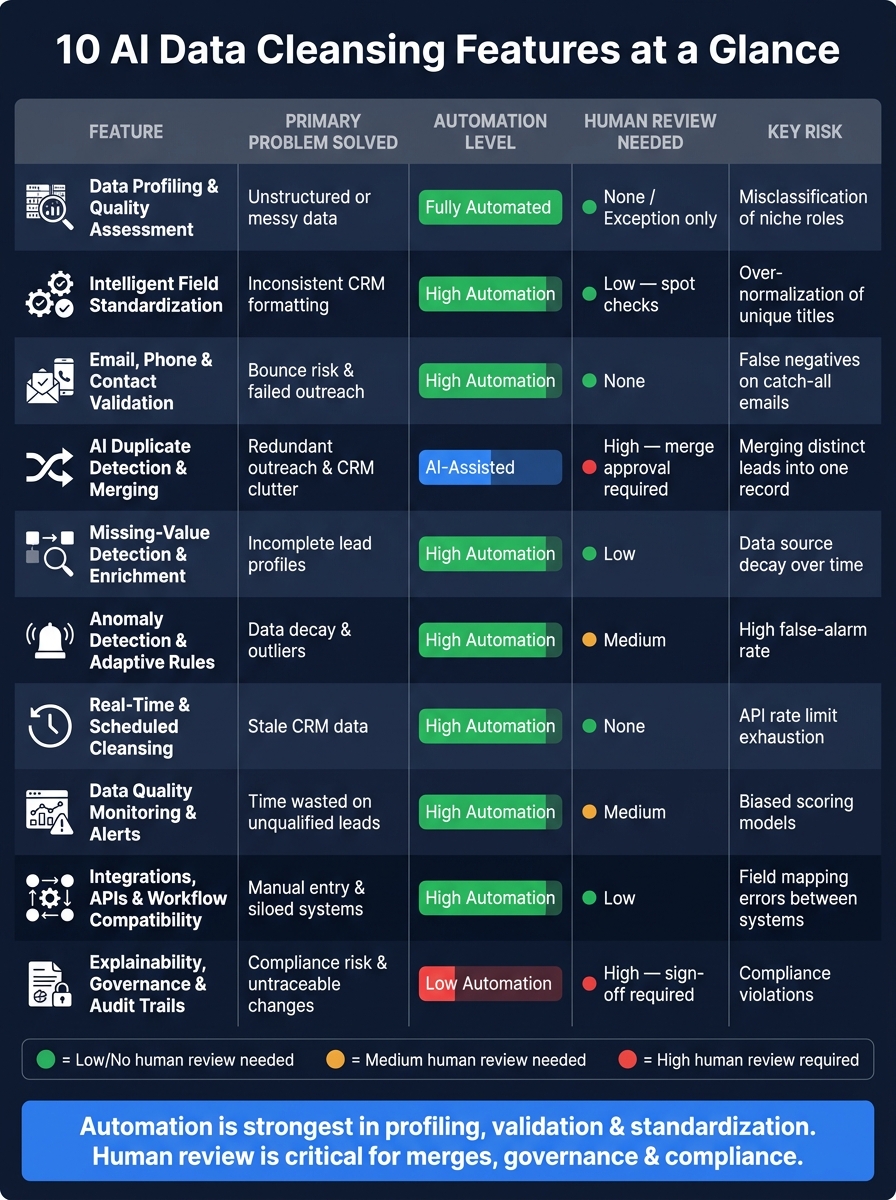
10 AI Data Cleansing Features: Automation vs. Human Review Requirements
After looking at the 10 features, use this table to compare tools based on risk, review workload, and proof across multi-client glossary">B2B lead workflows.
A clear pattern shows up here: automation is strongest in profiling, validation, and standardization. Human review matters most when records are being merged or when compliance, governance, and change tracking are on the line.
Think of Evidence to Request as the real buying test. Don’t just take the sales pitch at face value. Ask for:
Profiling samples
Before-and-after records
Match logic
Alert logs
API docs
Written compliance proof
That makes it much easier to pressure-test vendors in the checklist below.
Agency Readiness Checklist Before Choosing a Tool
The comparison table above shows what to look at. But feature checks alone don't tell you if a tool will fit the way an agency actually works.
Before you buy, run through a short reality check. The goal is simple: sort must-have workflow features from the extras that look nice in a demo but don't help much day to day.
Does it handle both real-time and batch cleansing?
You need both. Real-time cleansing helps at the point of entry, while batch cleansing helps clean large sets of records at once. It should also support scheduled refreshes for stale records.
Can you set rules per client or per data source?
An agency usually can't run every client the same way. Look for client-level rules and isolated workspaces so one setup doesn't spill into another.
Does it retain original values before making changes?
This matters more than it might seem. The tool should keep original values and preserve change history, so your team can trace what changed and when.
Does it clearly flag inferred vs. verified data?
Those two are not the same, and they shouldn't be treated the same. Verified fields should stay separate from inferred fields.
Are data quality signals connected to scoring and outreach?
Check that quality signals feed scoring, routing, RBAC, SSO, and audit logs for traceability.
Next, weigh these requirements against your agency's workflow and risk tolerance.
Conclusion
These features work best as one connected workflow. AI data cleansing tools don't just fix a single field. They tie together profiling, standardization, validation, deduplication, enrichment, monitoring, automation, integration, and governance in one system. Each part supports the next.
For agencies, that workflow matters because every bad record has a cost. It can hurt deliverability, weaken targeting, and distort reporting. And agencies deal with more moving parts than most teams: multiple clients, multiple data sources, and multiple campaigns running at the same time. So completeness, validity, uniqueness, and freshness aren't nice extras. They're direct inputs to outreach performance and meeting volume.
The practical takeaway is simple: data quality can't be occasional. It has to stay active. Treat it like ongoing infrastructure, not a one-time cleanup. Agencies that build strong data hygiene with weekly CRM maintenance, client-isolated workspaces, confidence-scored fields, and clear governance controls are the ones that scale without chaos. That's the framework agencies need if they want growth without the mess.
FAQs
Which features matter most first?
Start with features that improve data accuracy and scale. Put smart agents at the top of your list. They should normalize job titles, parse names, format phone numbers, and verify emails so your team can protect deliverability and sender reputation.
If you run an agency, look for sub-account architecture early too. Clear client data separation and custom branding make multi-client campaign management much easier and help keep day-to-day work organized.
How much human review is still needed?
AI-powered tools handle most data cleansing and lead management work, but human review still matters for quality control and edge cases.
In workflows like SalesLabel, AI takes care of routine classification, enrichment, and organization. That gives teams more time to focus on exceptions, tricky cases, and higher-value decisions.
How do I test a tool before buying?
Run a full trial in a sandbox sub-account so you can see the whole workflow for yourself.
Then send test reports to a colleague and check the details that are easy to miss. Make sure email footers, PDF exports, and login screens keep your agency’s branding and don’t show the vendor.
It also helps to favor platforms with fast setup. For example, if you can start data enrichment without a credit card, you can test the product with less friction and get answers faster.