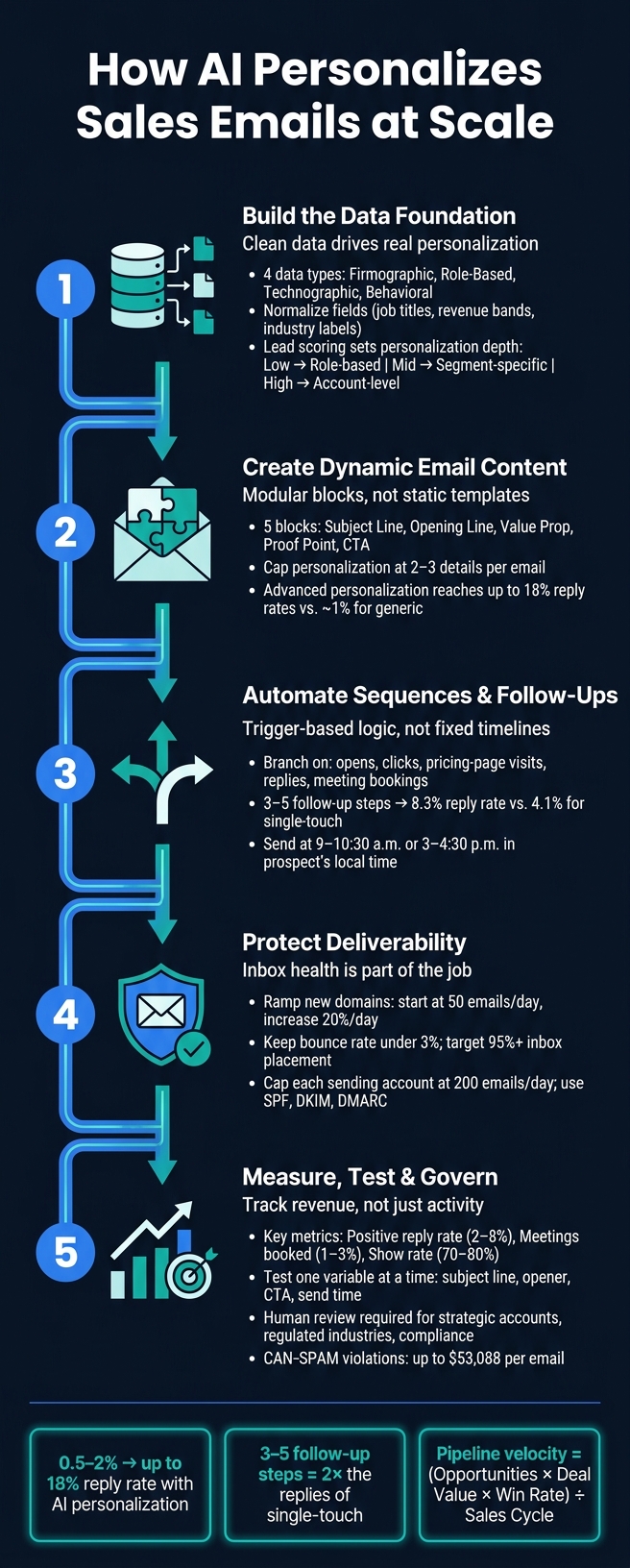
AI helps sales teams send more personal emails without doing all the research by hand. The core idea is simple: use clean lead data, build emails from reusable parts, trigger follow-ups based on behavior, protect deliverability, and track results that tie to revenue.
Here’s the short version:
Generic outreach performs poorly. Basic cold email often lands around 0.5%–2% reply rates.
AI works best when data is clean. Job titles, industries, tech stack, and buyer behavior shape what each person gets.
Not every lead needs the same level of detail. Lower-score leads can get role-based copy. Higher-score leads can get account-level or person-level messaging.
Good AI emails use a few targeted details, not too many. In most cases, 2–3 personal details is enough.
Follow-ups should react to signals. Opens, clicks, replies, pricing-page visits, and booked meetings should all change the next step.
Timing and inbox health matter. Send in the lead’s local time, warm up domains slowly, and keep bounce rates under control.
The main numbers to watch are revenue-focused. That means positive replies, meetings booked, show rate, pipeline created, and deal value.
Human review still matters. It helps with high-risk accounts, regulated fields, and compliance.
If I strip the whole article down to one point, it’s this: AI does not fix weak outreach by itself. It works when the data is clean, the logic is clear, and the team measures what turns into pipeline.
This article walks through that system in plain terms, then shows how SalesLabel fits into the workflow for agencies.
AI Sales Email Personalization: 5-Step System for Scale
How to Personalize Cold Email Outreach at Scale With AI to Get More Replies
1. Build the Data Foundation First
AI can only personalize well when your lead data is clean, standardized, and up to date. If records are incomplete, the output gets generic fast. And that makes it much harder to scale. This data layer also decides how much personalization each lead should get.
The core data points AI uses
AI works from four main data types: firmographic (company size, industry, revenue band, location), role-based (job title, seniority, department), technographic (current software stack, tools in use), and behavioral (website visits, pricing page views, email opens, content downloads, demo requests, prior reply history). Put together, these fields help AI match the message, angle, and urgency to each lead.
That’s what lets AI write messages that feel specific without manual research.
Data Type
Examples
How AI Uses It
Firmographic
Company size, industry, revenue band
Matches messaging to business scale and vertical
Role & Department
Job title, seniority, department
Adjusts language and value props to decision-making level
Infers buying stage and triggers appropriate sequences
Email Engagement
Opens, clicks, replies, bounces
Shows current interest and guides the next step
Data standardization matters just as much as completeness. If one lead is tagged as “VP Sales,” another as “Vice President of Sales,” and another as “Sales VP,” segmentation starts to get messy. The same goes for revenue bands and industry labels. Normalize those fields so your segments stay consistent.
Once those fields are normalized, scoring can rank which leads should get deeper personalization.
Consent status, source, timestamp, and scope should be required fields. They should also act as workflow gates.
How lead scoring improves personalization depth
Not every lead deserves the same level of personalization effort. Lead scoring helps you decide where to put the work.
A fit score measures how closely a prospect matches your ICP using firmographic and role data. An intent score tracks behavioral signals like pricing page visits, webinar attendance, content downloads, and email engagement. Together, those scores decide which personalization tier a lead gets.
Here’s how that usually plays out:
Low-scoring leads get simple, role-based messaging.
Mid-range leads get segment-specific copy that mentions their industry, company size, or known tools.
High-scoring leads with strong ICP fit and active intent signals get account-level outreach with tailored openers, relevant pain-point framing, and references to recent behavior.
In plain English, scoring tells AI how deep each personalization layer should go.
That score then feeds the dynamic content rules in the next step.
2. Use AI to Create Dynamic Email Content
Once lead scores are set, AI can write the email itself. The simplest way to do this is with modular email blocks, each filled with data from the lead. Those blocks should run on clean data and score-based rules.
The building blocks of a dynamic sales email
A strong dynamic email usually has five core blocks. Each one should map to a clear data signal:
Subject line - AI can use the recipient's role, company name, or a recent trigger to make the subject feel specific. For example, Cut SDR ramp time at [Company Name] is more pointed. Analysis of 130M+ B2B emails found that the best-performing subject lines are 4–7 words, specific to the recipient, and often phrased as questions.[8]
Opening line - This is where recent triggers do a lot of work. A line like Noticed you just added 10 new SDRs - curious how you're keeping ramp time reasonable without sacrificing pipeline quality works because it points to a recent, verifiable change at the account.
Value proposition - AI should match this to the lead's role and industry. A VP of Sales should see messaging tied to pipeline and demo conversion rates. A Head of Customer Support should get messaging tied to SLAs and response time.
Proof point - AI can pick the best case study based on industry and company size. A short result with a number - like For a similar HubSpot-based SaaS firm, AI-assisted outbound increased demo conversions by 32% - builds credibility faster than a broad claim.[3][5]
Call to action - The CTA should fit the lead's intent level. Cold prospects usually respond better to a low-friction ask, like Open to a 20-minute walkthrough next week? High-intent leads can get a more direct offer tied to a clear outcome.
One practical rule: cap personalization at 2–3 elements per email.[4][6] If you stack in too many data points, the message can feel intrusive instead of useful. It also helps to set a strong default version for each block, so the email still reads well when a field is missing.
Choosing the right personalization tier
Not every campaign needs the same level of personalization. The right tier depends on data quality, target list size, and how much setup time you can put in.
Higher scores can unlock account-level detail. Lower scores should stay closer to role and industry signals.
Personalization Tier
Data Requirements
Setup Effort
Scalability
Likely Impact on Reply Quality
Role-Based
Job title, department
Low
Very High
Moderate - addresses general professional pain points
Industry-Based
Industry category, company size
Low
High
Moderate-High - uses sector-specific trends and challenges
Account-Based
Recent news, funding events, company growth
Medium
Medium
High - demonstrates timely relevance to the business
Individualized
LinkedIn posts, profile bio, recent activity
High (AI-automated)
High (with AI)
Very High - creates a human-to-human feel that builds trust quickly
Account-based personalization fits high-value targets, where the extra data work is worth it. Individualized outreach goes a step further. Here, AI reviews LinkedIn posts and profile details to shape both the message and the tone. That level of detail can scale when AI handles enrichment and copy generation.
Campaigns with advanced personalization reach reply rates up to 18%, roughly 2× what generic-template campaigns produce.[7]
These blocks then feed branching rules, follow-ups, and send-time decisions.
3. Automate Sequences and Follow-Ups Without Losing Relevance
Once the first email feels personal, the next step is sequence logic. That’s what decides what happens after each touch. Instead of sending the same follow-up on a fixed timeline, behavior-based triggers shift the message based on what the prospect does. The result is outreach that stays tied to actual interest, not guesswork.
Common workflow triggers and branching rules
A newly qualified lead can move into a shorter intro sequence. If a lead score jumps, that person can shift from a nurture flow to a direct CTA. If someone visits the pricing page, the next email can speak to what they looked at.
This is where branching matters. It keeps the story straight instead of making the sequence feel stitched together. Non-openers can get a new subject line and a shorter email. People who opened but didn’t click can get a lighter ask. Clickers who still haven’t replied can get a nudge linked to the asset they engaged with. And if someone books a meeting, the sequence should stop right there and switch to a confirmation email with calendar details and prep material.
More steps don’t help on their own. Each step has to match the last signal. A separate analysis of over 20 million cold emails found that sequences with 3–5 follow-up steps averaged an 8.3% reply rate, compared with 4.1% for single-touch outreach.[10]
Send-time optimization and deliverability safeguards
Once branching rules are in place, timing becomes the last big lever for relevance. For U.S. prospects, time-zone alignment isn’t optional. AI can infer local time zone from IP data, open times, or CRM location, then schedule each email to send at 9:00–10:30 a.m. or 3:00–4:30 p.m. local time.[9]
Sending at scale also needs tight infrastructure. New domains should begin at 50 emails per day and ramp by 20% per day, with bounce rates kept under 3% and a target inbox placement rate of 95% or higher.[2] Each sending account should stay capped at 200 emails per day. If volume needs to go past that, spread it across multiple mailboxes.[2]
If bounce rates spike, throttling should start automatically to protect domain reputation before the damage spreads.
sbb-itb-a781ab9
4. Run AI Personalization at Scale with SalesLabel
Once your data, content, and sequence logic are set, the next move is to run everything inside one branded workflow.
How SalesLabel supports end-to-end personalized outreach
SalesLabel is a white-label AI platform built for agencies. Because it runs under the agency’s own brand, domain, and logo, clients see a fully branded experience from start to finish. That includes dashboards, reports, and even the app URL, like app.youragency.com, so the agency’s identity stays front and center the whole time.
SalesLabel brings the full outbound process into one system, from sourcing to booking. That includes lead sourcing, enrichment, personalized outreach, follow-ups, AI replies, lead scoring, and inbox management. When a prospect shows intent, SalesLabel can send a calendar link and book the meeting.
Agencies can also pick the setup that fits how they work best:
Copilot Mode: AI drafts each reply, and a human approves it before sending
Autopilot Mode: the system manages conversations from start to finish
Matching SalesLabel plans to agency growth stages
The right plan comes down to client volume, sequence complexity, and how much hands-on support your team wants.
Plan
Price
LinkedIn Accounts
Best Fit
Starter
$799/month
Up to 30
Boutique agencies testing AI outreach with a small client roster and simple sequences
Growth
$1,279/month
Up to 99
Agencies adding clients on a regular basis and needing a branded Chrome extension, priority support, and a monthly strategy call
Scale
$1,999/month
Unlimited
High-volume agencies running campaigns for many clients at once, with a dedicated success manager and bi-weekly strategy calls
Starter fits a small roster. Growth makes sense when client volume is climbing. Scale is built for high-volume, multi-client work. At $1,279/month, Growth works out to about $128 per month for an agency with 10 active retainers.
5. Measure, Test, and Govern the System
The metrics that matter most
Once outreach is live, focus on what turns into revenue, not just what gets attention.
An open is nice. A booked meeting is better. Pipeline is what counts.
That means tracking the numbers tied to sales: positive reply rate, meetings booked, meetings held, pipeline created, and average deal value.
You can also use pipeline velocity to connect email work to a revenue forecast:
(# of qualified opportunities × average deal value × win rate) ÷ sales-cycle length [11]
This gives you a clearer view of whether the program is moving deals forward or just producing activity.
Segmentation matters just as much as the top-line numbers. Break out every metric by role, industry, and company size. A campaign can post a decent overall open rate and still only generate qualified meetings from one pocket of the market, like mid-market operations leaders in software. If you don't segment the data, that kind of signal disappears. [11]
The best teams don't "set it and forget it." They review the system every week for tactical issues, like deliverability problems, weak variants, or drops inside a single segment. Then they do a monthly review to look at bigger patterns, such as message-market fit and pipeline quality. That rhythm helps keep the program sharp and makes it easier to spot wins worth scaling. [11]
When you test, change one variable at a time. That could be the subject line, first-line personalization, send time, CTA, or sequence length. Subject lines tend to shape opens most. First-line personalization has more impact on replies. If you change several things at once, you won't know what caused the lift or the drop.
A few rules help here:
Set the success metric before the test starts
Keep the audience segment the same across variants
Measure message differences, not audience-quality differences
Testing improves performance. Governance keeps the system clean and safe.
Under the CAN-SPAM Act, violations can cost up to $53,088 per email violation[12]. That's not a small mistake. Every workflow needs clear opt-out handling, accurate sender identity, consent tracking, send logs, content snapshots, and audit trails.
AI-written messages also need human checks at the points where mistakes hurt most: strategic accounts, regulated industries, and event-based messages. That helps protect brand consistency and catch edge cases before send.
A hybrid setup tends to work best. AI handles scale and repetitive personalization. Humans step in to approve high-risk content, look into odd performance spikes, and tighten the message based on what the data says. AI output stays more dependable when people review edge cases and fact-check source data before anything goes out.
6. Key Takeaways
Clean, enriched data is where real personalization starts. If your firmographics, role data, and behavior signals are off, AI won’t do much more than shuffle wording inside the same old template. That’s not personalization. That’s light editing.
Dynamic content should replace static templates. A better setup is to build emails from modular parts: subject line, opener, proof, value prop, and CTA. Then AI can swap those parts based on 2–3 buying signals for each prospect, instead of sending the same message with tiny changes.
Automated sequences also need clear trigger rules and stop conditions. If someone replies, books a meeting, or hits a disqualifying action, the system should know what to do next. And at scale, deliverability isn’t a side issue. It’s part of the job. Use authentication, warm-up, and send caps to protect inbox placement.
Once the workflow is set, execution becomes the next big piece. For agencies handling more than one client, SalesLabel puts the full outreach process in one place under the agency's brand, which makes scaling a lot easier without matching headcount growth one-for-one.[1]
After that, measurement becomes the feedback loop. Track replies, meetings, and pipeline by segment. Test one variable at a time. Keep human review in place for high-stakes sends. The three themes that show up again and again are data quality, branching logic, and measurement. Those are the parts that keep the system from falling apart. Governed, tested systems get better over time.
FAQs
How much data do I need to personalize emails well?
You don’t need to sift through huge datasets by hand. AI can look into each prospect using details like job role, company info, intent, recent posts, and communication style, then shape each message to fit the person on the other end.
With a defined ICP, SalesLabel taps into a database of more than 250,000,000 contacts to enrich and validate lead data. That means teams can scale personalized outreach without doing all the research manually or falling back on generic templates.
When should AI emails be reviewed by a human?
In SalesLabel, human review is required in copilot mode. Every message must be approved before it’s sent.
You should also step in during more complex conversations, or when a reply needs a final pass, so you keep full control of the exchange.
What metrics best show if AI email campaigns are working?
Track reply rates first. They give you the clearest read on engagement.
AI-personalized openers and multi-channel sequencing can push reply rates to 25% to 40%, compared with the 8% to 12% plateau that’s common with single-channel email outreach.
You should also watch conversion metrics, like meeting-booked rates and predictive lead scoring, to make sure you’re reaching the most qualified prospects.