How to Personalize Outreach at Scale for B2B Sales
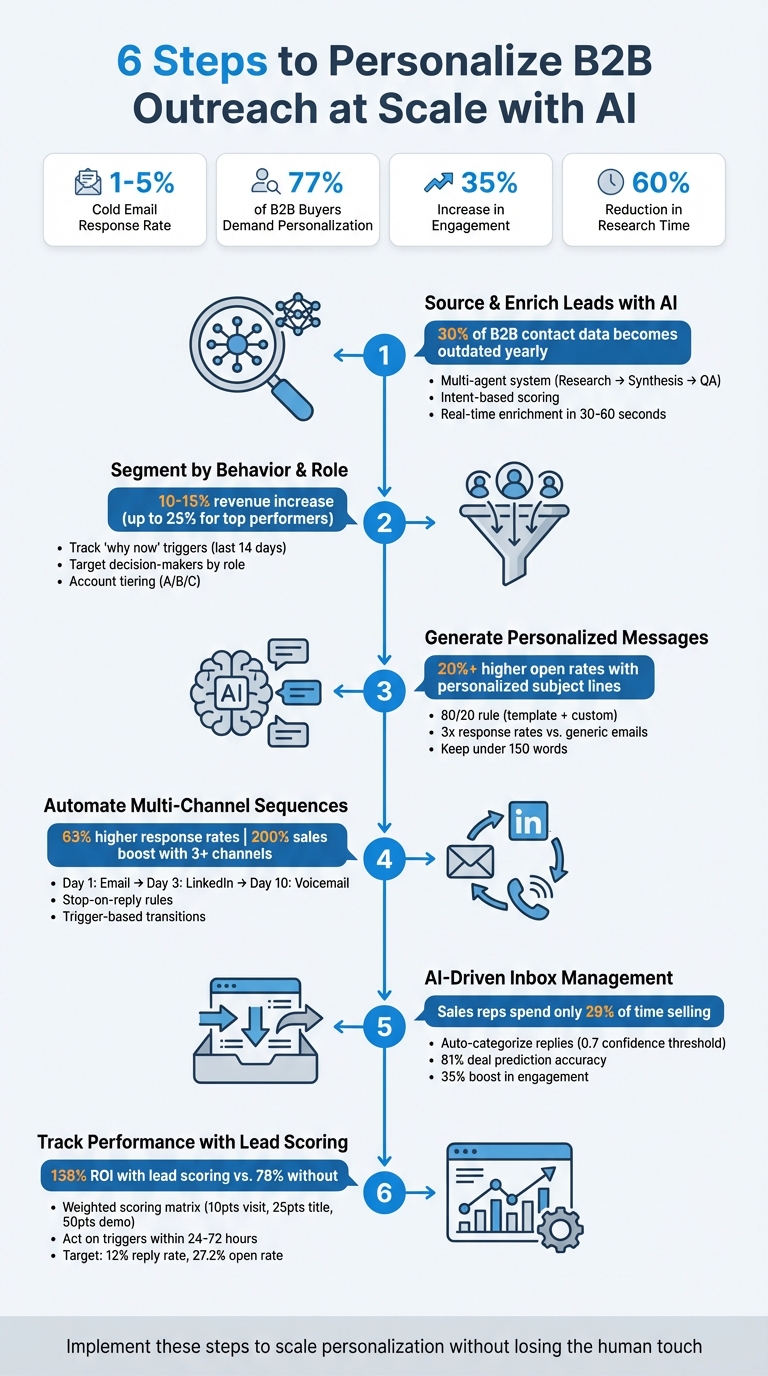
B2B sales teams often struggle to balance personalization with scalability. Here's the reality: cold email response rates hover between 1-5%, and 77% of B2B buyers demand personalized content before making a purchase. Yet, traditional methods of deep personalization are time-consuming and hard to scale.
The solution? Leveraging AI to automate and enhance personalization efforts. AI tools can:
Save time by automating lead research and data enrichment.
Segment prospects based on behavior and role for targeted outreach.
Generate tailored messages that feel personal but are efficient to produce.
Automate multi-channel outreach sequences for higher response rates.
Manage replies and qualify leads automatically using AI-driven tools.
Track performance with lead scoring to prioritize high-value opportunities.
For example, AI-powered prospecting systems have already shown results like a 35% increase in engagement and a 60% reduction in manual research time. This guide breaks down six actionable steps to scale personalization without losing the human touch.
6-Step AI-Powered B2B Sales Personalization Process
Harnessing AI to Personalize B2B Customer Interactions
Step 1: Source and Enrich Leads with AI
To personalize outreach, it’s crucial to identify the right prospects and understand what drives their decisions. However, sales reps spend just 29% of their time actually selling, with much of the rest consumed by manual tasks like research and data entry [10]. By automating prospect identification and data enrichment, AI simplifies this process, paving the way for more targeted and efficient engagement.
How AI Finds Your Ideal Prospects
AI tools go beyond simple filters, detecting nuanced signals that indicate a prospect may be ready to buy. These systems pull data from a variety of sources - LinkedIn profiles, SEC 10-K filings, news updates, and technology stack databases - to uncover key events like funding rounds, leadership changes, or product launches [4][3].
For example, SalesLabel employs a multi-agent system to streamline this process. A Research Agent gathers data from public sources, a Synthesis Agent organizes and consolidates the findings, and a QA Agent ensures accuracy before the information is added to your outreach queue [9][10]. On top of that, the platform uses intent-based scoring to rank prospects, prioritizing those actively showing interest - like visiting pricing pages or requesting demos - so your team can focus on high-potential leads [3].
Automating Lead Data Enrichment
After pinpointing promising prospects, AI enriches their profiles with detailed information, including firmographic and technographic data. This might include company size, revenue, industry, current tech stack, and recent organizational changes [9][4][10]. Real-time data from multiple sources is used to update CRM fields in as little as 30–60 seconds [13][14].
SalesLabel’s waterfall logic ensures no detail is overlooked. It queries multiple data providers in sequence to fill gaps and maintains separate workflows for contact and company data, improving accuracy [11][14][12].
With over 30% of B2B contact data becoming outdated each year [14], continuous enrichment is essential. AI keeps profiles current by refreshing data just before outreach, capturing updates like job changes or new funding announcements [3]. To test your AI setup, consider running a 100-contact pilot and track metrics like "signals found" and "QA pass rate" to fine-tune the process [2][9].
Step 2: Segment Prospects by Behavior and Role
Now that you’ve got enriched lead data, it’s time to organize your prospects based on their current actions and their roles in the buying process. Relying on traditional filters like industry or company size won’t tell you why someone is ready to engage with you today. Instead, focus on what they’re doing right now and how they fit into the decision-making process. Personalization is still underutilized, even though it’s critical for success. This step dives into how to segment prospects effectively by combining behavior and role-based insights.
Segment by Actions and Intent Signals
The best way to segment prospects is by identifying "why now" triggers - specific events or actions that justify immediate outreach. These could include recent funding announcements, upticks in hiring, leadership changes, new product launches, or technology upgrades [5][18]. Blend internal data (like website visits, trial signups, or webinar attendance) with public information (such as LinkedIn updates, 10-K filings, or news reports) to create a fuller picture [2][18].
Timing is crucial here. Behavioral signals lose relevance fast - events from the last 14 days are far more impactful than older ones [2][7]. For example, if someone visited your pricing page yesterday, that’s a strong intent signal. But if it happened three weeks ago, it’s no longer actionable. As one expert explains, "The difference between noticing a single hiring update and observing multiple targeted role postings distinguishes basic templates from valuable insights" [18].
To maximize results, implement an account tiering system. For top-tier accounts (let’s call them "Tier A"), invest in detailed research and multi-channel outreach. Lower-tier accounts ("Tier C") can be targeted with broader, segment-based templates [5]. This approach usually leads to a 10–15% revenue bump, and the best-performing teams see gains as high as 25% [5].
Target Decision-Makers by Role
Different stakeholders have different priorities. For instance, CMOs are looking for strategic insights, while Sales Managers care more about immediate results [19]. Use a segmentation matrix to categorize prospects by both their persona and their influence in the buying process [17]. Pinpoint key players within the buying committee - decision-makers, influencers, and champions - and craft messaging that speaks directly to their concerns [5].
AI tools can streamline this process by scanning LinkedIn profiles, company blogs, and 10-K filings to identify roles automatically, saving 15–20 minutes of manual research per prospect [10][15]. Once roles are identified, connect specific triggers to their pain points. For example, personalized subject lines - built around one compelling data point - are over 20% more likely to be opened than generic ones [2][7]. Keep these subject lines short and impactful, ideally between 6–8 words, to increase open rates [2].
Step 3: Generate Personalized Messages Using AI
After segmenting your prospects, the next step is to craft messages that feel personal without sacrificing efficiency. A smart way to do this is by applying the 80/20 rule: use a high-quality template for about 80% of your message, and let AI fill in the remaining 20% with custom lines based on specific research or triggers [5]. This approach strikes a balance between speed and personalization, ensuring your outreach stands out while staying efficient. By leveraging the detailed segmentation from earlier, your messages become more targeted and impactful.
Modern AI workflows often rely on a multi-layered system. Here’s how it works: a Research Agent gathers data from sources like LinkedIn profiles, company blogs, or news updates. Then, a Draft Agent uses that data to create tailored message variants. Finally, a QA Agent steps in to fact-check and ensure the tone aligns with your brand. This process ensures that every message is not only accurate but also relevant to the recipient.
Develop Unique Message Openers for Each Prospect
AI shines when it comes to creating attention-grabbing openers. For instance, if a prospect has recently announced a funding round, taken on a new role, or interacted with specific LinkedIn content, AI can craft openers that directly reference these events. It can also combine pre-written value propositions and proof points into highly targeted messages that resonate with the prospect’s industry or role.
To maintain quality, set a confidence threshold for sending messages automatically - something like 0.6 or 0.7. If the AI-generated message falls below this score, it can be flagged for human review. This way, you automate most of your outreach while still ensuring the quality of your communication.
Address Specific Pain Points in Your Outreach
Once your AI drafts personalized messages, take it a step further by addressing the unique challenges each prospect faces.
Generic emails are easy to ignore, but messages that connect to a prospect’s specific context - like a recent product launch or a hiring spree - stand out. This approach, often called hypothesis-led personalization, ties your outreach to a prospect’s priorities, pain points, or timing. It’s this level of detail that separates insightful messages from cookie-cutter templates.
Here’s a practical framework: use AI to generate research-backed openers, then structure your message in five concise sentences. Start with relevant context, highlight a specific pain point, explain how your solution addresses it, add a proof point (like a case study or statistic), and finish with a clear call to action. Keep the total word count under 150 to make it mobile-friendly.
Don’t underestimate the power of personalized subject lines - they’re over 20% more likely to be opened. And AI-personalized emails? They can triple your response rates compared to standard templates. The secret is ensuring every AI draft includes at least one verified signal and avoids generic phrases like “Great company!” Program your QA Agent to enforce these rules automatically for consistent quality.
sbb-itb-a781ab9
Step 4: Automate Multi-Channel Outreach Sequences
After crafting personalized messages, the next step is delivering them effectively across multiple channels while keeping the interaction personal. Using multi-channel sequences allows you to maintain the human connection established in your emails while expanding your touchpoints. Research backs this up - multichannel campaigns see 63% higher response rates compared to single-channel ones, and businesses using three or more channels can boost sales by up to 200%[21]. This approach builds on the personalized messaging strategies covered earlier.
Build a Multi-Channel Outreach Plan
Start with email as your main channel, then layer in LinkedIn for added visibility and phone calls to create urgency [20]. Here’s an example of a sequence:
Day 1: Send a personalized email.
Day 3: Follow up with a LinkedIn connection request (no pitch included).
Day 10: If there’s still no response, leave a voicemail.
"The secret doesn't lay in the 'what' but in the 'how'. There are not 1000 channels in B2B, but there are a number of different angles, cadences and touch points you can use – and nailing those is key."
Tailor your messages for each platform. Avoid copying and pasting the same message everywhere. LinkedIn messages should be short and conversational - keep them under 100 words. Emails, on the other hand, can go into more detail and focus on solutions [21][22]. For example, if a prospect views your LinkedIn profile after receiving your email, follow up with a LinkedIn message like: "Noticed you checked out my profile after my email..." This creates a seamless, connected experience across channels [3].
Adjust Content and Timing Based on Engagement
Your outreach features">automation should adapt based on how prospects engage. Use "stop-on-reply" rules to pause sequences as soon as someone responds. This avoids the awkwardness of sending automated follow-ups after a conversation has already started [1].
To keep things authentic, randomize send times by varying the exact hour and minute [8]. You can also use trigger-based transitions - specific actions on one channel, like a LinkedIn profile view, can automatically initiate the next step, such as a follow-up email through your outreach platform [23].
Once your multi-channel outreach is automated, the next step is to fine-tune lead qualification with the help of AI-driven responses.
Step 5: Use AI-Driven Replies and Inbox Management
Once your multi-channel sequences are live, the replies will start rolling in. Managing these responses efficiently is key. On average, sales reps spend just 29% of their time in live selling conversations, with the rest eaten up by tasks like sorting through inboxes and entering data manually [10]. AI can revolutionize this process by automatically sorting messages, prioritizing high-value leads, and keeping your CRM updated. This builds on earlier AI strategies to ensure every prospect gets the attention they deserve. Let’s dive into how AI categorizes and prioritizes these responses.
Qualify Leads with AI Response Analysis
AI reply classifiers are designed to categorize incoming messages based on intent, such as "scheduling request", "question", "objection", or "not interested" [2]. This helps you spot high-priority leads instantly. For instance, if a prospect asks about pricing or mentions a competitor, AI can flag the message as urgent and route it to your sales team within an hour [2][16].
To maintain accuracy, set a 0.7 confidence threshold for AI classifications. If a message falls below this threshold, it should be flagged for human review instead of triggering an automated response [2]. This "human-in-the-loop" approach reduces errors while allowing AI to handle routine queries. In fact, AI can even predict deal outcomes with 81% accuracy by analyzing engagement signals from emails and calls [24].
Organize and Prioritize Conversations
AI doesn't just categorize replies - it also helps organize your inbox, ensuring that urgent and important messages rise to the top. Using sentiment analysis, AI can identify buying signals or warning signs that a deal might be in trouble [3][16]. For example, a prospect who repeatedly visits your pricing page should be prioritized over one who simply downloaded a whitepaper.
A great example of this in action comes from November 2025, when Victoria Loewenstern, Director of Sales Development at LivePerson, introduced AI-powered reply management. Her team saw a 35% boost in prospect engagement and cut manual research time by 60%[6]. The system not only identified successful response patterns but also replicated them across the sales development team. On top of that, AI took care of administrative tasks like removing responders from active sequences, updating CRM fields with meeting results, and pulling action items from call transcripts [16][25]. This keeps your data accurate and your sales team focused on closing deals.
Step 6: Track Performance with Lead Scoring
Once you’ve automated prospect enrichment, the next step is prioritizing high-value opportunities through lead scoring. This approach significantly impacts results - companies using lead scoring report a 138% ROI compared to just 78% for those that don’t [26]. The key lies in focusing on metrics that consistently predict revenue.
Monitor Engagement Metrics in Real Time
Real-time tracking allows you to identify high-intent prospects as they interact with your content. Lead scoring evaluates signals like behavioral clicks, demographic details, and intent data to calculate the likelihood of conversion [10][16]. Not all actions are created equal - a prospect revisiting your pricing page three times shows much stronger intent than someone casually reading a blog post [3][27].
To make this process systematic, create a weighted scoring matrix. For instance:
This automated scoring system ensures high-priority leads are flagged and routed quickly. But timing is everything - intent signals can lose their value fast. Act on triggers like job changes or funding announcements within 24 to 72 hours to maximize your chances [3].
Track both short-term signals (e.g., engagement per contact, QA pass rates) and long-term outcomes (e.g., meetings booked, pipeline growth) [2]. For cold outreach, aim for a 12% reply rate and a 27.2% open rate. Use sentiment analysis to identify genuine interest - top-performing teams report achieving 23% positive sentiment rates [8]. These insights help refine your outreach and improve results over time.
Use Data to Improve Your Outreach
Once you’ve set up engagement tracking, use the data to fine-tune your outreach efforts. Experiment with subject lines, opening messages, and call-to-action buttons to see what resonates best [5]. However, ensure you collect enough data - at least 2,000 deliveries per template - before drawing any conclusions, as smaller sample sizes can lead to unreliable insights [8][15].
Machine learning can take your lead scoring to the next level, boosting conversion rates by up to 75% compared to traditional methods [26]. These systems learn from past successes and failures, applying those patterns to new prospects. Update your scoring models quarterly to stay aligned with market trends [16].
Don’t overlook deliverability metrics. Keep bounce rates below 2.8% and opt-out rates under 1.1% to maintain a healthy outreach process [8][2]. Additionally, pause outreach for prospects who hit your engagement threshold to avoid over-messaging and potentially turning them away [27].
Choose the Right Plan for Your Agency
Pick a plan that fits your LinkedIn account needs and the level of support your agency requires. Each plan is tailored to help you implement the AI-driven personalization strategies mentioned earlier. SalesLabel offers three tiers, each designed for different agency sizes and growth stages.
By aligning the right plan with your outreach strategy, your agency can scale operations smoothly and effectively.
Starter Plan: Up to 30 LinkedIn Accounts
The Starter Plan is priced at $799/month and supports up to 30 LinkedIn accounts. It includes the complete AI prospecting system, fully branded for your agency, along with AI-powered replies, setup assistance, and email support. This plan is ideal for agencies just beginning to explore automated outreach with a smaller client base. By automating tasks like research and follow-ups, it allows your team to focus more on engaging with prospects.
Growth Plan: Up to 99 LinkedIn Accounts
For agencies that are expanding, the Growth Plan costs $1,279/month and supports up to 99 LinkedIn accounts. It comes with a custom-branded Chrome extension, priority support, and a monthly strategy call. This plan is perfect for agencies scaling their client base and needing quicker support and strategic input. It also enables multivariate testing of subject lines and CTAs, helping you identify what works best [5]. AI tools included in this plan save 15–20 minutes of manual research per lead, streamlining your workflow [10].
Scale Plan: Unlimited LinkedIn Accounts
The Scale Plan is available for $1,999/month and removes all limits on LinkedIn accounts. It includes everything from the Growth Plan, plus additional features like a documentation center, bi-weekly strategy calls, and a dedicated success manager. This plan is tailored for high-volume agencies where capacity is a key concern. With this level of automation, you can handle large-scale personalized outreach, leading to a 10–15% revenue boost [5].
FAQs
How does AI help personalize B2B sales outreach at scale?
AI is transforming B2B sales outreach by streamlining how teams gather insights about prospects. From identifying roles and tracking company updates to spotting recent activities, AI does the heavy lifting. This means sales teams can send personalized messages that directly address a prospect's specific challenges and goals, making their outreach feel more relevant and impactful.
Additionally, AI-powered tools can craft customized content - like emails or LinkedIn messages - using the data it collects. Automating these tasks allows sales teams to scale their outreach while still delivering quality interactions. The result? Better engagement rates, stronger trust, and improved outcomes. Plus, with AI handling repetitive tasks, sales professionals can focus on strategic, high-value activities without losing the human touch in their high-volume campaigns.
How can I use AI to automate lead data enrichment for B2B sales?
To make lead data enrichment more efficient with AI, start by using tools designed to collect and analyze key prospect details, like company information, job roles, and online behavior. These tools simplify the process, saving you time while boosting accuracy.
Next, connect these AI-driven tools to your CRM to keep prospect profiles updated automatically. Having enriched data at your fingertips allows you to pinpoint high-value leads and tailor outreach messages that truly connect. Start small by running pilot tests, track metrics like data accuracy and response rates, and fine-tune your approach before expanding.
By following these steps, you can strike the perfect balance between personalized communication and efficient workflows.
How does using multiple channels improve engagement in B2B sales?
Using multiple channels in B2B sales allows sales teams to engage with prospects on the platforms they use most, creating more opportunities for meaningful interactions. Whether it’s email, LinkedIn, phone calls, or other digital touchpoints, reaching out across different platforms makes outreach feel more relevant and tailored to each prospect.
This strategy also helps tackle inbox fatigue. If a prospect overlooks one channel, they might still respond on another. By carefully timing outreach across platforms, sales teams can reinforce their message and maintain a consistent presence. This not only keeps prospects engaged but also improves response rates and drives conversions. Incorporating tools like AI and automation makes it possible to scale this personalization without losing efficiency.