Update lead scores instantly to route high-intent prospects, cut response time, and improve conversions—requires clean CRM data and enrichment.
SalesLabel Team
Growth Expert • 21.09.2026
Share:
Hazır bir çözüm mü arıyorsunuz?
SalesLabel, giden satışı uçtan uca otomatikleştirir — yapay zekâ potansiyel müşterileri bulur, kişisellendirilmiş mesajlar gönderir ve markanız altında toplantılar ayarlar.
If lead scores update the moment buyer intent shows up, your team can reply while interest is still there. That is the core point.
I’d sum the article up like this:
Manual lead sorting wastes time and lets hot leads sit too long.
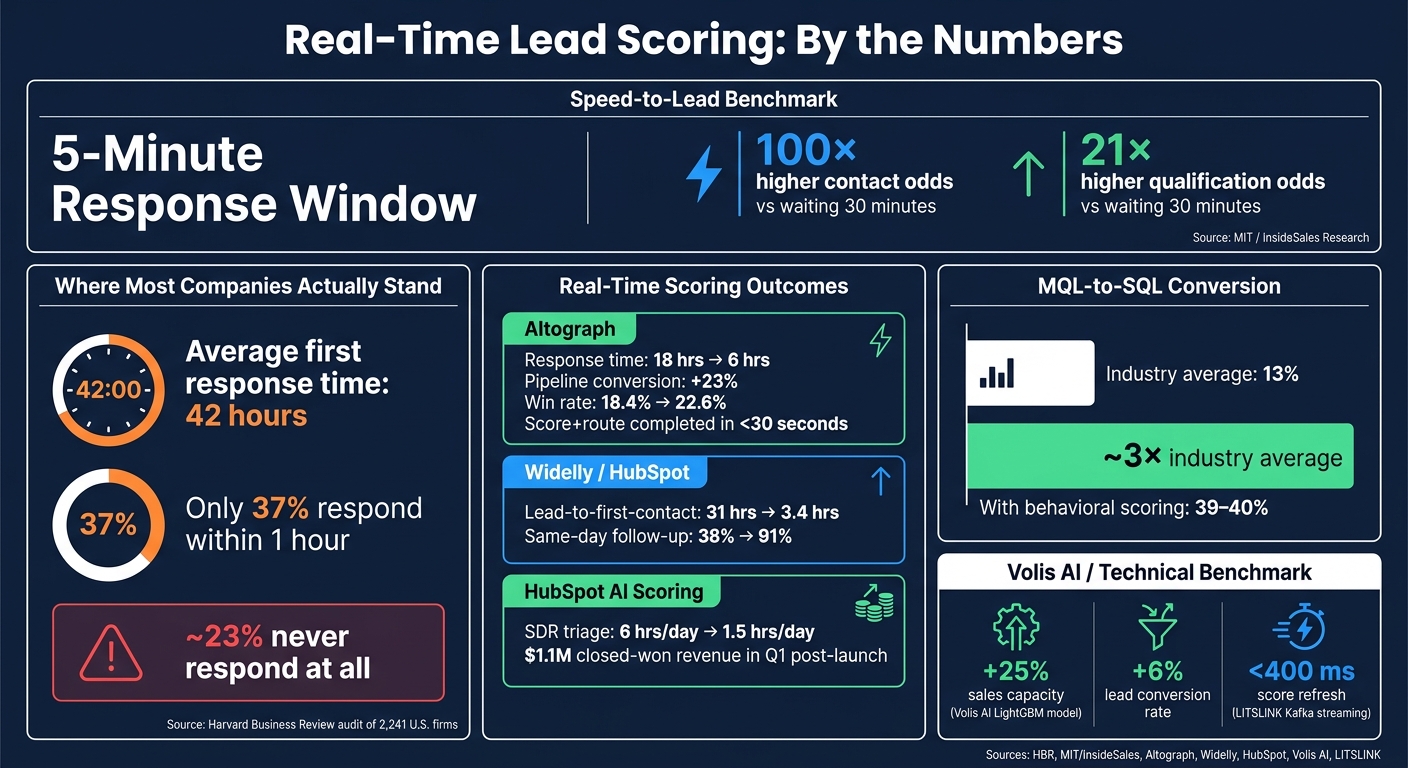
Fast follow-up matters a lot. Contacting a lead within 5 minutes can lead to 100x better contact odds and 21x better qualification odds than waiting 30 minutes.
Real-time scoring beats batch scoring because it updates scores after each key action, not hours later.
The model works best when it combines fit data, engagement data, and enrichment or intent data.
A score only matters if it triggers action inside the CRM, like routing, alerts, tasks, or nurture paths.
Clean CRM data is a hard requirement. If your fields, stages, and event tracking are messy, the score will be off.
Teams using this setup often see lower response times, less rep triage, and better conversion results.
In plain English: I’d treat real-time lead scoring as a way to tell sales teams who to contact now, who to nurture, and who to ignore for the moment.
A simple way to think about it:
Area
What it does
Fit
Tells me if the lead matches the account I want
Engagement
Tells me if the lead is showing buying intent now
Enrichment / intent
Tells me if the CRM record is accurate and current
The article’s main message is clear: real-time scoring is not just a scoring feature. It is a response system tied to CRM workflows, rep time, and pipeline results.
If I were reading this for action, my takeaway would be simple: use live score updates, tie them to clear follow-up rules, and clean up CRM data before turning anything on.
Real-Time Lead Scoring: Key Stats & CRM Impact
From 12% to 40% Close Rate: The Smart CRM Lead Scoring System Every B2B Company Needs
sbb-itb-a781ab9
1. Real-Time Lead Scoring in CRM Automation: What It Is and Why It Matters
Real-time lead scoring updates a lead’s score the moment new data comes in, then sends that change into routing, alerts, task creation, or sequence enrollment.[14][13][4] In plain English: the system reacts while the lead is still warm.
That timing matters more than it might seem. If a score changes after interest fades, the update doesn’t help much. In most setups, reps should see those changes within minutes so they can act while the lead is still engaged. That’s where the gap between scheduled scoring and event-driven scoring starts to show.
1.1 From Batch Scoring to Live Score Updates
Batch scoring recalculates lead scores on a set schedule, like hourly, nightly, or weekly runs.[10][11][14] That approach works fine when data moves slowly. But when buyer activity changes fast, batch scoring creates delay. By the time the next run finishes, the lead’s action may no longer feel urgent.
Event-driven scoring changes that completely. Instead of waiting for a scheduled job, the system listens for each event and recalculates the score as soon as it happens.[14][5] The new score is written back to the CRM and automation platform with sub-minute latency, and downstream workflows - routing, alerts, task creation, or sequence enrollment - can trigger right away.[12]
That shift makes scoring useful in the moment, not just something you look back on later. Reps can work from current priorities instead of old ones. The leads at the top of the queue are the people showing intent now, not the ones who were active yesterday. Once live scoring is in place, the next step is figuring out which signals should move the score.
1.2 How Scoring Fits Into Lead Enrichment Workflows
Scoring and enrichment work best as a loop, not as two separate steps. A new lead enters the CRM, gets enriched with firmographic data like company size, industry, job title, revenue band, or technology stack, and then gets scored based on fit and the engagement signals available at that point.[16][17]
As that same lead takes new actions - visiting a key page, replying to outreach, or showing other signs of interest - the score updates again. This time, the system layers fresh behavioral data onto the enriched profile.
Enrichment helps scoring stay on target, while scoring turns that data into action.[18][17] Without enrichment, scores can drift in the wrong direction. An active but poor-fit lead may get pushed too high, while a quieter lead that matches the ideal customer profile may get pushed too low. For agencies handling multiple accounts, this loop helps teams route leads at scale and keep handoffs steady. But it only works when the signals underneath are clean and up to date.
2. The Data Signals Behind Real-Time Lead Scores
Building on the enrichment loop above, real-time scoring depends on three signal types: fit, engagement, and enrichment/intent data.
2.1 Fit Signals: Who the Lead Is
Fit signals tell you whether a lead matches your ideal customer profile. The strongest predictors are usually company size, industry, seniority, revenue band, geography, and tech stack. These inputs don’t change much, which is exactly why they work so well as a scoring baseline.
Technographics matter because they show compatibility, overlap, and migration potential. That gives you a sharper way to sort leads than firmographics alone.
Fit scoring should reflect closed-won patterns, not guesswork. If your best opportunities usually come from directors and VPs at companies with 200–1,000 employees in target industries, those traits should carry the most weight.
2.2 Engagement Signals: What the Lead Does
Engagement signals show buying intent. Pricing page visits, demo requests, ROI calculator usage, integration page views, and meeting bookings are consistently treated as high-intent actions. A homepage visit or a single email open is weak, because it rarely points to purchase intent on its own.
Depth and repeat activity matter more than one-off clicks. A lead who visits the pricing page three times in a few days is sending a very different message than someone who opened one email weeks ago. Many scoring models use recency decay, which gives more weight to recent actions and lowers scores when activity slows down. That keeps score changes tied to current buying behavior, not stale activity.
Negative signals matter too. Personal email addresses, competitor domains, very small companies, long inactivity, and unsubscribes should subtract points. Without that subtractive logic, unqualified leads can pile up enough passive activity to trigger sales alerts they never should have reached.
That keeps score changes tied to current buying behavior, not stale activity.
2.3 Enrichment and Intent Signals: What Improves Score Accuracy
First-party behavioral data only shows activity on your own properties. Enrichment and intent signals fill in what you can’t see there. Job title changes, company growth events, industry classification corrections, contact verification, and account-level firmographic updates can all change whether a lead still qualifies, and the score should update as soon as that new data arrives.
Enrichment and intent data cut down on false positives and keep routing tied to records the CRM can trust. Third-party intent data goes a step further by showing research activity happening off your site, including topics being searched, competitor review pages being visited, and high-intent keywords being tracked across the web. In plain English: a cold record can start to look warm before the person ever visits your site.
Signal Type
Speed
Common CRM Source
Value
Fit (Firmographic/Technographic)
Slow / Static
CRM profile fields, enrichment provider, account data
High - establishes the ICP baseline
Engagement (Behavioral)
Real-time
Web tracking, marketing automation, email platform, sales engagement tools
Very high - indicates urgency and current intent
Enrichment / Intent
Near real-time to moderate
Data enrichment, verification, intent platforms
High - sharpens precision and corrects stale records
Use fit signals to decide whether a lead belongs in the funnel, engagement signals to judge whether they’re acting now, and enrichment signals to confirm the CRM record is complete enough to trust. If the CRM record is stale, automation sends the wrong lead down the line and follow-up gets weaker.
3. How CRM Automation Turns Score Changes Into Action
A lead score means nothing unless it starts something.
3.1 Routing, Assignment, and Follow-Up Triggers
When a score changes, the CRM needs to decide the next move right away. The setups that work best tie score bands to clear actions on a 0–100 scale.
Leads scoring 75 or above should get same-day call tasks, instant alerts, and immediate sequence enrollment. These leads are then routed through round-robin assignment to a specialist team.
Leads in the 50–74 range should enter a standard outreach sequence, get a follow-up task due in 24–48 hours, and join a general SDR queue.
Leads below 50 should move into long-term nurture, with no manual tasks or rep alerts unless their score goes up.
That kind of setup gives teams a simple rulebook. No guesswork. No digging through records to figure out who needs attention first.
A hybrid model raised MQL-to-SQL conversion from 18% to 26% and closed-won rates by 22% over six months.[20]
Escalation matters too. If a high-score lead sits untouched for more than two to four hours during U.S. business hours, the system should escalate on its own. That can mean sending a second alert, notifying a manager, or reassigning the lead. The goal is simple: keep high-intent leads from getting stuck in queue.
3.2 Real-Time Scoring for Agency Delivery Models
For agencies running white-label operations, real-time scoring works like one shared score system across outreach, follow-up, and booking. It applies the same logic no matter which client owns the lead.
A platform like SalesLabel fits this setup by using score changes to control handoff directly: warmer leads stay in AI-led outreach, higher-intent leads move to human reps, and colder leads shift into lower-frequency nurture campaigns.
Use the same score bands across every channel. When outreach intensity, follow-up timing, and meeting booking logic all point to the same tiers, prioritization stays aligned across every client account.
That only holds up when the scoring model works and the CRM data stays clean.
4. How to Build a Reliable Lead Scoring Model
Start with one measurable outcome: booked demo, SQL, or closed-won. Then make sure your CRM labels that outcome the same way every single time.[23][15] If that definition is loose, the model ends up chasing the wrong goal.
4.1 Rules-Based, AI-Based, and Hybrid Models
The right setup comes down to two things: how much clean historical data you have, and how much your team needs to explain the score to clients or reps.
High-volume agencies with deep, consistent CRM data
Hybrid
Medium - fit rules plus behavioral data
Moderate - rules layer adds context
Moderate
Scaling agencies that need predictive accuracy with clear guardrails
For most teams, rules-based scoring is the best place to begin when you have fewer than 100 closed-won deals or less than 12 months of conversion history.[25][19] It’s simple, direct, and easy to sanity-check.
Once you’ve built up several hundred closed-won deals and your field data is consistent, AI-based scoring starts to make sense.[31] That’s the point where pattern-finding can help more than hand-built logic.
Hybrid models sit in the middle. They combine a machine-learned score with simple exclusion rules, like filtering out target-excluded industries. That makes them a strong fit for mature agency teams that still need reporting people can follow without squinting at a black box.[22][28]
None of this matters, though, if the CRM can’t store clean events and labels.
4.2 Data Quality and CRM Readiness Requirements
Bad inputs lead to bad scores. Before you turn on real-time scoring, four things need to be in place: event tracking, deduplication, lifecycle stages, and standardized field mapping.[21][26][29]
Event tracking should record key touchpoints - form fills, email clicks, meeting bookings, and page visits - with correct timestamps and tied to the right contact and account.
Deduplication needs to be strict. Use a unique identifier like email or domain, and run regular merge routines so engagement history doesn’t get split across duplicate records.
Lifecycle stages such as Subscriber → MQL → SQL → Opportunity → Customer must be clearly defined and used the same way every time. These stages power both routing and model training.
Standardized field mapping makes sure fit data like industry, company size, and job title lands in the fields your scoring logic can actually read.
There are also a few benchmarks worth aiming for. Try to get 80%+ completeness across contact and firmographic fields, and keep email accuracy in the 90%–95% range.[27][30] For AI-based scoring, fold in a minimum training volume of at least 1,000+ contacts or leads with clear Won/Lost tracking.[29][31] That shouldn’t be treated as a side check. It’s part of whether the model is ready at all.
Closed-loop feedback matters just as much. Win/loss reasons and disqualification notes should be logged in a consistent way, so recalibration is based on what actually turns into revenue, not guesswork.
This is where a lot of scoring projects wobble. The model itself may be fine, but the CRM data underneath it is messy. Clean tracking and clear labels are what make real-time enrichment usable for scoring. Once that data is in good shape, the model can trigger actions you can trust.
4.3 Example SaaS Workflow for Agencies
Once the model and data rules are set, the score should trigger the same routing and follow-up logic across every account. SalesLabel brings enrichment, scoring, outreach, follow-up, and inbox management into one branded workflow. High-scoring leads can move into tailored sequences automatically, while lower-scoring contacts move into slower nurture flows. As scores change, each handoff changes with them too.
5. Research Findings and Case Study Patterns
The clearest way to judge real-time scoring is simple: look at what happens inside a live CRM. Does the team respond faster? Do reps spend less time sorting leads by hand? Do more of those leads turn into pipeline and revenue?
That’s the pattern the research points to. Across studies and live deployments, real-time scoring tends to show up first in response speed, then in routing efficiency, and then in conversion.
5.1 Reported Gains Across Implementations
Speed-to-lead is still the clearest signal in the data. The 5-minute response window remains the strongest benchmark.[37][9][8] But most companies are nowhere close to that mark. A Harvard Business Review audit of 2,241 U.S. firms found an average first response time of about 42 hours. Only 37% responded within an hour, and about 23% never responded at all.[38]
That gap is where real-time scoring starts to matter. When score updates trigger routing and rep alerts right away, teams don’t have to wait for someone to review leads manually.
One CRM automation case from Altograph cut average lead response time from 18 hours to 6 hours. In that setup, enrichment, scoring, routing, and rep notification were all finished in under 30 seconds from form submission.[32] Another setup refreshed scores in under 400 ms.[3]
Manual triage time drops too. In one AI scoring project, SDR triage fell from 6 hours per day to 1.5 hours per day. The model also beat manual SDR ranking by 2.3× on closed-won prediction.[7] Put plainly, reps spent less time guessing and more time working leads that were more likely to close.
5.2 Conversion and Pipeline Impact
Speed by itself doesn’t mean much if conversion stays flat. The stronger cases are the ones where faster action also leads to better pipeline results.
The benchmark MQL-to-SQL conversion rate is about 13%.[34][35] Companies using behavioral scoring models report 39% to 40%, which is roughly three times that average.[34][35]
The case studies follow that same pattern. A HubSpot setup tracked by Widelly saw same-day sales follow-up on marketing-sourced leads jump from 38% to 91% after automated lead assignment went live. Average time from lead creation to first contact dropped from 31 hours to 3.4 hours.[33]
In another HubSpot AI scoring deployment, the model was tied to $1.1 million in closed-won revenue in the first quarter after launch.[7]
Pipeline quality improved in the Altograph case as well. The company reported a 23% improvement in pipeline conversion rate, a win rate increase from 18.4% to 22.6%, and a shorter average sales cycle, from 34 days to 26 days.[32]
Volis AI reported a similar pattern. Its LightGBM model, tied into Vertex AI for real-time CRM scoring, delivered a 25% increase in sales capacity and a 6% increase in lead conversion rate by routing higher-probability leads to the right reps first.[36]
5.3 How to Read the Evidence
Of course, not every case study should be treated the same way.
Production case studies are useful because they show live before-and-after results inside a CRM. But many also involve vendors, which can tilt the story toward success. Vendor materials, including SalesLabel, are helpful for showing how the workflow operates, but they don’t always prove the size of the lift. Method studies can help explain why the system works across multiple setups, though they may still rely on vendor-reported datasets.
A good way to read this evidence is to check for a few basics:
A clear baseline
A defined outcome metric, such as MQL, SQL, win rate, or closed-won revenue
A believable comparison period
A direct link between the score change and the downstream automation step
The strongest studies don’t just say scoring got better. They show that a score changed, an automation fired, and a sales outcome moved with it. That’s the difference between noise and something you can trust.
Scores updated in real time while prospects browse; routing triggered instantly
Academic/industry research (MIT/InsideSales)[37][9][8]
Lead-response timing study
5-minute contact threshold analysis
Contact odds 100× higher within 5 min vs. 30 min; qualification odds 21× higher
6. What Real-Time Lead Scoring Changes for Modern Agencies
Real-time scoring only works when three things move together: clean data, instant CRM action, and revenue metrics you can track.[1][2][3] If that chain breaks, a score change is just a number on a screen.
Bad data can misread buyer intent. Weak automation can send leads to the wrong place. Missing metrics make it hard to tell whether the model is driving more revenue. That’s the difference between scoring as a reporting tool and scoring as a way to manage team capacity.
For U.S. agencies, this matters because real-time scoring helps lean SDR teams work more leads without hiring SDRs at the same pace.[6][39][40] Score thresholds help reps stay focused on the conversations most likely to turn into pipeline. Lower-scoring contacts can move into automated sequences or nurture tracks instead of eating up rep time.
That shift gives agencies more qualified conversations from the same CRM flow. SalesLabel fits this setup by automating lead sourcing, enrichment, outreach, follow-ups, and meeting booking under the agency's brand, while real-time scoring signals when a lead is ready for a human handoff.
That also changes how agencies sell their work. Instead of sending over activity reports packed with emails sent or calls made, they can point to metrics clients care about: qualified pipeline generated, meetings booked, and conversion rates improved. For U.S. clients who want funnel metrics at each stage, that’s a much stronger position.
In practice, the payoff shows up in three areas: real-time lead scoring ties together data quality, CRM automation, and sales execution. When those parts line up, agencies respond faster, qualify leads more consistently, and show ROI through client metrics tied to revenue.
FAQs
How is real-time lead scoring different from batch scoring?
Real-time lead scoring updates a lead’s score the moment new signals come in, whether that’s behavior, fit, intent, or activity in the inbox or on your site. That gives sales teams a chance to act right away as a lead’s level of readiness shifts.
By contrast, batch scoring updates scores on a set schedule using data pulled at intervals. Because of that, scores can lag behind a lead’s most recent actions.
What data do I need before turning on real-time lead scoring?
Before you turn on real-time lead scoring, set the rules first.
Start with your ICP and your scoring model. That means defining:
Fit
Engagement
The exact criteria used for scoring
Your time-decay logic
In plain English, you need to decide who looks like a good prospect, what actions matter, and how scores should change as activity gets old.
You also need live data sources connected to your CRM and scoring system. That can include CRM activity, web or intent data, and inbox signals.
And one more piece matters just as much: validation metrics. Use conversion outcomes to check whether your scoring is accurate after launch.
How should score changes trigger CRM actions?
Score changes should trigger CRM actions in real time so your team can focus on high-intent prospects and act fast.
When a lead score shifts based on behavior, fit, or intent signals, SalesLabel can trigger the right workflow right away. That might mean personalized outreach, follow-ups, meeting booking, or sales alerts.
The payoff is simple: your team stays timely and relevant, without spending extra time on low-priority leads.