Map an AI-driven lead-scoring workflow: clean data, separate fit vs intent, automate routing with SLAs, and close the feedback loop.
SalesLabel Team
Growth Expert • 28.09.2026
Share:
Hazır bir çözüm mü arıyorsunuz?
SalesLabel, giden satışı uçtan uca otomatikleştirir — yapay zekâ potansiyel müşterileri bulur, kişisellendirilmiş mesajlar gönderir ve markanız altında toplantılar ayarlar.
Lead scoring fails when the score does not trigger the next step. If you want better pipeline results, I’d focus on three things first: clean data, clear fit and intent rules, and automatic routing with response SLAs.
Here’s the short version:
A score alone is not enough. It has to trigger routing, outreach, or review.
Bad input breaks scoring. Missing titles, stale company data, duplicates, and invalid emails lead to weak routing.
Fit and intent should stay separate. A good account is not always ready now. A ready lead is not always a good account.
Speed matters. One cited study found conversion rates were about 8x higher when the first attempt happened within 5 minutes.
Human review still matters. Edge cases like current customers, competitors, and odd account paths should not be left to features">automation.
Feedback closes the loop. Rejection reasons, meetings, and closed-won data should feed back into score rules and thresholds.
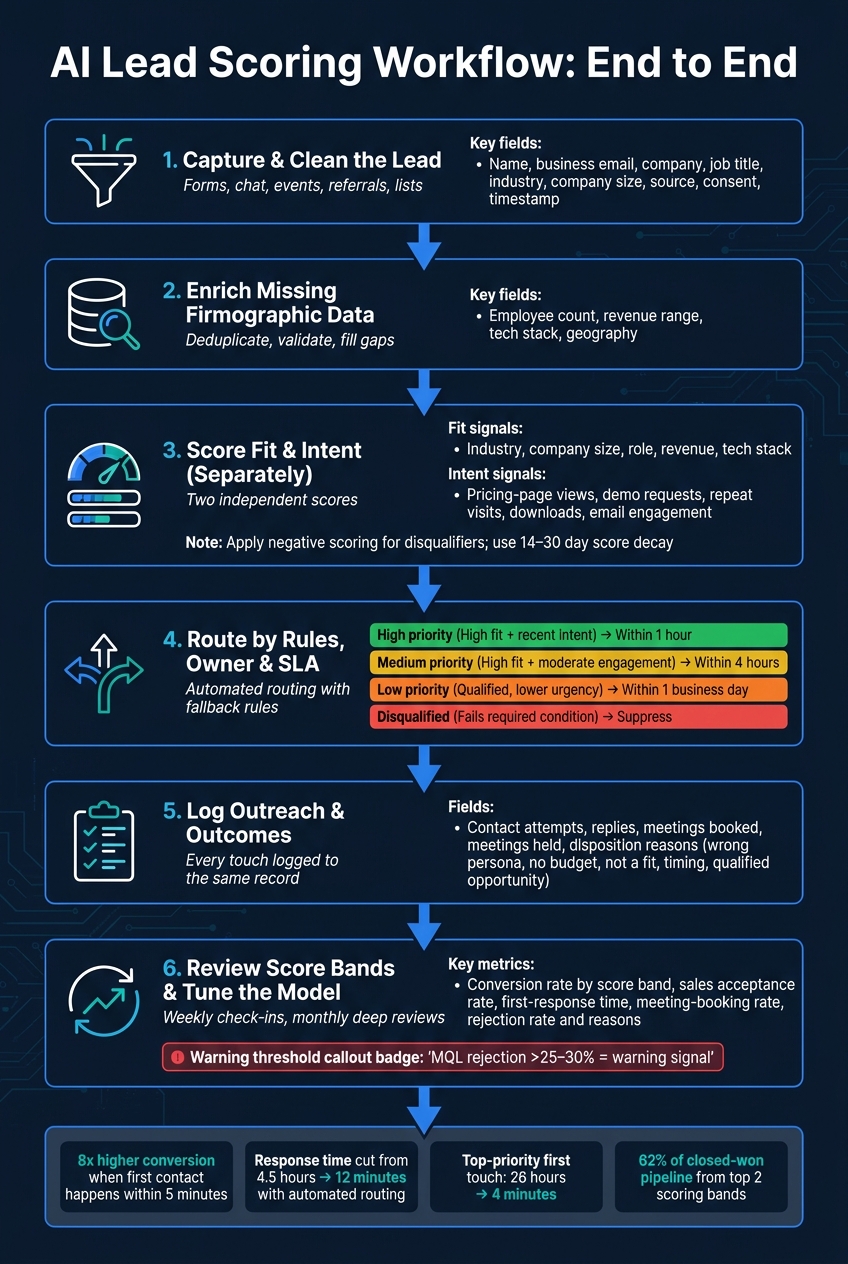
If I were setting this up, I’d map the workflow in this order:
Capture and clean the lead
Enrich missing firmographic data
Score fit and intent
Route by rules, owner, and SLA
Log outreach and outcomes
Review score bands and tune the model
A few numbers stand out from the article:
55 million+ sales activities studied
5.7 million inbound leads reviewed
Response time cut from 4.5 hours to 12 minutes in one case
Top-priority first touch dropped from 26 hours to 4 minutes in another case
A warning sign appears when MQL rejection rises above 25% to 30%
In plain English: lead scoring works when it behaves like a system, not a spreadsheet. The main job is to make sure every score leads to a tracked action, with automation for volume and human review for edge cases.
That’s the frame I’d use for the rest of the article.
Automated Lead Enrichment & Scoring Using Sim Ai (Step-by-Step AI Tutorial) | Best N8N Alternative
sbb-itb-a781ab9
What AI Workflow Mapping Means for Lead Scoring
AI workflow mapping lays out how a lead moves from capture to enrichment, scoring, routing, outreach, and review. It spells out the data inputs, scoring logic, thresholds, automations, owners, and the points where a person needs to step in. At the start, that usually means one thing: keep fit signals and intent signals separate.
A basic points model tells you what score a lead got. A mapped workflow shows what happens after that. Say a lead comes from a target industry and has the right company size. That points to strong fit. If that same lead visits the pricing page, that adds intent. The workflow can then create a sales task and alert the right rep.
For agencies handling more than one client, this matters even more. Each client may have its own ICP, score weights, and routing rules, while the core workflow stays the same. That’s how agencies grow without turning the process into a mess.
Fit Signals vs. Intent Signals
A solid scoring workflow tracks two separate things: fit and intent.
Fit tells you whether a prospect looks like the kind of customer you want. That can include industry, company size, job title, geography, revenue range, or technology stack. Intent tells you whether that prospect seems to be in buying mode right now. That can include pricing-page visits, demo requests, repeat site visits, webinar attendance, downloads, or email engagement.
Keeping those scores apart makes routing rules easier to check and tune. It also stops teams from treating very different leads as if they were the same.
A high-fit, low-intent lead may be a strong match on paper but not ready yet. A high-intent, low-fit lead may be active now but still unlikely to turn into a good customer. Good routing rules look at both.
One more thing: don’t let passive engagement, like a single blog visit, outweigh stronger buying signals.
Where Human Oversight Still Matters
Even with AI in place, some cases still need a person to take a look. AI is good at routine scoring, enrichment, and routing. But reps can catch things AI may miss, like current customers, competitors, out-of-ICP accounts, strategic accounts with odd buying paths, or leads with data that doesn’t line up.
The workflow should say exactly when that review happens instead of leaving it to chance. And when a human makes a call, that outcome should loop back into the scoring rules.
How to Map the Lead-Scoring Workflow End to End
AI Lead Scoring Workflow: From Capture to Closed-Won
Lead scoring works best when you treat it as a workflow, not just a number on a record.
Here’s the core idea: define the input, owner, action, and logged outcome for each stage. When scoring feels messy, the problem usually isn’t that the score is too simple. It’s that the workflow around it was never spelled out.
At a practical level, the workflow should move in three steps: clean the data, route the lead, then log the result.
Stage 1: Capture and Enrich Lead Data
Every lead comes from somewhere: a website form, landing page, chat, webinar, event, referral, outbound prospecting effort, or imported list.
Before you assign any score, the record needs to be clean and complete. At a minimum, capture:
Name
Business email
Company
Job title
Industry
Company size
Source
Consent status
Timestamp
You’ll also want to standardize UTM fields, or the same kind of source tracking, so you can connect leads back to pipeline and revenue later.
Once the record exists, deduplicate it and enrich it before scoring begins. Check for existing CRM records using normalized email and company domain. Then add firmographic data like employee count, revenue range, technology stack, and geography to fill in gaps that affect fit scoring.
If sources conflict, use source priority and flag the record for review. Bad or duplicate data sends leads down the wrong path. And once that happens, the score doesn’t matter much.
After the record is clean, fit and intent scores can guide the next step without extra noise.
Stage 2: Score, Qualify, and Route
With a clean record in place, the workflow should dedupe, validate, score fit and intent, subtract negative signals, and assign a lifecycle stage.
Use this routing map:
Stage
Criteria
Action
Nurture
Low fit or low intent
Enroll in educational sequence
MQL
Hits the marketing threshold
Send to an SDR queue
SQL
Meets fit, intent, and sales qualification rules
Assign to rep with task and SLA
Disqualified
Fails a required condition
Suppress or archive
Thresholds should be set by marketing, sales, and operations together, not by one team working alone. And those thresholds should come from your own conversion history, not generic benchmarks.
Routing also shouldn’t depend on score alone. Territory, account ownership, rep capacity, industry specialization, and deal size all shape who should get the lead. If AI enrichment confidence is low, send the record to a review queue instead of auto-assigning it.
Also, don’t leave routing to chance. Define a fallback rule up front, such as round-robin, territory, or account owner, so no lead sits unassigned.
Every routed lead should flow back to the same record. That way, follow-up data can keep sharpening the score over time.
Stage 3: Follow Up and Feed Results Back
Once a lead is routed, every outreach event should be logged to that same record: contact attempts, replies, meetings booked, meetings held, and outcomes.
Use structured disposition fields like "wrong persona", "no budget", "not a fit", "timing," and "qualified opportunity" instead of free-text notes. That one change makes review much easier later.
Log every call, reply, meeting, and outcome. Then review rejected, recycled, and won leads every month and every quarter.
How AI Fixes Common Lead-Scoring Problems
Moving Beyond Static and Over-Simplified Scores
Once the workflow is mapped, AI can stop treating every action the same.
Static models tend to reward isolated actions and ignore context, recency, frequency, and fit.[3][4] AI looks at fit, engagement, intent, recency, and sequence together instead of giving fixed points to single actions. So instead of just adding up clicks or downloads, the model looks at the mix of signals, the order they happened in, and how recent they are. A recent high-intent action from a strong-fit account should beat generic engagement every time.
Negative scoring matters too. Subtract points for clear disqualifiers like out-of-ICP titles, competitor domains, unsubscribes, and non-target account size. Those deductions should come from past conversion data, not gut feel. If you skip negative scoring, leads can keep stacking positive points even when they have little or no sales value.
Score decay handles the rest. Use a 14- to 30-day half-life for most behavioral signals, and let stronger signals like demo requests decay more slowly. If a new meaningful signal shows up, reset the decay. That keeps the queue centered on current intent instead of stale activity.[2][4]
Cutting Slow Handoffs and Missed Follow-Up
A better score only helps if it triggers the right next step right away.
Once a lead crosses a score threshold, the workflow - not a person - should decide what happens next. Automated routing assigns the lead to the right owner and, at the same time, sends an alert, creates a task with a deadline, and starts a follow-up sequence if no action happens inside the set window.[5]
The time savings can be dramatic. One implementation cut average lead response time from 4.5 hours to 12 minutes after combining fit and behavioral scoring with automated routing and real-time notifications. That’s a 96% improvement.[6]
Use this SLA structure:
Priority
Criteria
Response Target
High
High fit + recent intent signal
Within 1 hour
Medium
High fit + moderate engagement
Within 4 hours
Low
Qualified, lower urgency
Within 1 business day
Disqualified
Fails required condition
Suppress; no outreach
If a rep misses the response window, the system should escalate or reassign on its own. Automated outreach should also pause on reply, meeting booking, unsubscribe, or disqualification so outreach stops at once.
With scoring and routing defined, the next step is to run the workflow inside the same system.
Once the workflow is mapped, the next step is running it in one place. You’ve already set the scoring logic and routing rules. Now comes the messy part: keeping sourcing, enrichment, scoring, outreach, replies, and booking tied together without losing the thread between steps. That’s where a connected platform starts to matter.
Connecting Sourcing, Scoring, and Outreach
SalesLabel runs this as one connected sequence: define your ICP, source and enrich prospects, score fit, send outreach, track replies, update intent scores in real time, and route qualified leads to your CRM or calendar.[7][8]
SalesLabel applies fit scoring during enrichment, then updates intent based on replies and engagement. Routine responses can be handled with AI-driven replies, while high-value or sensitive conversations are passed to a human reviewer.[7] That split helps keep response times short without giving up oversight where it matters.
Meeting booking is the conversion point that shows whether your thresholds are doing their job.[7] Booked meetings and reply outcomes then feed back into score calibration. So scoring doesn’t just sit there like a report in a dashboard. It becomes a working loop.
Scaling Agency Delivery With White-Label Branding
For agencies, the main draw is control. You get one workflow, one brand, and room to run it across many clients. Client dashboards, reports, and outreach use your agency’s brand, while SalesLabel stays in the background.[9][10] You can also set your own pricing model, whether that’s a monthly retainer, a per-lead fee, or a performance-based setup.[9]
Once scoring is live, the job isn't done. Now you need to see if it improves lead quality, speeds up response, and helps revenue. In plain English: does the workflow separate fit from intent, and does it move the right leads to sales faster?
Metrics That Show Workflow Quality
A single top-line conversion rate won't tell you much. You need to look at performance by score band over a fixed 60-day window - for example, 0–25, 26–50, 51–75, and 76–100.[11] Then break those results down by campaign, source, industry, and time period.
If the scoring logic is working, higher bands should convert better in a clear step-by-step pattern. If two nearby bands perform about the same, the thresholds likely aren't separating intent in a useful way.
Here are the main metrics to track:
Metric
What it tells you
Conversion rate by score band
Whether scores actually rank buying potential
Sales acceptance rate
Whether your qualification definition matches sales reality
First-response time (median + 90th percentile)
Whether routing and handoffs work in practice
Meeting-booking rate
Whether prioritized leads move to a concrete next step
Sales rejection rate and reasons
Whether ICP assumptions or signals are off
Opportunity and closed-won rate by score band
Whether scoring improves revenue results, not just MQL volume
For first-response time, measure from the moment the lead becomes actionable to the first human response - not an auto-reply. If that number is slow, the problem is often routing, handoff friction, or simple team capacity.
One benchmark gives a useful gut check: a published software case study found that about 62% of closed-won pipeline came from the top two scoring bands, while median first touch for top-priority records dropped from 26 hours to 4 minutes after workflow changes.[15] That's a reference point, not a promise.
If the gap between bands looks weak, the model needs tuning. That's your cue to revisit thresholds, weights, and routing rules.
Refining Thresholds and Models Over Time
Thresholds shouldn't be treated like permanent law. They're more like capacity controls. If your team can only follow up well on 200 high-priority leads each week, set the routing threshold high enough to keep volume near that level.[12]
There's also a simple warning sign to watch. One reported model-decay framework treats an MQL rejection rate above 25–30% as a warning and anything above 40% as a serious problem.[16] If a lot of high-scoring leads are still being rejected, dig into the reasons by score band.
Poor-fit rejection patterns can tell you a lot. If sales keeps flagging leads for the wrong industry, company too small, or no buying authority, that's usually a sign the model gives too much weight to engagement and not enough to firmographic fit. A lead clicking around your site is nice. A lead from the wrong company type is still the wrong lead.
Review performance weekly or every two weeks, and do a deeper model check at least once a month during active campaigns. Focus on:
Score-band conversion
Rejection reasons
Response-time SLA compliance
Source-level differences
Any major change should trigger a fresh review. That includes a new offer, pricing change, target market shift, sales-process update, CRM field change, or a new outreach channel.
It also helps to use time-based validation: train on older records, then test on newer ones. That's one of the best ways to spot model drift before performance starts slipping in the background.[13][14]
Conclusion: Build a Lead-Scoring Workflow That Scales
Lead scoring only works at scale when each score leads to a clear next step. And the workflow only works at scale when capture, enrichment, scoring, routing, and follow-up all connect.
A score sitting in a spreadsheet doesn't move a deal forward. A documented workflow does. It ties together data capture, enrichment, qualification, routing, outreach, and outcome tracking in one repeatable process.
Write down the core parts of the system:
which inputs shape the score
what triggers each score range
who owns the handoff
how feedback updates the model
Once those decisions are documented and tracked, the workflow stops feeling like guesswork and starts acting like a repeatable revenue process.[18][19]
After that, speed becomes the real test. Fast routing and follow-up are what close the gap. Better scoring alone won't do it. The gap closes when routing, alerts, and follow-up sequences are automated, so a qualifying event leads to an immediate, documented next step instead of sitting there until someone spots it.
For agencies, there's a bigger play here: one standard workflow across clients. If the workflow is mapped out with configurable thresholds and messaging rules, the same operating model can support multiple clients under the agency's own branding. SalesLabel serves as the execution layer for that workflow, connecting sourcing, scoring, outreach, follow-up, and booking in one branded system. That means one operating model can support multiple clients without changing the process.
AI handles the repetitive prioritization. Humans still own edge cases, strategic accounts, and borderline or high-value situations.[17][20] That split - automation for volume, judgment for exceptions - is what helps a lead-scoring workflow hold up over time. Start with one clearly defined workflow, measure it against a baseline, and expand only when the data shows faster handoffs and better conversion.
FAQs
How do I set fit and intent thresholds?
Define your Ideal Customer Profile first. That gives you a baseline for fit. Then layer in real-time behavior data to see who’s showing intent.
With SalesLabel’s AI-driven predictive scoring, you can tune thresholds using live CRM, website, and inbox signals. Check those scores against actual conversion data on a regular basis so they stay accurate and useful as your agency grows.
When should a human review a lead?
A human should review a lead when AI flags high-intent prospects or spots behavior that calls for a more personal touch.
By automating routine scoring, SalesLabel helps your team spend time on high-value leads at the right moment. That means less time wasted on low-priority follow-up, while still keeping the sales process personal.
How often should I update lead scoring rules?
Update lead scoring rules on a regular basis, and check them against actual conversion data.
With SalesLabel, AI uses real-time signals from CRM data, website behavior, and inbox analytics to keep lead scoring dynamic and in line with current buyer intent and your changing ideal customer profile.