Inbox analytics transforms how businesses prioritize leads by using AI to analyze real-time message data, like emails and DMs, for buyer intent. This approach enhances lead scoring by identifying high-value prospects based on their behavior, such as pricing inquiries or demo requests, rather than relying solely on static data like job titles or company size.
Lead scoring combines fit (who the lead is) with engagement (what they’re doing now).
High-intent actions like pricing page clicks or demo requests carry more weight in scoring models.
AI can refine scoring by detecting subtle signals like urgency or decision-making patterns.
Automating inbox insights reduces wasted time, improves response rates, and increases conversions.
Why it matters: Traditional lead scoring often misses real-time intent signals, leading to inefficiencies. Inbox analytics bridges this gap, helping teams focus on leads most likely to convert while cutting response times and boosting sales productivity.
Mapping Inbox Signals to Lead Scoring Criteria
Core Behavioral Signals from Inbox Analytics
Not every inbox signal carries the same weight. For instance, an email open might show initial interest, but a reply asking about pricing demonstrates a much stronger intent to engage. Your scoring model should reflect these differences.
The most impactful signals fall into four main categories: high-intent actions, general engagement, negative signals, and contextual modifiers. Actions like clicking on a pricing page, requesting a demo, or completing an ROI calculator are high-intent signals and should carry 3–5 times more weight than general actions like opening a newsletter or clicking on a blog post [7]. Two often-overlooked signals are email forwards and time-to-open. When a prospect forwards your email, it’s a strong indicator they’re involving others in the decision-making process [6]. Similarly, how quickly a prospect opens an email can signal immediate interest, compared to those who take days to engage [6]. On the flip side, negative signals like unsubscribes, spam reports, or no-shows for meetings should reduce a lead’s score to keep your pipeline focused and efficient [6].
The order in which content is consumed also matters more than the sheer volume of activity. As Kumo.ai explains:
"The sequence is the signal. The count is noise." [4]
For example, a lead who progresses from reading a blog post to a case study, then to API documentation, and finally requests a demo is clearly on a buying journey. In contrast, someone who reads 20 blog posts but never visits the pricing page is likely just browsing.
Next, we’ll explore how these signals improve both fit and engagement scoring.
Fit Scoring vs. Engagement Scoring
Inbox analytics plays a key role in refining two dimensions of lead scoring: fit and engagement. Fit scoring answers who the lead is - details like their industry, company size, and job title - and whether they align with your Ideal Customer Profile (ICP). Engagement scoring, on the other hand, focuses on what the lead is doing right now and how close they are to making a purchase.
Here’s the key difference: Fit acts as a gate in your model. If a lead doesn’t match your ICP, no amount of engagement should qualify them for the sales queue [10][7]. Engagement, however, serves as a trigger, signaling when your team should act on a qualified lead.
Dimension
Primary Question
Role in Model
Data Sources
Fit Scoring
Is this the right type of customer?
Gate / Filter
CRM, LinkedIn, enrichment data
Engagement Scoring
Is this customer ready to buy now?
Trigger for outreach
Inbox activity, web tracking
Inbox analytics enhances both dimensions. For fit scoring, it identifies colleague signals - when multiple people from the same company engage with your emails, it shows account-level interest. Leads from companies where a colleague has already converted are 3–5 times more likely to convert themselves [4]. For engagement scoring, sentiment analysis powered by natural language processing (NLP) can identify key signals from email replies, such as pricing inquiries, objections, or mentions of competitors - insights that go beyond simple click tracking [6].
Turning Inbox Signals into Score Components
Once you’ve identified the important signals, the next step is assigning point values that reflect genuine buying intent rather than just activity volume.
Weight signals by their destination. For example, a click to an ROI calculator signals much stronger intent than a click to a blog post. As RhinoAgents puts it:
"A click to your ROI calculator carries ten times the intent signal of a click to your blog." [6]
Avoid inflating scores with repetitive actions. For instance, email opens shouldn’t add more than +10 points total, no matter how many times a lead opens your emails [8][9]. Additionally, implement score decay - a 30-day half-life for behavioral signals ensures older actions don’t artificially inflate a lead’s score [4].
Here’s a guide to point weights based on signal types:
Signal
Intent Level
Point Weight
Positive email reply
Very High
+20 to +30 pts
Demo request / pricing page click
High
+15 to +25 pts
Email forward
High (contextual)
Multiplier or priority alert
General link click
Medium
+5 to +10 pts
Email open (no click)
Low
+1 to +5 pts
Unsubscribe / spam report
Negative
−20 to −50 pts
These scoring adjustments help prioritize leads by clearly identifying buyer intent. To maintain quality, ensure that no lead qualifies as a Marketing Qualified Lead (MQL) without at least one definitive intent signal - such as a pricing page visit, demo request, or positive reply - before routing them to sales [7].
sbb-itb-a781ab9
Building an Inbox-Aware Lead Scoring Model
What You Need Before You Start
If you're looking to integrate inbox analytics into your lead scoring process, there are two key things you need to get started: real-time data capture and strong identity resolution.
On the data side, your system should capture email events - like opens, clicks, and replies - in real time, using webhooks or event streams. Avoid batch exports, as they can delay scoring by more than 22 hours. By responding within just 5 minutes, you can significantly improve lead qualification rates [3].
On the identity side, inbox data tends to be sparse. To address this, use domain-first matching to consolidate email addresses into a single Lead ID. This should include firmographic details, ensuring your scoring model has a complete and accurate view for better fit scoring.
Lastly, make sure your Ideal Customer Profile (ICP) is finalized before diving into behavioral scoring. A lead that doesn’t align with your target profile shouldn’t earn points just because they casually interact with your emails.
Setting Up Rule-Based Scoring
Once your data is clean and ready, rule-based scoring is a great place to start, especially if you don’t have a large historical dataset (fewer than 1,000 leads) to train a predictive model. This method is simple to understand, can be deployed in 4–6 weeks, and is widely accepted by sales teams - 85–90% of them adopt it thanks to its straightforward logic [11].
To improve accuracy, don’t score individual actions in isolation. Instead, bundle related signals. For instance, a lead clicking on your pricing page and replying positively to an email is a much stronger indicator of intent than either action by itself. This also helps weed out bots or casual visitors.
Score decay is another critical feature. Leads should lose 2–5 points weekly or face a 10% score reduction after 30 days of inactivity. This ensures your lead priorities reflect current interest levels rather than outdated activity. Additionally, apply negative scoring for disqualifying factors like unsubscribes, competitor email domains, or irrelevant job functions to keep your pipeline clean.
Lastly, collaborate with your sales team to define the threshold for a Marketing Qualified Lead (MQL). As Adam McLane from Growth Marketing Consultancy advises:
"A model that sales helped build is a model sales trusts. Adoption happens at the design stage, not the rollout stage." [7]
Once this framework is in place, you can take things further with AI for even more precise scoring.
Using AI for Predictive Scoring
While rule-based scoring is great for clear, straightforward actions, AI can uncover more subtle patterns that traditional methods might miss. After setting up your basic scoring model, use AI to identify nuanced signals - like a lead mentioning “evaluating for Q2 budget” in an email - that rules alone can’t detect [13].
AI also helps differentiate between similar actions, such as distinguishing competitor research from genuine pricing inquiries. The accuracy of AI-driven scoring ranges between 40–60%, compared to the 15–25% typical of traditional models [12][15].
The good news? Implementing AI doesn’t have to cost a fortune. For example, a project documented on GitHub by developer Alan Scott Encinas used the Claude API and HubSpot to process 1,051 leads at an API cost of just $15.07 - about $0.01 per lead. This system analyzed full email threads, enriched company data, and uncovered significant pipeline opportunities, generating over $18,000 in quotes within days [14].
A key design principle for AI scoring is explainability. AI should provide plain-language explanations for its scores. For example, a lead might be scored 85 with an explanation like, “Scored 85 due to 3 pricing page visits and a demo request reply.” This context gives sales reps the confidence they need to act. Without such transparency, adoption rates can drop from 85–90% (seen with rule-based models) to just 60–70% [11][12].
Tools like SalesLabel make it easy to integrate AI scoring directly into your inbox workflows. These platforms combine scoring, data enrichment, and reply intelligence in one place, so you don’t need to juggle multiple tools. With AI-powered scoring, you can apply insights directly to your workflows, streamlining the entire process.
With these foundations in place, you’re ready to see how inbox analytics can be applied in more specific scenarios, which will be covered in the next section.
Putting Inbox Analytics to Work in Lead Scoring
Auditing and Configuring Your Current Setup
To make the most of inbox signals and scoring models, start by reviewing your existing pipeline. Trace the path of leads from their initial entry to either conversion or dropout. Look for weak points, such as leads that receive a single email but never a follow-up, or those who reply but aren’t passed to a sales rep. It’s worth noting that around 70% of leads are lost due to poor follow-up caused by prioritization issues[3].
Next, audit your scoring rules for two common pitfalls. First, make sure no single action skews a lead’s score unfairly. For instance, a lead who repeatedly opens the same email shouldn’t outrank someone who clicks on a pricing link just once. Implement a score cap for each category (like email activity, website behavior, or direct replies) to avoid this problem. Second, ensure that your ideal customer profile (ICP) criteria are strictly applied. Studies show that 32% of marketing-qualified leads are unusable, often due to role changes, disconnected contact information, or ICP mismatches [16]. Fit scoring should act as a filter before engagement scoring even starts.
Once you’ve identified gaps and streamlined your scoring rules, assign accurate point values to each inbox interaction.
Connecting Inbox Events to Scoring Rules
The secret to effective scoring lies in prioritizing intent over activity. Not all actions are created equal. For example, replying to an email demonstrates more intent than simply opening it, and clicking a pricing page carries more weight than clicking a blog post. Here’s a breakdown:
Inbox Event
Suggested Points
Intent Level
Email open
+2 to +3
Low
Email CTA click
+10
Medium
Pricing page click
+40
High
Reply to outreach
+20 to +30
Medium/High
Demo request
+50 to +100
Very High
Unsubscribe / "Remove me"
−50 to −100
Negative
Instead of scoring actions individually, focus on intent bundles - combinations of actions that signal stronger interest. For instance, a pricing page click paired with a positive reply should trigger a high-priority alert, while casual interactions won’t. Negative signals, like unsubscribes or hard bounces, should immediately disqualify leads from the active queue.
Organize score ranges into specific actions for your team, with clear response timelines. For example:
80–100 points: Trigger a Slack alert with a 24-hour response window.
60–79 points: Enroll the lead in a fast-track sequence within one hour.
Below 40 points: Shift to an automated nurture track, with no rep involvement.
Tools like SalesLabel can automate this process by syncing inbox labels directly with CRM deal stages, cutting down on manual delays and improving response time.
After assigning scores, it’s crucial to test and refine your model for accuracy.
Testing and Refining the Model
Start by backtesting your model with 90 days of historical lead data. Compare the scores against actual outcomes, such as meetings booked or deals closed. If high scores don’t align with conversions, adjust your weights before rolling it out live [3].
Run a 14-day shadow test where AI-generated scores are compared to your sales reps’ priorities without affecting routing. Then, launch a 30-day trial, splitting traffic evenly between the new model and your current process. Measure conversion rates and gather feedback from your team to fine-tune the system.
As Peter Vogel, Founder of peppereffect, explains:
"Models built once and never recalibrated decay 30–40% within six months." [12]
To keep your scoring system effective, schedule quarterly reviews. Every 90 days, analyze your MQL→SQL→Closed Won data to spot patterns. Look for false positives (high-scoring leads that didn’t convert) and false negatives (low-scoring leads that eventually closed). This ensures your model stays aligned with real buyer behavior.
A Deep Dive On Lead Scoring & Messaging Insights | Spotlight Fall 2024
Measuring the Results of Inbox-Enhanced Lead Scoring
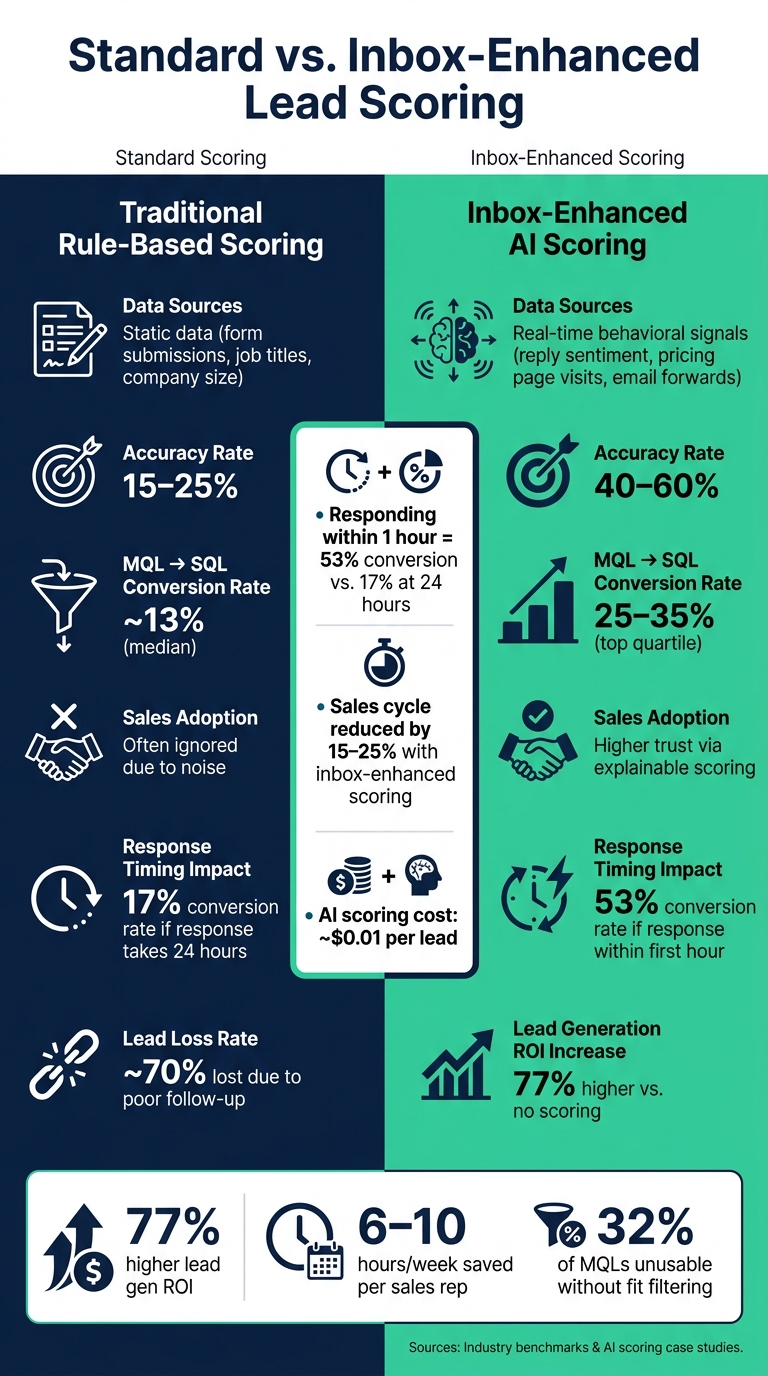
Standard vs. Inbox-Enhanced Lead Scoring: Key Metrics Compared
Key Metrics to Track
Once your inbox-enhanced lead scoring model is live, tracking the right metrics is essential to measure its effectiveness. One of the most critical metrics is speed-to-lead by priority tier - how quickly your team reaches out to high-priority leads within your Service Level Agreement (SLA). Jason Lemkin, Founder of SaaStr, emphasizes its importance:
"Speed to lead is the most underrated metric in B2B sales. Every B2B company I've audited has a response-time leak somewhere in their inbound funnel, and it's almost always the difference between 'we're growing' and 'we're scaling.'" [5]
Other key metrics include the MQL-to-SQL conversion rate and Sales Acceptance Rate (SAR). A strong SAR - 80% or higher - indicates that sales teams agree with the model's prioritization of leads. If more than 20% of high-priority leads are being rejected, it’s a sign your scoring criteria may need adjustments.
On the revenue side, look for sales cycle compression. Inbox-enhanced scoring has been shown to reduce the lead-to-win time by 15–25% [12]. These metrics not only validate the model’s performance but also provide insights for ongoing refinements.
Standard Scoring vs. Inbox-Enhanced Scoring
When compared to traditional rule-based models, inbox-enhanced lead scoring delivers significantly better results. Standard scoring systems rely on static data like form submissions or job titles, achieving accuracy rates of just 15–25%. In contrast, inbox-enhanced scoring incorporates real-time behavioral signals - such as reply sentiment or pricing page visits - boosting accuracy to 40–60% [12].
Metric
Standard Scoring
Inbox-Enhanced Scoring
MQL → SQL Rate
~13% (median)
25–35% (top quartile)
Sales Adoption
Often ignored due to noise
Higher trust via explainable scoring
Timing also plays a crucial role. Responding to a high-intent lead within the first hour can result in a 53% conversion rate, compared to just 17% if the response takes 24 hours [18][5]. That’s not just a small improvement - it’s the difference between winning and losing a deal.
Connecting Lead Scoring Improvements to Revenue
Better lead scoring doesn’t just improve metrics - it drives revenue growth. Start by conducting a quartile analysis: divide your scored leads into four groups and evaluate their conversion rates. A well-tuned model will show a clear "staircase" pattern, with top-tier leads converting at the highest rates and each subsequent tier decreasing predictably [19][4]. If the results are inconsistent, it’s a sign to revisit your signal weighting.
You can also measure efficiency gains through recovered selling capacity. Automated re-scoring and lead routing can free up 6–10 hours per account executive each week [12]. Multiply that by your team size and average deal value, and you’ll see the impact on your bottom line. Companies using lead scoring report a 77% increase in lead generation ROI compared to those that don’t [3], and effective scoring can cut wasted selling time in half [17]. These aren’t just theoretical improvements - they translate directly into higher pipeline value and revenue per salesperson.
Conclusion: Using Inbox Analytics to Scale Agency Lead Scoring
Inbox analytics moves lead scoring beyond static demographics, focusing instead on real-time revenue signals. This shift allows agencies to prioritize prospects with the highest potential value.
For agencies, the operational benefits are clear. Without automation, manual inbox management caps growth at around 10–15 active clients before hiring becomes a necessity [2]. By automating lead routing based on score tiers (e.g., hot, warm, cold), agencies can scale without needing to expand their team [5].
This efficiency aligns with core scoring principles that help improve lead conversion rates. Here are three key practices to implement:
Combine related actions to strengthen intent signals: For example, a prospect visiting a pricing page and asking a direct question signals higher intent than either action alone [3].
Use score decay to keep priorities current: This ensures your team focuses on the most relevant and timely opportunities.
Maintain explainability: Highlighting drivers like "High ICP Fit" or "Urgent Timeline" builds trust within the team and encourages action [1][4].
By blending real-time signals with structured scoring frameworks, agencies can significantly improve conversion rates. Tools like SalesLabel are designed with this approach in mind, offering real-time lead scoring, AI-powered inbox management, and automated routing in one white-label platform. For agencies juggling multiple clients and inboxes, such solutions make scaling beyond manual processes achievable and sustainable.
"The core failure mode of the standard inbox is that it mixes active buyers with non-revenue conversations... forcing sales professionals to make poor pipeline decisions based on timing rather than value." [1]
Data shows that nearly 70% of leads are lost due to poor follow-up and mis-prioritization [3]. Inbox analytics tackles this issue directly, improving pipeline quality and increasing revenue per client. By addressing these inefficiencies, agencies can unlock measurable growth and deliver better outcomes for their clients.
FAQs
What inbox signals best predict buying intent?
Certain email behaviors can reveal a lot about a prospect's buying intent. Key indicators include quick response times, frequent email interactions, and the participation of multiple stakeholders. These patterns often point to active engagement and internal alignment within a potential buyer's team.
Pay attention to signs like sudden increases in activity, collaborative email chains, and ongoing, detailed exchanges. Tools such as SalesLabel make it easier for agencies to track these signals in real-time, helping them focus on prospects who are most likely to convert.
How do I prevent email opens from inflating scores?
To prevent email opens from artificially inflating lead scores, consider either removing them from your scoring model entirely or assigning them much less weight. This is because factors like security scanners and privacy proxies can make open rates unreliable. Instead, prioritize tracking high-intent actions such as link clicks, website visits, and form submissions, which provide a clearer picture of user engagement.
If you choose to include email opens, segment by user agent to weed out automated fetches caused by bots. For accounts with significant bot activity, you might also explore using dual scoring models to maintain accuracy.
When should I switch from rules to AI scoring?
Once you've gathered enough historical data, consider transitioning to AI scoring for better precision. While rule-based systems are effective for smaller teams, AI models typically need at least 500 converted contacts or 200 closed-won deals to deliver reliable results.
A practical middle ground is a hybrid approach: use rule-based methods to identify core signals, then let AI handle re-ranking. This combination often enhances accuracy while maintaining transparency, which helps build trust with your sales team.