White-Label API Integration: Benefits and Drawbacks
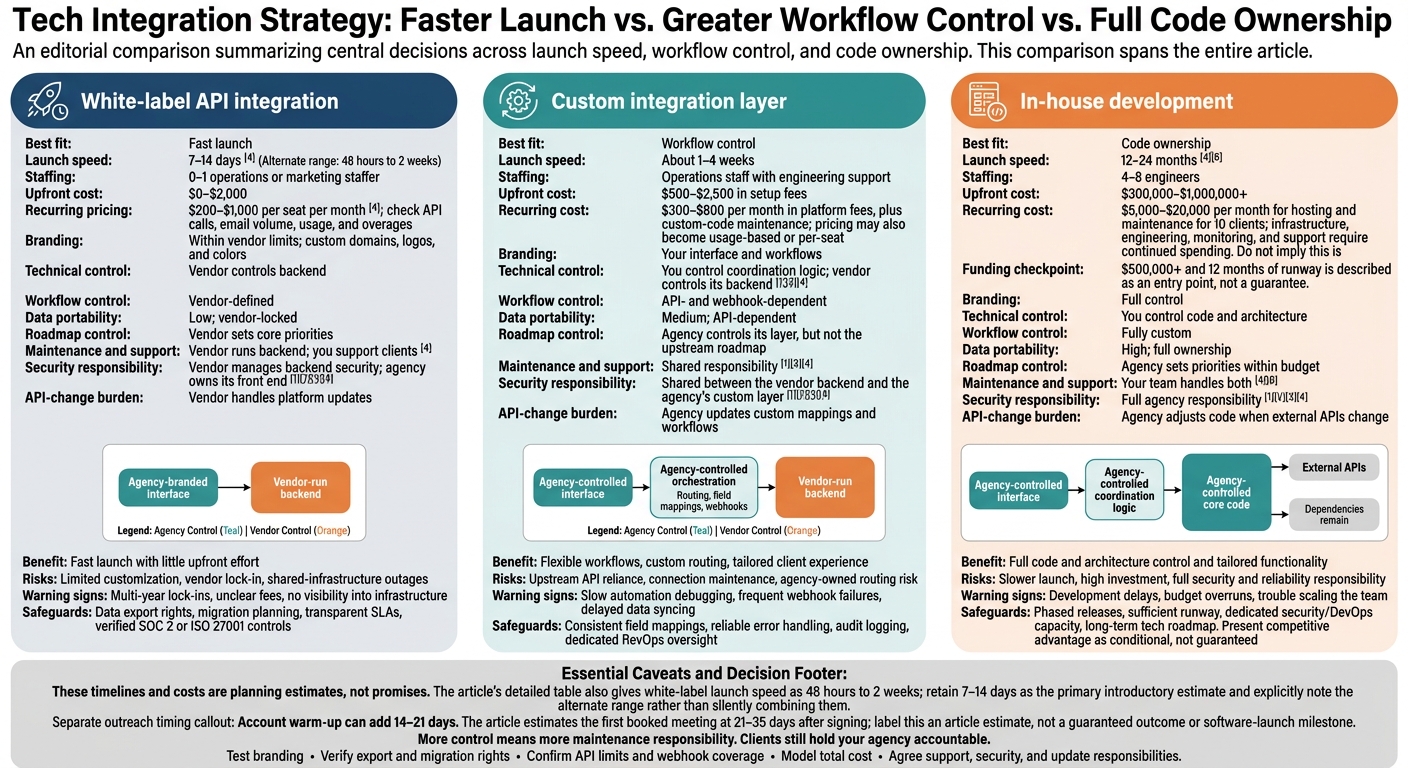
I’d choose white-label API integration for a fast launch, a custom integration layer for workflow control, and in-house development for code ownership. Before choosing, set your deadline, price the setup and monthly costs, and decide who handles support, security, and updates.
Here’s how I’d weigh the three options:
White-label API integration: Launch in roughly 7–14 days with a branded interface and vendor-run backend. Less build work, but less control and possible vendor lock-in.
Custom integration layer: Launch in about 1–4 weeks while controlling routing, data mapping, and the client experience. Your team maintains the connections; the vendor still controls its backend.
In-house development: Plan for 12–24 months and $300,000–$1 million+ upfront. You own the code - and the work of running, securing, and supporting it.
Quick Comparison
Factor
White-label API integration
Custom integration layer
In-house development
Launch speed
7–14 days
About 1–4 weeks
12–24 months
Branding
Within vendor limits
Your interface and workflows
Full control
Technical control
Vendor controls backend
You control coordination logic
You control code and architecture
Cost
Seats, usage, and overages
Platform fees plus connection maintenance
High build and staffing costs
Maintenance and support
Vendor runs backend; you support clients
Shared responsibility
Your team handles both
These timelines and costs are planning estimates, not promises. I’d also separate software launch from outreach results: account warm-up can add 14–21 days.
My rule before signing: <u>test the branding, verify export rights, and confirm API limits and support terms</u>. A provider can reduce your maintenance work, but your clients still hold your agency accountable.
White-Label API vs. Custom Integration vs. In-House
1. White-Label API Integration
White-label API integration is the fastest way to launch under your own brand. The trade-off: the provider controls the backend.
Launch Speed and Engineering Work
A typical launch takes 7–14 days, followed by 14–21 days of account warm-up. That puts the first booked meeting at about 21–35 days after you sign the contract.[4]
No-code or low-code setup can let you skip hiring developers.[5] But a custom dashboard still needs domain, SSL, webhook, and embed work.[4][5]
Branding and Technical Control
You control sequences, ICPs, qualification rules, and reply SLAs - but not the provider’s code.[4][7] Before signing, use a sandbox account to check for vendor branding on login screens, email footers, and exports.[4]
Also check what data you can take with you. Client data, sender reputation, and sequence history may remain tied to the vendor, making a later move harder.[4]
Total Cost and Scaling
Pricing usually falls between $200 and $1,000 per seat per month.[4] Check whether that includes API calls and email volume. Usage-based bills can jump during busy months.[1]
Flat fees make budgeting simpler, but price is only part of the picture. Check rate limits too, so your growth plan stays within the provider’s capacity.[1][4]
Reliability and Data Responsibilities
The provider handles updates, which cuts your maintenance work. But shared infrastructure adds outage risk: one provider incident can affect multiple agency accounts.[1][4]
Check data-sourcing compliance and platform compliance separately. Your branding proves neither.[4] When you need more workflow control or easier data portability, the next option is a custom integration layer.
sbb-itb-a781ab9
2. Custom Integration Layer
Launch Speed and Engineering Work
A custom integration layer leaves the vendor’s backend in place but puts the agency in charge of orchestration. APIs and webhooks connect sourcing, enrichment, outreach, and CRM updates.[1][7] Ops or marketing teams can map fields and route webhooks.[3][4]
Branding and Technical Control
You control the client-facing experience and how records move between systems. That includes standardizing field names, setting round-robin assignment rules, and defining routing or qualification standards before data reaches a CRM.[1][3]The agency owns the coordination logic, while the vendor controls its product roadmap.[1][3]
Total Cost and Scaling
Plan for the cost of maintaining field mappings and API connections as upstream systems change.[1][4] As client volume grows, pricing may move from a flat SaaS fee to usage-based or per-seat charges.[2][4]
Reliability and Data Responsibilities
Owning more of the integration means taking on more day-to-day oversight and compliance work. Agencies must monitor rate limits, keep client data separate, remove duplicate leads, and pass opt-outs and deletion requests to every connected tool.[3][4][7][8] This setup does not eliminate provider-side deliverability or compliance risk.[4] Teams that need full code ownership can move to in-house development.
3. In-House Development
Building in-house gives you full ownership, but it takes longer to launch.
Launch Speed and Engineering Work
Your agency builds and runs the core lead generation software. Plan for 4–8 engineers and 12–24 months of development. These are planning estimates - not guaranteed launch dates.[4][6]
Branding and Technical Control
You control the codebase, features, and UI.[4][6] Take this route only when the technology itself gives your business an edge competitors can’t easily copy. Prove demand with a white-label setup first, before building proprietary software.[4][6]
Total Cost and Scaling
Upfront costs are estimated at $300,000 to more than $1 million. Hosting and maintenance for 10 clients can add $5,000–$20,000 per month.[4][6]
Treat $500,000+ and 12 months of runway as the entry point - not a guarantee that the build will work. Growth also requires continued spending on engineering and R&D.[4][6]
Reliability and Data Responsibilities
Full ownership puts the risk of running the software on your team. You’re responsible for uptime, patches, and incident response.[1] Budget for encryption at rest, permission controls, audit logs, and independent audits.[1][2][3]
List your data sources and confirm which privacy and outreach laws apply, including GDPR, CCPA, and CAN-SPAM. Prepare DPAs and a security summary for client reviews.[1][2]
4 Trade-Offs to Compare
The three models differ most in speed, control, cost, and maintenance ownership.
Launch Speed and Engineering Work
The table below compares launch timelines, staffing, costs, and who handles each part of the system.
The main difference is how much control your agency has over the front end, workflow logic, and underlying data.
Total Cost and Scaling
Compare lifetime cost, not just the price to launch.
Reliability and Data Responsibilities
Reliability risk follows ownership: the more you control, the more you maintain.
Shared infrastructure also creates cross-account risk. Watch for this warning sign: a provider’s deliverability or compliance incident can affect every reseller using that infrastructure.[4]
Benefits, Drawbacks, and Warning Signs
The table below compares what each approach offers, where it can fail, and the controls it needs.
Limited customization, vendor lock-in, and risk tied to the vendor’s backend. [4]
Multi-year lock-ins, unclear fees, or no visibility into infrastructure. [4]
Agency-owned migration planning, data export rights, transparent SLAs, and verified SOC 2 or ISO 27001 controls. [1][4]
Custom integration layer
Flexible workflows, custom routing, and a tailored client experience. [3][4]
Reliance on upstream APIs, more maintenance and coordination, and routing risk that your agency owns. [3][8]
Slow automation debugging, frequent webhook failures, or delays in data syncing. [3][8]
Consistent field mappings, reliable error handling, audit logging, and dedicated RevOps oversight. [3]
In-house development
Full control over code and architecture, tailored functionality, and the strongest long-term moat. [4][6]
Slower launch, high investment, and full internal responsibility for security, reliability, and maintenance. [4]
Development delays, budget overruns, or trouble scaling the team. [4]
Phased releases, enough funding for a long runway, dedicated security/DevOps capacity, and a long-term tech roadmap. [4][6]
Use these warning signs to judge how much risk your team can handle in day-to-day work.
Test the branding before signing: Check login screens, transactional email footers, and PDF exports for vendor branding. A branded dashboard alone isn’t enough. [4]
Make migration rights a contract requirement: Require data export rights, migration support, and clear data-handling terms. [1][4]
Clients hold your agency accountable for support, outages, and data issues. Agree on who handles escalations and review the provider’s SLA before making promises to clients. [1][4]
Conclusion: Choose Your Level of Ownership
Match your level of ownership to your launch timeline and the maintenance work your agency can handle.
Choose white-label integration when you need to launch fast and have limited engineering capacity. Choose a custom integration layer when you need orchestration tailored to your agency but still want to use external infrastructure. Build in-house when core workflows, data requirements, or contracts call for deeper ownership - and your agency has the runway to support it.
Once you’ve chosen a model, verify it before signing. Open a sandbox sub-account, check API and webhook coverage, model the total cost, and confirm your export and migration paths. [4]
FAQs
How can I test API reliability before signing?
Run a sandbox proof-of-concept with a live client account. Check the vendor’s documentation for a REST API and connectors that work with your existing stack. Verify that webhooks return a 2xx status code when they receive the correct JSON payload.
Test integration mapping from end to end against client workflows, including custom configuration. Review the vendor’s support history, average first-reply times, and uptime warranties to judge whether the service can stay reliable over the long term.
How do I calculate my break-even client count?
To find how many clients you need to cover your monthly platform expenses, divide your total monthly fixed costs by your net profit per client. Calculate that profit by subtracting your wholesale cost per client from the price you charge.
SalesLabel lets you set your pricing tiers, helping you keep margins predictable and revenue above platform costs as you grow.
How can I switch providers without disrupting clients?
Allow 30–45 days for the migration. Export your prospect lists, sequence content, and reply history. Set up matching sub-accounts while re-warming sender accounts in parallel. Don’t reuse warmed domains across providers - sender reputation doesn’t transfer cleanly [1].
Run the new provider in shadow mode at 10% of your sending volume for one to two weeks. Keep the remaining 90% on the old system, and complete the switch only when reply rates match [1].