Custom Domain Setup: Best Practices for White-Label Agencies
Want to make your white-label agency stand out? Setting up a custom domain is the key to presenting your platform as your own, improving client trust, and boosting retention. By replacing generic URLs with branded ones like app.youragency.com, you position your agency as a true SaaS provider - not just a reseller. Here’s why it matters:
Faster Launches: Agencies with structured onboarding (including custom domains) launch 3x faster and retain 2.4x more clients in their first year.
Stronger Branding: Custom domains ensure your brand is visible in every interaction - logins, dashboards, emails, and more.
Higher Revenue Potential: Agencies using custom domains often charge $149–$499/month, with some earning $10K–$50K+ in recurring revenue.
The setup is straightforward: configure CNAME records in your DNS provider, integrate with your white-label platform (like SalesLabel), and verify your domain. This process typically takes 15–60 minutes, with DNS propagation requiring up to 48 hours. Keep reading for a step-by-step guide to ensure a smooth setup and maximize your branding potential.
Custom Domain Setup: The Ultimate Step-By-Step Guide
sbb-itb-a781ab9
Why Custom Domains Matter for White-Label Agencies
Custom domains play a key role in turning your white-label platform into a seamless extension of your brand. Using a domain like app.youragency.com eliminates any reference to third-party providers and reinforces the idea that your agency owns the technology. This shift can change how clients view your business - from just a service provider using external tools to a SaaS company offering proprietary software [3]. This perception of ownership can lead to better financial results and stronger client loyalty.
Agencies with custom domains often charge between $149 and $499 per month, with some reaching monthly recurring revenues of $10,000 to over $50,000 [3]. On the other hand, agencies relying on manual systems risk losing about 23% of their clients each year [8].
Strengthening Your Brand Identity
A custom domain ensures your brand is front and center in every digital interaction. From login screens to system notifications, password reset emails, and even API integrations, clients experience your branding consistently. This eliminates the "reseller stigma" and positions your agency to charge premium subscription fees instead of hourly rates [3].
"From your client's perspective, they are using software that you built and own." - Ashley, GoHighLevel.ai [3]
Beyond just changing the URL, technical configurations like SPF, DKIM, and DMARC records ensure that all emails reflect your brand. This attention to detail prevents clients from realizing they’re interacting with a white-label platform during routine interactions [7].
Building Client Trust
Custom domains also enhance trust and credibility. When clients log in through a custom domain secured with SSL certification, they see the reassuring "Secure" padlock in their browser. This small but important detail builds confidence from the very first interaction [4]. Branded URLs like portal.youragency.com also signal a level of technical sophistication that generic provider URLs simply can’t match [7].
For example, SalesLabel reported an impressive 93% client retention rate as of Q2 2026 among agencies using their white-label platform [5][8]. This success is partially attributed to the perception of ownership that a custom domain creates, which encourages clients to see the platform as tailor-made for their needs.
Improving User Experience
Custom domains also make life easier for clients. Using a memorable subdomain like app.youragency.com simplifies access compared to lengthy provider URLs. Clients can bookmark this familiar address, making it feel like a natural part of your main website [1]. Plus, when you customize elements like the favicon and SEO metadata, your branding is visible in browser tabs, bookmarks, and history. Every redirect and notification automatically reinforces your brand identity [9].
Feature
Impact on Client Experience
Custom Subdomain
Provides an easy-to-remember entry point tied to your website
Branded Login Page
Establishes authority and professionalism at first glance
Custom Email Sender
Ensures notifications come from a trusted, recognizable address
SSL Certification
Displays a "Secure" status, boosting confidence in data protection
Branded Browser Elements
Keeps branding consistent in tabs, bookmarks, and navigation history
Prerequisites for Custom Domain Setup
Follow these technical and strategic steps to ensure a smooth launch of your white-label platform.
Selecting the Right Domain Name
The domain name you choose has a direct impact on how clients perceive your platform. If your main domain already hosts a website, consider using a subdomain like app.youragency.com or portal.youragency.com for the white-label platform. This keeps the root domain free for other purposes [11].
Common subdomain prefixes such as app, portal, clients, or agents make it clear what the URL is for [10][11][9]. Many agencies use multiple subdomains to organize different functions - for example, app. for client logins, sites. for hosted content, and mail. for branded email services[2]. This structure helps maintain clarity and scalability as your business grows.
"White labeling creates the impression that you're not using an external tool - it feels like your very own platform, tailored to your agency's brand." - Omar Sohrab, OneSuite [9]
Important: Avoid selecting a domain or subdomain already in use for another website. Doing so can create DNS conflicts that might disrupt both sites [10].
Once you’ve chosen your domain, you’ll need to access your DNS provider to configure it.
Accessing Your DNS Provider Settings
Your DNS settings can be found in the dashboard of your domain registrar [12][10]. Look for sections labeled "DNS Settings", "Manage DNS", or "Advanced DNS" [10]. Here, you’ll add either:
A CNAME record to point your subdomain to the platform URL.
An A record to point to a specific server IP address [12][14].
To make corrections faster, lower your TTL (Time to Live) to 60 seconds [13]. If you're using Cloudflare, make sure to disable the "Proxy" feature to enable automatic SSL certificate generation[14].
For added security, if you’re using CAA records, include your SSL provider to ensure HTTPS functionality [11].
After configuring your DNS settings, the next step is integrating with SalesLabel for a seamless white-label setup.
SalesLabel’s enablement team handles the majority of the setup during the first week [6]. This structured process allows agencies to launch their first client campaigns within 14 days [6].
To prepare for your initial setup call, gather your brand assets in advance. This includes your logo files, brand color hex codes, and custom email templates. Having these materials ready speeds up the transition [6]. The enablement team will handle everything from domain setup to CRM integrations and account architecture, coordinating through a dedicated Slack channel [6]. Agencies that follow this program launch three times faster than those who opt for DIY setups and retain 2.4 times more clients during their first year [6].
How to Configure CNAME Records
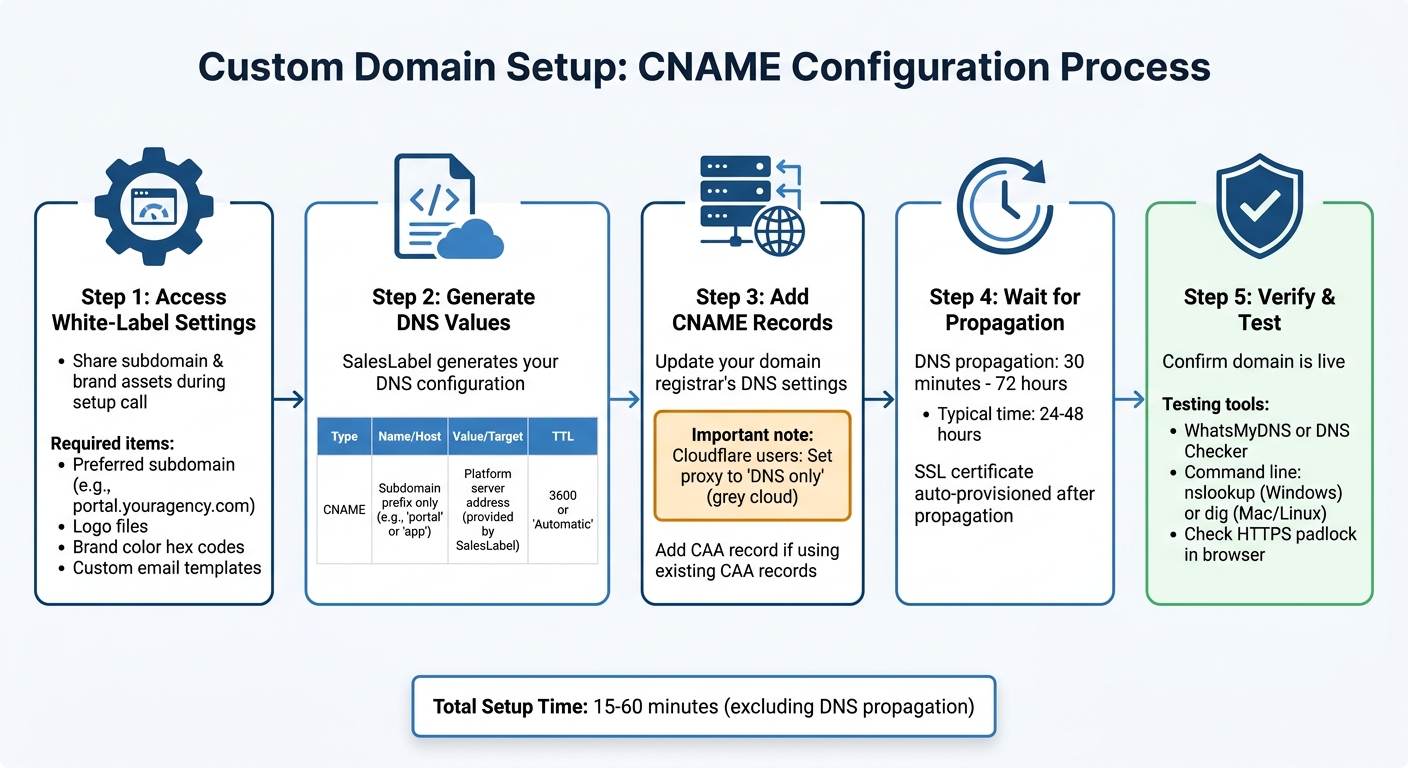
Custom Domain Setup Process for White-Label Agencies
Setting up your custom subdomain to work with SalesLabel requires a few steps: accessing white-label settings, retrieving DNS values, and updating your domain registrar. Here's how to get it done.
Accessing SalesLabel White-Label Settings
Start by sharing your desired subdomain and brand assets during your initial setup call. SalesLabel will use this information to configure your platform. You'll need to provide your preferred subdomain (like portal.youragency.com or clients.youragency.com), along with logo files, brand color hex codes, and any custom email templates you plan to use.
Generating Your Custom Subdomain Token
SalesLabel will generate the DNS values you need to configure your domain registrar. These values include:
CNAME Host: This is the prefix of your subdomain, such as "portal" or "app."
Value/Target: The server address provided by SalesLabel.
When entering your subdomain, only include the prefix. For instance, if your subdomain is portal.youragency.com, you should only input "portal." Most DNS providers will automatically append your root domain.
DNS Field
What to Enter
Example
Type
CNAME
CNAME
Name/Host
Subdomain prefix only
portal or app
Value/Target
Platform server address
Provided by SalesLabel team
TTL
Time to Live
3600 or "Automatic"
Once you have these details, you’re ready to update your DNS records.
Adding CNAME Records in Your DNS Provider
Log in to your domain registrar and go to the DNS management section. Add a new CNAME record using the values provided by SalesLabel.
If you’re using Cloudflare, make sure to set the proxy status to "DNS only" (indicated by a grey cloud). This step is crucial for enabling automatic SSL provisioning.
For domains with existing CAA records, you may need to add an additional record to allow the platform’s certificate authority to issue SSL certificates for your custom domain. DNS changes can take anywhere from 30 minutes to 72 hours to propagate. After propagation, your SSL certificate will be automatically provisioned, and your white-labeled platform will be accessible through your custom domain.
Verifying Domain Propagation and Testing
Checking DNS Propagation Status
After adding your CNAME records, it’s important to confirm that the changes have propagated globally. This process usually takes anywhere from 24 to 48 hours [15][16].
To check the status, you can use online tools like WhatsMyDNS or DNS Checker. These tools query multiple servers worldwide and provide a real-time map showing which regions recognize your new records and which are still using outdated data. If results are consistent across all servers, propagation is complete. However, if you see mixed results (some servers showing the new record while others show the old one), propagation is still ongoing. If all servers show old data even after several hours, there may be a configuration issue, and you should review your DNS settings.
For those comfortable with command-line tools, faster verification methods are available. On Windows, run nslookup portal.youragency.com 8.8.8.8 to query Google's DNS server. On Mac or Linux, use dig @1.1.1.1 portal.youragency.com to query Cloudflare's DNS resolver. These commands bypass your local DNS cache and display the records seen by major DNS providers.
If your domain still doesn’t resolve correctly on your local machine despite propagation being confirmed globally, try clearing your DNS cache. Use ipconfig /flushdns on Windows, sudo dscacheutil -flushcache on macOS, or sudo systemd-resolve --flush-caches on Linux to refresh the cache.
Once propagation is confirmed, you can move on to testing the domain.
Testing Domain Functionality
After DNS propagation is complete, open your custom domain in a browser to ensure it loads your white-labeled SalesLabel platform. The platform should display your branding, and the URL should reflect your custom domain without any unexpected redirects. Additionally, verify that HTTPS is enabled by checking for the padlock icon in the browser’s address bar - SalesLabel automatically issues SSL certificates once your CNAME is verified.
For a deeper check, open your browser’s developer tools (press F12), go to the Network tab, and reload the page. Click on the first request in the list and look at the "Remote Address" field. This will confirm whether your browser is resolving the domain to the correct server.
To ensure consistent functionality, test the domain on various devices and networks, such as a mobile phone using cellular data. This helps verify that the domain works seamlessly across different ISPs and locations.
Best Practices for Scalable White-Label Branding
With your domain verified, it's time to focus on strategies to effectively scale your white-label branding.
Choosing Professional Subdomains
The subdomains you choose play a big role in how clients view your platform. Opt for names that clearly describe their purpose, like:
app.youragency.com or portal.youragency.com for client logins
sites.youragency.com for hosted content
mail.youragency.com for system notifications
This approach not only boosts professionalism but also removes traces of external providers, reinforcing your SaaS brand.
Using subdomains also helps avoid overlaps with your main website and ensures technical separation. If your operations involve advanced integrations, adding a subdomain such as api.youragency.com for white-label API calls can enhance your branding for developers and tech-savvy clients. Currently, over 60,000 agencies rely on white-label infrastructure to power their branded platforms [3].
Once your subdomains are selected, double-check your DNS settings to ensure everything is configured correctly and avoid common errors.
Common Pitfalls and Troubleshooting DNS Issues
One of the most common mistakes is incorrect DNS record entries. Always verify that your records match the provided instructions exactly. If you're using Cloudflare, make sure to disable proxying to allow proper CNAME verification.
Another critical step is updating your CAA records to permit the certificate issuer associated with your platform. For example, platforms using AWS may require adding a line like yourdomain.com CAA 0 issue "amazontrust.com" to your DNS configuration [11]. After making changes, test your setup in an incognito browser window to bypass cached sessions that could mask branding inconsistencies [1].
Using SalesLabel Plans for Custom Branding at Scale
Scaling your white-label platform goes beyond domain setup - it requires a structured onboarding process. SalesLabel offers an 8-week enablement roadmap designed to simplify technical setup while supporting your brand's growth. The roadmap includes:
Initial setup and asset uploads
Team training
Ongoing performance reviews
This process is supported by dedicated communication channels and strategy calls, ensuring a smooth experience. Agencies that follow this roadmap have reported impressive results, including a 2.4× boost in client retention and a 47% increase in leads within the first month [6].
SalesLabel also provides robust support options. For example:
Growth Plan ($1,279/month): Includes support via a Slack channel with under 2-hour response times and monthly strategy calls.
Scale Plan ($1,999/month): Adds bi-weekly strategy calls with a dedicated success manager.
This hands-on support ensures your white-label setup remains consistent and scalable as you onboard more clients and expand your LinkedIn accounts.
FAQs
Should I use a subdomain or a separate domain?
When deciding between using a subdomain (like app.clientdomain.com) or a separate domain (clientdomain.com), the choice often comes down to branding goals and technical requirements.
Subdomains: These are easier to set up, require fewer DNS adjustments, and keep a clear link to your main domain. They’re a good option when you want to maintain a unified brand identity and streamline the process.
Separate domains: These provide complete independence and help establish a more client-specific brand identity. However, they come with higher setup complexity and additional costs.
If simplicity and connection to your primary domain are key, go with subdomains. If your priority is creating a distinct, standalone presence, a separate domain is the better choice.
What can break SSL on my custom domain?
When setting up SSL on a custom domain, things can go wrong for a few reasons. Common culprits include incorrect DNS settings, expired or invalid SSL certificates, or server misconfigurations. These issues can interfere with the SSL handshake and validation process, ultimately blocking secure connections.
How do I fix DNS propagation delays?
To deal with DNS propagation delays, here are a few actions you can take:
Clear your local DNS cache: This removes any outdated records that might be causing issues.
Use a VPN or DNS propagation checkers: These tools help you monitor how the changes are spreading across different regions.
Lower the TTL (Time To Live): Before making future DNS changes, set a lower TTL to ensure updates happen faster.
Double-check DNS records: Confirm with your provider that everything is set up correctly.
Keep in mind, DNS propagation can take anywhere from 4 to 72 hours, so a bit of patience might be necessary.