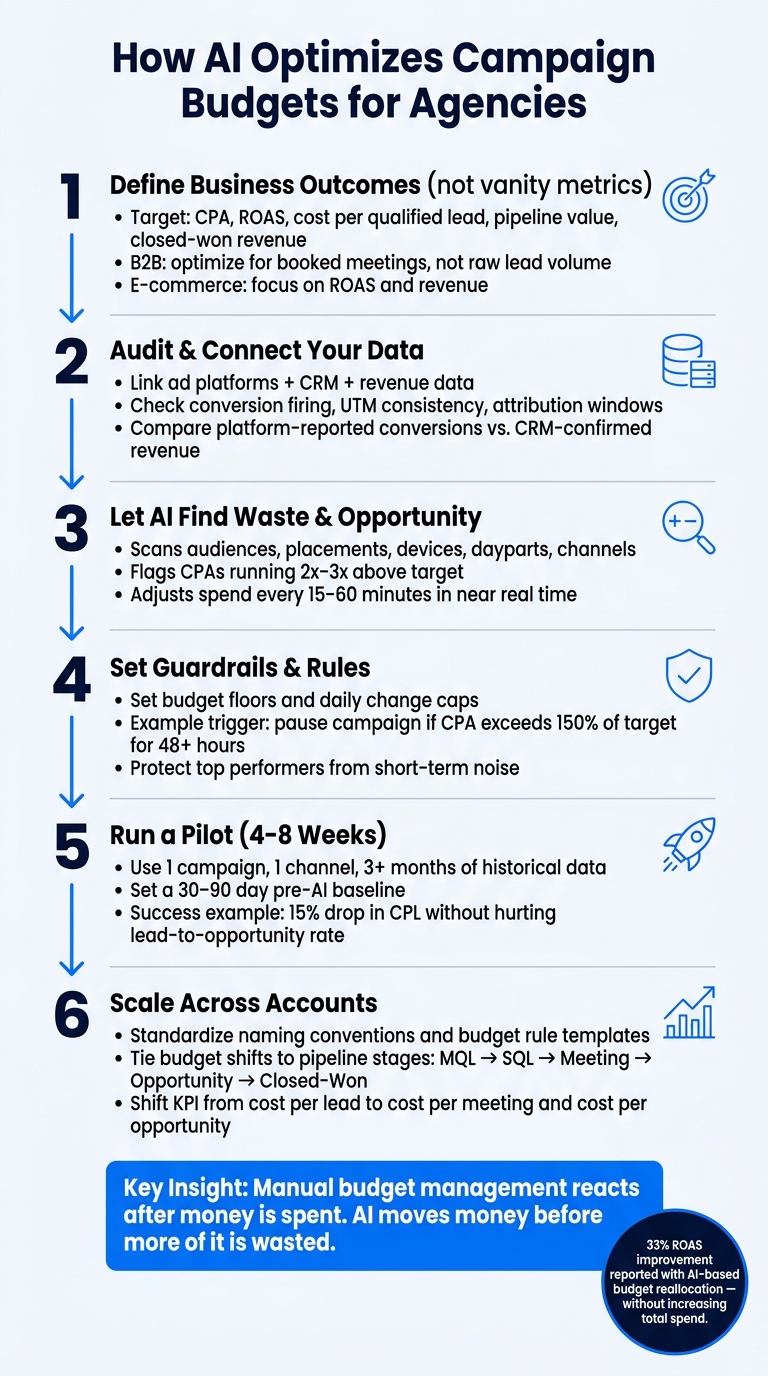
AI can help agencies cut wasted ad spend by shifting budget toward campaigns that drive better CPA, ROAS, pipeline, and revenue. In one reported case, AI-based budget moves improved ROAS by 33% without increasing total spend.
If I were explaining this in plain English, I’d put it like this: AI works best when I give it the right goal, clean data, and hard limits. Then it can move money across Google Ads, Meta, LinkedIn, and other channels based on what is most likely to produce better business results.
Here’s the full idea in a few points:
I need to optimize for business outcomes, not just clicks or cheap leads
I need to connect ad data, CRM data, and revenue data
I need to check conversion tracking, UTM tags, and attribution windows
I need clear rules, budget floors, and pause triggers
I should start with a small pilot, usually with 3+ months of history
I should review performance on a daily, weekly, and monthly rhythm
I should tie budget shifts to meetings, opportunities, and closed-won revenue
A simple way to think about it: manual budget management reacts after money is spent; AI tries to move money before more of it is wasted.
What matters most is this: if the data is wrong, AI will scale the wrong decisions. But if the inputs are clean, AI can help me move spend toward campaigns that bring in better leads and more revenue.
That’s the core of this article.
for Agencies: Step-by-Step Framework" >
AI Budget Optimization for Agencies: Step-by-Step Framework
Budgets, bidding & AI-powered campaigns: Best practices for 2026
sbb-itb-a781ab9
1. What AI Budget Optimization Means for Agencies
AI budget optimization uses machine learning, live performance data, and features">automation to move spend toward the campaigns most likely to hit target CPA or ROAS across client accounts and paid channels.
What makes it different from old-school rules-based management is pretty simple: AI is predictive and goal-based.
A standard rule might pause a campaign when CPA goes above a set limit. An AI system does more than that. It learns from past patterns, accounts for seasonality like Black Friday or fiscal year-end cycles, and predicts which campaigns are most likely to hit target CPA or ROAS before more budget gets burned. So the job is no longer just pacing spend. It becomes directing that spend to the highest-ROI chances in near real time.
Of course, that only works if the data is clean and the goals are set up the right way.
Why Manual Budget Management Breaks Down at Scale
Spreadsheets and weekly check-ins can work when you're handling a small set of campaigns. Once an agency is running hundreds of campaigns across Google Ads, Meta, LinkedIn, and programmatic, that approach starts to crack.
U.S. ad auctions can change by the hour. A weekly review cycle just can't keep up.
There’s also the pattern-recognition problem. A manager might miss something like a certain audience segment in California converting at 2x the rate during evening hours, simply because spotting that by hand across dozens of accounts isn’t realistic. Then pile on the usual issues:
Data entry mistakes
Missed pauses on weak ad sets
Mid-month client goal changes
That’s when small errors start stacking up. As account volume and spend grow, manual budget management often leads to overspend, underspend, and drift from business goals [3][4].
The Core Outcomes Agencies Should Expect
Agencies can often lower CPA and improve ROAS when AI optimizes toward revenue instead of lead volume [3][4].
The first win is usually speed. Instead of waiting for a weekly review, budgets can shift hourly or daily based on fresh data. That means high-performing campaigns can get more budget faster, while weak campaigns get trimmed sooner.
There’s also a reporting upside. When budget delivery stays closer to target CPA or ROAS, results tend to be steadier. That makes client reporting easier to explain and forecasting easier to trust. In practice, agencies can estimate spend and pipeline value with more confidence.
Before automation starts, agencies need clean, connected data.
2. Audit Your Data Before Automating Spend
AI will optimize the signal you give it. If that signal is messy or disconnected from closed revenue, it won’t fix the problem. It will scale it. That’s why you need to audit your inputs before you automate spend. Start with the metric, then check the data behind it.
Define the Metrics AI Will Optimize
The first call is simple but high stakes: choose the right target metric.
Clicks and impressions tell you about delivery. They do not tell you whether the campaign is driving business results. The metrics that matter here are cost per acquisition (CPA), return on ad spend (ROAS), cost per qualified lead, pipeline value, and closed-won revenue.
The right choice depends on the account.
For a B2B lead-gen agency, that could mean optimizing for booked meetings instead of raw lead volume.
For an e-commerce account, it could mean focusing on ROAS and revenue.
Set the metric that matches actual business value before AI starts making decisions. Once automation is live, it will chase the target you gave it, whether that target makes money or just looks good on a dashboard.
Connect Ad, CRM, and Revenue Data
Ad platforms only see part of the story. Google Ads can tell you a form was submitted. It can’t tell you whether that lead turned into revenue.
When CRM and revenue data sit in separate systems, AI can end up favoring cheap leads over leads that close. That’s a common trap. On paper, lead costs look better. In the business, sales teams get stuck with junk.
Unified tracking across ad platforms, CRM, and revenue data is what lets AI optimize for outcomes, not appearances.
Clean Historical Data and Attribution
Historical data is how AI learns what works. If that history includes broken conversion events, messy UTM parameters, or attribution windows that don’t match the sales cycle, the model will learn the wrong lessons.
Check the basics first:
Conversion firing
UTM consistency
Attribution windows
Then compare platform-reported conversions with CRM-confirmed revenue. If there’s a big gap, that’s your warning sign. It usually means AI is learning from bad inputs and steering spend in the wrong direction.
With clean data in place, AI has a much better shot at finding waste and shifting budget where it counts.
3. How AI Finds Budget Waste and Opportunity
AI can scan audiences, placements, devices, dayparts, and channels to find weak spend and stronger pockets of performance. For agencies, that turns into a clear action list: what to cut, what to cap, and what to scale.
Spotting Overspend and Underperforming Segments
AI spots waste by looking at the return from the next dollar spent in each segment. If a conversion rate sits well below the account average, that's a red flag. The same goes for a CPA that comes in 2x to 3x above target for a certain audience or placement.[4][1][6]
Here’s the part that trips people up: a lower CPC doesn’t always mean a better result. A cheap placement can still drive a worse CPA than a higher-CPC search campaign. So the goal isn’t the cheapest click. It’s the better business outcome.
AI also looks at engagement signals like bounce rate and session quality to catch clicks that go nowhere. If certain segments keep pulling in traffic that doesn’t convert, the system can push them down the budget queue.[4][1][6]
Using Predictive Signals to Forecast ROI
AI doesn’t just look backward. It also estimates what’s likely to happen next. It uses past conversion patterns, time-to-convert data, seasonality, and live performance changes to forecast CPA, ROAS, and pipeline value.[5][9][10][11]
That makes budget talks a lot more concrete. Instead of arguing from gut feel, agencies can model a move like shifting $10,000 from broad prospecting to branded search and estimate the effect on closed-won revenue over the next 30 days.[5][9][10][11]
Reallocating Budget in Real Time
AI can watch performance all day and adjust spend in near real time, often every 15 to 60 minutes.[2][4][7][1][12][13]
When a segment starts bringing in better lead quality, AI can move budget toward it fast. When a campaign starts chewing through spend with weak results, it can pull back before the waste stacks up.
These moves tend to work best when teams set clear guardrails first.
4. Set Rules for AI-Driven Budget Reallocation
AI can move budget fast. That's the upside. The downside is just as clear: without guardrails, it can swing too hard, too soon, and throw performance off track. The goal here is simple - use automation for speed, but keep tight control over how money moves.
Performance Thresholds and Guardrails
Start with a clear optimization goal. That could be a target CPA, a minimum ROAS, or a cost per sales-qualified lead below a set dollar amount. Once that target is in place, you can build rules around it. [14][8][15]
Set minimum spend floors so campaigns don't get choked too early. Cap daily budget changes too, so the system can't make sharp cuts or spikes based on a short stretch of weak data. One solid trigger rule shows the basic idea: if CPA goes above 150% of target for 48 straight hours, pause the campaign and flag it for review. [15]
It also helps to treat your best campaigns differently. Mark top performers as protected so AI can't pause them or slash budget because of short-term noise. If a protected campaign is going to lose budget, require either multi-day proof of underperformance or a manual approval step first. New campaigns need a bit more room as well. Give them softer caps and learning-period protection so they have time to collect enough data before the system makes major moves. [14][8][15]
Manual Budgeting vs. AI Allocation
The day-to-day difference mostly comes down to how control works:
Speed and precision: Manual budgeting usually gets updated weekly, if that. AI can adjust many times a day based on granular performance data.
Labor: Manual budget management eats up analyst time with routine checks. AI shifts that time toward strategy and rule setting.
Error profile: Human-led budgeting can drift because of fatigue or inconsistency. AI-led budgeting brings a different risk: bad rules can lead to bad decisions at scale.
Humans set the rules. AI follows them. After the guardrails are in place, start with a small pilot and review performance on a fixed schedule.
5. Start With a Pilot and Monitor on a Set Cadence
Start Small, Then Expand
Once your guardrails are set, test them in a pilot first before using them across all accounts.
Start with one campaign in one channel. Then expand only after it shows clear results. Pick a stable, mid-sized account that looks like the rest of your portfolio. You want enough spend to get useful data, but not so much that you're putting a top account at risk.
Use a campaign that runs on one main channel, like Google Ads or Meta Ads, and has at least 3 months of historical data. Skip brand-new campaigns. Also stay away from shaky periods, like seasonal retail in Q4, where performance can swing fast.
Set a 30- to 90-day pre-AI baseline and choose one success threshold. For example, aim for a 15% drop in CPL without hurting lead-to-opportunity conversion rate. That gives you a clear benchmark. You're not guessing based on instinct.
Most pilots run for four to eight weeks, which is usually long enough to cover at least one full sales cycle. Treat the first 7 to 14 days as a learning phase, and don't make back-to-back edits during that window. The point of the pilot is simple: show that AI can improve efficiency without hurting lead quality or pipeline value.
When the pilot levels out, move into a steady review rhythm. Start by extending AI optimization to a second campaign in the same client account. After that, apply the same playbook to a small group of similar clients that share the same vertical, sales cycle, and data quality. Expand only when the pilot shows steady gains.
Choose a Review Rhythm
Your review schedule should help you catch drift without constantly interrupting the model. The right cadence depends on how fast useful signals show up and how much budget is at stake.
Daily: Best for high-spend or volatile campaigns in an early learning phase. Watch for CPA spikes, sudden budget drops, and signs that lead quality is slipping.
Weekly: A good fit for B2B lead-gen accounts with 2- to 6-week sales cycles. Check tactical performance against your baseline, review guardrail triggers, and look at lead-to-opportunity conversion rate trends.
Monthly: Best for long enterprise sales cycles and mature campaigns. Use these reviews to look at pipeline movement, budget alignment across clients, and strategy shifts at the portfolio level.
In most agencies, the rhythm is pretty practical: a light daily scan for anything that looks off, like a sudden CPA jump or a campaign chewing through budget too fast, plus a deeper weekly review for tactical calls. Monthly reviews are for the bigger-picture view, especially how AI-driven budget shifts are affecting pipeline and revenue across clients.
Document the pilot start date, log every major change, and stick to the review schedule. That record makes it much easier to compare pre- and post-pilot performance cleanly and show when it's time to scale AI optimization further.
6. Apply AI Budget Optimization Across Agency Workflows
Once the pilot proves the rules, apply that same logic across each client account.
Standardize Multi-Client Budget Management
When the pilot works, the next step is scale. The goal is simple: run the same budget logic across 10, 20, or 50 client accounts without adding more people. That’s where standardization comes in.
Start with shared naming conventions. Every campaign name should include the key variables your team tracks every day: objective, funnel stage, audience type, and geography. Use one format across accounts, like US | TOFU | LeadGen | Lookalike 1%. That gives your team a clean way to read performance across clients, and it helps AI tools process account data in a consistent way.
Then build budget rule templates that can be reused in new accounts. If each account starts from the same setup, your team spends less time rebuilding rules from scratch and more time checking what’s working.
It also helps to use one reporting schema across clients. That way, AI models judge performance against the same benchmarks no matter who the client is. From there, automate the reports your team uses most:
Weekly performance summaries
Budget reallocation logs
Forecast-vs.-actual comparisons
When account managers stop pulling numbers by hand, they can spend that time explaining what the numbers mean and giving clients sharper advice.
After that workflow is in place, the next move is to connect each budget change to revenue.
Tie Budget Decisions to Pipeline Outcomes
Platform metrics like impressions and click-through rates can tell you what happened in-platform. They don’t tell you if a campaign is helping grow the client’s business.
That’s why pipeline-based optimization matters. Instead of judging campaigns by surface metrics, AI should make budget decisions based on things like cost per qualified lead, cost per meeting, cost per opportunity, and revenue per dollar spent.
To do that, map each stage of the funnel and send those events back into your AI system as conversion data. That usually includes:
MQL
SQL
Meeting booked
Opportunity created
Closed-won
Once those signals are in place, budget shifts get a lot smarter. Campaigns that produce SQLs at a low cost and turn into pipeline at a strong rate get more spend. Campaigns that bring in volume but weak down-funnel results get throttled.
Your dashboards should show these numbers side by side so anyone on the team - media, strategy, or client success - can explain a budget move in plain business language. For example, a team might say it moved $5,000 from Campaign A to Campaign B because Campaign B drives meetings at half the cost and 1.5x the pipeline value.
For lead-gen agencies, a closed-loop setup makes this feedback much faster.
SalesLabel automates outbound workflows under the agency’s own branding. Its real-time lead scoring looks at each lead through firmographic data, engagement behavior, and sales outcomes. That gives agencies a clear signal on which campaigns are driving high-quality prospects and which ones are just producing low-value volume.
Those scores feed back into budget decisions. Campaigns that bring in high-scoring leads and booked meetings at good costs get pushed up. Segments that miss the mark get cut back.
With this kind of setup, agencies can shift their target from cost per lead to cost per meeting and cost per opportunity. That gives clients a stronger way to judge performance because the budget is tied to lead quality, not just raw volume.
7. Conclusion: Build a Smarter Budgeting System With AI
Once the pilot shows the rules work, you can scale the system. AI budget optimization isn’t a magic switch you flip once. It’s a repeatable process. Start by cleaning up and connecting your ad platforms, CRM, and revenue systems. If that data is messy or disconnected, AI can end up optimizing the wrong signals.
Next, pick one clear main goal. That could be cost per qualified lead, ROAS, pipeline value, or customer acquisition cost. The point is to give the system a single target to optimize against. Then set guardrails around it, like budget floors, performance thresholds, and approval rules, so AI stays inside clear limits.
After that, test those rules in a pilot. Keep the first run narrow. Then expand only when performance stays steady across several review cycles and you have enough proof that the system can handle more spend.
For lead-gen agencies, SalesLabel can support this workflow with branded lead sourcing, enrichment, outreach, follow-ups, meeting bookings, and real-time lead scoring - so spend stays tied to lead quality and revenue.
FAQs
What data do I need before using AI for budget optimization?
Start with accurate data from CRM records, web analytics, and intent data. That gives the AI a solid base to work from. You also need clear qualification criteria, so it can tell what a successful lead looks like instead of guessing.
Past performance data matters too. Include metrics like outreach volume, response rates, and conversion data. With that input, AI can do a better job with lead scoring, pipeline forecasting, and ROI.
How long should an AI budget optimization pilot run?
The sources don’t give a fixed timeline for an AI budget optimization pilot.
Instead, agencies should watch performance over time and use real-time analytics to judge when they have enough data to confirm budget allocation changes. With tools like SalesLabel, the goal is to gather enough performance data to make a sound call, not to stick to a preset schedule.
How do I know if AI is improving lead quality, not just lowering costs?
Look past raw lead volume and judge performance against clear conversion metrics. Before the campaign begins, agree with your clients on a qualification rubric so everyone uses the same definition of a high-quality lead.
Then use real-time lead scoring, like in SalesLabel, and track meeting-booked rates and conversion ratios. If leads keep moving through the sales pipeline, AI is improving lead quality, not just cutting costs.
 for Agencies: Step-by-Step Framework" >