Ultimate Guide to Scaling Agencies with Automation
Standardize processes, then automate repeat tasks—lead gen, reporting, and ops—to grow agency capacity without matching headcount.
SalesLabel Team
Growth Expert • 19.06.2026 г.
Share:
Търсите готово решение?
SalesLabel автоматизира проспектирането от край до край — AI намира потенциални клиенти, изпраща персонализирани съобщения и резервира срещи под вашия бранд.
Ultimate Guide to Scaling Agencies with Automation
Most agencies do not hit a sales wall first. They hit a workflow wall. If you want to grow without adding payroll at the same pace, I’d focus on automating repeat tasks first: lead sourcing, follow-ups, CRM updates, reporting, onboarding, and task routing.
Here’s the short version:
I’d keep strategy, client calls, positioning, and review in human hands
I’d automate high-volume, rules-based work
I’d start with lead gen, sales handoff, reporting, and internal admin
I’d use a simple stack with clean data, tool connections, workflow logic, and triggers
The numbers make the case. Agencies can spend 35%–45% of billable time on admin work, and automation can lift margins by 25%–40% within 12 months. Reporting alone can save 80–200 staff hours per month for a 10-client agency. And account managers can often handle more clients per person when manual work drops.
If I were doing this today, I would not start with fancy AI projects. I’d start by writing down the process, fixing weak steps, then automating the parts that happen again and again.
Agency automation uses software and AI to take care of repeatable work across sales, delivery, reporting, and operations. It connects tools like CRM, project management, and ad platforms [1][6].
Think of it as the layer that moves work from one system to another without constant manual handoffs. Instead of someone copying data, updating records, or pushing tasks along by hand, the system does it for them. And the opportunity is big: up to 45% of agency work can already be automated with current tech[4].
Tasks Agencies Can Automate
The biggest automation wins usually show up in five areas: lead generation, sales coordination, client delivery, reporting, and internal operations.
Category
What You Can Automate
Lead Generation
Lead sourcing, data enrichment, intent scoring, outreach
With the scope laid out, the next step is understanding why these workflows help agencies scale.
Tasks That Still Need Human Oversight
Automation handles execution, not judgment. Strategy, creative direction, offer positioning, and sensitive client conversations should still stay human-led.
It also makes sense to add a review-and-approve step before AI-generated reports and proposals go out. That extra check helps protect quality and keeps mistakes from slipping through. Automation adds capacity, but it works best when people stay in control of the parts that call for taste, context, and trust.
That split is what helps agencies improve output, move faster, and protect margins.
Why Automation Helps Agencies Scale
Manual work puts a hard ceiling on agency growth. Every new client doesn't just add revenue. It also adds emails, handoffs, status checks, reporting, and follow-up. Over time, that extra coordination slows everything down. So when agencies hit a wall, the issue usually isn't hiring alone. It's workflow.
More Output Without Matching Payroll Growth
The numbers are pretty clear. 60–70% of what agencies bill for is delivery work - pulling data, scheduling content, compiling reports, updating CRMs - and much of that can be handled by software [3]. When that work is automated, teams get hours back. And those hours can go straight into client work.
That shift changes capacity in a big way. Account managers can handle three to five times more clients than they can in fully manual setups [8]. Same role, more output.
It also helps protect payroll. A 10-person marketing agency can lose $180,000–$240,000 per year to non-billable admin work [7]. That's money tied up in tasks no client wants to pay for. If even part of that work is automated, those hours can turn into billable time or reduce the need for extra hires.
Once a team has more room to breathe, the next gain shows up on the client side: work gets done faster and with fewer slips.
Better Consistency, Speed, and Margins
Speed matters more than most agencies think. If a prospect fills out a form and hears nothing back, trust starts to fade fast. Automated systems can enrich lead data, score prospects against your ideal customer profile, and send a personalized follow-up right away. Following up within 5 minutes leads to a 9x higher conversion rate than waiting one hour [1].
Consistency matters too. When agencies scale by adding more manual work, quality often slips. Service quality can drop by 20% when account managers get stretched too thin [8]. Automated workflows help keep the work steady as volume grows, so clients get the same level of service even when the pipeline gets busier.
The margin impact is hard to ignore. Agencies that put three or more automation workflows in place report gross margin gains of 18–22 points within six months[4]. And agencies using workflow automation see 31% higher client retention rates thanks to faster follow-up and more consistent reporting [1].
The best place to start is usually simple: lead generation, sales coordination, and internal operations. Those tend to deliver the biggest payoff first.
High-Impact Workflows to Automate First
Not every workflow should be automated on day one. The best ones to start with have three things in common: they happen all the time, they need little judgment, and they burn a lot of hours. Start with those, and you’ll see results fast.
Lead Generation and Outreach
Manual prospecting is one of the biggest time sinks for agencies. Finding contacts, pulling company data, writing personal messages, and sending follow-ups can eat up entire workdays when it’s all done by hand.
A better first move is to automate lead enrichment, ICP scoring, and personalized outreach using signals like company size, revenue, news, tech stack, and LinkedIn activity. That matters because AI-powered personalization drives a 3–4x response rate lift compared with generic templates [13].
Speed is just as important as personalization. Reaching out to a lead within 5 minutes makes a firm 100 times more likely to connect and 21 times more likely to qualify that prospect than waiting 30 minutes [11]. You simply can’t hit that kind of response window with a manual process. Automation makes that first touch happen on time. SalesLabel handles lead sourcing, enrichment, personalized outreach, and follow-up under your agency's branding.
Once outreach starts getting replies, the next step is obvious: automate the handoff from response to booked meeting.
Sales Coordination and Pipeline Management
After the first reply, speed still matters just as much as personalization. At this stage, automate inbox triage, meeting booking, and response drafting. Real-time lead scoring helps keep your pipeline honest by showing which deals need attention now and which ones are starting to cool off.
The payoff is hard to ignore. Companies using AI-driven lead scoring report conversion rates 25–40% higher than teams relying on manual methods [12].
Delivery and Internal Operations
Once the deal is closed, automation should push work from sale to execution without manual handoffs. This is where many agencies lose time behind the scenes. Internal coordination and reporting take up 28–40% of billable team capacity[7] - and clients usually never see that work or pay for it.
Client reporting is the best place to begin. It follows a set pattern, runs on a fixed schedule, and is one of the easiest areas to automate first. For a 10-client agency, automating reporting can give back 80–200 staff hours per month[2].
A simple approach works best here:
Automate report building
Keep people focused on review and client-facing decisions
That change alone can save 4–6 hours per client every month[7].
Automated task routing and client nudges also cut out manual follow-up without turning your process into a headache.
These workflows are the first layer. Next comes the stack that runs them.
How to Build an Automation Stack
Core Stack Categories
An automation stack has four core layers: data, integrations, workflows, and triggers. Together, they cut down manual handoffs across lead generation, delivery, and reporting. That’s where agencies tend to lose the most time.
The key point here is simple: a clean foundation matters more than the number of tools you own.
Once those layers are clear, the next move is picking a platform that can support them without adding extra manual work.
When to Use a White-Label Lead Generation Platform
Use a white-label lead generation platform when you want your prospecting system to run as your own branded service. At that stage, sourcing, enrichment, outreach, follow-up, and booking all need to work under your agency’s name.
SalesLabel is built for that exact use case. It automates the full lead generation workflow - from sourcing and enrichment to personalized outreach, AI-driven follow-ups, meeting bookings, and inbox management - all under your agency’s branding. Real-time lead scoring shows which deals need attention now, and AI-driven replies handle incoming responses.
The result is a system that feels like a product your agency built in-house. As client volume grows, that can act like a capacity multiplier instead of forcing your team to patch things together by hand.
At that point, tool selection becomes less about a long feature checklist and more about fit, control, and brand ownership.
How to Evaluate Tools Before You Buy
Evaluate tools based on setup time, branding, integrations, reporting, support, limits, and cost.
The average 10–25 person agency already uses 14–22 SaaS tools[1], and those handoffs often turn into manual coordination work. It’s the classic “too many moving parts” problem. Without a workflow hub like Make.com or n8n connecting everything, adding more tools usually creates more gaps, not fewer.
After the stack is chosen, the next step is phasing it in without disrupting delivery.
How to Roll Out Automation Without Breaking Things
Once you’ve picked your stack, don’t flip the switch all at once. Roll it out in phases so client work stays on track and you can see what’s working.
A phased rollout helps protect delivery. It also gives you baseline data, so you’re not guessing whether automation is helping or hurting.
Start With a Workflow Audit
Before touching a single tool, map what your team does each day. List every recurring task, who owns it, how much time it takes, and how often mistakes happen. Track this for at least two weeks before making any changes [15].
Then use a simple filter: the best first candidates are tasks that repeat often, follow clear rules, and don’t need much judgment. Client reporting is a strong place to start because it’s internal-facing and can cut prep time by an average of 68%[7].
Fix the workflow before you automate it.
Launch in Phases With Human Review
For most agencies, a 12-week rollout is a good pace [15]:
Weeks 1–2: audit
Weeks 3–4: quick wins
Weeks 5–10: core workflows
Weeks 11–12: governance
If an automation creates client-facing output, keep a human in the loop until the quality is steady [15][8]. One simple way to handle that is with a three-tier approval setup:
It also helps to run each new automation alongside the manual process for at least one full cycle before moving over fully [15]. Think of it like test-driving a car before taking it on the highway.
Track Results and Improve
Once automations go live, measure them against your pre-automation baseline. Focus on the numbers that matter most: reply rates, booked meetings, turnaround time, error rates, and gross margin. Set failure alerts so problems don’t slip by unnoticed.
Each live automation should have a named internal owner. That person is responsible for watching it and reviewing it every 90 days [15]. Automation adds capacity only when someone is keeping an eye on it, not when it’s left to run on autopilot.
Next, watch for quality drift, deliverability issues, and tool sprawl before they start stacking up.
Common Risks and How to Avoid Them
Once automation goes live, three risks tend to do the most damage: weak personalization, deliverability issues, and tool sprawl. After rollout, the bigger problem usually isn't losing speed. It's quality slipping over time.
Poor Personalization and Low Reply Quality
Weak personalization can drag down reply rates and chip away at client trust. To avoid that, agencies should spend 2–3 hours per client upfront to prime the workflow with 15–20 approved examples plus clear rules about what the system should avoid [3]. That setup work makes a big difference. It's often the line between outreach that gets replies and outreach that gets skipped.
Any client-facing message that includes specific numbers or commitments should always keep a human review step in place [9]. Even a 60-second review before sending can catch tone issues, factual mistakes, and hallucinations that AI prompts can still produce [9]. If your team keeps fixing the same kinds of errors, that's a sign the workflow needs tuning.
Deliverability, Compliance, and Brand Risk
Once messaging is automated, the next places things can break are delivery and compliance. AI should never run cold outreach sequences on its own without human oversight [9].
If outreach touches regulated or sensitive areas, legal or compliance approval should happen before AI-generated templates go live. It also helps to run a weekly audit of bounce rates and email blocklist status so problems show up early instead of snowballing [9].
Clients can tell when agency communication starts to feel generic, even if the process behind it is automated. Being open about AI-augmented workflows - and explaining that the agency is putting time into infrastructure so senior staff can stay focused on strategy - can help protect trust and perceived value [3].
Tool Sprawl and Operational Confusion
As your stack gets bigger, complexity becomes a problem of its own. Too many tools can lead to integration gaps, duplicate data entry, and reporting drift.
A simpler fix is to consolidate around an orchestration layer that connects the tools you already use into end-to-end workflows [3][6]. Before adding anything new, run a quarterly tool audit to cut unused SaaS seats and spot places where manual coordination is still patching over integration gaps.
At scale, workflow ownership matters more than feature count. One of the easiest mistakes to miss is building automation inside one employee's account with no documentation. Document every automation in a shared hub like Notion, GitBook, or ClickUp so the whole team can see how the system works [5][10].
Costs, ROI, and Capacity Planning
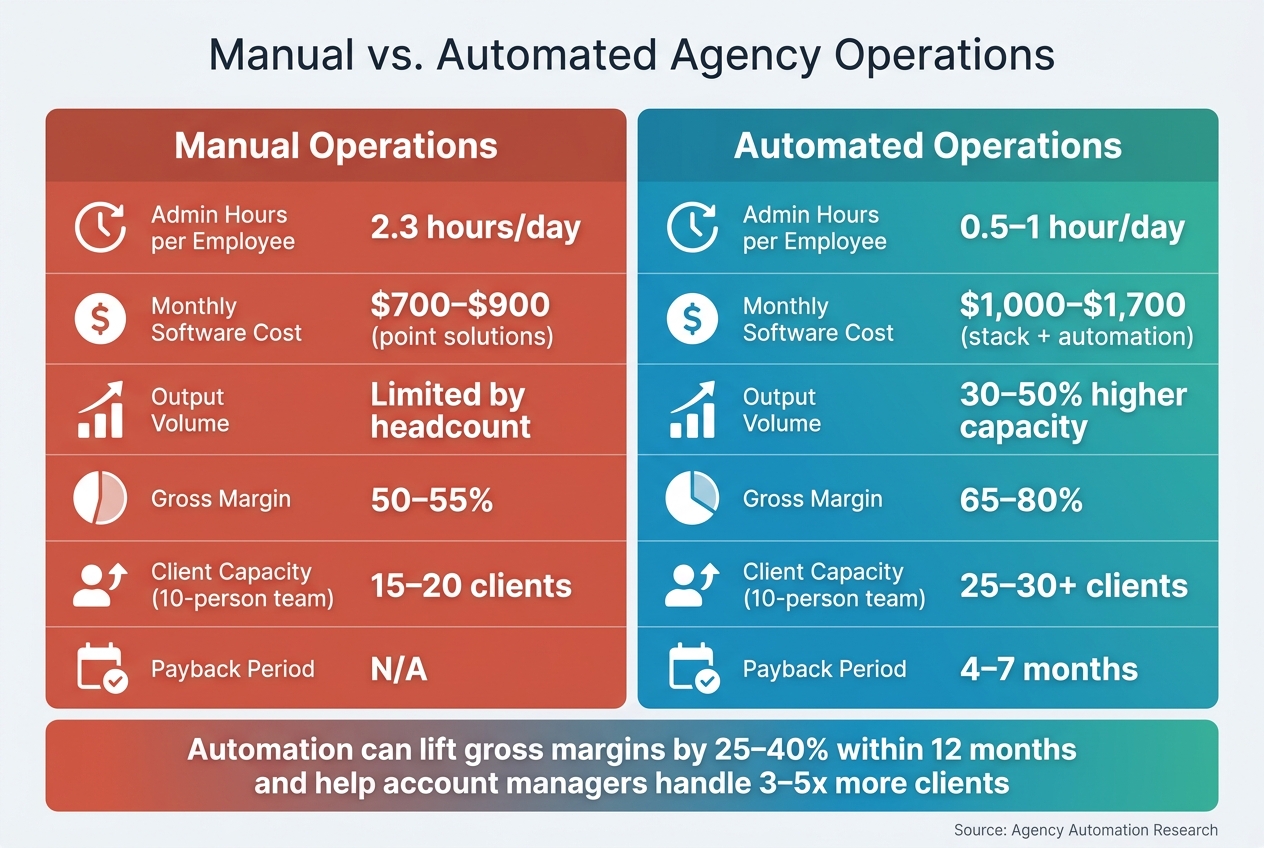
Manual vs. Automated Agency Operations: ROI & Capacity Comparison
Once your stack is stable, the next question gets practical fast: what does it cost, and how soon does it earn its keep?
What Automation Costs an Agency
Automation is fairly easy to budget for. Basic tools start at about $50 per month, while enterprise operations platforms can run past $2,000 per month[16]. For most 10-person agencies, a realistic monthly stack usually falls between $1,000 and $1,700[16].
The bigger surprise is often the one-time setup cost. A full rollout that covers tool audits, integration configuration, workflow setup, and staff training usually takes 7–15 weeks and costs between $3,500 and $14,000 in internal labor and setup [16]. That sounds like a lot at first glance. But the picture changes once you compare that spend with the hours you get back and the extra clients your team can take on.
How to Estimate Return on Investment
The standard ROI formula is ([Savings + New Revenue] – Costs) / Costs[17]. In most agencies, the biggest gains come from labor savings and added capacity.
Labor hours are the clearest place to start. If your team is spending 2.3 hours per day per employee on admin work, automation can cut that down to 0.5–1 hour per day[16]. At a fully loaded internal rate of $75–$80/hour, those reclaimed hours stack up fast [18][6]. Time tracking often shows something else too: billable hours that were there all along but kept slipping through the cracks.
You can also use your current account manager load to estimate how many more clients the team can handle without hiring. Automation lets account managers manage 8–12 clients instead of the manual norm of 4–6[3]. For most agencies, the investment pays back within 4–7 months[16].
Manual vs. Automated Operations: ROI Comparison
Use this view to compare spend, capacity, and margin side by side.
Margin is where the payoff tends to show up first. In agency operations, margin often improves before headcount changes. Put simply, automation moves team time away from coordination and into billable work.
Conclusion: Building a Scalable Agency Operating System
Scaling an agency isn't about hiring faster. It's about building systems that let output grow without adding headcount at the same rate. In plain English: set up workflows that can carry more weight before you add more people. As Nick Eubanks, Founder of Assassins Only, said:
"Scaling an agency in 2026 doesn't require a larger headcount; it requires a more intelligent infrastructure." [14]
That shift changes how the agency runs day to day. Repetitive work should be automated. Processes should be standardized. Human judgment should stay focused on strategy, creative direction, and client relationships. That's where the team does its best work.
Once those systems are in place, the founder's job changes too. The role moves from doer to system designer. Automation takes on high-volume execution, while the team spends more time on the work that shapes client results.
If there's one rule that matters most, it's this: standardize before you automate. Write the workflow down in SOPs first. Then automate it.
For agencies that want to apply this model to outbound, white-label systems can run the execution layer. For outbound-focused agencies, SalesLabel automates sourcing, enrichment, outreach, follow-ups, and booking under your brand.
The goal is a connected system where every core workflow runs with less friction and more visibility.
FAQs
What should an agency automate first?
Agencies should start by automating high-frequency, rule-based tasks that eat up billable hours or pull senior staff into manual work. A simple rule of thumb: begin with the process that takes the most hands-on time each week.
Good places to start are client reporting, client onboarding, and lead management. For example, tools like SalesLabel can handle lead sourcing, enrichment, outreach, and follow-ups. Before you automate anything, write the process down as a standard operating procedure. That step matters. If the workflow is messy on paper, it’ll be messy in software too.
How do I know if a workflow is ready to automate?
A workflow is ready for automation when it happens over and over, follows clear rules, and runs on inputs you can count on. Start with tasks that eat up a lot of manual time but don’t need much judgment, like data aggregation, status reporting, or routine onboarding steps.
Before you automate anything, map the process step by step, note who handles each part, and track how long it takes today. That helps you see if the workflow is stable enough to automate or if it needs cleanup first.
How long does automation take to pay off?
It depends on the workflow, but the basics often pay off fast.
Work like invoicing, time tracking, and retainer alerts can often pay for themselves in under 30 days. Invoice generation, in many cases, starts showing a return in under two weeks.
Client onboarding and status reporting tend to pay off within 30 to 60 days. Broader automation projects often show ROI within 14 to 90 days, depending on scope and complexity.