Ultimate Guide to AI-Enhanced Lead Data Collection
Capture, enrich, verify, score, and route clean B2B leads with AI to boost pipeline and reduce manual work.
SalesLabel Team
Growth Expert • 29.07.2026 г.
Share:
Търсите готово решение?
SalesLabel автоматизира проспектирането от край до край — AI намира потенциални клиенти, изпраща персонализирани съобщения и резервира срещи под вашия бранд.
Ultimate Guide to AI-Enhanced Lead Data Collection
If I want more pipeline without adding more manual work, I need one thing: clean lead data moving through one clear system.
Here’s the short version: AI-driven lead data collection helps me pull lead info from forms, CRM records, LinkedIn, website activity, and public signals, then clean it, verify it, score it, and send it to the right rep. That matters because reps spend only 37% of their time selling, while bad or stale B2B data can eat up a big part of outbound effort.
If I had to boil this guide down into a few points, it would be this:
Manual lead research does not scale. Data decays by about 22%–30% per year, and many B2B leads are invalid, incomplete, or duplicated.
Good lead records go beyond name and email. I need contact, firmographic, technographic, intent, behavioral, and trigger-event data.
The workflow matters. The basic flow is: collect → match → append → verify → dedupe → normalize → score → route.
Verification protects outreach. Teams that verify emails can cut bounce rates to around 0.4%–0.9%.
Scoring should split fit from intent. A lead can match my ICP and still not be ready to buy.
Routing needs rules. High-score leads should get fast follow-up, while weaker or messy records should go to nurture or review.
CRM control and consent rules matter. Bad field mapping, stale data, and suppression errors can hurt results and create compliance problems.
Rollout should stay small at first. One niche, one ICP, one offer, and one pilot is the safest starting point.
A few numbers stand out. AI tools can give back about 2.7 hours per rep per day. Inbound routing in under a few minutes can lift meeting rates. And cleaner enrichment can improve field completion from 34% to 91% in some cases.
So the core idea is simple: I’m not just collecting lead data. I’m building a repeatable system that turns scattered signals into sales-ready records.
Exactly How to Build The Perfect Lead List
sbb-itb-a781ab9
What AI-Enhanced Lead Data Collection Covers
AI-enhanced lead data collection works like a pipeline. It starts by pulling in raw inputs, then enriches and checks them, and finally sends clean records into CRM and outreach workflows. That only works if you collect the right inputs at the start.
The Main Lead Data Types
A name and email are only the first layer. A complete lead record pulls from six different data types, and each one plays its own role in qualification.
Email opens, content downloads, demo requests, ad clicks
Reveals how far along a prospect is
Trigger events
New funding, hiring spikes, leadership changes, product launches
Adds timing and urgency context
Each layer adds a different signal. The strongest records bring together all six.
Contact and firmographic data help with early qualification. Technographic data shows fit at the systems level. Intent, behavioral, and trigger data help answer a tougher question: is this lead a fit right now, or just someday?
That timing piece matters a lot. A company that just raised a Series B and is hiring sales reps is a very different prospect from a similar company that isn't doing either. On paper, both may look alike. In practice, the conversation changes fast.
How Better Data Improves Agency Performance
When these signals are combined, the impact shows up right away. Complete, verified records make qualification sharper, segmentation cleaner, routing smoother, and personalization easier before outreach even starts.
Data Sources and Capture Methods
Lead data comes from a lot of places, and it rarely shows up in one neat package. You might get a name from a form, a company from LinkedIn, site behavior from your website, and a funding update from a public announcement. Agencies pull this data in through forms, webhooks, CRM syncs, validated imports, research workflows, and behavioral tracking. After that, the job is pretty simple in theory but messy in practice: decide which inputs matter most and standardize them.
Primary Lead Inputs to Collect
For most agencies, the best starting inputs are website forms, CRM exports, LinkedIn data, company domains, email lists, site behavior, first-party engagement data, and public web signals.
Website forms should collect first name, last name, work email, phone number with country code, company name, job title, industry, company size, budget range in USD, timeline, and consent. Structured fields like dropdowns and radio buttons cut down on messy entries and make AI parsing easier. CRM exports should include contact and account IDs, status or stage, lifecycle status, source channel, last activity date, deal value, past notes, and any custom qualification fields.
LinkedIn data should include profile URL, title, seniority, department, location, skills, and recent activity. Company domains help tie records back to the right account. Event and content lists should be imported with source, opt-in status, and acquisition date so teams can run validation and compliance checks.
Site behavior can track page views, session duration, pages visited, content categories, return visits, device type, and inferred intent. First-party engagement data should include email opens, clicks, replies, meeting bookings, and call outcomes, along with timestamps. Public web signals like recent announcements, job postings, leadership changes, product launches, and funding events give AI timely outreach triggers to work with.
Capture quality shapes everything that happens next. If inputs are structured and complete, the system has far less cleanup work later.
How AI Merges Signals into One Record
Once the inputs are in, AI starts resolving duplicates and conflicts into a single profile. It begins with deterministic matching. If records share the same normalized email address, company domain, phone number, or CRM ID, they can usually be linked with high confidence.
From there, AI moves to probabilistic matching. This looks at signals like name similarity, job title, seniority, company name variations, location, and LinkedIn URL to catch near-duplicates that exact matching misses.
When fields don’t agree, agencies usually set a source hierarchy. Internal CRM data often comes first, then verified data providers, then LinkedIn, then scraped web signals. Recency matters too, so newer information can replace older values when confidence is high enough. If confidence is low, those conflicts should be flagged for review instead of being overwritten without notice. It also helps to keep source IDs and snapshots so merges stay auditable and reversible.
Source Comparison Table
Use the table below to compare sources by speed, confidence, and agency use case.
Source Type
Coverage
Freshness
Confidence
Typical Agency Use Case
Website Forms
Low (inbound only)
Real-time
Very high
Capturing high-intent inbound leads
LinkedIn Data
High (B2B)
High
High
Sourcing, role verification, and seniority review
Company Domains
High
Medium
High
Account-level firmographic enrichment
CRM Exports
Variable
Low–Medium
High
Deduplication, re-engagement, and pipeline context
Site Behavior
Medium
Real-time
Medium
Intent scoring and outreach timing
Email Lists
Medium
Low
Variable
Bulk outreach after validation and consent checks
Public Web Signals
Very High
Medium–High
Medium
Trigger-based outreach and market opportunity identification
First-Party Engagement Data
Low
Real-time
Highest
Lead scoring and high-priority routing
Using more than one source gives agencies a much better base for scoring, routing, and personalized outreach. Those merged records then move into enrichment, qualification, and routing.
AI Enrichment and Verification Workflow
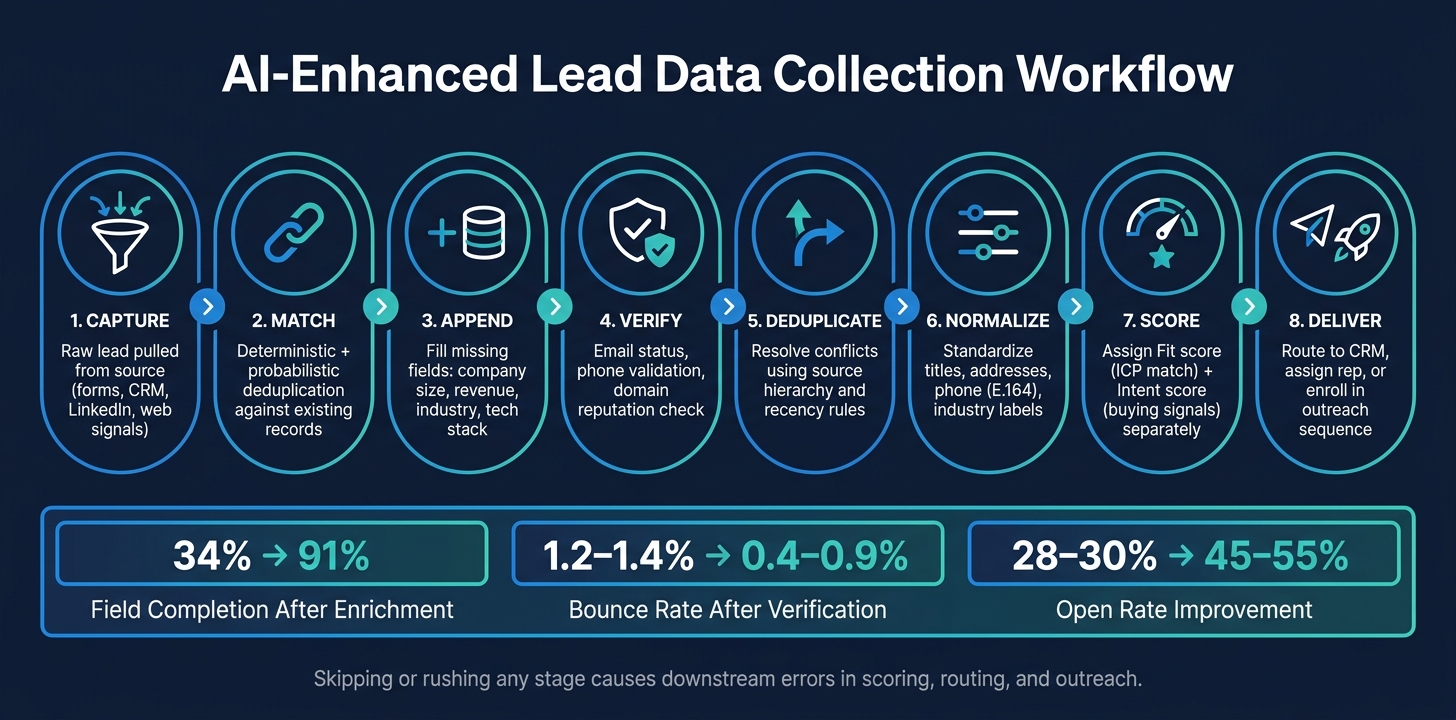
AI-Enhanced Lead Data Collection Workflow: 8 Steps to Sales-Ready Records
Enrichment turns raw lead data into records your team can actually use for routing, outreach, and CRM sync. The goal is simple: cut out manual research and give reps a clean record from the start.
From Capture to Delivery
The workflow follows eight stages: capture, match, append, verify, deduplicate, normalize, score, and deliver.
Capture brings in the raw lead from its source. Match lines that lead up with existing records, while deduplication and conflict handling sort out overlaps based on source priority. Append fills missing firmographic and demographic fields, such as company size, industry, revenue in USD, location, role level, and tech stack, using third-party data and web crawling.
Verify checks email status, phone numbers, and domain reputation. Normalize then standardizes job titles, industry labels, addresses, and data into standard date, address, numeric, and E.164 phone formats, so records stay consistent across your CRM and reporting. Score assigns fit and intent values based on ICP match and behavioral signals. Deliver sends the finished record into your CRM, routes it to the right owner, or drops it into an outreach campaign.
If you skip or rush any part of this flow, problems show up later. Verification is the big one. Weak verification can lead to high bounce rates, bad routing, and a messy CRM. This process is what creates the clean record used in the next step for scoring and routing.
How AI Fills in Missing Context
Enrichment does more than fill empty fields. It helps with qualification, personalization, and prioritization. AI pulls from public sources and turns loose context into structured fields, which makes handoff faster, CRM data cleaner, and follow-up sharper.
From company websites, AI can pull product categories, target segments, and positioning, then map them to fields like solution type, vertical focus, and estimated ACV. From professional profiles, it can surface seniority, role, past employers, and tenure. Those signals help teams judge buying authority and shape the message.
Job postings can tell you a lot too. A listing for a "RevOps Manager familiar with HubSpot and Salesforce" points to a pipeline efficiency focus and a specific tool set. News coverage adds more context, like funding rounds, product launches, or regulatory changes that can act as outreach triggers.
One AI-enriched CRM case study found that enrichment completeness improved from 34% of critical fields populated to 91%, and win rates on enriched deals increased by 19% relative to baseline.[4]
A raw lead that starts as "[email protected], Acme Corp, United States" can leave the process as a Director of Operations at a mid-market Chicago-based manufacturer with $75,000,000 in estimated revenue, an SAP/Salesforce tech stack, and a supply chain optimization initiative.
That added context becomes the input for scoring, routing, and outreach timing.
Real-Time vs. Batch Enrichment
Use real-time enrichment for urgent inbound leads. Use batch enrichment for database refreshes and cleanup jobs.
Mode
Best For
Speed
Cost Per Lead
Accuracy
Real-Time
Inbound forms, demo requests, live chat, meeting bookings
The email verification numbers alone make the case for using verification in both modes. Agencies that put structured email verification in place saw bounce rates drop from roughly 1.2–1.4% to 0.4–0.9% and open rates climb from 28–30% to 45–55%, with some campaigns exceeding 65%.[3]
That matters because verification protects sender reputation and decides whether your outreach lands in an inbox or goes nowhere.
Scoring, Qualification, and Routing
A clean, enriched lead record only helps if you do something with it. If you skip scoring and routing, even great data just sits in your CRM. The job here is simple: turn enriched fields into action. Who owns the lead? When should they act? Which sequence should the lead enter?
Fields That Matter Most for Qualification
Some fields matter a lot more than others. For U.S.-focused B2B campaigns, the main ones are company size by employee count, revenue range in USD, industry, U.S. location like state, metro area, or time zone, role seniority and function, intent level, and trigger signals such as hiring spikes or funding rounds.
It helps to score fit and intent as two separate things.
Fit measures ICP match: company size, industry, revenue band, geography, and tech stack.
That split matters. A company can be a perfect fit and still not be ready to buy. On the flip side, a mid-fit account might be actively researching right now. If you lump both together, teams end up wasting roughly 40% of their time on unqualified leads.[2]
You should also use negative scoring. Take points away for personal email domains, non-target industries, or unsubscribes. Add score decay too, so old leads don't stay pinned to the top of the queue long after interest has cooled off.
Once the scores are in place, turn them into routing rules.
Building Practical Routing Rules
A simple four-tier setup works well: High-fit (80–100), Mid-fit (60–79), Low-fit (30–59), and Needs review for records with missing or conflicting data.
High-fit leads need same-day outreach. For top-tier inbound, the SLA should be 1–5 minutes.[5][6] Mid-fit leads should move into a structured nurture sequence, with automated monitoring for intent spikes that can bump them up. Low-fit leads need very little manual work: put them in a content drip and run periodic automated checks for new trigger signals. Leads in Needs review should stay on hold until the missing fields are filled in or the conflicting signals are sorted out, then get re-scored and assigned.
You can route by state, metro, time zone, or client pod. And don't skip the audit trail. Every routing decision should show what score caused it, which rule fired, and who got the assignment. That gives sales leadership room to override strategic accounts without losing sight of what happened.
SalesLabel can apply routing rules, sync assignments to your CRM, and log each decision for transparency.
Routing Outcomes Table
Use the tiers below to standardize ownership and follow-up.
Lead Score Tier
Score Range
Primary Action
Secondary Action
Tier A – High-fit
80–100
Immediate personalized outreach by assigned rep
Short high-touch sequence aimed at booking a meeting
Tier B – Mid-fit
60–79
Enroll in structured nurture sequence
Monitor for intent spikes; auto-upgrade to Tier A
Tier C – Low-fit
30–59
Add to low-effort content drip
Periodic automated check for new trigger signals
Tier R – Needs review
N/A
Hold for re-enrichment and manual review
Assign to appropriate tier once validated
Set up your CRM so score updates automatically re-check the tier and trigger any ownership or sequence changes. Make the tier labels easy for sales and marketing to see, and map one sequence to each tier.
Automation, Compliance, and Data Quality Controls
Once scoring and routing are live, the next job is simple to describe and hard to do well: keep your data clean, current, and compliant so automation keeps making the right calls. The answer isn't occasional cleanup. It's automated maintenance built into the workflow.
CRM Sync, Field Mapping, and Refresh Rules
Your CRM should be the system of record. Every enrichment update should flow back into it through controlled field mappings. In plain English, each enriched attribute needs one canonical CRM field before it touches scoring or routing.
Most errors start with bad overwrite logic. A safer setup uses a field-level hierarchy. Form-captured data, like name, email, and company, should be treated as the top source and should never be overwritten by enrichment. For fields like phone number or job title, use a clear priority order: manual update > verified system update > inferred AI update. Low-confidence data should never control fields that affect routing or outreach. Once these mappings are locked down, refresh rules and overwrite priorities help keep the system steady.
Refresh timing matters too. Re-enrich active pipeline records every 30–60 days, firmographic data quarterly, and cold records every 180–365 days. The clean way to handle this is with scheduled batch jobs that pull records by last-enriched date, run validation checks, and write back only the values that meet your confidence rules.
Every sync error should be logged. Retries should happen automatically with exponential backoff. If a failure keeps happening, send it to human review.
Quality Standards and Governance
Deduplication should happen at capture, not later. Use email address, company domain, and name-plus-company fuzzy matching to stop duplicate records before they enter scoring and routing.
Normalization matters just as much. Phone numbers should use E.164 format (+1-XXX-XXX-XXXX), and U.S. state fields should use two-letter USPS abbreviations.
For every enriched field, store the source, timestamp, and confidence score. That way, every routing decision can be audited later if someone asks, "Why did this lead go there?"
For U.S.-focused agencies, consent handling isn't optional. You need to store the consent type - opt-in, double opt-in, or implied - the capture channel, the timestamp, and the policy version. Keep one centralized global suppression list for email addresses and domains that must not be contacted, and make sure opt-out requests sync across every outreach tool right away. Under CAN-SPAM and TCPA, AI enrichment and scoring workflows must never overwrite or remove consent or suppression fields. The cleanest way to think about this is as a routing rule: if a record doesn't have valid consent, it should not enter any outreach sequence, no matter how high its score is.
Governance should be formal, not informal. Set role-based access controls so only approved users can change consent and suppression fields or strategic account fields. Run quarterly data quality audits. Track exception metrics like invalid email rates and unsubscribe spikes. Document the approval process for adding new enrichment sources. Poor data quality costs companies an average of $13–$15 million per year in wasted spend and missed opportunities [7][8] - and that's before you factor in the mess it creates for compliance and client trust.
Managing sourcing, enrichment, scoring, outreach, follow-ups, and inbox activity across a stack of disconnected tools creates its own data problem. Every handoff between systems is a chance for something to break: bad field mapping, missed suppression syncs, or replies that never make it back to the record.
SalesLabel brings sourcing, enrichment, scoring, outreach, follow-ups, reply detection, and booking into one branded system. Because engagement data lives in the same place as the lead record, there's no gap between what happened and what the CRM shows.
Agencies can set up SalesLabel to enforce their own field mappings, qualification thresholds, and suppression rules. They can also show a branded client dashboard that reports performance without exposing the underlying vendor. Fewer handoffs mean fewer sync errors and a cleaner audit trail.
With those controls in place, rollout becomes a phased implementation task instead of a tool-sprawl mess.
How to Implement AI-Enhanced Lead Data Collection at Your Agency
A Simple Rollout Plan
Implementation is where lead scoring, enrichment, and routing stop being ideas and start working like a repeatable system. Once those pieces are set, don't roll this out across your whole agency at once. Keep it tight.
Start with one niche, one ICP, one offer, and one workflow. A 12-week rollout split into three phases keeps things under control and makes it easier to spot what's working.
Weeks 1–4: Define your niche and ICP with firmographic filters such as industry, employee count, geography, and funding stage. Add contact-level filters like job titles. Then match that with one clear offer, such as "We book qualified demos with marketing leaders for your SaaS product in 60 days." Map the data fields you need, set up your AI tools, and connect your CRM.
Weeks 5–8: Run a pilot with 100–500 leads in a single channel. Review results each week. Based on live performance, adjust required fields, scoring thresholds, and routing rules.
Weeks 9–12: If the numbers stay steady, increase lead volume and write SOPs for data capture, enrichment checks, routing logic, and meeting handoff. Add a second ICP variation only after the first one is running cleanly. Before you scale, document ownership, SLAs, and handoff rules.
Use one system to keep sourcing, enrichment, outreach, and booking aligned. If those steps live in different places, things get messy fast.
Key Metrics to Track
Track the numbers that show data quality, deliverability, speed, and revenue impact. That's the stuff that tells you if the system is doing its job.
Total campaign cost ($) ÷ qualified leads generated
Varies by niche; track vs. manual baseline
Use these same metrics to decide whether to stay in pilot mode or move forward. CQL is especially useful because it shows how your AI workflow stacks up against your current manual process.
Only expand when data quality, deliverability, and routing stay steady for several weeks.
Conclusion: Build a Scalable Lead Data Engine
Most agencies treat lead data collection like a one-off task. Agencies that grow treat it like a system that produces a steady pipeline. Companies using AI lead generation see 37% higher conversion rates and 52% lower cost-per-lead than old-school outbound methods.[18] That edge doesn't come from piling on more tools. It comes from linking the right steps in the right order.
A scalable engine works as one connected workflow. That means capture, enrichment, verification, scoring, routing, and compliance all run together as one system. When those steps are standardized, every lead moves through the same process. Field definitions stay consistent. Scoring thresholds stay clear. Routing logic stays predictable. Refresh schedules stay disciplined. That's how the system becomes repeatable across clients.
Speed matters just as much. AI-powered routing can cut median response time from hours to under two minutes and lift inbound-to-meeting conversion by 35%–60% by reaching prospects while intent is still high.[17] In plain English: timing can make or break the handoff. A hot lead that waits for hours can go cold fast.
A platform like SalesLabel can support that model by putting the workflow in one place under your brand. The goal isn't more data for the sake of it. The goal is a durable lead data system that turns scattered signals into qualified pipeline.
Track a small set of metrics that show whether the engine is doing its job:
lead response time
enrichment completion
routing accuracy
duplicate rate
qualification-to-meeting rate
time saved per lead
FAQs
How does AI improve lead data quality?
AI helps clean up lead data by automating enrichment and using predictive scoring. For agencies, that means less guesswork and fewer bad records getting in the way.
It can validate leads against conversion metrics and build sharper fit and engagement scores based on your ideal customer profile. So instead of looking at a contact and hoping they’re a match, you have data that points you in the right direction.
AI can also read live behavior and intent signals to rank prospects in real time. That helps teams spend less time on dead ends and keep outreach focused on the people most likely to move.
SalesLabel supports this with automated end-to-end data collection and enrichment.
What data should I collect first?
Start by defining your Ideal Customer Profile (ICP). That gives your lead data collection a clear focus and helps AI go after the prospects that make the most sense.
From there, focus on data that supports ICP fit and engagement scoring. Tools like SalesLabel can then automate sourcing, verification, and enrichment while keeping outreach personal under your agency's branding.
How do I start without overcomplicating it?
Start by automating your outbound lead data collection instead of building custom solutions from scratch. SalesLabel helps with lead sourcing, real-time enrichment, personalized outreach, follow-ups, and meeting bookings under your agency’s branding.
That means less manual, time-heavy work and a more consistent system you can scale without making your outreach feel robotic.