AI-powered lead workflows for K-12, higher ed, and training: focus on clean data, role-based outreach, timing, scoring, and human handoffs.
SalesLabel Team
Growth Expert • 20.07.2026 г.
Share:
Търсите готово решение?
SalesLabel автоматизира проспектирането от край до край — AI намира потенциални клиенти, изпраща персонализирани съобщения и резервира срещи под вашия бранд.
If you sell to schools or colleges in the U.S., a normal B2B lead process will often fail. Education deals move slowly, involve many people, and depend on school calendars, budget windows, and approval steps.
Here’s the short version: I’d build the workflow around three things:
Who to target: districts, colleges, or training teams, plus the right roles
When to reach out: budget season, testing windows, fiscal dates, and RFP timing
What data to use: enrollment, funding, tech stack, role in the decision, and engagement history
A few numbers show why this matters:
37% of district officials spend 6–11 months reviewing EdTech purchases
22% take 12–17 months to sign
Budget talks often peak from January through April
By June, purchase order volume can be 4–5x higher than mid-year months
AI chat on one private university site handled 82% of routine questions and cut response time from 36 hours to 45 seconds
What I’d take from the article is simple:
Use AI to handle list building, enrichment, outreach, follow-ups, scoring, and booking
Keep your CRM clean, with fixed fields for segment, role, state, timing, and compliance
Write different messages for curriculum leaders, IT teams, enrollment leaders, and procurement staff
Route hot leads fast, nurture warm leads, and send high-stakes cases to a person for review
Track results with CPQL, meeting rate, pipeline, cycle length, and account-level engagement
AI-powered: best when you need scale, role-based messaging, and always-on follow-up
And if I were running this for clients, I’d keep the process the same across accounts and change the message by segment. Same engine, different copy.
So the core point is this: AI helps most when your education data is clean and your workflow matches how schools actually buy.
How Education Companies Should Use AI for Lead Generation - Without Sounding Like AI
sbb-itb-a781ab9
Understanding AI-Powered Lead Workflows for EdTech
An AI-powered lead workflow automates lead sourcing, enrichment, outreach, follow-up, scoring, and meeting booking, while keeping human review for high-value leads or unusual cases. In EdTech, that workflow has to line up with the school-year calendar and the fact that buying decisions usually involve several people. So the next step is getting clear on the ICP and the data fields AI needs to personalize outreach and route leads the right way.
What Makes EdTech Lead Generation Different
EdTech sales move on a long timeline. Research on K–12 purchasing behavior shows that 37% of district officials spend 6–11 months evaluating EdTech purchases, and 22% take 12–17 months to sign a contract [2][3][5]. In plain terms, one deal can stretch across most of a school year, or even longer.
Budget timing makes that even tighter. The most important budget conversations happen between January and April. More specifically, 32% of district administrators say the key discussions happen in January and February, while 40% point to March and April[4]. Then the pace shifts again: by June, purchase order volume can jump 4 to 5 times above mid-year months [4].
There’s also the people side of it. A district purchase rarely depends on one person saying yes. It can involve curriculum directors, IT leaders, finance staff, principals, and school boards. And each group looks at the same product in a different way. One person cares about classroom fit. Another cares about data privacy. Someone else is focused on budget. That’s why workflow design needs role-specific data from the start, not a generic list of names.
Where AI Fits in the Workflow
AI helps most when repetitive work slows the pipeline down. Once you know when schools buy and who is involved, AI can take over much of the execution.
Workflow Stage
What AI Does
Lead sourcing
Searches education directories and databases for ICP matches by role, institution type, and segment
Enrichment
Adds school type, district size, enrollment, tech stack, and initiative tags
Personalization
Analyzes public sources to generate role-specific outreach at scale
Follow-ups
Runs multi-step sequences automatically, adjusting cadence based on opens, replies, and calendar signals
Scoring
Weighs engagement, role seniority, district size, and timing to surface the highest-priority accounts
Booking meetings
Proposes time slots, coordinates calendars, and sends reminders without manual back-and-forth
These automations only work if the ICP is defined well and the underlying data is set up correctly.
Building Your EdTech ICP and Data Foundation
Now it’s time to define the accounts, roles, and data fields that help AI segment, personalize, and route leads the right way.
Defining Education Segments and Buyer Roles
EdTech lead workflows tend to break when an ICP treats "education" like one big market. It isn’t. K–12 districts and charter networks, higher education institutions, and workforce/training providers all run on different funding timelines, purchasing rules, and buying groups. Each one needs its own profile.[9][12]
In K–12, the main buyers are often superintendents, assistant superintendents for curriculum or technology, CIOs/CTOs, principals, and sometimes school board members for bigger purchases. In higher ed, deals often move through provosts, deans, enrollment management leaders, admissions directors, and CIOs. Workforce and continuing education programs usually involve heads of L&D, HR leaders, and program directors. Teachers and specialists should still be tracked as influencer contacts, even if they don’t sign off on the deal.[10][11]
Each segment also needs its own ICP cutoffs. For example, a useful K–12 ICP might focus on public districts with 5,000 or more students, a documented digital learning initiative, and an LMS or SIS already in place, such as Canvas, Blackboard, or PowerSchool. And if your closed-won data clusters around districts with 2,000 to 8,000 students, that’s the range to target, not a vague label like "large districts."[12]
Those roles only help if your CRM stores them in machine-readable fields.
The Data Fields That Drive Better Outreach
At the account level, the fields that connect most closely to buying decisions include institution type and governance - such as public district, charter network, community college, or 4-year university - plus enrollment band, funding signals like Title I/III/IV status, ESSER grants, or recent bond measures, and documented strategic priorities pulled from board minutes or published strategic plans.[12]
At the contact level, job title alone doesn’t tell you much. What matters more is decision role - final approver or influencer - along with committee membership in groups like curriculum, technology, or budget, and engagement history, such as webinars attended, content downloaded, and prior replies. That context helps AI route leads well and tailor messages without sounding flat. Strategic messages should go to executives. Technical messages should go to IT leaders. That only works when the CRM stores both roles in separate, machine-readable fields instead of burying them in free-text notes.[8][10][11]
It also helps to add fiscal year end, grant award dates, and RFP dates as workflow triggers. That way, outreach can pause during testing windows, speed up when new grants come in, or line up with budget discussions.[9][12]
With those fields in place, the next move is keeping the CRM clean, compliant, and ready for automation.
Data Quality, Compliance, and CRM Structure
Clean data is what makes AI routing and personalization work. In education CRMs, the usual problems are pretty plain: the same district entered three different ways, a contact who left 18 months ago still marked active, or missing fields that force AI to guess where a record belongs. The fix starts with standardized picklists for institution type, role, state, and segment, plus validation rules that require core fields before a record can be saved. It also means running a scheduled enrichment cycle - at least once a year for enrollment and budget data, and more often for grants and strategic initiatives.[7][9][12]
On the compliance side, U.S. teams need to account for FERPA, CAN-SPAM, and, when student-facing elements are involved, COPPA.[8][10]FERPA covers student records. Staff outreach usually sits outside that scope, but any workflow tied to student-level data or outcome claims needs review. CAN-SPAM requires accurate sender information, honest subject lines, and a working opt-out link in every email. On top of that, many districts and universities have their own vendor communication rules, which may limit contact frequency or require certain channels. Store consent status, opt-out date, preferred channel, and compliance notes in the CRM so AI can follow account-specific rules on its own.[8][10]
How to Design AI-Powered Lead Workflows for Education
With the ICP and CRM in place, the next step is to map the path from list to meeting. In education, this works best when the process stays consistent every time: identify, enrich, personalize, route, and hand off.
From List Building to Personalized Outreach
Start by pulling accounts that match your ICP criteria, such as institution type, enrollment band, funding profile, and tech stack. From there, AI can match leads, enrich each record, and add role, calendar, and engagement data before any outreach begins.
Once those records are enriched, AI can use fields like segment, role, enrollment band, and timing to write outreach that fits each contact's situation. That matters. A note to a K–12 curriculum director should sound different from one sent to a higher ed enrollment director.
For example:
A K–12 curriculum director message might mention the district's blended learning initiative.
A higher ed enrollment director message might focus on application yield improvements.
Timing matters too. Outreach should line up with planning windows, budget cycles, or recruitment deadlines instead of going out at random.
For multichannel sequences, a practical setup usually runs for three to four weeks. A common flow looks like this:
A personalized intro email
A LinkedIn connection request with a short follow-up note
A phone call or voicemail for priority contacts in week two [6]
During that sequence, AI tracks opens, clicks, and replies. It can also pause outreach on its own if a contact goes quiet or moves into a testing window or exam period. That creates the base for follow-up logic, routing rules, and sales handoff.
Follow-Ups, Routing, and Sales Handoff
Most education deals need structured follow-up because procurement cycles are long and buying decisions often involve committees. When a contact shows clear interest by asking about pricing, pilots, or implementation timelines, the system marks them as an MQL and routes them based on CRM fields like state, enrollment band, and segment.
From there, lead handling can split by intent:
Hot leads get routed fast.
Warm leads move into a structured nurture sequence.
Cold leads go into a long-term nurture track.
When a meeting gets booked, the handoff should include a short brief with the contact's role, institution profile, past touchpoints, and any limits flagged during outreach. That way, the sales conversation can pick up where the automation stopped instead of forcing the buyer to repeat themselves.
LMS/SIS integration, measurable usage gains, fast implementation
Each segment needs a slightly different workflow.
For K–12, AI enriches district data to find the right roles, scores accounts based on funding indicators and tech readiness, and routes interested districts to reps by state.
For higher ed, the workflow targets institutions with online or hybrid programs, groups them by enrollment challenge, and hands engaged leads to human specialists once they interact with content tied to analytics or personalization.
For EdTech SaaS, AI chatbots on landing pages can capture inbound interest from faculty and staff, qualify those leads in real time, and send high-intent prospects to account executives. Lower-intent contacts can move into automated content journeys instead.
The next layer builds on this with dynamic personalization, chat, and scoring tied to live engagement.
For agencies selling this as a service, a white-label setup can run the whole workflow under one brand. SalesLabel lets agencies offer branded AI lead workflows with sourcing, enrichment, outreach, follow-up, scoring, and booking under their own name.
"The AI sometimes answers better than I would. It analyzes the website and profile of the person." - Mike R., SalesLabel [6]
That lets the agency keep strategy and client ownership in-house while the workflow runs in the background.
AI Personalization, Chatbots, and Lead Scoring in EdTech Workflows
Three AI layers hold EdTech workflows together: chatbots, personalization, and lead scoring. Each one does a different job. Put them together, and education teams can scale outreach without making every interaction feel generic.
Using AI Chatbots to Capture and Qualify Inbound Interest
AI chatbots manage live conversations on websites, landing pages, and messaging apps. They answer FAQs, ask structured qualification questions, and send prospects to the right next step.
In education, that often starts with a role prompt like "Are you a student, educator, administrator, or training manager?" From there, the bot can ask focused questions about institution type, learner count, timeline, budget authority, and technical requirements.
Those answers drive routing. For example:
Students go to admissions counselors or application pages
Teachers go to trial sign-ups
Administrators go to a demo calendar
Procurement officers go to RFP documentation
If the workflow includes a product catalog, the bot can also suggest the most relevant solution before routing. A white-label platform can brand the intake and routing flow for each client, with AI drafting reply suggestions from public website data [6].
At one private U.S. university with about 6,000 students, an AI chatbot handled 82% of routine questions on its own, cut average response time from 36 hours to 45 seconds, and increased inquiry-to-enrollment conversion from 23% to 30%[13].
Those same answers should also feed lead scoring, so the system can score the lead and route it automatically.
Personalization and Real-Time Lead Qualification
A principal and a CIO don't need the same message. They care about different proof points, respond to different tones, and often need different next steps. That's where AI personalization engines come in. They generate outreach from live data - segment, role, engagement history, and content consumed - so the message, channel, cadence, and depth shift based on the prospect.
The key point is simple: ground personalization in role, public activity, and firmographic data, not student-level data.
Lead scoring works side by side with personalization. It combines behavioral and firmographic signals - page visits, resource downloads, chatbot responses, reply tone, institution type, and buying role - to assign a running score. If a contact starts asking about pricing, implementation timelines, or rollout needs, any lead at 40 points or higher should go to sales [14]. SalesLabel uses this same real-time scoring logic inside its inbox and outreach workflows, which helps agencies spot active education leads without having to read every reply by hand [6].
The same signals should update both score and routing in real time. No lag, no waiting for someone to clean up the data later.
When to Bring in Human Review
Some education conversations should not be left to automation alone. Human review makes sense for sensitive or high-stakes topics, including financial aid, disability accommodations, student data privacy, scholarships, disciplinary policies, and anything involving minors or protected student information.
The same goes for more complex procurement discussions, such as:
Multi-year contracts
Public bidding processes
Union negotiations
District-wide technology rollouts
High-value accounts also need a manual review step. That includes any opportunity above $100,000 per year, or any lead tied to a large district, statewide system, major university, or enterprise learning team. In those cases, a Copilot mode tends to work well: AI drafts the reply, and a staff member approves it before it goes out [6]. SalesLabel supports that workflow by combining AI-driven replies, real-time lead scoring, and inbox management with human approval for sensitive topics or high-value accounts [6].
Sensitive or high-value leads should move to human approval before any reply sends.
Comparing EdTech Workflow Models and Tool Options
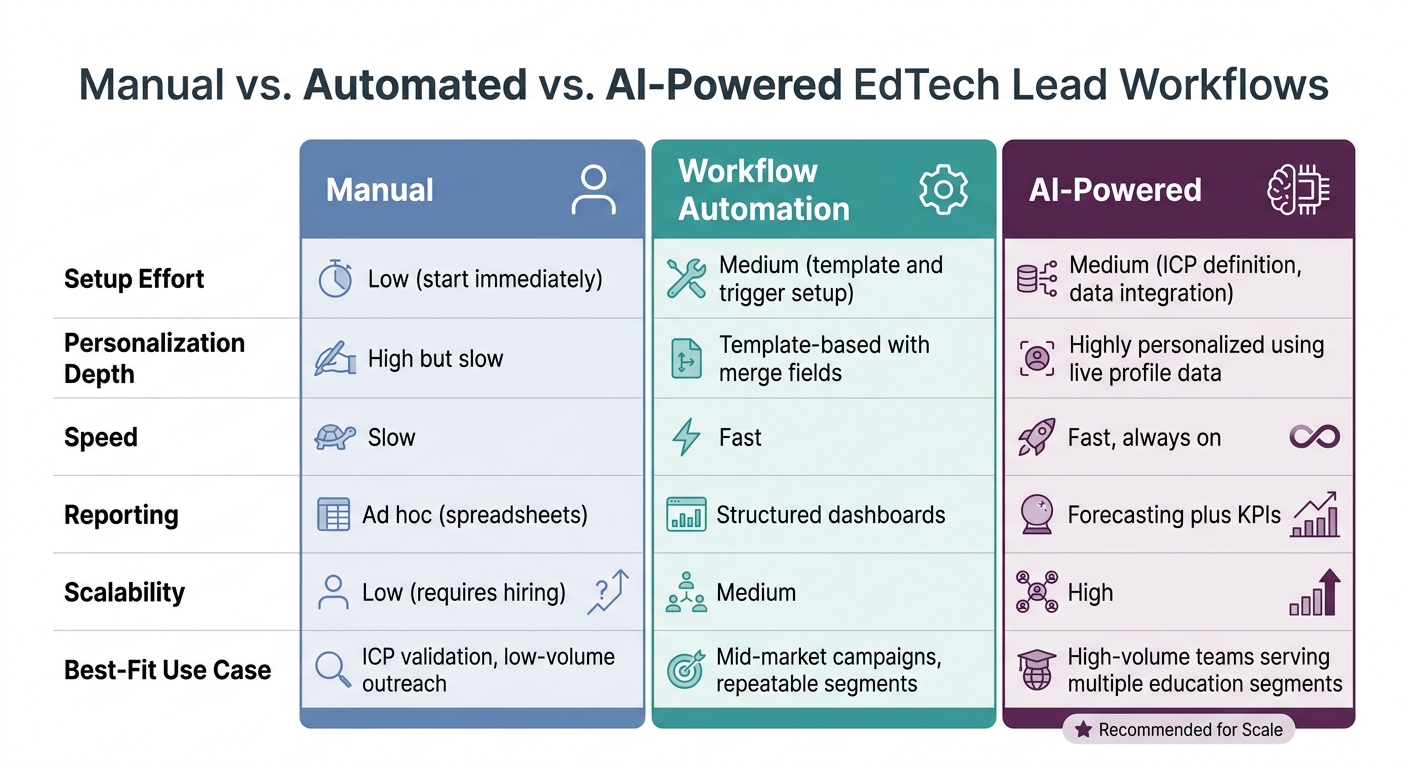
Manual vs. Automated vs. AI-Powered EdTech Lead Workflows
With the ICP and workflow set, the next move is deciding how to run it: manually, with automation, or with AI.
Manual vs. Automated vs. AI-Powered Workflows
Education teams need a setup that can keep up with committees, budget windows, and long follow-up cycles.
Manual workflows make sense for early-stage teams testing an ICP with a small list of districts or universities. The upside is strong personalization. The catch? Volume stays low, and consistency tends to slip as the team grows.
Workflow automation adds more structure. Triggered email sequences, CRM stage updates, and webinar follow-ups help teams move faster and handle more outreach. But personalization usually stops at basic merge fields like district name or job title.
AI-powered workflows go further. They keep speed high while using live profile data to tailor outreach in a much deeper way.
Dimension
Manual
Workflow Automation
AI-Powered
Setup Effort
Low (start immediately)
Medium (template and trigger setup)
Medium (ICP definition, data integration)
Personalization Depth
High but slow
Template-based with merge fields
Highly personalized using live profile data
Speed
Slow
Fast
Fast, always on
Reporting
Ad hoc (spreadsheets)
Structured dashboards
Forecasting plus KPIs
Scalability
Low (requires hiring)
Medium
High
Best-Fit Use Case
ICP validation, low-volume outreach
Mid-market campaigns, repeatable segments
High-volume teams serving multiple education segments
That model becomes the baseline for staffing, speed, and reporting.
Building In-House vs. Using a White-Label Platform
Once a team decides to use AI-powered workflows, the next call is whether to build the stack in-house or use a platform that handles the infrastructure. Both can work, but the trade-offs are clear.
Building in-house gives you full control over data architecture, tool choice, and integrations. That can matter a lot for vendors with complex CRM connections or deep data needs, like tying outreach activity to in-product usage or district-level renewal data.
But control comes with a price. Building the stack from scratch - CRM, enrichment tool, outreach platform, AI layer, and inbox management - can take around 6 months before launch. A white-label platform can be set up in about 7 days.[1] On top of that, each SDR seat running that system costs between $5,000 and $8,000 per month in U.S. labor alone.[1]
For agencies serving multiple education clients, the need is a bit different. They often want one branded system they can use across accounts instead of rebuilding the setup every time. SalesLabel bundles these functions into one branded workflow, which lets agencies launch fast without building the stack themselves. Clients see only the agency’s name and domain. The agency stays focused on strategy and client relationships.
Dimension
Building In-House
White-Label Platform (SalesLabel)
Branding Control
Total
Full (agency brand and domain)
Time to Launch
Longer
Fast
Operational Complexity
High (maintenance, integrations, updates)
Low (managed infrastructure)
Monthly Cost Structure
High (labor plus tool subscriptions)
Single platform subscription
Customization
Deep, proprietary
High via AI configuration and ICP settings
Once the model is set, track reply rate, meetings booked, and pipeline velocity.
Measuring, Optimizing, and Scaling EdTech Workflows
Key Metrics for Education Lead Performance
Once outreach, routing, and handoff are live, measurement comes next. At this stage, the goal is simple: track metrics tied to revenue, not just busywork. The main ones are cost per qualified lead (CPQL), meeting rate, pipeline contribution, and account engagement across buying committees.
CPQL is the baseline efficiency check. You calculate it by dividing total workflow cost by the number of leads that meet agreed criteria like role, budget, and timeline. Here’s a sample quarterly report: $15,000 in total cost, 100 qualified leads (CPQL = $150), 30 meetings booked (30% meeting rate), 10 opportunities worth $500,000 in pipeline, and 3 closed deals worth $120,000 in revenue. [1]
Benchmarks change by segment. K–12 district leads usually come with a higher CPQL because buying committees are bigger and sales cycles last longer - often 90–180 days from first contact to closed deal. Corporate training leads may be less expensive to qualify, but deal sizes are often larger. For student-focused EdTech, like bootcamps or online degree programs, application and enrollment rate matters more. End-to-end lead-to-enrollment conversion often lands in the 3–10% range, depending on program price point. [1]
For institutional sales, it helps to look at engagement at the account level instead of focusing on one contact. A single reply doesn't tell you much. Repeated activity across the superintendent, curriculum director, and IT director tells a far better story. Account-level engagement scores pull together replies, downloads, webinar attendance, and meetings into one buying signal. That gives teams a clearer view of where buying momentum is building across multi-stakeholder committees. [1]
How to Improve Workflow Performance Over Time
Use the same reporting setup to test what moves performance. On a monthly basis, run A/B tests on subject lines, message body variations, and send times. Change one variable at a time so the result is easy to read. For instance, testing role-based subject lines against generic ones for K–12 curriculum directors gives you a clean comparison. Then on a quarterly cadence, compare full workflow versions and report the winning sequence to clients. [1]
Message testing is only part of it. Calendar timing matters just as much. K–12 districts usually make curriculum and budget decisions in late winter through spring, well before the school year begins. Higher ed institutions move around semester cycles and fiscal years. During high-stress periods - like the first week of school - it makes sense to pull back on outreach and switch to resource-based content instead. [1]
Lead scoring should shift as new deal data comes in. A scoring review every 90 days with client sales teams helps reset what MQL and SQL mean in practice, not just on paper. [1]
How to Scale Across More Education Clients
For agencies, scale comes from reusing the core workflow while changing the messaging layer for each client. Standard workflow blocks - data enrichment routines, initial outreach sequences, follow-up branching logic, and meeting booking flows - should live in shared templates and be reused across accounts. The workflow stays the same at its core, but the message changes by market. K–12 messaging points to state standards and district demographics. Higher ed messaging points to enrollment cohorts and degree program outcomes. Corporate training messaging points to ROI and workforce development goals. [1]
Reporting works the same way. Standardized dashboards with CPQL, meeting rate, pipeline contribution, and account engagement scores let clients track performance over time without asking for a custom report every month. Regional details like state funding programs, local enrollment deadlines, and time zones for send scheduling fit into the part that can be adjusted per client. [1]
SalesLabel supports this model by centralizing multi-client management under one branded platform. The agency team can stay focused on ICP configuration, scoring calibration, and client strategy. That gives agencies room to take on more clients without growing headcount at the same pace. [1]
Conclusion and Key Takeaways
AI-powered EdTech lead workflows work best when three things shape every step: school-year timing, multi-stakeholder buying cycles, and structured data. That’s the core idea.
The biggest difference-maker is clean, education-specific data. Without it, routing gets sloppy, personalization falls flat, and outreach starts to sound generic. With it, teams can send the right message to the right person at the right point in the buying cycle.
For agencies, the playbook is simple: standardize the workflow; customize the message. SalesLabel brings sourcing, enrichment, outreach, follow-ups, and reporting into one branded platform.
Use the checklist below to launch with fewer gaps and get approvals moving sooner.
Checklist for Launching an EdTech AI Lead Workflow
ICP and segment definition - Write down target segments, buyer roles, and clear exclusions so AI stays focused on high-fit accounts.
Data model and CRM setup - Set up required fields like institution type, enrollment size, state, funding category, role, department, decision committee involvement, and current systems. Keep dates, numbers, and currency in consistent en-US formats.
Data quality checks - Deduplicate records, normalize institution names, verify domains, and log FERPA/COPPA compliance flags.
Workflow design - Map the path from first touch through nurture, qualification, and handoff. Tie triggers to U.S. school-year milestones and decision cycles.
Messaging and template review - Have AI-assisted scripts reviewed by someone who knows U.S. education norms and student privacy concerns. Then check all personalization fields.
Lead scoring logic - Build scoring rules for firmographic and behavioral signals, with clear thresholds for human follow-up, SDR outreach, or nurture.
Routing and handoff rules - Set assignment rules by region, segment, or account tier. Before handoff, require last touch, engagement history, AI summary notes, and SLAs.
Reporting and dashboards - Track meeting rate, pipeline by segment, conversion by workflow, and cycle length. Filter by academic year, term, and region.
Testing and safeguards - Start with small pilots. A/B test subject lines and message variations, check that AI outputs are accurate and compliant, and add approval steps for high-stakes communications to superintendents, deans, or board members.
Optimization cadence - Review scoring, segmentation, templates, and feedback every month.
FAQs
How do I choose the right education segment to target first?
First, define your Ideal Customer Profile (ICP). Then look for education segments where you can score fit and engagement in a clear way based on conversion data.
With SalesLabel, you can use AI to test those criteria against real contact data. Focus on segments where you can check your assumptions through measurable interactions and send hyper-personalized, data-driven outreach.
What CRM fields matter most for AI lead workflows in EdTech?
Prioritize CRM fields that show lead intent, profile fit, and behavioral engagement.
That usually means keeping two things in focus: demographic data for ICP-based fit scoring, and real-time interaction logs that show how a lead is engaging right now.
It also helps to track time-decay metrics and predictive AI inputs, so scores don’t go stale as interest shifts. SalesLabel supports this by automating lead enrichment and sending validated, scored leads into your CRM, which makes timely, personalized outreach much easier.
When should AI hand a lead off to a human?
AI should hand a lead off when it spots high-intent interest or when the moment calls for a human touch.
With SalesLabel, you stay in control by reviewing AI-drafted replies before they go out. Hot leads are sent to your CRM and calendar, so your team can spend time on the prospects that matter most while still keeping the interaction personal.