Best Practices for CRM and Lead Workflow Automation
Build reliable CRM lead workflows with clear owners, clean data, stop rules, pilot testing, and staged scaling.
SalesLabel Team
Growth Expert • 18.11.2026 г.
Share:
Търсите готово решение?
SalesLabel автоматизира проспектирането от край до край — AI намира потенциални клиенти, изпраща персонализирани съобщения и резервира срещи под вашия бранд.
Best Practices for CRM and Lead Workflow Automation
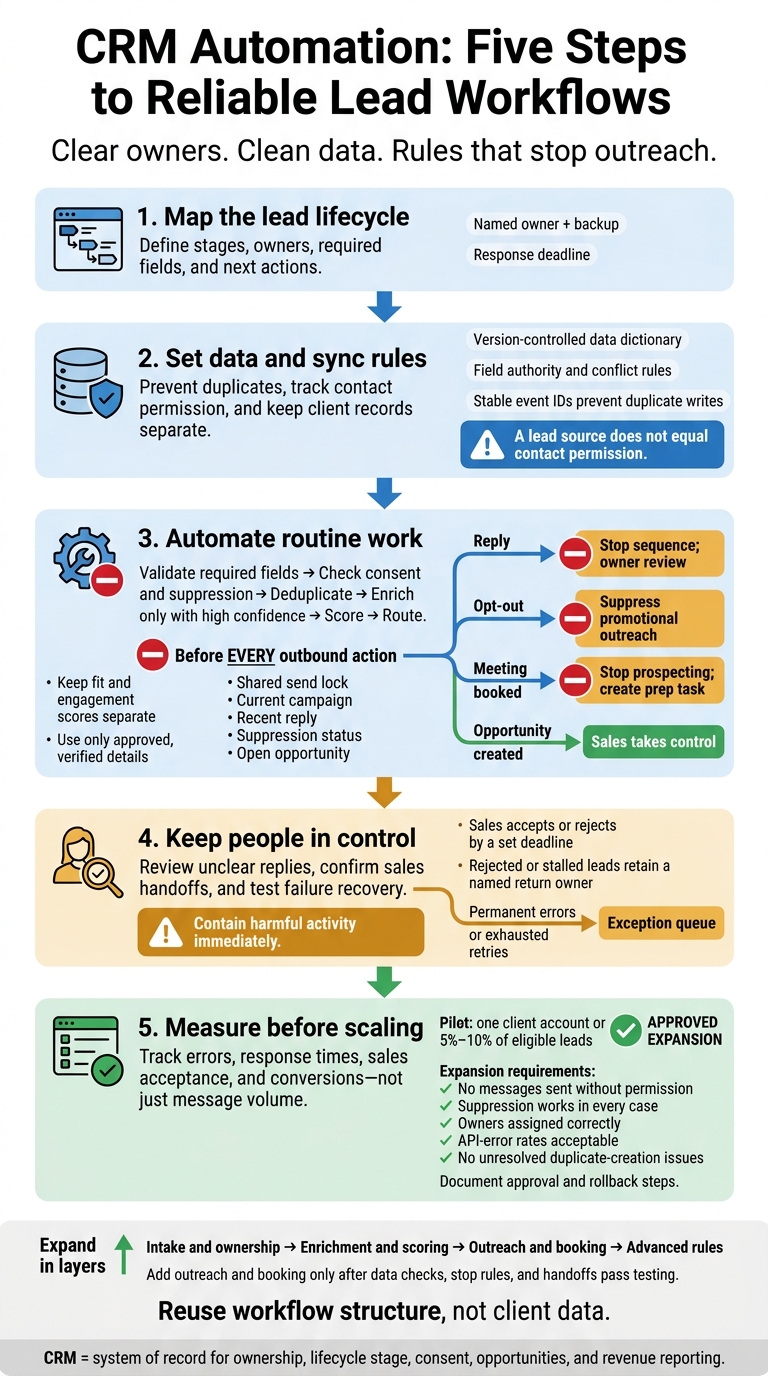
Reliable CRM features">automation starts with clear owners, clean data, and rules that stop outreach. Keep the CRM in charge of lead records and sales status, then test workflows with 5%–10% of eligible leads before expanding.
The process comes down to five steps:
Map the lead lifecycle: Define stages, owners, required fields, and next actions.
Set data and sync rules: Prevent duplicates, track contact permission, and keep client records separate.
Automate routine work: Validate, enrich, score, and route leads; pause outreach for replies, opt-outs, and bookings.
Keep people in control: Review unclear replies, confirm sales handoffs, and test failure recovery.
Measure before scaling: Track errors, response times, sales acceptance, and conversions - not just message volume.
Start with intake and assignment. Add outreach and booking only after data checks, stop rules, and handoffs pass testing.
CRM Automation: Five Steps to Reliable Lead Workflows
Set Data Standards and Workflow Rules
Standardize Records and Assign Owners
Use the lifecycle map to set the fields and rules for each stage. Keep a version-controlled data dictionary so records route correctly, attribution stays accurate, and handoffs happen safely. For every field, define its meaning, type, allowed values, edit permissions, and when it becomes required.
Normalize emails, standardize U.S. phone numbers, and format dates as MM/DD/YYYY. Keep first-touch attribution separate from the latest campaign source. Apply validation to imports, integrations, and manual entries.
Before turning on automatic updates, document merge rules. Keep the oldest CRM ID, full activity history, latest verified phone number, and most restrictive communication status. Require human review when matches are uncertain or permission histories conflict. Send unmatched records to a client-specific fallback queue with a clear escalation deadline.
Store consent details separately from source fields. A lead source does not equal contact permission.
Define Workflow Triggers and Stop Rules
Once the data model is set, define how records enter and leave each workflow. Document enrollment criteria, required data, routing priority, actions, wait periods, suppression checks, failure handling, and exits.
Set explicit re-enrollment rules instead of restarting a workflow whenever a field changes. Store a stable enrollment key and completion status. Before every outbound action, check the shared send lock, current campaign, recent reply, suppression status, and open opportunity. Don’t rely only on values saved at enrollment.
Replies stop the sequence and send it to the owner for review. Opt-outs suppress promotional outreach, while opportunity creation hands control to sales. Disqualification or loss of qualification cancels pending steps.
Honor commercial-email opt-outs within 10 business days. Keep the opt-out mechanism available for at least 30 days after sending the message.[1]
Map Fields and Set Sync Rules
With fields and triggers defined, map how each system syncs data to protect sales handoffs. Maintain a field map that lists the source, destination, type, stage mapping, system of record, direction, update frequency, and conflict rule.
Keep existing values when incoming data is blank unless deletion is explicitly approved. Use source timestamps and versions to reject stale updates. Use event IDs so retries don’t create duplicates.
Before enabling sync, verify supported fields, sync method, API limits, pagination, scopes, and credential expiration.[2][3]
[ ] Administrators, sales owners, compliance stakeholders, and the client approve the configuration.
sbb-itb-a781ab9
Automate Lead Processing and Sales Handoffs
Validate, Enrich, Score, and Route Leads
Once data rules are set, apply them in a fixed order: validate required fields, check consent and suppression, deduplicate, enrich only with high confidence, score, and route. Store the enrichment source, confidence level, and verification date alongside proposed values. Use enrichment to fill gaps - not replace trusted data or overwrite source and campaign attribution.[4]
Keep fit and engagement scores separate. Qualify leads with strong fit and engagement, and nurture high-fit leads with low engagement. Send low-fit leads with strong interest, along with uncertain matches, for review. Route qualified leads by territory, account ownership, availability, and product interest - not just round-robin assignment. Give each lead an owner, backup, next task, and response deadline based on the correct business-hours calendar and time zone.[7]
Personalize Outreach and Schedule Follow-Ups
Personalize messages using only approved, verified details. Include a source and date for public announcements and hiring changes. If facts are missing or outdated, use a neutral message or request review rather than generate a claim. Require human approval for sensitive topics, key accounts, nonstandard offers, and unclear automated replies.
Set a follow-up schedule with a clear endpoint and a maximum number of attempts. Classify replies before resuming contact. Opt-outs should suppress marketing across connected systems. Hard bounces should suppress the email address, while soft bounces should follow a limited retry policy.
For agencies using SalesLabel, keep the CRM as the system of record while SalesLabel handles outreach and booking. The platform supports enrichment, personalized outreach, follow-ups, AI-driven replies, inbox management, and meeting booking under the agency’s branding.[5][6] The CRM should remain the authority for ownership, lifecycle stage, consent, opportunities, and revenue reporting.
Before deployment, verify connector availability, supported events, field mappings, duplicate handling, webhook timing, reply classification, opt-out synchronization, booking updates, retry logic, and error logs.
Sync Replies, Meetings, and Sales Handoffs
A positive reply should update the CRM, stop outreach, and create a follow-up task. Questions and ambiguous replies need review. When a meeting is booked, record its ID, time zone, owner, and source. Stop prospecting and create a prep task.
For cancellations, retain the booking history and trigger the appropriate rescheduling steps. For no-shows, set a follow-up deadline without sending duplicate reminders. Create or update an opportunity only when the lead meets qualification criteria.
Require sales to accept or reject each handoff within a set deadline. Rejected or stalled leads must stay with a named return owner until resolved. The outreach tool should mirror the CRM’s handoff state, and that CRM state should control the next action.
Handoff checklist
[ ] Verified identity, a valid contact method, source attribution, and consent status are available.
[ ] Fit and engagement scores include qualification answers and rationale.
[ ] A brief conversation summary and meeting details are attached.
[ ] Sales has an owner, next action, and acceptance deadline.
[ ] Rejections include a reason code; missing information, wrong territory, and stalled acceptance each have a return owner and deadline.
Test, Protect, and Monitor Workflows
Test the workflow in isolation before rolling it out to production. Check that routing, suppression, and handoff rules work safely under production-like conditions.
Test Workflows and Run a Pilot
Use separate test records, inboxes, phone numbers, and calendars that cannot reach real prospects or production reports. Keep test credentials separate and out of source code and plaintext files. Record expected and actual results for valid leads, missing fields, duplicates, opt-outs, delayed webhooks, outages, rate limits, mapping errors, restricted permissions, and exit rules.[8]
Run a pilot with one client account or 5%–10% of eligible leads to check the defined handoff and stop rules. Expand only when there are no messages sent without permission, suppression works in every case, owners are assigned correctly, API-error rates are acceptable, and no duplicate-creation issues remain unresolved.
Name the business, technical, security, and go-live approvers. Train users to spot automation errors, pause workflows, review exceptions, and escalate incidents. Document rollback and restart steps before launch.
After the pilot passes, lock down access and separate client data before extending use.
Protect Data and Keep Client Accounts Separate
Require MFA, least-privilege access, and encrypted connections. Store credentials in a secrets manager - not workflow notes.[8] Remove departed users promptly.
Keep each agency client’s workspaces, credentials, connection records, dashboards, and suppression lists separate so one account cannot affect another. Validate the client ID on every read and write. Test that cross-client actions are blocked and logged.
Keep permission and consent records, plus audit trails that show the actor, timestamp, source, changed values, and workflow run ID. Apply retention and deletion schedules. Keep only the identifiers and request details needed to honor suppression.
Honor commercial email opt-outs within 10 business days, keep the opt-out mechanism active for at least 30 days after sending, and propagate suppression immediately. Log propagation to every destination so enforcement can be audited.[9][10]
With access controls in place, monitor failures continuously and send exceptions to the right people promptly.
Resolve Failures and Flag Human Review
Monitor API errors, rate limits, enrichment failures, missing fields, duplicates, unassigned leads, conflicting updates, and uncertain AI replies.
Before expanding, check the recovery safeguards. Use stable event IDs or idempotency keys to prevent duplicate writes. Retry only transient failures, using bounded exponential backoff and a fixed attempt limit. Send permanent errors and exhausted retries to an exception queue.
Log the client, lead ID, step, timestamp, attempted action, error, retry count, and resolution owner. Set escalation deadlines by severity - for example, one business hour for active compliance risks and one business day for noncritical routing errors. Contain harmful activity immediately, regardless of the escalation deadline.
Preserve logs, pause affected workflows, and document recovery steps and lessons learned. Exception handling is the last guardrail before scale: contain, log, and assign failures before expanding.
Launch-and-monitoring checklist
[ ] Failure tests, client-isolation checks, and suppression tests pass.
[ ] Approvers, pause controls, rollback steps, and escalation contacts are documented.
[ ] Retry limits, alerts, exception owners, and human-review rules are active.
[ ] Access controls, audit logging, retention, and deletion are verified.
[ ] Dashboards are reviewed daily during launch, weekly during stabilization, and monthly once reliable; expansion requires documented approval.
Measure Results and Expand in Stages
Track Workflow Health and Sales Outcomes
After launch, check that the workflow works as intended before scaling it.
More activity doesn’t mean better performance. Set a baseline before changing workflows. Then compare the same lead cohorts and time windows by client, source, campaign, and owner. Define conversion as a documented CRM stage, and base targets on your baseline and client requirements - not assumed industry benchmarks.
Use the scorecard to pinpoint failures in routing, qualification, or handoffs. Require rejection reason codes so teams can tell poor targeting apart from missing context or missed follow-up.
Review Results Before Expanding
Let the scorecard guide which rules stay, which need fixing, and what scales next. Before expanding, review routing accuracy, stage conversion, suppression behavior, AI reply quality, and sales feedback. Assess results against the ownership, suppression, and handoff rules already in place.
For each change, log its version, date, owner, reason, affected clients, test evidence, and rollback plan. Review source conversion, acceptance, bookings, complaints, and unsubscribe rates monthly. Check mappings and integrations quarterly.
Expand in layers. Start with intake and ownership, add enrichment and scoring, then outreach and booking, and finally advanced rules. Reuse workflow structure, not client data. Set up each client’s rollout separately and require documented approval before adding another layer. Recurring services should cover maintenance and outcome reviews - not just more sends.
Conclusion: Build Reliable Automation First
Before approving expansion, confirm that every item below passes:
[ ] Prerequisites and setup: The lead lifecycle, owners, stages, success metrics, required fields, source attribution, permissions, suppression rules, and client-data boundaries are documented and verified.
[ ] Testing: Intake, deduplication, routing, sync failures, opt-outs, and human-review paths are tested.
[ ] Pilot: The workflow has documented approval and rollback steps.
[ ] Monitoring and review: Workflow health, sales outcomes, compliance guardrails, exceptions, and versioned changes are reviewed on a fixed schedule.
[ ] Expansion: Reliability and sales handoff requirements are documented and met before scaling.
FAQs
How do I prioritize which CRM workflows to automate?
Map each step from lead capture to conversion, then find the weakest link. Focus first on repetitive, high-volume, rules-based tasks that help turn leads into booked meetings. Automate low-risk tasks, add human review for medium-risk tasks, and keep people in charge of high-risk work.
Set a baseline, then run a 4–6-week pilot with one client or segment. Track qualified opportunities and revenue - not just how many messages you send.
How can I measure CRM automation ROI?
Measure financial results and efficiency - not activity volume. Compare results against a similar period before automation. Track total monthly delivery costs, including software, data, API fees, inbox management, and oversight labor. Divide that total by the number of booked qualified meetings to calculate cost per qualified meeting.
Also track qualified pipeline value, closed-won revenue, time saved, response time, conversion rates, sales acceptance, and meeting attendance. Use the comparison to assess gross-margin improvements, and keep attribution rules fixed so you're measuring results on the same basis.
How much data do I need before scaling automation?
Run a 2–4-week pilot until you’ve scored 500 leads. Scale only when you meet all four targets: at least 90% reviewer agreement, at least 95% correct routing, fewer than 2% duplicate records, and costs within your cost-per-booked-meeting budget.
For lead scoring, stick with rules-based models if you have fewer than 100 closed-won deals or less than 12 months of history. For predictive AI scoring, aim for at least 1,000 contacts with clear Won/Lost tracking.