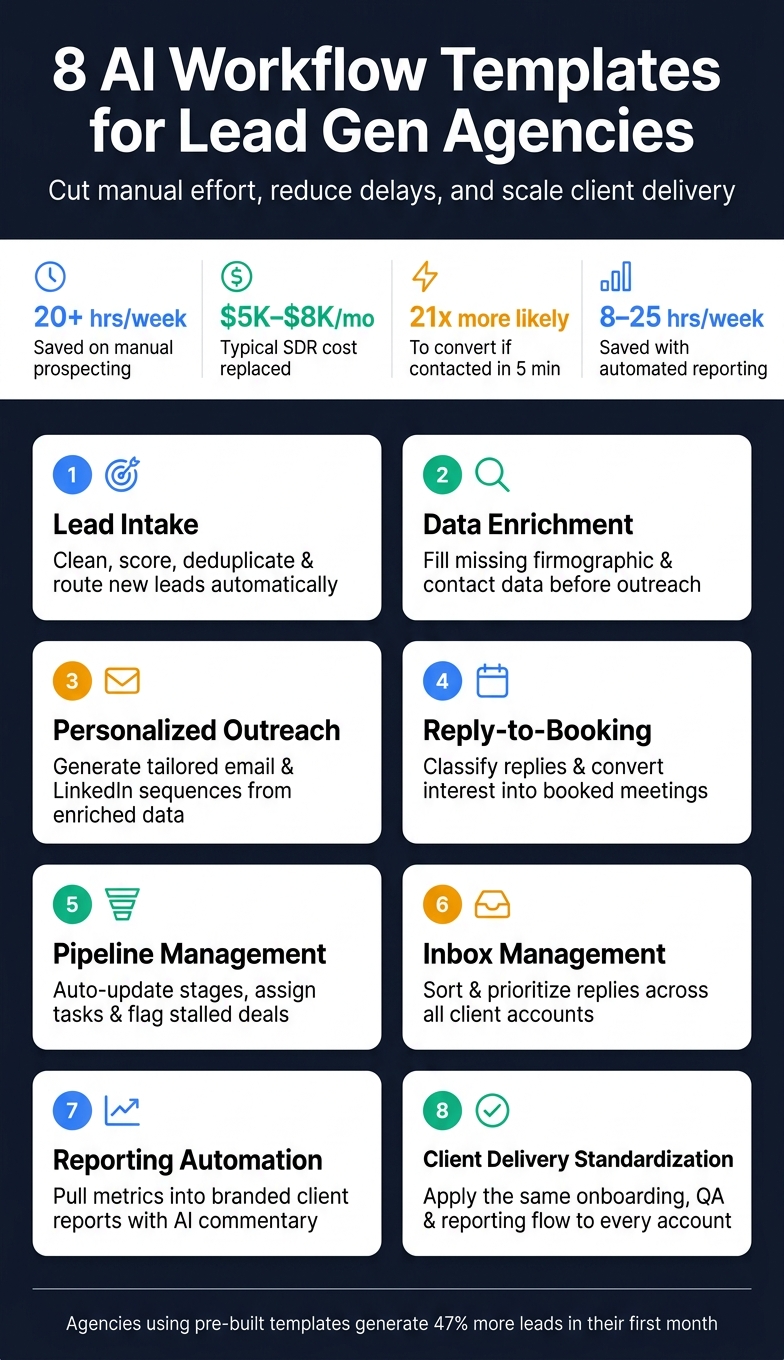
How AI workflow templates cut manual work and speed lead-to-meeting across intake, enrichment, outreach, booking, and reporting.
SalesLabel Team
Growth Expert • 12.08.2026 г.
Share:
Търсите готово решение?
SalesLabel автоматизира проспектирането от край до край — AI намира потенциални клиенти, изпраща персонализирани съобщения и резервира срещи под вашия бранд.
If I had to boil this down to one point, it’s this: AI workflow templates help lead gen agencies do the same client work with less manual effort and fewer delays.
In this article, I walk through 8 core use cases that matter most for agency delivery: lead intake, data enrichment, personalized outreach, reply-to-booking, pipeline management, inbox management, reporting, and client delivery standardization.
A few numbers stand out right away:
Sales reps can spend 20+ hours per week on manual prospecting work
An SDR can cost $5,000–$8,000 per month
Leads contacted within 5 minutes can be 21x more likely to convert
Automated reporting can save 8–25 hours per week
So the main idea is simple: if I turn repeat tasks into set workflows, I can cut admin work, keep response times low, and help more leads move from first touch to booked meeting.
Here’s the full scope at a glance:
Lead intake: clean, score, deduplicate, and route new leads
Data enrichment: fill in missing firmographic and contact data
Personalized outreach: draft tailored emails and LinkedIn messages
Reply-to-booking: classify replies and move interested leads to scheduling
Pipeline management: update stages, assign tasks, and flag stalled deals
Inbox management: sort and prioritize replies across client accounts
Reporting: pull results into branded client reports with AI-written notes
Client delivery standardization: use the same setup and QA flow across accounts
The big takeaway: this isn’t about replacing every human step. It’s about using set templates to handle repeat work, keep quality steady, and help agencies scale without adding headcount at the same pace.
8 AI Workflow Templates for Lead Gen Agencies
What Makes an AI Workflow Template Useful for Agencies
Not every automation helps an agency in a way that shows up in day-to-day work. The ones that do usually follow a simple chain: trigger, AI action, output, and outcome.
Here’s what that looks like in practice: a form fill kicks things off, the system enriches the lead, scores it, and drafts a first message. Then the CRM gets a routed lead plus an email that’s ready to send.
That four-part setup is what separates a real template from a one-off automation. A one-off automation handles a single task a single way. A template, on the other hand, is modular. The core logic stays the same - things like scoring thresholds and routing rules - while the parts that change, like messaging tone, ICP criteria, and campaign goals, can be swapped for each client.
Speed also plays a big role. Leads contacted within 5 minutes are 21x more likely to convert than leads reached after 30 minutes. Templates help close that gap by automating enrichment, scoring, and outreach prep.[4][5][6][7]
The other big payoff is consistency. When the same workflow runs across every client account, follow-ups are less likely to slip through the cracks, names get entered correctly, and tone stays on-brand. SalesLabel describes this as compressing hours of work into minutes per day while running 24/7 in 50+ languages.[1]
Next: lead intake, where a new inquiry becomes the trigger.
sbb-itb-a781ab9
1. Lead intake
The template idea:Automated multi-source lead capture with real-time scoring and CRM routing.
Lead intake begins the moment a form fill, list upload, or referral hits the system. And leads rarely come from just one place. They can show up from LinkedIn lists, web forms, referrals, and ad campaigns. Without automation, each source tends to create its own mess: messy fields, duplicate records, missing details, and extra admin work.
An AI-powered lead intake template pushes leads from source to CRM in one flow. When a new lead comes in, the workflow cleans and standardizes contact details, checks for duplicates, scores the lead against ICP fit based on industry, company size, location, and role, and then creates or updates the CRM record with the right owner and campaign tag.
It can also run consent checks and send high-intent leads into enrichment or outreach sequences. The result is a clean record that the next workflow can score and enrich.
Removing that manual step helps every stage that follows. In fact, eliminating manual data entry alone can lead to a 30% increase in engagement rates.[2]
For agencies running campaigns across many clients, SalesLabel can manage lead sourcing, deduplication, scoring, and CRM routing under the agency's brand. Once intake is clean, the next step is enrichment.
2. Data enrichment
The template idea:Auto-enrich raw leads before outreach.
Once a lead comes in, there’s usually a gap between having a record and having enough context to act on it. A first name and company name don’t give a rep much to work with. They’re not enough to write a relevant message, score the lead well, or send it to the right person.
A data enrichment template fills in the missing details, such as company name, industry, employee count, revenue range, role, and LinkedIn profile. With those fields in place, the record is ready for the next step. Segmentation gets sharper. Lead scoring gets more accurate. First-touch outreach has a better shot at landing. From there, message generation becomes much easier.
Enriched leads can convert 20% to 30% better than stale records.[10]
For agencies running campaigns for several clients, SalesLabel can enrich new leads automatically under the agency's brand. That extra context helps teams move faster and write outreach that feels more relevant to each account.
Enrichment takes a valid lead record and turns it into something a rep can use right away. You can also add a short company summary, likely pain points, and suggested talking points, so outreach starts with context instead of a bare set of fields.
3. Personalized outreach
The template idea:Turn enriched lead data into tailored, multi-touch outreach sequences - automatically.
Once a lead is enriched, the next move is outreach. This is where the extra context starts to pay off.
An AI-powered outreach template can pull in fields like role, industry, company size, location, and trigger events, then place them into dynamic message frameworks. From there, it can write email and LinkedIn messages that mention those triggers, match the lead’s seniority, and space follow-ups across both channels. It can also test subject lines, hooks, and CTAs automatically, then send more volume to the versions that get the best response.
For agencies, the upside is simple: outreach stays personal without piling on manual work. A message that mentions a funding round, product launch, or hiring spike feels a lot more relevant than a generic follow-up. And that relevance can show up in the numbers. A Marcus Evanscase study reported a 30% lift in engagement after automated sequences targeted senior decision-makers.[2]
For teams handling outreach for multiple clients, SalesLabel can generate messages for each client under that client’s branding and connect straight to enrichment data. That means leads can move from a raw record to an active sequence without manual handoffs. And when a reply shows buying intent, it should go straight into booking.
4. Reply-to-booking
The template idea:Turn a prospect's reply into a booked meeting - automatically, without manual back-and-forth.
When a lead replies to outreach, the clock starts ticking. The window is short, so the goal is simple: move that reply into a booked meeting while interest is still there.
A reply-to-booking template does that by classifying the reply and choosing the next step right away.
It usually starts by sorting the message into one of a few buckets:
positive interest
objections
questions
deferrals
not the right contact
From there, the workflow can respond in the same thread. It might answer a question, handle a simple objection, or send a scheduling link with open time slots. That cuts out the slow back-and-forth that often happens between a reply and an actual booking.
If the reply is qualified, the workflow can push it straight into scheduling and CRM updates. The scheduling message should stay tied to the conversation, with details like the prospect's name, company, pain point, service interest, and earlier thread context. That small touch matters. It makes the reply feel connected, not dropped in from nowhere.
The main numbers to watch are:
reply-to-meeting conversion
time to booking
human escalation rate
no-show rate
ASIO used a Messenger flow with qualification, Calendly booking, and SMS/WhatsApp reminders. That flow increased meetings booked by 500%[11]. For agencies, that's a much faster path from outreach to a booked call. Once the meeting is set, the CRM stage should update automatically too.
For agencies running outreach for many clients at once, SalesLabel can help with this handoff through AI-driven replies, lead scoring, follow-ups, and meeting bookings under the agency's branding. That helps move interested leads into booked meetings without making the client-facing experience feel disconnected.
5. Pipeline operations
The template idea:Automate stage movement, follow-up tasks, and stall alerts so every lead keeps moving without manual oversight.
Once a reply turns into a booked meeting, the next job is making sure that deal doesn’t go cold in the pipeline. Manual tracking - stage updates, call logs, and follow-up tasks - eats up time fast. Pipeline operations templates act like the control layer, keeping the earlier automation from slowing down after the meeting gets booked.
After booking, the workflow still needs to push the deal forward. A pipeline operations template handles those repeat triggers on its own. For example, a lead can move from "New" to "Contacted" after outreach is sent, a follow-up task can be created if no reply comes in after 3 days, and a rep can get an alert if the deal has been inactive for 7 days. Those simple rules make sure every opportunity moves through the pipeline in the same way across every client account an agency runs.
Marcus Evans used AI to remove manual data entry and spreadsheet tracking from its pipeline and reported a 30% lift in engagement rates [2].
It also helps to watch a few core numbers:
Stage conversion
Time in stage
Follow-up completion
Stalled deals
These numbers show agencies where things are breaking down across client pipelines before deals go cold. SalesLabel can keep opportunities moving with real-time scoring and AI follow-ups under the agency's brand.
Once the pipeline is moving, the next bottleneck is the inbox.
6. Inbox management
The template idea:Automatically classify, score, and route every incoming prospect reply so high-intent leads get a response in minutes - not hours.
As outreach grows across client accounts, the inbox often becomes the last manual bottleneck. Replies stack up fast across several client inboxes, and high-intent messages can get buried before anyone sees them.
The AI tags each reply by intent and routes it based on priority. It can also suppress unsubscribe requests on its own, which helps the agency stay compliant. From there, it gives each reply a priority score based on buying signals, job title, and company size. If a reply scores 70 or higher, it can be routed to a senior closer, trigger a CRM stage update, and send a calendar-link reply. That keeps hot leads moving while lower-priority messages wait in line.
Five-minute replies convert far better than next-day replies [12]. For U.S. agencies running high-volume outbound campaigns, that time gap can turn into more booked meetings.
For agencies handling several client brands at the same time, the template can be set up with per-client routing rules, tone libraries, and SLA timers. If a hot reply goes unanswered for more than 15 minutes during business hours, the system can send an alert in Slack or by email so nothing slips through the cracks. SalesLabel's white-label inbox management supports this multi-client setup under the agency's own branding, keeping client data and workflows separate while AI triage runs across accounts at the same time.
For enterprise accounts or compliance-sensitive threads, keep a human approval step before any AI-drafted reply goes out. AI handles the triage and drafts the response; a person approves the send. That means faster reply times without giving up human control.
7. Reporting automation
The template idea:Automatically pull outreach metrics, reply data, booked meetings, and pipeline movement into a single branded weekly or monthly client report, with AI-written commentary that explains what happened and what to do next.
Once lead intake, outreach, replies, and pipeline movement are in place, reporting closes the loop. And honestly, manual reporting eats up a lot of agency time. When you automate it, you can win back 8–25 hours per week or 100+ hours per month, which gives account teams more room to spend time on strategy and client communication.[13][14][15][16][17][18]
An automated reporting template pulls data from your ad platforms, outreach tools, CRM, and calendar, then turns it into a client-ready report. A report might show 230 leads sourced, an 18% reply rate, and 27 meetings booked, along with a short AI summary explaining what changed and why. That matters because a good report shouldn’t just dump numbers on the page. It should show which metrics explain performance.
The reports that help the most are the ones that connect activity to outcomes. That usually means pulling in metrics like:
Lead source
Cost per lead
Reply rate
Booking rate
Opportunity conversion
Stage movement
Influenced pipeline value
With those numbers in one place, agencies can see where results are being pushed forward and where they’re slipping. Add week-over-week or month-over-month comparisons, and patterns get a lot easier to spot before they turn into a bigger mess.
AI can also add proactive alerting. If reply rate drops fast, or cost per booked meeting starts going up, the template can flag it right away so the team can adjust targeting or messaging before the client spots the issue first. If reply rate falls below your benchmark, such as the 25%–42% range seen in top-performing AI-enhanced sequences, flag it at once.[8] That gives the report a second job: it’s not just for updates, it also helps guide day-to-day decisions.
For client-facing delivery, SalesLabel can keep the reporting branded and consistent.
8. Client delivery standardization
The template idea:Use one end-to-end AI workflow for onboarding, campaign setup, QA, and reporting so every client gets the same delivery standard, so quality stays consistent across account managers.
Reporting shows what happened. Standardized delivery is what helps you do it again and again. Without a set process, quality leans too hard on individual team members. That’s a shaky way to scale.
So every account should move through the same launch path, with only the client-specific fields changing. AI can take care of the repeat decisions inside each stage, like flagging missing personalization variables before a sequence goes live. Agencies using pre-built campaign templates generate 47% more leads in their first month than those starting from scratch [3].
The main stages stay the same across every account:
onboarding
ICP validation
sequence setup
QA checks
performance review
At the same time, configurable fields like industry, persona, offer type, and geography let AI adjust messaging and channel mix for each client’s niche. A SaaS client and a professional services firm may follow the same delivery process, but their outreach angles and qualification questions won’t look the same. That balance helps cut launch delays and keeps quality from drifting across a real client portfolio.
SalesLabel supports this directly. Because it’s white-label, every client gets the same onboarding, QA, and reporting structure under the agency’s brand. That gives teams one clear way to run accounts without reinventing the process each time.
Once delivery is standardized, choosing the right template becomes a fit question, not a build-from-scratch problem.
How to Choose the Right Templates for Your Agency
Use the use cases above to find the stage that creates the biggest bottleneck. Then start with the task that eats up the most time.
When you decide where to begin, run each option through three filters:
Bottleneck: Start with upstream workflows like lead capture, enrichment, outreach, and reply handling. If a task is repetitive, time-sensitive, or easy to mess up, it should be your first template.
Scale: Smaller agencies usually only need a handful of templates tied to one offer. Larger agencies need templates that can work across many accounts, with consistent field mapping, clear handoff rules, and routing logic that can be reused across campaigns.
Complexity: A single-segment outbound program can run on a simple linear sequence. But once you add multiple segments, A/B messaging, and several lead sources, you need conditional logic and fallback actions. Match the template to the number of campaign decision points, not how polished it looks.
Once the front-end workflows are stable, shift to back-end reporting and QA. Add reporting and standardization after intake and outreach are running cleanly. When those inputs are clean, those templates become much more useful.
Conclusion
The agencies getting the most from AI workflow templates usually fix one bottleneck at a time. Each template is built to handle a specific agency problem. And those use cases matter because they affect the numbers agencies watch most closely.
The upside shows up in the data: faster response times, better personalization, and more conversions when outreach is timely and tailored [9][19][20][21]. Across campaigns and client accounts, those gains stack up.
They tend to stack up even faster when the workflow stays consistent. That's the thread running through all of this: consistent execution. Teams onboard faster, and performance stays steadier across accounts.
For agencies that want one connected system, SalesLabel supports this model with AI-driven lead sourcing, enrichment, outreach, follow-ups, booking, scoring, and inbox management under your agency's brand.
The next step is simple: pick the use case with the most friction, build the template around it, measure the outcome, and expand from there. That’s how AI workflow templates become part of daily operations.
FAQs
Which workflow should I automate first?
Start with your top-of-funnel outbound work. Manual prospecting - like finding profiles and sending first messages - is often the biggest thing slowing growth.
Using SalesLabel to automate lead sourcing, personalized outreach, and meeting booking cuts manual data entry and gives your team more time for strategy. It also helps with early lead qualification, so your agency can scale without adding headcount.
How much human review should AI workflows still have?
AI workflows need real human review at the moments that matter most. Start with a careful pilot, watch performance metrics closely, and scale only after the setup proves itself.
That mix gives you the best of both sides. AI can handle prospecting, scoring, and follow-ups at scale, while people keep an eye on quality during setup and step in when metrics start to drift. It’s a simple way to cut down on errors as you grow.
What metrics should I track to judge template ROI?
Track lead volume and quality, including ICP fit and engagement scoring, along with the outcomes that matter most: response rate, meeting-booked rate, and pipeline conversion.
It also helps to watch day-to-day efficiency. That means looking at time to first campaign launch and whether you can scale without adding headcount, such as growth in leads or engagement compared with team size.