AI speeds follow-up A/B tests, but only disciplined one-variable tests with clear guardrails yield reliable winners.
SalesLabel Team
Growth Expert • 4.09.2026 г.
Share:
Търсите готово решение?
SalesLabel автоматизира проспектирането от край до край — AI намира потенциални клиенти, изпраща персонализирани съобщения и резервира срещи под вашия бранд.
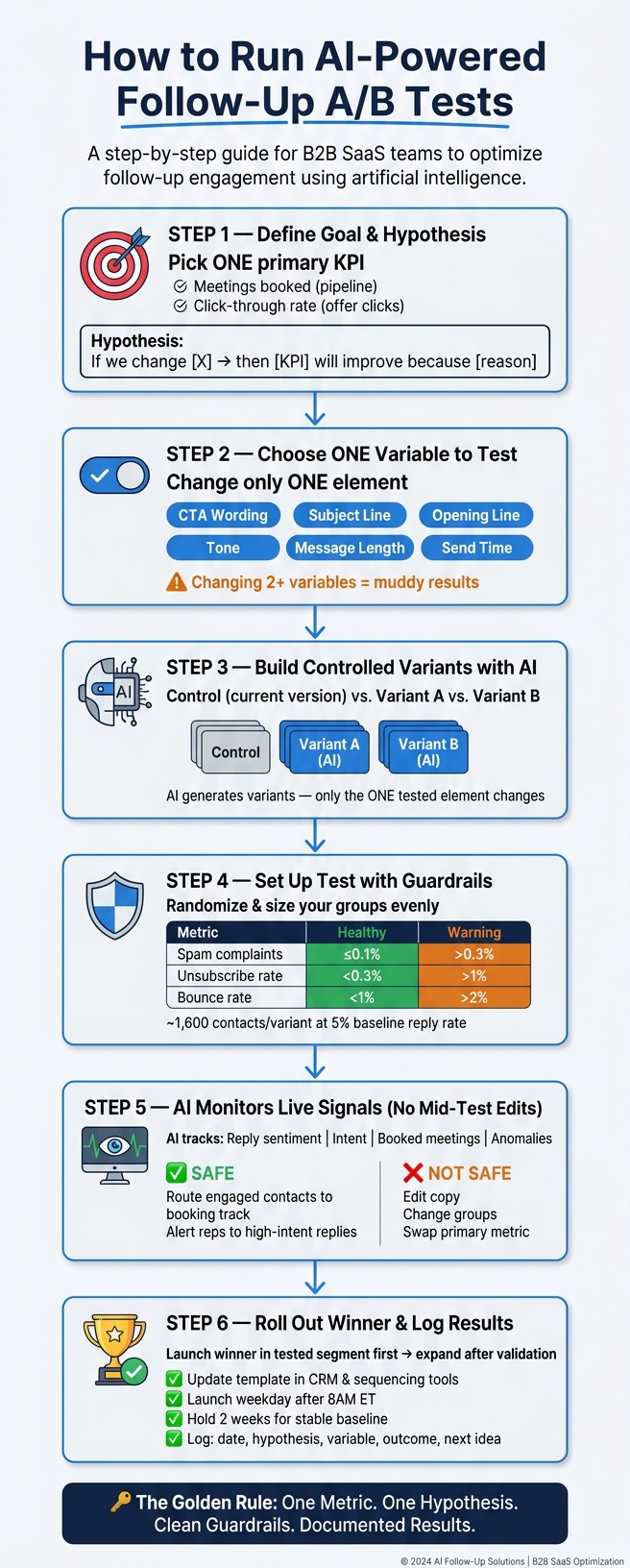
AI helps follow-up A/B testing work better when you keep the test simple: pick one goal, change one thing, split contacts evenly, watch replies and meetings, and only ship a winner if deliverability stays in range. That’s the whole playbook.
Here’s the short version:
Manual testing wastes time and can let warm leads go cold. The article cites losses of up to 30% when follow-up slows down.
AI helps with setup and tracking, like writing variants, assigning groups, reading reply intent, and spotting results as they come in.
Your test still needs rules. AI does not fix a bad test design.
Use one main KPI, such as:
Meetings booked for pipeline
Click-through rate for offer clicks
Write one clear hypothesis and test one variable only:
Keep a control version and make sure each variant changes just one part.
Split groups evenly and use enough volume. The article notes ranges from hundreds to a few thousand contacts per variant, depending on baseline rates.
Watch guardrails, not just wins:
Spam complaints
Unsubscribes
Bounce rate
Inbox placement
Do not edit the test mid-run. Let AI monitor performance, but keep copy, groups, and success rules fixed until the test ends.
Roll out winners by segment first, then log results so the next test starts from a better baseline.
If I had to boil the article down to one line, it would be this: AI speeds up follow-up testing, but clean testing rules are what make the result worth using.
This article walks through that process from start to finish in plain steps.
AI-Powered Follow-Up A/B Testing: Step-by-Step Process
1. What AI Changes in Follow-Up A/B Testing
Why Manual Follow-Up Testing Falls Short
Manual follow-up testing falls apart fast. SDRs don't have much time to run clean tests, and even one variant can take weeks before it shows a usable result.
Things get messy even faster when reps tweak subject lines or CTAs in the middle of a test. At that point, you're no longer testing one thing. You're testing several things at once, and the result gets muddy.
Reply tagging is another weak spot. When people tag replies by hand, the labels often vary from rep to rep. That makes the data hard to trust.
Then there's the bigger problem: results stay scattered across client accounts. A strong idea in one account often never turns into a repeatable process in another. That's why AI helps most when it improves control, not just speed.
Where AI Adds the Most Value
AI is most useful when it keeps follow-up tests clean while cutting setup time. It can generate follow-up variants in minutes and keep each test limited to one variable. That matters, because once multiple things change at once, the signal gets buried.
It also applies formatting rules automatically, so the test starts in a clean state instead of drifting right away.
On top of that, AI can classify replies by intent and compare results by segment, which makes performance easier to read without manual exports. It can also watch the test as it runs, so teams can reach a decision sooner. AI-driven personalization can raise reply rates and shorten the time to a decision. [1]
Another big win is segmentation. AI can group leads by:
role
company size
industry
engagement history
That way, variant comparisons happen inside comparable cohorts instead of across mixed audiences.
For example, a direct CTA might work better for founders at small U.S. startups but do worse for directors at larger enterprises. If those groups are mixed together, the signal gets hidden. AI keeps those groups separate, which makes the result easier to use.
Once AI strips out the noise, the test still comes down to the same rule: one clear goal and one variable.
sbb-itb-a781ab9
How AI is Revolutionizing AB Testing
2. Define Your Goal and Hypothesis Before Testing
AI can speed up variant creation and analysis. But the test still needs a clear goal and one variable. Before you build a follow-up variant, lock in two things: one clear objective and one testable hypothesis.
Pick One Primary Success Metric
Your metric should match what the follow-up sequence is meant to do.
If the follow-up is tied to sales pipeline, meetings booked is the strongest primary KPI because it connects straight to revenue activity. If the goal is to get people to click on an offer or resource, click-through rate is a better primary measure. Reply rate and open rate can still help, but they shouldn't decide the winner.
Using more than one primary metric muddies the result. Pick one up front, and the readout gets much cleaner. You can still track secondary metrics like unsubscribes or time-to-first-reply. Just use them to explain the outcome, not to overrule it. That primary metric becomes the base for your hypothesis.
Write a Single-Variable Hypothesis
A good hypothesis spells out three things: what you're changing, what you expect to happen, and why. A simple format works well:
"If we change [one element] from [A] to [B], then [primary metric] will improve because [reason]."
For example: "If we change the follow-up CTA from 'Let me know if you're interested' to 'Book a 15-minute call,' then booked meetings will increase because the request is more explicit and easier to act on."
Test one element at a time, such as:
CTA wording
opening line
tone
message length
offer framing
send time
Each of these can change how people respond. Change two at once, and you're left guessing what made the difference. AI won't save a messy test setup. Next, use AI to turn that hypothesis into controlled variants.
With the goal, metric, and hypothesis set, you can build controlled follow-up variants.
3. Use AI to Build Controlled Follow-Up Variants
Once your hypothesis is set, the next move is simple: turn it into test versions you can measure. AI can do this fast, but the key is control. Your baseline should stay the same, and AI should change ONLY the one element tied to your hypothesis.
Set One Control and Focused Variants
Your control is your current follow-up. That's the baseline with your standard personalization, and every AI-made version gets judged against it.
When you prompt AI, be direct. Tell it to keep the email body the same and change only the subject line. If AI starts changing two or three things at once, the test gets muddy fast. Then you're left guessing what caused the lift - or the drop.
Here's a practical example. A U.S. B2B team sending follow-ups to marketing directors might test three versions:
The control uses the subject line "Following up on potential partnership" with the CTA "Would you be open to a 20-minute call next week?"
Variant A changes only the subject line to "Quick idea to improve your lead-to-meeting rate in Q4."
Variant B keeps the original subject line but changes only the opening sentence to mention the prospect's paid traffic activity.
In all three, the body copy and CTA stay the same.
Once you've set the variants, the next job is putting guardrails around the test so the results mean something.
Test High-Impact Follow-Up Elements
Not every part of a follow-up affects your main metric in the same way. Subject lines usually have the biggest effect on open rates. So if opens are lagging, start there.
After open rates level out, shift to opening sentences and CTA phrasing. A personalized opener that mentions the prospect's role, recent activity, or industry often leads to better replies because it gives people something concrete to react to. And if your goal is booked meetings, direct CTAs like "Are you open to a 20-minute call next week?" often drive more meetings, while softer asks can bring in more detailed positive replies.
The table below shows what to test based on where the funnel is leaking:
Element to Test
Main Metric
Use When
Subject line
Open rate, meeting volume
Open rate is weak
Opening sentence
Reply quality, positive replies
Open rates are stable, replies are weak
CTA phrasing
Meetings booked
Replies come in but few convert
Personalization depth
Lead quality, positive reply rate
Meetings booked but poor fit
With those controlled variants ready, the next step is assigning them cleanly and tracking the signals that matter.
4. Set Up the Test With Clear Guardrails
Once your variants are ready, the next job is simple: make sure the test is set up in a way that gives you results you can trust. A clean setup protects the test and helps keep your emails out of trouble in the inbox.
After the variants are defined, guardrails stop AI from chasing speed while hurting test quality.
Randomize Groups and Size Your Sample
Assign each contact to one variant, then keep that assignment fixed for the full test. Split groups evenly by industry, persona, and company size.
Small lists can muddy the picture. With a 5% baseline reply rate, you need about 1,600 contacts per variant to spot a 2-point lift. With a 2% baseline, you need about 3,800 contacts per variant to spot a 1-point lift. [9]
In plain English: plan for hundreds to a few thousand contacts per variant, and let the test run long enough to catch late replies across U.S. business days.
Track More Than Your Main KPI
Your main KPI tells you if performance went up. Guardrails tell you if you paid too high a price to get there.
Guardrail Metric
Healthy Range
Warning Sign
Spam complaint rate
≤0.08–0.1% per send
>0.3%
Unsubscribe rate
<0.3% per campaign
>1%
Bounce rate (total)
<1%
>2%
Inbox placement
Primary inbox
Promotions or spam folder
These ranges reflect common 2026 deliverability benchmarks for commercial email programs. [3][4][5][6][7][8]
Only call a variant a winner if it improves the KPI and stays within these limits. If spam complaints, unsubscribes, or bounce rates start to climb, pause the test or switch back to the safer control version.
If the variant stays within range, the next move is to watch live signals without touching the setup.
Compare Variables in a Simple Test Table
Before launch, write down what you're changing and what you think will happen. A simple table keeps everyone on the same page and makes the results easier to read later.
Variable
Expected Impact
Risk
Ease of Testing
Main KPI Influenced
Subject line
High
Medium
Easy
Open rate
Follow-up timing
Medium
Low
Easy
Reply rate
Message length
Medium
Low
Easy
Reply rate
Personalization depth
High
Medium
Moderate
Reply rate, meetings booked
CTA wording
High
Low
Easy
Meetings booked
A good place to start is with high-impact, low-risk variables like CTA wording or follow-up timing.
With the test live, AI can watch engagement in real time without changing the setup.
5. Let AI Monitor Results and Adjust in Real Time
Once your variants are live, AI can watch performance without interfering with the test. That’s the key idea here. You want live visibility, not mid-test edits.
With the test running, AI can track signals as they come in while leaving the test setup alone.
Read Live Engagement Signals
Opens and clicks still matter. But for follow-up A/B tests, replies, sentiment, intent, and booked meetings usually tell you a lot more.
The most useful signals tend to be:
Reply threads
Reply sentiment
Intent
Downstream outcomes like booked meetings
AI can classify replies as positive, neutral, negative, or automatic, such as out-of-office messages. [11][10][12] That matters more than raw reply volume when your actual goal is a qualified meeting.
Here’s why: a variant with a slightly lower reply rate may still win if those replies are more likely to turn into booked meetings. More replies don’t always mean better results.
Use those live signals to move engaged contacts to the next step without changing the test itself.
Optimize Without Breaking Test Validity
There’s a simple line here: monitoring reads the test, while intervention changes it.
AI can monitor opens, clicks, replies, sentiment, lead scores, and call outcomes. But once you start changing subject lines, body copy, CTAs, groups, or the main metric during the run, you’re no longer just watching the test. You’re changing the conditions.
Safe real-time actions include routing engaged contacts out of the test flow and into a booking or qualification track once they respond, alerting reps to high-intent replies, and queuing sequence-level updates for the next test cycle. Keep the subject line, body copy, CTA, groups, and primary metric fixed until the test ends.
Set decision rules before launch. AI can flag when a variant is trending toward the threshold and notify your team, but rollout should stay blocked until the predefined criteria are met. Declare a winner only after the pre-set sample, observation window, and confidence threshold are met. [13][14][2]
When a variant meets your preset threshold, it’s ready for rollout.
6. Roll Out Winners and Build a Repeatable Process
After the test ends, put the winner into use and treat it as your new baseline.
Promote the Winning Follow-Up Version
Sending the winner to every segment right away isn't always the best move. If the winning version was tested in one segment, launch it there first. Then check it in a second segment before rolling it out more broadly. If results change a lot by segment, keep separate versions for each group instead of forcing one template across all of them. [15][16][18][21]
Update the template in your email, CRM, and sequencing tools. Then launch it on a weekday morning after 8:00 a.m. ET. Keep the winner unchanged for two weeks so you have a stable baseline to measure against. As soon as it goes live, record the result.
Log Insights for the Next Test
Track every finished test in one shared sheet: date, hypothesis, variable, segment, outcome, guardrails, confidence, and next idea. That last field often gives you the next hypothesis.
Review the log in a weekly 30-minute team session. [17] That's short enough to keep the habit going, but long enough to check whether new test ideas still line up with current pipeline goals. Over time, the log turns into a reusable knowledge base. Your team won't waste time repeating tests that already have answers, and new team members can get up to speed without starting from zero. [19][20]
For agencies running campaigns for multiple clients, the jump from test finished to winner live is often where things stall. SalesLabel keeps sequences, AI replies, lead scoring, inbox management, and meeting booking in one white-label workflow. That means agencies can launch the winning version without extra handoffs, then track it and test again with less friction.
7. Conclusion
AI doesn't replace testing discipline. It just makes the work move faster. And when speed goes up, process matters even more.
The core process doesn't change: one metric, one hypothesis, clean guardrails, documented results. That's the point. Disciplined testing matters more than how many tools you use. Once your setup is clean, AI's biggest edge is speed.
What AI changes is the feedback loop. It surfaces live signals, catches anomalies early, and feeds winners into the next test. That's the loop worth repeating.
Start small: one goal, one segment, and one variable. Run the test clean, watch your guardrails, and log the result. One clean test beats a dozen messy ones.
FAQs
How long should a follow-up A/B test run?
Run a follow-up A/B test after the initial warm-up, and keep it live long enough to hit early pipeline targets. Wait until volume is high enough to give you a signal you can trust.
In most cases, that means planning for about 4–5 weeks total. That gives each variation time to generate measurable replies and meetings, not just opens.
What sample size do I need per variant?
The available SalesLabel information does not include a specific sample size for each A/B test variant.
Instead, it centers on AI personalization and lead scoring, including behavioral, predictive, and real-time scoring. But it does not give numeric guidance on sample sizing for follow-up A/B tests.
When should I stop a test early?
Avoid stopping an A/B test too soon during the early warm-up phase. Give it 21–35 days to build sender reputation. If you cut that short, you can end up with 90+ days of weak performance.
If you're using SalesLabel, let the AI workflow collect enough lead scoring and behavior data before you make changes. Sender reputation comes first during this stage, not early intervention.