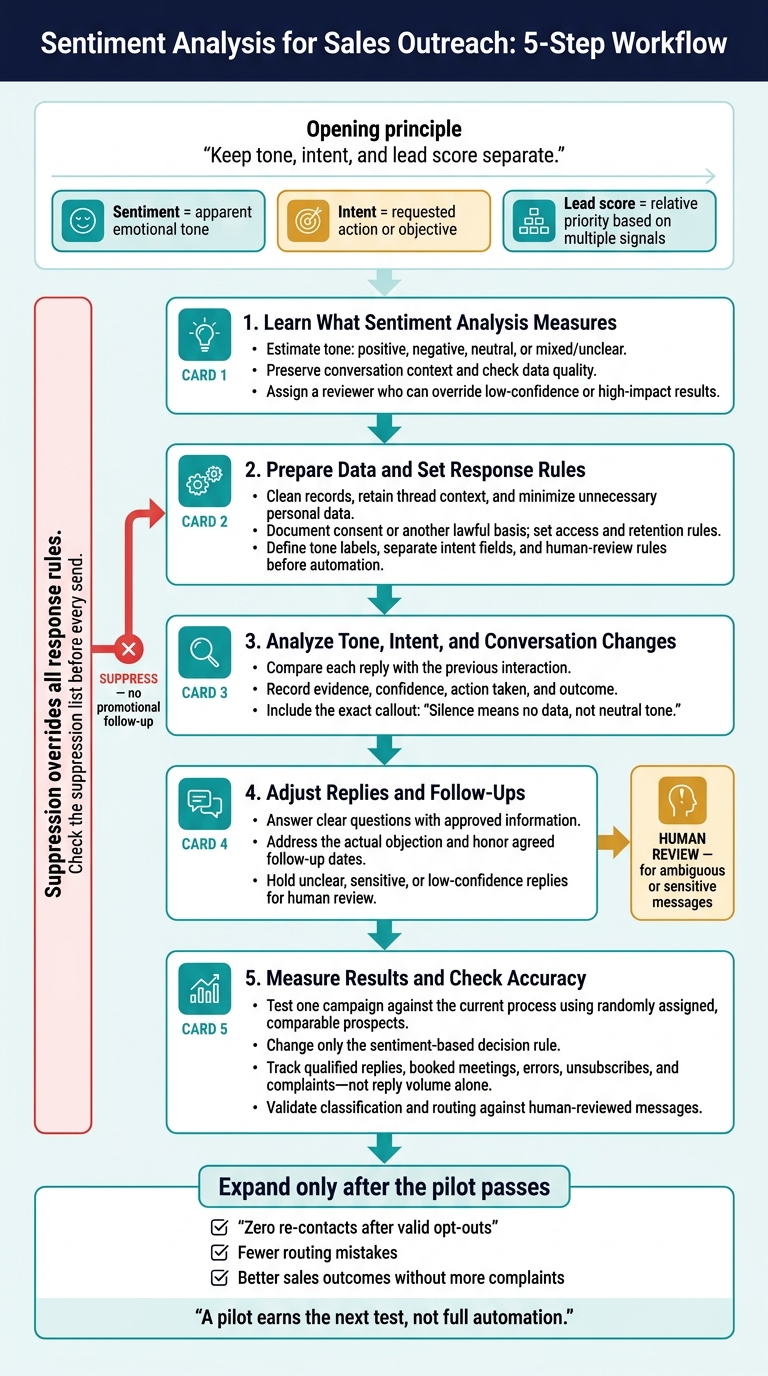
Use sentiment analysis to guide replies, enforce privacy and human review, and pilot one campaign to improve outreach.
SalesLabel Team
Growth Expert • 21.10.2026
Share:
Cauți o soluție gata de utilizare?
SalesLabel automatizează prospectarea de la un capăt la altul — AI găseşte prospecți, trimite mesaje personalizate şi rezervă întâlniri sub brandul tău.
I use sentiment analysis to guide replies - not to decide who’s ready to buy. My starting rule: answer clear questions, send mixed or unclear messages to a person, and stop outreach immediately when someone opts out.
A friendly reply can still mean “no budget.” That’s why I keep tone, intent, and lead score separate.
Here’s the process I recommend:
Prepare the data: Clean conversation records, keep thread context, and check privacy and consent rules.
Set response rules: Define labels, human review steps, and opt-out controls before connecting tools.
Track changes: Compare each reply with earlier messages and record what action followed.
Adjust follow-ups: Address the actual question or objection, use approved information, and honor agreed dates.
Test one campaign: Compare results with your current process using qualified replies, booked meetings, errors, and unsubscribes - not reply volume alone.
My rule for expansion: <u>zero re-contacts after valid opt-outs</u>, fewer routing mistakes, and better sales outcomes without more complaints.
Sentiment Analysis for Sales Outreach: 5-Step Workflow
Step 1: Learn What Sentiment Analysis Measures
Sentiment analysis uses NLP and machine learning to estimate the tone of emails, replies, call transcripts, chats, and follow-ups. It usually labels tone as positive, negative, or neutral, sometimes adding polarity and confidence scores. These estimates help guide response timing, tone, and routing.[4][5]
Treat sentiment as a tone estimate - not a judgment about personality or buying likelihood. Clear labels help you decide what to automate and what needs human review.
Distinguish Sentiment, Intent, and Lead Scores
Concept
What it measures
Hypothetical signal
Sales use
Sentiment
The apparent emotional tone of a message
Frustration about an unresolved issue
Acknowledge concerns and escalate when needed
Intent
The prospect’s likely objective or requested action
A request for implementation details
Guide the next question or response
Lead score
Relative priority based on multiple signals
A target-account decision-maker opens several messages and requests a demo
Rank leads and route follow-ups
Sentiment alone doesn't qualify a lead. Pair it with intent indicators, conversation history, and account fit, but store sentiment, intent, and lead score separately. Before using those labels, check the data behind them.
Set Data Quality and Human Review Standards
Start with complete, current records: clear contact and account IDs, accurate timestamps, and identified speakers. Preserve thread context, but remove quoted text, signatures, and automated footers before classification. Check transcript accuracy, and keep internal notes separate from the prospect’s language.
Document consent or another lawful basis before processing communications. Before prioritizing labels, define your ideal customer profile (ICP), including industry, company size, geography, role, use case, and exclusions. Keep a labeling guide for positive, negative, neutral, mixed, and unclear tone. Use separate intent labels for objections, purchase requests, and opt-outs.[7][9]
Assign a reviewer who can override low-confidence or high-impact results. Human review should cover sarcasm, mixed tone, transcript errors, sensitive complaints, and routing decisions that affect priority or escalation. This helps prevent sensitive or high-value replies from going to the wrong place. Record the original text, predicted label, confidence, final decision, and reason for any correction.[6][8]
Next, turn these labels into response rules and routing logic.
sbb-itb-a781ab9
Step 2: Prepare Data and Set Response Rules
Give every interaction the same record structure so tone can guide the next sales action. Include prospect ID, account, campaign, channel, sender, recipient, timestamp, message or transcript, reply status, and outcome. Keep the full thread so the model can assess each reply in context. Normalize time zones before measuring response delays, and remove personal data you don’t need before sending records to an AI provider.[10][11][13] Use this structure to keep tone and action labels consistent.
Define Tone Labels and Action Categories
Before automating across campaigns, ask two reviewers to independently label several hundred interactions. Cover different channels, segments, message lengths, and response types. Record unanswered outreach as a reply status - not a tone label. Resolve disagreements, then save the reviewed sample as a reference set for testing.
Use positive, neutral, negative, and mixed/unclear as tone labels. Track interest, questions, objection type, and opt-outs in separate fields. Let intent guide the sales action: prioritize explicit interest, answer questions with approved information, route objections to the right playbook, and pause negative or unclear replies for review.
Suppression overrides all response rules. Keep access, retention, and suppression rules consistent so the labels work as intended.
Set Privacy and Outreach Controls
Document who can access conversations, how each AI vendor may use them, and when records must be deleted or anonymized. Check vendor terms for model training, subprocessors, storage, and deletion. Set separate retention schedules for conversation history, evaluation samples, and suppression records. Businesses covered by the CCPA/CPRA must also meet notice, consumer-rights, and data-minimization requirements.[11][12] Confirm recording-consent requirements before recording, transcribing, or analyzing calls.[14]
Check the suppression list before every send. CAN-SPAM covers B2B commercial email. It requires accurate sender information, nondeceptive subject lines, advertising identification, a valid physical postal address, and a clear opt-out method. The FTC requires businesses to honor opt-outs within 10 business days and keep the opt-out mechanism working for at least 30 days after sending. Treat suppression as immediate.[3]
Next, use these rules to compare tone shifts with engagement results, reply quality, and conversion patterns.
Step 3: Analyze Tone, Intent, and Conversation Changes
Log each interaction, label its tone and intent, and compare it with the previous message. Then choose the next action and record the result. Include the triggering phrase and confidence score for each label. Treat labels as working signals - not facts about how the prospect feels.
Mark tone and intent as improved, declined, or unchanged since the previous interaction. Silence means no data, not neutral tone. Record the previous state, new evidence, action taken, and next review date. If the wording conflicts with the AI label, stop the automated action and have a person review the full thread.
Match Message Signals to Sales Actions
Use these labels to decide whether to reply, route, pause, or suppress.
The examples are hypothetical, not customer quotes or reported results.
Signal
Possible interpretation
Recommended response
Review or stop rule
Positive interest: Prospect says the offer looks relevant and asks about pricing.
Possible evaluation, not confirmed purchase intent
Share pricing and clarify the use case or timeline.
Check qualification before advancing the lead.
Neutral question: Prospect asks what integrations are supported.
Information gathering
Reply with verified information.
Route to a human for configuration-specific answers or implementation details.
Negative reaction: Prospect asks to stop sending generic emails.
Frustration and a possible stop request
Stop the sequence.
Suppress requests for no further contact; review unclear wording before sending.
Objection: Prospect says the topic cannot be prioritized this year.
Timing barrier
Acknowledge the constraint.
Remove from near-term sequencing; do not assume permission to follow up.
Mixed message: Prospect says the idea is interesting, but there is no budget this quarter.
Interest with a budget constraint
Ask whether a later check-in would be useful.
Do not let positive wording override the constraint.
Unsubscribe: Prospect asks to be removed from the list.
Explicit request to stop marketing
Suppress.
Suppress across relevant campaigns. No persuasion or promotional follow-up.
After routing each reply, compare its labels with engagement outcomes to see which signals predict useful responses.
Compare Sentiment With Engagement Data
Compare sentiment with reply rate, reply time, qualified replies, meetings booked, conversions, and unsubscribes. A qualified reply confirms need, authority, timing, or a next step.
Use the same denominators and attribution windows when comparing campaigns. Break down results by audience, message variant, and sentiment category. The goal is to see whether sentiment predicts better outreach outcomes - not just more replies.
Positive language alone does not confirm buying intent. It may reflect politeness or curiosity without budget, urgency, or buying authority. Look for supporting behavior: requested information, a confirmed business problem, a booked meeting, or a conversion.
Review outcomes weekly or after every 100 interactions per campaign. If tone improves while qualified replies fall or unsubscribes rise, investigate the mismatch.
Step 4: Adjust Replies and Follow-Ups
Respond to What the Prospect Says
Use the sentiment label, intent label, and confidence score to draft the next reply. Address the prospect’s immediate need first: confirm what they need, send approved pricing when asked, route technical questions to a specialist, and offer one clear next step. If the message is unclear, ask one short question or send it to a representative. Don’t guess.
Respond to the objection, not just the tone. If setup effort is the concern, share verified implementation steps and explain which tasks remain manual. A cheerful pitch won’t answer that concern. Acknowledge frustration without adding sales language. Require human approval for complaints, sensitive personal information, legal or compliance questions, and pricing exceptions.
Set a practical response target - for example, answer buying questions within one business day during the prospect’s business hours. Honor agreed follow-up dates instead of restarting a fixed sequence. Before sending, check the latest message, unanswered questions, promised information, meeting status, and any opt-out language. Never switch channels to get around a pause or opt-out request.
SalesLabel is white-label AI lead generation software for agencies.[15][16] Use external sentiment labels to decide whether to revise a draft, delay a follow-up, or hand the conversation to a representative. Don’t assume SalesLabel has native sentiment scoring unless you’ve verified the integration.
Before connecting those labels, check whether the sentiment provider can pass labels, confidence scores, conversation IDs, and recommended actions into the workflow. Also confirm that SalesLabel supports the required integration, routing, field mapping, and suppression behavior.
Define each client’s approved claims, tone, offers, response times, and human review rules. Test the full workflow in a limited pilot. If the connection isn’t supported, keep reviews manual. If classification fails or confidence is low, hold the reply for a representative rather than sending it by default. Log each pilot result so Step 5 can measure accuracy and routing quality.
Step 5: Measure Results and Check Accuracy
Use the Step 4 pilot results to check whether sentiment-guided outreach improves outcomes without adding errors.
Set a baseline and keep measurement rules consistent. Track positive replies, qualified replies, meetings booked, unsubscribes, and negative responses per delivered message. Record delivery failures separately. Define what makes a reply qualified and what counts as a conversion, such as an opportunity created. Set the conversion denominator, attribution window, and reporting period before testing. Report counts alongside rates, and keep these definitions unchanged throughout the test.[19][20]
Randomly assign comparable prospects to either the current process or a sentiment-guided workflow. Keep the audience, offer, sender, channel, volume, follow-up count, and test dates aligned. Change only the sentiment-based decision rule. Choose one primary outcome, such as meeting-booking rate, and report absolute and relative differences, sample sizes, and results for each audience segment - not just the overall average.[17][19]
Next, check whether the model classifies and routes messages correctly.
Find Classification and Routing Errors
Compare model decisions against a human-reviewed sample of positive, negative, neutral, ambiguous, and opt-out messages. Include sarcasm, short replies, regional wording, missing context, and different audience segments. Reviewers should label messages independently, then resolve disagreements using a documented adjudication rule.
Use a confusion matrix to check false positives and false negatives for interest, negative reactions, and opt-outs. Overall accuracy can hide costly mistakes.[18]
Also check what happens after classification: incorrect queue assignments, unwanted follow-ups, response delays, and human overrides. Refine prompts, label definitions, and routing rules, then rerun the same evaluation set before releasing changes.
Use confidence-based routing only when scores have been validated against reviewed messages. Otherwise, flag ambiguity explicitly. Keep versioned records so you can trace and reverse harmful changes.
Weigh Benefits and Risks
Expand only when gains outweigh errors and review workload. Check whether better reply or meeting rates also bring more unsubscribes, complaints, or manual handling. Accuracy alone doesn't show whether an AI workflow is suitable for deployment.[21]
Politeness mistaken for buying intent leads to wasted or intrusive follow-up
Validate labels against human-reviewed samples; measure qualified replies and meetings
Personalization: acknowledge objections or enthusiasm
Sarcasm, regional or community phrasing, or missing context prompts inappropriate responses
Use representative test data, cautious automation, and human review for ambiguous cases
Efficiency: categorize and route routine replies
Follow-ups continue after negative replies or opt-outs
Apply suppression rules, monitor false negatives, and test opt-out handling end to end
Conversation insight: identify recurring objections and tone shifts
Sensitive data creates privacy, access, retention, or compliance risks
Limit access, set retention rules, document permitted uses, and obtain legal or privacy review
Conclusion: Test One Campaign Before Expanding
Start with one campaign. Let the evaluation results guide whether you expand. Use clean conversation data, assess tone separately from intent and lead score, and define which signals change a reply, stop a follow-up, or send a conversation for human review.
Review AI classifications and drafted replies, and log every correction. Measure those decisions against qualified replies and booked meetings - not reply volume.[24]
Set a go/no-go date and clear thresholds for expansion: precision and recall targets for each label, zero re-contacts after valid opt-outs, and better results without complaint, compliance, or deliverability issues.[22][23][24]
If the pilot passes, expand to a small group of similar accounts. Recheck labels and client-specific rules at every stage, and keep ambiguous or sensitive conversations under human review. A pilot earns the next test, not full automation.[24]
FAQs
How much data do I need for a reliable pilot?
Start with 100 contacts to check your AI setup and process quality. Track metrics such as “signals found” and “QA pass rate.”
Before drawing A/B test conclusions, collect at least 2,000 deliveries per template to reduce the risk of misleading results from small samples. For smaller A/B tests, use about 200–300 recipients per variant over 3–7 days. [1][2]
How do I choose human-review thresholds?
Start with conservative AI confidence thresholds. Expand only after 2 weeks of human-in-the-loop validation.
Set separate thresholds: around 0.6–0.7 for auto-drafted messages and about 0.7 for reply classification, including pricing questions, objections, and unsubscribes. Send classifications below that threshold to a human for review.
Require human review of sensitive CRM-sync fields, such as reply sentiment, and high-risk decisions before updating fields or triggering automation. [1][2]
How can I measure the ROI of sentiment analysis?
Track revenue outcomes - not just open rates - to measure ROI. Compare positive, neutral, and negative sentiment labels against meetings booked, qualified opportunities, and pipeline generated. This shows whether leads with more positive sentiment convert at higher rates.
Use SalesLabel to bring sentiment insights into lead scoring. Then weigh the time and cost savings from automated inbox management and less manual research alongside growth in revenue-generating meetings and pipeline value.