Cut reply time, route leads by fit, and use intent-triggered follow-ups to boost meetings and conversions.
SalesLabel Team
Growth Expert • 17.06.2026
Share:
Cauți o soluție gata de utilizare?
SalesLabel automatizează prospectarea de la un capăt la altul — AI găseşte prospecți, trimite mesaje personalizate şi rezervă întâlniri sub brandul tău.
If you want more leads to turn into meetings, fix three things first: reply fast, route leads well, and follow up based on intent.
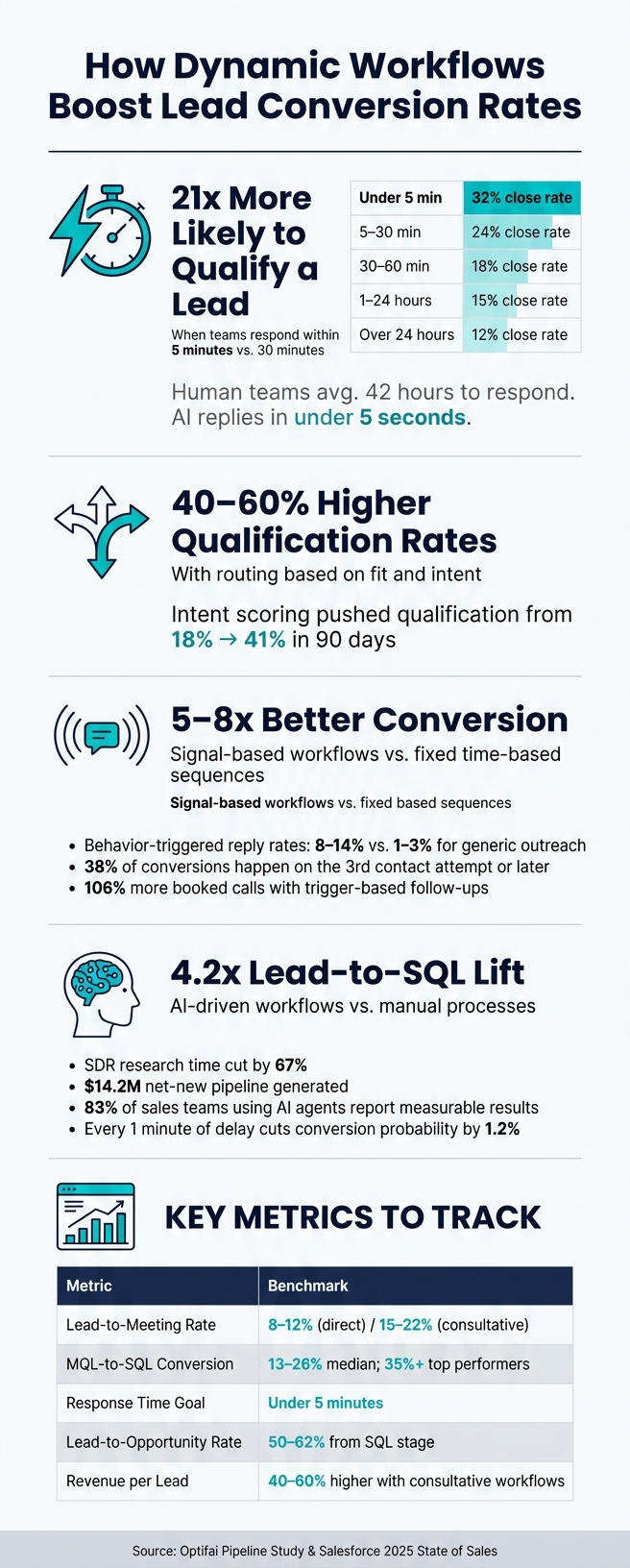
I’d sum up the data like this: teams that respond within 5 minutes can be 21x more likely to qualify a lead than teams that wait 30 minutes. Routing by fit and intent can lift qualification rates by 40% to 60%. And signal-based follow-up can convert 5x to 8x better than fixed sequences.
Here’s the short version:
Speed wins early. Lead interest drops fast after the first touch.
Routing matters after speed. The right rep, at the right time, changes outcomes.
Personal follow-up beats fixed cadences. Behavior-based outreach gets more replies and more booked calls.
AI helps with execution. It can score, enrich, route, and respond in seconds instead of hours.
Measurement matters. I’d track response time, lead-to-meeting rate, MQL-to-SQL conversion, lead-to-opportunity rate, and revenue per lead every week.
What this means is simple: dynamic workflows work because they react to what each lead does, instead of forcing every lead through the same path.
If I were putting this into one sentence, it would be this: the best conversion gains usually come from cutting reply time, improving lead routing, and sending follow-ups triggered by real buying signals.
How Dynamic Workflows Boost Lead Conversion Rates: Key Stats
How to Set Up Automated Workflows That Actually Convert
sbb-itb-a781ab9
What Research Shows About Conversion Gains
Research points to two big levers behind conversion gains: fast response and better routing.
How Response Speed Affects Qualification Results
Response time is still one of the clearest factors behind qualification rates. Companies that reply within 5 minutes are 21x more likely to qualify a lead than teams that wait 30 minutes [6][9]. Stretch that delay to 30–60 minutes, and qualification rates become 21x lower[10].
That drop makes sense. Leads are most likely to respond right after they reach out. Once a prospect slips into an inactive state, getting them back in the conversation becomes 10x harder[7][9].
This is where the gap between human teams and AI stands out. Human teams average 42 hours to respond, while AI can reply in under 5 seconds, including nights and weekends [6][8][9]. That kind of speed matters because interest fades fast.
Fast response, by itself, isn’t the whole story. It works best when the workflow can act on those signals right away.
How Personalization and Routing Affect Sales Results
Speed gets the lead. Routing helps decide if that lead turns into revenue.
Routing based on fit and intent can lift qualification rates by 40–60% [11]. In one case, adding intent scoring tied to return visits and pricing-page views pushed qualification from 18% to 41% in 90 days [11].
Personalization adds one more push. 74% of B2B buyers expect reps to understand their specific business context from the first touchpoint [14]. And when outreach is tied to signals like funding news or pricing-page visits, reply rates land between 8–15%, compared with only 1–3% for generic outreach [14].
Teams that swap demo-request forms for AI discovery conversations are also seeing sharper sales results. They report 3.4x more qualified pipeline from the same traffic volume, and booked demo show-up rates increase by 41%[5].
These results come from specific workflow pieces, which the next section breaks down.
Workflow Components Tied to Better Conversion
Lead Scoring, Enrichment, and Real-Time Routing
The best workflows don’t just send messages. They decide who matters first, fill in the blanks, and get that lead to the right rep fast.
That starts with scoring. AI-driven lead scoring is far more accurate than manual scoring - 40–60% accuracy vs. 15–25% for older methods [3]. That gap matters. If scoring is off, reps waste time on leads that were never likely to close in the first place.
Then comes enrichment. When CRM records are enriched, teams get 44% more sales-qualified leads (SQLs) than they do from unenriched records [3]. Automated enrichment tools can fill in missing details like company revenue and tech stack before a rep even opens the record. That cuts manual research time by 40%[15][16]. Instead of walking into a call half-blind, reps show up with context.
Routing is the last piece, and it can make or break everything that came before it. Real-time routing gets leads to reps in under 2 minutes, which helps keep interest from fading. Manual lead handling often stretches response times to 6–8 hours, and that delay alone causes up to 40% of qualified leads to slip away[15].
Trigger-Based Follow-Ups and Personalized Messages
Once a lead is scored and routed, follow-up speed and relevance start doing the heavy lifting.
Trigger-based workflows send messages based on what a prospect does, not just because a timer says it’s time. If someone visits a page, downloads a guide, or shows some other buying signal, the outreach feels timely instead of random. That’s why behavior-triggered outreach lifts positive reply rates to 8% to 14%, about 2–3x higher than cold outreach [1].
Signal-based workflows push this even further. These workflows branch based on prospect behavior, and they convert 5–8x better than fixed, time-based sequences [2]. The reason is pretty simple: they react to what the prospect is saying through actions and intent. A product question, a competitor mention, or a return visit tells you more than a preset cadence ever will.
Persistence matters too. 38% of conversions happen on the third contact attempt or later, and 19% occur on the fifth attempt or later[12]. So if a workflow gives up after one or two touches, it’s leaving a big chunk of pipeline behind.
Workflow Components, Expected Impact, and KPIs: A Comparison
The table below shows which workflow parts tend to move conversion the most, along with the main KPI to watch for each.
3.4x more qualified pipeline from same traffic [5]
Qualified Pipeline Value
How AI Improves Dynamic Workflow Execution
Where AI Has the Biggest Effect on Conversion
Scoring, enrichment, routing, and follow-up only work if execution is fast and able to adjust. That execution layer is where AI has the most impact. Old-school features">automation sticks to fixed rules: form fill, email A. AI-driven workflows go a step further. They read tone, urgency, and intent, then choose the next move based on what the lead is saying and doing.
One Series D B2B cybersecurity SaaS company used this approach and saw lead-to-SQL conversion jump from 6% to 25% - a 4.2x lift. At the same time, SDR research time fell by 67%, which helped generate $14.2 million in net-new pipeline [17].
Speed matters more than most teams think. Every minute of delay in responding to a lead cuts conversion probability by 1.2% [18]. An Australian B2B SaaS firm trimmed response time from 24 hours to under 2 minutes with an agentic workflow and saw discovery call bookings climb by 35% within 30 days [4].
AI agents also help with personalization at scale. They can pull live data from LinkedIn profiles, company websites, and financial reports to shape outreach around the buyer’s current situation [4]. That’s the difference between a message that feels written for one person and one that feels blasted out to a list. The Salesforce 2025 State of Sales report found that 83% of sales teams using AI agents report measurable results [1].
The edge doesn’t come from stacking more tools. It comes from building a workflow that reacts in the moment.
For agencies running client workflows, this has a direct effect on day-to-day execution. SalesLabel handles sourcing, enrichment, outreach, follow-up, and booking under the agency’s brand. The result is faster workflows, more context in each touchpoint, and less manual work across every client engagement.
How to Measure Workflow Impact
Core Metrics to Track
Once you’ve improved scoring, routing, and follow-up, the next job is simple: show that those changes led to better conversion.
Lead volume by itself won’t tell you much. A pile of leads can look good on a dashboard and still do very little for pipeline. What matters is whether the workflow turns speed into more meetings, more opportunities, and more revenue per lead.
Use the KPIs below to judge whether scoring, enrichment, routing, and triggers are moving the needle.
One metric teams often miss is SAL margin - revenue minus channel and labor costs, divided by SAL count. That gives you quality and cost efficiency in one number, which is far more useful than raw lead count [20].
Track these numbers weekly, not monthly. If MQL-to-SQL conversion drops by 5 points in week one, that can snowball into a 20% pipeline shortfall by the end of the quarter if no one steps in [19].
How to Tell Correlation from Causation
A lift in conversion after launch looks good, but it doesn’t automatically mean the workflow caused it.
Other factors can move the same numbers at the same time. Seasonality can change buyer behavior. Market timing can shift demand. Sales team changes can help or hurt follow-up. So if conversion goes up, you need a clean way to separate “good timing” from “this workflow worked.”
That’s where A/B tests and holdout cohorts come in. Compare dynamic workflows against the static process [21]. Without that side-by-side view, you’re looking at correlation, not proof.
Attribution tagging helps as well. Your dashboards should connect each conversion to the exact workflow or agent that influenced it [21]. Then pair that with closed-lost reason analysis by reviewing deal loss codes each month. That makes it easier to tell whether the shift came from the workflow or from outside pressure, like competitor activity or market timing [19].
One more reality check: top-of-funnel gains don’t flow straight into revenue. SDR capacity and scheduling friction chip away at that lift before it shows up in closed business.
Conclusion: What the Research Means for Agencies
The research points to three main conversion levers: fix response speed first, then routing, then follow-up. Dynamic workflows improve conversion when they reduce response time, send leads to the right person, and tailor follow-up based on intent. And when outreach takes a consultative approach, deal values tend to land 40% to 60% higher than direct meeting-request workflows [2].
That said, good execution by itself doesn’t prove much. A lift in conversion only matters if an agency can show why it happened. The clean way to do that is to run controlled pilots, track lead-to-opportunity conversion, and tie results back to specific workflow actions.
For agencies, the practical move is a white-label workflow that handles those steps in one place. SalesLabel gives agencies a way to run that system under their own brand, with sourcing, enrichment, outreach, follow-up, scoring, and booking in a single platform.
FAQs
What makes a workflow dynamic?
A workflow is dynamic when it changes in real time based on prospect and system signals instead of sticking to a fixed sequence.
It shifts based on behavior, like objections, product questions, or silence. It also uses conditions such as intent, availability, and workload to decide the next best action or route. That way, prospects don't all get the exact same treatment, and handoffs change on their own without manual work.
Which KPI should I improve first?
Prioritize your visitor-to-lead conversion rate first.
Why start there? Because this top-of-funnel KPI can have a multiplier effect across your entire sales process. When more of your visitors turn into leads, you can often drive more growth without increasing traffic acquisition costs.
SalesLabel helps on that front by automating lead sourcing, enrichment, personalized outreach, qualification, and real-time lead scoring. The goal is simple: turn high-intent visitors into qualified opportunities.
How can I prove the workflow caused the lift?
Track conversion metrics at each stage - meeting bookings, opportunity conversion, and deal close time - and compare them against your historical baseline.
Then use behavior-triggered analytics to tie specific actions, like downloading a resource or visiting a pricing page, to higher conversion rates. When you isolate those variables, it becomes much easier to see the workflow’s direct impact.