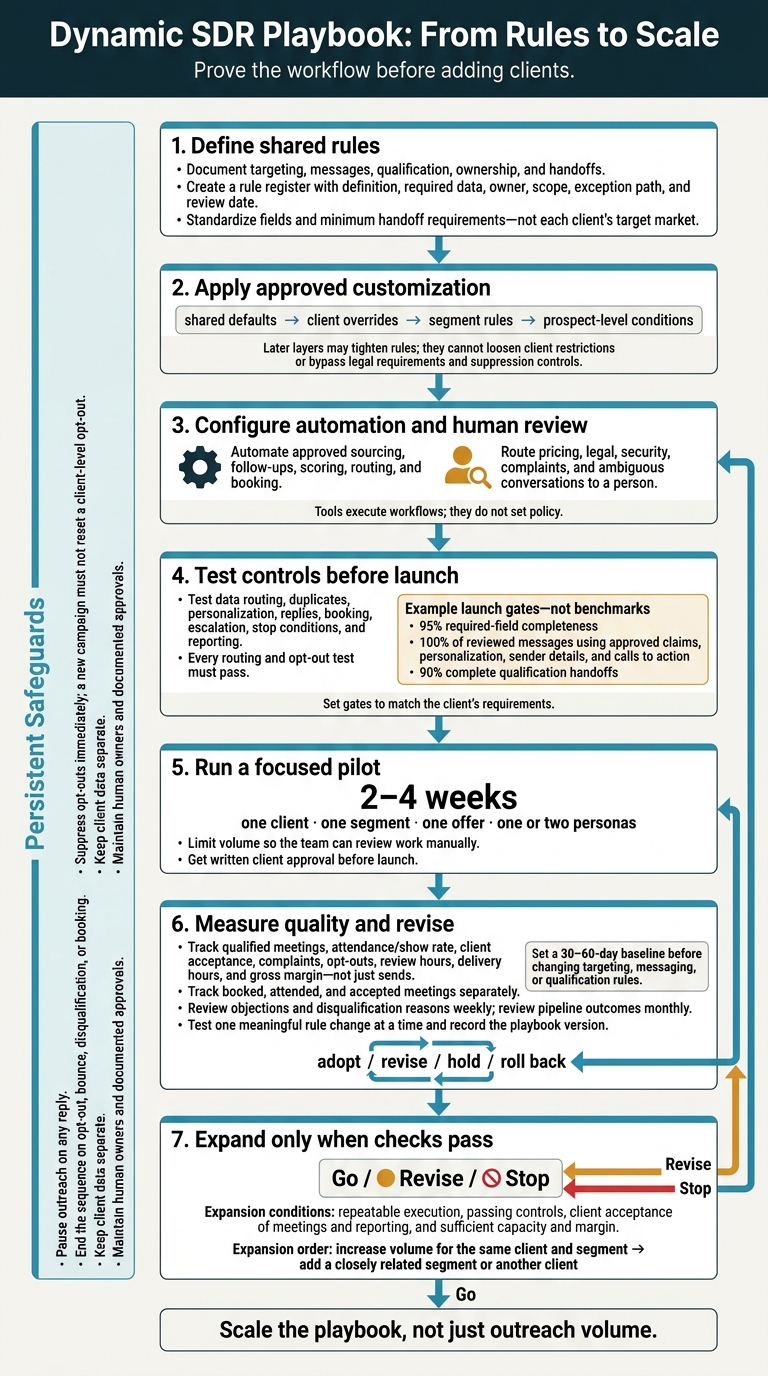
Build rule-based SDR playbooks: pilot one client, automate safely, track qualified meetings, and enforce compliance.
SalesLabel Team
Growth Expert • 12.10.2026
Share:
Cauți o soluție gata de utilizare?
SalesLabel automatizează prospectarea de la un capăt la altul — AI găseşte prospecți, trimite mesaje personalizate şi rezervă întâlniri sub brandul tău.
I’d start with one client, one segment, and a 2–4-week pilot - not more outreach. A dynamic SDR playbook gives your team shared rules for targeting, messages, qualification, and handoffs, with client-specific settings.
Here’s the approach I’d use:
Set the rules first: Define lead stages, owners, approved claims, and meeting requirements.
Automate routine work: Use SalesLabel or another tool for sourcing, follow-ups, and booking. Keep people responsible for unclear replies, pricing, and sensitive questions.
Make stops nonnegotiable: Pause sequences on replies, suppress opt-outs immediately, and keep client data separate.
Check quality before growth: Track qualified meetings, attendance, client acceptance, review hours, and margin - not just sends.
Change one rule at a time: Compare results, document decisions, and expand only when checks pass.
My starting point: <u>prove the workflow before adding clients</u>. More booked meetings won’t fix poor fit or missed handoffs.
Dynamic SDR Playbook: From Rules to Scale
AI For SDR Teams Masterclass: Proven Processes & Tactics
sbb-itb-a781ab9
What Is a Dynamic SDR Playbook?
A dynamic SDR playbook is a documented set of rules for workflows, messages, ownership, and routing. These rules vary by client, segment, verified signal, and campaign result. Agencies reuse them to keep execution consistent across accounts.
features">Automation follows approved branches. Managers change the rules only after reviewing evidence. That review covers qualification thresholds, positioning, signal weighting, and objection-handling messages. “Dynamic” means controlled adjustments - not rewriting the strategy.
Automation can route pricing questions to an account executive or stop follow-ups when a meeting is booked.
Static vs. Dynamic Playbooks
Area
Static playbook
Dynamic playbook
Personalization
Uses fixed templates with limited variable fields
Selects approved messages based on role, industry, pain point, and verified activity
Qualification
Applies one consistent checklist
Adjusts routing or qualification steps based on client and segment rules
Client variations
Requires separate manual instructions or duplicated sequences
Uses shared standards with client-specific branches
Maintenance
Easy to launch but can become outdated
Requires monitoring, documentation, and controlled rule revisions
Testing
Compares complete templates or campaigns
Tests individual rules, messages, timing, segments, and routing decisions
Static playbooks suit stable, single-segment campaigns. Dynamic rules suit campaigns where clients, roles, objections, or signals change often. You don’t need complex software: a dynamic workflow can run on simple if/then automation.
Signals That Guide the Next Step
Account fit determines eligibility; buyer role shapes the message. Confirmed company size, industry, location, and technology stack can guide qualification and scoring.
A finance executive and a technical evaluator may need different proof points and calls to action.
Replies guide timing and routing. Positive interest moves the conversation toward meeting booking. Referrals send it to the named colleague, while timing objections support permission-based follow-up. Meeting outcomes should also update the stage: a no-show belongs in a rescheduling workflow, not the original outreach sequence.
Separate verified facts from inferred intent. A stated need or explicit reply supports stronger decisions than interest assumed from browsing. Keep fit and engagement separate - activity alone doesn’t qualify an unsuitable account. Don’t trigger SDR decisions from email opens alone; privacy tools can inflate open rates.[2][3][4]
Document each branch’s trigger, evidence level, action, owner, timing, and stop rule. Send unclear replies to a person rather than forcing them into a confident classification.
Build the Shared Agency Playbook
Once signals point to the next step, turn those decisions into shared rules every account follows.
Before adding automation, create a shared rule register. Record each rule’s definition, required data, owner, scope, exception path, and review date. Keep data definitions and minimum handoff requirements consistent across the agency. Set client-specific rules for targeting criteria, offers, and meeting requirements.
Define Ideal Customer Profiles and Buyer Personas
Use a shared ICP structure across clients. Build each client’s criteria from closed-won, closed-lost, and highest-retention accounts. Separate required, preferred, and disqualifying attributes across industry, employee count, revenue range, geography, technology environment, and business triggers.
Standardize the fields, not the target market. Define each field’s meaning, allowed values, source, and how current its data must be. Keep employee count and revenue as separate fields. Include assigned client, lead owner, source, last activity date, and opt-out status.
Create reusable persona cards for buying roles. Record title variations, priorities, success measures, objections, decision authority, budget influence, and key stakeholders. Link each card to approved proof and discovery questions so SDRs can personalize outreach without making unsupported assumptions.
Keep the field structure the same across clients; change only the client-specific values.
Set Qualification, Lead Stages, and Handoff Rules
Use the shared data model to move leads through the same stages across accounts. For each stage, define its owner, entry criteria, required fields, allowed actions, and exit criteria. Use these stages as the agency standard: New, Researched, Contacted, Engaged, Qualified, Booked meeting, Accepted, Nurture, and Disqualified.
The qualification scorecard should capture problem, impact, authority, timing, and next step. Set client-specific thresholds for when those requirements are met. Require a review date for Nurture and a reason code for Disqualified.
Before handoff, require:
Prospect role, company, and source.
Stated problem, trigger, desired outcome, and objections.
Attendees, meeting time, time zone, and receiving owner.
Agree on a response deadline. Require specific rejection reasons, not vague feedback.
Define Messages, Channels, and Cadences
Build reusable, approved modules across clients for first touches, follow-ups, objection responses, referral requests, meeting confirmations, and reminders.
Each module needs a purpose, target persona, proof source, permitted claims, brand voice, channel, sender, and approval owner. Document send windows in the prospect’s local time zone, along with holiday exceptions and channel restrictions. Set escalation paths for unresolved questions.
Pause outreach on any reply. End the sequence on opt-out, bounce, disqualification, or booking.
Customize Playbooks for Clients and Prospects
Apply the shared framework in this order: shared defaults → client overrides → segment rules → prospect-level conditions. Each later layer can tighten earlier rules, but it cannot loosen client restrictions or bypass legal requirements and suppression controls. Keep one reusable playbook with approved settings.
Set Client and Segment Rules
Document every default rule and client override with the rule, override, reason, approver, effective date, and review date. Include brand voice, proof points, territories, personas, lead sources, routing owners, and success criteria. Flag any changes to qualification thresholds, calls to action, and contact-frequency limits.
Give segments their own message angle, qualification questions, cadence, and meeting owner only when those details differ. Before launch, get client approval for targeting and representative messages. Save the approved version so later edits don’t silently change what the client authorized.
Personalize Messages for Each Prospect
Build the opening, relevant problem, call to action, and qualification question around verified business facts. For each fact, store its source, verification date, confidence, and approved use. Connect it to a specific business problem, then offer a simple next step. AI-generated messages must stay within the client’s approved claims and voice.
When data is missing, follow this sequence: verified prospect fact → account fact → role-and-industry-based message → neutral value proposition. Record why you used the fallback. Match timing to explicit requests: if someone asks you to reconnect next quarter, place them in dated Nurture rather than leaving them in the unchanged follow-up sequence.
Define Signal-Based Actions and Stop Rules
Keep the branching logic the same across clients, but use each client’s rules to determine the action:
Signal
Automated action
Human review
Record update
Positive reply
Move to human review and create an owner task
Confirm fit and the requested next step
Set Engaged; log reply
Objection or information request
Draft an approved response
Clarify timing, price, or fit before sending
Keep Engaged, or set Nurture with a review date; tag objection
Check suppression accuracy without delaying the stop
Record opt-out status, timestamp, channel, and scope
Booked meeting
Trigger confirmation and handoff
Check the agenda and receiving owner
Set Meeting Booked; log booking details
Specify whether each stop covers one channel, one campaign, or all marketing for that client. A new campaign must not reset a client-level opt-out. Treat invalid contact information, job changes, client exclusions, and complaints about relevance as reasons to stop or review outreach.
The FTC allows up to 10 business days to honor commercial-email opt-outs; the playbook should suppress them immediately.[1][5] Automation must apply these rules consistently across clients and prospects, using the defined branches for sourcing, outreach, replies, and handoff.
Once the playbook rules are approved, use SalesLabel to put them into action at scale.
SalesLabel runs approved sourcing, outreach, scoring, and booking workflows under the agency’s brand.[7][9][11]These tools execute workflows; they don’t set policy. Check which requirements the platform supports directly and which need an integration or manual step. Run the workflow in SalesLabel, but keep rule changes in the playbook.
Lead Sourcing, Enrichment, and Scoring
Match sourcing filters to each client’s approved ICP. Check enriched records for required fields, up-to-date information, duplicates, and permitted use.
Use fit to decide where leads go and engagement to decide when to act. Validate scores against reviewed leads before using them for routing.
Outreach, AI Replies, and Meeting Booking
Use personalized outreach and follow-ups to run approved cadences, and route replies for review. Keep AI replies within approved claims.
Before automating handoffs, test stop rules, suppression across enabled channels, CRM synchronization, qualification gates, calendar permissions, territory routing, time zones, and duplicate-booking checks.
Require human review for pricing, legal, security, complaints, and ambiguous conversations.
White-Label Delivery and Agency Accountability
Set up the client’s custom domain, logo, colors, and branded dashboard.[10] Check that client data stays separate, access permissions are correct, and audit trails are in place. Assign a workspace owner to review client delivery.
Use this matrix as the launch checklist.
Function
Launch check
Lead sourcing and enrichment
Confirm client exclusions are applied
Scoring
Verify weights, update frequency, and client-specific thresholds
Outreach and AI replies
Confirm sending limits and escalation owners
Meeting booking
Check initial bookings for complete handoff details
White-label delivery
Require workspace-owner approval of client reports
Before quoting clients, confirm current pricing, usage limits, integration support, and add-on charges. Include monitoring, review, and reporting work in the agency’s service price.[8][10]
Measure Results and Revise the Playbook
Measure business outcomes, not just outreach volume. Set a 30–60-day baseline before changing targeting, messaging, or qualification rules. Before comparing results, agree with each client on metric definitions, attribution windows, and revenue reporting. Track results by playbook version so each rule change has a clear before-and-after comparison.
Track Funnel Metrics and Report to Clients
Report counts alongside rates. Booked means scheduled; qualified means the meeting meets agreed criteria; attended means the prospect showed up. Use a shared reporting schema that includes client, persona, campaign, lead source, channel, and playbook version. Report monthly with rolling comparisons, and label recent cohorts as incomplete.
Metric
Shared definition
Measurement window
Positive replies
Replies showing interest, a relevant need, or next-step intent ÷ delivered outbound messages
Weekly, with a rolling 30-day view
Qualified meetings
Meetings that meet agreed qualification criteria ÷ delivered contacts
Weekly, with immediate escalation for unusual increases
Find the first failing stage in the funnel, then change only the rule tied to that stage.
Review Results and Test Rule Changes
Invalid records suggest a data problem. Frequent “wrong role” outcomes point to targeting problems. If contacts are relevant but positive replies are weak, look at messaging. If qualified meetings lead to low client acceptance, check the handoff.
Review objections and disqualification reasons weekly with the SDR owner. Review pipeline outcomes monthly with the client’s sales contact.
Test one meaningful rule change at a time using comparable contacts. Record the hypothesis, version, dates, sample size, owner, primary metric, and stopping rule. Keep the audience, channel, cadence, and qualification standards stable. Treat small samples as directional only - not proof.
Roll back changes that increase replies but reduce qualification or client acceptance, or increase complaints. Log every decision as adopt, revise, hold, or roll back.
Track Capacity, Costs, and Margins
Performance is only part of the picture. Track profit, too:
Cost per qualified meeting = direct delivery costs ÷ qualified meetings
Include software, data, sending, labor, and client-specific delivery work in direct delivery costs. Report general overhead separately. Never use booked meetings instead of qualified meetings in the cost denominator.
Track human review hours by task, along with reply classification and escalations per client. Use workload data to set capacity limits, and pause new accounts before review backlogs put quality at risk.
Set Quality Controls and U.S. Outreach Compliance
Once routing and stop rules are set, put controls in place to keep outreach compliant and client data separate.
Make compliance a launch gate. Give each control an owner, a backup, and a review schedule. Do not launch until approvals and tests are documented. Next, define the legal rules and day-to-day safeguards.
Follow Outreach Laws and Honor Opt-Outs
CAN-SPAM applies to B2B email, too.[1][12] Require accurate sender and header information, truthful subject lines, an advertisement or solicitation label when required, a valid physical postal address, and clear opt-out instructions.[1][5] Keep the opt-out method working for at least 30 days after sending, and honor requests within 10 business days.[1][5] Unsubscribing must not require a login, payment, or unnecessary information.[1][6]
Opt-outs must cover all marketing email from the sender. Use a centralized suppression list that retains opt-out records across the agency’s sending domains and approved platforms. Keep its scope client-specific and client records isolated. Apply opt-outs immediately and check suppression before every send. Reimporting a suppressed contact requires documented, affirmative permission and a compliance review.[1][6]
Before launch, have qualified counsel review each campaign’s jurisdiction and channel. Applicable state privacy laws may affect access, deletion, sensitive data, profiling, and retention.[13][14][15] Calling and texting require separate consent and do-not-call reviews; email rules do not cover them. Also check platform terms of use for automation and scraping.
Control Data Access and Document Reviews
Give designated owners authority to pause outreach immediately, without further approval. Restart only after remediation, record review, a test send, and documented approval.
Review bounces, complaints, opt-outs, sync failures, escalations, and anomalies daily. Sample messages weekly or per batch. Review access, retention, and open incidents monthly.
Use these controls as launch checks and recurring audit items.
Requirement
Owner
Playbook control
Evidence
Client data separation
Agency operations lead
Keep each client’s workspaces, data, credentials, and suppression lists isolated
Access configuration and sample record audit
Permissions
Security or platform administrator
Apply role-based access, least privilege, MFA, and quarterly access reviews
Permission export and review log
Retention
Client account owner with legal or privacy reviewer
Set retention periods by data type for each client; delete or anonymize expired records
Retention schedule and deletion log
Approved claims
Client marketing owner
Maintain a client-specific approved-claims library and block unsupported claims
Versioned claim register and approval record
Sensitive replies
SDR manager
Route legal, security, pricing, complaint, medical, financial, or discriminatory replies to a human; pause automated responses
Escalation ticket and response review
Suppression lists
Deliverability owner
Verify agency-wide and client-level suppression syncs; block reimport without documented permission and compliance review
Sync report and suppression audit
Campaign pause triggers
Campaign owner
Performance: Pause when bounce, complaint, unsubscribe, negative-reply, hallucination, or compliance-error rates are elevated. Control failures: Pause for missing required email disclosures, failed suppression syncs, wrong client identity, unsupported claims, cross-client exposure, platform-policy warnings, or sensitive replies that cannot be classified
Alert history and pause record
Roll Out the Playbook in Stages
Once you’ve defined the playbook rules, test them in a controlled pilot.
Audit Workflows and Document Shared Rules
Have revenue ops map the workflow from start to finish so the agency can apply the same rules across clients. Document who owns each step, what data it needs, when it happens, and where it can fail.
Use recent historical data, when available, to set a baseline for conversion rates, response times, meeting quality, show rates, sales acceptance, opt-outs, complaints, and delivery hours per client. Standardize the rule register and keep it under version control.
Assign owners for lifecycle rules, messaging, data quality, compliance, client approvals, and final conflict resolution. Before configuration begins, document the workflow, owners, field dictionary, compliance checklist, and baseline scorecard. Track booked, attended, and accepted meetings separately in that scorecard.
Configure One Client and Run a Small Pilot
Once owners and controls are in place, start with one client.
Choose a client with a clear offer, ICP, sales process, and approver. Keep the initial 2–4-week pilot focused: one client, one segment, one offer, and one or two personas. Limit volume so the team can review work manually. Test the rule set before scaling it.
Get written approval for target accounts, personas, claims, qualification, handoff rules, meeting types, routing, cadence, channels, suppression, review dates, and success thresholds.
If you use SalesLabel, configure the client’s lead sourcing, enrichment, personalized outreach, follow-ups, AI replies, lead scoring, inbox management, and meeting booking under the agency’s branding. Keep human approval owners in place.
Before launch, have the SDR manager run test records through data routing, duplicate handling, personalization, replies, booking, escalation, stop conditions, and reporting. The compliance reviewer should check suppression tests and opt-out handling.
Set written launch gates in advance:
Example launch gates: 95% required-field completeness, 100% of reviewed messages using approved claims, personalization, sender details, and calls to action, and 90% complete qualification handoffs.
Every routing and opt-out test must pass. Set the gates to match the client’s requirements. These are launch thresholds, not benchmarks.
Check Quality Before Adding Clients
After the pilot, decide whether to expand, revise, or stop.
Hold a go/revise/stop review with operations, the SDR manager, compliance, and the client sponsor. Compare qualified meetings, show rate, sales-acceptance rate, complaints, opt-outs, time per lead, delivery hours per client, and gross margin against the baseline and written targets.
Expand only when execution is repeatable, controls pass, and the client accepts the meetings and reporting. Fix required issues and rerun quality checks. Then increase volume for the same client and segment before adding a closely related segment or another client.
Conclusion: Set Rules Before Scaling Outreach
Dynamic playbooks cut manual SDR work by turning decisions into repeatable rules. Scale the playbook, not just outreach volume. Once the pilot proves the workflow, scale only the rules that pass review. Keep human owners, stop rules, compliance checks, and data separation in place.
Change one rule at a time and review the results weekly. Record what changed, why it changed, and when you’ll check the outcome. Measure progress through meeting quality, client feedback, capacity, and margin - not message count.
If you run the playbook with SalesLabel, test it against the same controls: approval rules, override paths, suppression controls, and client data separation. Expand only when you can explain why an action happened, who owns it, and how to stop or fix it.
FAQs
How do I migrate existing campaigns to a dynamic playbook?
Migrate gradually. Map your campaign lifecycle, from audiences to outreach and follow-ups. Identify repetitive, rules-based tasks. Then test one high-value workflow alongside your manual process for 4 to 6 weeks to establish a performance baseline.
Once the pilot succeeds, document the workflow as your default operating model. Clone it across client workspaces, then roll it out to additional accounts over time. Keep human review checkpoints in place for quality control.
What if my pilot produces too few meetings to evaluate?
Don’t push for volume at the expense of your domain reputation. Check your setup instead: thorough onboarding, a clear ideal customer profile and offer, clean data, and sound targeting logic all shape how well your AI SDR performs.
During the pilot, track reply rates and lead quality, not just the number of meetings booked. Compare those results with your pre-automation baseline to see where the workflow needs adjustment.
How do I resolve conflicting client and agency rules?
Before launching a campaign, agree on clear boundaries and document what counts as a qualified lead with the client. Use a standard operating procedure to record each client’s requirements while keeping your agency’s core workflow consistent. If conflicts arise, review those agreements quarterly.
SalesLabel helps you keep accounts separate with isolated client workspaces. Each workspace lets you manage its own routing rules, tone libraries, and compliance settings - all under your agency’s branding.