CCPA checklist for lead-gen agencies: map lead lifecycles, assign roles, manage opt-outs/requests, secure vendors, and test controls.
SalesLabel Team
Growth Expert • 14.10.2026
Share:
Cauți o soluție gata de utilizare?
SalesLabel automatizează prospectarea de la un capăt la altul — AI găseşte prospecți, trimite mesaje personalizate şi rezervă întâlniri sub brandul tău.
CCPA compliance starts before you import a lead list - not after someone asks you to delete their data. I start by checking the agency and client separately: coverage thresholds include annual revenue above $26.625 million, qualifying activity involving 100,000 California consumers or households, or at least 50% of revenue from selling or sharing their personal information.
California’s B2B exemption ended January 1, 2023. That means a work email can still be personal information.
In this guide, I cover how to:
Map the full lead lifecycle, from sourcing and enrichment to outreach, storage, and deletion.
Assign agency, client, and vendor roles, then match contracts and notices to actual data use.
Handle privacy requests, sale and sharing opt-outs, GPC signals, and suppression across connected tools.
Check security, retention, staff training, and SalesLabel workflows.
Assess the 2026 rules, data-broker duties, and later deadlines that apply to your business.
My starting rule: <u>test your controls before launching campaigns</u>. A privacy policy alone won’t stop a deleted lead from returning through your next upload.
This guide provides general information, not legal advice.
CCPA Compliance Launch Checklist for Lead-Gen Agencies
When the CCPA Applies
Business Thresholds and California B2B Data
The B2B exemption ended January 1, 2023. Lead-gen agencies need to check coverage before every list import, enrichment step, and outreach workflow. Work emails, direct dials, job titles, outreach history, and inferred buying intent can qualify as personal information when linked to a person. Company-level data does not qualify unless it identifies someone.
An agency or client can fall under the CCPA without having a California office. Assess each legal entity separately, then review affiliated-business rules for common control, shared branding, and shared personal information. [8] Once you confirm coverage, map every lead field and workflow to the data lifecycle.
For each entity, record the three statutory thresholds, attach revenue and volume records, and document the coverage decision and California connection. Holding 100,000 records alone does not meet the transaction threshold. Count qualifying annual activity, not database rows. Aggregate affiliates only when the rules require it. [7][8]
Business, Service Provider, Contractor, and Third-Party Roles
Assign roles by workflow, not by contract heading. Document who controls sourcing, enrichment, scoring, outreach, suppression, retention, and reuse. Client instructions alone do not establish service-provider status: the processing must match a qualifying written agreement.
Reusing client data independently, combining unrelated datasets, or licensing records can change the role analysis. An agency below the business thresholds still must meet applicable service-provider or contractor duties when processing data for a covered client. [8]
Role
Permitted-use focus
Contract requirements
Consumer-request duties
Business
Controls the purposes and means of sourcing, enrichment, outreach, and reuse.
Must use required agreements for vendor processing and data transfers.
Coordinates verification, fulfillment, and responses within statutory deadlines.
Service provider
Processes personal information for the business’s specified purposes under a qualifying written agreement.
Terms must restrict sale, sharing, retention, use, disclosure, and combining data, and require compliance assistance.
Helps the business with searches, deletion, correction, and suppression.
Contractor
Receives personal information for specified services under statutory restrictions.
Terms must include required use restrictions and certification that the contractor understands and will comply.
Helps the contracting business fulfill requests as required by law and agreement.
Third party
Receives data outside the service-provider or contractor framework, potentially for independent reuse.
Transfers require applicable disclosures and contractual controls.
Handles applicable requests based on its own business status and data practices.
Role labels must match the actual workflow. Next, map the data itself.
CCPA Rules and Deadlines as of October 14, 2026
California’s updated regulations took effect January 1, 2026, with phased deadlines. Businesses subject to risk-assessment requirements begin compliance in 2026; their first submissions are due April 1, 2028.
ADMT-specific requirements begin January 1, 2027. Lead scoring counts only if it determines or materially affects a significant decision. Businesses subject to cybersecurity audits with revenue above $100 million must submit their first certifications by April 1, 2028. Lower-revenue businesses have later phased deadlines. These requirements are conditional - not deadlines for every agency.[7][8][9][13]
Separately, assess data-broker status if the agency collects and sells personal information about consumers with whom it has no direct relationship. Lead generation alone does not make an agency a data broker. Qualifying brokers must register annually.
Starting August 1, 2026, qualifying brokers must check DROP at least every 45 days and process eligible deletion requests through it, subject to statutory exceptions. Assign an owner for registration, deletion matching, suppression, and processing logs. [10][11][12] These triggers determine which outreach controls, notices, and request processes must be in place.
sbb-itb-a781ab9
Exploring US Privacy CCPA Updates
Map Data Through the Lead Lifecycle
Once roles are set, trace how each record moves through the campaign stack. Map each processing activity, not just each database.For agencies, that means following every field from first touch to deletion. Record inputs, outputs, recipients, and deletion triggers. Include exports, connected inboxes, AI tools, and backups - not just the CRM. [9][18]
Contact Data, Identifiers, and Inferences
Forms, directories, social platforms, public records, clients, vendors, CRMs, enrichment tools, email, and calendars can all supply data for the inventory. Derived data counts too: CRM IDs, engagement history, predicted interests, and lead scores may be personal information when linked to a person or household. Note whether each field was supplied, obtained from a vendor, or inferred by the agency. [19]
Publicly accessible does not automatically mean “publicly available.” The statutory exclusion covers qualifying government records, data the business reasonably believes was lawfully made public, and other defined sources. Restricted profiles and vendor databases do not automatically qualify. Document the source, access limits, collection method, collection date, and basis for the exclusion. An excluded public field does not automatically exempt a profile built around it. [9][15]
Use the inventory structure below. Set retention triggers based on purpose, not statutory retention periods, and document each campaign’s schedule.
Data category
Source
Purpose
System
Recipient
Processing role
Retention trigger
Deletion method
Name, work email, job title
Form, client CRM, directory
Collect and identify prospects
CRM
Agency, client
Agency or client, depending on the workflow
Until the campaign purpose ends, unless a documented need remains
Remove from production systems and exports; route deletion downstream
Email, validation result, appended attributes
Validation and enrichment vendors
Validate, deduplicate, enrich
Enrichment tool, CRM
Agency and authorized vendors
Service provider or contractor, depending on actual use
Only as long as necessary for the stated campaign
Delete cached results, vendor copies, and unnecessary suppression references
Segment, inferred interest, lead score
Agency rules, AI analysis
Segment and prioritize follow-up
Scoring tool, CRM
Agency and client
Agency or client, depending on who sets the scoring purpose
Campaign period plus a documented review period
Delete the derived profile and exported scores
Messages, replies, meeting details
Email and calendar
Conduct outreach and book meetings
Inbox, calendar, client CRM
Agency, client, and connected providers
Agency or client, with vendor support
Retain only for operational, contractual, or legal purposes
Remove messages, notes, and connected copies
Qualified-lead details
Campaign records
Deliver leads to client
Client portal, CRM
Client
Business or service provider/contractor, depending on the transfer
Only as needed to honor the request and document compliance
Keep a minimal suppression record; delete unnecessary profile fields
After mapping the data flow, check each transfer for sale, sharing, and sensitive-data issues.
Sales, Sharing, and Sensitive Personal Information
Assess every outbound transfer separately. A sale involves monetary or other valuable consideration. Sharing concerns cross-context behavioral advertising, even without payment. Service-provider or contractor processing falls outside sale and sharing only when actual use and contracts support that treatment. Hashed identifiers are not automatically exempt if they can still be linked to a consumer. Review SalesLabel workflows for vendor terms and deletion behavior. [4][14][16][17]
Flag sensitive personal information in free-text forms, replies, enrichment fields, and meeting notes. Relevant categories include government identifiers, account-access credentials, precise geolocation, racial or ethnic origin, health information, and certain communications. Ordinary contact details and generic scores are not sensitive by default. [14][17]
Avoid unnecessary collection and unrelated profiling of sensitive data. Assess the right to limit use or disclosure when either goes beyond legally permitted purposes. Keep only the minimum suppression record needed to prevent recontact. Delete unnecessary contact details, scores, and connected copies according to documented retention schedules. [14][17]
Use the inventory to guide notices, request handling, and suppression across every system.
Privacy Notices and Consumer Rights
Use the data map from the prior section to connect each collection, disclosure, and suppression step to a notice and request workflow.
Privacy Policies and Notices at Collection
The client business owns the notices; the agency puts them in place. Display the Notice at Collection before collecting data on agency sites, client landing pages, and forms. Agency-hosted forms must identify the client and explain the agency’s role.
The notice should state which categories of personal information are collected, including sensitive data; why they’re collected; whether they’re sold or shared; and retention periods or criteria. Include links to the privacy policy and opt-out notice. The privacy policy should explain information practices, consumer rights, request methods, categories and sources collected in the past 12 months, recipient categories, and purposes for disclosure, sale, or sharing. Review notices and policies at least annually - and whenever the campaign, source, vendor, purpose, or disclosure changes.[20][21]
Before using purchased lists or enrichment data, document the source, purpose, disclosures, retention, and notice path. For indirect collection, carefully assess exceptions tied to the collection context. Don’t assume a form-based notice covers every use. Moving data from a stated recruiting or sales context into unrelated enrichment or outreach may require a new notice or updated disclosure. Outreach workflows also need a practical way to submit privacy requests and opt-outs. An email unsubscribe alone isn’t enough.[21]
Rights to Know, Delete, Correct, Opt Out, and Limit
When required, provide a clear “Do Not Sell or Share My Personal Information” mechanism and honor Global Privacy Control (GPC) signals without asking consumers to take further action. Offer a sensitive-information limitation mechanism when applicable.[9][21][26][27]
Keep email unsubscribe and privacy-request statuses separate. Unsubscribing stops promotional email. It does not automatically delete CRM records, stop enrichment, prevent data sharing, or fulfill a formal know, delete, correct, opt-out, or limitation request. Read replies and message context for broader requests rather than relying only on the link someone clicked.[9][21][26][27]
Once notices are in place, route every request to the right owner and track its deadline.
Right
Intake channels
Verification
Responsible party
Deadline
Downstream action
Know/access
Privacy form, email, toll-free number, authenticated portal, or authorized agent
Proportionate to the sensitivity of the requested data
Client business responds; agency searches contracted systems
Same deadline applicable to the underlying right[21]
Record authorization and apply the result across systems
Acknowledge requests to know, delete, and correct within 10 business days. When reasonably necessary, the business may extend the response period by another 45 calendar days, provided it notifies the consumer during the initial period.[9][21][24][25]
Request Verification, Deadlines, and Minors
Verify without creating unnecessary barriers. For know, delete, and correct requests, match existing identifiers and ask only for information reasonably needed. Avoid collecting new sensitive information solely to verify identity. If verification fails, explain what’s missing and offer a reasonable way to retry. Opt-out and limitation requests must not depend on identity verification.[9][21][25]
Timestamp each request, promptly route it to the responsible business, and track business-day deadlines separately from calendar-day deadlines. An agency handoff must not delay acknowledgment or fulfillment.[9][21][25]
Sales and sharing of minors’ data need separate authorization controls. Minors require affirmative authorization before sale or sharing. Consumers ages 13–15 must authorize sale or sharing themselves; children under 13 require parent or guardian authorization. Keep this authorization separate from general consent, and record its date and source. If required authorization is missing or withdrawn, suppress sale or sharing.[3][23][25]
Privacy Controls for Automated Outreach
Once you’ve defined rights and request handling, build those rules into every automated workflow.
Purpose Limits, Data Minimization, and Suppression
Create a processing-purpose register for each campaign. Record the source, purpose, lawful purpose, systems, sale/sharing status, and retention period. Enrich only the fields you need, block uses outside the disclosed purpose, and set expiration rules by data type and campaign status.[9][29]
Before launch, assign an owner to each control and keep evidence that it works.
Stage
Required campaign check
Sourcing
Record the provider, collection method, date obtained, California coverage, source terms, and permitted agency and client uses.
Collection
Record the notice shown, categories collected, purpose, and any sensitive data.
Enrichment
Approve only needed fields; record the provider, purpose, source, accuracy checks, and reuse.
Outreach
Confirm channel rules, approved message purposes, and active opt-out methods.
Suppression
Apply unsubscribe, do-not-contact, deletion, and client-specific exclusions before uploads, enrichment, sequence activation, and sends.
Access
Restrict permissions by role; keep a searchable way to locate records across connected systems and exports.
Retention
Set campaign-specific expiration dates for each lead stage.
Deletion
Delete or de-identify records you no longer need, keep only justified minimum suppression data, and document completed client and vendor deletions.
Enforce suppression across connected systems at every stage listed above, and block reimports. Test that automation follows the rules:
Use a seed contact to send an opt-out, then check queued messages, AI replies, exports, and later uploads.
CCPA compliance alone does not permit outreach. Its controls govern data use. Outreach must also meet TCPA, state telemarketing, platform, and contract rules. Under CAN-SPAM, commercial email needs accurate headers and subject lines, advertisement identification, a valid physical postal address, and an opt-out mechanism available for at least 30 days. Honor opt-outs within 10 business days.[9][28][30]
After setting purpose limits, secure the systems that process the data.
Security Controls and Vendor Checks
Use least-privilege access, individual accounts, strong authentication, encryption, protected API keys, and activity logs. Separate client access, restrict bulk exports, and document secure deletion and incident-response procedures.
Check vendor claims against evidence before onboarding and after material changes. Test how deletion and exports work. Contracts should restrict processing and require confidentiality, security, incident cooperation, and help with consumer requests.[9]
Apply these controls inside agency automation tools, too.
In SalesLabel, map sourcing, enrichment, personalized outreach, follow-ups, AI-generated replies, real-time scoring, inbox management, and meeting booking to approved purposes. Then verify the data received, sources used, retention, subprocessors, and reuse.
Limit AI inputs to approved fields. Avoid sensitive inferences unless justified and permitted, and require human review for risky replies. Check that access, search, correction, export, retention, deletion, and suppression controls work in practice. Where a control is unavailable, document an external procedure.
For example, maintain a suppression register in the agency’s CRM and check it before every upload.
Automation and white-label branding do not reduce CCPA duties; agency and client roles still need contracts, monitoring, and documented controls.[1][9]
Assign Agency and Client Responsibilities
Once campaign controls are defined, assign one owner per duty before launch. Map roles by workflow, not by entity. Client-directed outreach and the agency’s own prospecting can create different CCPA duties. Service-provider or contractor status requires both compliant contracts and practices that match those contracts.
Use this matrix as a contract exhibit:
Responsibility
Client business
Agency
Platform provider
Subcontractors
Role mapping
Defines purposes and approves roles
Maps processing; flags independent uses
Discloses processing and reuse
Discloses processing
Notices
Provides applicable notices
Supplies source and campaign details
Supplies processing details
Reports collection and use
Requests
Verifies, decides exceptions, responds
Routes and executes instructions
Searches, exports, corrects, deletes
Follows downstream instructions
Security/incidents
Sets requirements; oversees response
Escalates; coordinates evidence
Protects hosted systems; reports incidents
Protects data; reports incidents
Vendor oversight
Performs or approves due diligence
Reviews direct vendors
Oversees subprocessors
Accepts flow-down restrictions
Retention/deletion
Sets periods; authorizes exceptions
Executes; records completion
Deletes or returns hosted data
Confirms downstream completion
Turn the matrix into contract language before any data moves.
Required Data-Processing Contract Terms
Contracts must name the processing purpose, data categories, approved sources, recipients, and retention periods. They must prohibit sale, sharing, unrelated commercial use, and retention, use, or disclosure outside the direct business relationship.
Include CCPA-level protections, assistance with consumer requests, flow-down agreements, monitoring rights, and contractor certification of understanding and compliance. Require notice if a party cannot comply, along with rights to stop and remediate unauthorized processing.
Also spell out security obligations, incident escalation and investigation duties, who pays response costs, and return or deletion at termination - with proof of completion. Define permitted data combining and service-improvement uses narrowly. The internal service-improvement exception does not allow client information to be used to serve another customer.[5][6][32]
Consumer Request Intake, Routing, and Fulfillment
Designate the client’s primary intake channel and monitor campaign inboxes, too. For each request, record the original receipt date, request type, owner, affected systems, verification outcome, exceptions, vendor instructions, and proof of completion.
The client business verifies requests where required and sends the response. The agency and vendors carry out the instructions. Set internal handoff deadlines that leave time to meet the statutory deadline. Do not require identity verification for sale or sharing opt-outs.
If the agency independently acts as a covered business, it must meet its own duties - not redirect every request to the client.[9][31]
Once contracts are in place, train the team on that same workflow.
Staff Training, Records, and Compliance Reviews
Train sales-development representatives, account managers, campaign operators, engineers, support staff, and request-handling staff to recognize and route requests without making informal promises. Training should cover role boundaries, approved data sources, notices, opt-out signals, verification procedures, secure deletion, vendor escalation, and rules against prohibited reuse of client leads.
Schedule annual refresher training and targeted retraining after material legal, system, or campaign changes. Review compliance immediately after a failed deletion, unauthorized reuse, or an incident.
Keep a compliance repository with request logs, verification records, disclosure and deletion evidence, suppression logs, security reviews, incident records, training completion records, campaign approvals, notice versions, and periodic review results.
Apply retention schedules by data category and client instruction. Delete raw lead files, enrichment outputs, and campaign exports when they’re no longer needed, subject to documented legal or operational exceptions. Limit the use of these records to CCPA compliance and related legal obligations.
Conclusion: CCPA Implementation Checklist
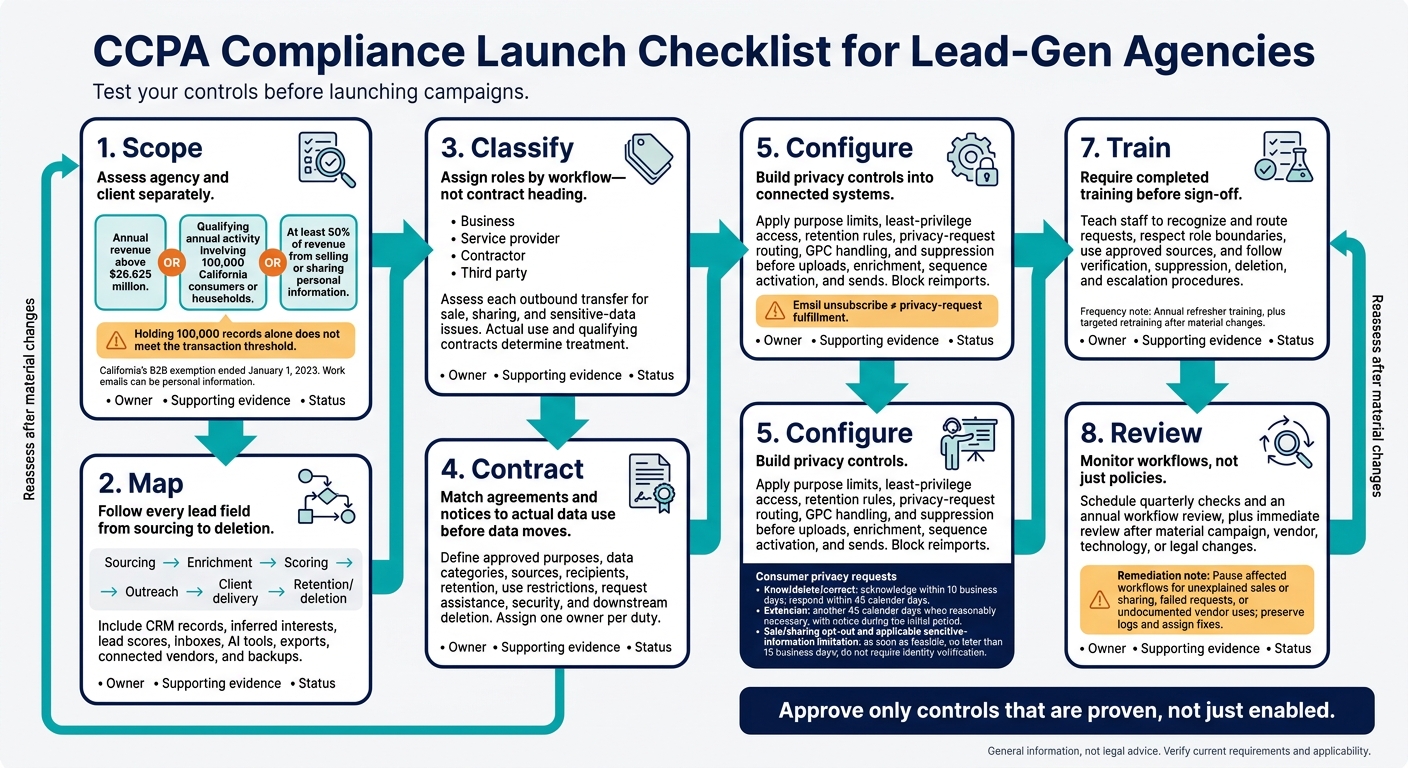
Use scope → map → classify → contract → configure → test → train → review as your launch gate to close the gap between policy and day-to-day work. Give each step an owner, supporting evidence, and a status.
Record agency and client applicability separately. Check every data path from first import to final deletion, including inferred interests and lead scores. Classify each transfer, then confirm that contracts and notices match the actual data flow - not just the planned campaign.
Test controls before scale-up in live campaign systems. Confirm that opted-out contacts stay suppressed after imports and enrichment updates across CRM, enrichment, inbox, and booking systems. Run each request type through every connected system and vendor. For SalesLabel workflows, store configuration records alongside test results. Settings alone don’t prove compliance.
Fix unexplained sales or sharing, failed requests, and undocumented vendor uses first. Pause affected workflows, preserve logs, and assign owners and deadlines for fixes. Escalate vendors that can’t explain their data uses.
Review how the workflows function, not just what the policies say. Require completed training before sign-off. Schedule quarterly checks and an annual workflow review, plus an immediate review after material campaign, vendor, technology, or legal changes. Check current CPPA and California Attorney General guidance. Approve only controls that are proven, not just enabled.
FAQs
How do I handle leads with unknown California residency?
Tag leads in your CRM by their headquarters country or state to support automated routing under privacy regulations such as the CCPA or GDPR.
If geographic or firmographic data is missing, mark the record as incomplete and exclude it from automated outreach until that information is added or verified. Standardize data when it enters your CRM so only records with confirmed, appropriate metadata enter your sequences.
What if a vendor cannot delete a lead?
If a vendor can’t delete a lead, immediately add the lead’s unique identifier, such as their email address, to a permanent, centralized suppression list [1][2]. This removes the lead from active outreach and keeps future imports from adding them back into campaigns [2]. Keep suppression lists in sync across all outreach tools, CRMs, and workflows so opt-outs take effect in real time and no further contact occurs [1][2][3].
How can I retain suppression data after deletion?
After a deletion request, delete the individual’s active record but keep an identifier, such as their email address, in a permanent suppression list [1]. This prevents accidental re-imports or future outreach. Keep only the identifier needed to distinguish that individual - not historical personal data - to support data minimization and compliance [1].
Manage suppression lists at the platform level so they automatically sync across all CRM and outreach workflows [1].