Ethical AI in B2B email requires strict rules: minimize data, disclose personalization, enforce human review and governance.
SalesLabel Team
Growth Expert • 26.08.2026
Share:
Cauți o soluție gata de utilizare?
SalesLabel automatizează prospectarea de la un capăt la altul — AI găseşte prospecți, trimite mesaje personalizate şi rezervă întâlniri sub brandul tău.
If I use AI for B2B email outreach, I need rules before I need scale. One bad workflow can lead to spam complaints, opt-out failures, weak targeting, and domain damage across hundreds or thousands of emails.
Here’s the short version:
Use less data, not more. I only use the data needed for the next email.
Tell people what’s happening. If data shapes personalization, I say so in plain English.
Make opt-outs easy. Under CAN-SPAM, the unsubscribe link must be clear and work.
Check for bias in targeting. Bad inputs can skew lead scoring, segmentation, and follow-ups.
Review AI output before send. AI can draft, but a person should approve the final email.
Track performance signals. Bounce rates, complaint rates, and reply patterns show when something is off.
Keep records. Audit trails, approval logs, and ownership rules help teams catch issues early.
Put another way: AI can help me write and sort emails. But I’m still responsible for every claim, every data point, and every send.
A few facts make this more urgent. 1 spam complaint can hurt inbox placement.1 broken unsubscribe flow can create legal risk. And at scale, even a 1% error rate can affect a large number of contacts fast.
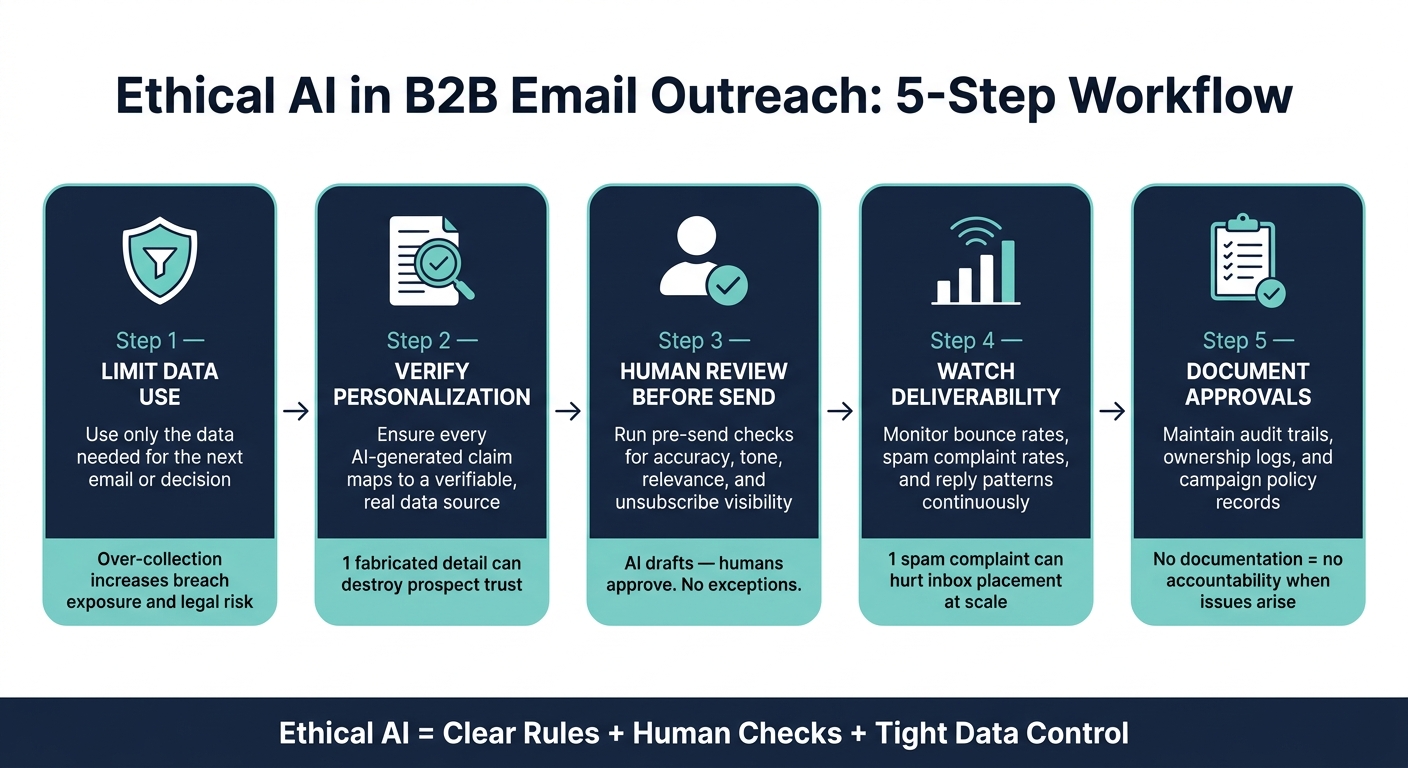
So the right approach is simple:
Limit data use
Verify personalization
Review before sending
Watch deliverability
Document who approved what
That’s the core of ethical AI in B2B email outreach: clear rules, human checks, and tight control over data and volume.
Ethical AI B2B Email Workflow: 5 Core Steps
AI Email That Converts - Without Sounding Like a Robot | INBOUND 2025
sbb-itb-a781ab9
What Ethical AI Means in B2B Email Personalization
Ethical AI in B2B email personalization means using features">automation without misleading prospects, mishandling data, or wearing down trust. For agencies, one small mistake doesn’t stay small for long. It can spread across hundreds or even thousands of contacts.
Core Principles of Ethical AI in Email Outreach
A few principles separate responsible AI outreach from risky automation.
Transparency means you can explain and audit how your AI classifies leads or writes copy.
Fairness means personalization fits the context instead of feeling random or invasive.
Accountability means tracking bounce rates, complaint rates, and engagement rates, then adjusting sends when performance changes.
Human oversight means AI can draft or classify, but a person reviews and edits before the final send.
Where Ethical Risks Appear in Email Automation
Ethical problems usually show up at specific points in the workflow. That’s where things can go off the rails if no one is paying attention.
Next, privacy and consent rules turn these principles into daily outreach practice.
Expert Guidance on Privacy, Consent, and Compliance
Privacy mistakes can snowball fast in automated outreach. A small issue in one campaign can spread across hundreds or thousands of sends before anyone notices. These controls turn the article’s ethical ideas into day-to-day outreach rules.
Use Data Minimization and Plain-Language Disclosures
Data minimization means using only the data you need for the next email or decision. In plain terms, focus on signals that show buying intent, and use only the data needed for the next step.
Plain-language disclosures matter for a simple reason: prospects should be able to tell, at a glance, how their data affects personalization. If your AI uses prospect data to tailor messages, say so briefly and clearly. Don’t bury it in legal jargon.
Make Opt-Out and Consent Controls Easy to Find
Under CAN-SPAM, emails need a clear, working unsubscribe option. Put the unsubscribe link where people can spot it right away, and sync suppression lists across every sequence immediately so anyone who opts out never gets pulled back into outreach.
Privacy Practices Comparison Table
Practice
Benefit
Risk if Ignored
Relevant Rule
Data Minimization
Cuts storage costs and legal exposure; builds prospect trust.
Bigger fallout from data breaches; potential "creepiness" factor.
Limits exposure by tying data use to a specific outreach action.
Over-collection creates compliance risk and weakens prospect trust.
CCPA / CPRA
Clear Opt-Out Controls
Helps protect sender reputation and cuts spam complaints.
Domain blacklisting; permanent loss of prospect contact.
CAN-SPAM
Suppression List Sync
Stops repeat contact after opt-out.
Legal penalties; damaged sender reputation.
CAN-SPAM / CCPA
With privacy guardrails in place, the next risk sits in the data and logic behind personalization: bias.
Expert Strategies to Reduce Bias in AI-Personalized Emails
With privacy controls in place, the next risk is bias in the data and logic behind personalization. At that point, the job shifts from protecting data to checking whether your system unfairly shapes who gets contacted and how.
Audit Data Sources and Personalization Logic
The best way to catch bias early is to trace it back to the source. Look closely at the data your AI uses, such as LinkedIn profiles, recent posts, and web research, and check whether that information is current and representative. If your logic relies on old profile headlines or stale company details, the emails can sound polished while still missing the point.
Use objection tags to spot repeat qualification problems before they spread.
Use fit scores to detect drift in ICP, intent, or urgency signals. If high-scoring leads keep pushing back for the same reasons, that’s a sign the scoring model needs to be adjusted.[1]
When the data is stale or skewed, human review becomes the last check before send.
Keep Humans in the Loop for Key Decisions
For high-stakes accounts sent under a client brand, a human approval gate is the most direct way to stop biased or inaccurate messages from reaching prospects.[1]
The same idea applies to intent tags. Preview and edit intent tags before they trigger workflows.
Bias-Mitigation Tactics Table
Tactic
What It Does
Who Owns It
Objection Tracking
Tags and categorizes rejection reasons to surface targeting flaws
Strategy Lead adjusts qualification criteria
Enrichment Audit
Reviews AI data sources (LinkedIn, web) for accuracy and recency
Ops Lead audits source quality
Fit Score Monitoring
Tracks ICP match scores to flag drift in lead prioritization logic
Marketing Manager reviews scoring rules
Approval Gate
Requires human sign-off on AI-drafted messages before sending
SDR or Account Executive performs final check
Tag Review
Lets humans review and correct intent tags before workflows trigger
Team member edits before routing applies
Transparency, Disclosure, and Human Oversight
Once bias controls are in place, a tougher question shows up: can you explain what your AI did, and why? That’s where ethics stops being abstract and starts looking like day-to-day process. Every draft needs a source, a reviewer, and a clear owner.
Be Ready to Explain How Personalization Works
Use traceable personalization. Every claim in the email should map back to a source your team can verify.
That includes every AI-written detail, like:
a pain point the draft mentions
a note about recent company news
a role-specific hook
Each one should lead back to real data your team can check and explain.
If a prospect replies and asks how you knew about their company news or funding announcement, someone on your team should be able to point to the exact source. If no one can do that, your personalization logic is too loose. The sender owns every line, even if AI wrote the first draft.
Also, verify AI-flagged patterns before you act on them.
Once a message is explainable, the next step is simple: a fast human review before it leaves the queue.
Build Pre-Send Review Checkpoints
Run a quick pre-send review for accuracy, tone, relevance, privacy, and opt-out visibility. The point is to catch the mistakes that hurt trust: a wrong company detail, stiff wording, or an unsubscribe link that’s hard to find.
For high-volume campaigns, send all AI-drafted messages through one review queue. For regulated accounts, route final approval to Compliance or Legal.
Use the checklist below to catch issues before they hurt trust or deliverability.
Pre-Send Checkpoint Table
Checkpoint
Key Question
Action if Failed
Factual Accuracy
Does the AI-generated opener reference a real, verifiable detail about the prospect?
Regenerate using a different data signal or manually research.
Tone Consistency
Does the language match the brand's voice and avoid robotic phrasing?
Edit for natural flow or adjust the AI's tone-training parameters.
Relevance
Is the pain point identified by AI actually relevant to the prospect's persona?
Re-classify the lead or move to a more generic sequence.
Approved Data Inputs
Does the draft use only approved public or consented data?
Remove sensitive data points from the personalization field before sending.
Visible Unsubscribe Link
Is the unsubscribe mechanism clearly visible and functional?
Fix the template footer before resuming the campaign.
Manual Final Review
Has a human verified the draft before it goes out?
Pause the sequence until a manual review checkpoint is completed.
Governance and Platform Controls for Agencies
Once one-off review checks are in place, agencies need guardrails that work across every client, every campaign, and every team member. That’s what governance does. It takes pre-send review from a single task and turns it into a system.
Document Policies, Audit Trails, and Ownership
Every ethical AI framework needs clear ownership. Someone has to approve outputs. Someone has to review reply data. Someone has to watch compliance. Someone has to set volume caps.
If those roles aren’t written down, accountability falls apart the second something goes wrong.
AI-tagged objections can also show where qualification is weak. When the same patterns keep popping up, the team can update policy based on what the data is saying. That kind of feedback loop only works when governance is documented and tracked.
Use Platform Features to Support Ethical Workflows
Platform controls should make ethical workflows the default, not something teams have to remember on their own.
SalesLabel supports that setup through four core controls. Copilot mode sends every AI-generated message through human approval before it goes out. Lead scoring helps teams focus on fit and intent before they send. The unified inbox keeps replies and context in one place across all client accounts. The Documentation Center tracks campaign policies, system activity, and audit trails.
Put simply, these controls turn policy into day-to-day workflow.
Governance Controls Table
Mechanism
What It Tracks
Owner
Impact on Ethical B2B Emails
Copilot Mode
Message drafts pending approval
SDR / Account Manager
Requires human sign-off before AI-generated emails send
AI Objection Tagging
Rejection reasons by category
Account Team
Turns repeat objections into qualification updates
Lead Scoring Controls
ICP match, intent, and urgency signals
Account Strategist
Focuses outreach on high-fit prospects
Multi-Domain Rotation
Volume per mailbox and reputation signals
Sales Ops
Limits send pace and protects domain health
Deliverability Monitor
Bounce rates, spam scores, SPF/DKIM/DMARC
Technical Ops
Maintains sender reputation and supports compliance
Documentation Center
Campaign policies, audit trails, system logs
Agency Ops / Admin
Creates an accountability record across all clients
These controls turn written policy into daily behavior. Instead of relying on memory or good intentions, the system helps teams review messages, watch send volume, track objections, and keep a record of what happened and who approved it.
Conclusion: Key Rules for Ethical AI in B2B Emails
After privacy, bias, transparency, and governance, the main point is pretty simple: ethical AI works best as a repeatable workflow, not a one-time setting.
In day-to-day use, that means you should:
Use only the data you need
Disclose personalization in plain language
Audit for bias
Require human review before send
Keep authentication and send limits in place to protect deliverability
Put another way, human oversight isn't optional. Governance is what makes the process hold up over time. AI can classify and draft, but a person still needs to review AI-drafted messages before send and confirm any tags or routing decisions.
Agencies that get this right build ethics into the workflow, not the checklist.
FAQs
How much human review is enough?
Human review should be enough to maintain compliance and quality in AI-driven B2B email workflows, especially for inbox management and data handling.
For agencies using SalesLabel, human oversight serves as a quality check. It helps automated personalization and outreach stay in line with brand standards, outreach plans, and rules like GDPR.
What data is safe to use for personalization?
Safe data for B2B personalization includes behavioral insights, engagement signals, and intent data pulled from interactions like website visits and email activity.
The key is data minimization. Use only the data you need for your outreach goals, not every data point you can get your hands on.
That means keeping compliance front and center, using real-time suppression, and adding human oversight before messages go out. Done well, this helps your outreach stay relevant, transparent, and respectful of prospect privacy.
How often should I audit AI email workflows?
Use continuous monitoring instead of relying only on periodic audits.
Track bounce rates, complaint rates, and engagement signals in real time. That helps keep outreach effective, compliant, and aligned with ethical standards.
SalesLabel supports this with automated inbox management and real-time monitoring.