Explains how AI turns live CRM, web, and intent data into instant lead scores, forecasts, alerts, and role-based dashboards.
SalesLabel Team
Growth Expert • 01.06.2026
Share:
Cauți o soluție gata de utilizare?
SalesLabel automatizează prospectarea de la un capăt la altul — AI găseşte prospecți, trimite mesaje personalizate şi rezervă întâlniri sub brandul tău.
AI is transforming how sales teams use real-time data to make decisions. By analyzing live data from CRMs, websites, and market signals, AI helps prioritize leads, predict outcomes, and automate actions like sending alerts or emails. This allows sales teams to act immediately on opportunities, reducing missed chances and improving results. Key points:
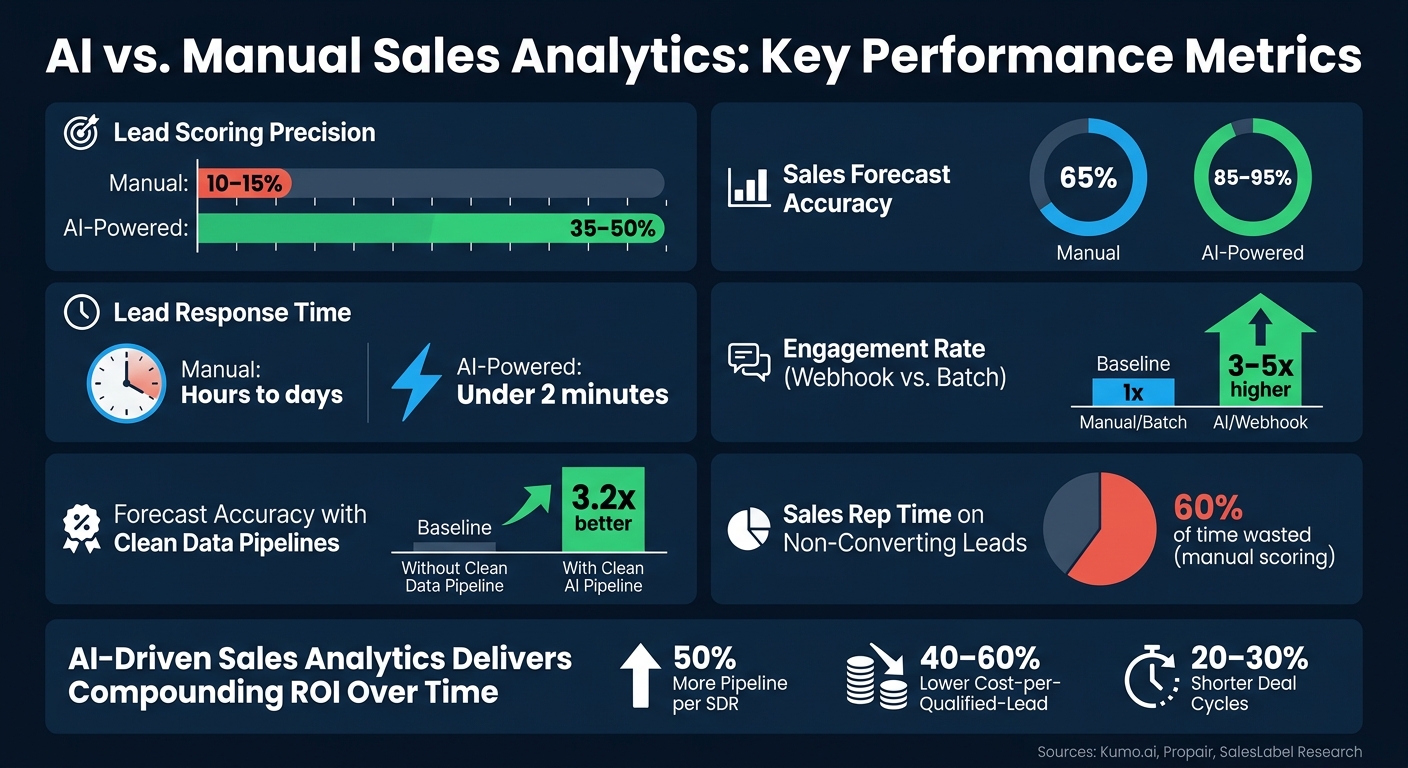
Real-Time Lead Scoring: AI updates lead scores instantly based on new activity, improving precision from 10–15% (manual) to 35–50%.
Faster Response Times: Teams using AI can respond to leads in under 2 minutes, boosting engagement by 3–5x.
Improved Forecasting: AI-powered forecasting achieves 85–95% accuracy compared to 65% with manual methods.
Data Quality Matters: Clean, standardized data is essential, with automated re-enrichment every 90 days to counteract natural data decay.
Actionable Dashboards and Alerts: Custom dashboards and real-time alerts keep teams focused on high-priority tasks.
AI tools like NLP and anomaly detection further enhance insights by analyzing unstructured data (emails, chats) and flagging unusual patterns. For agencies, white-label platforms can create client-facing dashboards, showcasing expertise while improving client results. The takeaway? AI-driven analytics turns raw data into real-time, actionable insights, helping businesses close deals faster and more effectively.
AI vs. Manual Sales Analytics: Key Performance Metrics Compared
AI Agents for Real-Time Lead Generation: Tools, Frameworks, & LLMs
sbb-itb-a781ab9
Preparing Your Sales Data and Tech Stack
Getting your sales data and tech stack in sync is essential if you want AI to deliver actionable insights in real-time.
Auditing and Mapping Your Sales Data
Start by creating a mapping table that lists each tool, the types of data it handles, and where that data ultimately lands in your CRM activity log [3]. To pinpoint inefficiencies, review a complete client campaign. Look for manual data transfers or gaps - these are prime candidates for features">automation. Why does this matter? Because disconnected data isn’t just frustrating; it can cost agencies anywhere from $600 to $1,200 per month per client account due to tool sprawl and human errors [3].
Another common issue is schema inconsistency. This happens when different CRMs use different field names for the same concept. Here's a quick example:
To fix this, map these variations to a unified object model - for instance, Deal.stage. This makes your AI workflows tool-agnostic and much easier to manage [4].
"A standardized object model decouples your AI workflows from specific tool implementations." - Grayson Campbell, Technical Guide Author [4]
This step is a must for deploying AI effectively.
Improving Data Quality and Governance
Poor data quality is the number one reason AI initiatives fail, accounting for 80% of failures[5]. And here’s another challenge: B2B contact databases degrade at a rate of about 30% per year[6]. That means data you trusted six months ago could already be misleading your models.
To stay ahead, treat data quality as an ongoing process. Standardize fields before they even enter your CRM. For example, normalize entries like "USA" and "United States" to avoid breaking segmentation rules [7]. Assign ownership for each field: forms handle lead sources, enrichment providers manage firmographics, and the CRM takes care of deal stages [1]. For AI, categorize fields into three groups:
Fields where AI can suggest values (but require human review).
Fields AI can fill if blank.
Sensitive fields that AI should never overwrite, like lifecycle stage or account owner [7].
Also, schedule automated re-enrichment every 90 days to counteract natural data decay [6]. Once your data is clean and reliable, you can focus on making your tech stack respond in real-time.
Connecting Real-Time Data Streams
With your data cleaned and mapped, the next step is reducing latency. Here, you’ll need to choose between polling and webhooks:
Dimension
Polling (Pull)
Webhook (Push)
Latency
Minutes to hours
Sub-second
Compute Cost
High (frequent calls, ~90% return no change)
Low (on-demand)
Data Freshness
Stale by design
Real-time
Scalability
Linear cost per account
Fixed receiver cost
Webhooks are the better option for AI workflows. They enable real-time, trigger-based outreach, which has been shown to drive 3–5x higher engagement compared to traditional batch methods [2]. To ensure reliability, implement HMAC signature validation, deduplicate events using IDs, and set up dead letter queues for any failed deliveries [2].
Efficient, real-time data streams are essential for tracking key metrics and continuously improving AI performance.
Key Metrics and KPIs to Track
Organize your data by urgency. Real-time signals, like funding announcements or visits to pricing pages, should be processed immediately. In contrast, reference data, such as deal ownership, can sync every 24 hours [4]. This approach ensures your AI focuses its energy on what truly matters.
For predictive models to perform well, you’ll need at least 18 months of CRM pipeline history. Focus on data like deal ID, value, stage, close date, and behavioral scores [5]. Companies with clean, structured data pipelines see 3.2x better forecast accuracy than those without [5].
The most critical metrics for real-time AI include:
Lead response time
Pipeline velocity
Conversion rates by lead source
Forecast accuracy
These metrics aren’t just numbers - they’re insights your AI can analyze, learn from, and improve over time.
Deploying AI Models for Real-Time Sales Analytics
Clean and real-time data has become a game-changer, transforming raw inputs into actionable insights. Leveraging well-structured data streams, AI models are now driving decisions in real time.
AI-Powered Real-Time Lead Scoring
Traditional lead scoring relies on static rules that rarely get updated. AI changes the game by continuously re-ranking leads in real time. It evaluates hundreds of signals - like behavior, timing, fit, and past conversion trends - and updates scores within seconds of any new activity [9].
Manual lead scoring typically achieves only 10–15% precision for top-tier leads, which means sales reps often chase prospects who aren’t ready to buy. Predictive machine learning models, on the other hand, can boost precision to 35–50%. This translates into fewer wasted efforts and more closed deals [11].
"The cost of getting this wrong is not abstract. Sales reps spend roughly 60% of their time on leads that never convert." - Kumo.ai [11]
AI scoring can be fine-tuned with a few smart practices. For instance, giving more weight to recent actions (like a pricing page visit yesterday versus one a month ago) makes scores more relevant. Prioritizing high-value actions - like a demo request - over lower-intent ones improves accuracy. Negative signals, such as unsubscribes or trial cancellations, also help reduce false positives [11].
Another advantage of AI is its ability to spot patterns traditional CRM systems miss. For example, when one person at a company converts, others at the same organization become 3–5 times more likely to follow suit. Advanced machine learning captures these relational dynamics [11].
Platforms like SalesLabel make this even easier by integrating real-time lead scoring directly into workflows. Leads are scored and routed as they engage, eliminating the need for extra analytics tools.
These refined scores can then feed into predictive models, further sharpening sales strategies.
Predictive Analytics and Forecasting
AI-driven forecasting uses historical pipeline data - like deal values, engagement frequency, and close dates - to assign probability scores to every open opportunity in your live pipeline [12].
This approach significantly improves accuracy. While manual forecasting methods often hover around 65% accuracy, AI-powered systems typically achieve 85–95% [5]. Teams using AI forecasting report shorter deal cycles and higher win rates, with improvements as high as 81% and 80%, respectively [13]. It’s worth noting that separate models for small and medium-sized enterprises (SMEs) versus enterprise deals can yield better results, as a single model might struggle with the complexity of larger, high-value opportunities [12].
"AI-powered predictive sales analytics has improved forecast accuracy by up to 10 times compared to traditional methods." - Propair [13]
AI can also send automated alerts when significant changes occur, such as a deal’s probability suddenly dropping. This allows managers to step in before opportunities are lost [5].
Lead Routing and Prioritization with AI
Scoring leads is only half the battle - getting them to the right sales rep at the right time is just as crucial. Slow follow-up can cost agencies up to 30% of warm leads [8]. AI eliminates this lag by automating the process: high-scoring leads are routed to available reps instantly, and alerts are triggered when a contact shows high intent [9].
Effective routing takes multiple factors into account, such as rep availability, deal type, territory, and past performance. This ensures the most promising leads are handled promptly while interest is still high.
Once leads are routed, analyzing unstructured data can provide even deeper insights.
Using NLP to Extract Sales Insights
Not all sales data fits neatly into spreadsheets. Emails, call transcripts, and chat logs often hold valuable insights hidden in unstructured text. Natural Language Processing (NLP) models can classify responses, gauge sentiment, and uncover patterns [8][15].
For example, NLP can automatically sort messages into categories like "Interested", "Meeting", or "Cold", saving teams 30–50% of the time they’d otherwise spend on administrative tasks [15].
"The AI sometimes answers better than I would. It analyzes the website and profile of the person." - Mike R., Sales Professional [8]
Tools like SalesLabel take this further by integrating NLP into outreach workflows. They parse responses and even draft follow-ups based on context, reducing the need for manual effort.
Anomaly Detection and Opportunity Alerts
Even well-organized pipelines can develop blind spots. Deals might stall, engagement rates can drop, or high-value opportunities might get buried in the shuffle. Anomaly detection models monitor these patterns in real time and send alerts when something deviates from the norm.
For example, these models can flag deals that have been stagnant for too long, accounts showing a sudden drop in activity, or segments with noticeable shifts in conversion rates. Automated notifications ensure that reps and managers can intervene quickly, keeping the pipeline on track and responsive to real-time changes.
Building Real-Time Dashboards and Alerts
AI models are great at generating real-time insights, but the real magic happens when you pair those insights with dashboards and alerts that make the data actionable. These tools give your sales team the clarity they need to align their strategies with real-time data.
Building Role-Based Dashboards
A one-size-fits-all dashboard doesn’t cut it. Each role in your sales team needs a tailored view. Executives want to see big-picture metrics like revenue forecasts and quota progress, while sales reps need a clear roadmap of their next steps and priority contacts.
"AI transforms reporting from backward-looking snapshots to forward-looking predictions that identify at-risk deals and quota shortfalls while you can still intervene." - Chaviva Gordon-Bennett, Content Strategist, monday.com [18]
For example, a rep’s dashboard should answer, “What’s my next move?” Meanwhile, a manager’s dashboard should focus on identifying reps or deals that need immediate attention. Research indicates that dashboards with 5–7 widgets are the sweet spot for reps, boosting daily active use by 3.2x compared to cluttered layouts [19]. Adding Explainable AI (XAI) features - like showing a lead score with a brief explanation (e.g., "+25 ICP: Strong revenue fit") - not only builds trust but also encourages quicker decision-making [16].
Key Real-Time Visualizations to Include
The widgets you include will depend on the user’s role, but some modules consistently deliver value across the board:
Dashboard Module
Key Visualizations
Purpose
Revenue Overview
KPI cards, win rate trends, CAC/LTV
Offers an executive-level snapshot of business health [16]
Pipeline Analytics
Funnel chart, stage velocity, rep leaderboard
Helps identify bottlenecks and track performance [16]
For sales reps, an AI-powered lead queue can prioritize high-intent contacts based on real-time behaviors. Acting quickly on these signals is critical - sales reps who engage within 4 hours of a lead’s action can close deals at 2–3x the rate of those who wait [19].
But dashboards alone aren’t enough. Real-time alerts ensure you stay on top of urgent opportunities.
Setting Up Real-Time Alerts
Dashboards give you the big picture, but alerts are your safety net for critical moments. To avoid overwhelming your team, keep alerts manageable - around 10 per hour per rep is a good rule of thumb. Alerts should only trigger when a lead’s intent score crosses a set threshold (e.g., above 75) [17].
Focus on two main types of alerts:
High-intent lead signals: For example, when a prospect visits your pricing page or downloads a key resource.
Stalled deal warnings: Such as when there’s no CRM activity for over two weeks or when a close date gets pushed multiple times.
Each alert should include context and a recommended action. For instance, "Lead viewed enterprise pricing - suggest offering a demo discount" [17].
"Real-time AI CRM alerts cut response times to seconds, but success hinges on tuning signals to your buyer journey." - Lucas Correia, Founder, BizAI [17]
AI-powered alerts can shrink response times to under 2 minutes [17]. Delivering these alerts through tools like Slack or mobile push notifications (instead of just email) ensures your team can act fast.
White-Label Reporting for Agencies
If you’re running an agency, these tools don’t just help internally - they can also be white-labeled to showcase your expertise to clients. White-label dashboards turn your internal analytics into a polished, client-facing asset.
Platforms like SalesLabel make this easy. Agencies can customize the platform with their own branding and domain (e.g., app.youragency.com), so it feels like proprietary software to clients. Pre-built campaign templates can also boost efficiency, with agencies reporting a 47% increase in leads during their first month using these templates [20]. For agencies managing large portfolios, SalesLabel’s Scale plan ($1,999/month) includes unlimited accounts and a dedicated success manager.
This approach not only enhances your agency’s perceived value but also ensures a smooth reporting experience that keeps your clients focused on results - not the tools behind them.
Measuring and Improving AI-Driven Analytics
Building on the foundation of real-time dashboards and efficient data pipelines, the next step is ensuring that measurement drives ongoing AI refinement.
Tracking Success Metrics
Once dashboards and alerts are in place, it’s time to assess their impact on activities that generate revenue. Focus on key metrics like Sales Velocity - calculated as (Number of Deals × Average Deal Size × Win Rate) ÷ Sales Cycle Length - and Qualified Pipeline Added per Dollar spent on AI programs to gauge effectiveness [21][24][26]. AI-powered sales tools can significantly impact performance, shortening deal cycles by 20–30% and doubling or tripling lead-to-meeting conversion rates [23].
Monitoring Model and Data Performance
AI’s effectiveness hinges on the quality of the data it processes. Before evaluating model performance, ensure important CRM fields - such as deal stage, closed-lost reason, lifecycle stage, lead source, and deal type - are consistently filled out [22]. To validate performance, manually review random data samples, cross-check results through various methods, and require the AI to document its calculation steps [21]. Additionally, use automatic score decay for leads inactive for over 30 days to avoid skewed results [25].
"The team that reviews scoring performance every week and adjusts in real time will outperform the team with the fancier AI model that checks in once a quarter." - Antony, Sales Label Consulting [25]
New AI models often need a 90-day adjustment period, during which they might overpredict by as much as 18% while calibrating to your data [5].
Running Experiments for Continuous Improvement
Measurement alone won’t drive progress - experimentation is key. Conduct small-scale A/B tests on messaging, scoring thresholds, and outreach timing before rolling out changes broadly. These tests help refine lead scoring, improve forecast accuracy, and enhance alert functionality [21]. Also, watch for lead distribution bias; use AI analytics to ensure top-performing reps aren’t receiving disproportionately better-quality leads compared to others before evaluating individual performance [21].
Data Privacy, Retention, and Compliance
As you experiment and refine models, it’s crucial to maintain strict data privacy and retention practices. Adhere to regional laws governing call recording and transcription [23]. Define clear retention timelines for lead data and training sets, and use Retrieval-Augmented Generation (RAG) to anchor AI outputs in actual CRM records, minimizing errors or false predictions [18].
"AI amplifies whatever data exists in your system, so standardize metric definitions and implement automated data hygiene workflows before launching any automation." - Chaviva Gordon-Bennett, Content Strategist, monday.com [18]
Conclusion and Next Steps
AI is reshaping sales analytics, offering a clear path to improved efficiency and outcomes. By adopting AI, agencies can see impressive results - generating 50% more pipeline per SDR, cutting cost-per-qualified-lead by 40–60% [27], and achieving forecasting accuracy of 85–95%, compared to 65% with manual methods [5]. These benefits grow over time, creating a compounding effect that can redefine success.
To harness these advantages, it’s essential to take actionable steps. Start by cleaning up your CRM data and clearly defining your Ideal Customer Profile (ICP) [27]. Once that foundation is set, focus on integrating real-time data streams, testing AI scoring with a controlled pilot program, and building targeted dashboards. Scaling should only come after these methods have proven effective.
"If you can't compare AI-assisted leads to your previous process using the same funnel definitions, you don't have ROI. You have activity." - ReachLabs [10]
This quote underscores the importance of measurable results when implementing AI. For agencies, the possibilities extend beyond internal improvements to enhancing client offerings. Tools like SalesLabel provide agencies with the ability to white-label AI-driven solutions, such as real-time lead scoring, automated outreach, and inbox management. With white-label SaaS margins ranging from 200–400% over wholesale platform costs [14], agencies can generate significant returns.
FAQs
What data do I need before using AI for real-time sales analytics?
Before diving into AI for real-time sales analytics, it’s crucial to start with clean, accurate, and well-integrated data. Your main data sources should include your CRM, marketing platforms, website analytics, and third-party intent data. To get the most out of your analysis, incorporate a mix of data types, such as behavioral signals, firmographics, and historical pipeline information.
Tools like SalesLabel can simplify the process by consolidating multiple data streams and automating key tasks. To enable real-time insights, make sure your systems are connected using APIs or webhooks for seamless data flow.
How do webhooks improve real-time sales workflows vs polling?
Webhooks streamline sales workflows by eliminating the need for repetitive polling and introducing event-driven updates instead. Unlike polling, which constantly checks for changes, webhooks send data immediately when specific events occur. This ensures real-time updates, saves resources, and delivers responses in less than a second. With features like built-in retry mechanisms for reliability, webhooks also enable automation of tasks such as lead scoring and CRM updates, allowing agencies to keep their sales processes both fast and precise.
How can I prove ROI from AI lead scoring and forecasting?
To demonstrate the ROI of AI-driven lead scoring, start by comparing the conversion rates of AI-graded leads (e.g., A, B, C) with a baseline conversion rate. This baseline is determined by dividing the number of closed-won deals by the total leads. If the top-scoring leads (like A-grade) show a clear boost in conversion rates, it indicates the system's effectiveness.
Keep monitoring these results over time to confirm the accuracy of the AI model. Additionally, emphasize operational advantages such as lower cost per lead and improved productivity. These benefits come from concentrating efforts on prospects with the highest potential.