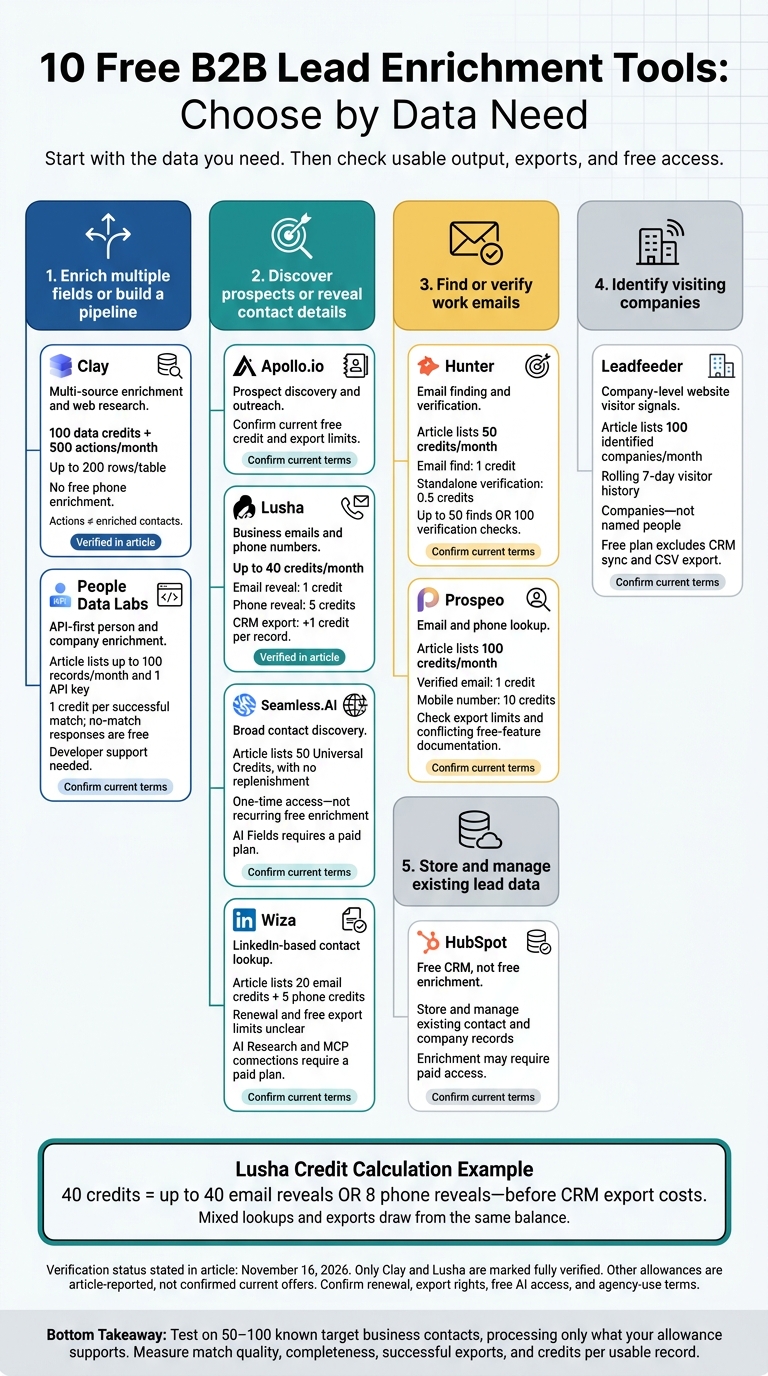
Choose a lead-enrichment tool by the data needed - not the largest credit count. For small agency tests, Clay supports multi-source workflows, Hunter focuses on email finding and verification, and Lusha offers contact lookups. Lusha’s 40 monthly credits cover up to 40 email reveals or 8 phone reveals, before CRM export costs.
The 10 tools below cover contact discovery, company data, email checks, website visitor signals, and CRM workflows. But free access does not always include enrichment or AI features. HubSpot’s free CRM stores lead records, while some tools require paid access for AI research.
Quick Comparison
Tool
Main use
Free allowance or caveat
Clay
Multi-source enrichment and web research
100 data credits and 500 actions per month
Apollo.io
Prospect discovery and outreach
Confirm current credit and export limits
HubSpot
Contact and pipeline management
Free CRM; enrichment may cost extra
Lusha
Business emails and phone numbers
Up to 40 credits per month
Hunter
Email finding and verification
50 credits per month
Seamless.AI*
Contact discovery
50 credits with no replenishment
Leadfeeder
Identifying visiting companies
100 companies per month; 7-day history
People Data Labs
Person and company data through an API
Up to 100 records per month
Prospeo
Email and phone lookup
100 monthly credits; check export limits
Wiza
LinkedIn-based contact lookup
20 email and 5 phone credits; renewal unclear
The sixth tool’s one-time credits do not meet this article’s recurring-free definition. Wiza’s renewal terms also need confirmation.
For client work, compare data accuracy, credits per usable record, exports, integrations, and agency-use terms. Test a small batch before scaling, and confirm current pricing and free AI access before building a workflow around any tool.
10 Free B2B Lead Enrichment Tools: Choose by Data Need
Get FREE High Quality Leads Using This AI Tool (Clay Tutorial)
Check email and phone access, export restrictions, and extension limits.
Verification status - November 16, 2026: Only Clay and Lusha are fully verified here. The other entries are placeholders, not confirmed free plans. Confirm credit-card requirements and rollover rules before publication.
Compare usable records - not just credit counts. Account for reveals, verifications, and exports. Lusha’s monthly allowance covers at most 40 email reveals or 8 phone reveals.[6] Clay counts workflow actions separately from enrichment credits, so 500 actions do not equal 500 enriched contacts.[3]
The next section explains what free enrichment usually covers in practice.
What Free Lead Enrichment Covers
Contact enrichment fills gaps in person records, such as job title, department, seniority, work email, and LinkedIn. Company enrichment adds industry, headcount, headquarters, tech stack, and revenue.
Email verification checks email format, domain validity, mail server responses, and risk signals. Verify shortly before sending: “valid” does not confirm someone’s current role or willingness to receive outreach.
Company-level website visitor identification links visits to organizations - not necessarily named people. VPNs, mobile networks, and privacy tools can limit matches. Treat visits as account signals, not proof of individual interest or consent.
Free CRM storage is not the same as paid enrichment. Check whether failed searches, exports, syncs, and deletes use credits. Also review which fields you can export, seat limits, API access, CRM sync, separate client workspaces, permissions, and deletion controls.
Test lead enrichment on 50–100 known target business contacts before scaling. Compare names, titles, company details, phone numbers, and email status against trusted records. Repeat the test across client segments, measuring title accuracy, company-match accuracy, missing fields, duplicates, and email validity separately.
For agency work, review agency-use terms, retention, deletion, resale, white-label reports, and CAN-SPAM/CCPA duties before delivering data to clients.[7][8][9][12]
1. Clay
Data and Best Use Case
Clay is a spreadsheet-style enrichment platform that lets you build client-specific workflows in tables. Its 150+ providers and waterfall lookups help improve match rates.[3][14]Claygent handles custom research.
AI and Automation
Claygent browses the web to create custom fields for qualification and personalization.[3][5][14]
Use it to check SOC 2, hiring, or tech-stack signals.[3][5][14]
Review the results before using them for clients, and factor usage limits into your workflow.
Free Access and Limits
Data Credits pay for data; Actions track workflow runs. Your allowances for both, along with table size, determine how much output you can use. Free credits reset monthly and don’t roll over. Connecting your own provider API keys avoids Clay’s data charges for that provider.[3][13][15]
Phone enrichment, job-change and signal tracking, email-campaign integrations, and larger tables require paid access. Check current allowances before planning a client workflow.[3][13]
Agency Fit and Main Limitation
Clay’s free access suits pilots and workflow testing, rather than high-volume enrichment. Separate tables and custom research questions let you test workflows for each client. But you’ll need to manage credits, actions, provider availability, and AI quality.[3][13] Choose Clay when workflow flexibility matters more than volume.
Next up: tools built for direct prospect discovery.
Apollo.io combines B2B prospect discovery and enrichment in one workspace. Agencies can find prospects by firmographics and role, then enrich contact and company records without switching tools.[16][19]
AI and Automation
The free Chrome extension lets you prospect in your browser and view contact and company details. Apollo’s AI Assistant can research prospects and draft follow-up context. Free accounts include five AI Assistant chats per billing cycle, with up to 10 messages per chat.[17][20]
Free Access and Limits
Apollo’s published free-plan limits differ across sources, so check your current credits before use. Credits cover contact-data access, enrichment, and AI research. Unused credits don’t roll over.[16][19]
The free tier includes two sequences, Gmail-only connections, and exports of up to 25 selected records at a time. These limits make it better suited to testing than large-scale use.[16][18][19]
Agency Fit and Main Limitation
Apollo suits agencies that want prospect discovery and enrichment in one tool. Its free plan works best for testing, rather than regular enrichment across multiple clients.[16][18][20]
Next: a CRM-first option for agencies that want enrichment tied directly to contact management.
HubSpot is a free CRM for storing and managing lead records - not enriching them. Agencies can track contacts, companies, deals, notes, tasks, and follow-up activity. You can also import lead data and map fields such as industry, lead source, and qualification status.[10] It’s a place to organize enriched data, rather than generate it.
AI and Automation
Breeze Assistant comes with the free CRM. It can summarize records, research accounts, prepare sales calls for existing leads, and handle admin tasks.[11] Native contact and company enrichment - including automatic or continuous enrichment - may require a paid plan or HubSpot Credits.[21][22] Use Breeze for support tasks, but check which enrichment actions carry a cost.
Free Access and Limits
HubSpot’s free tools support up to 2 users, 1,000 contacts, and 1,000 other records, with no time limit or credit card required.[10] Automation is limited to one automated action per email and one automated email per form - not full multi-step workflows.[10] Before setup, check HubSpot’s current pricing and credit documentation, since limits and AI-credit rules can change.
Agency Fit and Main Limitation
HubSpot suits solo consultants and small agencies that already have lead data and need a shared pipeline. Missing contact details still need to come from a data source. More users, larger contact volumes, more automation, and advanced permissions require upgrades.[10][21][22]
Use it to keep imported leads in one place, assign owners, log outreach, and track opportunities through qualification, meetings, proposals, and won deals.
Lusha helps you look up high-value contacts, with verified business emails, direct dials, mobile numbers, job titles, and company details. Its Chrome and Edge extension works on LinkedIn, Sales Navigator, company websites, and supported CRM pages.[6][29][30]
AI and Integrations
Lusha’s AI filters and conversational search let you build prospect lists based on ICP and buying-signal criteria.[24][25] Native HubSpot and Salesforce syncs send contacts into your CRM workflows.[23][28]
Free Access and Limits
The permanent Free plan includes up to 40 credits per month, one seat, and no credit card requirement.[6][23] A verified email costs 1 credit, while a phone reveal costs 5. That gives you 40 emails, 8 phone reveals, or a mix within your allowance.[6]
CRM exports cost another 1 credit per record when it syncs to your CRM.[31] Credits reset on your billing date, and unused credits don’t roll over.[26][27]
Agency Fit and Main Limitation
Lusha works well for agencies that need small batches of verified decision-maker contacts. The Free plan is better for testing data quality than bulk enrichment: phone lookups use credits fast, and the extension, Workspace, API, and AI/MCP connections all draw from the same balance.[6][23][32]
Next: email-first enrichment for teams that need verified addresses more than phone data.
Hunter focuses on finding and verifying professional email addresses. Domain Search finds emails tied to a company domain. Email Finder uses a name and domain to suggest a likely address, while Email Verifier checks deliverability.[35][36][37]
AI and Automation
The free plan includes 30 AI Discover searches per month for light workflow automation. A Google Sheets add-on and API let you send results to spreadsheets or CRM workflows, though bulk use still depends on your credit balance.[33][40][41]
Free Access and Limits
Hunter’s listed Free plan costs $0 and includes 50 credits per month, with no credit card required and no time limit. Finding an email uses 1 credit; a standalone verification uses 0.5 credits. That covers 50 email finds or 100 verification checks per month. Unused credits don’t roll over.[34][38][40][42]
Hunter suits agencies that need to fill email gaps in targeted prospect lists rather than enrich full account records. Verification checks likely deliverability - not buying intent. Handle accept-all results separately: they don’t confirm that a mailbox exists.[35][39]
Seamless.AI goes beyond email lookup to find business emails, phone numbers, direct dials, job titles, and company details. Its real-time search pulls and verifies records with each query. Agencies can filter by role, seniority, industry, and company size to find decision-makers and fill gaps in their contact data.[43][48]
AI and Automation
AI Fields requires a paid plan. It can research contacts and companies, spot buying signals and competitors, find pain points, qualify leads, and draft outreach messages or call scripts.[43][49] Job-change monitoring can also find updated contact details when saved prospects switch employers.[43]
Free Access and Limits
The $0 free license includes 50 Universal Credits, with no replenishment. Credit use depends on the action, so 50 credits won’t necessarily get you 50 complete profiles.[44][46][47] Job-change monitoring and API access may require paid access. Check both before building your workflow.[45][50]
Agency Fit and Main Limitation
Seamless.AI works best for targeted contact pulls, not recurring free enrichment. Use it to pull client prospects quickly, then check titles and employers against your CRM before exporting. Confirm export permissions and API costs before setting up recurring enrichment.[43][46][50]
For company-level visitor data rather than contact search, the next tool is Leadfeeder.
Leadfeederidentifies visiting companies, not individual people. It adds account-level intent signals to lead data. Agencies can use company names, locations, and engagement data to spot target accounts researching their services - even when nobody submits a form.[52][53] It’s built for account-level intent, not person-level enrichment.
AI and Automation
Machine learning helps improve company matching. Paid features let you filter visitor feeds, send alerts, sync records to a CRM, create deals, assign owners, and set tasks.[52][53][54]
Free Access and Limits
Lite includes the last 100 identified companies per month and a rolling 7-day visitor history, with unlimited users. It doesn’t include alerts, CRM sync, deal creation, owner assignment, or task automation. Page-level visit details, full company profiles, filters, saved lists, and CSV export are also excluded.[51][52][54][55]
Separate Web Insights reports provide up to 3 months of reporting for sites with up to 50,000 monthly visitors. They don’t extend Web Visitors history. Check the official plan details before setup, as limits can change.[55][56]
Agency Fit and Main Limitation
The free plan supports manual account prioritization, not contact enrichment. Use it to decide which accounts to pursue, then enrich named contacts separately. Review the dashboard regularly and save qualified companies in your CRM before the 7-day history expires. From there, enrich the decision-makers’ contact records separately.[52][53]
People Data Labs is an API-first tool for agencies that need to update person and company records rather than work through a dashboard. It’s a good fit for LinkedIn- or domain-based matching.[57][58][59][62]
AI and Automation
PDL returns structured data that you can map into your CRM for scoring, segmentation, and personalized outreach.[58][59][60][61]
Free Access and Limits
The $0 plan includes up to 100 records per month and one API key. Each successful match costs 1 credit; no-match responses are free.[61][63][64] Sandbox APIs return synthetic data without using credits.[65]
Agency Fit and Main Limitation
PDL works best for agencies with developer support that need custom CRM enrichment. Its API-first setup requires technical work for ingestion, deduplication, syncing, and scoring.[60][63]
For a simpler, no-code option, the next tool is easier to use.
Prospeo is a lighter option for agencies that need no-code email lookup with intent filters. It focuses on verified business emails and phone numbers, along with intent-based prospect filtering. Agencies can segment lists by ICP filters and buying intent, then reveal contact details only for the leads that fit best.[66][67][71]
AI and Automation
AI Search turns prompts into prospect searches. Prospeo’s pricing page lists AI Search, three intent topics, and five free AI Lookalike searches. Its help docs describe a more limited free plan, though, so check your account’s current limits before counting on those features.[67][69]
Free Access and Limits
The free plan includes 100 monthly credits that reset each month and don’t roll over. A verified email uses 1 credit, while a mobile number uses 10. Browsing results and failed searches don’t use credits.[66][68][70]
Agency Fit and Main Limitation
The pricing page lists 28 filters, but the help docs describe fewer advanced options. They also note a 25-row export-selection cap, limited API access, and no CSV enrichment.[67][69][70] These limits make Prospeo a better fit for testing client lists than for recurring enrichment work. Check matches before spending credits.
If your workflow starts on LinkedIn, the next tool is Wiza.
Wiza’s Chrome extension reveals professional emails and phone numbers from supported LinkedIn profiles and saves contacts to outreach or CRM lists.[73][76] It’s a good fit for small, LinkedIn-led campaigns, though some records are unverified or flagged as risky.[4][72][74][77]
AI and Automation
AI Research and MCP connections require a paid plan. Don’t assume the free extension includes AI automation.[73][75]
Free Access and Limits
The free plan lists 20 email credits and 5 phone credits. But Wiza’s pricing pages use inconsistent wording, so confirm whether those credits renew monthly before planning your usage.[4][72][75][78]
Free export limits are also unclear. Test your CSV or CRM workflow before building a client list.[4][72]
Agency Fit and Main Limitation
Build your target list before revealing contact details, save phone credits for priority contacts, and track email, phone, and export usage separately. Wiza works best for occasional LinkedIn-based enrichment, not sustained high-volume campaigns.[4][72] The next section compares tools by data needs and free-plan limits.
Choose a Tool by Data Needs and Free Limits
Start with the data you’re missing. Then weigh your team’s technical skills and the free credits you can actually use. Check allowances and export rights before committing to client delivery.
Use the table to match your data needs with each tool’s free limits.
Agency requirement
Tool
Main strength
Free limit or check needed
Workflow fit
Fill several missing fields
Clay
Multi-source enrichment
100 Data Credits and 500 actions on the free plan.[2]
Requires someone to configure workflows.
Find prospects and coordinate outreach
Apollo.io
Prospect discovery
Confirm free sequencing limits.
Prospecting and sequencing in one interface.
Store enriched client records
HubSpot
Central CRM
Check whether enrichment requires paid access.
CRM-based management; requires configuration and data hygiene.
Reveal direct contact details
Lusha
Fast contact lookups
40 credits per month; phone reveals use credits faster.[2]
Requires developers to handle authentication, matching, and errors.
Complete a targeted email list
Prospeo
Email lookup
Confirm free export limits.
Focused list completion.
Build lists from LinkedIn profiles
Wiza
Profile-based contact collection
Confirm whether free credits renew.
Small, targeted list-building projects.
Test your chosen tool on 50–100 ICP contacts before scaling, processing only as many as the allowance supports.[2] Measure match rate, required-field completeness, verified emails, duplicates, successful exports, and staff time. Track credits consumed per usable record, not just records returned.
FAQs
How do I resolve conflicting lead data?
Rank sources by reliability for each field, and keep your CRM as the source of truth. Give manual updates priority over system data, and rank AI-inferred enrichment last. Set confidence thresholds so low-confidence data can’t overwrite key routing or outreach fields.
Send unresolved conflicts to a human-review queue. For every override, log the source, timestamp, and reason in an audit trail so your team can roll back changes when needed.
When should I re-enrich my leads?
How often you re-enrich data depends on your data quality plan and field types. Run automated cleanups weekly to catch data decay, and update job titles, names, and contact information regularly [1].
Review company-level data, including legal identifiers, quarterly or annually. Update other fields that change monthly [2]. Pair real-time triggers for new leads entering your system with scheduled batch updates for stale records [1][3].
How can I combine free tools without duplicating costs?
Build your stack around one agency workflow, not a collection of features. Keep client records in one CRM as your source of truth. Add tools that integrate with it only when you need to fill gaps in sourcing, enrichment, or outreach.
Test each tool before committing. It should cut manual work without creating data silos. Compare total costs for 5, 20, and 50 clients to see where volume discounts apply.